Adobe Firefly vs. Flux Kontext vs. GPT Image: Decision Guide for 2026
TL;DR
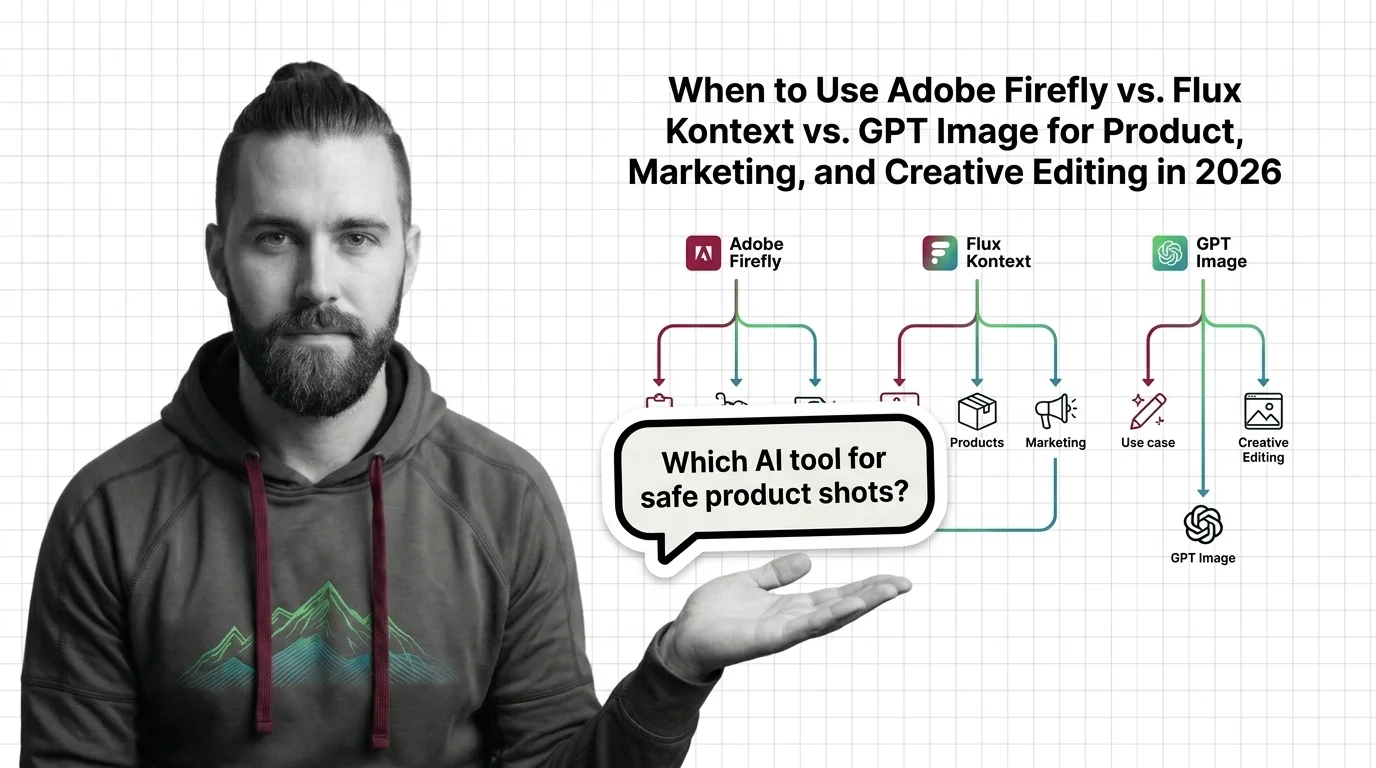
- Pick the editor by the commercial risk your output carries — Firefly for provenance, Flux Kontext for iterative consistency, GPT Image for instruction-heavy edits
- Masks do not work the same across all three — GPT Image rewrites broader regions than the mask, Firefly respects Photoshop layers, Flux Kontext preserves character identity across steps
- Price per image is a distraction. The real spec surfaces are license terms, indemnification, and reference-image behavior
Your design lead dropped a Flux render into the launch deck on Friday. Marketing flagged the model’s face on Monday — “is that a licensed likeness?” Legal asked for training-data provenance. The answer was somewhere between “we think so” and “probably.” That moment nobody wants at 4 p.m. on launch day is what this guide fixes — by the spec, not by the tool.
Before You Start
You’ll need:
- Access to at least one editor: Adobe Creative Cloud (for Firefly), BFL Playground or the FLUX API (for Kontext), or the OpenAI API / ChatGPT Plus (for GPT Image)
- Understanding of AI Image Editing — what the tool changes vs. what you change
- Familiarity with Diffusion Models — all three editors are diffusion-family under the hood, conditioned differently
- A clear picture of three facts: who sees the output, where it appears, and what happens if provenance is challenged
This guide teaches you: how to decompose an image-editing job into four specification surfaces — pattern, commercial context, tool, validation — and map each surface to the editor that actually fits.
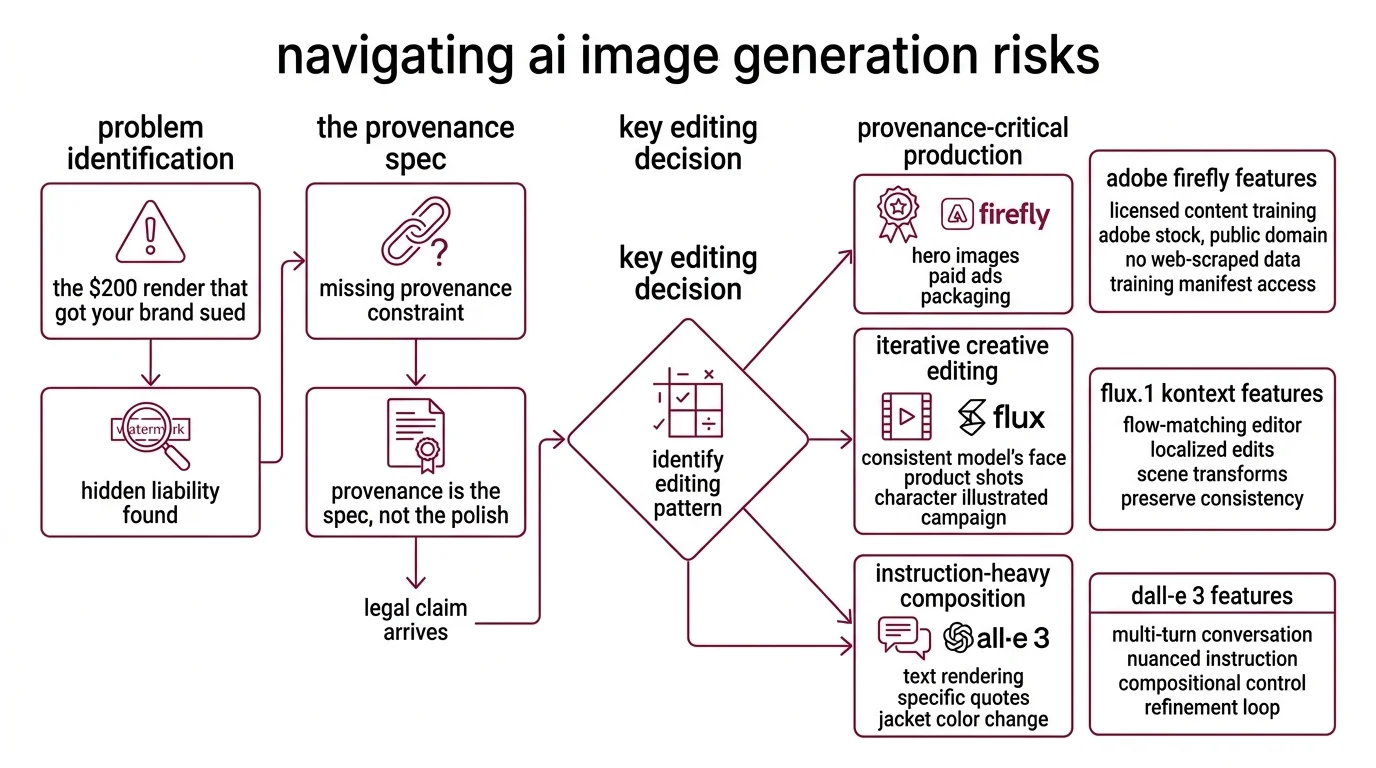
The $200 Render That Got Your Brand Sued
You open GPT Image, type “photo of our new shoe on a marble countertop, studio lighting, 4K.” Five seconds later you have it. You push it to the social carousel. Two weeks later, someone flags a watermark fragment baked into the reflection. Where did it come from? You cannot answer.
Provenance is the spec, not the polish. Every AI image you publish carries a question nobody asks until they have to: what was this model trained on, and who defends you if the answer is wrong?
It shipped on Tuesday. On Thursday, the brand team asked for “the licensing chain” and the pipeline collapsed — because nobody specified “training data source” as a constraint in the first place.
Step 1: Identify the Editing Pattern
Three editors. Three jobs. Mapping one to the other is the whole decision.
The three patterns your job maps to:
- Provenance-critical production — hero images for paid ads, packaging, anything that ships under your brand’s legal name. Adobe Firefly is built for this. Adobe Firefly Enterprise confirms Firefly is trained exclusively on licensed Adobe Stock, public domain, and openly licensed content — no web-scraped data. That matters when procurement asks for the training manifest.
- Iterative creative editing with reference consistency — the model’s face must stay the same across ten product shots, or the character in your illustrated campaign must keep their look across scene transforms. Flux.1 Kontext is the flow-matching editor purpose-built for this. BFL Announcement describes it as supporting localized edits, scene transforms, and multi-step refinements while preserving character and style consistency.
- Instruction-heavy composition with text rendering — the edit needs a specific quote on the packaging, the jacket color must change but the face and background stay, or the edit is driven by a multi-turn conversation where each turn refines the last. gpt-image-1.5 handles this best. OpenAI Community reports it shipped December 16, 2025 with a native multimodal architecture — text and images processed in the same network — roughly four times faster than gpt-image-1.
Secondary editors — Qwen Image Edit, Hunyuan Image, Seedream — exist in the open-source tier but do not lead on any of these three pattern axes in 2026 verified sources. Treat them as context, not primary comparison targets.
The Architect’s Rule: If you cannot name which of these three jobs your image is doing, your pipeline will pick the cheapest tool and hope for the best. Hope is not a spec.
Step 2: Lock Down the Commercial Context Contract
Before any tool generates anything, the AI needs four answers. Miss one and the wrong tool wins by default.
Context checklist:
- Provenance requirement — “training data is licensed or we cannot ship” vs. “we carry the legal risk internally”
- Indemnification — do you need the vendor to defend you against third-party copyright claims, or is that an acceptable business risk
- Reference preservation — must the same face, product, or character appear identically across N edits, or does each edit stand alone
- Text rendering fidelity — is there a legal line, price, or quote that must appear pixel-perfect inside the image
- Model license — output commercial use and model commercial use are separate clauses, and they need separate answers
Indemnification is where the risk model splits. Adobe Firefly Enterprise states that qualifying plans — Enterprise and Premium tier — include IP indemnification: Adobe defends customers against third-party copyright claims on Firefly-generated content. OpenAI has no equivalent commercial indemnification for gpt-image-1.5 outputs, and training data is not fully disclosed (Adobe Firefly Review). That is not a minor product difference. That is the risk model.
FLUX.1 Kontext has a two-layer license that trips teams who read it fast. BFL Licensing states the Kontext [dev] weights are released under a Non-Commercial License — outputs may be used commercially, except to train or fine-tune competing models, but the model itself (weights and derivatives) requires a paid self-hosted license for commercial deployment. Your spec must treat “commercial outputs” and “commercial model” as different questions.
The Spec Test: If your context does not name “training-data provenance” and “indemnification,” your tool will default to whatever is fastest to access. For a hero ad, that default has a legal bill attached.
Step 3: Match the Tool to the Spec
Three tools, three positioning strategies, three price models. The contract from Step 2 picks the winner.
Decision order:
If provenance is a hard legal constraint → Adobe Firefly. Plans start at $9.99/month Standard with 2,000 premium credits, $19.99/month Pro with 4,000, and $199.99/month Premium with 50,000 — unlimited standard image generations on all paid plans, per Adobe Firefly Blog. Firefly plugs into Photoshop, Illustrator, and Premiere Pro through Generative Fill, Generative Expand, Text-to-Vector, and Structure/Style Reference (Adobe Firefly Blog). If your team already ships in Creative Cloud, there is no new pipeline to integrate.
If character or product consistency across multiple edits is the constraint → FLUX.1 Kontext or FLUX.2. FLUX API pricing runs from roughly $0.03 per megapixel for text-to-image and ~$0.045 per megapixel for image editing (BFL Pricing). Kontext was announced May 29, 2025 (BFL Announcement). FLUX.2 — released November 25, 2025 — supports up to four reference images, HEX color precision, and JSON-structured prompting (BFL FLUX.2). The two coexist: use Kontext for in-context iterative editing, FLUX.2 Max for high-fidelity generation.
If instruction-following and text rendering dominate the brief → gpt-image-1.5. OpenAI Docs list the 1024x1024 prices at $0.009 low, $0.034 medium, $0.133 high per image; portrait and landscape 1024x1536 at $0.013, $0.05, $0.20. OpenAI Community notes that gpt-image-1.5 follows instructions more reliably than its predecessor, preserves lighting and likeness across edits, and excels at text rendering and multi-step iterative edits — a jacket color change leaves face and background intact.
For each tool, your context must specify:
- What it receives (base image, reference images, mask if used, prompt with constraints)
- What it returns (output resolution, file format, number of variants)
- What it must NOT do (“do not alter brand colors outside mask,” “do not regenerate hands”)
- How to handle failure (what a wrong output looks like — drifted face, wrong text, added watermark)
Security and commercial notes:
- OpenAI DALL-E 2 / DALL-E 3: Full shutdown on May 12, 2026 (OpenAI DALL-E Deprecation). If any production code still calls DALL-E endpoints, migrate to gpt-image-1.5 or gpt-image-1-mini before that date.
- OpenAI gpt-image-1: Still live as of April 2026 but positioned as “previous model” — plan for model-name parameterization in your API calls (OpenAI Docs).
- FLUX.1 Kontext [dev] license: Outputs commercial-safe; model weights are non-commercial unless you buy a self-hosted license (BFL Licensing). Separate the two concerns in legal review.
Step 4: Validate Before You Publish
Output generation is the easy part. Validation is where brand-safe pipelines separate from “we just posted it.”
Validation checklist:
- Provenance check — failure looks like: you cannot produce a training-data statement if asked by procurement or legal. Fix: regenerate in Firefly for anything above the risk threshold your team defines.
- Reference consistency check — failure looks like: the model’s face drifts across the carousel, the product’s label changes shape, the character’s outfit shifts color between panels. Fix: use FLUX Kontext with reference image anchors (or FLUX.2 if you need up to four references), or tighten the prompt’s identity anchors.
- Text rendering check — failure looks like: logos with warped letters, prices with invented digits, product names misspelled. Fix: gpt-image-1.5 for text-heavy compositions, or composite the text post-generation in the design tool.
- Mask fidelity check — failure looks like: you masked the jacket; the tool changed the jacket and the lighting and the background. The mask is guidance, not a boundary. OpenAI Guide documents this: edits are guided semantic rewrites, not strict pixel-only patches, so users often see broader rerenders than expected. If pixel-locked local edits matter, use Firefly’s Generative Fill inside Photoshop — where the mask respects layer boundaries.
- Commercial-safety check — failure looks like: a watermark fragment, a recognizable copyrighted character, a likeness that belongs to a real person. Fix: Firefly indemnification or a human review pass before publication.
Adobe’s Credits Are Not BFL’s Credits
A sub-spec that trips teams: the word “credits” means different things across these vendors. Adobe premium credits only gate premium features like video, translation, and partner models — standard Firefly image generation remains unlimited on all paid plans (Adobe Firefly Blog). BFL credits gate every generation — Kontext Pro edits cost about 10 credits per image, Kontext Max about 20 (BFL Pricing). Spec the unit before you spec the budget. If your finance team equates the two, their cost model will be wrong by an order of magnitude.
Common Pitfalls
| What You Did | Why the Tool Failed | The Fix |
|---|---|---|
| Used gpt-image-1.5 for hero ad | No IP indemnification; training data not disclosed | Regenerate in Firefly for anything shipping under the brand’s legal name |
| Asked Firefly for 10-panel character consistency | Firefly optimizes single-image Creative Cloud workflows, not iterative reference chains | Switch to FLUX.1 Kontext with reference image anchors per panel (or FLUX.2 if you need up to four references) |
| Masked a jacket in GPT Image, got a full rerender | Mask is guidance, not a pixel boundary | Use Firefly Generative Fill for pixel-locked local edits |
| Deployed FLUX Kontext [dev] weights inside a product | [dev] license is non-commercial for the model itself | Buy BFL’s self-hosted commercial license or call the hosted API |
| Kept DALL-E 3 endpoints in production | Full shutdown on May 12, 2026 | Migrate to gpt-image-1.5 with parameterized model names |
Pro Tip
When the commercial risk is high, pick the tool that answers the hardest question before you generate. For branded production, that question is “where did the training data come from and who defends me if someone disputes it.” For iterative creative work, it is “will the face still look like the same person in ten edits.” For instruction-heavy edits, it is “will the text be spelled right.” Spec the constraint that kills the project first. Every other decision — price, API ergonomics, integration depth — sits underneath those three.
Frequently Asked Questions
Q: How to use AI image editing for marketing and product photography?
A: Decompose the job. For a hero shot shipping under your brand’s legal name, use Firefly inside Photoshop — Generative Fill respects layer masks and training data is licensed (Adobe Firefly Blog). For iterative product shots where SKU identity must hold across ten renders, switch to FLUX Kontext with reference images.
Q: Which AI image editor is best for commercial safe work in 2026?
A: Adobe Firefly, by a clear margin on indemnification grounds. Qualifying Enterprise and Premium plans include IP indemnification (Adobe Firefly Enterprise) — no other 2026 editor carries that contract language. FLUX outputs are commercially usable, but the model weights need a paid license (BFL Licensing). OpenAI has no comparable indemnification clause.
Your Spec Artifact
By the end of this guide, you should have:
- A three-pattern decomposition — provenance-critical, reference-consistent, instruction-heavy — mapped to Firefly, FLUX, and GPT Image respectively
- A commercial context checklist — provenance requirement, indemnification needs, reference preservation, text fidelity, model license
- A validation protocol — provenance check, reference consistency check, text rendering check, mask fidelity check, commercial-safety check
Your Implementation Prompt
Use this spec when briefing your designer, your AI tool, or the junior teammate you are handing the project to. Fill in the bracketed placeholders with values from the context checklist in Step 2.
Produce an AI-edited image with these specifications:

JOB PATTERN:
- Pattern type: [provenance-critical / reference-consistent / instruction-heavy]
- Output destination: [paid ad / social organic / internal / concept only]
- Brand legal exposure: [high / medium / low]

COMMERCIAL CONTEXT:
- Provenance requirement: [licensed-only / acceptable-risk]
- Indemnification needed: [yes — pick Firefly Enterprise/Premium / no]
- Reference images: [count, each with role — subject / style / composition / negative]
- Text rendering requirement: [exact quote / price / product name / none]
- Model license constraint: [commercial self-host / hosted API only / internal-only]

TOOL SELECTION:
- Primary tool: [Firefly / FLUX.1 Kontext / FLUX.2 / gpt-image-1.5]
- Fallback tool: [name + trigger condition]
- Output resolution: [e.g., 1024x1024, 4MP]
- Output format: [PNG / WebP / layered PSD]

GENERATION CONSTRAINTS:
- Must preserve: [list elements — face, product label, logo position]
- Must change: [list elements — background, color, lighting]
- Must NOT: [do not alter brand color palette / add humans / invent text]
- Failure handling: [regenerate with tighter prompt / composite in design tool / escalate to licensed stock]

VALIDATION:
- Provenance check: [pass criteria — can produce training-data statement]
- Reference consistency check: [pass criteria — subject identity preserved across N outputs]
- Text rendering check: [pass criteria — exact string match or composite post-generation]
- Mask fidelity check: [pass criteria — edit contained to named region]
- Human review: [required for brand legal exposure = high]
Ship It
You now have a decision framework that maps three commercial editing patterns to three specific tools — and separates license risk from output cost. The next time a hero render needs provenance, you will not guess. The next time a character needs to stay consistent across ten scenes, you will not fight with the wrong tool. Spec the constraint first. Pick the editor second.
AI-assisted content, human-reviewed. Images AI-generated. Editorial Standards · Our Editors