What Are Browser and Computer Use Agents and How Screenshot-Grounded AI Controls Your Desktop
ELI5
A computer use agent is an LLM that operates a computer by looking at screenshots and emitting mouse and keyboard actions — no APIs, no DOM hooks, just pixels in and clicks out. Browser use agents are the web-only flavor.
The model is staring at your desktop. Not reading the DOM, not calling an API — looking. Every few hundred milliseconds it asks for a fresh screenshot, returns a pair of coordinates, and your mouse moves. If you watch the cursor without watching the network tab, you cannot tell whether a human or a probability distribution is in control.
That is the thing most engineers get wrong on first encounter. Computer use agents are not orchestration glue with privileged OS hooks. They are vision models trained to point at the right rectangle, embedded inside a loop that screenshots, decides, acts, and screenshots again. The interface is the screen itself — the same surface humans use — which is why these agents work on legacy software that nobody will ever wrap in an API.
The Screenshot Loop That Replaces APIs
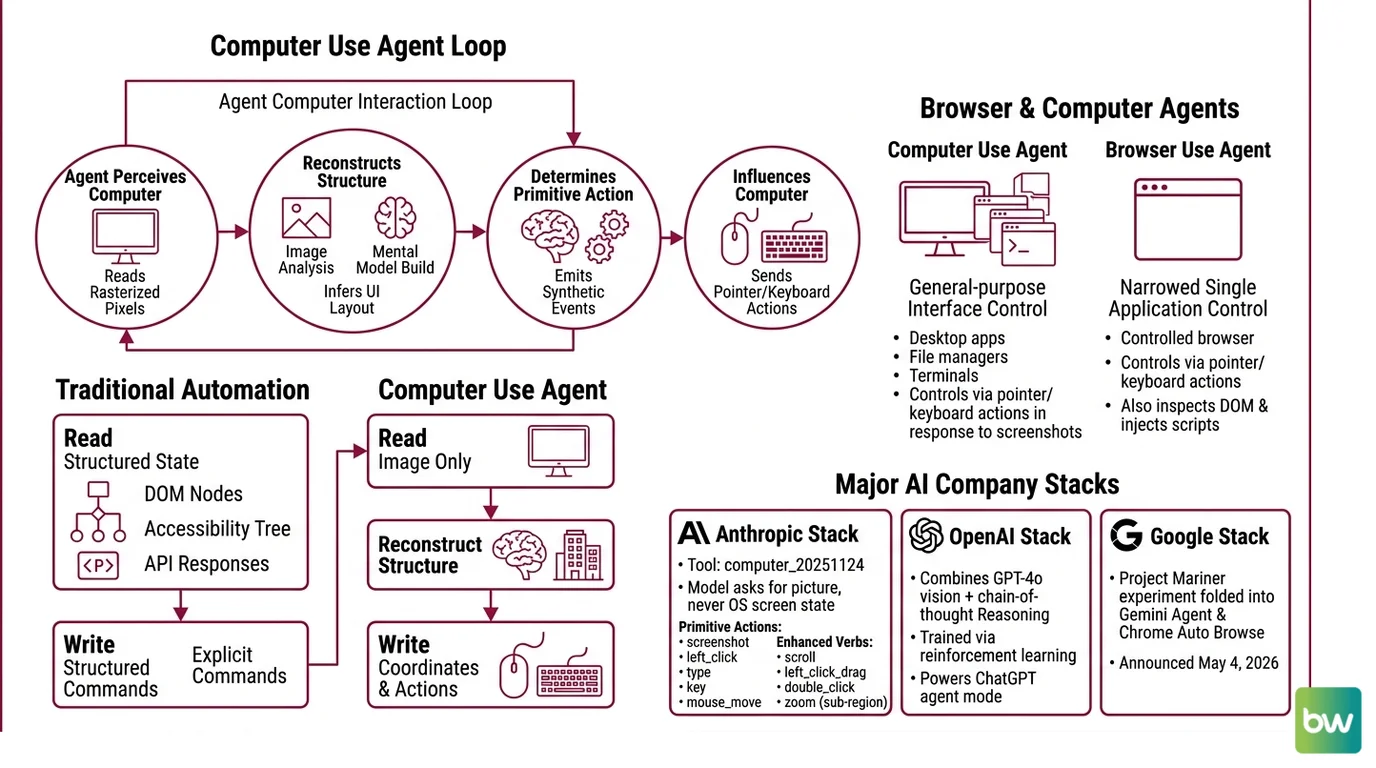
Before pulling apart the components, it helps to fix the loop in your head. The agent does not “use” the computer in any classical software sense. It perceives the computer through one narrow channel — rasterized pixels — and influences it through another narrow channel — synthetic input events. Everything interesting happens between those two channels.
That asymmetry matters. Traditional automation reads structured state (DOM nodes, accessibility trees, API responses) and writes structured commands. A computer use agent reads an image and writes coordinates. The structure has to be reconstructed, every turn, from the pixels alone.
What are browser and computer use agents?
A computer use agent is an LLM-driven system that controls a general-purpose graphical interface — desktop apps, file managers, browser windows, terminals — by emitting low-level pointer and keyboard actions in response to screenshots. A browser use agent is the same idea narrowed to a single application: a controlled browser, where the agent can also inspect the DOM and inject scripts in addition to the visual loop.
Anthropic’s current tool, computer_20251124, exposes exactly this surface. It defines a small set of primitive actions — screenshot, left_click, type, key, mouse_move, plus enhanced verbs like scroll, left_click_drag, double_click, and a new zoom action that lets the model request a sub-region at full resolution (Anthropic Docs). The model never asks the operating system what is on the screen. It only asks for the picture.
OpenAI’s stack is structurally similar. The original Computer-Using Agent combined GPT-4o vision with chain-of-thought reasoning trained via reinforcement learning, and that lineage now powers ChatGPT’s agent mode after the standalone Operator product was sunset in July 2025 (OpenAI). Google folded its Project Mariner experiment into Gemini Agent and Chrome Auto Browse on May 4, 2026, with Gemini 3 Pro and Gemini 3 Flash driving the actions (Android Headlines). The product names shift; the loop does not.
Not orchestration. Perception.
This is the bright line that separates this category from neighboring ideas. Workflow Orchestration For AI systems chain pre-defined steps over typed APIs. Code Execution Agents run scripts in a sandbox. Retrieval Augmented Agents pull text into the context window before responding. Computer use agents do something different: they treat the GUI as the universal interface and let the vision model figure out the rest.
How do computer use agents interact with a screen?
The interaction loop has four moves. The agent receives the current goal and a screenshot. It reasons about what to do next. It emits an action — a click at coordinates, a keystroke sequence, a scroll. The environment executes the action and returns a new screenshot. Repeat until the goal is satisfied or the budget runs out.
Two details turn this from a toy demo into something that survives contact with real software.
The first is visual grounding — the act of converting “click the blue Submit button” into pixel coordinates the OS can dispatch. There are several pathways here, and conflating them obscures how each system actually works.
- End-to-end emission: the vision-language model produces coordinates directly in its output tokens. Anthropic’s computer use tool works this way. Claude Opus 4.7 operates on images at 1:1 with the underlying pixels up to 2576 pixels on the long edge, so the coordinates the model writes are the coordinates the runtime clicks (Anthropic Docs). Older Claude models capped at 1568 pixels and required the host to rescale.
- Set-of-Mark: a preprocessing step overlays numbered bounding boxes on every interactable element before the screenshot reaches the model. The agent then references elements by ID instead of by coordinate, sidestepping the coordinate-prediction problem.
- Composed pipelines: a planning model decides what to do next in natural language, and a separate grounding model — UGround, for example, trained on 1.3 million screenshots and 10 million GUI elements with referring expressions — converts the instruction into coordinates.
Each approach has a different failure mode. End-to-end systems get fewer steps wrong but lose accuracy when UI density exceeds what the vision encoder can resolve. Set-of-Mark removes coordinate ambiguity but breaks when the preprocessing pipeline mislabels an element. Composed pipelines are more transparent but accumulate errors across the handoff between planner and grounder.
The second detail is rescaling. Most production systems internally render at 1024×768 or 1280×720 because the model’s training distribution concentrated there; resolutions above 1920×1080 degrade performance and inflate the token bill. Behind the scenes, the agent runtime may downscale, click, and translate coordinates back to the user’s native resolution — a small dance the application code has to get exactly right, because a one-pixel rounding error can land the click on the wrong button.
The Three Parts Hiding Behind Every Action
A working agent is more plumbing than model. The reasoning step gets the credit; the rest of the stack does the work.
What are the core components of a browser use agent?
Strip away the marketing layers and four components remain.
The vision-language model. It receives the screenshot, the goal, and the action history. It produces the next action in a structured format. The interesting tradeoffs live here: Claude Opus 4.7 leads on conservatism and refusal behavior, GPT-5.4 currently leads on raw success rate, Microsoft’s Fara-7B — released November 24, 2025 — shows that a 7-billion-parameter model can run the loop locally with surprising competence (Microsoft Research).
The action layer. A typed set of primitives the model can emit. Anthropic exposes around fifteen verbs through
computer_20251124; browser-specific frameworks expose more, because a browser permits things a generic desktop driver cannot — DOM injection, network interception, cookie reads. The action layer also enforces what the agent cannot do: no shell commands, no file writes outside a scratch directory, no actions during a confirmation pause.The runtime environment. The reference Anthropic stack is Xvfb providing a virtual display, Mutter as the window manager, Tint2 as the taskbar, all inside a Docker container (Anthropic Docs). Browser use agents often substitute a headless Chromium controlled by Playwright. The runtime owns coordinate translation, action throttling, and the security boundary between the agent and the host.
The orchestration shell. Loop control, retry logic, goal tracking, prompt assembly. Open-source projects like
browser-use— currently at v0.12.6 with 94.2k GitHub stars and MIT-licensed (browser-use GitHub) — make this layer swappable across models. The shell is also where humans intervene: confirmation prompts, kill switches, and replay logs all live here.
The system prompt for computer use itself adds 466 to 499 extra tokens, and the tool definition consumes 735 input tokens on Claude 4.x models (Anthropic Docs). Those numbers feel small until you realize the agent makes dozens of model calls per task; the overhead compounds before the first click lands.
What the Pixel Loop Predicts
The mechanism is mostly a forecasting device. Once you accept that the agent sees pixels and emits coordinates, several practical consequences follow without further argument.
- If the UI redesigns, the agent’s prompts do not need updating, but its grounding accuracy will drop until the underlying model has seen the new layout. The agent has no schema to break — only a probability distribution that suddenly fits less well.
- If the target element is below 20 pixels, expect coordinate errors. The model’s spatial resolution is bounded by the input image’s effective patch size.
- If the task requires reading small text — invoice line items, dense tables, IDE diagnostics — expect failure, unless the runtime supports
zoomor a manual crop, because the rasterizer is downsampling before the model ever sees the content. - If two visually identical buttons share the screen, the agent will sometimes click the wrong one. There is no “name” to distinguish them; only neighborhoods.
Rule of thumb: if a sighted human would need to squint, the agent will get it wrong.
The performance ceiling is also more knowable than it looks. On OSWorld — a benchmark of 369 real computer tasks across Ubuntu, Windows, and macOS — GPT-5.4 currently leads the OSWorld-Verified leaderboard at 75.0% as of March 2026, with Claude Opus 4.6 at 72.7% (Coasty Blog). The human baseline sits around 72-74%, which means the frontier models have just crossed parity on tasks the benchmark covers. But OSWorld-Verified was tightened in July 2025 specifically to stop eval gaming, and most production agents — once measured against tasks they were not trained on — sit far below the leaderboard headlines.
When it breaks: the screenshot-action loop is fragile against unannounced UI changes, modal dialogs the model has never seen, and anything that demands precise sub-character text targeting; recovery typically requires either human handoff or a constrained replay against a known-good DOM snapshot.
The Benchmark That Embarrassed the Field
There is a quieter story underneath the benchmark scores. OpenAI’s Computer-Using Agent posted 38.1% on full OSWorld at its January 2025 launch and 58.1% / 87% on WebArena and WebVoyager respectively (OpenAI). One year later, the same architecture lineage clears 75% on the harder OSWorld-Verified set. That is not a slow climb. That is a vertical line.
The interesting question is why. The model architectures changed less than the numbers suggest. What changed more was training data — millions of screen-grounded trajectories, replayed sessions, synthetic UI tasks — and the willingness of providers to invest in environments where the agent could fail safely at scale. The skill being acquired is not “reasoning” in any abstract sense. It is the ability to map a perceptual scene to a small set of motor actions, the same skill that takes a human child several years and many bruised shins to learn.
The recent shift from end-to-end vision models to small specialized ones — Fara-7B is the clearest example — suggests the frontier is fragmenting. Big general models are getting better at the loop, but small models trained specifically on GUI interaction are arriving at usable accuracy without the cost or latency. That changes who can deploy these systems.
The Data Says
Screenshot-grounded agents have crossed the human baseline on standardized desktop tasks while remaining noticeably brittle outside that distribution. The pixel-in, coordinate-out architecture works because GUIs are the universal interface — but the same architecture inherits every weakness of vision under degraded resolution, ambiguous targets, and adversarial layouts. Capability is real; reliability is conditional.
AI-assisted content, human-reviewed. Images AI-generated. Editorial Standards · Our Editors