Verifying and Embedding Content Credentials: A 2026 Guide to C2PA and Watermarking APIs
TL;DR
- A C2PA manifest is fragile — re-encoding, screenshots, or a re-upload can strip it, so a provenance pipeline needs more than one signing layer.
- Trust List version, jurisdiction deadlines, and detector availability are specification line items, not afterthoughts — the EU and California both require disclosure by August 2026.
- Invisible watermarking is the recovery layer when the manifest disappears, but research shows it can be stripped too — design for defense in depth, not a single proof.
Your generation pipeline signs every export with a C2PA manifest. Three weeks later, a journalist re-uploads one of your images to a CMS that re-encodes on ingest, and the Content Credentials are gone — not stripped maliciously, just lost in transit. Nobody broke your signature. Your spec never said what happens after the file leaves your hands.
Before You Start
You’ll need:
- An AI coding tool (Claude Code, Cursor, or Codex) to wire the integration layer — this guide specs the architecture, not the code
- Conceptual grounding in AI Watermarking And Content Provenance — what a manifest proves versus what a watermark proves, and where the two overlap
- A real distribution path to test against: the CDN, social platform, or CMS your content passes through after publish
This guide teaches you: How to decompose a provenance pipeline into four components, specify the trust and jurisdiction constraints each one needs, and validate the chain against re-upload instead of trusting the first signature.
The Manifest That Didn’t Survive the Re-Upload
Most teams treat content provenance as a single step: sign the file, ship it, done. Content Credentials — the manifest format C2PA defines — carries an editing history, but it is not built to survive every path a file takes after publish. Re-encode the image, screenshot it, or let a platform recompress it on upload, and the manifest can disappear along with the metadata it lived in.
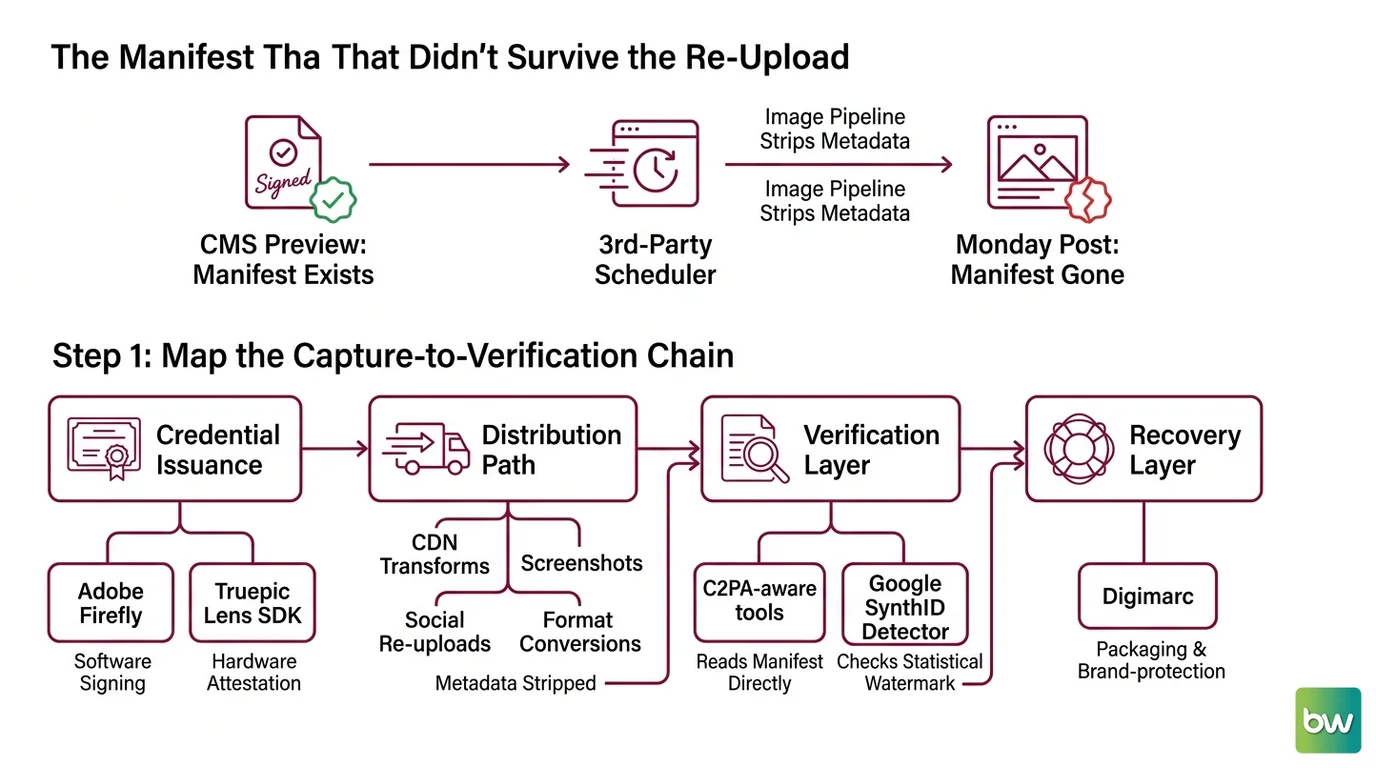
It worked in the CMS preview on Friday. On Monday the marketing team posted the same asset through a third-party scheduler, and the verification badge that showed up in the newsroom’s review tool was gone — because the scheduler’s image pipeline stripped everything outside the pixel data.
Step 1: Map the Capture-to-Verification Chain
A provenance claim is only as strong as its weakest link. Map it as four components, not one feature: where the manifest gets created and signed, what happens to the file in between, how a reader checks it, and what happens when that check fails.
Your system has these parts:
- Credential Issuance — where the manifest gets created and signed. Adobe Firefly does this automatically now; Truepic’s Lens SDK signs at the moment of capture, adding hardware-level attestation Adobe’s software-only flow doesn’t have.
- Distribution Path — every hop the file takes after your pipeline: CDN transforms, social re-uploads, screenshots, format conversions. Most strip metadata by default, not out of malice — manifest preservation was never part of their job.
- Verification Layer — how a downstream reader checks the claim. C2PA-aware tools read the manifest directly; Google’s SynthID Detector checks for a statistical watermark instead, but only on content made with Google’s own models.
- Recovery Layer — what catches the claim once the manifest is gone, a separate vendor decision from signing. Digimarc covers packaging and brand-protection, not general AI-content provenance — confirm your recovery vendor actually matches your use case.
The Architect’s Rule: If you can’t name which component survives a screenshot, you don’t have a provenance pipeline — you have a signature that only works in the demo.
Step 2: Specify the Trust Boundary
Signing a file is easy. Deciding what counts as a valid signature, and to whom, is the part that breaks in production. Your spec needs to answer who you trust, for how long, and under which jurisdiction’s rules.
Context checklist:
- Trust List version pinned — C2PA replaced the Interim Trust List with a new Trust List; content signed under a still-valid Interim Trust List certificate stays valid within its original window, but any new signer in your pipeline must use a Trust-List-certified certificate authority.
- Manifest binding method specified — assertions chain together with Cryptographic Hashing, and the manifest closes with a Digital Signature; your verifier needs to know which signing scheme it’s checking against.
- Jurisdiction requirements named — the EU AI Act’s Article 50 applies from August 2026; California’s SB 942 lands on the same date, pushed back from its original January 2026 start. Both require visible and machine-readable disclosure; SB 942’s detection-tool requirement covers image, video, and audio, not text.
- Content types in scope — confirm your recovery and detection vendors cover the media types you ship; a watermarking API built for images won’t help your audio pipeline.
The Spec Test: If your spec doesn’t name a Trust List version, your verifier will silently accept a certificate that should already be retired — and you won’t find out until an audit asks which root of trust signed a given file.
Step 3: Sequence the Signing and Recovery Layers
Build order matters here the way it matters in any pipeline with dependencies. Sign before you watermark, and watermark before you compress for distribution — reverse either step and you embed a layer into data that gets thrown away downstream.
Build order:
- Credential Issuance first — every other layer depends on having something to protect. No dependencies, foundational.
- Recovery Layer next — it needs the final rendered output from step 1, not the source asset. A vendor like Steg.AI embeds its signal using Steganography, encoding recovery data directly into the content rather than metadata compression can strip — and can reconstruct C2PA credentials from the watermark even after the manifest is gone.
- Distribution-aware export last — this is where re-encoding happens, and it must run after both signing and watermarking or you’ll compress away the layer you just built.
For each component, your context must specify:
- What it receives — raw asset, signed asset, or watermarked asset
- What it returns — the same asset plus a manifest, a watermark, or both
- What it must NOT do — never let a failed signing step silently pass an unsigned asset downstream
- How to handle failure — state explicitly whether a failed signing step blocks the publish or ships flagged as unverified. That’s a product decision, not one the AI tool should guess at.
Step 4: Prove the Chain Survives Distribution
Validation here isn’t “check that the manifest exists.” It’s “check that the claim survives the exact path your content takes.” Test against real distribution surfaces, not a clean local file.
Validation checklist:
- Manifest integrity after re-upload — failure looks like: a valid signature on export, then a missing or unparseable manifest after the asset passes through your CMS or a platform’s re-encode step
- Watermark recoverability — failure looks like: the recovery vendor’s API returns no match after the asset is cropped, recompressed, or edited
- Trust List currency — failure looks like: your verifier accepting a certificate valid under the old Interim Trust List window that should now route through the current Trust List
- Detector reachability — failure looks like: code assuming SynthID Detector’s Cloud API is generally available; it’s currently a limited preview for select partners — the separate public verification portal is the waitlist-gated option, not the Cloud API itself
- Content matching as a backstop — cross-check a numerical Embedding of the asset against Perceptual Hashing of a known reference, catching edits a stripped manifest alone would miss
Security & compatibility notes:
- California SB 942: Operative date moved to August 2026, delayed from January 2026 by AB 853. Posts citing the January date are out of date — verify current text before citing a deadline.
- Nikon Z6 III signing certificates: A camera-level signing vulnerability after the 2025 firmware update led Nikon to revoke certificates from affected units; in-camera signing was not restored as of early 2026 — treat hardware-signed credentials from that window as unverifiable until confirmed.
- Invisible watermark removal: 2026 research shows reconstruction and re-watermarking attacks can strip invisible watermarks without access to the embedding model. Adobe’s open-source TrustMark project added a watermark-removal function to its repository in April 2026 — treat watermarking as defeatable, not a guarantee.
Common Pitfalls
| What You Did | Why AI Failed | The Fix |
|---|---|---|
| Shipped C2PA signing with no fallback | Manifest stripped on the first re-encode or screenshot | Add an invisible watermark recovery layer |
| Verified against the Interim Trust List | New certificates route through the current Trust List, not the frozen interim one | Pin and check your Trust List version explicitly |
| Built against SynthID Detector as a public API | The Cloud detection API is a limited partner preview, not GA | Use the waitlist portal or scope your spec to what you have |
| Treated Digimarc as a drop-in provenance API | Its flagship products target packaging and brand inspection, not genAI watermark verification | Match the vendor’s actual product to your use case |
Pro Tip
Provenance is the one place where “add another layer” is the right answer to almost every failure mode. A manifest catches edits; a watermark catches manifest loss; a Trust List catches an untrustworthy signer; a jurisdiction check catches one you forgot existed. Spec each layer to fail loud — your verification layer should say which layer failed, not just that the asset came back unverified. That’s the difference between a real attack and a CDN that recompresses thumbnails.
Frequently Asked Questions
Q: How can news publishers use C2PA Content Credentials to verify photos in 2026? A: Newsrooms check the signing certificate against the current C2PA Trust List, not the frozen Interim Trust List, at intake. Watch-out: cameras caught in recent certificate revocations — Nikon’s Z6 III, for one — will fail verification even on unaltered photos. Flag those for manual review, don’t auto-reject.
Q: How can businesses use SynthID detection to identify AI-generated content in 2026? A: Without partner access, businesses use the public SynthID Detector portal, which checks for Google’s watermark in Gemini, Imagen, Veo, or Lyria output — but it’s waitlist-gated for journalists, media, and researchers, not self-serve. It only catches Google-made content, nothing generated elsewhere.
Q: How to add C2PA Content Credentials to images using Adobe Firefly and open-source tools in 2026? A: Firefly embeds Content Credentials automatically now — Adobe removed the option to disable them on generative workflows, and its terms prohibit stripping them after export. For assets outside Firefly, implement the same 2.4-family manifest spec against open-source C2PA tools; the spec, not the brand, makes output interoperable.
Q: How to integrate an invisible watermarking API like Steg.ai into a content generation pipeline? A: Steg.ai ships as a REST API, web app, or DAM integration — wire the call after your final render, before any export-compression step, since the watermark must survive whatever encoding comes next. Bonus: it recovers C2PA credentials from the watermark once the manifest gets stripped downstream.
Your Spec Artifact
By the end of this guide, you should have:
- A four-component provenance map — issuance, distribution, verification, recovery — with a named vendor or tool for each
- A trust and jurisdiction checklist — Trust List version, signature binding method, and which August 2026 disclosure rules apply
- A validation checklist that tests the chain against your real distribution path, with named failure symptoms for manifest loss, watermark loss, and stale trust certificates
Your Implementation Prompt
Drop this into Claude Code, Cursor, or Codex when wiring the provenance layer into your content pipeline. It encodes the four-component map, the trust boundary, the build order, and the validation checklist from this guide — fill in the brackets with your stack.
Build a content provenance and watermarking layer for [your platform: CMS / generation pipeline / mobile app].

Architecture (4 components, build in this order):
1. Credential Issuance — integrate [Adobe Firefly API / Truepic Lens SDK / your tool] to emit a signed C2PA manifest at creation. Output: asset + manifest bound by a digital signature.
2. Recovery Layer — embed an invisible watermark via [Steg.ai API / your vendor] on the FINAL rendered output, before export/compression. Output: asset that can reconstruct the manifest if stripped.
3. Distribution Path — list what touches the asset after creation: [CDN re-encoding / social re-upload / screenshot surfaces]. Flag every step that could strip the manifest.
4. Verification Layer — on intake, check for a manifest signed against [Trust List version]. If missing, fall back to watermark extraction via [vendor API]. Log which path resolved the claim.

Constraints:
- Trust List: verify against [version/date], not the frozen Interim Trust List.
- Jurisdiction: disclosure must meet [EU AI Act Article 50 / California SB 942] for [your content types — text is exempt under SB 942].
- Content types: [image / video / audio — confirm vendor coverage matches].
- Detector availability: if using SynthID Detector, confirm [waitlist / partner Cloud API] access.

Validation:
- Re-upload a test asset through [your lossiest distribution path]; confirm the manifest OR watermark survives.
- Confirm revoked or expired signing certificates are rejected, not silently accepted.
- Log every result (manifest-valid / watermark-recovered / unverifiable) — never treat unverifiable as "not AI-generated."
Ship It
You now have a way to think about content provenance as a chain, not a checkbox: issuance, distribution, verification, and recovery, each with its own way to fail. The manifest is your first signature, not your only one — spec the watermark layer as backup before a stripped manifest costs you a correction nobody can trace back to source. Treat the Trust List and the August 2026 jurisdiction deadlines as version pins you check on a schedule, not background reading you did once.
AI-assisted content, human-reviewed. Images AI-generated. Editorial Standards · Our Editors