Understanding Claude Skills: A New Paradigm for Agentic Workflow Automation
The Efficiency Gap: Moving Beyond Repetitive Prompting
Last week I caught myself copying frontmatter from an old article for the thirtieth time. Title, slug, meta description, author URL, ui_categories, image path — fifteen fields, and I got at least two wrong every time. The fix wasn’t a better checklist. It was a skill.
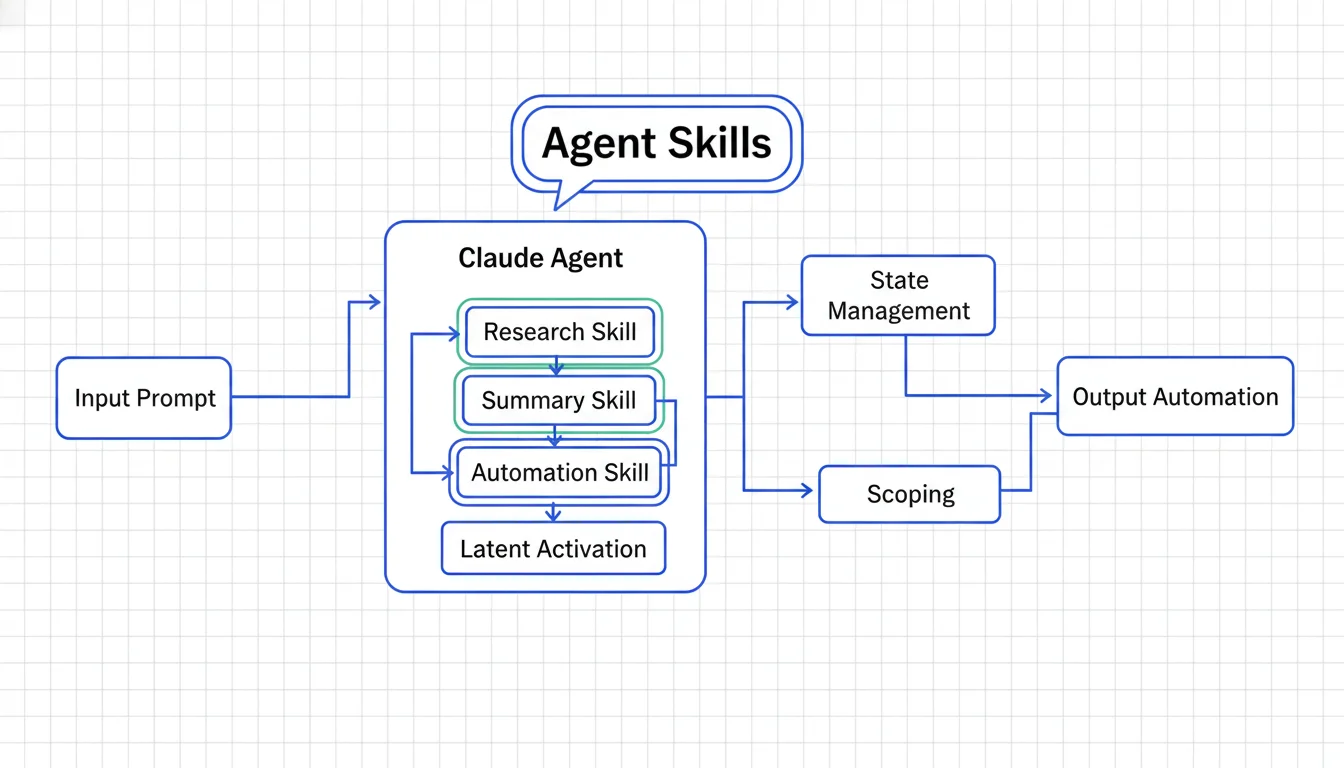
Within Claude Code, the “repetition tax” — re-explaining coding standards, PR structures, and formatting guidelines in every new session — is a real friction point. When you’re forced to restate the same constraints session after session, it signals a failure in how you’ve set up your AI workflow. Agent Skills are the architectural solution: persistent, file-based instruction sets that codify expertise into the file system itself.
What Is a Claude Skill?
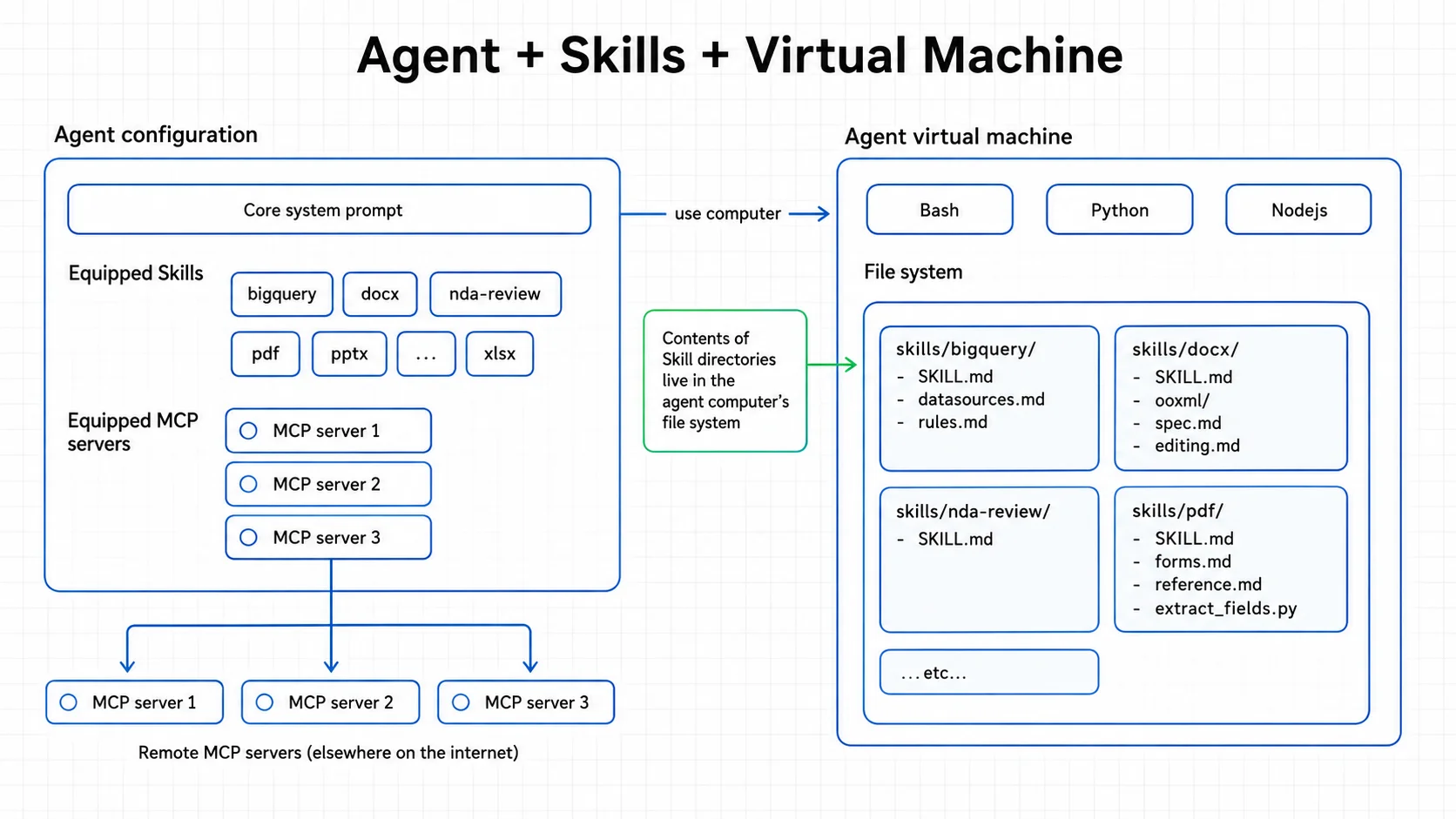
From a technical strategy perspective, instructions must be treated as modular assets rather than disposable context. Within Claude Code, a Skill is defined as a folder containing a skill.md entry point alongside any necessary scripts and resources. This folder-based architecture allows the skill to be self-describing; the skill.md file provides the instructions, while the bundled scripts allow the AI to perform local environment tasks—such as executing a specific linter or running a formatter—to fulfill its objective.
Synthetically, a skill is a discovered instruction set that Claude identifies and applies based on the current task. This architecture supports the Single-Instruction Principle, grounded in the concept of Idempotency:
The Single-Instruction Principle: Define a standard once within a skill to achieve consistent, idempotent results across all future sessions, ensuring the AI performs the task accurately without further human intervention.
By bundling instructions with executable resources, developers shift from “prompting” the model to “equipping” the agent with the specific tools and knowledge required for specialized tasks.
A Skill We Actually Built
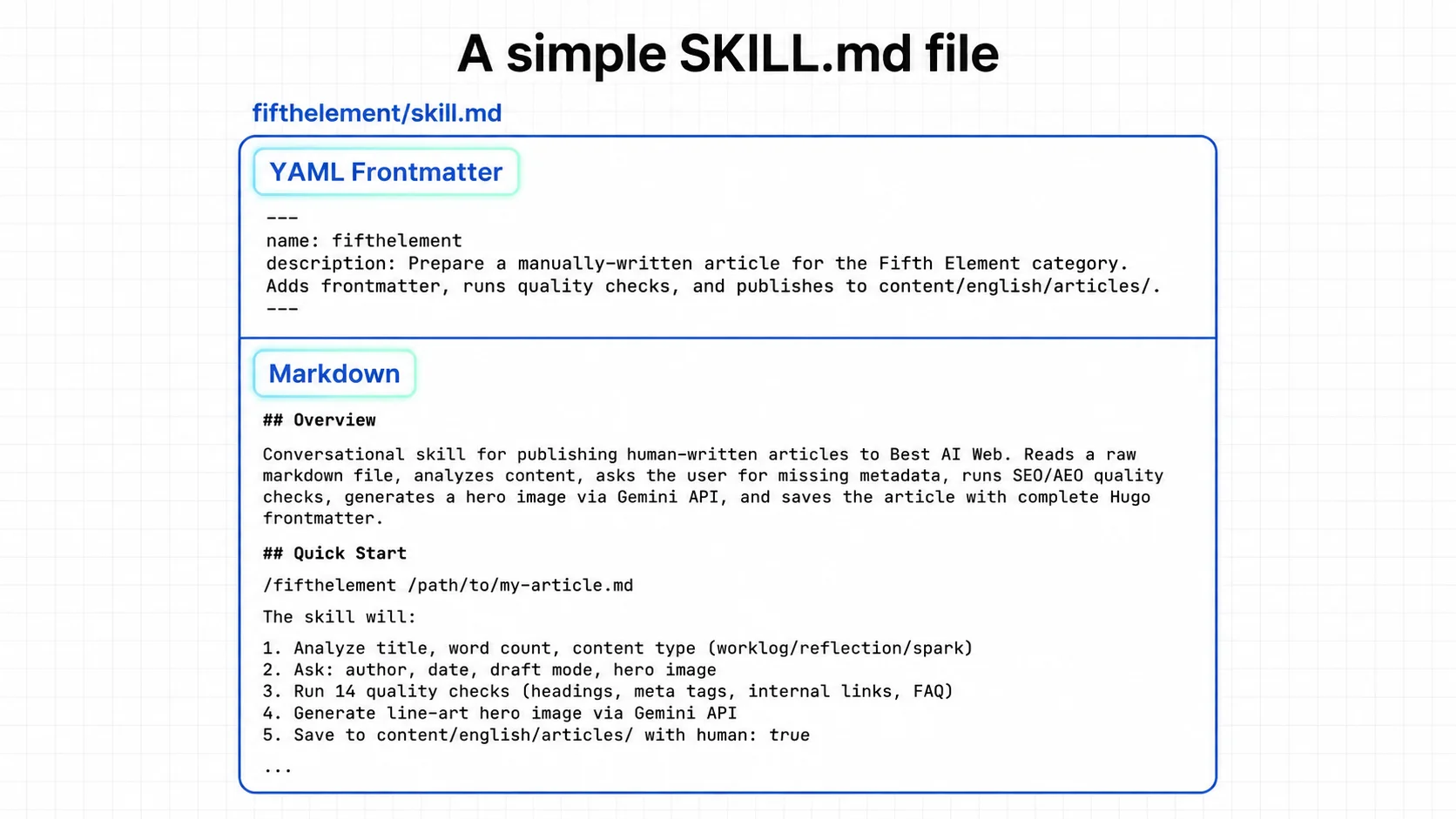
The first skill I wrote was /fifthelement — a publishing workflow for human-written articles on this site. Before the skill existed, publishing a single article meant: open an old article, copy the frontmatter, change fifteen fields by hand, guess the right ui_categories slug, forget the human: true flag (which controls whether the page says “Written by a human editor” or “AI-assisted content”), manually run the Hugo build to check for errors, and hope I didn’t break the schema.
The skill replaced all of that with a conversation. I give it a raw markdown file. It reads the content, proposes a title, slug, and meta description, and asks me what it doesn’t know — author, date, draft mode. Then it runs fourteen quality checks: Are the headings proper markdown? Is there at least one internal link? Is any heading phrased as a question people would actually search? It flags problems but doesn’t auto-fix — this is human-written content, and the skill respects that.
The part that surprised me most was image generation. The skill calls the Gemini API with the article’s title and summary, and gets back a line-art diagram on a grid-paper background — consistent with our site’s visual style, but generated in seconds. We iterated on the prompt three times before landing on the right balance: the first version put my photo too large in the frame, the second used black-and-white when I wanted natural color, the third finally produced clean line-art without a person at all. That iteration — prompt, result, adjust, retry — is the actual work of building a skill. The skill.md file is the finished artifact. The learning is in the drafts you delete.
How Skills Stay Out of Your Way
The clever part is that skills don’t eat up your context window until they’re needed. Claude Code only scans skill names and descriptions at the start — the actual instructions stay unloaded. Your 200-line PR review checklist consumes zero tokens while you’re debugging. The moment you say “review this PR,” the skill loads. When you move on, it’s gone.
That matters more than it sounds. I used to put everything into CLAUDE.md — formatting rules, commit conventions, review checklists — and the model got noticeably worse as the file grew. Skills solved that: each instruction set only exists in context when it’s relevant.
Where Skills Live: Personal vs. Project
Skills live in two places, and the distinction matters:
Personal skills (~/.claude/skills/) follow you across every project. I keep my documentation style and preferred response format here — things that are mine, not the team’s.
Project skills (.claude/skills/ in the repo) are shared. Commit them to version control and every developer who clones the repo inherits them. Our /fifthelement skill lives here — anyone on the team can publish a Fifth Element article the same way I do.
When to Use Skills vs. CLAUDE.md vs. Slash Commands
Three tools, three jobs:
- CLAUDE.md is always on — universal constraints that should never be ignored (e.g., “Always use Strict TypeScript mode”). The trade-off: it’s static overhead in every session, whether relevant or not.
- Skills activate automatically when the task matches. Best for specialized, repetitive work. Zero overhead when you’re doing something else.
- Slash Commands require you to type
/commandexplicitly. More control, more cognitive load. Good for things you run intentionally, not things that should just happen.
If the instruction applies always, put it in CLAUDE.md. If it applies to a specific type of task, make it a skill. If you want to trigger it manually and only when you choose, make it a slash command.
If you want to see the full anatomy of a skill — frontmatter, activation, scoping, and deployment — the sources below cover everything. Anthropic’s engineering blog explains the architecture, the PDF guide walks through building one from scratch, and the YouTube playlist covers it end to end. What this article adds is one thing the docs don’t have: what it actually feels like to use a skill you built yourself, on a problem you used to solve by hand.
The pattern is simple: if you explain the same thing to Claude more than twice, write it down once as a skill and never explain it again. The skill I built took an afternoon. The time it saved me started the next morning.
Frequently Asked Questions
Q: What is the difference between a Claude Skill and a CLAUDE.md file? A: CLAUDE.md is always loaded into context and applies globally. A Skill activates only when the task matches its description, saving context tokens and keeping the model focused on the current task.
Q: Can Claude Skills run scripts and tools automatically? A: Yes. A skill folder can contain scripts alongside the skill.md instructions. When the skill activates, Claude can execute bundled linters, formatters, or validation scripts as part of the task.
Q: How do I share Skills across a development team?
A: Place the skill folder in .claude/skills/ at the repository root and commit it to version control. Every developer who clones the repo automatically inherits the skill — no manual setup required.
First-hand experience from a human editor, written with AI assistance. Part of our Fifth Element series. Editorial Standards · Our Editors