Prompts as Code vs Prompt Registries: Storage Strategy, A/B Rollouts, and Rollback for LLM Teams
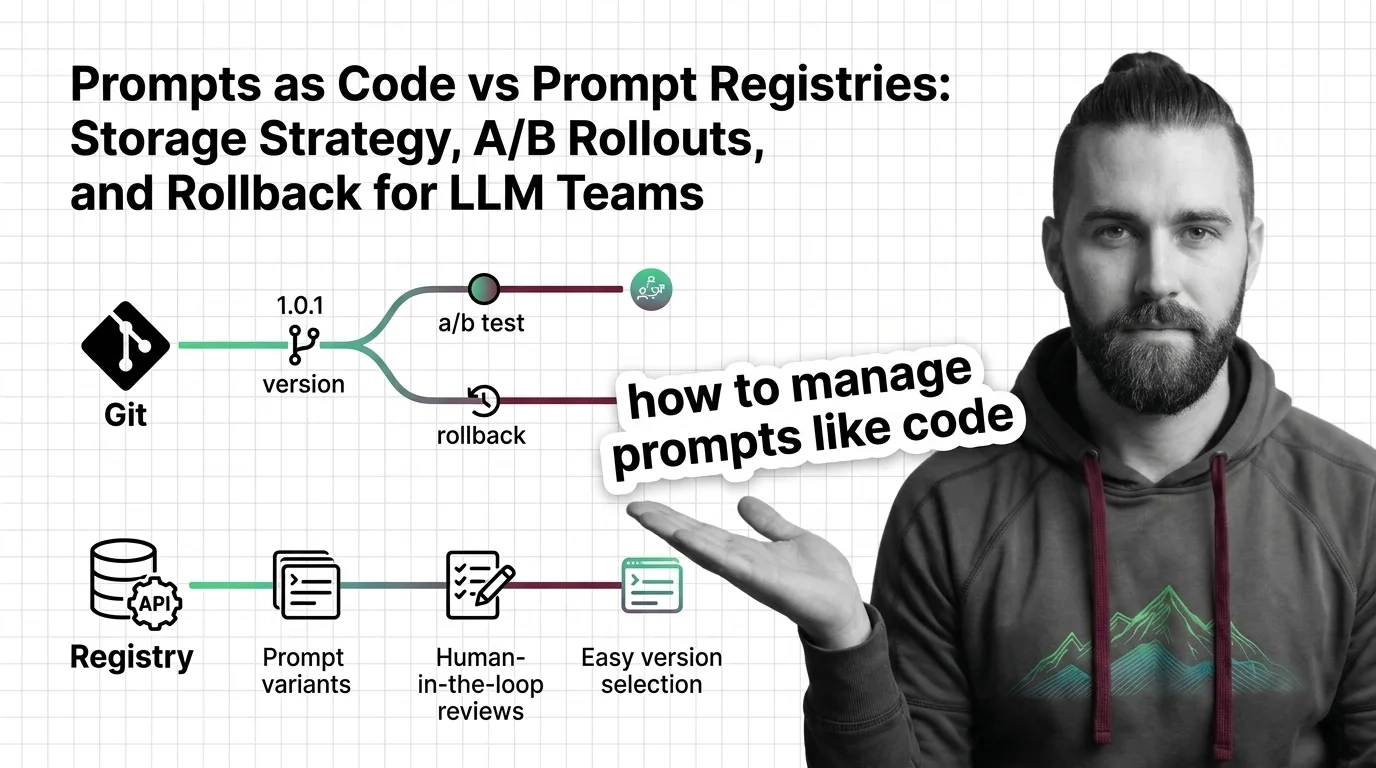
TL;DR
- Git stores prompts as code artifacts — every production change requires a redeploy
- Registries hot-swap prompts by pointing a label like “production” to any prior version — no redeploy, rollback in seconds
- Detecting a real accuracy difference between two prompt variants requires at least 50–100 samples per variant; binary pass/fail metrics need a chi-square test to reach statistical significance
You push a prompt change on Tuesday. Wednesday morning: a support ticket. Outputs are malformed — wrong format, missing required fields. You need to know what changed and how to revert it in the next five minutes. Nobody remembers which version is in production. Nobody is sure when it changed. The rollback is a guess.
This is the incident that reveals your storage spec was never written. Fix the spec before you need the rollback.
Before You Start
You’ll need:
- A production or near-production LLM pipeline with at least one prompt you’re responsible for
- Basic familiarity with Prompt Versioning And Management — what a version is, why prompt identity matters across environments
- A working model of LLMOps — how prompts connect to model calls in a production stack
- If you go the registry path: a free Langfuse or LangSmith account (both have free tiers with meaningful limits)
This guide teaches you: how to choose between Git-based prompt storage and a dedicated Prompt Registry, then build a deployment pipeline with canary rollouts, A/B validation, and instant rollback baked in from the start.
The Prompt Nobody Could Trace
Here is what the broken deployment looks like before you fix the storage problem.
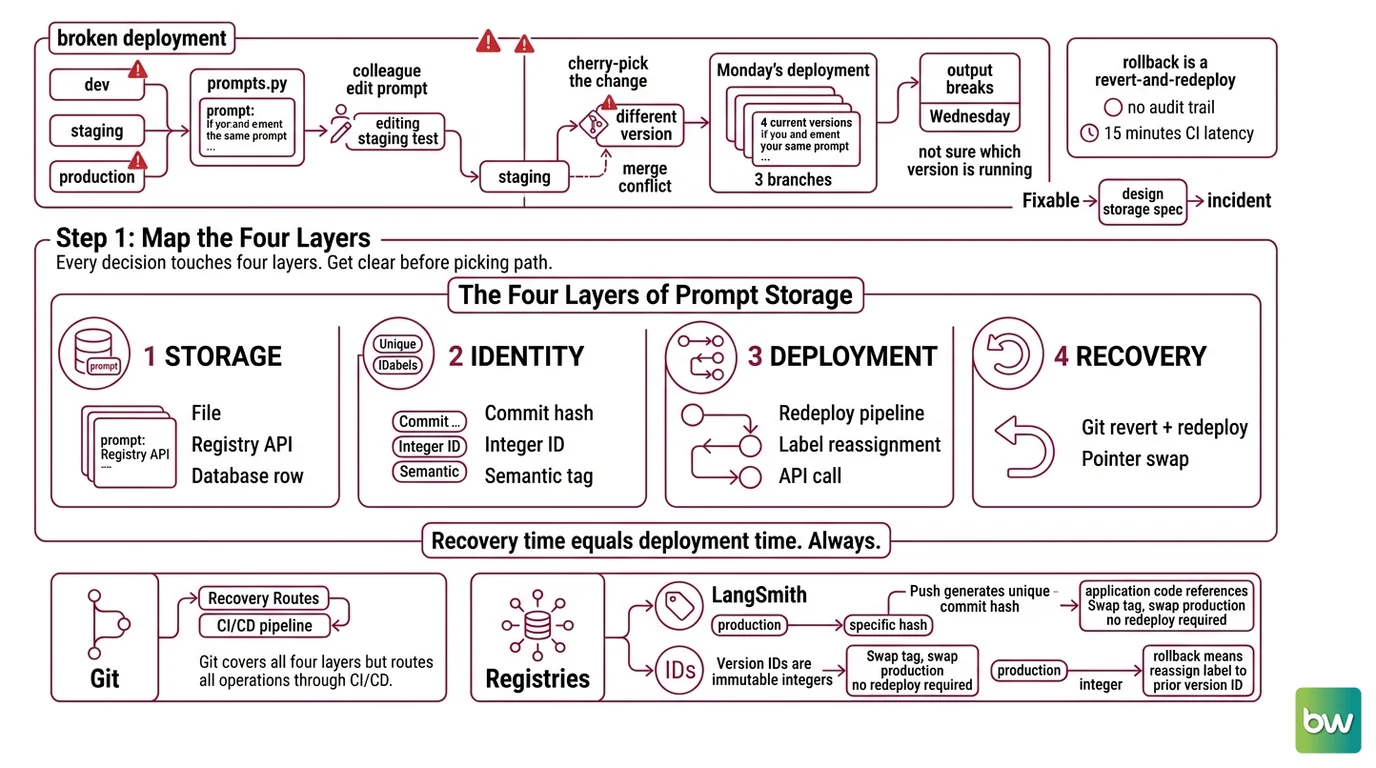
You have three environments: dev, staging, production. The prompt lives in prompts.py. A colleague edits it for a staging test. Another cherry-picks the change to production — but the cherry-pick includes a slightly different version because there was a merge conflict two weeks ago. Monday’s deployment shipped four “current” versions of the same prompt across three branches.
Output breaks Wednesday. No one is sure which version is running. The rollback is a revert-and-redeploy with 15 minutes of CI latency and no audit trail of what changed between versions.
Fixable. But only if you design the storage spec before the incident.
Step 1: Map the Four Layers of Prompt Storage
Every Prompt Versioning And Management decision touches four layers. Get clear on all four before you pick a path. Skipping this step means your storage choice will surprise you at incident time.
The four layers:
- Storage — where the prompt text lives (file, registry API, database row)
- Identity — how you distinguish version 7 from version 8 (commit hash, integer ID, semantic tag)
- Deployment — how a specific version reaches production (redeploy pipeline, label reassignment, API call)
- Recovery — how you undo a bad version (git revert + redeploy, or pointer swap)
Git covers all four — but every deployment and recovery operation routes through your CI/CD pipeline. Recovery time equals deployment time. Always.
Registries cover the same four layers differently. In LangSmith, each push generates a unique commit hash. A tag like “production” points to a specific hash. Your application code references the tag, not the hash — swap the tag, swap what production serves, no redeploy required (LangSmith Docs). In Langfuse, version IDs are immutable integers. The production label points to one integer. Rollback means reassigning that label to any prior version number via the UI or API — the application serving the prompt sees the change immediately (Langfuse Docs).
Prompts that embed Tool Use in Prompts definitions — tool schemas, function signatures — carry additional versioning complexity. A tool schema change is a version-breaking change even if the prose text is identical. Treat the full prompt payload, not just the instruction text, as the versioned artifact.
The Architect’s Rule: Your code should reference a label that never changes. What the label points to is the version. That single decision determines whether a rollback takes five seconds or five minutes.
Step 2: Choose Your Storage Contract
This is the spec step. Work through the checklist before committing to either path. Missing an item here is what causes the wrong tool to be in production six months later.
Context checklist:
- Deployment cadence — do you change prompts more often than you redeploy code? If yes, Git charges you a deploy cycle every time. Registry is a stronger fit.
- Team composition — do product managers or QA engineers need to edit prompts? Git requires a pull request workflow. Most registries have a UI without a terminal in sight.
- Per-trace observability — do you need to know which exact prompt version generated a specific output six weeks from now? You need a registry that logs prompt version alongside each inference call. Langfuse stores this per request.
- Protected labels — does your team need role controls so only admins can move the “production” label? Langfuse enforces this: viewer and member roles cannot modify or delete protected labels (Langfuse Docs).
- Security surface — if your prompts handle external user input, include Prompt Injection defenses as a constraint in the prompt spec. Version those defenses the same way you version the instruction text. A defense rollback is just as risky as a feature rollback.
- Self-host requirement — if data cannot leave your infrastructure, Langfuse (MIT license, Docker Compose and Kubernetes) and MLflow Prompt Registry (open source, GA in MLflow 3.x as of May 2026) both self-host cleanly.
- Budget — both LangSmith and Langfuse have free tiers that cover small teams and early-stage pipelines, with paid plans for larger usage and additional seats. LangSmith’s overage pricing is per additional trace batch and can grow non-linearly at scale — check current pricing before committing to a budget estimate.
The Spec Test: If your requirements include “roll back a broken prompt in under two minutes without touching application code,” the Git path already fails. That is not a criticism. It is a constraint. Name it before you build the pipeline.
Step 3: Build the Deployment Pipeline
Three components. Build them in this order — each one is a prerequisite for the next.
Build order:
Version storage first — commit your prompts to your chosen system before wiring anything else. For Langfuse: push via the SDK; each push generates an immutable integer version ID. For LangSmith: push via the CLI or SDK; each push generates a commit hash and you assign a named tag. Both operations are audited — who pushed, when, from which branch.
Canary gate second — before any version reaches 100% of production traffic, ship it at 5–10% behind a feature flag. Monitor latency and constraint pass rates for 24–48 hours before expanding exposure (TianPan.co). If either metric declines, rollback before the problem scales.
Rollback trigger third — define what triggers a rollback and what the operation looks like. For Langfuse: reassign the
productionlabel to the prior version ID via the UI or API — takes under ten seconds, no application restart. For LangSmith: move the “production” tag to the prior commit hash. For Git: revert the commit and redeploy — rollback time equals your deployment pipeline time.
For each component, specify:
- What it receives (the prompt text and metadata — version ID, author, timestamp, environment target)
- What it returns (the confirmed version ID or hash after write)
- What it must NOT do (overwrite the production label without a review gate)
- How to handle failure (no-label state: serve the last known good version, not an empty prompt — an empty prompt is worse than a stale one)
One tool that is no longer a valid option in this list: Humanloop, which shut down on September 8, 2025 after Anthropic acqui-hired the team (TechCrunch). If your existing documentation or tooling references Humanloop, substitute Langfuse or LangSmith as active alternatives with equivalent features.
Step 4: Validate with A/B Tests Before You Promote
You have a version in staging. You think it is better. Before you move the “production” label, prove it. Prompt Testing And Evaluation at the A/B level has a specific protocol — and most teams skip the parts that matter.
Validation checklist:
- Minimum sample size — 50–100 samples per variant to detect a 5–10% accuracy difference; 200–500 samples per variant to detect a 1–3% difference (FutureAGI Blog). Below 50 samples, you are measuring noise. Failure looks like: declaring variant B better after 15 outputs.
- Statistical method — for continuous metrics (ROUGE score, latency, semantic similarity): use a t-test or non-parametric equivalent. For binary or categorical outputs (pass/fail, correct/incorrect, Structured Output Prompting schema adherence): use a chi-square test or two-proportion z-test (FutureAGI Blog). Failure looks like: eyeballing percentages and calling it significant.
- Metric alignment — the test metric must match your production objective. Testing on ROUGE when users care about factual accuracy means you are validating the wrong thing. Failure looks like: variant B wins the test, underperforms in production.
- CI gate — Braintrust’s GitHub Action runs evaluations on every PR that modifies a prompt, and blocks the merge if scores fall below your defined baseline (Braintrust Docs). This turns the A/B decision into an automated gate, not a post-hoc judgment call.
- Format constraints — if you use Constrained Decoding to enforce output grammar, treat the grammar spec as a versioned artifact alongside the prompt. A grammar change without a version bump is an untracked deployment.
When it breaks: A/B testing catches prompt regressions only for the metrics you instrument. If a new prompt version adds a field that downstream code does not handle, the test can pass while the integration breaks — and the failure appears in production, not in your eval suite.
Common Pitfalls
| What You Did | Why It Failed | The Fix |
|---|---|---|
| Stored prompts as strings in config files | No version identity — “what’s in production” is whoever deployed last | Move to explicit version IDs with a stable label pointing to current production |
| Tested on 20 samples, declared a winner | Sample size too small to separate signal from temperature variance | Minimum 50–100 per variant; use chi-square for pass/fail metrics |
| Referenced the commit hash in application code | Every rollback requires a code change and redeploy | Code references the label; the label is your deployment handle |
| Shipped to 100% traffic without a canary step | No circuit breaker — bad prompt reached all users before detection | Start at 5–10% behind a feature flag; monitor before expanding |
| Referenced Humanloop in your runbook | Humanloop shut down September 8, 2025 | Migrate runbook to Langfuse or LangSmith |
Pro Tip
The label is your deployment abstraction. Your code never changes. Only what the label points to changes. This is the same principle behind blue/green deployments, DNS TTLs, and feature flags — a stable name, a mutable pointer, a one-operation swap. Once you apply this to Prompt Optimization cycles — iterating on prompts without modifying your application code — prompt experiments become as safe as any other A/B test. The infrastructure is the same. The mental model is what changes.
Frequently Asked Questions
Q: Should LLM teams store prompts in Git or a dedicated prompt registry — and is Humanloop a current option?
A: Humanloop is no longer available — it shut down September 8, 2025 after Anthropic acqui-hired the team (TechCrunch). For active tools: use Git when your team is code-first and prompt changes ship on your existing CI schedule. Use a prompt versioning system when you need sub-minute rollback, non-engineer editing, or per-trace observability. Edge case: both approaches compose — prompts authored in Git, pushed to a registry for hot-swap deployment. The decision is about recovery time, not about one tool being objectively superior.
Q: How do you run A/B tests on LLM prompt variants and reach statistical significance?
A: Collect at least 50–100 samples per variant to detect a 5–10% performance difference; detecting a 1–3% difference requires 200–500 per variant (FutureAGI Blog). For pass/fail metrics, a two-proportion z-test or chi-square test gives you the significance threshold. Watch out for the common mistake of using LLM temperature as a natural “randomizer” — temperature adds variance across samples, which is not the same as the controlled variation you need for a valid test. Fix your temperature setting for the duration of the experiment.
Q: How do you roll back a bad prompt in production without breaking live applications?
A: In Langfuse: reassign the production label to the previous version integer via the UI or API — the running application picks up the change immediately, no restart (Langfuse Docs). In LangSmith: move the “production” tag to the prior commit hash. In Git-only setups: revert the commit and redeploy — rollback time equals your deployment pipeline time. For anything where minutes matter, the label-based approach is the clear choice. The tradeoff: registries add a vendor dependency your Git-only stack does not have. Name that dependency explicitly in your architecture doc.
Your Spec Artifact
By the end of this guide, you should have:
- A storage decision with the specific constraint that drove it documented — redeploy latency, team composition, or per-trace observability requirement
- A version deployment checklist: canary percentage, monitoring window, rollback trigger metric and threshold
- An A/B validation protocol: metric name, sample size target, statistical test method, and the CI gate or manual review step that gates promotion
Your Implementation Prompt
Use this prompt in Claude Code, Cursor, or Codex to scaffold a prompt versioning specification for your system. Fill in every bracketed placeholder before running.
You are helping me design a prompt versioning specification for a production LLM pipeline.

STORAGE DECISION:
- Storage path: [Git-based | Registry-based — choose one and state the deciding constraint]
- Registry target (if applicable): [Langfuse cloud / Langfuse self-hosted / LangSmith / MLflow]
- Rollback time budget: [e.g., under 2 minutes / under 30 seconds / best-effort]

FOUR-LAYER SPEC:
- Storage: [where prompt text lives — file path, SDK push, or database entry]
- Identity: [version ID format — immutable integer / commit hash / named tag]
- Deployment: [how new version reaches production — label reassignment / git tag + CI deploy]
- Recovery: [exact rollback operation — label pointer swap / git revert + redeploy / API call]

DEPLOYMENT GATE:
- Canary percentage: [e.g., 5% or 10%]
- Monitoring window: [e.g., 24 hours or 48 hours]
- Rollback trigger: [metric name + threshold — e.g., "schema pass rate drops below 95%"]

A/B VALIDATION:
- Primary metric: [e.g., JSON schema pass/fail / ROUGE-L score / task accuracy]
- Minimum samples per variant: [50–100 for 5–10% diff | 200–500 for 1–3% diff]
- Statistical test: [chi-square for binary outcomes | t-test for continuous metrics]
- Baseline version: [version ID or label of current production prompt]
- CI gate: [Braintrust GitHub Action / manual review / other — specify block or warn]

Given these constraints, generate:
1. A version storage schema (fields, types, immutability rules)
2. A deployment checklist in order (storage → canary → promote → monitor)
3. A rollback runbook with exact UI steps or API calls for your chosen registry
4. A validation gate definition that blocks promotion if the primary metric falls below baseline
This prompt maps Step 1’s four layers to the FOUR-LAYER SPEC, Step 2’s checklist to the STORAGE DECISION and DEPLOYMENT GATE, Step 3’s build order to the deployment checklist, and Step 4’s validation to the A/B VALIDATION block.
Ship It
You now have a version control system that separates where prompts live from how prompts deploy. That separation is what makes rollback a ten-second label operation instead of a fifteen-minute CI event. Run this framework on every LLM pipeline your team ships — the four layers apply regardless of which model, registry, or deployment tool you use.
Compatibility notes:
- Langfuse Python SDK (v3 → v4): The
blocked_instrumentation_scopesparameter is deprecated; migrate toshould_export_span. Full upgrade path: Langfuse SDK Docs.- LangSmith tracing: langchain-core 1.2.4+ changed where token counts appear in traces — older LangChain versions show missing token data in the prompt hub (GitHub Issues).
AI-assisted content, human-reviewed. Images AI-generated. Editorial Standards · Our Editors