Promptfoo, Braintrust, and DeepEval: How to Choose and Use Prompt Testing Tools in 2026
TL;DR
- Promptfoo handles YAML-based regression and red team testing in CI; DeepEval wraps pytest with 50+ LLM quality metrics; Braintrust tracks experiment quality over time; LangSmith is the right choice only when you’re already deep in LangChain.
- Your eval is only as good as your test case catalog — start from real production failures, not hypothetical edge cases.
- Wire one tool first. Picking the right tool for your current testing surface beats adding all four at once.
Every week I see the same pattern. A team ships a prompt. It works in dev. They do a quick mental walkthrough, test three inputs, and push to production. Six weeks later they’re debugging why summaries are suddenly shorter, why the output started dropping a required field, or why a model upgrade silently changed the tone. They have no eval. They have no baseline. They have no idea which change caused it.
Before You Start
You’ll need:
- An AI coding tool: Cursor / Claude Code (for generating eval configs and test cases)
- Understanding of Prompt Testing And Evaluation — the difference between eyeballing output and systematic regression testing
- A production prompt with at least one example of what “good output” looks like
- If you’re building structured-output pipelines using Instructor, BAML, or Constrained Decoding approaches: knowing your output schema before testing determines which assertions you’ll write
This guide teaches you: How to map your evaluation requirement to the right tool — Promptfoo, Deepeval, Braintrust, or LangSmith — and how to specify that tool so Claude Code builds you a working eval pipeline.
When Prompts Break Silently
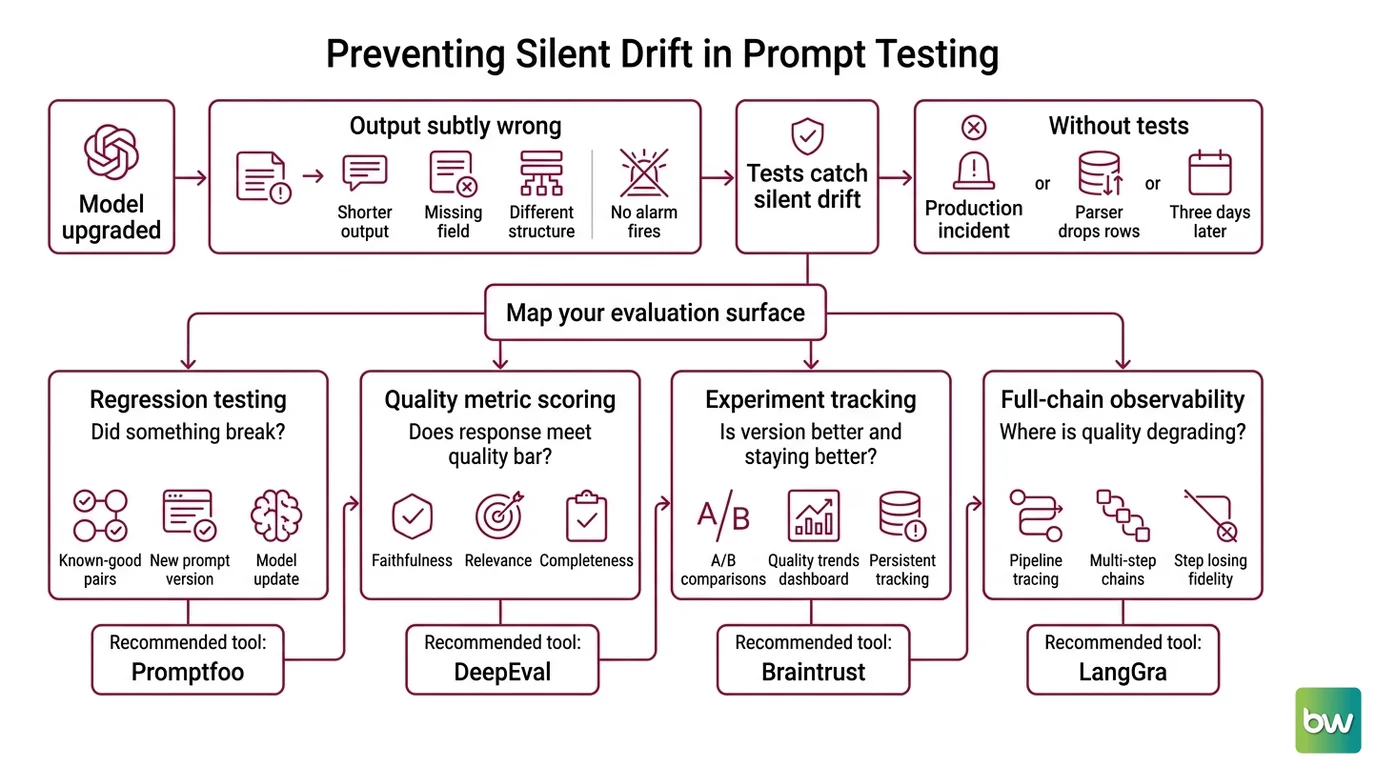
You upgraded the model. The prompt still returns output. The output is subtly wrong — shorter, missing a field, different structure. No alarm fires. No test fails. You find out three days later when a downstream parser starts dropping rows.
That’s the failure mode prompt testing prevents. Not catastrophic failure. Silent drift. The tests that catch silent drift are the ones nobody writes until after the first production incident.
It worked in staging. In production, the model version was different and the output format shifted silently. The downstream parser started producing empty rows for every third record.
Step 1: Map Your Evaluation Surface
Before you pick a tool, name what you’re actually testing. Four surfaces exist — they require different tools, and confusing them is why teams end up with four tools and use none of them properly.
Regression testing asks: “Did something I changed break an output that was working?” You have known-good input-output pairs. You want to know if a new prompt version, model update, or parameter change breaks them.
Quality metric scoring asks: “Does this response meet a minimum quality bar?” You want to quantify faithfulness, relevance, answer completeness, or task success — not just “does it look right to me.”
Experiment tracking asks: “Is this version of my prompt better than the last one, and is it staying better over time?” You’re running A/B comparisons and need a persistent quality dashboard.
Full-chain observability asks: “Where in my LangChain pipeline is quality degrading?” You’re not testing a single prompt — you’re tracing multi-step chains to find the step losing fidelity.
Match surfaces to tools:
- Regression: catch regressions in known-good prompt versions → Promptfoo
- Quality metrics: enforce LLM-as-a-judge standards in CI → DeepEval
- Experiment tracking: compare prompt versions, track quality trends → Braintrust
- Chain observability: trace LangGraph or LangChain multi-step pipelines → LangSmith
The Architect’s Rule: If you can’t name what type of failure you’re testing for before you pick a tool, you’ll pick the wrong tool — or you’ll pick all four and use none of them properly.
Step 2: Specify Your Tool-to-Test Match
Each tool has a tight scope. When you understand that scope, the selection is deterministic.
Promptfoo is the right tool for regression testing and red team security probes, including
Prompt Injection adversarial testing. It uses a YAML config file (promptfooconfig.yaml) that specifies your prompt templates, providers, test cases, and assertion types. Assertions include exact string matching,
JSON Schema validation, semantic similarity, and
LLM as a Judge scoring. The Community tier is free — all eval features, self-hosted, with 10K red team probes per month (Promptfoo’s pricing page). It supports every major provider: OpenAI, Anthropic, Azure, Google, HuggingFace, Bedrock, and Ollama, among others.
One caveat worth naming: Promptfoo was acquired by OpenAI earlier this year (AppSecSanta Newsletter). The MIT license is intact and the Community tier remains free, but the community has flagged uncertainty about the long-term open-source roadmap. Factor that into any decision about deep organizational integration before the roadmap clarifies.
DeepEval runs natively inside pytest. You write test functions with metric assertions — AnswerRelevancyMetric, FaithfulnessMetric, HallucinationMetric, or agentic metrics like TaskCompletionMetric and ToolCorrectnessMetric for multi-turn evaluation. Version 4.0.5 ships 50+ metrics covering RAG pipelines, multi-turn conversations, safety, and multimodal outputs (DeepEval Docs). Run your suite with deepeval test run. Every metric runs as a CI gate. The core library is open-source; the Confident AI cloud dashboard adds regression tracking and observability at a price point that isn’t publicly listed.
Braintrust is for teams who need to track quality over time — not just pass/fail assertions, but how quality trends across prompt versions and model upgrades. The Starter plan is free with a one-time $10 credit and unlimited users, projects, datasets, and playgrounds (Braintrust’s pricing page). Pro runs $249/month with $249 in monthly credits, 5 GB processed data, 50K scores per month, and 30-day retention. The key feature is experiment logging: every eval run is recorded, scored, and compared to prior runs in a diff view.
LangSmith belongs in this conversation only if you’re running LangChain or LangGraph. It’s an observability and eval layer designed around trace instrumentation — not a standalone prompt testing tool. The Developer tier is free at 5K traces per month; Plus is $39 per seat per month with 10K traces and 14-day base retention (LangSmith Docs). Extended 400-day retention costs an additional $5 per 1K traces — separate from the base plan, not included.
One technical note: LangSmith tracing changed in langchain-core 1.2.4+, affecting how token counts and costs are captured. If you’re on an older version, upgrade to 1.2.4 or later before instrumenting (LangChain GitHub, issue #34689).
The Spec Test: If you pick Braintrust before you have a quality baseline with known-good scores, you’ll have an experiment dashboard with nothing to compare against. Start with Promptfoo or DeepEval until you have passing assertions, then layer in Braintrust.
Step 3: Wire Your First Eval Pipeline
Pick the tool that matches your primary surface. Wire that one first. Here’s what your context must specify for Claude Code to generate a working configuration:
For regression testing (Promptfoo) — your context must include:
- Provider list: which models to test, with exact version identifiers
- Prompt template: the full prompt text with
{{variable}}placeholders for dynamic inputs - Test cases: minimum five cases, with at least one drawn from a real production failure
- Assertions per case: what correct output looks like — JSON schema validation, substring match, or LLM judge scoring with a rubric
For quality metric testing (DeepEval) — your context must include:
- LLMTestCase fields per test: input, actual output, expected output, and optional retrieval context
- Which metrics to instantiate and at what threshold (e.g.,
AnswerRelevancyMetric(threshold=0.7)) - Whether you’re testing single-turn or agentic multi-turn flows — they use different metric families
- The CI command to run:
deepeval test runagainst your test file
For experiment tracking (Braintrust) — your context must include:
- Which SDK you’re using: Python or TypeScript
- How you’re calling the model: direct API or through a framework
- What score you’re logging: a Braintrust LLM judge call, or your own numeric scoring function
- Which fields map to “input,” “output,” and “expected” in your Braintrust dataset schema
Build order regardless of tool:
- Start with a single test case — one real input, one known-good output
- Add one assertion — the simplest one that would have caught your last production failure
- Run it in CI — even a manual GitHub Actions trigger counts; the discipline of running it on every merge is what matters
- Add test cases from production — every incident is a free regression test if you capture it
Step 4: Prove the Eval Catches Real Failures
Your eval setup is not done until it fails on purpose.
Validation checklist:
- Break a prompt intentionally: change the output format instruction and run the assertion — it must fail
- Introduce a known-bad case: an input that historically produced a wrong output — the metric must score below threshold
- Swap providers: run the same suite against two different models — the eval should surface which passes and which doesn’t
- Run the eval in CI on a branch where you changed nothing — it must pass clean with no false positives
Common Pitfalls
| What You Did | Why It Failed | The Fix |
|---|---|---|
| Built a happy-path test suite only | Model passes easy inputs; edge cases ship untested | Seed test cases from real production failures first |
| Picked Braintrust without a baseline | Experiment dashboard has nothing to compare against | Start with Promptfoo or DeepEval; add Braintrust when you have passing baseline scores |
| Added LangSmith for a non-LangChain stack | LangSmith’s trace model assumes LangChain instrumentation | Use DeepEval or Promptfoo for non-LangChain pipelines |
| Skipped the deliberate-failure validation step | Assertions pass for wrong reasons; eval doesn’t catch real regressions | Always run a break-it-on-purpose test before trusting the eval |
| Set up Structured Output Prompting without schema assertions | Format drift is the most common silent regression | Add JSON schema assertions for every prompt that returns a structured output |
Pro Tip
The most durable part of your eval setup isn’t the tool configuration — it’s the test case catalog. Every time a prompt fails in production, capture the input, the wrong output, and the correct output, and add it to your test suite. Tools get replaced. Models change. That catalog of real failures is the one eval asset that survives every migration and catches things no synthetic test case will think to cover.
Frequently Asked Questions
Q: How do I use Promptfoo for YAML-based prompt regression testing?
A: Create a promptfooconfig.yaml with your providers (e.g., openai:gpt-4o, anthropic:claude-sonnet-4-5), prompt templates with {{variable}} placeholders, test cases with inputs, and per-case assertions. Run npx promptfoo eval locally or in CI. Use is-json for format validation, contains for required substrings, and llm-rubric for semantic scoring. Watch for this gap: a prompt returning valid JSON with the wrong field names passes a format assertion and fails silently on content — add field-level checks alongside schema validation.
Q: How do I evaluate prompts with DeepEval metrics in a pytest CI pipeline?
A: Install DeepEval, write a pytest function that creates an LLMTestCase (input, actual_output, expected_output), instantiate your metric with a threshold, and call assert_test(test_case, [metric]). Run with deepeval test run test_eval.py. For agentic flows, use TaskCompletionMetric and ToolCorrectnessMetric (DeepEval Docs). Practical CI tip: cache the LLM-as-a-judge model downloads between runs — re-downloading them per pipeline trigger adds several minutes to build times on first run.
Q: How do I run prompt A/B tests and track quality over time with Braintrust?
A: Braintrust’s experiment model logs each eval run as a named experiment with per-case scores. Wrap prompt calls with the SDK to log inputs, outputs, and scores. For ongoing quality tracking on the free tier, implement your own scoring function — regex matching, schema validation, or a simple numeric rule — and log the result as the score. Braintrust’s diff view then shows exactly which test cases changed between versions without consuming the one-time credit on every run.
Q: When should I use LangSmith instead of a dedicated prompt evaluation tool?
A: Use LangSmith when you’re running LangChain or LangGraph and need trace-level visibility into multi-step chains — not for standalone prompt regression testing. LangSmith’s strength is correlating which step in a chain degraded quality. If you’re on a non-LangChain stack, Promptfoo or DeepEval will give you more value with less setup overhead. If you do use LangSmith, upgrade to langchain-core 1.2.4 or later first — token count capture changed in that release.
Your Spec Artifact
By the end of this guide, you should have:
- A testing surface map — which of the four surfaces (regression, quality metrics, experiment tracking, chain observability) applies to your current prompt and stack, written down explicitly
- A tool assignment — which tool handles your primary surface and which you’ll add later as secondary surfaces emerge
- A baseline validation — at least one test case with a known-good output, one deliberate failure test that confirms the assertion fires, and one CI trigger running the eval on every merge
Your Implementation Prompt
Paste this into Claude Code or Cursor, filling in the bracketed values. The structure mirrors the decomposition from this guide — surface first, tool selection second, then config generation with validation built in.
You are helping me set up prompt evaluation infrastructure.

My primary testing surface is:
[regression | quality-metrics | experiment-tracking | chain-observability]

My chosen tool for this surface is:
[promptfoo | deepeval | braintrust | langsmith]

My prompt template:
[paste your prompt here, with {{variable}} placeholders for dynamic inputs]

Target provider(s):
[e.g., openai:gpt-4o, anthropic:claude-sonnet-4-5]

Output format:
[plain text | JSON with this schema: <paste schema> | structured with these required fields: <list>]

A real production failure to include as a regression case:
- Input: [paste input]
- Wrong output received: [paste wrong output]
- Correct output: [paste correct output]

Generate the complete eval configuration for my chosen tool. Include:
1. All test cases, with the production failure above as the first case
2. Assertions for both format correctness (JSON schema validation or substring match)
   and semantic quality (LLM-as-a-judge rubric or threshold-based metric)
3. CI integration step (GitHub Actions YAML or equivalent)
4. A deliberate failure test — modify one assertion to be intentionally wrong so I can
   confirm the eval fires before I trust it in CI

Output only the configuration files. No explanation.
Ship It
You have a decision framework now — not just a list of tools. When the next prompt breaks in production, you’ll know which surface it maps to, which tool should have caught it, and what assertion was missing. Wire one surface. Get it running in CI. Then add the next surface when you need it.
Deploy safe, Max.
AI-assisted content, human-reviewed. Images AI-generated. Editorial Standards · Our Editors