Prompt Grammar by Model: Midjourney, SD, Flux, GPT Image, Gemini 2026
TL;DR
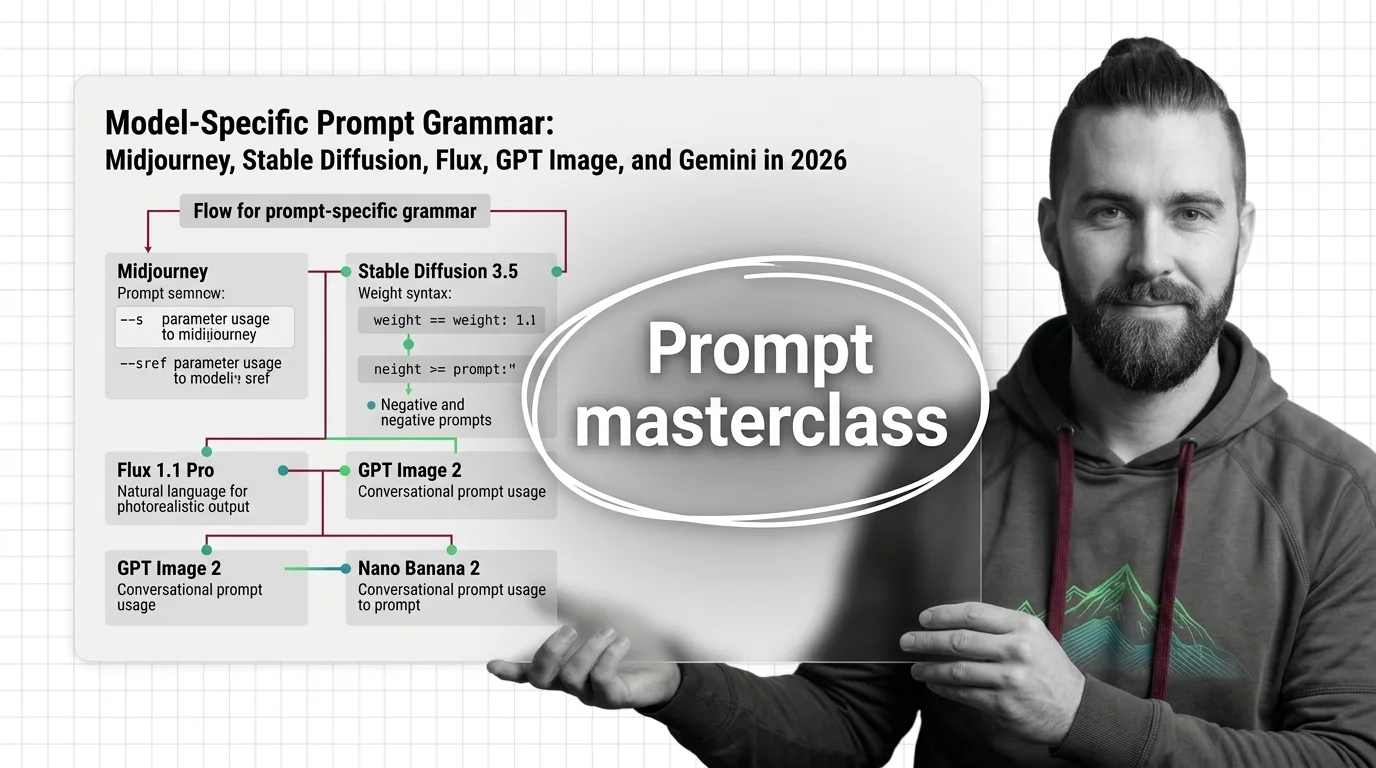
- Each image model has its own prompt grammar — parameter flags, weight syntax, or natural language. Pick the grammar before you write a single word.
- Specify constraints in the order the model expects them. Wrong order, wrong output — even with the right keywords.
- Validate every prompt the same way you validate code: known input, expected output, repeatable test.
You wrote a prompt that nailed Midjourney. Pasted it into GPT Image 2. Got back something that looked like a stock photo of disappointment. Same words, different result. The prompt didn’t translate because the models don’t speak the same language — and you never told it which one to use.
Before You Start
You’ll need:
- An account on at least two of: Midjourney V7, Stable Diffusion 3.5, Flux 1.1 [pro], GPT Image 2, or Gemini (Nano Banana 2 / Pro)
- A working understanding of Prompt Engineering For Image Generation as a discipline
- A concept you actually want to render — not “make me a cool image”
This guide teaches you: How to identify which prompt grammar a given image model expects, then specify your concept in that grammar so the output matches your intent the first time.
The $200 Prompt That Generated Five Different Concepts
Here’s the failure I see in every image-gen Slack: a designer writes one prompt, runs it across four models, and gets four outputs that don’t share a visual language. Same subject, same style words, same “cinematic lighting, 35mm” trailing tags. Four different aesthetics. Three of them unusable. One round of credits gone.
The prompt was fine for the model the designer originally tuned it on. It was wrong for everything else. The trailing parameter flags Midjourney expects (--ar 16:9 --s 250) are dead text to GPT Image 2. The weight syntax (cinematic:1.4) that Stable Diffusion respects is parsed as literal punctuation by Flux. And the conversational paragraph that Nano Banana eats for breakfast confuses Midjourney into ignoring half of it.
It worked on Friday. On Monday, the agency switched models for cost reasons and three weeks of brand-aligned prompts stopped working — because the spec was implicit in the model, not in the prompt.
Step 1: Identify Which Grammar Your Model Speaks
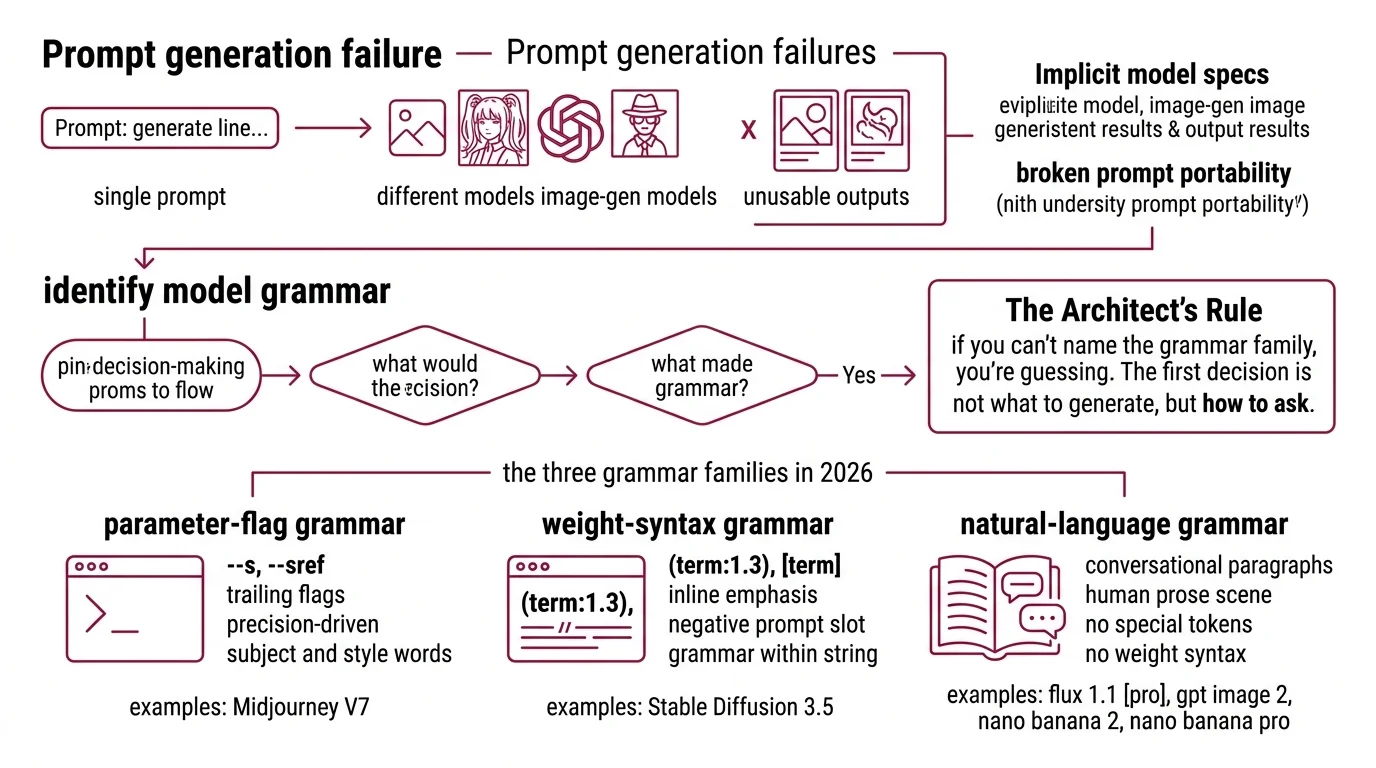
Before you write a prompt, decide which of three grammar families you’re writing in. The model picks the family. You don’t.
The three grammar families in 2026:
- Parameter-flag grammar — Midjourney V7. Subject and style as natural English, then trailing flags like
--s,--sref,--sw,--no. Flags carry the precision; words carry the intent. - Weight-syntax grammar — Stable Diffusion 3.5. Inline emphasis controls like
(term:1.3)and[term], plus a separate negative-prompt slot. The grammar lives inside the prompt string itself. - Natural-language grammar — Flux 1.1 [pro], GPT Image 2, Nano Banana 2, Nano Banana Pro. Conversational paragraphs that describe the scene in human prose. No special tokens, no weights, no negative prompt slot (OpenAI Cookbook).
The Architect’s Rule: If you can’t name the grammar family before you start typing, you’re guessing. The first decision is which language you’re writing in, not which adjectives to use.
GPT Image 2 is the structural outlier. OpenAI explicitly rejects every shorthand the previous generation taught you. Past tense matters here — your muscle memory from SDXL or Midjourney is now a liability when you switch into the GPT Image / Gemini lane.
Step 2: Lock Down the Model-Specific Contract
Each grammar family has a different contract. Skip the contract and the model fills the gaps with its training bias — which is to say, it guesses.
Midjourney V7 contract:
- Subject and scene in plain English up front
--sref <code>or--sref <imageURL>for visual style reference (Midjourney Docs)--sbetween 0 and 1000 (default 100) — higher pushes toward Midjourney’s trained aesthetic--sw(0–1000, default 100) tunes how strongly the sref dominates;--sv 6is default V7 sref model--no <term>for suppression — never inline negation in the prose
Stable Diffusion 3.5 contract:
- Positive prompt front-loaded — early tokens carry more weight
- Emphasis with
(term:1.3), used sparingly — MMDiT with dual CLIP+T5 encoders is less weight-responsive than SD 1.5 (getimg.ai) - De-emphasis with
[term] - Negative prompt kept short and focused — “blurry, extra fingers, watermark” outperforms a kitchen-sink list (imagetoprompt.dev)
Flux 1.1 [pro] contract:
- Natural-language prose for subject, scene, and lighting
- Hex codes inline (
#FF5733) where exact brand color matters - Quoted literal text plus named font style for typography
- JSON-structured prompt for complex multi-element scenes (BFL Skills)
- No weights, no negative prompt — Flux’s transformer ignores both
GPT Image 2 contract:
- Strict order: background/scene → subject → key details → constraints
- Use case stated explicitly (“ad creative”, “UI mock”, “editorial illustration”) so the model picks the right rendering mode (OpenAI Cookbook)
- Photorealism cued by the word “photorealistic” or anchors like “real photograph”, “iPhone photo”
- Literal text wrapped in quotes or ALL CAPS; tricky words spelled letter by letter
- Negation expressed as positive constraints — “empty desk surface” instead of “no objects”
Nano Banana 2 / Pro contract:
- Narrative paragraph naming subject, composition, action, location, and style in one breath (Google Cloud Blog)
- Camera angle, lighting, and lens behavior in cinematographer’s vocabulary
- Factual elements called out explicitly so Pro’s real-world grounding via Google Search activates
- Output resolution stated when you need above default (Pro renders up to 4K)
The Spec Test: If your prompt would produce the same output pasted into a different grammar family, your spec is too vague. A correctly-specified prompt is unportable by design.
Step 3: Wire the Prompt in Build Order
Don’t write the full prompt in one pass. Build it in the order the model parses it, because models weight earlier content more heavily — and a wrong start anchors a wrong output.
Parameter-flag (Midjourney V7): Subject and scene first → style and mood as comma-separated clauses → format flags (--ar, --style) → reference flags (--sref, --sw, --sv) → stylize and negation last (--s, --no).
Weight-syntax (SD 3.5): High-weight subject tokens first (what the image is OF) → mid-weight style tokens (how it looks) → low-weight environment tokens (where and when) → negative prompt populated separately, short and surgical.
Natural-language (Flux, GPT Image 2, Nano Banana): Set the stage (environment, lighting, atmosphere) → place the subject (who or what, doing what) → render the details (texture, materials, secondary elements) → lock the constraints (aspect ratio, mood, use case, any literal text).
For each prompt, your spec must specify:
- What the image must contain (positive constraints)
- What the image must avoid (negatives, expressed in the model’s grammar)
- What output mode you want (photographic, illustrative, schematic, UI mock)
- What edge cases break the brief (text rendering, brand colors, real people)
Step 4: Validate With Repeatable Tests
Validation isn’t “run it three times and pick the best.” That’s lottery, not engineering. Treat your prompt like Diffusion Models treat conditioning — fixed input, fixed seed, observed output, recorded delta.
Validation checklist:
- Seed control — failure looks like: same prompt, wildly different outputs run-to-run with no traceable cause. Fix: lock the seed wherever the API exposes it.
- Spec adherence — failure looks like: model added an element you didn’t ask for, or dropped one you did. Fix: re-read your prompt in the model’s grammar and find the missing constraint.
- Cross-model regression — failure looks like: a prompt that worked in Midjourney V7 produces garbage in GPT Image 2. Fix: confirmed expected — different grammars, rewrite from scratch, don’t translate.
- Cost per accepted output — failure looks like: ten generations to get one usable image. Fix: tighten the spec until your accepted-output rate climbs above one in three.
- Text rendering — failure looks like: misspelled words in posters, signs, UI mocks. Fix: GPT Image 2 wants quotes or ALL CAPS; spell tricky words letter-by-letter (OpenAI Cookbook).
Model version notes:
- Flux 1.1 [pro]: Still on the BFL API at $0.04 per image (BFL Pricing), but FLUX.2 [dev] (Nov 2025) and FLUX.2 [klein] (Jan 2026) are the new headline Black Forest Labs models. Same natural-language grammar carries forward — recommended target for new work.
- Midjourney V7: Default since June 17, 2025 (Midjourney Updates). V8 Alpha launched March 17, 2026 in Fast mode only. The
--s,--sref,--sv,--nogrammar is current as of April 2026 but expect divergence in V8.- Nano Banana 2 and Nano Banana Pro: Both labeled “Preview” in Google’s docs as of April 2026. API surface may change before general availability.
- GPT Image 2 pricing: $5/M text input tokens, $10/M text output tokens, ~$0.04–$0.35 per image depending on resolution (OpenAI Pricing). Confirm against the live pricing page before locking budget.
Common Pitfalls
| What You Did | Why AI Failed | The Fix |
|---|---|---|
| Pasted Midjourney flags into GPT Image 2 | --ar, --s, --no are inert text to natural-language models | Rewrite as conversational prose; express constraints positively |
Used (cinematic:1.4) weight syntax in Flux | Flux ignores SD weight tokens — they get treated as literal punctuation | Move emphasis into word choice and sentence structure |
| Wrote “no people, no text, no signs” for GPT Image 2 | Negation language flips the model’s attention toward the suppressed terms | Use positive constraints: “empty plaza at dawn” |
| Front-loaded SD 3.5 prompt with environment | Subject tokens lost weight to early environment tokens | Lead with the subject; environment goes last |
| Trusted Nano Banana for accurate brand text without grounding cues | Default Nano Banana 2 doesn’t activate real-world grounding aggressively | Switch to Nano Banana Pro and call out the factual element you need accurate |
| Reused last quarter’s “magic” Midjourney prompt without checking version | --sv 4 (pre-June-2025 sref model) behaves differently from --sv 6 default | Pin --sv explicitly; never rely on the default to stay constant |
Pro Tip
Write your spec in plain English first — what’s in the image, what’s not, what mode, what constraints — then translate it into each model’s grammar separately. The spec is the source of truth. The prompts are renders of the spec, like compiling the same source for different targets. When a model misbehaves, you debug the translation, not the spec.
The same spec-first discipline carries into every adjacent task in your pipeline. Whether you’re stacking a LoRA for Image Generation on top of SD 3.5, doing iterative AI Image Editing with Nano Banana Pro, running Image Upscaling as a post-step, or applying AI Background Removal on the output, the rule holds — write the spec once in plain English, render it into each tool’s grammar separately.
Frequently Asked Questions
Q: How to write prompts for Midjourney v7 using –s and –sref parameters?
A: Lead with subject and scene in plain English, then add --sref <code> for style reference and --s (0–1000, default 100) to control how strongly Midjourney leans into its trained aesthetic. Combine multiple sref codes with spaces, then tune --sw (0–1000) to weight reference dominance over your subject description.
Q: How to use weight syntax and negative prompts in Stable Diffusion 3.5?
A: Emphasize with (term:1.3) and de-emphasize with [term], but use weights sparingly — SD 3.5’s MMDiT architecture responds less to heavy weighting than SD 1.5. Short focused negatives like “blurry, extra fingers, watermark” outperform kitchen-sink lists because the dual CLIP+T5 encoder treats long negatives as noise.
Q: How to prompt Flux 1.1 Pro with natural language for photorealistic output?
A: Write a flowing paragraph describing scene, subject, lighting, and lens behavior — no weights, no negatives, no flags. Drop hex codes inline (#FF5733) for brand-accurate work and quote literal text you want rendered. For complex multi-element scenes, switch to JSON-structured prompts, which Flux parses as a scene graph.
Q: How to write conversational prompts for GPT Image 2 and Nano Banana 2? A: Order matters: background → subject → details → constraints for GPT Image 2; one narrative paragraph naming subject, composition, action, and style for Nano Banana. State the use case so the model picks the right rendering mode. Express what you want — never what you don’t, since both models flip attention toward suppressed terms.
Your Spec Artifact
By the end of this guide, you should have:
- A grammar-family map for every image model in your stack (parameter-flag, weight-syntax, or natural-language)
- A model-specific contract checklist that names the constraints each model expects, in the order it expects them
- A validation routine with locked seeds, expected outputs, and a documented failure-symptom-to-fix table
Your Implementation Prompt
Paste this into Claude or GPT (text model, not image model) when you need to translate one design concept into model-specific image prompts. It walks the LLM through the same four steps you just learned.
You are helping me translate a design concept into model-specific image
prompts for [TARGET MODELS — list any of: Midjourney V7, Stable Diffusion 3.5,
Flux 1.1 Pro, GPT Image 2, Nano Banana 2, Nano Banana Pro].

The concept:
[YOUR CONCEPT — one paragraph describing subject, mood, intended use]

Constraints:
- Must contain: [POSITIVE ELEMENTS]
- Must avoid: [ELEMENTS TO SUPPRESS]
- Use case: [ad creative / UI mock / editorial / product render / other]
- Brand colors: [HEX CODES OR "none"]
- Literal text in image: [QUOTED TEXT OR "none"]
- Aspect ratio: [16:9 / 1:1 / 9:16 / other]
- Photorealism required: [YES / NO]

For each target model, do the following four steps:

1. Identify the grammar family (parameter-flag / weight-syntax / natural-language).
2. List the model's required contract (parameters, syntax conventions, ordering).
3. Build the prompt in the model's expected order. For natural-language models,
   write flowing prose. For Midjourney, write subject + scene then trailing flags.
   For SD 3.5, front-load high-weight subject tokens and populate a separate
   negative prompt.
4. Output a validation note: what should appear, what should not, and which
   parameter to adjust if the first generation misses.

Return one prompt per model, clearly labeled, ready to paste into the model's
interface or API. Do not invent parameters or syntax not documented for that
model. If a constraint cannot be expressed in a given grammar, say so explicitly
and recommend the closest workaround.
Ship It
You now have a mental model that separates the spec (what the image must be) from the prompt (how each model wants to hear about it). Next time a prompt fails when you switch models, you’ll know it’s a translation bug, not a model bug — and you’ll have the contract checklist to fix it in one pass.
AI-assisted content, human-reviewed. Images AI-generated. Editorial Standards · Our Editors