How to Write Effective Multimodal Prompts and Build a Cross-Modal Pipeline with GPT-5.5, Claude, and Qwen3-VL in 2026
TL;DR
- Each model has a different modality contract — GPT-5.5 accepts text and images only; Qwen3-VL handles documents and video frames natively; one generic prompt for both breaks the pipeline
- Cross-modal prompts fail when you don’t define the output format your next pipeline stage depends on
- Specify input type, grounding rules, and output schema before you call the API — the same way you’d write an interface contract
You added vision support to your pipeline. Fed it a scanned invoice. Got back two paragraphs describing “a document containing numerical values.” Your next stage was expecting JSON with total_amount and line_items. The pipeline stopped cold.
The prompt was four words: “Extract the invoice data.” Four words that told the model nothing about what “extract” means in your context, what format the output should take, or how to handle a scanned image versus a native PDF. The model made its best guess. Its best guess was wrong.
This is a specification problem. And specification problems have specification fixes.
Before You Start
You’ll need:
- Access to GPT-5.5 (API model ID:
gpt-5.5), the Claude API, or Qwen3-VL via DashScope - A clear picture of which modalities your pipeline ingests — images, PDFs, charts, or a mix
- Familiarity with Multimodal Prompting, Context Window constraints per model, and basic System Prompts architecture
This guide teaches you: How to decompose a multimodal task into modality-specific contracts so the AI generates what your downstream pipeline actually needs — not what it guesses you might want.
When “Describe This Image” Produces Nothing Useful
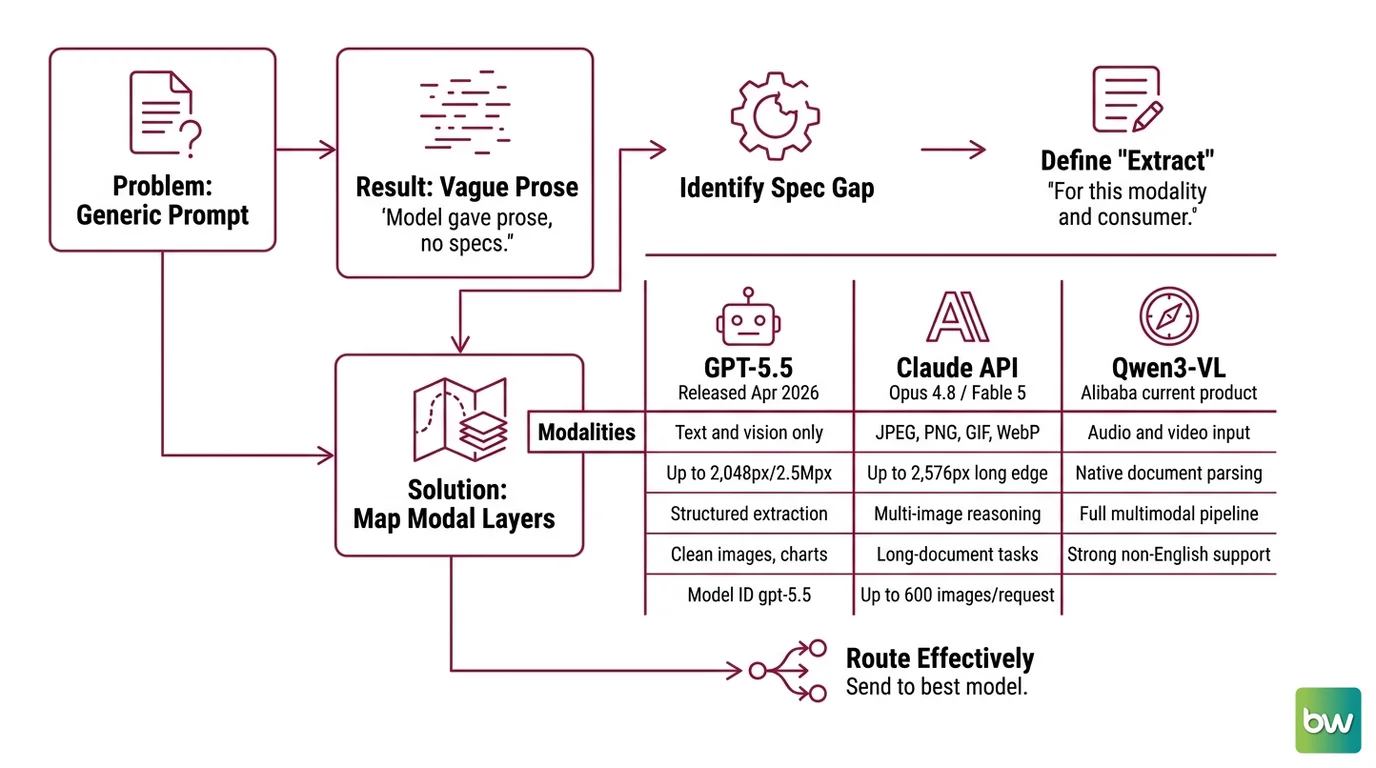
You open GPT-5.5. Type “describe this image.” Attach a bar chart from your quarterly report. Get back: “The image shows a bar chart with several bars of varying heights, labeled with different colors. The bars appear to represent data over time.”
Your dashboard renderer needed: {"chart_type": "bar", "x_axis": "quarter", "y_axis_unit": "revenue_usd", "data_points": [...]}.
The model gave you prose because you never said otherwise. That is not a model failure. That is a spec gap.
Monday comes. Same pipeline. Different quarter’s chart — slightly different visual layout. Same generic prompt. Different prose structure. The downstream parser breaks again.
The root cause is always the same: the prompt didn’t define what “extract” means for this modality and for this output consumer.
Step 1: Map the Modal Layers
Before you write a single prompt, map every modality your pipeline touches and match it to the model that handles it best.
The three models in this guide have meaningfully different capability profiles — and confusing them is a routing bug before it’s a prompt bug.
GPT-5.5 (released April 23, 2026, per OpenAI Blog) handles text and vision. No audio, no video, no native document parsing. High-resolution mode accepts images up to 2,048px on the longest dimension or up to 2,500,000 total pixels (OpenAI Vision Docs). Strong for structured extraction from clean images and charts. Model ID: gpt-5.5.
The Claude API — if you are starting a new build, target Opus 4.8 or Fable 5, not Opus 4.7 (marked legacy in Anthropic Docs as of June 2026, superseded by both models). Vision resolution reaches up to 2,576px on the long edge. Accepts JPEG, PNG, GIF, and WebP. Supports up to 600 images per API request on 1M-context models (Anthropic Vision Docs). Strong for multi-image reasoning and long-document tasks.
Qwen-VL — specifically Qwen3-VL, the current product from Alibaba (not “Qwen VL,” which is the 2023 original) — handles images, video frames, and documents natively. The flagship Qwen3-VL-235B-A22B supports 256K tokens natively, expandable to 1M (Qwen GitHub). Its DashScope API uses OpenAI-compatible endpoints, so you can drop it into existing toolchains with a base-URL swap. The 32B variant costs $0.10/$0.42 per million input/output tokens (eesel AI pricing) — cost-effective for high-volume document pipelines.
Your system has these modal layers:
- Input modality layer — which modality arrives at which model (image → GPT-5.5 or Claude, multi-page PDF → Qwen3-VL or Claude, long document with embedded images → Claude)
- Extraction layer — what structured data you pull from each modality
- Transformation layer — how extracted data feeds the next stage (JSON → database, text → embedding, table → chart renderer)
- Grounding layer — how you verify the extracted data against the original input before it leaves this stage
The Architect’s Rule: If you can’t describe each layer’s input type, output format, and failure behavior in one sentence, the AI will invent all three.
Step 2: Define Your Modality Contracts
A modality contract tells the model exactly three things: what it’s looking at, what it must extract, and what format the output takes. No contract — no reliable extraction.
Use Role Prompting to anchor the model’s extraction role before you define the output schema. “You are a structured data extractor. You return JSON only. You do not summarize, explain, or add commentary.” That frame establishes what all subsequent instructions inherit.
Context checklist for every multimodal prompt:
- Input type specified (photograph, scanned document, rendered chart, screenshot, or video frame)
- Resolution or quality constraints noted (high detail vs. low — matters for GPT-5.5 high mode)
- Extraction target named explicitly (“extract the table rows,” not “extract the data”)
- Output schema defined — a JSON object with named keys, not prose
- Null handling specified (what to return when a value is missing or illegible)
- Ambiguity resolution rule (“if two values conflict, return both and set
conflict: true”)
For Visual Question Answering tasks, specify the question type upfront: closed (yes/no, discrete choice) or open (free text). The model formats its answer differently for each. Your parser handles those formats differently. Specify which you need.
For image description prompts specifically, the most common failure is asking for “a description” without specifying the description’s consumer. Describe-for-human and describe-for-machine are different tasks with different outputs.
The Spec Test: Strip your prompt down to the output schema it implies. If that schema doesn’t match what your downstream stage expects, the prompt fails before the model even runs.
Step 3: Sequence the Cross-Modal Pipeline
Order matters in a cross-modal pipeline. The wrong sequence means Stage 2 waits on data that Stage 1 didn’t produce.
Build order for a document analysis pipeline:
Modal routing first — classify the input (image, PDF, chart) before passing it anywhere. A misrouted TIFF to a text-only API call is a silent failure. Route on MIME type, not on a user-facing label.
Extraction before transformation — pull structured data from the modality first, validate it, then transform. Don’t combine extraction and transformation in one prompt. The model will silently make transformation choices that don’t match your schema.
Grounding after extraction — for high-stakes data (financial figures, identifiers, dates), build a Multi-Turn Prompt Design step that feeds the extracted output back alongside the original image and asks the model to verify. “Does the total in field
total_amountmatch the figure at the bottom of the invoice?” is a grounding check, not a re-extraction.Schema validation last — validate the extracted JSON against your schema before passing downstream. Structured output mode (available in GPT-5.5 and Claude) forces schema compliance at the API layer, but doesn’t verify semantic correctness. Application-level assertions are still your job.
For each pipeline stage, your context must specify:
- Input format it receives (raw image bytes, base64 string, URL, file_id)
- What it must NOT do (don’t infer missing values, don’t summarize instead of extracting)
- Error payload format (what to return when extraction fails — not a thrown exception, a structured error object)
- Token budget (GPT-5.5 prompts exceeding 272K input tokens incur a pricing surcharge per OpenAI API Docs — cost compounds across pipeline stages)
For Context Engineering across the full pipeline: put the output schema and null-handling rules in the system prompt once (cached), and keep per-call content minimal. Shared context stays cheap. Per-call context stays fast.
Step 4: Validate Cross-Modal Output
Most teams check whether the model returned something. They don’t check whether what it returned is correct.
Models that score well on Instruction Following benchmarks still produce schema-invalid output when the schema is underspecified. The benchmark measures whether the model follows clear instructions. It doesn’t measure whether your instructions were clear. Validation closes that gap.
Validation checklist for cross-modal pipelines:
- Schema shape — does the output match the JSON schema you defined? Failure looks like missing keys, wrong types, or prose where an array was expected
- Semantic grounding — does a numeric value from the chart match the value visible in the image? Failure looks like transposition errors, off-by-one rows, or hallucinated values in low-contrast regions
- Modal consistency — if you passed the same image to two models (or the same model twice), do the outputs agree on discrete values? Disagreement on amounts or dates flags ambiguous source material, not model error
- Null behavior — did the model correctly return nulls for fields genuinely absent from the input? Failure looks like invented values that sound plausible but aren’t in the source
For Prompt Engineering at pipeline scale: run your validation against 20-50 representative samples before deploying. Not 5. Edge cases — rotated images, low-resolution scans, tables with merged cells — only surface above a sample size of 20.
Common Pitfalls
| What You Did | Why AI Failed | The Fix |
|---|---|---|
| “Describe this document” | No output format specified — model chose prose | Add explicit schema: {"fields": [...], "format": "json"} |
| Sent a PDF to GPT-5.5 | GPT-5.5 accepts images, not PDFs natively | Convert to images first, or route to Claude or Qwen3-VL |
| One system prompt for all modalities | Chart extraction spec conflicts with text extraction spec | Write modality-specific system prompts |
| Skipped null handling | Model invented values for illegible fields | Add null rule: “Return null if value cannot be clearly read” |
| Using Opus 4.7 for new builds | Model marked legacy — behavior updates in Opus 4.8 | Update model ID to claude-opus-4-8 per Anthropic Docs |
| Combined extraction and grounding | Model trades off between tasks — grounding loses | Separate calls: extract first, verify second |
Pro Tip
The system prompt is your modality contract template. Write one base section that defines your output schema and null-handling rules, then add a modality-specific section for each input type (image, PDF, chart). The base section handles the majority of the spec. The modality section handles what changes by input type. Two layers, not six separate prompts.
This is context engineering applied to multimodal systems: the shared context stays cached and cheap, the per-call context stays minimal and fast.
Frequently Asked Questions
Q: How do I write effective image description prompts for GPT-5.5 and Gemini 3? A: Define the description’s consumer before writing the prompt. A downstream parser needs a JSON schema with named keys; a human reader needs audience and detail level specified. For GPT-5.5: request high detail mode explicitly for dense charts — it’s a call parameter, not a default. For the Gemini 3 family (latest: Gemini 3.5 Flash, May 2026): name which input modalities you’re sending so the model grounds its description on the correct source.
Q: How do I use multimodal prompting for document analysis and chart understanding? A: Treat document analysis and chart extraction as separate tasks even from the same file — they need different extraction contracts. For multi-page PDFs, route to Qwen3-VL (256K token native context, Qwen GitHub) or Claude (up to 600 images per request, Anthropic Vision Docs). For charts: specify axis labels and units, add an ambiguity rule for illegible legends, and use closed-form questions when you need a binary output downstream.
Q: How do I build a multimodal prompting pipeline step by step with the Claude API and Qwen3-VL?
A: Start with a router classifying input by MIME type before any model call. For Claude: the Files API (file_id) avoids re-uploading the same reference asset. For Qwen3-VL via DashScope: the endpoint is OpenAI-compatible — swap the base URL and key. Reserve multi-turn design for grounding steps only, not initial extraction. DashScope’s old free tier ended April 15, 2026; new accounts start with 1M free tokens, 90-day validity (eesel AI pricing).
Your Spec Artifact
By the end of this guide, you should have:
- Modal layer map — which model handles which input type, with routing logic and capability boundaries per model
- Modality contracts — per-modality prompt templates with output schemas, null-handling rules, and ambiguity resolution instructions
- Validation checklist — four checks (schema shape, semantic grounding, modal consistency, null behavior) applied to a representative sample before deployment
Your Implementation Prompt
Use this in Claude Code, Cursor, or Codex to generate the routing and extraction code for your pipeline. Fill in bracketed sections with values from your modality contracts before running.
You are building a multimodal data extraction pipeline.

System context:
- Input modalities handled: [list from your modal layer map — e.g., JPEG charts, multi-page PDFs, screenshots]
- Primary extraction model: [GPT-5.5 / Claude Opus 4.8 / Qwen3-VL 32B]
- DashScope base URL if using Qwen3-VL: [your DashScope API endpoint]
- Claude model ID if using Claude: [e.g., claude-opus-4-8]

Pipeline stages to generate:
1. Modal router function — classifies input by MIME type, returns target model ID and call parameters
2. Extraction function — calls the target model with the modality contract below
3. Grounding verification function — multi-turn check that re-presents the image alongside extracted values
4. Schema validation function — checks output against JSON schema before passing downstream

Modality contract for [your primary input type — e.g., "bar chart as JPEG"]:
- System prompt: [paste your role-prompting frame + modality-specific instructions]
- Output schema: [paste your JSON schema — field names, types, required vs. optional]
- Null handling rule: [your rule — e.g., "return null for any field not clearly legible in the source"]
- Ambiguity rule: [e.g., "if two values conflict, return both and set conflict: true"]
- Token budget cap: [your limit — note GPT-5.5 pricing surcharge above 272K input tokens]

Error output format for all stages:
{"status": "error", "stage": "[stage name]", "reason": "[error string]", "input_ref": "[input identifier]"}

Build with typed functions, explicit error handling per stage, and a single entry point that accepts input bytes and returns either the validated JSON object or the structured error payload.
Ship It
You can now look at any multimodal task and immediately locate where the spec is missing: no output schema, no null rule, no routing decision. Those three gaps cover most cross-modal pipeline failures. Fill them before you call the API — not after you debug the output. Every modality contract you write makes the next extraction faster and the next failure rarer.
AI-assisted content, human-reviewed. Images AI-generated. Editorial Standards · Our Editors