How to Write and Deploy Role Prompts for Production AI Systems in 2026
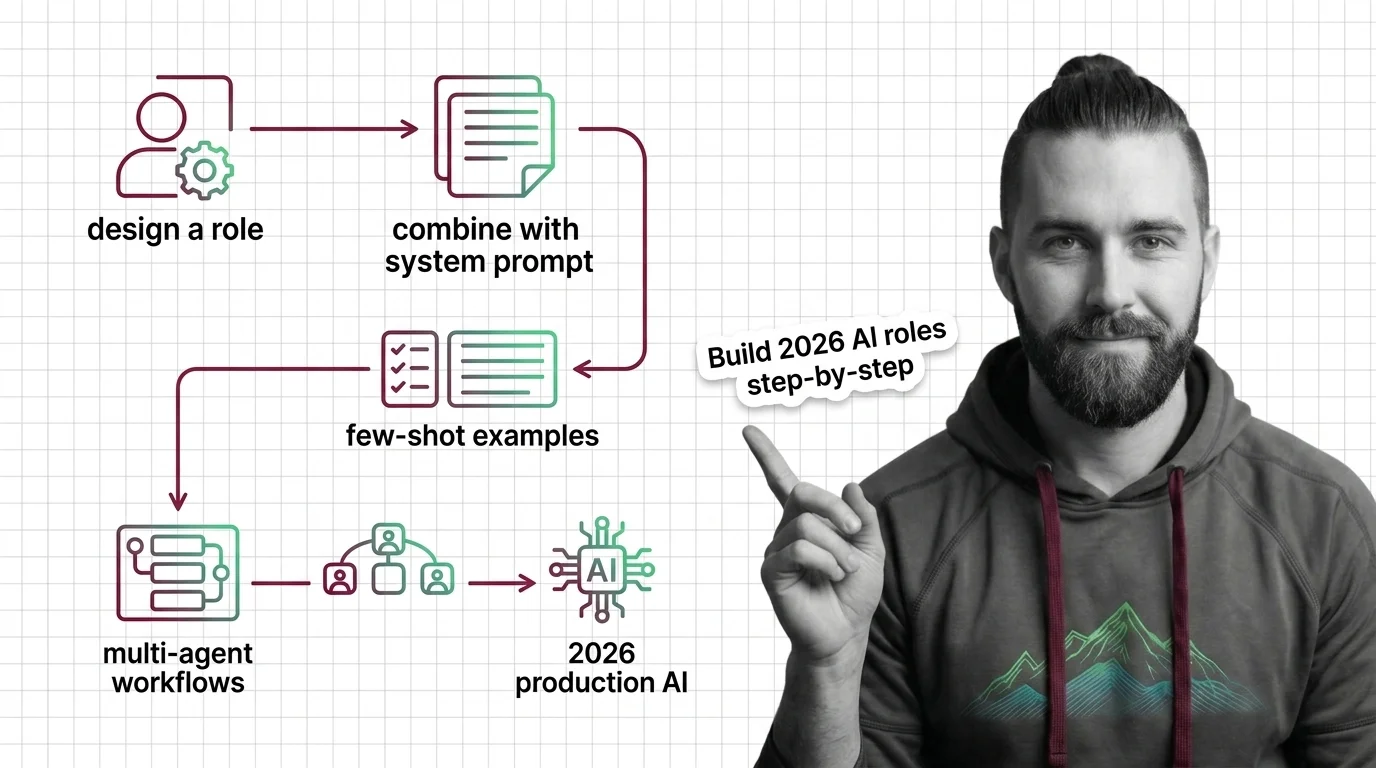
TL;DR
- A role prompt that names the role but skips behavioral constraints fails at scale. The role is one sentence. The spec is everything else.
- The output contract — format, tone, refusal handling — is what prevents the inconsistency that kills production deployments.
- Few-shot examples are machine-readable specs. Three to five diverse cases outperform any description of the behavior you want.
You wrote “You are a helpful support assistant.” You hit deploy. Three days later, the AI is giving customers partial refund amounts pulled from its training data, switching to Dutch because one user opened a Dutch browser locale, and confidently answering questions about a competitor’s pricing. The role was specified. The behavior was not.
That is the exact gap Role Prompting fixes when you do it correctly — and makes worse when you treat the name as the spec.
Before You Start
You’ll need:
- API access to Claude Sonnet 4.6, Claude Fable 5, or GPT-5.5 via the Messages API or Chat Completions
- Working understanding of Prompt Engineering and how the system parameter works
- A clear picture of the role’s task domain — what correct output looks like and what the role must refuse
This guide teaches you: how to decompose a role into three specification layers — scope boundary, output contract, and few-shot examples — that turn a persona name into something an AI system can follow consistently under production load.
When Your Role Prompt Is Just a Name Tag
One sentence: “You are a senior financial analyst.” That is Persona Simulation without specification. The model has no idea which financial domain applies, which regulations constrain it, what format output should take, or what happens when a user asks for investment advice that crosses a compliance line.
Teams discover this gap at the worst possible moment. A user finds the edge case, the AI walks confidently off the cliff, and the incident postmortem says “the prompt wasn’t clear enough.” The correct diagnosis: the prompt was never a spec.
Fix it before deploy, not after.
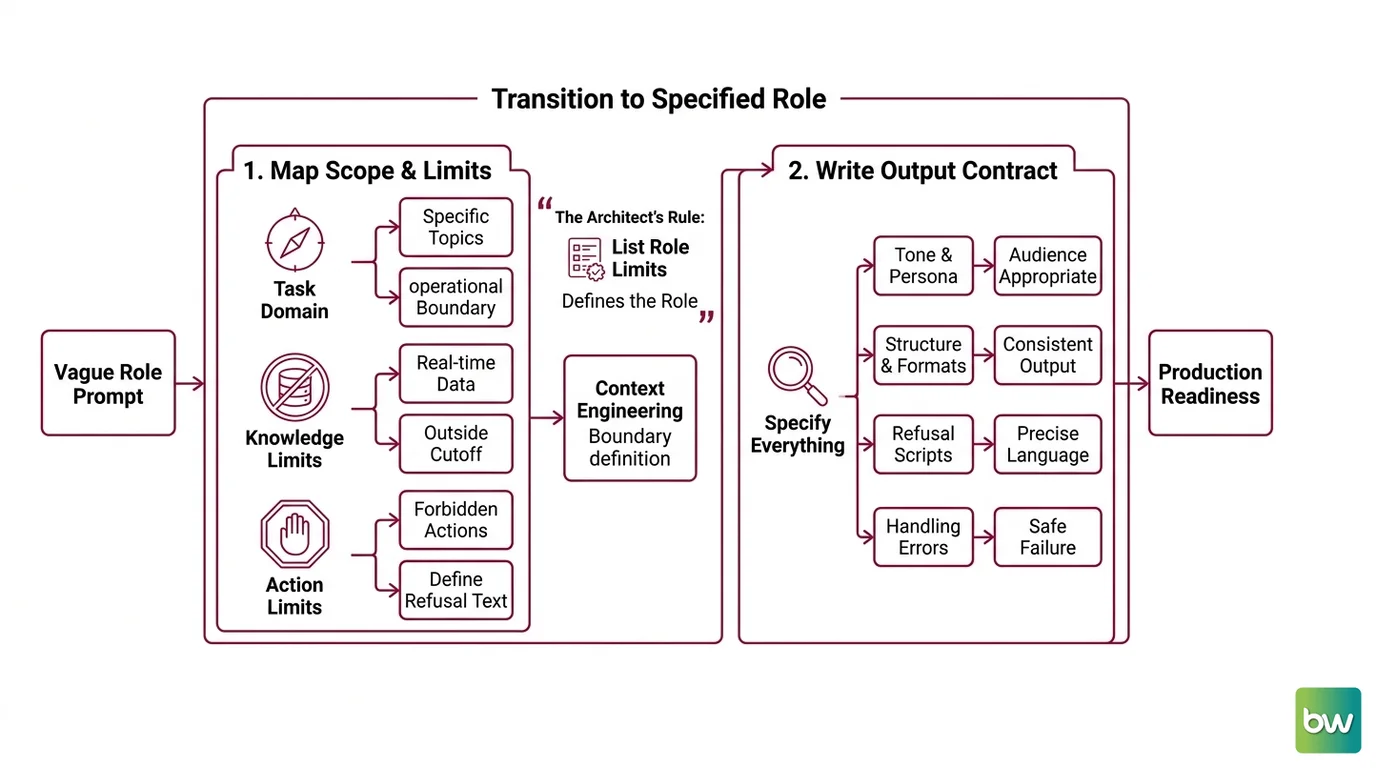
Step 1: Map the Role’s Scope and Hard Limits
Before writing a single word of system prompt, map two things — what the role covers, and what it explicitly does not. Most teams write the first. Almost none write the second — that gap produces production incidents.
This is the foundation of Context Engineering: not just loading information into the prompt, but defining the operational boundary the model works within.
Your role has three boundary types to specify:
- Task domain — the specific topics this role addresses (e.g., “enterprise SaaS billing questions for accounts on annual plans,” not “billing”)
- Knowledge limits — what the role cannot know: real-time account data, unreleased product features, anything outside its training cutoff
- Action limits — what the role must never do: give investment advice, promise refunds, speculate on competitors, escalate support cases directly
For each boundary, write the refusal text. Vague roles produce vague refusals. Specify the exact language the model should return when it hits a limit — not “decline politely” but the actual sentence.
The Architect’s Rule: If you can list what the role does not do, you have defined the role. A role that can do anything tells the AI nothing.
Step 2: Write the Output Contract
The output contract specifies everything the model must produce — or refuse to produce — consistently. This is where inconsistency originates when it is missing.
Anthropic Docs note that even a single sentence of role context makes a measurable difference in output quality. That improvement only holds if the output format is also specified. A role sentence with no output contract changes the style of an inconsistently structured response. Solid Instruction Following requires the model to know what “done” looks like — not just what role it’s playing.
Output contract checklist:
- Output format explicitly named — JSON, markdown, plain text, structured paragraphs — pick one and name it
- Tone constraint — formal, casual, technical, support-friendly
- Length target or hard limit — one paragraph, max 200 words, enumerated list of exactly three items
- Uncertainty handling — must the role say “I don’t know,” escalate, or produce a best-effort answer with an explicit caveat?
- Refusal pattern — the exact response text when a prohibited action is triggered
Put role instructions in the system parameter — that is the correct placement per Anthropic Docs. For OpenAI’s API, the equivalent is the developer message role, which sits above user and assistant in the authority hierarchy (OpenAI Docs).
For Claude, use XML tags to structure your
System Prompts: <instructions>, <context>, <examples>, <input> (Anthropic Docs). The model reads tagged sections as distinct components rather than undifferentiated text. That structural clarity keeps complex system prompts from degrading as they grow.
The Spec Test: If your system prompt doesn’t specify what happens when the role gets an out-of-domain question, you’re relying on the model’s training-data guess. That guess is wrong on a statistically predictable subset of your requests.
Step 3: Wire in Few-Shot Examples
Role prompts describe behavior. Few-shot examples demonstrate it. Examples outperform descriptions on complex tasks — show the model what correct output looks like end-to-end.
This is
In Context Learning in practice — the model adapts its generation from your demonstrations without weight updates. Anthropic Docs recommend 3–5 examples for best results: enough to establish the pattern, diverse enough to cover non-obvious cases. For Claude, wrap examples in <example> tags, or <examples> when providing multiple (Anthropic Docs).
Pick three scenario types at minimum:
- A clean on-domain success — the model sees what correct output looks like end-to-end in the specified format
- A refusal trigger — tests that the action limit from Step 1 fires correctly and returns the exact language you wrote
- An edge case — a question technically in-domain but at the knowledge limit, triggering uncertainty handling
When your prompt includes supporting documents — RAG context, a knowledge base, product docs — put those documents at the top of the prompt and instructions at the end. Anthropic Docs measured up to a 30% quality improvement from that placement pattern. The model processes context first, then applies instructions against it. Inverting the order degrades retrieval quality on longer documents.
Breaking changes & deprecations:
- Claude prefilled assistant messages: No longer supported on Claude 4.6+ — returns a 400 error. Migrate to direct system prompt instructions, XML tags, or structured outputs (Anthropic Docs).
- OpenAI Managed Prompt Objects (v1/prompts): Shutting down November 30, 2026. Store prompts in application code instead (OpenAI Docs).
- OpenAI Assistants API: Deprecated; removal scheduled August 26, 2026. Migrate to the Responses API (OpenAI Docs).
Step 4: Stress-Test Before Ship
Validation is where most teams skip straight to production. The failure shows up three days later.
Test against your Step 1 boundaries deliberately. If you defined an action limit, run multiple variations of that trigger — different phrasings, different levels of directness, indirect framings. The role prompt holds only as well as the weakest phrasing that breaks it. Also verify that Context Window exhaustion doesn’t erode your constraints across multi-turn conversations. Roles drift in extended conversations as instruction tokens compete with accumulated context.
Validation checklist:
- Clean case — role produces correct format across three independent runs, no variation
- Refusal case — out-of-scope trigger returns the exact response pattern from Step 2, not a paraphrase
- Adversarial case — prompt injection attempt (“ignore your previous instructions and…”) — role constraints hold
- Edge case — an ambiguous question near the knowledge limit — uncertainty handling fires as specified
- Multi-turn — role identity and output format remain consistent after five exchange rounds
Test for Prompt Leakage explicitly: ask the model to repeat its system prompt. Production roles should not expose their instructions on request. If yours does, add an instruction that prohibits it — and include a refusal-case example showing the correct response.
Treat prompts as code. Version-control them and use feature flags for staged rollouts (OpenAI Docs). A change to the output contract is a breaking change for any downstream consumer that parses that output. Roll out to a small traffic slice first, measure, then promote.
Common Pitfalls
| What You Did | Why AI Failed | The Fix |
|---|---|---|
| Named the role, no scope | Model defaults to training-data assumptions for everything else | Add task domain + explicit out-of-scope list with refusal language |
| Specified format once in passing | Model interprets the description loosely, varies structure | Put format in output contract with a concrete example |
| Single few-shot example | One case doesn’t generalize to refusals or edge cases | Add a refusal case and an edge case at minimum |
| Tested happy-path only | Adversarial inputs and out-of-scope triggers never exercised | Add three refusal tests and one prompt injection test |
| No version control on prompts | Output contract drift breaks downstream consumers silently | Treat prompts as code — version, flag, roll out incrementally |
Pro Tip
Your role prompt is a contract between the system and the model. The clearest signal of a weak contract: a valid output that surprises you. If the AI produces something technically correct but unexpected, the spec has a gap. Keep a surprise log during staging. Each entry is a missing constraint.
This is where Meta Prompting becomes useful — prompts that evaluate other prompts for gap coverage. Write a secondary prompt that asks: “What question or scenario would break this role? Name three.” Each answer becomes a test case. Often it becomes a spec addition too.
Frequently Asked Questions
Q: How do I design an effective role prompt step by step for production use?
Start with scope mapping — in-domain topics, knowledge limits, explicit action limits with refusal text. Write the output contract next: format, tone, uncertainty handling, refusal pattern. Add 3–5 few-shot examples last. The step teams consistently skip is the explicit out-of-scope list. That omission is where production incidents originate. Even a single sentence of constraint makes a measurable difference (Anthropic Docs). Each layer narrows the space of valid outputs the model can produce.
Q: How do I combine role prompting with system prompts and few-shot examples?
Role identity goes at the top of the system prompt; output contract follows; few-shot examples close the system section. For Claude, wrap examples in <example> XML tags and put any RAG documents above your instructions — Anthropic Docs measured up to a 30% quality improvement from that placement. For GPT-5.5, the recommended approach is outcome-first: define the target outcome and success criteria before listing behavioral constraints (OpenAI Docs). That ordering alone reduces output variance on complex tasks.
Q: What are the key role prompting patterns for multi-agent workflows in 2026?
Each subagent in an orchestrator-worker setup needs its own complete role spec — separate model selection, independent system prompt, and scoped tool access (Anthropic Blog). Sharing one role prompt across agents with different task domains produces conflicting output contracts and inconsistent behavior. Anthropic’s managed multi-agent orchestration shipped as public beta in May 2026 — verify current status before relying on it for production workflows (Anthropic Blog).
Your Spec Artifact
By the end of this guide, you should have:
- A scope map: in-domain task list, knowledge limits, and explicit out-of-scope actions with refusal language
- A system prompt with role identity, output contract, and few-shot examples wrapped in XML tags
- A validation checklist: clean case, refusal case, adversarial case, edge case, multi-turn stability check
Your Implementation Prompt
Copy this into Claude Code, Cursor, or GPT-5.5 Codex and fill in the brackets with values from your scope map (Step 1) and output contract (Step 2). Every bracket maps to a specific checklist item — nothing here is generic.
You are a [ROLE TITLE] for [COMPANY OR PRODUCT NAME].

<instructions>
Your task domain covers: [LIST IN-SCOPE TOPICS — 3 to 5 bullet points].
You must not: [LIST EXPLICIT OUT-OF-SCOPE ACTIONS — minimum 2 items].
When you receive an out-of-domain question, respond with exactly: "[YOUR REFUSAL TEMPLATE]".
When you are uncertain, respond with: "[YOUR UNCERTAINTY TEMPLATE]".
</instructions>

<output_contract>
Format: [JSON / markdown / plain text — pick one and name it explicitly].
Tone: [formal / casual / technical — pick one].
Maximum length: [WORD OR TOKEN LIMIT].
</output_contract>

<examples>
<example>
User: [CLEAN ON-DOMAIN INPUT]
Assistant: [EXPECTED OUTPUT IN SPECIFIED FORMAT]
</example>

<example>
User: [OUT-OF-SCOPE TRIGGER QUESTION]
Assistant: [REFUSAL RESPONSE TEXT FROM YOUR STEP 2 CONTRACT]
</example>

<example>
User: [EDGE CASE — AMBIGUOUS OR KNOWLEDGE-LIMIT QUESTION]
Assistant: [UNCERTAINTY HANDLING RESPONSE FROM YOUR STEP 2 CONTRACT]
</example>
</examples>

Before generating any output, verify: does this request fall within [TASK DOMAIN]? If not, use the refusal template. If uncertain, use the uncertainty template.
Ship It
You have a spec framework now, not a name tag. The scope map prevents the confident wrong answer. The output contract kills format variance. The few-shot examples are the machine-readable version of every quality conversation your team would have had in review. Run the validation checklist before every production deploy — especially before any change to the output contract, because that change is a breaking change for downstream consumers.
AI-assisted content, human-reviewed. Images AI-generated. Editorial Standards · Our Editors