How to Use Suno v5.5, Mureka V9, and the Google Lyria API for Production Music in 2026
TL;DR
- Suno v5.5 has no official public API — only third-party wrappers with ToS risk; Mureka V9 and Google Lyria 3 both offer official APIs with full commercial rights
- Commercial rights and copyright ownership are different things: paid plans give you usage rights, not copyright; U.S. law does not protect AI-only music without meaningful human input
- Suno v5.5 models are scheduled for deprecation in 2026 under the Warner Music deal — build with a migration path in mind
You set up a YouTube automation pipeline. Background music is the last piece. You drop “lo-fi chill beats for studying” into Suno, download the track, post the video — and two weeks later a copyright strike lands on your channel. Not from a human composer. From Suno’s training data.
That’s the gap between “this model generates music” and “this music is production-safe.” The three tools covered here — Suno v5.5, Mureka V9, and Google Lyria 3 — each solve different parts of that problem. The spec decisions you make before you generate the first track determine whether you’re building something durable or something that breaks the first time a label’s ContentID scanner touches your upload.
Before You Start
You’ll need:
- An AI Music Generation use case with a clear commercial intent (background music, game audio, licensed sync)
- Basic understanding of audio formats: MP3 vs. WAV for delivery, and what Mel Spectrogram processing means for quality
- A paid plan on at least one tool — free tiers don’t include commercial rights on any of the three platforms
- For API automation: Python or Node environment; for Lyria 3, a Google AI Studio API key
This guide teaches you: How to match your production use case to the right tool, lock down your licensing spec before generating, and build an automated pipeline that doesn’t collapse when a model gets deprecated.
The Production-Unsafe Default
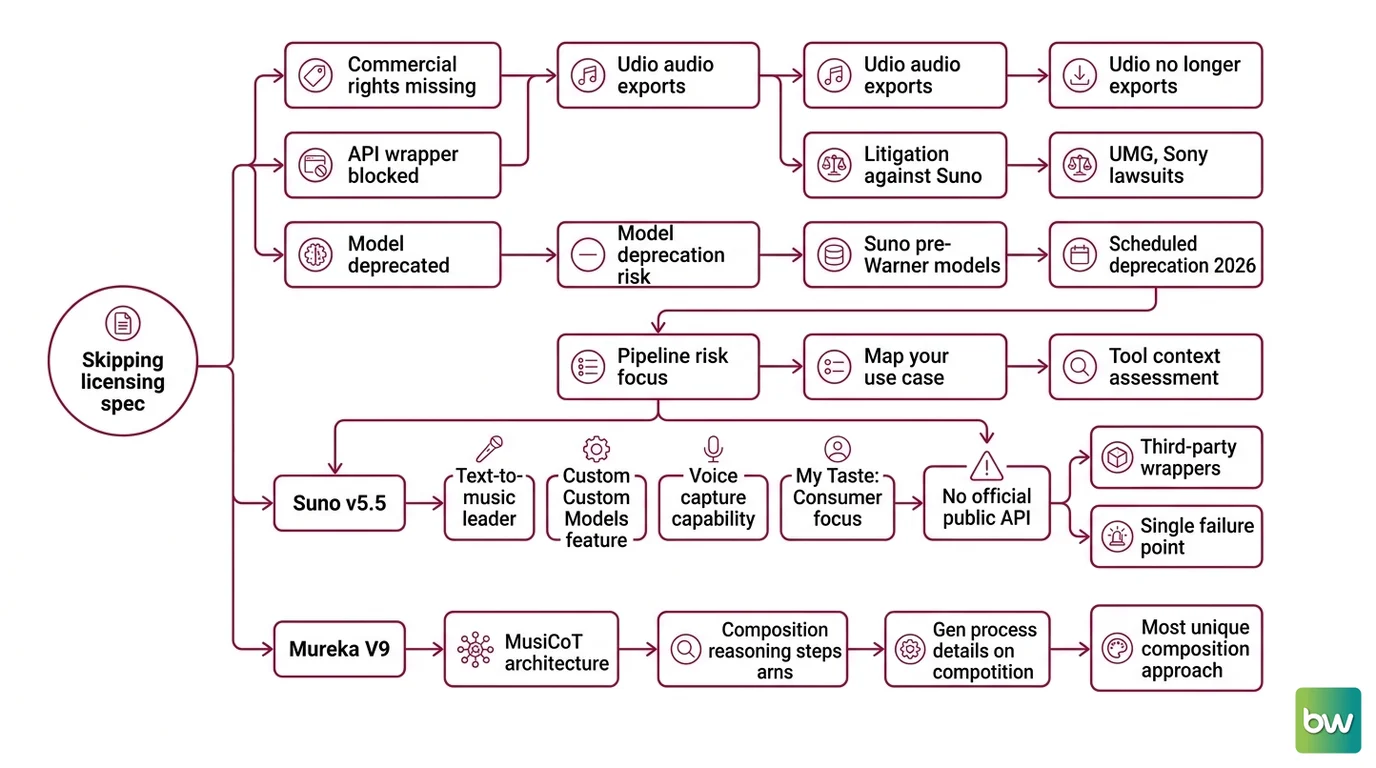
Here’s what happens when you skip the licensing spec. You generate music, the output sounds great, you ship it — then discover that the free plan you used doesn’t include commercial rights, or that the third-party API wrapper you relied on has been blocked by the platform, or that the model producing your tracks is being deprecated because it was trained on unlicensed recordings.
All three of these failures are currently active risks in the AI music space. Udio, once a strong Suno competitor, no longer exports audio at all post-settlement (OpusClip Blog). UMG and Sony continue litigating against Suno as of mid-2026 (AutoMusic Blog). And every Suno model from v3 through v5.5 — trained before the Warner Music licensing deal — is scheduled for deprecation when replacement models launch later in 2026 (VoteMyAI). The deprecated date isn’t confirmed yet. But it’s coming.
Your spec decision here isn’t which model sounds best. It’s which model won’t pull the floor out from under your pipeline.
Step 1: Map Your Use Case to the Right Tool
The three tools cover different production contexts. Start here before touching any API or prompt.
Suno v5.5 is the consumer-facing text-to-music leader. Released March 26, 2026 (Suno Blog), it adds Custom Models (train genre preferences, up to 3 per Pro/Premier user), voice capture, and “My Taste” adaptive learning. The output quality is high and the interface is fast. The problem: Suno has no official public API. Every “Suno API” you find — Apiframe, evolink.ai, AIML API — is a third-party wrapper operating without official Suno sanction (AIML API Blog). Those wrappers can be shut down without notice. If your production pipeline depends on one, you have a single point of failure that Suno doesn’t control and you can’t predict.
Mureka V9 runs a different architecture — MusiCoT (Music Chain-of-Thought), which breaks composition into deliberate reasoning steps before generating audio. The practical difference: Mureka produces more structured, arrangement-aware output and supports WAV export, stem separation, and MIDI export on Premier plans. It has an official API with documented rate limits (tier-5 = 5 concurrent requests, tier-10 = 10) and explicitly grants full commercial authorization for API-generated content, including video game and film use (Mureka API FAQ).
Google Lyria 3 is the developer-first option. Two model variants: lyria-3-clip-preview generates 30-second clips at $0.04/request; lyria-3-pro-preview generates full tracks (a couple of minutes, length controlled via prompt) at $0.08/request (Google AI Docs). Both output 44.1 kHz stereo MP3. The Pro variant also supports WAV. Lyria 3 went into public preview on March 25, 2026 (Google Blog), and paid API users get Google’s copyright indemnification for covered uses (RightsDocket). Every output — Clip and Pro — carries an imperceptible SynthID watermark regardless of plan.
Your system has these parts:
- Use case — background music vs. sync licensing vs. interactive game audio vs. batch automation
- API requirement — one-off generation vs. automated pipeline; official API vs. tolerated wrapper
- Output format — MP3 for streaming; WAV/stems for post-production; MIDI for DAW hand-off
- Commercial intent — personal/educational (free tier OK) vs. commercial (paid required everywhere) vs. sync licensing (check platform-specific terms)
Step 2: Lock Down the Licensing and API Spec
This is where most production pipelines fail. The licensing spec isn’t a legal formality — it’s a constraint that determines which tool, which plan, and which workflow you can actually use.
Context checklist before generating a single track:
- Commercial rights tier confirmed: Suno Pro ($8/mo annual, 500 songs/mo) or Premier ($24/mo annual, 2,000 songs/mo) both include commercial use rights for new songs made on the platform (Suno’s pricing page). Mureka’s Premier tier adds WAV, stems, and MIDI to the commercial package — verify current pricing at mureka.ai/subscribe before committing. Lyria 3 requires a paid Gemini API key — no free tier exists (Google AI Docs).
- Copyright ownership understood: Paid plans grant commercial use rights. They do not grant copyright ownership. U.S. Copyright Office position as of 2026: AI-only music without meaningful human input is not copyrightable (AutoMusic Blog). Your human creative choices in the prompt, structure, and post-processing matter for establishing any ownership claim.
- Suno model deprecation risk acknowledged: If you’re building on Suno v5.5, you need a migration path. The Warner Music deal requires replacing all current models with licensed versions. No launch date confirmed as of June 2026, but the deprecation is contractually committed.
- Third-party API risk documented: If you’re using a Suno wrapper API, that wrapper has no Suno ToS sanction. Document this as a known risk, not a solved problem.
- SynthID watermark policy reviewed: All Lyria 3 output is permanently watermarked with Google’s SynthID. This is non-removable and persists in the audio regardless of post-processing. Not a problem for most commercial uses — but it matters if your client expects unencumbered audio ownership.
- Platform-specific ContentID policies checked: YouTube, Twitch, and major streaming platforms have independent policies for AI-generated music. The rights your tool grants don’t override platform ContentID systems.
The Spec Test: If you can’t answer “which specific plan covers this specific commercial use on this specific platform,” you haven’t locked the licensing spec. Generate after you can answer that.
Step 3: Sequence Your Build
Build for the highest-stability tool first. Here’s the ordering logic.
Build order:
Lyria 3 Clip integration first — because it has the most stable API contract (official Google endpoint, versioned), the clearest commercial path, and the lowest cost per test iteration ($0.04/clip). Build your basic audio generation loop here before introducing higher-cost or higher-risk components.
Mureka V9 for structured content — once your Lyria 3 pipeline validates, add Mureka for use cases that need stems, MIDI export, or arrangement control. The official API spec is documented (Mureka API FAQ), rate limits are clear, and commercial rights are unambiguous. Hook this in for game audio and sync licensing workflows.
Suno v5.5 via web interface for exploratory work only — use it for prompt iteration and quality evaluation, not as a pipeline dependency. Given the third-party API risk and pending model deprecation, Suno should be your creative prototyping tool, not your automated production source.
For each tool integration, your context must specify:
- What it receives: text prompt (all three), style reference (Suno Custom Models), instrument/tempo constraints
- What it returns: MP3 (all three), WAV (Mureka Premier, Lyria 3 Pro), stems (Mureka Premier only), MIDI (Mureka Premier only)
- What it must NOT do: request copyrighted lyrics or specific artist voice clones — Lyria 3’s safety filters block these prompts (Google AI Docs)
- How to handle failure: Lyria 3 API uses
client.interactions.create()at thehttps://generativelanguage.googleapis.com/v1beta/interactionsendpoint; catch HTTP 400 for safety filter rejections, HTTP 429 for rate limits
Lyria API Schema Warning: The legacy
outputs → stepsrequest schema was removed June 8, 2026 (Gemini API Changelog). Any code sample predating June 2026 will break. Always use the current schema from the official docs.
Security & compatibility notes:
- Lyria Interactions API schema (BREAKING): The legacy
outputs → steps/response_formatrequest schema was deprecated May 26, 2026 and removed June 8, 2026. Use the current schema from Google AI Docs changelog. - Suno v5.5 model deprecation (WARNING): All Suno models v3–v5.5 are scheduled for deprecation when licensed replacement models launch in 2026; no confirmed date as of June 2026 per VoteMyAI.
- Third-party Suno wrappers (WARNING): Apiframe, evolink.ai, and similar wrappers operate without official Suno sanction; subject to ToS changes or shutdown without notice per AIML API Blog.
Step 4: Validate Before You Commit
Don’t validate by listening to the output once. Validate the full contract.
Validation checklist:
- Commercial rights match your plan tier — failure looks like: you’re generating on a free tier or using credits from a plan that doesn’t include commercial rights (Suno Free tier uses v4.5-all only; v5.5 requires paid plan per Suno’s pricing page)
- Audio format matches your downstream use — failure looks like: you need stems for a post-production workflow but you’re on a plan that only exports MP3
- Prompt rejection handling works — failure looks like: your pipeline crashes on a Lyria 3 safety filter rejection instead of logging and retrying with a revised prompt
- Rate limit handling is implemented — failure looks like: a batch of 50 track generations hits Mureka’s tier-5 limit (5 concurrent) and your pipeline stalls without a queue
- Deprecation fallback is defined — failure looks like: Suno deprecates v5.5, your pipeline calls a model that no longer exists, and you have no fallback
Common Pitfalls
| What You Did | Why It Failed | The Fix |
|---|---|---|
| Used the Suno free tier for YouTube content | Free tier lacks commercial rights; ContentID can still flag based on training data | Upgrade to Suno Pro or switch to Mureka/Lyria for commercial work |
| Built a pipeline on a third-party Suno wrapper | No official sanction; wrapper can shut down without notice | Use Mureka V9 or Lyria 3 official APIs for production automation |
| Assumed paid plan = copyright ownership | Rights grant ≠ copyright; U.S. Copyright Office requires meaningful human input | Document your creative choices; use the rights grant for what it is |
| Used pre-June 2026 Lyria API code samples | Legacy schema removed June 8, 2026; old code returns errors | Update to current schema from Gemini API Changelog |
| Chose Udio for production audio | Post-settlement: no audio exports available | Udio is not viable for production pipelines — use Suno, Mureka, or Lyria |
| Didn’t account for SynthID watermark | Lyria 3 watermarks all output permanently | Review your use case — most commercial uses are unaffected, but unencumbered ownership isn’t possible |
Pro Tip
The deprecation risk you’re ignoring is the spec gap you’ll pay for. Every tool in this space sits on legal proceedings, label negotiations, or API versioning timelines that don’t follow your project schedule. Build with an abstraction layer between your pipeline and any specific model: a wrapper function that takes a prompt and returns audio, with the model choice as a config parameter — not hardcoded. When Suno v5.5 gets deprecated or when a wrapper API shuts down, you change one config value instead of rewriting three microservices.
Frequently Asked Questions
Q: How to use Suno v5.5 for royalty-free background music in YouTube videos and podcasts? A: Suno Pro ($8/mo annual) or Premier ($24/mo annual) both include commercial use rights for new songs generated on the platform. Use these for YouTube and podcast background tracks. One caveat: “commercial use rights” is not copyright ownership, and YouTube’s ContentID system operates independently of Suno’s rights grant. As of mid-2026, UMG and Sony litigation against Suno is ongoing — factor that timeline risk into long-term production commitments.
Q: How to choose between Suno, Mureka V9, and Google Lyria API for a commercial music production project? A: Default to Mureka V9 or Lyria 3 for any pipeline requiring API automation — Suno has no official public API. Choose Mureka V9 when you need stems, MIDI export, or arrangement control for post-production. Choose Lyria 3 when you want Google’s copyright indemnification, cost-per-call pricing ($0.04–$0.08), and a stable versioned API contract. Use Suno v5.5 for creative prototyping where you’re manually downloading tracks, not automating a pipeline.
Q: How to use AI music generation for video game soundtracks without licensing risk? A: Mureka V9 is the cleanest option here. The Mureka API FAQ explicitly states full commercial authorization for API-generated content, including video game and film use. Export stems for adaptive audio layering. For procedural generation at scale, Lyria 3 Pro’s batch API gives you more cost predictability ($0.08/track). Document the rights you’re using in your project spec — game publishers and platforms increasingly require paper trails for AI-sourced assets.
Q: How to build an automated AI music generation pipeline with Suno API and Google Lyria 3 in 2026?
A: Lyria 3 is your automation layer — the client.interactions.create() call at the v1beta/interactions endpoint is the current interface (Google AI Docs). Build a queue-based system: text prompt in, audio file out, with retry logic for safety filter rejections (HTTP 400) and rate limit hits (HTTP 429). Don’t build Suno into the automated pipeline — third-party wrappers are not sanctioned and carry shutdown risk. Use Suno v5.5 through its web interface for prompt R&D, then port your validated prompts into Lyria 3 or Mureka for production runs.
Your Spec Artifact
By the end of this guide, you should have:
- Tool selection decision — which platform matches your use case, API requirements, and commercial rights needs, with a documented fallback for deprecation
- Licensing constraint matrix — plan tier confirmed, commercial rights scope documented, copyright ownership limits understood, SynthID watermark policy reviewed
- Pipeline validation checklist — format verification, prompt rejection handling, rate limit queueing, and a deprecation fallback config parameter
Your Implementation Prompt
Copy this into Claude Code, Cursor, or Codex when building your audio generation pipeline. Fill in every bracket with values from your Steps 1–4 spec.
You are building an AI music generation pipeline. Here is the complete spec.

USE CASE: [background music / game soundtrack / sync licensing / other]
TOOL: [lyria-3-clip-preview / lyria-3-pro-preview / mureka-v9-api]
API ENDPOINT: [Lyria: https://generativelanguage.googleapis.com/v1beta/interactions | Mureka: platform.mureka.ai]

COMPONENTS:
1. Prompt builder — receives [topic/mood/tempo/duration] and returns a structured text prompt
2. Audio generator — calls the API with the prompt; returns audio file path
3. Error handler — catches HTTP 400 (safety filter), HTTP 429 (rate limit), and [tool-specific errors]
4. Output validator — checks audio format [MP3/WAV], file size, and [your downstream format requirement]

CONSTRAINTS:
- Commercial plan confirmed: [your plan name and rights scope]
- Output format: [MP3 / WAV / stems]
- Rate limit: [Lyria: per-key quota | Mureka: tier-5 = 5 concurrent / tier-10 = 10 concurrent]
- Model deprecation fallback: model name is a config parameter, not hardcoded
- Do NOT request copyrighted lyrics or specific artist voices (Lyria safety filter blocks these)
- API schema: use current Lyria Interactions API schema (post-June 8, 2026)

BUILD ORDER:
1. Audio generator first — one prompt, one API call, validate the response shape
2. Error handler second — before you test batch runs
3. Prompt builder third — once you know the API contract is stable
4. Output validator last — after format requirements are confirmed

VALIDATION:
- Single call succeeds with expected format
- Safety filter rejection returns error code, not crash
- Rate limit triggers queue, not failure
- Output file passes [your format check: duration, sample rate, bit depth]
Ship It
You now have the tool-to-use-case mapping, the licensing spec checklist, and a pipeline architecture that treats model deprecation as a config parameter instead of a fire drill. The mental model is this: every AI music tool in 2026 is a moving target — legal proceedings, model updates, API changes. Your pipeline stability comes from the abstraction layer, not the model. Build the wrapper once, swap the config when the landscape shifts.
— Deploy safe, Max.
AI-assisted content, human-reviewed. Images AI-generated. Editorial Standards · Our Editors