Model Routing for Cost, Fallback, and Latency Control with OpenRouter and Portkey in 2026
TL;DR
- Route queries by complexity: cheap model for simple tasks, frontier model for hard ones — one config key per provider
- Fallback chains in OpenRouter and Portkey keep your app running when a provider goes down; failed attempts cost you nothing
- Semantic caching (Portkey Enterprise) and exact-match caching (Helicone) are different tools solving different problems — pick the right one for your traffic pattern
On June 13, 2026, Anthropic disabled Fable 5 and Mythos 5 globally under a US export-control directive. Teams with hard-coded model names in their API calls woke up to broken production apps. Teams with a routing layer didn’t notice. That’s the difference a routing specification makes — not just lower bills, but operational resilience against decisions you have no control over.
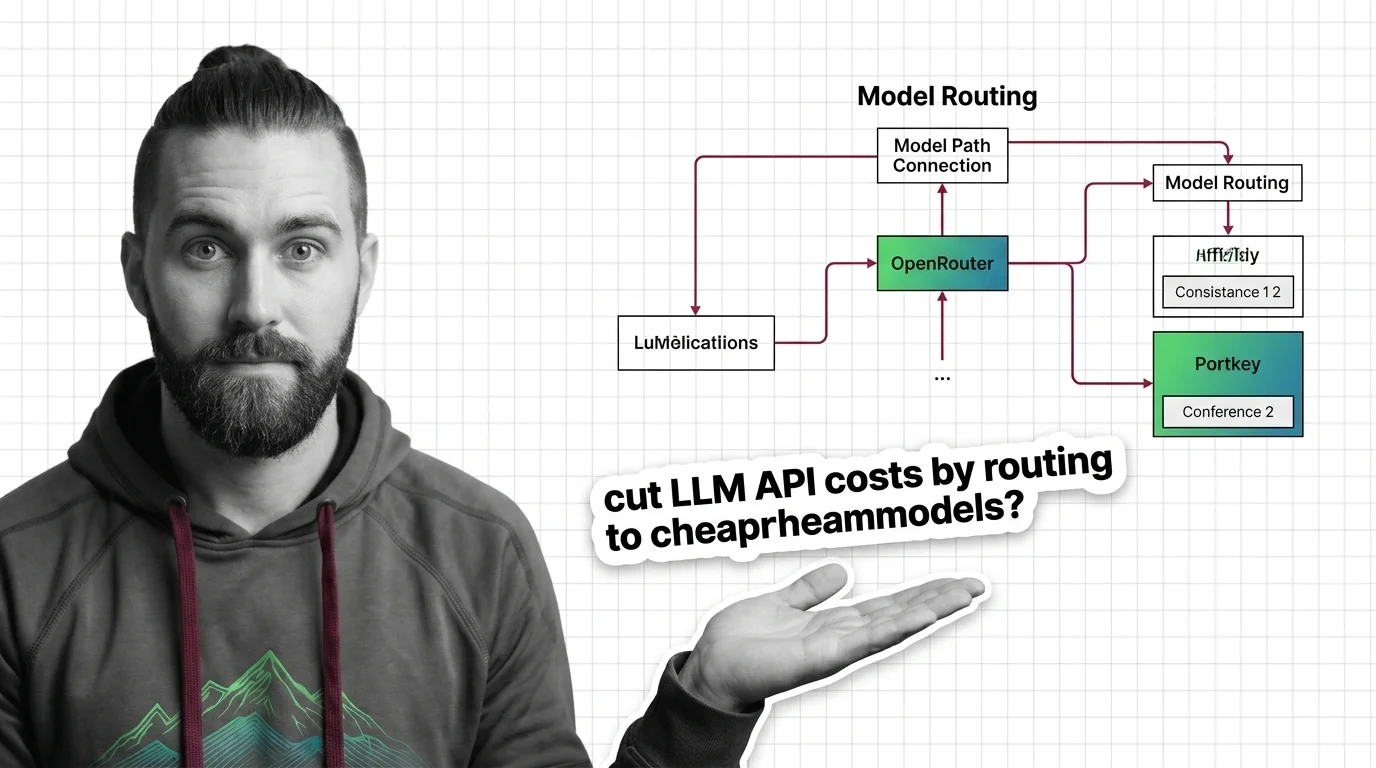
Model Routing sits between your application and the provider APIs. Done right, it makes your application model-agnostic. Done wrong — which usually means not done at all — it’s a single point of failure dressed up as a cost optimization.
Before You Start
You’ll need:
- An Openrouter account (free tier: 25+ models, 50 requests/day) or a Portkey account (Dev plan: 10K logs/month)
- Familiarity with LLM Gateway concepts — what a proxy layer is and why it sits between your app and the provider
- A working LLM application with at least one identifiable query type you could classify as “simple” vs. “complex”
- Understanding of Fallback Strategy and Rate Limiting so you know what you’re configuring
This guide teaches you: How to specify a routing layer so your AI application controls cost, survives provider outages, and stays within latency budgets — without rewriting your application code.
The $3,000 Bill That Didn’t Need to Happen
Here’s what I see in production logs every month.
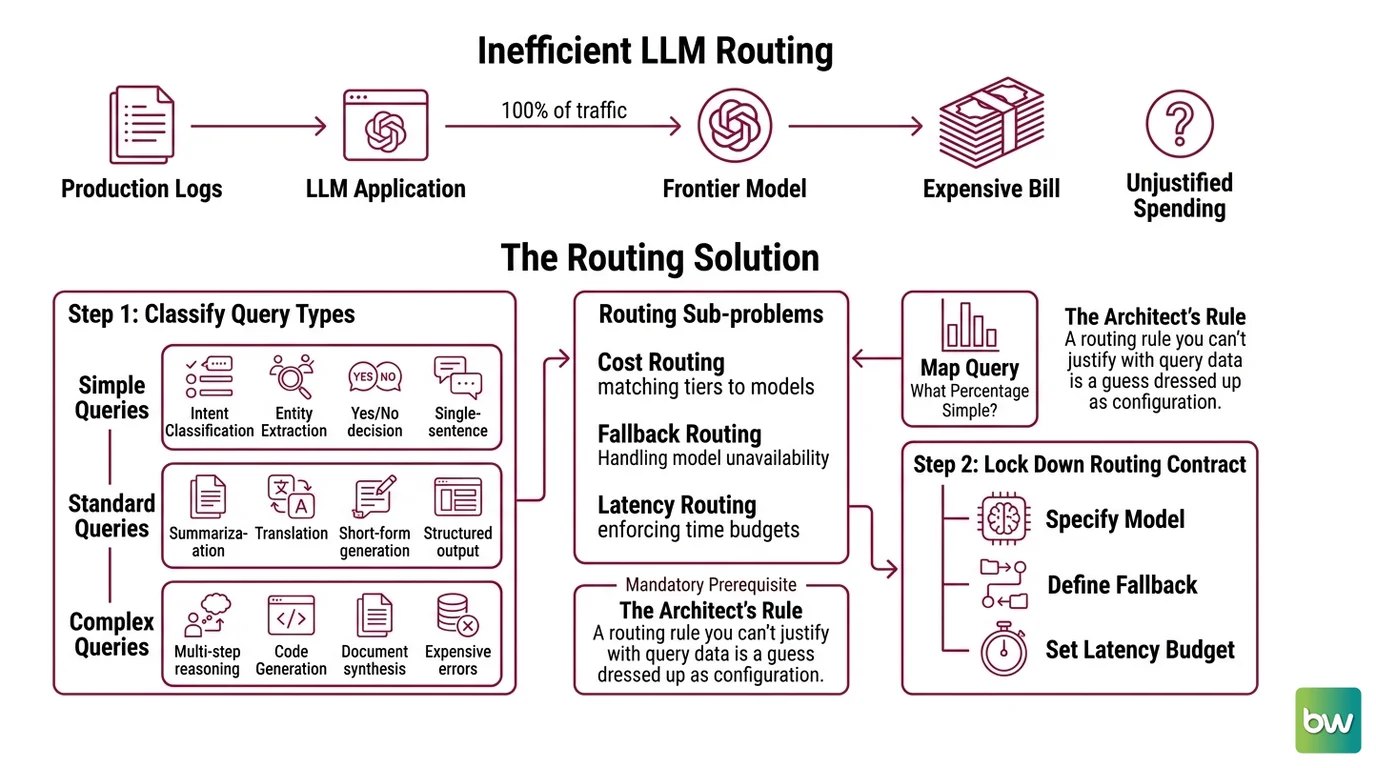
An LLM application routes 100% of its traffic to a frontier model. Intent classification queries. Short summarizations. Single-sentence slot-filling. All of them hitting the same model that handles the complex reasoning tasks. The bill at month-end is three times what it needs to be.
The developer thinks they need the frontier model’s quality for everything. They don’t. They just never wrote a routing spec.
Step 1: Classify Your Query Types
Before you configure a single routing parameter, map your query traffic. This is the decomposition that everything else depends on.
Your query types fall into three tiers:
- Simple queries — intent classification, entity extraction, yes/no decisions, single-sentence outputs. These tasks do not need a frontier model. A smaller, cheaper model handles them with equivalent quality.
- Standard queries — summarization, translation, short-form generation, structured output with well-defined schema. Quality matters but not maximally. Mid-tier models work here.
- Complex queries — multi-step reasoning, code generation, document synthesis, tasks where errors are expensive. Send these to your best available model.
Your routing system has three sub-problems:
- Cost routing — which model tier matches which query tier
- Fallback routing — what happens when the target model or provider is unavailable
- Latency routing — how to enforce time budgets per query type
Map your current query distribution before writing any config. If you can’t answer “what percentage of my queries are simple tasks?”, you’re not ready to write a routing spec. Instrument first.
The Architect’s Rule: A routing rule you can’t justify with query data is a guess dressed up as configuration.
Step 2: Lock Down the Routing Contract
Now you have query tiers. The routing contract specifies what each tier gets — model, fallback chain, latency ceiling, and cost cap.
Routing contract checklist per tier:
- Primary model name and provider specified (not just model family — exact model ID)
- Fallback model chain: minimum two alternatives, in priority order
- Maximum per-request latency in seconds (by percentile: p50 for normal, p99 for SLA)
- Maximum price per million tokens (prompt + completion separately)
- Error conditions that trigger fallback vs. hard fail
OpenRouter routing contract — provider selection parameters:
OpenRouter’s /api/v1/chat/completions accepts a provider object that encodes your contract (OpenRouter Docs). The sort field takes three values: "price", "throughput", or "latency". You don’t specify a single provider — you specify a preference, and OpenRouter selects from its 70+ providers accordingly.
For latency-sensitive queries, set "sort": "latency" and add preferred_max_latency with per-percentile thresholds (p50, p75, p90, p99 values, in seconds). For cost-sensitive queries, use "sort": "price" or append :floor to the model name as a shortcut.
The max_price parameter sets a per-million-token ceiling for prompt, completion, request, and image tokens separately. Any provider above your ceiling is excluded from selection.
Portkey routing contract — config object:
Portkey uses a config object attached to your request via
Virtual Keys. The config specifies strategy.mode, targets array, and optional on_status_codes. Your contract lives in one JSON object that Portkey’s
API Gateway enforces per request.
The Spec Test: If your routing config doesn’t specify what happens on a 429 (rate limit) and a 503 (downtime) separately, you have a single-node failure mode wearing a routing costume.
Step 3: Wire the Routing Layers
Build in this order. Each layer depends on the previous one being stable.
Build order:
- Provider selection first — configure your primary model and provider preference. Get one route working end-to-end before adding fallback logic. A fallback chain you can’t test doesn’t work.
- Fallback chain second — add alternative models in priority order. Test the fallback by intentionally triggering an error condition (wrong model name, exceeded rate limit).
- Caching third — add caching only after your routing and fallback are stable. Caching on broken routing hides errors.
- Cost and latency caps last — add
max_priceand latency thresholds once you know what your real traffic distribution looks like.
For each routing layer, your config must specify:
- What it receives (query tier, model selection criteria)
- What it returns (model used, fallback triggered, cache hit or miss)
- What it must NOT do (e.g., fall back to a model with different content policy)
- How to handle failure (hard fail vs. silent fallback vs. alert)
OpenRouter fallback chains:
Pass a models array instead of a single model name. OpenRouter tries them in order (OpenRouter Docs). Triggers include context length errors, moderation flags, rate limits, and downtime. The critical detail: only the successful model is billed — failed attempts cost nothing (OpenRouter Docs). Your fallback chain is free to be long.
The allow_fallbacks parameter defaults to true at the provider level, meaning OpenRouter already tries alternative providers for your primary model before touching your model fallback list. You’re getting two levels of fallback by default.
OpenRouter’s Auto Router (openrouter/auto) adds a third option: let the routing be handled dynamically based on a cost_quality_tradeoff integer from 0 to 10 (0 = maximum quality, 10 = maximum cost savings, default 7). As of mid-2026, the Auto Router model pool includes Claude Sonnet 4.5, Claude Opus 4.5, GPT-5.1, Gemini 3.1 Pro, and DeepSeek 3.2 (OpenRouter Docs) — though the exact pool updates as new models become available.
Portkey fallback chains:
Set "strategy": {"mode": "fallback", "on_status_codes": [429, 503, 524]} and list your targets in priority order (Portkey Docs). Portkey’s default triggers on any non-2xx response, but on_status_codes lets you be specific — rate limits only, or downtime only, or both.
Portkey adds circuit breakers on top of fallback: configurable on P99 latency or error rate, with probe requests to test provider recovery (Portkey Docs). A circuit breaker that stops probing a failed provider instead of hammering it is what separates a real fallback spec from a retry loop.
Note on Portkey’s status: Portkey was acquired by Palo Alto Networks in May 2026 (~$700M deal per Palo Alto Networks press release). The Gateway 2.0 codebase is Apache 2.0 licensed and open-sourced on GitHub (Portkey’s GitHub). Pricing and enterprise bundling may shift post-acquisition — verify current portkey.ai pricing before committing to plan-specific features.
Step 4: Validate Your Routing Spec
Don’t scan the first three outputs and call it done. Validate each layer independently.
Validation checklist:
- Cost routing — run 20 queries in your “simple” tier. Check provider logs: are they hitting the cheap model? Failure looks like: frontend reports success, but all 20 queries billed to frontier model.
- Fallback trigger — send a request with an invalid model name in position 1 of your fallback chain. The request should complete using position 2. Failure looks like: request returns 404 or empty response instead of completing via fallback.
- Provider-level fallback — check that
allow_fallbacks: true(OpenRouter) or equivalent is set. Failure looks like: a provider outage takes down your whole request class, not just one provider’s allocation. - Latency cap — send a batch of 10 requests with your
preferred_max_latencyset to a value below the slowest provider’s P99. Verify that slow providers are excluded from selection. Failure looks like: requests still route to a provider above your latency ceiling. - Caching — send the same query twice. Check logs for cache hit on second request. Failure looks like: two full model calls billed for identical input.
Common Pitfalls
| What You Did | Why the Router Broke | The Fix |
|---|---|---|
| Hard-coded model name in app code | Provider disables model → hard break | Route via model ID in config, not in application code |
| Fallback chain with one model | Provider + model both unavailable → full outage | Minimum two models, across at least two providers |
| Semantic caching on all plans | Portkey semantic cache is Enterprise-only | Use exact-match caching (Helicone, any plan) for non-Enterprise; semantic (Portkey Enterprise) for fuzzy matching |
| Treating Helicone as a router | Helicone does observability + exact-match caching only — no fallback, no load balancing | Add LiteLLM or OpenRouter for routing; use Helicone for logging |
| No latency cap on real-time queries | Chat/voice requests wait on slow providers | Set preferred_max_latency (OpenRouter) per percentile for each query tier |
| One cost cap for all query types | Complex queries blocked by ceiling set for cheap queries | Separate max_price configs per tier |
Pro Tip
The routing spec is your insurance policy against vendor decisions you can’t control. When Anthropic pulls a model, when OpenAI changes rate limits, when a provider has an outage — your routing config determines whether your application degrades gracefully or breaks completely. Write the fallback chain before you need it, because you’ll need it before you expect to.
Frequently Asked Questions
Q: How do I use model routing to cut LLM API costs by routing simple queries to cheaper models?
A: Classify queries by output complexity — intent classification, slot filling, and yes/no decisions don’t need frontier models. Set a sort: "price" or :floor suffix in OpenRouter to route to cheapest qualifying providers. The real spec gap most teams miss: you also need a max_price ceiling per tier, otherwise a “cheap” provider with a temporary price spike still routes there. Set both the sort direction and the cap.
Q: How do I use OpenRouter for automatic model failover and provider redundancy?
A: Pass a models array in your request body with alternatives in priority order. OpenRouter automatically tries each in sequence on context errors, moderation flags, rate limits, or downtime — failed attempts are not billed (OpenRouter Docs). Provider-level fallback (allow_fallbacks: true, the default) kicks in before your model list, giving you two layers. The watch-out: test your fallback chain by intentionally triggering a failure — don’t find out it’s misconfigured in production.
Q: How do I use Portkey or Helicone to add semantic caching to a model routing layer? A: These are two different tools with different caching types. Helicone uses exact-match caching only (URL + body + headers hash), stored on Cloudflare Workers KV across 300+ edge locations (Helicone Docs) — available on the free Hobby tier. Semantic Caching in Portkey uses cosine similarity at a 0.95 threshold (Portkey Docs), catching near-identical queries — but this is an Enterprise-only feature requiring a vector database backend (Milvus or Pinecone). Portkey’s simple (exact-match) cache is available on all plans. If you need semantic caching without Enterprise licensing, combine LiteLLM with your own embedding + vector store.
Q: How do I use model routing for latency-sensitive real-time chat and voice applications?
A: Set sort: "latency" in OpenRouter’s provider config and add preferred_max_latency with per-percentile thresholds (p50 for median response time, p99 for worst-case SLA). For voice, p50 below 800ms is a common starting point — adjust based on your actual user-perceived latency budget. The structural fix: create a separate routing config for real-time query types and don’t mix them with batch or async query configs. Different latency requirements need different routing rules, even if the same model serves both.
Your Spec Artifact
By the end of this guide, you should have:
- A query tier map — three tiers with criteria for each, and your current traffic distribution across them (get this from logs before writing any config)
- A routing contract per tier — primary model, fallback chain (minimum two alternatives across two providers), max price ceiling, and latency thresholds per percentile
- A validation checklist — four checks: cost routing, fallback trigger, provider-level fallback, and cache hit verification — with specific failure symptoms for each
Your Implementation Prompt
Use this prompt in Claude Code, Cursor, or Codex to generate the routing configuration files for your stack. Fill in every bracketed placeholder before running — these map directly to the contract items in Step 2.
You are helping me configure a model routing layer for a production LLM application.

Context:
- Primary LLM gateway: [OpenRouter / Portkey / LiteLLM — pick one]
- Application type: [real-time chat / batch processing / mixed]
- Query tier distribution: Simple [X%] / Standard [Y%] / Complex [Z%]

Routing contract:
- Simple tier: primary model [model-id], max price [$/M prompt tokens, $/M completion tokens], max latency p50 [Xs], p99 [Ys]
- Standard tier: primary model [model-id], max price [$/M prompt tokens, $/M completion tokens], max latency p50 [Xs], p99 [Ys]
- Complex tier: primary model [model-id], max price [$/M prompt tokens, $/M completion tokens], max latency p50 [Xs], p99 [Ys]

Fallback chain (in priority order, minimum two):
1. [primary-model-id, provider-preference]
2. [fallback-1-model-id, provider-preference]
3. [fallback-2-model-id, provider-preference]

Caching:
- Cache type needed: [exact-match / semantic / none]
- Cache TTL: [seconds]
- Semantic cache threshold (if applicable): [note: Portkey default is 0.95, not user-configurable]

Error handling:
- Trigger fallback on: [list status codes: 429, 503, 524, etc.]
- Hard fail (no fallback) on: [list conditions]
- Circuit breaker: [P99 latency threshold / error rate threshold]

Generate:
1. The routing config object for [gateway] with the above contract
2. A validation test plan: one test per routing layer (cost, fallback trigger, latency cap, cache hit)
3. A query classifier prompt that routes a given query text to Simple / Standard / Complex tier

Constraints:
- No hard-coded model names in application code — all model IDs in config only
- Fallback chain must span at least two providers
- Each tier must have its own config object — do not share configs across tiers
Ship It
You now have a routing specification, not just a routing setup. The difference is that your spec tells you exactly what should happen at each failure mode — and you’ve tested it before production finds out. Every query tier has a contract, every contract has a fallback, and your application code never hard-codes a model name again.
— Deploy safe, Max.
AI-assisted content, human-reviewed. Images AI-generated. Editorial Standards · Our Editors