How to Build Training, Marketing, and Multilingual Videos with HeyGen and Synthesia
TL;DR
- Pick the avatar engine by workflow, not demo polish: HeyGen leans toward high-volume marketing and broad localization reach; Synthesia leans toward enterprise training with tighter compliance controls.
- Specify the avatar model, language scope, and distribution channel before you open the editor — these three variables, not the subscription tier, determine your real cost.
- Credit and minute budgets don’t scale linearly. A model swap or a localization pass can burn a month’s allotment in an afternoon if nobody priced it in first.
A learning-and-development team built an onboarding video in HeyGen on the Creator plan, the week before launch. It looked great in English. Then localization kicked in — several languages, a couple of late avatar re-renders — and the team hit its credit ceiling mid-rollout, with a launch date that didn’t move. The platform wasn’t broken. The spec was missing a budget line.
Before You Start
You’ll need:
- A HeyGen or Synthesia account (or both, if you’re comparing)
- A working grasp of AI Avatar Generation and what Talking Head Synthesis changes about a video production pipeline
- A locked script — avatar tools render what you give them; they don’t write your copy
This guide teaches you: how to decompose “make us an avatar video” into the avatar model, language scope, and distribution constraints that determine the right specification — and what it actually costs at scale.
Scope check: this guide specifies talking-head avatar generation — animating a Digital Human likeness to deliver a script, not Text-to-3D asset generation, where pipelines run NeRF or Gaussian Splatting reconstruction, optimize with Score Distillation Sampling, and finish the mesh in PBR Materials. Different inputs, different validation, different failure modes. If the brief calls for a rotating product, not a person talking to camera, this isn’t the spec you want.
The Credit Ceiling Nobody Saw Coming
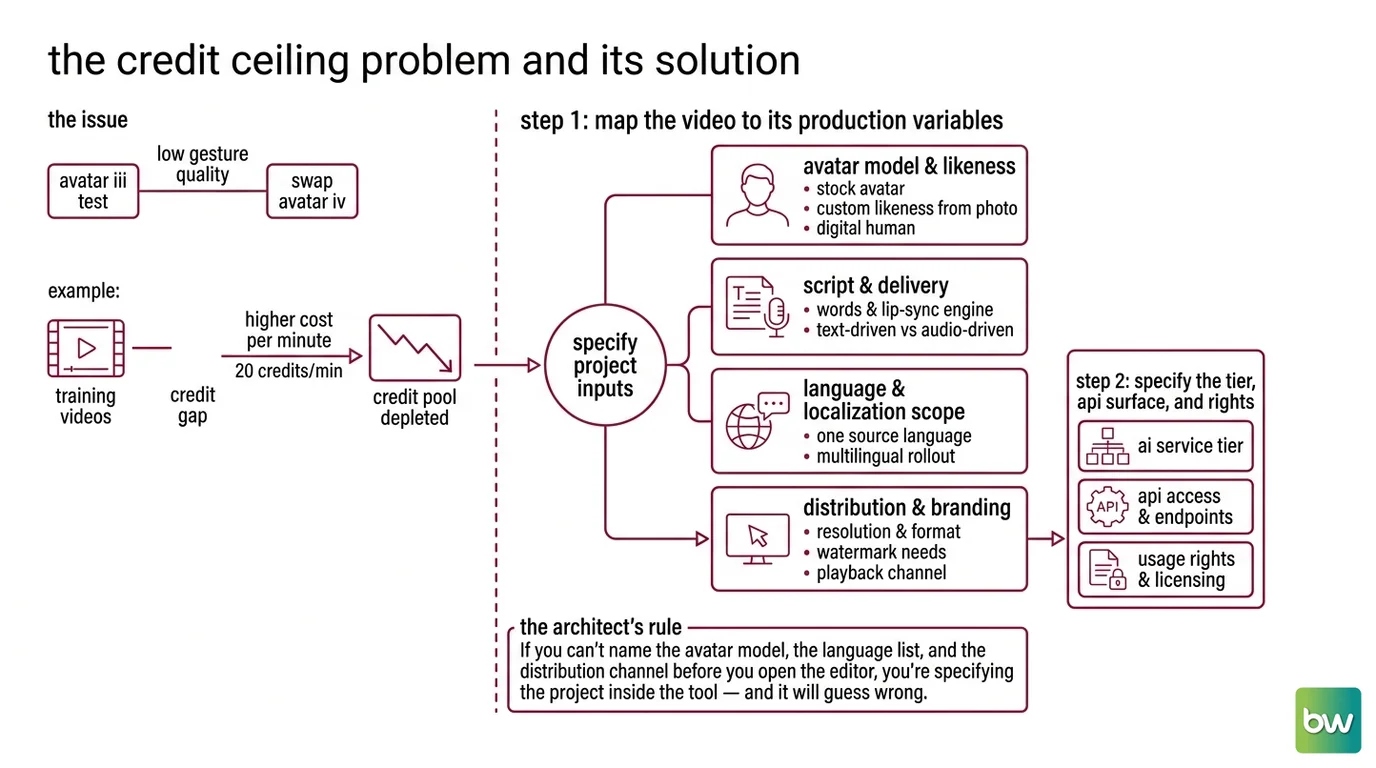
Most teams budget a HeyGen or Synthesia plan by minutes, not by avatar model — and that’s the gap that breaks projects mid-rollout. HeyGen prices Avatar III renders at 3 credits a minute and Avatar IV or Avatar V renders at 20 credits a minute, per HeyGen’s pricing page. Same monthly pool, very different cost per minute depending on which engine the project needs.
It rendered fine on the first pass — the team tested with Avatar III. The client wanted better gesture quality, so the swap to Avatar IV happened a few days later, and the credit pool meant to cover a quarter’s worth of training videos didn’t survive the localization batch.
Step 1: Map the Video to Its Production Variables
Stop treating “make a video” as one request. It’s four specifications stacked together, and HeyGen or Synthesia will guess at any you don’t lock down — usually wrong, always at full credit cost.
Your system has these parts:
- Avatar model and likeness — stock avatar, custom likeness from one photo, or digital human trained on a longer clip. Each has a different cost and a different ceiling on realism.
- Script and delivery — the words, and the Lip Sync engine that turns them into mouth movement. Text-driven and audio-driven inputs don’t sync identically, and that matters most in non-English output.
- Language and localization scope — one source language or a full multilingual rollout. This is the variable that breaks budgets when it isn’t specified before the contract is signed.
- Distribution and branding — resolution, watermark, output format for whichever channel actually plays the video.
The Architect’s Rule: If you can’t name the avatar model, the language list, and the distribution channel before you open the editor, you’re specifying the project inside the tool — and it will guess wrong.
Step 2: Specify the Tier, the API Surface, and the Rights
This step prevents the credit-ceiling problem above — and it’s where most teams skip the boring parts.
Context checklist:
- Avatar engine and model version pinned — Avatar IV vs. Avatar V, EXPRESS-2 vs. Personal Avatar — not just “an avatar”
- Plan tier mapped to a realistic credit or minute budget for the full rollout, not the pilot
- Localization scope defined as a feature, not a number — voice-over and full lip-synced translation are different specs
- API version pinned if any part of the pipeline is automated
- Likeness and disclosure terms documented for anyone whose face or voice the avatar reproduces — skip this and what you shipped isn’t a training video, it’s an undisclosed Deepfake
HeyGen’s Creator plan costs $29/month ($24 annual) for 600 credits at 1080p; Pro is $49 for 1,000 credits at 4K; Business adds SSO and per-seat billing at $149 plus $20/seat, per HeyGen’s pricing page. Synthesia budgets minutes, not credits: Starter is $29/month ($18 annual) for 120 minutes across 125+ avatars; Creator is $89 for 360 minutes, 180+ avatars, and API access, per Synthesia’s pricing page.
Prices shown are indicative and may vary. Always check the provider’s current pricing before including cost constraints in your specifications.
HeyGen’s video translation covers 175+ languages with context-aware lip-sync, per HeyGen Docs. Synthesia’s pricing page advertises 160+ languages and voices — but that figure covers text-to-speech generation; its supported-languages documentation narrows the count to 130 entries for video translation and dubbing specifically, per Synthesia Docs. Confirm whether “multilingual” means voice-over or full lip-synced translation before quoting a number to a client.
The avatar models aren’t interchangeable. HeyGen’s Avatar IV builds a photorealistic avatar from one reference image via a diffusion-inspired audio-to-expression engine; Avatar V fine-tunes from a short reference clip and learns the subject’s real motion instead of generating plausible gestures, per HeyGen’s Help Center. Synthesia’s EXPRESS-2 handles body language, EXPRESS-1 facial expression only; Personal Avatars pair a cloned voice with the subject’s own likeness, per Synthesia Docs.
Automating any part of this means pinning the API version and reviewing account security before handing out logins on a multi-seat plan.
Security & compatibility notes:
- HeyGen API v1/v2 sunset: Endpoints stay operational through October 31, 2026, then retire. Point new integrations at v3; migrate existing calls before the cutoff.
- HeyGen account takeover vector: A third-party researcher reported HeyGen sessions can stay active after a password or MFA change, and email changes don’t require re-verification — both abusable to retain access after a credential reset. Patch status is unconfirmed. Force a full session review after every credential change on shared accounts.
Step 3: Sequence the Production Build
Order matters here the same way it matters in any pipeline with one source of truth and several downstream consumers.
Build order:
- Lock the script first — lip-sync quality, gesture timing, and avatar choice all derive from it, not from a draft still in review
- Render the source-language avatar next — every localized output gets compared against this version, so approve it before it multiplies
- Run localization last — translating an unapproved source means redoing every language pass the moment the source changes
For each component, specify:
- Inputs (script section, avatar model, language list)
- Outputs (rendered video, dubbed variant, caption file)
- Constraints (no off-brand gestures, no auto-selected avatar, no unreviewed publish)
- Failure handling (a re-render request, not a silent edit)
Skip that last part and the first sign of trouble is a published video with the wrong script — in eight languages.
Step 4: Validate Before You Scale to More Languages
Don’t sign off on a pilot and assume the rest of the rollout behaves the same way.
Validation checklist:
- Lip-sync accuracy per language — failure looks like mouth movement lagging or leading the audio, most visible on hard consonants in non-English dubs
- Tone and gesture consistency — failure looks like an avatar’s body language reading upbeat over a script covering a compliance violation
- Credit or minute consumption against the full rollout, not the pilot — failure looks like the account locking mid-batch
- Disclosure and likeness compliance — failure looks like a distribution platform flagging the video as undisclosed synthetic media after it’s live
Common Pitfalls
| What You Did | Why AI Failed | The Fix |
|---|---|---|
| One-shot “make us a training video” | Tool defaults to a stock avatar and generic tone | Decompose script, avatar model, and language scope into separate specs first |
| Picked a plan tier by price alone | Avatar III costs 3 credits a minute, Avatar IV/V costs 20 | Map avatar model to credits before estimating the budget |
| Treated “multilingual” as one spec | Voice-over and lip-synced translation are different features with different limits | Specify which language feature the rollout needs before quoting a number |
| Skipped the disclosure line | Nothing told the tool likeness rights mattered, so nobody flagged it before publish | Add likeness and disclosure requirements to the spec before generation |
Every row traces back to the same root cause: a spec that named the outcome but not the constraints.
Pro Tip
Treat the avatar video spec the same way you’d treat an API contract: name the model, the credit budget, the language scope, and the validation criteria before you touch the editor. The tool will render exactly what you didn’t specify, at full credit cost, in every language you asked for.
Frequently Asked Questions
Q: How to create a talking head avatar video for corporate training with HeyGen? A: Lock the script, then match the avatar model to your reference material — a photo for Avatar IV, a short clip for Avatar V — at the resolution your LMS requires. Pilot on HeyGen’s free tier first: three one-minute videos a month validates lip-sync before paying.
Q: How to use Synthesia to produce multilingual marketing videos with AI avatars? A: Approve the source-language video first with an EXPRESS-2 or Personal Avatar, then translate per target language. Confirm whether the campaign needs TTS voice-over or full lip-synced dubbing before budgeting minutes — same plan, different production cost.
Q: How can small businesses use AI avatars to cut video production costs? A: Test the format before paying: Synthesia’s free tier gives 10 minutes across 9 watermarked avatars; HeyGen’s gives three one-minute videos. Skip a custom likeness build until the script is proven — a stock avatar with tight copy usually outperforms a loose one.
Your Spec Artifact
By the end of this guide, you should have:
- A component map: avatar model and likeness, script and lip-sync source, language scope, distribution constraints
- A constraint list: plan tier mapped to a full-rollout budget, API version pinned, likeness and disclosure documented
- Validation criteria: lip-sync accuracy, tone and gesture consistency, consumption rate at scale, disclosure compliance
Your Implementation Prompt
Use this to brief a producer, wire up the API, or spec the project for yourself before opening HeyGen or Synthesia. It mirrors the four-step decomposition above — fill in the brackets.
Project: [avatar video name / campaign]
Platform: [HeyGen / Synthesia]

STEP 1 — Production variables:
- Avatar: [stock / custom likeness from one photo / digital human from reference clip]
- Script and lip-sync source: [text-driven / audio-driven] — status: [locked / in review]
- Language scope: [source language] + [target languages] — feature: [voice-over only / full lip-synced translation]
- Distribution: [resolution] for [LMS / ad platform / landing page / other]

STEP 2 — Constraints:
- Avatar engine/version: [e.g., Avatar IV / Avatar V / EXPRESS-2 / Personal Avatar]
- Plan and budget: [tier] mapped to [credit or minute estimate] for the FULL rollout
- API version: [pin to current surface if automating]
- Likeness/disclosure: [presenter] — rights documented: [yes/no] — disclosure required: [yes/no]

STEP 3 — Build order:
1. Lock script — no avatar render until approved by: [name/role]
2. Render and approve source-language video before localization
3. Localize only after approval; flag script changes for re-render, not silent edit

STEP 4 — Validation:
- Lip-sync accuracy per language, especially [hard consonants / known phonemes]
- Tone and gesture match script intent, not just brand color or logo
- Credit or minute consumption at [full rollout volume], not pilot volume
- Disclosure requirement met for [channel] before publish
Ship It
You now have a way to decompose “make us an avatar video” into the variables that actually determine cost and quality: avatar model, language scope, distribution constraints, and validation criteria. Specify those before you open HeyGen or Synthesia, and the credit ceiling stops being a surprise mid-rollout.
AI-assisted content, human-reviewed. Images AI-generated. Editorial Standards · Our Editors