How to Train and Choose a Custom Tokenizer with tiktoken, SentencePiece, and HF Tokenizers in 2026
Table of Contents
TL;DR
- tiktoken is encoding-only — you cannot train a custom tokenizer with it
- Vocabulary size is a scaling decision tied to your model’s parameter count and language targets, not a fixed number
- Train with HF Tokenizers or SentencePiece, encode with tiktoken, and validate coverage before committing GPU hours
Someone on your team just spent two days trying to train a custom BPE tokenizer with Tiktoken. They wrote the data loader, built the merge pipeline, and got nothing but errors — because tiktoken doesn’t train tokenizers. It encodes text using pre-built vocabularies. Two days. Gone.
Before You Start
You’ll need:
- Python 3.9+ with pip
- A representative corpus of your target domain text, cleaned and deduplicated
- Understanding of Subword Tokenization and Tokenizer Architecture
This guide teaches you: how to decompose the tokenizer decision into library choice, vocabulary specification, training execution, and quality validation — so you stop guessing and start specifying.
The Tokenizer Your Model Depends On — and You Never Specified
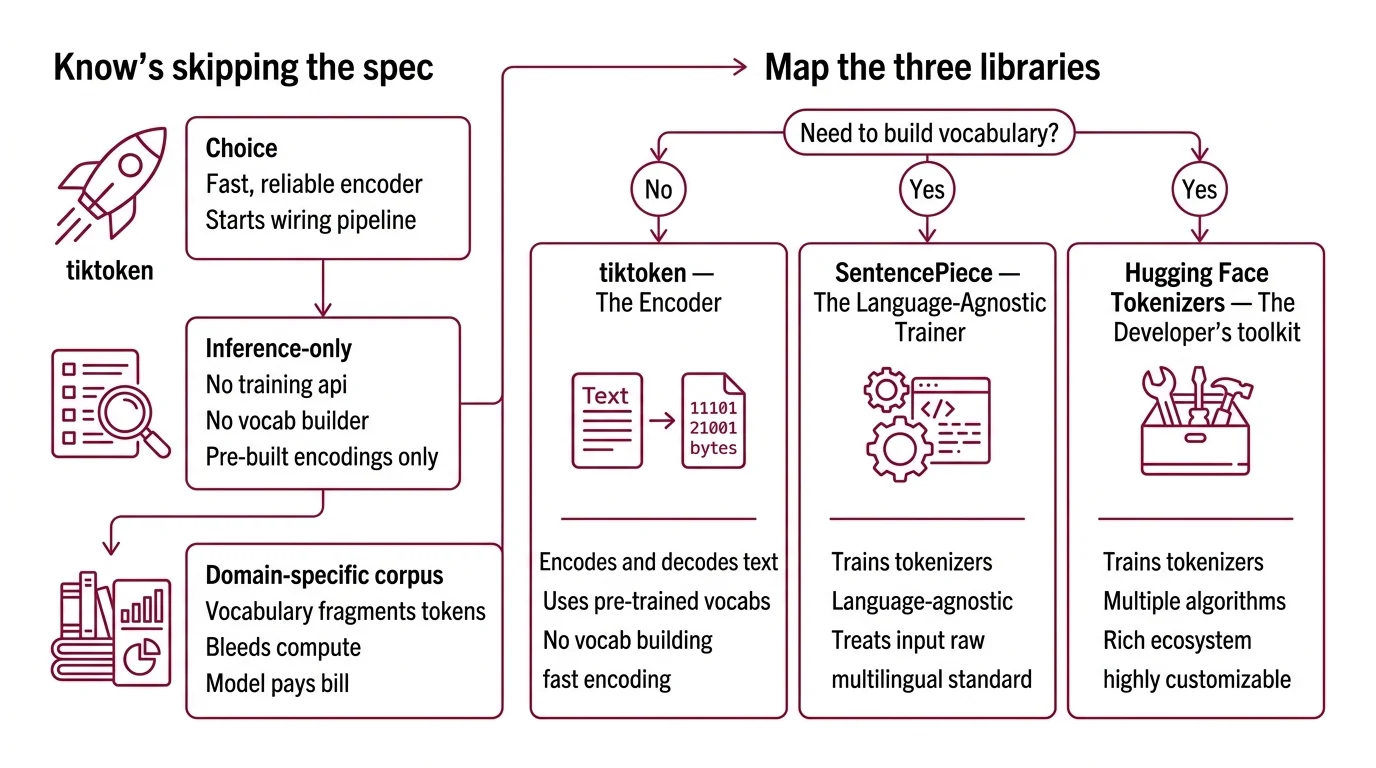
Here’s what happens when you skip the spec.
You pick tiktoken because it’s fast. It is — 3-6x faster than comparable open-source tokenizers (OpenAI GitHub). You assume “fast tokenizer” equals “right tokenizer for my project.” You start wiring a training pipeline around it.
Then you discover tiktoken is inference-only. No training API. No vocabulary builder. No merge learning. It ships pre-built encodings — cl100k_base, o200k_base, o200k_harmony — and that’s the entire feature set.
Your corpus is domain-specific. Medical text. Legal filings. Code in three languages. The pre-built vocabulary fragments your tokens into unrecognizable byte sequences. Every fragmented token bleeds compute through every layer of your Transformer Architecture, and your model pays the bill on every forward pass.
Step 1: Map the Three Libraries and What They Actually Do
Three libraries own the tokenizer space in 2026. They are not interchangeable. They don’t do the same things. Treating them as equivalent is how you end up rebuilding your pipeline mid-project.
tiktoken — The Encoder
tiktoken 0.12.0 does one thing: encode and decode text using OpenAI’s pre-trained vocabularies. It’s the tokenizer behind GPT-3.5 and GPT-4 (cl100k_base), GPT-4o and GPT-5 (o200k_base), and the Llama 3.x family. The o200k_harmony encoding adds role-based prompting support with 201,088 tokens (Modal Blog), though which production models actively use it versus o200k_base is not fully documented as of early 2026.
You use tiktoken when you need fast, reliable encoding against an existing vocabulary. You do not use it when you need to build a vocabulary from scratch. The distinction is binary.
SentencePiece — The Language-Agnostic Trainer
SentencePiece 0.2.1 trains tokenizers from raw text. No pre-tokenization required — it treats the input as a raw byte stream, which makes it the standard choice for multilingual models. It supports BPE and Unigram Tokenization algorithms out of the box. It powers Gemini, Gemma, T5, mBART, XLNet, and AlBERT (HF Docs).
Training speed sits at roughly 50,000 sentences per second with a 6MB memory footprint. That’s training speed, not encoding speed. For teams building language-specific models on constrained hardware, that footprint matters.
HF Tokenizers — The Flexible Pipeline
Hugging Face Tokenizers 0.22.2, released in late 2024, is the most flexible option. Rust-backed. Supports BPE, Wordpiece, and Unigram algorithms. Can tokenize 1GB of text in under 20 seconds on a server CPU (HF Tokenizers GitHub).
With over 191,000 dependent projects, it’s the library most teams default to. And since Transformers v5 shipped in December 2025, the old “Fast” versus “Slow” tokenizer distinction is gone — everything runs on a unified Rust backend. If your codebase still references PreTrainedTokenizerFast as a separate class, that distinction is effectively superseded.
The Architect’s Rule: If you can’t answer “Does my library train or just encode?” before you start, you’ve already lost a day.
Step 2: Specify Your Vocabulary Before You Touch a Config File
Vocabulary size is not a number you copy from a paper. It’s a function of your model’s parameter count, your target languages, and your domain coverage.
The trend line is clear: Llama 2 shipped with 32K tokens, Llama 3 jumped to 128K, GPT-4o pushed past 200K, and Gemini 3 sits at 262K (Let’s Data Science). But bigger is not automatically better.
The ratio of vocabulary parameters to total model parameters matters — roughly 20% for standard tokenizers, scaling up to 40% for specialized ones (Rohan Paul). A smaller model with an oversized vocabulary is allocating disproportionate capacity to the embedding layer. A large model with a tiny vocabulary is leaving multilingual performance on the table. Match vocabulary to model scale, not to someone else’s architecture.
Your specification must include:
- Target vocabulary size — tied to model scale and calculated, not borrowed
- Language coverage — which scripts and languages must tokenize cleanly
- Algorithm choice: BPE for most use cases, Unigram if you need probabilistic segmentation
- Special tokens: padding, end-of-sequence, beginning-of-sequence, role markers, domain-specific delimiters
- Reserved token slots for downstream fine-tuning
The Spec Test: If your vocabulary spec doesn’t name the target languages and model scale, you’re guessing. The tokenizer will encode your Mandarin corpus into byte-level fragments and your model will burn Attention Mechanism capacity reconstructing characters instead of learning semantics.
Step 3: Train With the Right Library, Encode With the Right Library
Build order matters. Training and encoding are separate operations. Conflating them is the single most common mistake in custom tokenizer projects.
Build order:
- Train the vocabulary with SentencePiece or HF Tokenizers — they accept raw corpora and output a merge table (BPE) or a probability model (Unigram)
- Export the model — SentencePiece produces a
.modeland.vocabfile; HF Tokenizers produces atokenizer.jsonthat plugs directly into the Transformers pipeline - Integrate for inference — if your production stack is OpenAI-compatible, convert the vocabulary to tiktoken format for encoding speed; otherwise, HF Tokenizers handles both training and serving
For each component, your context must specify:
- Training corpus: cleaned, deduplicated, representative of your target distribution
- Byte-fallback strategy: what happens when the tokenizer encounters a character outside its learned vocabulary
- Normalization: NFKC unicode normalization is SentencePiece’s default — decide if that’s what you want before training
- Model compatibility: Decoder Only Architecture models (GPT, Llama) and Encoder Decoder Architecture models (T5, BART) have different special token requirements — your tokenizer must match
Step 4: Validate Before You Burn a Single GPU Hour
You trained a tokenizer. Now prove it works. Not by eyeballing a few examples. With metrics.
Validation checklist:
- Fertility score — average number of tokens per word across your evaluation corpus. Lower is better. If your domain text tokenizes into significantly more tokens per word than general English, your vocabulary is bleeding efficiency. Failure looks like: training takes markedly longer than expected with no quality gain.
- Unknown token rate — percentage of input bytes that fall back to byte-level encoding. If this rate is anything more than negligible on your target languages, your vocabulary has coverage gaps. Failure looks like: the model hallucinates on domain-specific terms because it never saw them as whole tokens.
- Encoding speed — benchmark against your inference latency budget. If your custom tokenizer is slower than your baseline, check normalization pipeline overhead. Failure looks like: tokenization becomes the bottleneck in your serving stack.
- Round-trip fidelity — encode, then decode. Compare against the original. Any difference means your tokenizer is destroying information. Non-negotiable.
Common Pitfalls
| What You Did | Why It Failed | The Fix |
|---|---|---|
| Picked tiktoken for training | tiktoken is encoding-only — no training API exists | Use HF Tokenizers or SentencePiece for training, tiktoken for production encoding |
| Copied vocab size from a paper | Optimal size depends on YOUR model scale and language targets | Calculate the vocab-to-params ratio for your specific architecture |
| Skipped multilingual validation | Tokenizer fragments non-Latin scripts into byte sequences | Include target language samples in training corpus and validate fertility per language |
| Used default normalization | NFKC normalization collapsed distinct characters in your domain | Test normalization impact before training; override if needed |
| Trained on unfiltered data | Corpus noise produced garbage merges that survived into production | Deduplicate, filter quality, strip templated boilerplate |
Pro Tip
Your tokenizer is the first contract your model signs with the data. Every decision you defer — vocabulary size, language coverage, special tokens — becomes a constraint your model learns to work around instead of a specification it can optimize for. Specify the tokenizer before the model. The other way around is renovation, not architecture.
Frequently Asked Questions
Q: How to train a custom BPE tokenizer from scratch using SentencePiece and tiktoken?
A: Train with SentencePiece using its BPE mode on your raw corpus — it handles normalization and merge learning without pre-tokenization. tiktoken cannot train tokenizers; use it only for encoding after training. Export the SentencePiece .model file and convert to tiktoken-compatible format if your serving stack requires it. The conversion step is non-trivial — test round-trip fidelity after export.
Q: How to choose between tiktoken, SentencePiece, and Hugging Face Tokenizers for your LLM project? A: If you need training: HF Tokenizers for maximum algorithm flexibility, SentencePiece for language-agnostic simplicity and low memory overhead. If you need fast encoding against existing OpenAI vocabularies: tiktoken. Most production pipelines use two libraries — one for training, another for serving. Single-library loyalty costs you optionality.
Q: How to optimize tokenizer vocabulary size for multilingual LLM applications? A: Match vocabulary to model scale — vocabulary embedding parameters should stay proportional to your total parameter budget. Add coverage for target scripts explicitly in your training corpus rather than relying on byte-fallback. Validate fertility per language: if any target language’s fertility score significantly exceeds English, increase vocabulary or oversample that language in training data.
Q: How to evaluate tokenizer quality and coverage before training a language model? A: Measure four metrics: fertility score (tokens per word), unknown token rate (byte-fallback percentage), encoding speed (tokens per second), and round-trip fidelity (encode-decode equality). Run these on held-out domain text, not the training corpus itself. A tokenizer that looks clean on training data but fragments on real inputs is a spec gap you’ll pay for during model training.
Your Spec Artifact
By the end of this guide, you should have:
- Library decision map — which library handles training, which handles encoding, and why
- Vocabulary specification — target size, algorithm, language coverage, special tokens, reserved slots
- Validation criteria — fertility threshold, unknown token budget, speed benchmark, round-trip test
Your Implementation Prompt
Copy this into Claude Code, Cursor, or your AI coding tool. Replace every bracketed placeholder with values from your specification above.
You are building a custom tokenizer training and evaluation pipeline.

LIBRARY SELECTION:
- Training library: [HF Tokenizers / SentencePiece]
- Encoding library: [tiktoken / HF Tokenizers]
- Algorithm: [BPE / Unigram / WordPiece]

VOCABULARY SPECIFICATION:
- Target vocab size: [number — calculated from model scale]
- Target languages: [list of languages/scripts]
- Special tokens: [PAD, EOS, BOS, role markers, domain-specific delimiters]
- Reserved slots: [number for downstream fine-tuning expansion]
- Normalization: [NFKC / None / Custom rule]

TRAINING CORPUS:
- Source: [path to cleaned, deduplicated corpus]
- Language distribution: [percentage per language]
- Preprocessing: [deduplication method, quality filter applied]

BUILD ORDER:
1. Train vocabulary on corpus using [training library] with [algorithm]
2. Export model to [.model / tokenizer.json / tiktoken-compatible format]
3. Integrate with [Transformers pipeline / custom inference stack]

VALIDATION (run before committing to model training):
- Fertility score on [eval corpus path] must stay below [your threshold] tokens/word
- Unknown token rate must stay below [your threshold] on all target languages
- Encoding speed must exceed [your tokens/sec target] on server CPU
- Round-trip encode-decode must produce identical output for [test suite path]

CONSTRAINTS:
- Byte fallback: [enabled / disabled]
- Maximum token length: [characters]
- Model architecture: [decoder-only / encoder-decoder] — set special tokens accordingly
Ship It
You now have a framework for the entire tokenizer lifecycle: choose, specify, train, validate. No more guessing which library trains and which encodes. No more copying vocabulary sizes from papers written for a different model scale. The tokenizer is the first specification your model depends on. Treat it like one.
AI-assisted content, human-reviewed. Images AI-generated. Editorial Standards · Our Editors