How to Train a Custom LoRA for Flux and SDXL with Kohya SS, AI-Toolkit, and fal.ai in 2026
TL;DR
- A LoRA training run has four spec surfaces — base model, trainer, dataset, and trigger word — each one needs its own contract
- Trainer choice is dictated by base model: Kohya for SDXL and FLUX.1, ai-toolkit for FLUX.2 and Qwen-Image, fal.ai when you do not want to own the GPU
- Dataset size, learning rate, and step count are not opinions — they are constraints set by your subject type and the architecture underneath
You uploaded forty photos of your subject. You let the trainer run for 4,000 steps. The output is plastic-faced, ignores your trigger word, and only ever generates the same pose. The dataset was fine. The base model was fine. The learning rate was wrong by a factor of three — and your config never named it. That is not a training problem. That is a specification problem.
Before You Start
You’ll need:
- A LORA trainer — Kohya sd-scripts, ostris/ai-toolkit, or a fal.ai endpoint
- A working understanding of Diffusion Models and how the Flux backbone differs from SDXL
- 15–50 high-quality images of your subject or style
- A GPU with 10 GB+ VRAM (local), or a fal.ai account (cloud)
- A clear picture of what the LoRA should do — character likeness, art style, or product look
This guide teaches you: how to decompose a LoRA for Image Generation project into four specification surfaces so the trainer produces a usable adapter on the first run, not the seventh.
The $40 LoRA That Came Back Looking Like Plastic
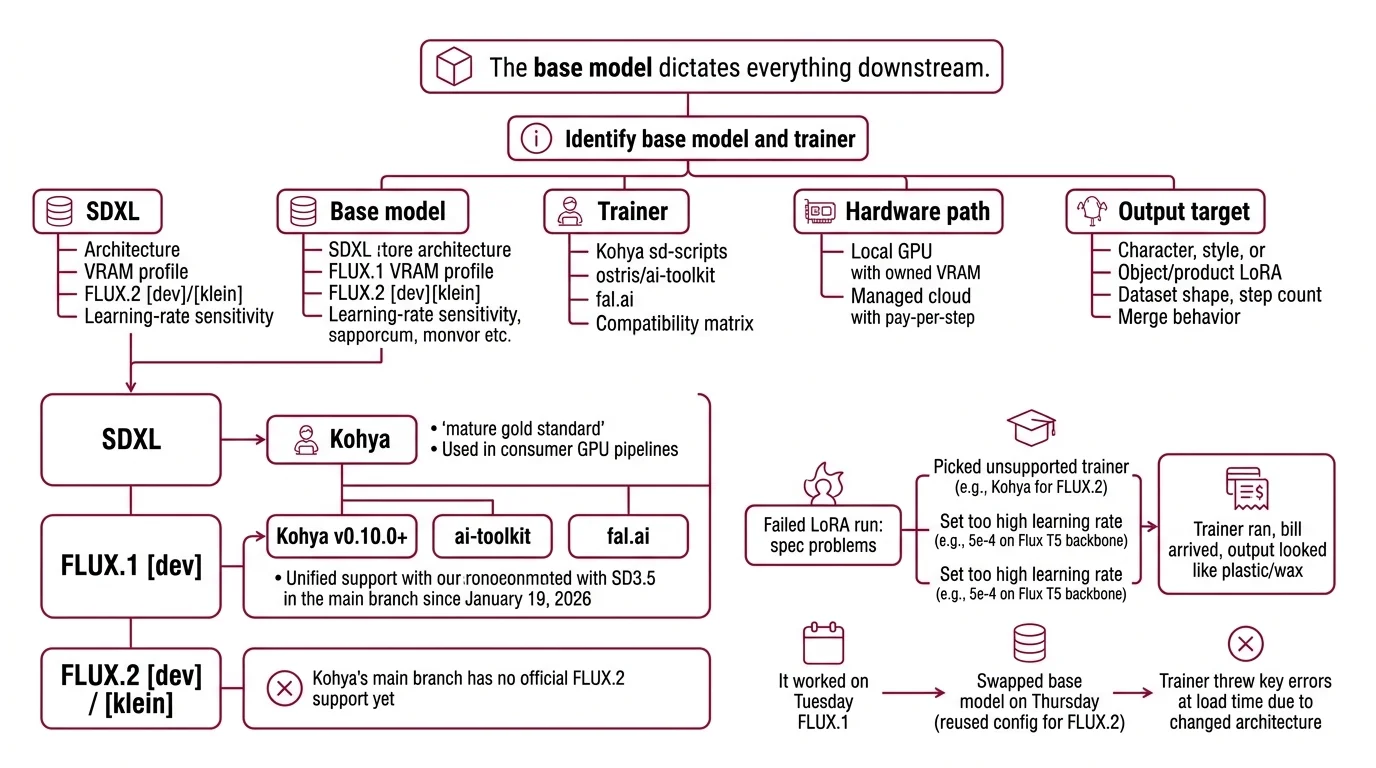
Most failed LoRA runs are not training problems. They are spec problems. You picked Kohya for FLUX.2 — except Kohya’s main branch has no official FLUX.2 support yet (Kohya sd-scripts repo). You set the learning rate to 5e-4 because that worked on SDXL — except Flux’s T5-conditioned 12B-parameter backbone overfits at that rate (Apatero Flux.2 guide). The trainer ran. The bill arrived. The output looked like wax.
It worked on Tuesday. On Thursday, you swapped from FLUX.1 to FLUX.2 [klein], reused the same Kohya config, and the trainer threw key errors at load time because the architecture changed underneath you. The base model dictates everything downstream.
Step 1: Identify Your Base Model and Trainer
A LoRA does not exist in isolation. It targets a specific base model. The base model dictates which trainer can produce a working adapter. Get this pair wrong and nothing downstream matters — not your dataset, not your captions, not your VRAM headroom.
Your system has these parts:
- Base model — SDXL, FLUX.1 [dev], or FLUX.2 [dev]/[klein]. Each has its own architecture, VRAM profile, and learning-rate sensitivity.
- Trainer — Kohya sd-scripts, ostris/ai-toolkit, or a fal.ai endpoint. Each supports a different subset of base models.
- Hardware path — local GPU (you own VRAM) or managed cloud (you pay per step).
- Output target — character, style, or object/product LoRA. This determines dataset shape, step count, and merge behavior.
The compatibility matrix is the spec, not a footnote:
- SDXL — Kohya is the gold standard, mature and battle-tested. AI Image Editing pipelines built on consumer GPUs still default here.
- FLUX.1 [dev] — Kohya v0.10.0 unified Flux.1 and SD3.5 support into the main branch on January 19, 2026 (Kohya sd-scripts releases). ai-toolkit and fal.ai also work.
- FLUX.2 [dev] / [klein] — Kohya’s main branch has no official FLUX.2 support yet. Use ai-toolkit or fal.ai.
The Architect’s Rule: If you cannot name the base model and the trainer in one sentence, you are not ready to start the run.
Step 2: Lock Down the Training Contract
Before you click “train,” every constraint must be explicit. The trainer will not ask. It will guess — and silently produce a LoRA that overfits, ignores your trigger, or refuses to compose with other adapters.
Context checklist:
- Dataset size — character LoRAs need 15–30 high-quality images at 1024×1024 with varied poses, lighting, and expressions (Segmind Flux LoRA guide). SDXL style LoRAs sit in the 30–50 range (Kohya LoRA settings guide).
- Learning rate — Flux LoRAs run between 5e-5 and 1e-4 because the T5 encoder punishes aggressive updates (Apatero Flux.2 guide). SDXL character LoRAs run 1e-4 to 2e-4; SDXL styles run 3e-4 to 5e-4.
- Step count — character runs land at roughly 1,500–2,500 steps with about 100 passes per image. Style runs need fewer.
- Trigger word — pick a unique non-English token like
txclorpelarbues, place it at caption start, and write captions in natural language because Flux’s T5 encoder reads sentences better than tag clusters (Diffusion Doodles LoRA guide). - VRAM ceiling — SDXL LoRAs need 10 GB minimum with batch 1, gradient checkpointing, and AdamW8bit; 16–24 GB is comfortable. Kohya’s fused backward pass cuts SDXL VRAM to ~17 GB at fp32 or ~10 GB at bf16 (Kohya LoRA settings guide).
- Caption format — natural-language captions for Flux. Tag clusters acceptable for SDXL.
The Spec Test: If your config does not name the trigger word, the LR, and the dataset image count, the trainer is picking defaults — and the defaults were tuned for somebody else’s subject.
Step 3: Sequence the Training Run
Order matters. Skip dataset prep and you spend GPU hours on garbage. Skip caption review and your trigger word never fires at inference.
Build order:
- Dataset assembly first — collect, deduplicate, and crop to 1024×1024. Same aspect ratio across the entire set.
- Caption generation second — auto-caption with a vision-language model, then hand-edit. Place the trigger word at the start of every caption.
- Config authoring third — pin the trainer version, set LR, step count, batch size, and save-every-N-steps so you have intermediate checkpoints to compare.
- Training run fourth — local GPU with Kohya or ai-toolkit, or upload a ZIP archive to fal.ai with optional matching
.txtcaption files at minimum 1024×1024 (fal.ai FLUX.2 trainer). - Cost estimate fifth — confirm the cloud bill before launch. fal.ai’s FLUX.2 [dev] trainer charges $0.008 per step, which is $8.00 for a 1,000-step run (fal.ai FLUX.2 trainer). The Turbo Flux Trainer runs $2.40 per 1,000-step batch (fal.ai Turbo Flux Trainer). The Flux Kontext Trainer charges $2.50 per 1,000-step batch with a 500-step minimum at $1.25 (fal.ai Flux Kontext Trainer). Edit trainers add a reference-image multiplier — roughly $18.99 for one reference plus 1,000 steps (fal.ai FLUX.2 Edit trainer).
For each component, your context must specify:
- Inputs — image set, caption files, trigger word
- Outputs —
.safetensorsfile plus intermediate checkpoints - Constraints — VRAM ceiling, max walltime, max cost
- Failure path — what to do when loss diverges or the GPU OOMs at load
Step 4: Validate the LoRA Output
You do not validate by generating one image and squinting at it. You validate against the contract you wrote in Step 2.
Validation checklist:
- Trigger word fires — generate with and without the trigger. The difference must be visible. Failure looks like: identical outputs in both runs (your trigger never bound).
- Subject consistency across poses — generate ten variations. Failure looks like: same face, same pose, every time (mode collapse on a single dominant training image).
- Composition with the base — generate the subject in a scene the training set never showed. Failure looks like: the subject only appears in original-photo backgrounds (overfit).
- Multi-LoRA stack behavior — load your LoRA together with one style LoRA in Diffusers using
pipe.set_adapters([...], adapter_weights=[...]), or merge permanently withadd_weighted_adapter(Diffusers Merge LoRAs docs). Keep the combined weight at or below 1.0 — for example, character at 0.5 plus style at 0.3. - Adapter limit — two to three LoRAs is the practical ceiling before quality degrades. Treat this as a community rule of thumb, not a benchmarked threshold.
- Inference weight tuning — sweep the LoRA weight at 0.6, 0.8, and 1.0. The right value depends on how aggressive your dataset was, not what the readme suggests.
Tooling notes (verified April 2026):
- Kohya
flux_merge_lora.py+ ai-toolkit LoRAs: Open issue #1612 reports keys from ai-toolkit-trained Flux LoRAs as “Unused”; the merge silently produces an unchanged file. Cross-validate merges with Diffusersadd_weighted_adapterfor production stacks.- FluxGym: Does not support FLUX.2 [dev], FLUX.2 [klein], Qwen-Image, or Z-Image Turbo training as of April 2026. Use ai-toolkit for those bases.
- bmaltais/kohya_ss GUI: Users still on pre-Flux/SD3 workflows must pin tag
v24.1.7— the main branch will not run that flow (bmaltais kohya_ss repo).- ai-toolkit FLUX.2 Klein: Load-time VRAM-spike fixes landed March–April 2026. Pull the latest before running on low-VRAM GPUs.
- Kohya multi-LoRA merge: Open issue #1888 — merging multiple LoRAs reported as “not working properly” in some configurations. For production stacks, use Diffusers’ weighted adapter API as the source of truth.
Common Pitfalls
| What You Did | Why The Trainer Failed | The Fix |
|---|---|---|
| Picked Kohya for FLUX.2 | Kohya main has no official FLUX.2 support yet | Switch to ai-toolkit or fal.ai for FLUX.2 |
| Reused SDXL LR (3e-4) on Flux | Flux’s T5 encoder overfits above 1e-4 | Lower LR to 5e-5–1e-4 for any Flux base |
| Used a real English word as trigger | Trigger collides with base-model concepts | Pick a unique non-English token at caption start |
| Tag-cluster captions on Flux | Flux’s T5 encoder reads sentences, not tag soup | Write natural-language captions for Flux runs |
| Stacked four LoRAs at full weight | Composition degrades past 2–3 adapters | Cap stack at 2–3 LoRAs, total weight ≤ 1.0 |
| Same dataset for character and style | Step count and LR differ by goal | Match dataset size and LR to the LoRA target type |
Pro Tip
Your trainer config is a contract between you, the GPU, and the base model. Every default the trainer offers was set by someone who never saw your dataset. Treat defaults as a starting line, not a finish. The faster you internalize the chain — base model dictates trainer, target type dictates LR, dataset shape dictates step count — the faster every subsequent LoRA you ship will land on the first run instead of the seventh.
Frequently Asked Questions
Q: How to train a LoRA for Flux.2 step by step in 2026?
A: Use ostris/ai-toolkit locally or the fal.ai FLUX.2 [dev] trainer at $0.008 per step. Kohya’s main branch has no official FLUX.2 support yet (Kohya sd-scripts repo). Start from the canonical 24 GB single-GPU recipe in config/examples/train_lora_flux_24gb.yaml (ai-toolkit 24GB config); on Klein with limited VRAM, pull the latest ai-toolkit so the March–April 2026 load-time fixes apply.
Q: How to use LoRAs for character consistency, style transfer, and product photography?
A: Pick the dataset shape that matches the target. Characters need 15–30 varied poses and lighting; styles need 30–50 mood-consistent images; product LoRAs need clean, high-resolution shots from multiple angles. Train each at the LR for its base model — never reuse a config across goals. Always test with prompts showing the subject in scenes the training set never contained.
Q: How to merge multiple LoRAs and pick trigger words for production pipelines?
A: Stack at most two to three LoRAs in Diffusers with set_adapters and weights summing at or below 1.0; permanent merges use add_weighted_adapter (Diffusers Merge LoRAs docs). For 3+ LoRAs, switch to TIES merging in LoRA-Merger-ComfyUI to resolve sign conflicts before averaging (LoRA-Merger-ComfyUI repo). Pick non-English trigger tokens — txcl, pelarbues — and keep them at caption start, never mid-sentence.
Your Spec Artifact
By the end of this guide, you should have:
- A trainer-and-base-model decision — written in one sentence, justified by the compatibility matrix in Step 1
- A training contract — dataset size, LR, step count, trigger word, VRAM ceiling, caption style, all explicit
- A validation rubric — trigger fires, subject varies across poses, the LoRA composes cleanly with at least one other adapter
Your Implementation Prompt
Drop this into your AI coding tool when you are ready to author the trainer config or the inference script. It mirrors the four-step decomposition above and forces you to fill the spec surfaces from your own project — no field is optional.
I am training a LoRA for image generation. Help me author a training config and a validation script.

Base model + trainer:
- Base model: [SDXL | FLUX.1 [dev] | FLUX.2 [dev] | FLUX.2 [klein]]
- Trainer: [Kohya sd-scripts vX.Y | ostris/ai-toolkit | fal.ai endpoint name]
- Hardware: [local GPU with N GB VRAM | fal.ai managed]

Training contract:
- LoRA target: [character | style | product]
- Dataset size: [N images at 1024x1024]
- Learning rate: [value, justified by base model -- Flux 5e-5 to 1e-4, SDXL character 1e-4 to 2e-4, SDXL style 3e-4 to 5e-4]
- Step count: [value, e.g. 1500-2500 for character]
- Trigger word: [unique non-English token, placed at caption start]
- Caption style: [natural language for Flux | tags acceptable for SDXL]
- VRAM ceiling: [value]
- Max cost (cloud only): [value, computed from per-step price * total steps]

Build order:
1. Dataset prep -- dedupe, crop to 1024x1024, single aspect ratio
2. Caption generation -- VLM auto-caption then hand-edit, trigger at start
3. Config authoring -- pin trainer version, save every N steps
4. Training run -- local or fal.ai upload (ZIP + .txt captions, 1024x1024 minimum)
5. Cost estimate -- confirm cloud spend before launch

Validation:
- Trigger fires (with vs. without)
- Subject varies across poses (no mode collapse)
- Composes with one style LoRA at combined weight <= 1.0
- Inference weight sweep at 0.6 / 0.8 / 1.0

Output:
- The training config file in the trainer's native format
- A short Python validation script using Diffusers set_adapters
- A list of failure symptoms I should watch for during training
Ship It
You now have a four-surface mental model — base model, trainer, dataset, trigger — that turns LoRA training from a tuning ritual into a specification problem. Next time someone hands you a folder of photos, you will know which trainer to pick before you open the config file. The runs get cheaper, the outputs get truer, the failures get rarer.
AI-assisted content, human-reviewed. Images AI-generated. Editorial Standards · Our Editors