How to Ship a Production App with Cursor, Claude Code, and Windsurf in 2026
TL;DR
- Each tool is shaped for a stage of the build, not the whole build.
- A clean spec beats a clever tool. Write the spec before you open an IDE.
- The cheapest way to ship is to refuse to one-shot a production app.
Friday demo. The Lovable prototype looks great. Monday morning, your engineer opens Cursor to “just clean it up,” and three hours later the auth flow is held together with hallucinated middleware. The model didn’t fail. The handoff did. Wrong tool, wrong stage, wrong spec.
Before You Start
You’ll need:
- A Cursor account, a Claude Code subscription, and a Windsurf account — or whichever subset you actually use
- A working mental model of Vibe Coding as a workflow, not a marketing word
- A one-paragraph description of what you’re building, who uses it, and what “done” looks like
This guide teaches you: how to decompose a production build into stages and match each stage to the AI coding tool whose training and runtime actually fit it.
The Tool Stack You’re Probably Mis-Using
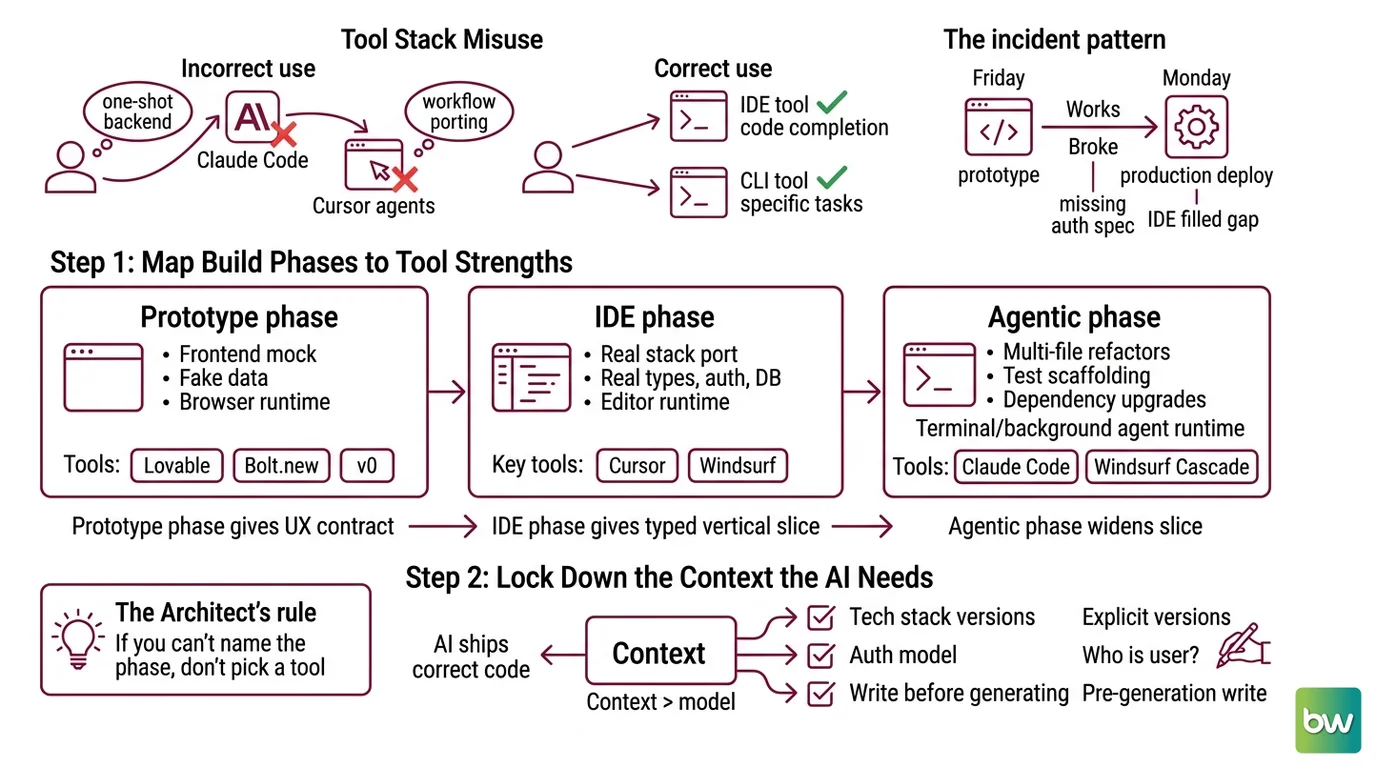
The mistake almost every team makes in 2026 is treating Cursor, Claude Code, and Windsurf as interchangeable. They’re not. A Cursor user trying to one-shot a backend in Claude Code is using a long-horizon agent like a code completion model. A Claude Code user porting their workflow into Cursor’s Agents Window is paying the IDE tax for tasks the CLI does better.
The incident pattern: it worked in the prototype on Friday. On Monday, the production deploy broke because the prototyping tool never specified the auth provider, and the IDE tool filled the gap with a confident default.
Step 1: Map the Build Phases to Tool Strengths
Before you open any editor, decompose your build into three phases. Each tool earns its place by the stage it owns.
Your production app has these phases:
- Prototype phase — clickable mock, fake data, frontend-only routes. Runtime: the browser. Tools: Lovable, Bolt.new, v0.
- IDE phase — porting the prototype into your real stack with real types, auth, and database calls. Runtime: your editor. Tools: Cursor, Windsurf.
- Agentic phase — multi-file refactors, test scaffolding, dependency upgrades. Runtime: terminal or background agent. Tools: Claude Code, Windsurf Cascade.
Each phase produces the input the next consumes. Prototype gives you a UX contract. IDE work gives you a typed, tested vertical slice. The agentic phase widens that slice across the codebase.
The Architect’s Rule: If you can’t name which phase a task belongs to, you’re not ready to pick a tool.
Step 2: Lock Down the Context the AI Needs
The single biggest factor in whether an AI tool ships correct code is not the model. It’s the context you hand it.
Context checklist — write this before you generate anything:
- Tech stack and versions — framework, language, package manager, deploy target. State them explicitly. The model’s training cut-off is not your version pin.
- Auth model — who logs in, with what provider, with what session strategy. Most “mysterious” bugs in AI-generated apps trace to this line being missing.
- Data shape — paste the actual TypeScript type or SQL DDL into the context, not a description of it.
- Input/output contracts — for every endpoint and function, the signature and the error cases.
- Style rules — linter config, import order, error handling pattern. The AI has no opinion until you give it one.
- MCP servers connected — every Model Context Protocol server you’ve wired into the tool is part of the context. List them. Audit them.
MCP is now the standard wire format for these tools — an open standard donated by Anthropic to the Linux Foundation’s Agentic AI Foundation in December 2025 (Anthropic), with over 10,000 public servers as of March 2026 (The New Stack). Pin which servers each tool can call, and treat unrestricted MCP access the way you’d treat a database with no row-level security.
The Spec Test: If your context doesn’t name the auth provider, database, and MCP servers, the AI picks. You will not like the choice.
Step 3: Sequence the Build — Prototype, Port, Refactor
The build order matters more than the tools. Never one-shot a production app.
Build order:
- Prototype in a rapid-build tool — Lovable Pro at $25/month with Supabase wired in, Bolt Pro at $20/month with file upload, or v0 starting free with $5 in monthly credits (Lovable, UI Bakery, NxCode). Treat the output as a Figma file. Copy the structure, rewrite the code in your real stack.
- Port to Cursor or Windsurf — open the prototype alongside your real codebase. Translate it into a typed, authenticated, real-database version one vertical slice at a time. Cursor Pro is $20/month and Pro+ $60/month on a usage-based credit pool (Cursor’s pricing page, Vantage). Windsurf Pro is $20/month with the Cascade agent for multi-file edits (Windsurf pricing index).
- Hand the cross-cutting work to Claude Code — schema-wide renames, test scaffolding, dependency upgrades that touch fifty files. Claude Code ships with Claude Pro at $20/month, Max 5x at $100, and Max 20x at $200 (Claude pricing page). Opus 4.7 hit 87.6% on SWE-bench Verified in its April 2026 release, with a 1M-token context window (Tech Insider). That long context is the only reason to reach for it over an IDE agent — when the task needs the whole repo in working memory.
For each phase, your context must specify:
- What it receives (the previous phase’s artifact)
- What it produces (the next phase’s input)
- What it must NOT touch (out-of-scope files)
- How to handle failure (revert, log, or escalate)
This is where AI Code Migration discipline pays for itself. The agentic phase is the closest thing to a codemod run, except the rules are written in English and the runtime makes judgment calls. If your spec is loose, those calls become technical debt.
Step 4: Validate Before You Promote Anything
The model is confident. That’s not the same as correct. Benchmark wins are not production warranties.
Validation checklist:
- Type check passes across the changed files — failure looks like: hallucinated imports, fictional helpers from libraries you don’t use.
- Tests cover happy path and edge cases from Step 2 — failure looks like: green CI with zero assertions on the auth flow.
- Manual trace through one full user journey — failure looks like: works in isolation, breaks because the AI assumed a different shape from the previous step.
- Security scan of any new MCP server permissions — failure looks like: the AI quietly granted full-cluster read to an analytics MCP because the spec didn’t restrict it.
- Cost trace on the AI provider dashboard — failure looks like: a runaway agent loop that drained a month of credits in one afternoon. Cursor’s June 2025 shift to a usage-based credit pool means a careless prompt costs real money (Vantage).
The temptation in the agentic phase is to glance at the first three outputs and merge. Don’t. The model is faster than you — your assertions need to be faster than the model.
Compatibility notes (as of May 2026):
- Cursor 3.0 (April 2026): Composer pane replaced by the Agents Window. Older Composer tutorials are stale.
- Claude Code billing (from June 15, 2026): Third-party Agent SDK usage draws from a separate credit pool, not subscription quota (Zed Blog).
- Windsurf: Pro raised from $15 to $20/month in March 2026; Cognition AI acquired Windsurf in December 2025, roadmap still consolidating with Devin (Taskade).
- MCP servers built before March 2026: May need migration to v2’s Streamable HTTP + OAuth 2.1 (Model Context Protocol).
- SWE-bench caveat: Third-party benchmark numbers are directional supporting evidence, not production warranties.
Common Pitfalls
| What You Did | Why AI Failed | The Fix |
|---|---|---|
| One-shot “build me the full app” | Too many concerns, model picks the wrong priority and confabulates the rest | Decompose into the three phases first |
| No stack or auth provider specified | Model defaults to its training bias — usually Next.js + Clerk or Express + Passport | State framework, version, and auth in your context file |
| Skipped the prototype phase entirely | IDE agents waste cycles inventing UX you would have rejected | Build the clickable mock first; lock the UX before generating real code |
| Used the IDE agent for a cross-repo rename | IDE context window can’t hold the whole repo; agent silently misses files | Move to Claude Code in the terminal where long context is the point |
| Connected an MCP server without scoping it | Tool reads more than you intended | Scope every MCP server to least privilege |
| Trusted SWE-bench numbers as production fitness | Benchmarks measure synthetic tasks, not your codebase | Evaluate on a representative ticket before adopting |
Pro Tip
The spec you write for the AI is also the spec for the next engineer who joins. Auth model, data shape, error pattern, scope boundaries — every constraint becomes onboarding documentation. Treat context files as first-class code. The team shipping fastest with this stack is the one whose specs are cleanest, not the one with the most subscriptions.
Frequently Asked Questions
Q: How to build a full-stack app step by step using Cursor and Claude Code?
A: Use Cursor for the vertical slice — one route, one component, one query, fully typed. Hand the horizontal work to Claude Code: scaffold the remaining routes, generate tests, run dependency upgrades. Run them in parallel terminals, not in sequence.
Q: How to use vibe coding for rapid prototyping with Lovable, Bolt, and v0?
A: Pick by output target. Lovable for full-stack flows with Supabase wired. Bolt.new for mobile-friendly demos and file upload. v0 for shadcn-style UI components. Treat the output as a Figma file, not a codebase — the technical limits of vibe coding mean you copy the structure and rewrite the code yourself.
Q: How to use Claude Code and Windsurf for refactoring large codebases?
A: Claude Code wins on cross-file reasoning — long context plus the strongest SWE-bench score in the stack. Windsurf’s Cascade is faster on bounded multi-file edits inside one feature folder. Use Claude Code for architectural refactors; reach for Windsurf when scope is contained.
Your Spec Artifact
By the end of this guide, you should have:
- A three-phase build map for your specific app — which tool owns which phase, with the artifact each phase produces
- A context checklist: stack, auth, data shape, contracts, style rules, MCP servers — written once, reused across every tool
- A validation checklist: type check, tests, manual trace, security scan, cost trace — with the failure symptom named for each
Your Implementation Prompt
Paste this into your AI coding tool at the start of a new build. Fill the brackets with your own values. The structure mirrors Steps 1 through 4.
You are helping me ship a production app. We will work in three phases. Do not
combine them. Do not skip ahead.

PHASE 1 - PROTOTYPE
Goal: lock UX contract with stakeholders.
Tool: [Lovable | Bolt | v0 — pick one]
Out: a clickable mock of [feature name], using fake data shaped like [data shape].

PHASE 2 - IDE PORT
Goal: turn the prototype into one typed, tested vertical slice in our real stack.
Stack: [framework + version]
Auth: [provider + session strategy]
Database: [engine + schema link]
Error pattern: [pattern name + example]
Style: [linter config link]
Constraints:
- Touch only files under [scope]
- Do not introduce new dependencies without asking
- All new functions must have input/output types

PHASE 3 - AGENTIC REFACTOR
Goal: widen the vertical slice to the rest of the codebase.
Scope: [list of files or directories]
MCP servers allowed: [server names; default deny]
Out-of-scope: [files or directories the agent must not touch]

VALIDATION (run before any merge)
- Type check passes across changed files
- Tests cover [list of edge cases from Phase 2]
- Manual trace through [one full user journey]
- Security scan of any new MCP server permissions
- Cost trace: no single agent run over [your budget cap]

Start with Phase 1. Stop and confirm before moving to Phase 2.
Ship It
You now have a phase-aware mental model for the 2026 AI coding stack. You can name which tool fits which stage, write the context spec each tool needs, and validate the output before it reaches production. The next prompt you write will be a better one because of the constraints you left out of the last one.
AI-assisted content, human-reviewed. Images AI-generated. Editorial Standards · Our Editors