How to Set Up AI Code Completion with Cursor Tab, GitHub Copilot, and Continue in 2026
TL;DR
- Pick the completion stack BEFORE the editor — the model, the runtime, and the billing model are the actual decision.
- A spec for code completion has four layers: latency budget, context window, privacy boundary, and cost ceiling. Skip any one and you will rip it out in a month.
- Self-hosting with Continue and Ollama is a real option in 2026, but only if your VRAM math works.
A senior developer pinged me last week. Copilot had stopped auto-completing on her Friday branch. Same repo, same VS Code, same login. The completion engine had silently rolled over to a new model variant — different latency, different context window. Her muscle memory still hit Tab. The suggestions stopped being useful.
That is what unspecified AI Code Completion does to a workflow. You wire up Tab and treat the tool as a static utility. Then the vendor changes the runtime, and your “set it and forget it” install becomes a daily friction. With GitHub Copilot moving to usage-based billing in a few weeks, this exact migration is about to happen to a lot of teams at once.
This guide is a setup spec. Three completion engines, four decision layers, one copy-paste prompt at the end.
Before You Start
You’ll need:
- An editor that the candidate tools support — VS Code, JetBrains, Cursor (its own fork), or Neovim
- A working mental model of Fill-in-the-Middle — completion engines do not autocomplete left-to-right, they fill a gap
- A clear picture of which repos and files you will and will not let the tool see
This guide teaches you: how to specify a completion stack so that you pick the right tool the first time and the spec survives a model swap.
The Friday-to-Monday Failure Mode
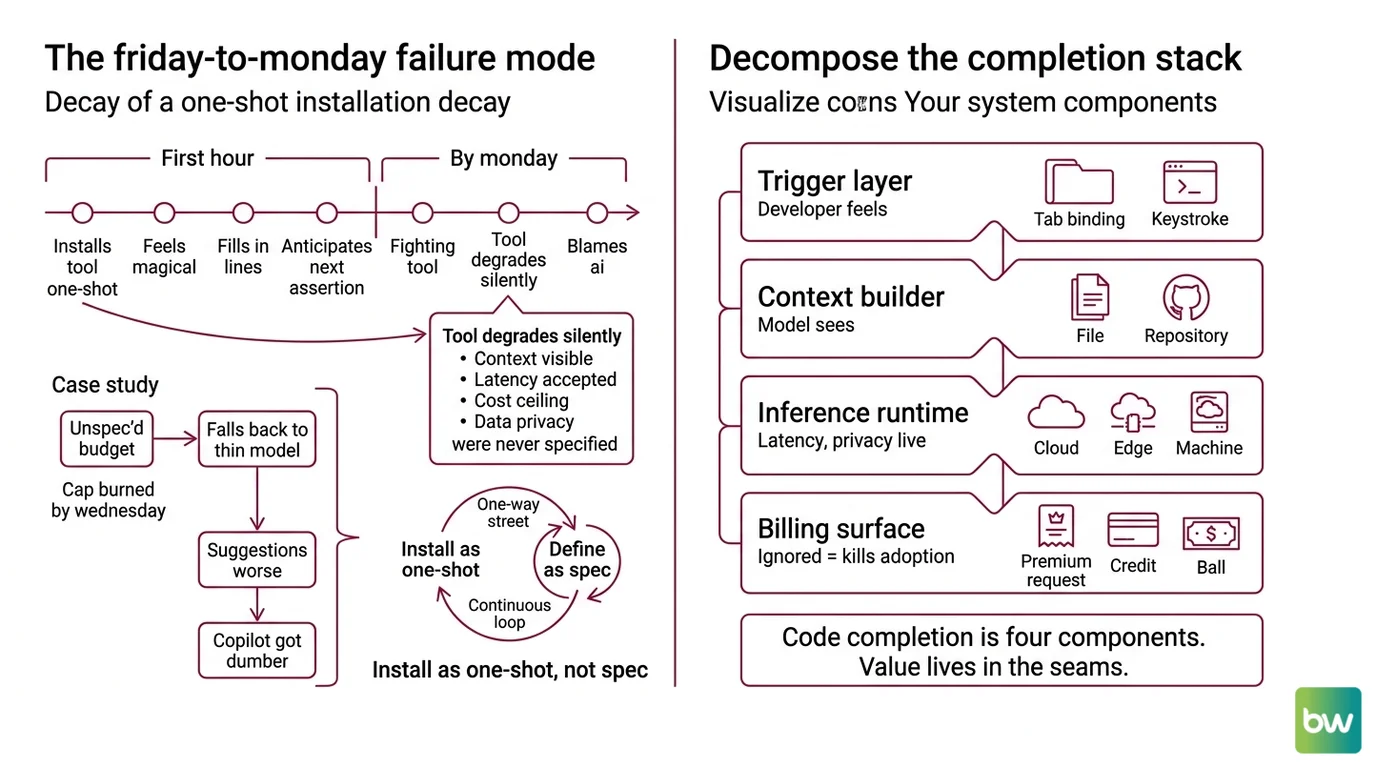
Here is what kills code completion adoption inside a team. Someone installs it on Friday. The first hour feels magical — the model knows your codebase, fills in three lines you would have typed by hand, anticipates the next assertion. By Monday, the same engineer is fighting it.
The reason is almost never the model. The reason is that the install was a one-shot — a name, a key, a Tab binding — and not a spec. Nobody decided what context the engine could see, what latency was acceptable, what the cost ceiling was, or what data should never leave the laptop. So when the vendor changes any of those, the tool degrades silently and the engineer blames the AI.
One concrete incident I keep seeing: a Copilot Pro user paid $10/month, treated premium-request counters as infinite, and on a benchmark week burned through their monthly cap by Wednesday. The completion engine fell back to a thinner model. Suggestions got worse. They concluded “Copilot got dumber.” It did not. The spec just never named a request budget.
Step 1: Decompose the Completion Stack
Code completion is not a single thing. It is four components glued together, and the value lives in the seams.
Your system has these parts:
- The trigger layer — the editor binding (usually Tab) and the keystroke window that decides when to call out for a suggestion. This is what the developer feels.
- The context builder — the code the editor packs into the request: current file, recently edited files, sometimes a repo embedding. This is what the model actually sees.
- The inference runtime — the actual model and where it runs (vendor cloud, vendor edge, your own machine). This is where latency and privacy live.
- The billing surface — premium requests, AI credits, per-seat licenses, or your own electricity bill. This is what kills adoption when ignored.
The tools we are evaluating split these components differently. Cursor bundles the editor and trigger with its own context builder and routes inference to its proprietary Tab model — one vendor, four layers. GitHub Copilot ships the trigger and a vendor context builder for VS Code and JetBrains, runs inference in Microsoft’s cloud, and bills through GitHub. Continue plus Ollama hands you the trigger and a configurable context builder, then lets you point inference anywhere — including your own GPU.
The Architect’s Rule: If you cannot name which vendor owns each of the four layers, your “completion stack” is actually a black box and you will be at the mercy of any single layer changing.
Step 2: Lock Down the Four Constraints
This is the step that survives a model swap. Every completion-tool decision reduces to four bracketed numbers. Fill them in BEFORE you install anything.
Context checklist:
- Latency budget — how many milliseconds from keystroke to suggestion you will tolerate before the tool feels worse than typing. Most developers stop using completion above ~300ms. Local 1.5B models on a modern laptop fit. A 32B model on a cold cloud endpoint does not.
- Context window — how much of your repo the engine sees per request. Single-file completion is fine for boilerplate. Cross-file refactors need repo-aware context, which only some tools provide and which usually costs more.
- Privacy boundary — which files and which secrets are NEVER allowed to leave your machine. This is a yes/no per repo. If the answer is “never” for any repo, hosted completion is out for that repo.
- Cost ceiling — the monthly dollar number per developer that does not require a finance conversation. As of May 2026, that line is around $20/seat for individuals and $30-40/seat for teams.
The four candidates map cleanly onto these constraints. Cursor’s Pro tier is $20/month and includes predictive multi-line Tab completions on every paid plan, with limited Tab on the free Hobby plan (Cursor’s pricing page). GitHub Copilot Pro is $10/month with 300 premium requests, and Pro+ jumps to $39/month with 1,500 premium requests and full chat model access (GitHub Docs). Windsurf, formerly Codeium, sits between them with a $15/month Pro tier that includes Tab/Supercomplete and the Cascade agent.
For the privacy boundary, the answer is different. Hosted tools — Cursor, Copilot, Windsurf — send context to vendor infrastructure. If your spec says “this repo never leaves the machine,” only the Continue + Ollama path satisfies it. Continue is MIT-licensed and supports any OpenAI-compatible API, so you can point it at a local Ollama daemon and never touch a vendor endpoint (Ollama Blog).
The Spec Test: Write down your four numbers. If any teammate cannot recite them from memory in a month, your tool will get blamed for a constraint nobody specified.
Step 3: Wire the Engine That Matches Your Spec
Order matters here. Pick the engine FIRST, the editor second, the keybindings last.
Build order:
- Pick the inference runtime — because this decides cost, latency, and privacy in one step. Hosted (Cursor, Copilot, Windsurf) wins on day-one latency. Self-hosted (Continue + Ollama) wins on privacy and predictable cost. There is no middle ground that is not a trap.
- Pick the editor binding — because the runtime constrains it. Cursor’s Tab only runs in Cursor. Copilot runs in VS Code, JetBrains, Neovim, and the GitHub web IDE. Continue runs in VS Code, JetBrains, and Neovim. If you are not switching editors, this narrows your runtime list automatically.
- Wire the context builder last — because this is the one knob you will keep adjusting. In Cursor and Copilot the builder is opaque, and your only knob is the ignore file. In Continue, you write a
config.yamlthat names the autocomplete model, the chat model, and the embedding model explicitly.
For each runtime, your spec must say:
- What it receives — current file plus N nearest files? Repo-wide embeddings? Just the cursor neighborhood?
- What it returns — a single line? A multi-line block? A whole function?
- What it must NOT see —
.envfiles, customer data fixtures, anything covered by your privacy boundary - How to handle failure — fall back silently, surface an error toast, or hard-disable on a flagged repo
For the self-hosted path specifically, the model choice IS the spec. The canonical small autocomplete pick is qwen2.5-coder:1.5b — small enough to respond inside your latency budget on a laptop GPU (Continue Docs). For the chat sidebar, qwen2.5-coder:7b or deepseek-coder:6.7b are the standard picks. The Qwen2.5-Coder 32B-Instruct variant is competitive with GPT-4o on EvalPlus and LiveCodeBench (Ollama Library) — but it needs ~32GB of RAM to run comfortably, which puts it on a workstation, not a laptop.
RAM is the real gate. The requirement scales with parameter count: 4GB for 1.5B-3B models, 8GB for 7B, 16GB for 13B, 32GB for 32B (Continue Docs). A 16GB MacBook Pro can host the 1.5B autocomplete plus the 7B chat model side by side. An 8GB machine cannot.
Step 4: Validate Before You Commit a Workflow
Most teams skip this step and then live with a bad install for six months. Spend an afternoon.
Validation checklist:
- Latency under your budget — failure looks like: you start typing before the suggestion arrives, then you reject it because it interrupts your thought. If this happens twice an hour, the runtime is wrong for your machine.
- Suggestions in your stack — failure looks like: the model proposes a function that does not exist in your dependency version, or imports a package that is not in your
package.json. This is a context window problem, not a model problem. - Privacy boundary holds — failure looks like: the model autocompletes a real API key from your
.envbecause you forgot to exclude it. Inspect what the tool actually sends. Cursor and Copilot both publish ignore-file syntax for this. - Cost stays under your ceiling — failure looks like: a premium-request counter that spikes during heavy-prompt days. Track it weekly for the first month, not monthly. Especially relevant with Copilot’s June 2026 transition.
Security & compatibility notes:
- GitHub Copilot billing transition: All Copilot plans move to usage-based AI Credits billing on June 1, 2026 (GitHub Blog). Premium-request counters are being retired. If you are pricing a Pro or Business subscription for after that date, treat current per-month limits as approximate — the dollar figures still apply, the request-counting model does not. Hedge any month-and-day-precise budget spec with “as of May 2026.”
- Continue config format:
config.jsonis deprecated.config.yamlis the only format receiving new features, including Hub model blocks and model roles. Existingconfig.jsonfiles auto-migrate on first load, but new installs should start withconfig.yamlat~/.continue/config.yaml(Continue Docs).- Codeium → Windsurf rename: Codeium rebranded to Windsurf in late 2024 and is now owned by Cognition. Any onboarding doc that still says “Codeium” is stale.
Common Pitfalls
| What You Did | Why AI Failed | The Fix |
|---|---|---|
| Installed Copilot and accepted defaults | Vendor context builder ignored your monorepo’s package boundaries | Add a .copilotignore and name the directories the engine should see |
| Picked the biggest local model you could fit | Latency went over 500ms and you stopped pressing Tab | Drop to a 1.5B-3B autocomplete model; keep the big model for chat only |
| Treated premium requests as unlimited | Heavy-prompt days blew through the monthly cap by mid-month | Pick a plan whose monthly request count exceeds your peak day times 22 |
| Self-hosted on an 8GB laptop | Ollama swapped to disk, latency went to multiple seconds | Run autocomplete only at 1.5B, OR move chat to a remote endpoint |
| Skipped the privacy boundary | Vendor saw a customer-data fixture that should never have left disk | Add ignore files BEFORE the first Tab press, not after |
Pro Tip
Treat the completion stack as a YAML file you can check into your dotfiles, not as a clicked-through install wizard. Continue makes this literal — ~/.continue/config.yaml is a real file with your autocomplete model, chat model, embeddings model, and context provider blocks. Cursor and Copilot do not give you that file, but you can still write one for yourself: a four-line spec naming your latency budget, context window, privacy boundary, and cost ceiling, committed to your team wiki. Next time the vendor changes a model, you grep your spec and ask “does this still satisfy the four constraints?” If yes, keep it. If no, swap. That is the only way to make completion tooling outlast a single vendor cycle.
Frequently Asked Questions
Q: How to use AI code completion effectively in a daily development workflow?
A: Bind Tab to accept, Esc to dismiss, and use completion only for boilerplate, repetitive transforms, and type imports. Keep the chat sidebar separate for design questions. The trap is reading every suggestion: skim, accept what is obviously right, ignore the rest. If you debate a suggestion for more than three seconds, dismiss it and type what you meant. Suggestion fatigue kills productivity faster than a bad model does.
Q: How to configure Cursor Tab, Copilot, and Windsurf for fast inline completion in 2026?
A: In Cursor, Tab is on by default on every paid plan; the Hobby tier limits it (Cursor’s pricing page). In VS Code Copilot, ensure github.copilot.editor.enableAutoCompletions is true and add a .copilotignore per repo. In Windsurf, enable Supercomplete in settings. For all three, the practical knob is the ignore file — most “slow” completions are oversized contexts, not slow models.
Q: How to build a self-hosted code completion backend with Continue, Ollama, and a local LLM step by step?
A: Install Ollama, pull qwen2.5-coder:1.5b for autocomplete and qwen2.5-coder:7b for chat (Continue Docs). Install the Continue extension in VS Code or JetBrains. Edit ~/.continue/config.yaml to declare both models with their roles. Restart the editor. Watch for the autocomplete role specifically — if Continue treats your model as chat-only, Tab will not fire. Plan on at least 16GB of RAM for both models running concurrently.
Your Spec Artifact
By the end of this guide, you should have:
- A one-page stack map naming which vendor owns each of the four layers (trigger, context builder, inference runtime, billing surface) for your chosen tool
- A constraint sheet with your four numbers filled in: latency budget in milliseconds, context window scope, privacy boundary per repo, monthly cost ceiling per developer
- A validation checklist with the four failure symptoms named (slow Tab, hallucinated dependency, privacy leak, cost spike) and what each one tells you to fix
Your Implementation Prompt
Paste the following into Claude Code, Cursor, or Codex when you start a new project and want the AI to scaffold your code completion configuration alongside the codebase. Replace every bracket with your actual constraint.
You are helping me set up AI code completion for a new project. Generate
the configuration files and ignore-list entries based on the spec below.
Do NOT pick the tool for me — the tool is already chosen.

LAYER OWNERSHIP (from Step 1 of my spec):
- Trigger layer: [Cursor Tab | Copilot | Continue | Windsurf]
- Context builder: [vendor default | Continue config.yaml | other]
- Inference runtime: [vendor cloud | self-hosted Ollama at host:port | other]
- Billing surface: [per-seat | premium requests | AI credits | self-hosted]

FOUR CONSTRAINTS (from Step 2):
- Latency budget: [e.g. 300ms]
- Context window scope: [single file | nearest N files | repo-wide embeddings]
- Privacy boundary - files NEVER sent to vendor:
  - [.env, .env.*]
  - [path/to/customer-fixtures/]
  - [your additions]
- Cost ceiling: [e.g. $20/seat/month]

BUILD ORDER (from Step 3):
1. Inference runtime first - generate the runtime config (config.yaml for
   Continue, vendor settings JSON for Copilot/Cursor)
2. Editor binding second - confirm Tab is bound to accept, Esc to dismiss
3. Context builder last - generate the ignore file matching the privacy
   boundary above

VALIDATION (from Step 4):
After generating the config, output a four-item checklist I can run
through manually:
- Test latency by typing a 5-line function and timing first suggestion
- Test stack-awareness by importing a package that exists only in this repo
- Test privacy by attempting completion inside one of the ignored paths
- Test cost by counting requests over one workday

Output the config files first, then the validation checklist. Do not
output explanation prose between them.
The prompt mirrors the four-layer decomposition from Step 1, names every constraint category from Step 2, follows the build order from Step 3, and ends with the four validation symptoms from Step 4. If you swap the tool later, the same prompt structure still applies — only the bracketed values change.
Ship It
You now have a spec for AI code completion that is independent of which vendor wins next quarter. Four layers to name. Four constraints to pin. One config file or wiki page to commit. The next time a vendor changes a model, retires a billing model, or rebrands itself, you will ask the spec a question instead of starting over.
AI-assisted content, human-reviewed. Images AI-generated. Editorial Standards · Our Editors