How to Set Up a Model Registry with MLflow and DVC for Reproducible ML Deployments in 2026
TL;DR
- MLflow’s Staging/Production/Archived stages are deprecated — use model aliases like
@championand environment-based registered models instead - DVC makes your registry Git-native: every model version is a tag, every promotion is a commit traceable to a data pipeline
- Rollback is a registry operation, not a redeployment: reassign the alias and your serving layer picks up the previous version automatically
You promoted the model on Friday. Your team re-ran an experiment on Monday and accidentally pointed the serving endpoint at last Tuesday’s candidate. Same $MODEL_PATH variable. Different model. The
Model Registry problem is not finding models — it is knowing, without ambiguity, which model is running in production right now.
Folder-based model management breaks at the first handoff. This guide gives you the specification to fix it.
Before You Start
You’ll need:
- Mlflow 3.x (self-hosted or Databricks Managed MLflow)
- DVC 3.67.1 — now stewarded by lakeFS after their November 2025 acquisition
- Claude Code, Cursor, or Codex for AI-assisted wiring
- Familiarity with Experiment Tracking, Model Artifact management, and Model Lineage
This guide teaches you: How to decompose a model registry into three distinct concerns — artifact storage, promotion logic, and deployment routing — and specify each one so your AI coding tool can wire them without guessing.
Why $MODEL_PATH Is Not a Model Registry
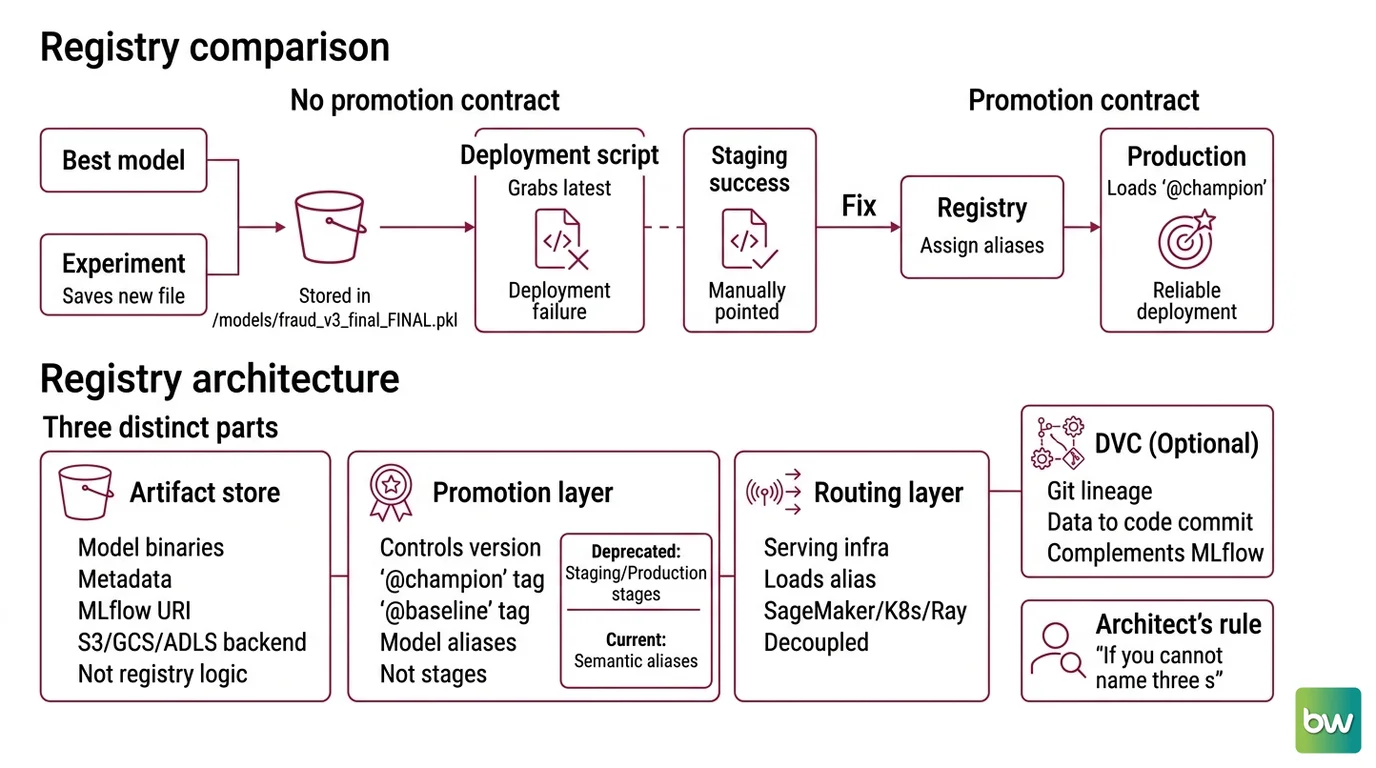
Here is what goes wrong without a specified promotion contract. Your best-performing model lives in /models/fraud_v3_final_FINAL.pkl. Someone runs a new experiment. They save to the same bucket, same prefix, different timestamp. Your deployment script grabs the latest file by modification date. Production is now running last week’s candidate, not your champion.
It worked in staging. Staging was manually pointed at the right path. Production grabbed the wrong one because nothing specified what “latest” actually means.
The real fix is promotion contracts, not path naming. You need a registry that encodes promotion state explicitly — not inferred from timestamps or folder depth.
Step 1: Map the Registry Architecture
Your registry has three distinct components. Treat them separately.
Your system has these parts:
- Artifact store — where model binaries and metadata live (MLflow artifact URI, S3/GCS/ADLS backend). This is storage, not registry logic.
- Promotion layer — what controls which version is
@championand which is@baseline. In MLflow 3.x, this is model aliases, not lifecycle stages. - Routing layer — how your serving infrastructure (SageMaker, Kubernetes, Ray Serve) knows which alias to load. Decoupled from the other two.
The alias approach replaced the old stage workflow. Under the deprecated model, you transitioned a version through Staging → Production → Archived. Under the current approach (MLflow Model Registry Docs), you assign semantic aliases — @champion, @baseline, @challenger — to specific version numbers. Multiple aliases can target one version, which enables A/B and canary patterns without lifecycle state machines.
If you’re running DVC alongside MLflow, DVC handles a different layer: Git-based Model Lineage linking model versions to the exact data pipeline and code commit that produced them.
The Architect’s Rule: If you cannot name three separate components of your registry, you haven’t specified it yet. Artifact storage, promotion logic, and deployment routing are three different problems.
Compatibility notes (MLflow 3.x):
- MLflow stages deprecated:
Staging,Production, andArchivedstages — includingtransition_model_version_stage()— have been deprecated since MLflow 2.9.0 and will be removed in a future major release. The current API uses model aliases (client.set_registered_model_alias()) and environment-based registered models (e.g.,dev.ml.fraud_model→prod.ml.fraud_model).- MLflow Recipes removed: Removed in MLflow 3.0. Do not reference in new implementation plans (MLflow 3 Release Docs).
- DVC governance change: lakeFS acquired DVC in November 2025. Development continues under lakeFS stewardship, but verify the
gtotool’s current maintenance status at dvc.org before adopting it as your primary workflow (PR Newswire).
Step 2: Define the Promotion Contract
This is where most implementations break. The artifact store exists. The aliases don’t. Deployment reads from a path nobody specified.
Context checklist before your AI tool writes any wiring code:
- Alias set defined (
@champion,@baseline,@challenger) — what each alias means in your system - Who triggers promotion (automated CI validation gate, not manual UI clicks)
- Environment naming convention (
dev.ml.fraud_model,staging.ml.fraud_model,prod.ml.fraud_model) - Promotion copy method: use
copy_model_version()to move across environment-specific registered models (MLflow Model Registry Workflow) - Rollback trigger: the metric threshold or human approval that resets
@championto the previous version - Webhook events: configure MLflow to POST to your CI endpoint when aliases change, when new versions are registered, or when tags are updated (MLflow Webhooks Docs)
The Spec Test: If your context doesn’t specify the alias naming convention and the promotion trigger, your AI tool will generate code that calls
transition_model_version_stage()— the deprecated API. Add “use model aliases, not stages — MLflow 2.9+ deprecates stages” to every prompt in this area.
Step 3: Sequence the Registry Build
Order matters. Building CI/CD webhook logic before you have a working alias assignment is how you end up debugging two systems at once.
Build order:
- Artifact registration first — log your model with
mlflow.log_model(), register it, confirm the version number exists in the UI. No aliases yet. Prove the storage layer works independently. - Alias assignment second — call
client.set_registered_model_alias("fraud_model", "champion", version). Load it back withclient.get_model_version_by_alias("fraud_model", "champion"). Prove promotion state is readable before you automate it. - Environment promotion third — use
copy_model_version()to copy the champion fromdev.ml.fraud_modeltoprod.ml.fraud_model. Prove cross-environment lineage without re-registering the artifact. - CI/CD webhook last — configure your MLflow instance to trigger a webhook POST to your pipeline when alias state changes. Wire your deployment to reload from
@championon each trigger.
For each component, your context must specify:
- What it receives: a model version number or alias name
- What it returns: the registered model URI or artifact path
- What it must NOT do: never hard-code a version number into the deployment config
- How to handle failure: webhook delivery failure must alert, not silently skip
If you’re using DVC for Git-based lineage: register version milestones with gto register, assign environment stages with gto assign. Git tags drive your CI/CD trigger in this model. Pick one trigger mechanism per environment — mixing MLflow webhooks and DVC git tags creates race conditions.
Step 4: Validate the Registry Integration
Don’t validate by reading the UI. Validate by running assertions against the API.
Validation checklist:
- Alias reads back correctly —
client.get_model_version_by_alias("fraud_model", "champion")returns the version you just set. Failure looks like:MlflowException: Registered model alias 'champion' not found— the alias write failed silently or targeted a different model name. - Cross-environment copy verified — load
prod.ml.fraud_model@champion, confirm the artifact URI matches the dev source version. Failure looks like: URI mismatch meanscopy_model_version()created a new artifact instead of referencing the same binary. - Rollback confirmed — reassign
@championto the previous version and confirm your serving endpoint reloads within your SLA. Failure looks like: endpoint still serving the new version — your serving layer is caching the resolved version number instead of resolving the alias at load time. - Webhook fires — trigger an alias update and confirm your CI receives the POST. Failure looks like: silent timeout — your MLflow instance needs webhook endpoint configuration. OSS MLflow and Databricks Managed MLflow differ in their webhook event coverage; verify which events your deployment supports (MLflow Webhooks Docs).
For LLM models specifically, add one more validation layer. Instrument your serving endpoint with OpenTelemetry and Distributed Tracing so you can confirm which model version handled each request. Prompt Logging captures the input-output pairs that surface serving regressions before your accuracy metrics do — especially when degradation is subtle rather than catastrophic.
Common Pitfalls
| What You Did | Why AI Failed | The Fix |
|---|---|---|
Called transition_model_version_stage() | AI trained on pre-MLflow-2.9 patterns | Add “use model aliases, not stages” to every registry-related prompt |
| Hard-coded version number in deployment config | No version contract specified | Serving must resolve @champion at load time, never by number |
| Mixed MLflow webhooks and DVC git tags as CI triggers | No trigger contract in spec | Pick one trigger per environment and document it in your context file |
| Built CI/CD webhook before testing alias reads | Skipped the build sequence | Validate each layer independently before wiring (Steps 1 → 4) |
Used gto without checking post-acquisition maintenance | Tool selected without governance check | Verify dvc.org changelog under lakeFS stewardship before adopting |
Pro Tip
The alias is a pointer. Configure your serving infrastructure to resolve it at request time, not at deploy time. If you embed the resolved version number into your Kubernetes manifest or deployment script, rollback becomes a manifest change followed by a CI run. Configure serving to always resolve @champion live — that one architectural decision makes rollback a registry operation instead of a deployment operation.
Frequently Asked Questions
Q: How to set up MLflow model registry with staging, production transitions, and automated approval workflows in 2026?
A: MLflow stages (Staging, Production, Archived) are deprecated since 2.9.0. The current approach uses model aliases (@champion, @baseline) with separate registered models per environment — dev.ml.model_name and prod.ml.model_name. Automated approval means your CI gate validates metrics, calls copy_model_version(), then assigns the alias. Approval logic lives in your CI pipeline, not in MLflow’s stage machine. See MLflow Model Registry Docs for the alias workflow.
Q: How to use a model registry to implement rollback when a production model deployment fails?
A: Rollback is client.set_registered_model_alias("model_name", "champion", previous_version). Your serving infrastructure must resolve the alias at request time — never cache the resolved version number in a manifest. The
LLM Observability layer flags the degradation; the rollback itself is a single alias reassignment. Pre-register a @baseline alias before every promotion so rollback always has a valid previous-version target to land on.
Q: How to integrate a model registry into a CI/CD pipeline for automated model validation and deployment?
A: Configure MLflow webhooks to trigger your CI pipeline when alias state changes or new versions are registered. Your CI job receives the event, runs validation assertions (accuracy threshold, LLM Cost Management budget check), then promotes the alias or rolls back. Keep your webhook receiver idempotent — retries happen. OSS MLflow and Databricks Managed MLflow differ in supported webhook events; check MLflow Webhooks Docs for your deployment type before wiring.
Your Spec Artifact
By the end of this guide, you should have:
- A component map: artifact store URI, alias set definitions (
@champion,@baseline,@challenger), environment naming convention - A promotion contract: CI trigger condition,
copy_model_version()flow, rollback threshold, webhook configuration - A validation checklist: alias read assertions, cross-environment URI match, rollback SLA test, webhook delivery confirmation
Your Implementation Prompt
Use this prompt in Claude Code, Cursor, or Codex when wiring the registry integration. Replace each bracketed placeholder before running.
You are implementing a model registry integration with MLflow 3.x.

ARCHITECTURE:
- Artifact store: [your S3/GCS/ADLS URI and bucket path]
- Environment models: [dev.ml.model_name], [staging.ml.model_name], [prod.ml.model_name]
- Alias set: @champion (production traffic), @baseline (rollback target), @challenger (A/B candidate)
- Serving layer: [SageMaker endpoint / Kubernetes deployment / Ray Serve / other]

CONSTRAINTS:
- Use model aliases only — do NOT call transition_model_version_stage() (deprecated since MLflow 2.9)
- Serving must resolve @champion at request time — never embed the version number in deployment config
- Use copy_model_version() for cross-environment promotion, not re-registration
- CI trigger: MLflow webhook on alias-change event (verify supported events for your MLflow deployment type)
- Rollback SLA: [your time window, e.g., under 5 minutes from alert to alias reassignment]

BUILD ORDER:
1. mlflow.log_model() + create_registered_model() + version registration — assert version exists
2. set_registered_model_alias() + get_model_version_by_alias() — assert read-back matches write
3. copy_model_version() dev → prod — assert artifact URI matches source
4. Webhook receiver that validates [your metric threshold] then promotes or rolls back

ERROR HANDLING:
- Webhook delivery failure: alert and dead-letter queue, never silent skip
- Alias read failure: surface immediately, do not fall back to version number resolution
- copy_model_version() failure: halt promotion, do not partially update the prod alias
Ship It
You now have three separate specifications — artifact storage, promotion logic, and deployment routing — instead of one ambiguous path variable. Your rollback is a registry operation. Your promotions are CI-gated. The alias is the contract — not the version number, not the path, not the timestamp.
— Deploy safe, Max.
AI-assisted content, human-reviewed. Images AI-generated. Editorial Standards · Our Editors