How to Self-Host and Fine-Tune a Code LLM with Qwen3-Coder, DeepSeek Coder, and Ollama in 2026
TL;DR
- A self-hosted code assistant is four separable parts — model, server, editor client, and an optional fine-tune loop. Spec each one before you pull anything.
- Pick the model by your VRAM, not by a leaderboard. The biggest tag is almost never the one you can serve.
- Ollama serves models; it does not train them. Fine-tuning happens in a separate toolchain and only then gets handed back to Ollama.
You pull the biggest Qwen3-Coder tag you can find, point your editor at it, and wait. Eight seconds for a single-line completion. The fan screams. You grabbed the 480b tag — 290GB of weights — on a box with 24GB of VRAM. The model isn’t broken. Your spec was wrong before you typed a single character. Self-hosting a code model fails the same way most AI projects fail: nobody decided what the system actually was before they built it.
Before You Start
You’ll need:
- A local serving runtime — Ollama, which ships MIT-licensed with an OpenAI-compatible API
- Honest hardware numbers — know your real VRAM and unified memory before you pick a model tag
- A working mental model of what a Code LLMs does for you day to day
- VS Code with an extension client — Continue for completion and chat, Cline for autonomous edits
This guide teaches you: how to treat a self-hosted code assistant as four components with clean contracts between them, so a change to one part never silently breaks another.
The 290GB Model That Wouldn’t Load
Most self-hosting failures aren’t model failures. They’re selection failures. Someone reads that a model tops a coding leaderboard, pulls the largest available tag, and discovers their machine can’t hold it in memory. The model never gets a fair test because it never finishes loading.
It worked in the demo video. On your machine, inference crawled because the demo ran on a cloud GPU with ten times your memory, and nobody specified that constraint anywhere.
Step 1: Separate the Model from the Machinery
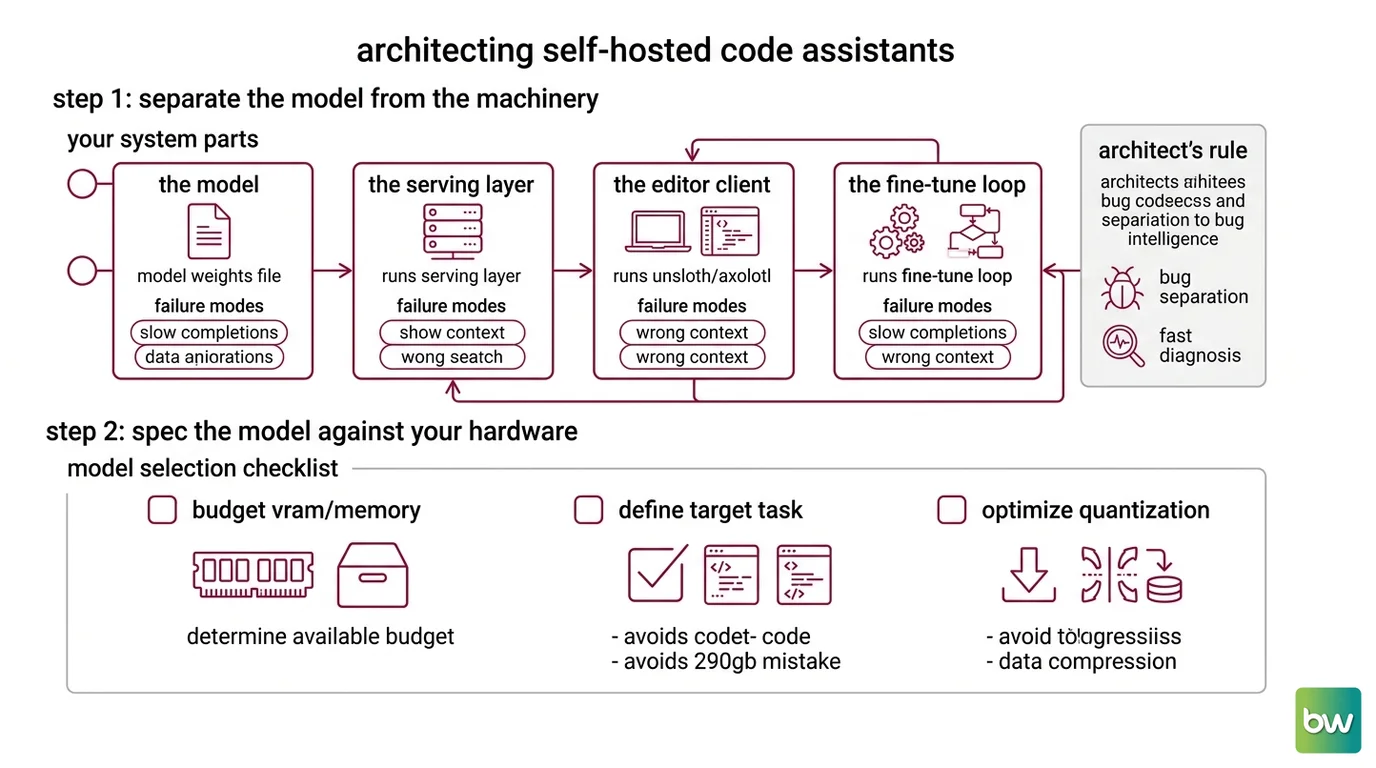
A self-hosted code assistant looks like one thing. It is four. Conflate them and every problem becomes unsolvable, because you can’t tell which layer broke.
Your system has these parts:
- The model — the weights themselves (Qwen3-Coder, DeepSeek-Coder-V2). This is a file, chosen by capability and size. Nothing more.
- The serving layer — Ollama. It loads the model and exposes an HTTP API. It decides nothing about quality; it decides availability.
- The editor client — Continue or Cline inside VS Code. It turns your keystrokes and selections into API calls and renders what comes back.
- The fine-tune loop — an optional, separate toolchain (Unsloth or Axolotl) that produces a new model file. It is not part of serving and never runs inside Ollama.
The Architect’s Rule: If you can’t say which of the four layers a bug lives in, you don’t have a system — you have a pile of moving parts.
Each layer has a different failure mode and a different fix. Slow completions are a model-or-server problem. Wrong context is a client problem. “It learned nothing” is a fine-tune problem. Keep them separate and diagnosis takes minutes instead of a weekend.
Step 2: Spec the Model Against Your Hardware
Before you pull anything, write down what the model has to fit into and what it has to do. This is the contract that the 290GB mistake violated.
Model selection checklist:
- VRAM / unified memory budget stated in gigabytes, not vibes
- Context window you actually need for your repo size
- License compatible with your use (Apache 2.0, MIT)
- Active vs. total parameters understood — mixture-of-experts models load all weights but only fire a fraction per token
- A fallback tag chosen in case the first one is too slow
Here is what fits the contract for most self-hosters. Qwen3-Coder’s 30b tag is 19GB on Ollama — 30B total parameters with roughly 3.3B active — under an Apache 2.0 license, with a 256K native context window extendable toward 1M via Yarn (Ollama Qwen3-Coder library; QwenLM GitHub). That qwen3-coder:30b tag is the one to lead with. DeepSeek-Coder-V2’s 16b tag is lighter still at 8.9GB with a 160K context window, MIT-licensed, and the upstream model reports support for 338 programming languages (Ollama DeepSeek-Coder-V2 library; DeepSeek-Coder-V2 GitHub).
Pick by what you can serve, not by what tops the chart.
The Spec Test: If your hardware line says 24GB and your model line says 290GB, the spec caught the failure before the download did. That is the entire point of writing it down.
Model selection notes (as of 2026):
- Qwen3-Coder
480b: needs ≥250GB of unified memory — out of reach for most self-hosters. Lead with the30btag (19GB).- DeepSeek-Coder-V2
236bon Ollama: that build exposes only a 4K context window — a quantization artifact, not the 128K of the upstream model. Use the16btag (160K context) for real work.- Currency: DeepSeek-Coder-V2 still pulls and runs freely, but DeepSeek V4 (April 2026) supersedes it for frontier coding, and the Qwen3-Coder family now reportedly outperforms it on real-world tasks. Treat Coder-V2 as a proven, lightweight, well-documented option — not “the best.”
Step 3: Bring It Up in Order — Server, Client, Then Training
Order matters because each layer depends on the one before it. Build them out of sequence and you debug phantom problems.
Build order:
- The serving layer first — get Ollama running and confirm the model answers on its OpenAI-compatible endpoint at
http://localhost:11434/v1. Until this responds, nothing downstream can work, so prove it in isolation. - The editor client next — point Continue at that same endpoint. Continue gives you tab completion plus a chat client wired to Ollama over HTTP; Cline is the autonomous-agent option for multi-file edits (Continue Docs). It depends entirely on Step 1’s endpoint being live.
- The fine-tune loop last — only after the base model proves useful do you decide it needs to learn your codebase.
For each component, your context must specify:
- What it receives — a prompt, a file selection, a repo snapshot
- What it returns — a completion, a diff, a chat answer
- What it must NOT do — Continue’s autocomplete role should never call your heavy chat model on every keystroke
- How it fails — a dead endpoint, an empty completion, a timeout
When you reach the fine-tune loop, keep one fact front of mind: Ollama serves, it does not train. The pipeline runs outside it. You fine-tune with Unsloth or Axolotl using LoRA or QLoRA, merge the adapter back into the base weights, export the result to GGUF, then wrap that file in a Modelfile so Ollama can serve it (Unsloth Docs). A sane starting recipe is 1–3 epochs, a learning rate between 1e-4 and 2e-4, rank 16, with gradient checkpointing on (Unsloth Docs). On the hardware side, an 8B model fine-tunes on a single 12GB GPU with QLoRA, and a 7B model trains in around four hours on 100k lines of code on an RTX 4090 (SitePoint fine-tune guide).
Step 4: Prove the Assistant Actually Helps
A model that loads is not a model that helps. Validation here means checking behavior at each layer, with a clear picture of what failure looks like.
Validation checklist:
- Completion latency — failure looks like: a multi-second pause on a single-line suggestion. Cause lives in the model size or the server, not the editor.
- Context awareness — failure looks like: the model suggests a function that doesn’t exist in your repo. The client isn’t passing repo context, or the window is too small.
- Fine-tune effect — failure looks like: identical output before and after training. Run the same prompts against the base and the merged model. If nothing changed, your data or your merge step did nothing.
- Role separation — failure looks like: your editor freezes on every keystroke because autocomplete and chat both point at the heavy model.
Common Pitfalls
| What You Did | Why AI Failed | The Fix |
|---|---|---|
| Pulled the largest model tag | Weights exceed your memory; model never loads | Spec VRAM first, pick a tag that fits |
Pointed at the 236b DeepSeek tag for long context | That Ollama build caps context at 4K | Use the 16b tag for its 160K window |
| One model for completion and chat | Heavy model stalls on every keystroke | Assign a small, fast model to the autocomplete role |
| Expected Ollama to fine-tune | Ollama only serves — it has no training path | Train in Unsloth/Axolotl, merge, export GGUF, then serve |
Pro Tip
Treat the serving endpoint as a contract, not a convenience. Once Ollama exposes that OpenAI-compatible API, every client downstream — Continue, Cline, a script, a future agent — depends only on the contract, not on which model sits behind it. Swap Qwen3-Coder for a fine-tuned variant and nothing upstream changes, because you specified the interface instead of the implementation.
Frequently Asked Questions
Q: How do I use a code LLM for code completion inside VS Code? A: Install Continue, point its config at your Ollama endpoint, and assign a fill-in-the-middle-capable model to the autocomplete role — that role is separate from chat. Watch out: use a small, fast tag for tab completion, or every keystroke stalls waiting on the heavy model.
Q: Which open-source code LLM is best for self-hosting in 2026?
A: For most single-GPU setups, Qwen3-Coder 30b under Apache 2.0 is the practical default. The frontier moved to DeepSeek V4 and Qwen3-Coder-Next, and Devstral Small 2 reportedly fits a 32GB Mac — but “best” means whatever fits your VRAM and license, not the top leaderboard row.
Q: How do I fine-tune a code LLM on my own codebase step by step? A: Ollama serves, it doesn’t train. Fine-tune with Unsloth or Axolotl using QLoRA, merge the adapter, export to GGUF, then wrap it in a Modelfile for Ollama. One detail to budget for: clean, instruction-formatted training data matters far more than stacking extra epochs.
Your Spec Artifact
By the end of this guide, you should have:
- A four-layer system map — model, server, client, fine-tune loop — with each layer’s job written down
- A model selection contract — VRAM budget, context window, license, and a fallback tag
- A validation checklist that names the failure symptom for each layer, so a slow completion or a missed repo reference points you straight to the layer that owns it
Your Implementation Prompt
Paste this into your AI coding tool when you’re planning a self-host setup. It mirrors the four layers from this guide and forces you to fill in your own hardware and model constraints before any download happens.
You are helping me plan a self-hosted code LLM setup. Treat it as four
separate layers and produce a spec for each. Do not suggest pulling any
model until the hardware constraint is filled in.

LAYER 1 — MODEL
- Hardware budget: [your VRAM / unified memory in GB]
- Context window I need: [token count for my repo size]
- License requirement: [Apache 2.0 / MIT / either]
- Candidate tags that fit the budget: [list, e.g. qwen3-coder:30b]
- Fallback tag if the first is too slow: [tag]

LAYER 2 — SERVING (Ollama)
- Endpoint to expose: http://localhost:11434/v1
- Confirm the model responds in isolation before wiring any client.

LAYER 3 — EDITOR CLIENT (VS Code)
- Tool: [Continue for completion+chat / Cline for autonomous edits]
- Model assigned to autocomplete role: [small, fast tag]
- Model assigned to chat role: [larger tag]
- Constraint: autocomplete must NOT call the heavy chat model.

LAYER 4 — FINE-TUNE LOOP (optional, separate from Ollama)
- Toolchain: [Unsloth / Axolotl]
- Method: QLoRA, rank 16, 1-3 epochs, lr 1e-4 to 2e-4
- Output path: merge adapter -> export GGUF -> Modelfile -> Ollama

VALIDATION
- For each layer, state the failure symptom I should watch for and
  how to confirm that layer works before moving to the next one.
Ship It
You now see a self-hosted code assistant the way you’d see any production system — as layers with contracts, not a single black box. You can pick a model by what your machine can actually serve, bring the stack up in dependency order, and tell at a glance which layer a problem lives in. That’s the difference between a model that loads and a model that helps.
Deploy safe, Max.
AI-assisted content, human-reviewed. Images AI-generated. Editorial Standards · Our Editors