How to Run MMLU Evaluation and Interpret Benchmark Scores for Model Selection in 2026
Table of Contents
TL;DR
- MMLU scores above 88% are saturated — switch to MMLU-Pro for meaningful model comparison
- Your evaluation configuration matters more than the headline number — batch size, shot count, and prompt format all shift results
- Benchmark scores are a filter, not a verdict — pair them with task-specific evaluation before committing
You compared two models last week. One scored 89.1% on MMLU. The other scored 88.4%. You picked the higher number. Both models failed on your actual task — a classification pipeline that needed consistent JSON output and domain-specific reasoning. The benchmark told you which model was better at multiple-choice trivia. It told you nothing about which model would work.
Before You Start
You’ll need:
- Python 3.10+ with pip (the evaluation harness dropped Python 3.9 support)
- A model to evaluate — local weights via HuggingFace, or API access to a hosted endpoint
- Familiarity with Model Evaluation concepts and what Few-Shot Learning means in a benchmark context
- A clear picture of what “good” looks like for YOUR task
This guide teaches you: how to configure, run, and interpret MMLU evaluations so the scores actually inform your model selection — not just confirm your bias.
When 87% Means Three Different Things
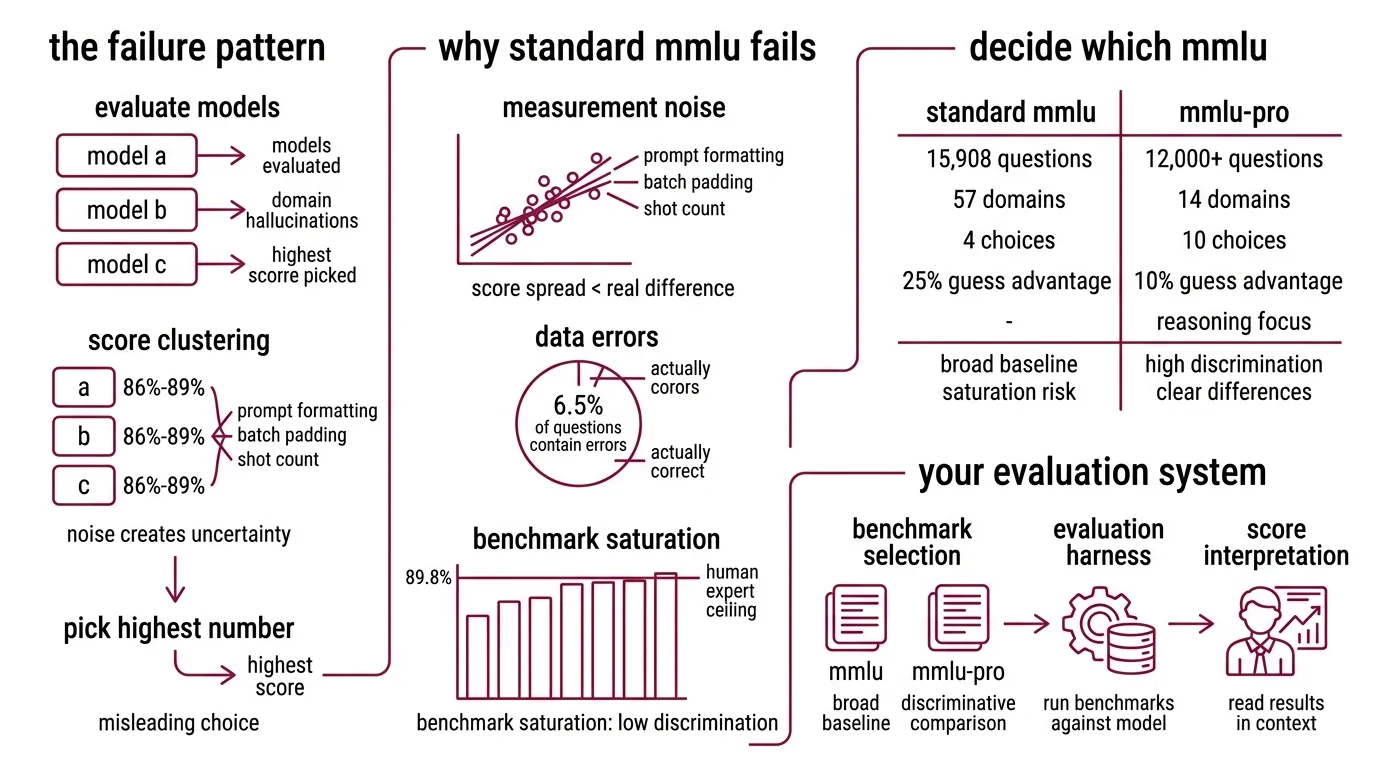
Here’s the failure pattern I see every month. Team evaluates three models. All score between 86% and 89% on MMLU Benchmark. Team picks the highest number. Six weeks later, the model hallucinates domain-specific terminology, misclassifies edge cases, and the team wonders what went wrong.
What went wrong: the score was real but the comparison was noise. Frontier models cluster within a few percentage points on original MMLU (LXT). At that range, the difference between 87% and 89% comes from prompt formatting, batch padding, and shot count — not capability.
And roughly 6.5% of MMLU questions contain errors (Wikipedia). Some “wrong” answers are actually correct. You are measuring against a test with known defects.
The score was never the problem. The specification of what you were measuring — and why — was.
Step 1: Decide Which MMLU to Run
The original MMLU has 15,908 questions across 57 domains — four-choice multiple choice, scored by exact match (Hendrycks et al.). Human expert accuracy sits at roughly 89.8% (Wikipedia). Frontier models have matched or exceeded that ceiling.
That is the saturation problem. When most frontier models score above 88%, the benchmark stops separating them.
MMLU Pro was built to fix this. It expands to 10 answer choices instead of 4, cutting the random-guess advantage from 25% to 10%. It covers 12,000+ questions across 14 domains with reasoning-heavy problems (Wang et al.). Models that score within a few points of each other on MMLU show 16-33% score drops on MMLU-Pro — and that spread is where real differences become visible.
Your system has these parts:
- Benchmark selection — MMLU for broad coverage baseline, MMLU-Pro for discriminative comparison
- Evaluation harness — the tool that runs the benchmark against your model
- Score interpretation — the framework for reading results in context
The Architect’s Rule: If your models all score within 3% on your chosen benchmark, you are measuring noise. Switch benchmarks or add task-specific evaluation.
Step 2: Lock Your Evaluation Configuration
Same model, different scores. This happens more often than you think.
Original MMLU has a prompt sensitivity of 4-5% — meaning the same model can swing several points depending on how the prompt is formatted (Wang et al.). MMLU-Pro reduces this to roughly 2%. But even 2% is enough to flip a model comparison if you are not controlling your variables.
Context checklist:
- Shot count specified — 0-shot, 3-shot, or 5-shot. Each gives different results. Pick one and hold it constant across all models
- Prompt template pinned — use the harness default or define a custom template. Do not mix
- Batch size documented — Confusion Matrix analysis only works when conditions are identical. Batch size affects padding, which affects token probabilities slightly
- Model loading configuration recorded — quantization level, dtype, device map
- Evaluation subset selected — full test set or specific domains relevant to your task
The Spec Test: If you ran the same model twice with different batch sizes and got different scores, your configuration is not a specification. It is a suggestion.
Step 3: Run the Evaluation
EleutherAI’s lm-evaluation-harness is the standard tool. Current version is v0.4.11, and it requires Python 3.10+ (EleutherAI GitHub).
Build order:
- Install the harness —
pip install lm_eval[hf]for HuggingFace models, addvllmorapiextras for other backends - Configure your model — specify the pretrained model path, quantization, and device mapping
- Select tasks —
mmlufor original,mmlu_profor the expanded version. You can filter to specific subject domains - Run and capture — execute the evaluation with your locked configuration from Step 2
Compatibility notes:
- CLI refactor (v0.4.10+): The harness refactored its CLI to subcommands —
lm_eval runandlm_eval ls. Older tutorials may show flat syntax, which still works but is deprecated.- Python version: Python 3.8 and 3.9 support was dropped in v0.4.9.2. Verify your environment runs 3.10+ before installing.
For API-based models you cannot run locally, DeepEval offers a Python API that runs MMLU against hosted endpoints with configurable shot count up to 5 (DeepEval Docs).
For each evaluation run, your spec must include:
- What model version you tested (exact checkpoint or API version)
- What task configuration you used (shots, template, subset)
- What hardware you ran on (GPU type and memory affect batch behavior)
- What baseline you are comparing against (previous model or a reference score)
Step 4: Read the Scores Without Fooling Yourself
Raw accuracy is the number everyone reports. It is also the number that misleads the most.
Validation checklist:
- Score in context — is this model in the saturated zone (above ~88% on original MMLU)? If yes, the score does not discriminate. Move to MMLU-Pro — failure looks like: two models with identical practical capability showing different scores due to prompt format noise
- Benchmark Contamination check — contamination is not hypothetical. Microsoft’s MMLU-CF variant showed GPT-4o dropping from 88.0% to 73.4% on contamination-free questions (Microsoft Research). If your model trained on MMLU test data, its score is inflated — failure looks like: high benchmark accuracy but poor real-world generalization
- Domain breakdown — MMLU reports per-subject scores. A model with a strong overall number might underperform on the specific domain you care about — failure looks like: headline accuracy masking domain-specific weakness
- CoT behavior — on MMLU-Pro, chain-of-thought reasoning improves scores. On original MMLU, it often does not (Wang et al.). If you are evaluating reasoning capability, MMLU-Pro with CoT is the right diagnostic — failure looks like: comparing CoT results across the wrong benchmark version
- Task relevance — MMLU measures knowledge recall. It does not measure generation quality, instruction following, or output formatting. Pair benchmark scores with Precision, Recall, and F1 Score metrics on your actual task
Common Pitfalls
| What You Did | Why It Failed | The Fix |
|---|---|---|
| Compared models on original MMLU in 2026 | Scores cluster within noise range above 88% | Use MMLU-Pro for frontier model comparison |
| Changed shot count between model runs | 0-shot vs 5-shot can swing scores by several points | Pin shot count in your evaluation spec |
| Trusted a leaderboard score at face value | Different platforms use different prompt implementations | Run your own evaluation with locked config |
| Ignored domain-level scores | Overall accuracy masked weak performance in your domain | Check per-subject breakdown before deciding |
| Skipped contamination consideration | Model may have trained on MMLU questions | Cross-reference with MMLU-CF or task-specific eval |
Pro Tip
Benchmark scores are a filter, not a verdict. Use MMLU-Pro to narrow your candidate list to three or four models. Then build a task-specific evaluation — fifty to a hundred examples from your actual domain, scored against your actual quality criteria. The benchmark tells you which models can reason broadly. Your task eval tells you which model works for you.
Frequently Asked Questions
Q: How to use MMLU scores to choose the best LLM for your use case in 2026? A: Use MMLU-Pro scores to filter candidates into a shortlist — models scoring above the 75th percentile have strong broad reasoning. Then evaluate shortlisted models on your actual task data with domain-specific metrics. Watch out: a model ranking high overall can underperform sharply on specific MMLU subjects like law or medicine.
Q: When to use MMLU-Pro instead of MMLU for comparing language models? A: Switch to MMLU-Pro when your candidates all score above 85% on original MMLU — at that range, score differences are mostly prompt formatting noise. MMLU-Pro’s reasoning-heavy questions also respond better to chain-of-thought prompting, so enable CoT when testing reasoning-focused models to get a more diagnostic signal.
Q: How to run the MMLU benchmark on a custom language model step by step?
A: Install lm-evaluation-harness (pip install lm_eval[hf]), pin your configuration — shot count, batch size, prompt template — then run the evaluation against your model. Save the full JSON output, not just the headline number. Per-subject scores in the output reveal domain weaknesses that the overall accuracy hides.
Your Spec Artifact
By the end of this guide, you should have:
- Benchmark selection rationale — documented reason for choosing MMLU, MMLU-Pro, or both
- Locked evaluation configuration — shot count, batch size, prompt template, model loading parameters
- Interpretation framework — criteria for what scores mean in context: saturation awareness, contamination caveats, domain-level analysis
Your Implementation Prompt
Copy this into Claude Code or Cursor when setting up your evaluation pipeline. Fill in the bracketed values from your Step 2 configuration checklist.
I need to evaluate [model name/path] on MMLU benchmarks for model selection.

Environment:
- Python version: [3.10+]
- GPU: [GPU type and memory]
- Evaluation tool: lm-evaluation-harness v0.4.11

Benchmark configuration:
- Benchmark: [mmlu / mmlu_pro / both]
- Shot count: [0 / 3 / 5] — hold constant across all model comparisons
- Batch size: [8 / 16 / auto] — document the exact value, do not vary between models
- Prompt template: [default / custom — if custom, paste the template here]
- Subject filter: [all / specific domains: list them]

Model configuration:
- Pretrained path: [HuggingFace model ID or local path]
- Quantization: [none / 4-bit / 8-bit]
- Device map: [auto / specific GPU mapping]

Output requirements:
- Overall accuracy percentage
- Per-subject accuracy breakdown for [list your priority domains]
- Comparison against baseline: [baseline model name and its locked scores]
- Full configuration log saved alongside results

Validation gates:
- If overall MMLU score is above 88%, flag saturation — recommend MMLU-Pro rerun
- If any domain score deviates more than 15 points from overall, flag for domain investigation
- Document exact model checkpoint, harness version, and run timestamp
Ship It
You now have a specification for running MMLU evaluations that produces comparable, interpretable results. Benchmarks are measurement instruments, and instruments need calibration. Pin your configuration, know where saturation starts, and pair broad benchmarks with task-specific evaluation. That is how scores become decisions.
AI-assisted content, human-reviewed. Images AI-generated. Editorial Standards · Our Editors