How to Run and Fine-Tune Open-Weight MoE Models with DeepSeek-V3, Mixtral, and Llama 4 in 2026
TL;DR
- MoE models activate a fraction of their parameters per token — match your hardware to active parameters, not total size
- Expert parallelism distributes experts across GPUs; get this wrong and inference stalls on a single bottleneck node
- Use bf16 LoRA for MoE fine-tuning — standard QLoRA breaks on expert routing layers
You downloaded DeepSeek-V3. All 671 billion parameters. Your cluster has the VRAM — on paper. Inference starts. One GPU spikes to 100%. The others idle. Tokens trickle out at two per second. The model works. Your deployment spec doesn’t.
Before You Start
You’ll need:
- An inference framework with Expert Parallelism support (vLLM, SGLang, or TensorRT-LLM)
- Understanding of Mixture Of Experts architecture — specifically how Gating Mechanism routing and Sparse Activation affect memory layout
- A clear picture of your target: inference-only serving, or fine-tuning for a domain task
This guide teaches you: how to decompose an MoE deployment into hardware mapping, inference stack configuration, and fine-tuning specification — so your AI coding tool generates working configs instead of guesses.
The 671 Billion Parameters That Fit on Four GPUs
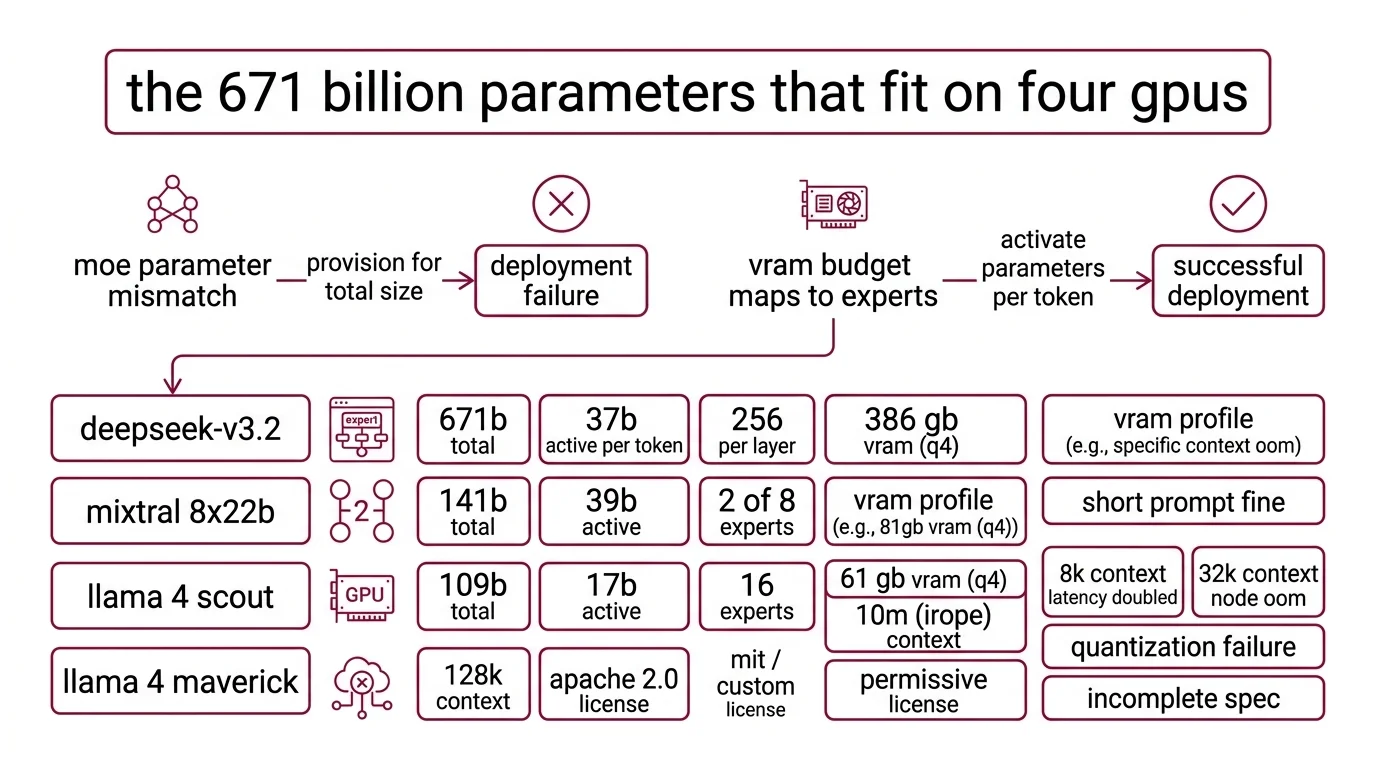
Most deployment failures with MoE models start the same way. Someone reads “671B parameters” and provisions for a 671B dense model. But DeepSeek-V3 activates 37B parameters per token (DeepSeek GitHub). The other 634 billion sit in expert layers, loaded but idle for any given input. Your VRAM budget maps to expert count, not total size.
A team spun up Llama 4 Maverick on a 4xA100 cluster last week. Inference ran fine for short prompts. At 8K context, latency doubled. At 32K, one node OOM’d. The quantization config didn’t account for the three MoE layers that resist aggressive compression. The model was running. The spec was incomplete.
Step 1: Map Every Model to Your GPU Budget
Before you write a single config line, you need a hardware-to-model mapping. Each MoE model has different total parameters, active parameters, expert counts, and VRAM profiles. Mix these up and you get a deployment that starts but can’t serve real traffic.
The models you’re choosing between:
- DeepSeek-V3 (now V3.2 as of December 2025): 671B total, 37B active per token, 256 routed experts per layer. At 4-bit quantization, expect ~386 GB VRAM (APXML). FP16 needs ~1,543 GB — a multi-node job. Supports 128K context. MIT license for code, custom Model Agreement for weights with commercial use allowed (DeepSeek GitHub).
- Mixtral 8x22B: 141B total, 39B active, 2 of 8 experts per token, 64K context. Apache 2.0 license. Weights remain on HuggingFace, but the model was retired from Mistral’s API in March 2025 and is no longer actively maintained. For new projects, evaluate whether the permissive license justifies the lack of upstream support.
- Llama 4 Scout: 109B total, 17B active, 16 experts. At Q4 quantization, ~61 GB VRAM — fits a single A100 80GB. The headline 10M-token context window uses iRoPE, but performance degrades at long contexts and the practical limit depends on your workload (Meta AI Blog).
- Llama 4 Maverick: 400B total, 17B active, 128 routed experts plus 1 shared expert. At Q4, ~224 GB. At 1.78-bit quantization, ~100 GB — achievable on two 48 GB GPUs.
The Architect’s Rule: If you can’t state the active parameter count and expert routing topology for your chosen model, you’re provisioning blind.
Step 2: Specify the Inference and Serving Stack
You’ve mapped the model. Now lock down the serving specification. This is where most AI-generated configs go wrong — the tool picks default settings that ignore MoE-specific routing.
Context checklist:
- Inference framework: vLLM, SGLang, LMDeploy, or TensorRT-LLM — DeepSeek GitHub lists all five supported frameworks
- Expert parallelism strategy: how experts distribute across GPUs. vLLM supports EP for DeepSeek-V3, Mixtral, and Llama 4 (vLLM Docs)
- Top K Routing configuration: DeepSeek-V3 uses auxiliary-loss-free Load Balancing Loss with a bias term for routing (DeepSeek Technical Report). Your serving config must preserve this, not override it
- Quantization precision: specify per-layer if needed. Llama 4 Maverick’s MoE layers 1, 3, and 45 have calibration issues — keep those layers at 3-4 bit while other layers go lower
- Context window limit: don’t default to the model’s maximum. DeepSeek-V3 supports 128K, Llama 4 Scout advertises 10M, but real-world throughput drops well before those ceilings
The Spec Test: If your config doesn’t specify expert distribution, vLLM defaults to tensor parallelism. For dense models, that works. For MoE, it means every GPU loads every expert — and you’ve lost the memory advantage that makes MoE worth running.
Step 3: Wire Up LoRA Fine-Tuning for the Experts
Inference is running. Now you want to adapt the model to your domain. MoE fine-tuning is not dense-model fine-tuning with more parameters. The expert routing layer changes everything.
Three strategies that work:
- Router-only fine-tuning — train only the gating network. Lowest cost. Good for adjusting expert selection to your domain distribution without touching expert weights.
- Top-activated expert LoRA — apply LoRA adapters to the experts that fire most for your data. Medium cost, best precision-to-compute ratio for domain adaptation.
- Full expert LoRA — LoRA on all expert layers. Highest cost. Use only when router-only doesn’t capture your task.
Build order:
- Validate inference first — your model must serve correct outputs before you fine-tune. Problems in the serving stack contaminate training evaluation.
- Set up the LoRA framework — Unsloth or LLaMA-Factory. Unsloth reports 12-30x faster training than Transformers v4 with more than 35% VRAM savings, and supports DeepSeek V3 through V3.2 (Unsloth Docs). LLaMA-Factory provides a unified interface for LoRA across MoE architectures.
- Run a test fine-tune on a small dataset — before committing GPU hours, verify that the LoRA adapters attach to the correct layers and that routing behavior doesn’t degrade.
Critical constraint: Do not use 4-bit QLoRA for MoE fine-tuning. BitsAndBytes lacks native MoE support — quantization interferes with expert routing (Unsloth Docs). Use bf16 LoRA instead.
Step 4: Prove the Routing Isn’t Wasting Your GPUs
A fine-tuned MoE model that passes your eval benchmark might still be broken in production. The failure mode is subtle: experts load-balance incorrectly, a few experts handle all tokens, the rest consume memory doing nothing.
Validation checklist:
- Expert utilization — check that active experts per token match the model’s design (2 for Mixtral, varies for DeepSeek-V3). If a single expert dominates most of the traffic, routing is collapsing. Failure looks like: high VRAM, mediocre quality, latency that doesn’t improve with more GPUs.
- Memory pressure — monitor per-GPU VRAM during inference at target context length. Spike on one GPU means expert distribution is uneven. Failure looks like: one GPU OOM while the rest are barely working.
- Output quality regression — compare fine-tuned outputs against the base model on a held-out set. MoE fine-tuning can degrade experts you didn’t target. Failure looks like: better on your task, worse on general knowledge.
- Latency under load — test at your expected concurrent request rate, not single-query. MoE batching behaves differently than dense batching because different requests activate different experts.
Security & compatibility notes:
- Mixtral 8x22B API retirement: Retired from Mistral’s hosted API as of March 2025. Successor: Mistral Small 3.2. Self-hosted weights remain on HuggingFace under Apache 2.0.
- Llama 4 Maverick quantization: MoE layers 1, 3, and 45 have calibration issues; vision layers must not be quantized. Keep affected layers at 3-4 bit minimum.
- QLoRA for MoE models: BitsAndBytes lacks native MoE support. 4-bit QLoRA not recommended — use bf16 LoRA instead.
- Llama 4 EU license clause: The Llama 4 license includes a clause that may restrict usage for EU-based companies. Verify compliance before production deployment.
Common Pitfalls
| What You Did | Why It Failed | The Fix |
|---|---|---|
| Provisioned VRAM for total parameters | Allocated 1.5 TB for a model that needs 386 GB at 4-bit | Map to active parameters and quantization level |
| Used tensor parallelism for MoE | Every GPU loaded all experts — no memory savings | Switch to expert parallelism via vLLM EP |
| Fine-tuned with QLoRA | BitsAndBytes corrupted expert routing weights | Use bf16 LoRA — no 4-bit quantization during training |
| Ignored per-layer quantization | Llama 4 MoE layers collapsed after aggressive compression | Keep sensitive layers at 3-4 bit; compress the rest |
| Set context to model maximum | Llama 4 Scout at 10M tokens degraded to unusable latency | Benchmark at your actual working context length |
Pro Tip
Every MoE model has a different expert topology — different expert count, different routing strategy, different active ratio. The spec you build for DeepSeek-V3 won’t transfer to Llama 4 Scout. But the decomposition transfers: map active parameters, specify expert distribution, choose LoRA targets, validate routing health. That framework works regardless of which model ships next quarter.
Frequently Asked Questions
Q: When should you use a mixture of experts model instead of a dense model? A: When you need large-model quality but can only budget inference compute for a fraction of those parameters per forward pass. MoE gives you that split natively. Watch for homogeneous workloads — if all requests hit the same expert subset, a dense model of equal active size may serve you better.
Q: Best open-source mixture of experts models for production use in 2026? A: DeepSeek-V3.2 and Llama 4 Scout or Maverick cover most production use cases as of early 2026. For permissive licensing without restrictions, Mixtral 8x22B remains available but unmaintained. Emerging options include Qwen3.5-397B-A17B for multimodal reasoning and gpt-oss for smaller deployments.
Q: How to fine-tune Mixtral or DeepSeek-V3 mixture of experts model step by step? A: Validate inference first, then attach bf16 LoRA adapters — never QLoRA — using Unsloth or LLaMA-Factory. Start with router-only fine-tuning to test your data distribution before committing to expert-level adapters. If routing collapses — one expert handling most tokens — reduce the learning rate on the gating layer before retrying.
Your Spec Artifact
By the end of this guide, you should have:
- Hardware-to-model map — active parameters, VRAM at your target quantization, expert parallelism strategy for each candidate model
- Inference stack specification — framework, EP config, per-layer quantization rules, context window limit
- Fine-tuning spec — LoRA strategy (router-only, top-activated, or full), framework choice, validation checklist for routing health
Your Implementation Prompt
Use this prompt in Claude Code, Cursor, or your preferred AI coding tool. Fill the bracketed placeholders with values from your hardware map and inference spec.
You are configuring a Mixture of Experts model for inference and fine-tuning.
Follow this specification exactly.

MODEL SELECTION:
- Model: [model name and version, e.g., DeepSeek-V3.2]
- Total parameters: [total, e.g., 671B]
- Active parameters per token: [active, e.g., 37B]
- Expert count and routing: [e.g., 256 routed experts, top-k routing]
- Context window target: [your working context length — NOT model maximum]

HARDWARE:
- GPU type and count: [e.g., 4x A100 80GB]
- Total VRAM available: [e.g., 320 GB]
- Quantization: [precision, e.g., 4-bit GPTQ]
- Per-layer exceptions: [layers requiring higher precision, e.g., MoE layers 1, 3, 45 at 3-4 bit]

INFERENCE STACK:
- Framework: [vLLM / SGLang / TensorRT-LLM]
- Parallelism: expert parallelism (NOT tensor parallelism)
- Expert distribution: [strategy, e.g., round-robin across 4 GPUs]
- Target batch size: [concurrent requests]

FINE-TUNING (if applicable):
- Strategy: [router-only / top-activated expert LoRA / full expert LoRA]
- Framework: [Unsloth / LLaMA-Factory]
- Precision: bf16 LoRA (NOT QLoRA — BitsAndBytes lacks MoE support)
- Dataset: [number of examples]
- Target experts: [which experts to apply LoRA, or "router-only"]

VALIDATION CRITERIA:
- Expert utilization: no single expert handling >25% of traffic
- Memory: no single GPU >90% VRAM while others <60%
- Quality: compare fine-tuned vs. base model on held-out set
- Latency: measure p50, p95, p99 at [target concurrent requests]
Ship It
You now have a framework for decomposing any MoE deployment into four decisions: hardware mapping, inference stack, fine-tuning strategy, and routing validation. The models will change — State Space Model hybrids, new expert topologies, denser routing schemes. The decomposition won’t.
AI-assisted content, human-reviewed. Images AI-generated. Editorial Standards · Our Editors