How to Refactor a Legacy Codebase with Claude Code, Cursor, and Aider in 2026
TL;DR
- AI-Assisted Refactoring fails when you treat the agent as a coder. Treat it as a contractor that needs a spec — seams, contracts, and verification criteria.
- Each tool covers a different stage. Claude Code Plan Mode reads the system. Cursor Subagents fan out across modules. Aider’s architect mode plans and commits atomically.
- The deliverable you write is not refactored code. It is the seam map, the pinned contracts, and the equivalence tests. The AI fills in the rest.
Last week a team showed me a pull request from Cursor that touched dozens of files, compiled clean, passed CI, and broke production within hours. The agent did exactly what it was asked. The ask was the bug. There was no seam, no contract, no rollback point — just a long prompt that said “modernize this.” Modern, sure. Working? Different question.
Before You Start
You’ll need:
- One AI coding tool open and configured: Claude Code, Cursor, or Aider (this guide uses all three for different stages)
- Working knowledge of the difference between AI Code Completion (line-level suggestions) and full AI-Assisted Refactoring (multi-file structural change)
- A legacy codebase you actually understand at the boundary level — modules, public APIs, data flow
- A test suite. Even a thin one. We will extend it before refactoring.
This guide teaches you: how to decompose a legacy refactor into a seam map and a contract layer so that the AI executes a bounded specification instead of guessing what “clean” means.
The 4-Day Refactor That Deleted Itself
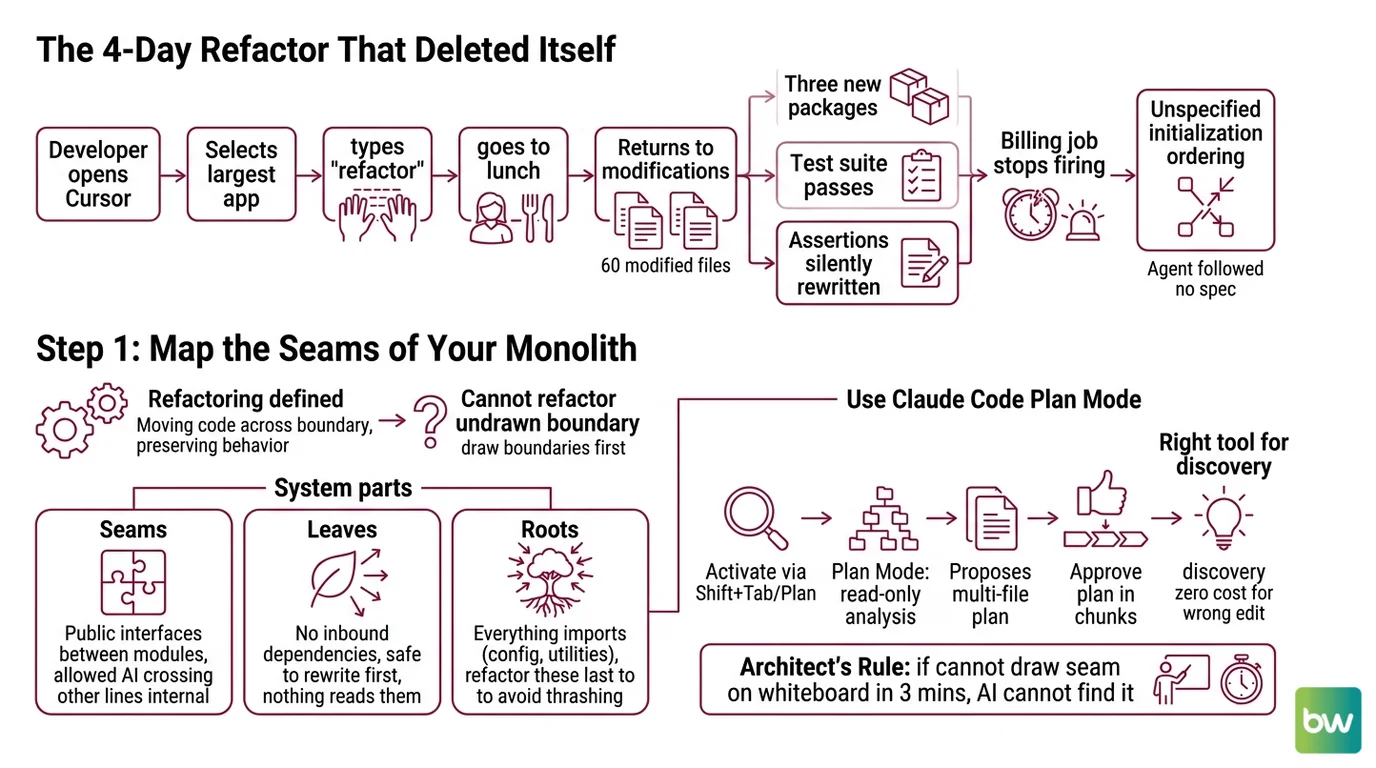
Here is the failure mode I see every month. Developer opens Cursor on a Django monolith. Selects the largest app. Types “refactor this into smaller modules following clean architecture.” Goes to lunch. Comes back to 60 modified files, three new packages, and a test suite that passes because half the assertions were silently rewritten to match the new behavior.
It worked on Friday. On Monday, the billing job stopped firing because an unspecified import-time side effect — a signal handler that registered during module load — moved to a lazily imported module that the scheduler never touched.
The agent did not lie. The agent had no specification for “preserve initialization ordering.” So it didn’t.
Step 1: Map the Seams of Your Monolith
Refactoring has one working definition that matters: moving code across a boundary while preserving behavior. Everything else is decoration. You cannot ask an AI to move code across a boundary that you have not drawn.
Your system has these parts:
- Seams — public interfaces between modules. These are the lines the AI is allowed to cross. Every other line is internal and stays put until the seam moves.
- Leaves — modules with no inbound dependencies from other modules in scope. Refactor these first. They are safe to rewrite because nothing else reads them.
- Roots — modules everything imports (config loaders, ORM base classes, shared utilities). Refactor these last, or your entire dependency graph thrashes.
Use Claude Code Plan Mode for this stage. Activate it with Shift+Tab twice or /plan (Claude Code Docs). Plan Mode is read-only — the agent analyzes the multi-file structure and proposes a plan without touching disk. You approve the plan in chunks. This is the right tool for seam discovery because the cost of a wrong edit is zero — there is no edit.
The Architect’s Rule: If you cannot draw the seam on a whiteboard in three minutes, the AI cannot find it in three hours.
Step 2: Pin the Contracts (Tests, Types, Public APIs)
Once you know the seams, you freeze them. A pinned contract is what tells the AI “this signature is sacred — change anything behind it, change nothing about it.”
Context checklist for every seam:
- Public function signatures with parameter and return types specified
- Exception contract — which exceptions the seam raises, which it swallows
- Side effects declared — does this seam write to disk, send a network call, mutate global state?
- Initialization order — when is this module imported relative to others?
- Equivalence test — one test that calls the seam through its public API and asserts the observable outcome
This is where
AI Test Generation earns its keep. Before the refactor, point Aider at each seam with /ask mode and have it propose equivalence tests against the current behavior. Not the spec’d behavior. The actual behavior. Then promote to /code mode and let it write those tests. Aider’s atomic git commits mean each test lands as its own commit (Aider Docs), so you can bisect later if any single test was wrong.
Skip this step and you are back to the Friday-to-Monday failure. The signal handler had no test. The refactor moved it. Nothing caught the move.
The Spec Test: if your context does not name initialization ordering as a contract, the AI will treat module load as commutative. It is not.
Step 3: Sequence the Refactor (Strangler Fig Order)
Pick the build order, then pick the tool for each step.
Build order:
- Leaves first — modules with no inbound dependencies. The AI rewrites them entirely if needed; the rest of the codebase never notices.
- Mid-tier next — modules that depend only on already-refactored leaves. The seam contract from Step 2 protects upstream callers.
- Roots last — shared base classes, config, dependency injection containers. By the time you touch these, every consumer has been updated and tested against its own seam contract.
For each module, your context must specify:
- Which seams it owns (from Step 1)
- Which contracts it must honor (from Step 2)
- What it must NOT touch (everything outside the seam)
- What failure looks like (which equivalence test must still pass)
Pick the tool per stage:
- Discovery + planning — Claude Code Plan Mode. Read-only, multi-file, proposes the full edit sequence before any disk write.
- Wide fan-out across independent leaves — Cursor Subagents (v2.4, January 2026). The primary agent dispatches independent subagents in parallel, each with its own context window (Cursor Blog). One subagent per leaf module. They cannot collide because their scope is bounded.
- Tight loop on a single seam with planning discipline — Aider’s architect mode (
/chat-mode architect). One model plans the edit, a second model turns the plan into file edits (Aider Docs). Use this for the root layer, where every change ripples and you want a reasoning model thinking before an editor model typing. - Long-running, off-machine work — Cursor Background Agents. Each gets its own dev environment with browser and UI access. Useful when the refactor needs to be validated against a running app.
A pattern that works in production: Plan Mode to write the seam map, Cursor Subagents to grind through the leaves in parallel, Aider architect mode to finish the roots with full reasoning per change.
Step 4: Validate Behavior Equivalence
The AI says it is done. The compiler agrees. CI is green. Now do the work that actually catches regressions.
Validation checklist:
- Run the equivalence tests from Step 2 — failure looks like: a test that passed against the old seam now fails. This is the only signal that matters. Green here means the public contract held.
- Diff the side-effect surface — failure looks like: a module that used to write a file no longer does, or vice versa. Static analysis catches some; running the smoke suite catches more.
- Replay production-shaped inputs through the refactored seams — failure looks like: an edge case that the equivalence tests did not cover. Record real traffic if you can, fuzz the seam if you cannot.
- Code review the diff with the AI itself — switch to
AI Code Review mode (Cursor’s review panel, Claude Code’s
/reviewworkflow, or Aider in/askmode against the diff). Ask: “Which behavior changed that the equivalence tests do not cover?” The agent that wrote the code is often the best at finding what it silently dropped. - If something breaks, do not patch forward — use
AI-Assisted Debugging only on the suspicious commit. Aider’s per-edit atomic commits mean
git revert <hash>undoes exactly the change that broke things, without losing the surrounding work.
Compatibility notes:
- Claude Sonnet 4 and Opus 4 retire June 15, 2026 (Tygart Media). Any refactor workflow pinned to
claude-sonnet-4orclaude-opus-4(no version suffix) must migrate to Sonnet 4.6 or Opus 4.7 before that date or your Plan Mode output will silently fall back to a replacement model.- Cursor switched to credit-based pricing in mid-2025. Older guides referencing “500 fast requests/month on Pro” are outdated — Pro now provides a monthly credit pool equal to the plan price ($20/mo), with Auto mode unlimited and premium models drawing from credits.
- Aider deprecated
--opus,--4o, and similar shortcut flags. Use--model <full-name>explicitly. Theremove_reasoningsetting was replaced byreasoning_tag.
Common Pitfalls
| What You Did | Why AI Failed | The Fix |
|---|---|---|
| Said “refactor this module” without naming a seam | No boundary defined; AI rewrites everything within reach and renames public APIs | Name the seam and pin its public signature in the context |
| Ran a single agent across the whole monolith | Context window exhaustion; later edits forget earlier decisions | Dispatch Cursor Subagents per leaf, one bounded scope each |
| Trusted a green test suite that came with the legacy code | Coverage was patchy; behavior changes hid in untested code paths | Generate equivalence tests against current behavior before touching anything |
| Refactored the data layer or config root first | Every other module depends on it; one change cascades through the codebase | Strangler fig order — leaves first, roots last |
| Skipped per-change atomic commits | A failed refactor mixed with twenty good ones; you lose all twenty rolling back | Use Aider’s atomic commits or Claude Code’s checkpointing so each change is independently reversible |
Pro Tip
The seam map is the artifact that survives the refactor. Every refactor you do, the seam map gets sharper, the contract patterns get reused, and the next refactor starts from a stronger spec. After three refactors most teams realize the seam map is more valuable than the refactored code — it is the architectural documentation they never wrote, now extracted as a side effect of working with the AI. Keep it in version control. The next time you onboard an engineer, hand them the seam map before the codebase tour.
Frequently Asked Questions
Q: How to use Claude Code for refactoring a legacy monolith?
A: Open Plan Mode first (Shift+Tab twice or /plan) so Claude Code reads the system and proposes the multi-file edit plan without touching disk. Approve the plan in chunks rather than as one block — partial approval lets you stop the refactor mid-flow if early edits surface a missing contract. Watch out: with Sonnet 4 and Opus 4 retiring June 15, 2026, lock your project to Sonnet 4.6 or Opus 4.7 in your settings before that date, otherwise Plan Mode output may drift silently as the fallback model differs in reasoning depth.
Q: How to set up an AI refactoring workflow with Cursor and Aider step by step in 2026?
A: Use Cursor’s Composer Agent for the local edit loop on individual seams, then dispatch v2.4 Subagents to fan out across independent leaf modules in parallel. For the root layer, switch to Aider via /chat-mode architect so a reasoning model plans each edit before the editor model writes it. Edge case: Cursor’s credit pool burns through Pro’s monthly allowance fast on long refactors — drop to Auto mode while iterating on the seam map, then spend premium-model credits only on the final architect passes.
Q: How to refactor across multiple files safely with AI assistants?
A: Use Aider’s repository map (tree-sitter parses sources, ranks files via graph algorithm) to bound the context to only the files the AI actually needs (Aider Docs), then let Aider commit each change atomically. If a test breaks, git revert HEAD undoes exactly one edit. Watch out: deprecated --opus and --4o shortcut flags silently fall back to a default model in newer Aider builds. Always specify --model <full-name> explicitly to avoid invisible model swaps mid-refactor.
Your Spec Artifact
By the end of this guide, you should have:
- A seam map — one document listing every boundary the refactor will cross, with leaves, mid-tier, and roots labeled
- A pinned contract list — for each seam: signature, exception contract, side effects, initialization order
- An equivalence test suite — written against the current behavior, before any refactor edit
Your Implementation Prompt
Paste this into Claude Code Plan Mode (or the equivalent Cursor / Aider context file) at the start of your next refactor. Fill the brackets with values from your seam map and contract list. The prompt mirrors Steps 1-4 — the AI executes against your spec, not against its training bias.
# Refactor specification

## Scope
- Seam I am refactoring: [name the public boundary, e.g., billing.Invoice → billing.invoicing.Invoice]
- Modules in scope: [list paths]
- Tier: [leaf | mid-tier | root]

## Pinned contracts (do not change)
- Public signature: [function/class signature with types]
- Exceptions raised: [list]
- Side effects: [filesystem writes, network calls, global state mutations]
- Initialization order: [when this module loads relative to others]

## Equivalence test (must still pass)
- Test file path: [path/to/test]
- The seam is correct if and only if this test passes against the refactored code with identical inputs and outputs.

## Allowed changes
- Internal structure inside the seam: free to restructure
- File layout under [old path]: free to move within [new path]
- Internal helper functions: free to rename, split, merge

## Forbidden changes
- Public signature of the seam: locked
- Exception contract: locked
- Side-effect surface: locked
- Initialization ordering relative to [list of dependent modules]: locked

## Build order
1. Refactor leaves: [list]
2. Then mid-tier: [list]
3. Roots last: [list]

## Validation
After each step, run [test command]. If any equivalence test fails, stop. Do not patch forward. Report the failing test and the diff that introduced it.
The prompt is the spec. If you cannot fill a bracket, you do not know the seam well enough yet — go back to Step 1.
Ship It
You now have a mental model that turns “refactor the monolith” from a wish into a specification. The seam map names the boundaries. The pinned contracts protect the public surface. The build order keeps the dependency graph stable. The equivalence tests prove behavior held. The AI is no longer guessing what you meant — it is executing against a spec you wrote. That is the difference between a 4-day refactor that deletes itself and a 4-day refactor that ships.
AI-assisted content, human-reviewed. Images AI-generated. Editorial Standards · Our Editors