How to Manage LLM Context in Production: Prompt Caching, Memory API, and Token Budget Patterns
TL;DR
- Your context window has four zones with different cost profiles — treat each zone with a different strategy
- Prompt caching cuts repeated system prompt costs by 90% on cache hits; compression saves 30–70% on growing conversation history
- Corpus under 200K tokens: try full-context with caching first. Over that threshold, route to RAG
Your bill came in. It’s three times what you projected. Nobody changed the model. Nobody pushed a feature. The chatbot just kept running — and the context kept growing. Every message added history. Every API call resent the full system prompt, unchanged, from the beginning of time. Multiply that by your daily call volume and you have your answer.
The fix isn’t a different model. It’s specifying where each token goes — and what strategy controls each zone.
Before You Start
You’ll need:
- Access to an LLM API with Prompt Caching support
- A baseline understanding of Context Window limits for your chosen model
- Production request logs showing token counts per call, or a way to instrument them
This guide teaches you: A four-zone decomposition of the context window and how to assign the right cost management strategy to each zone.
The Context Budget Nobody Specified
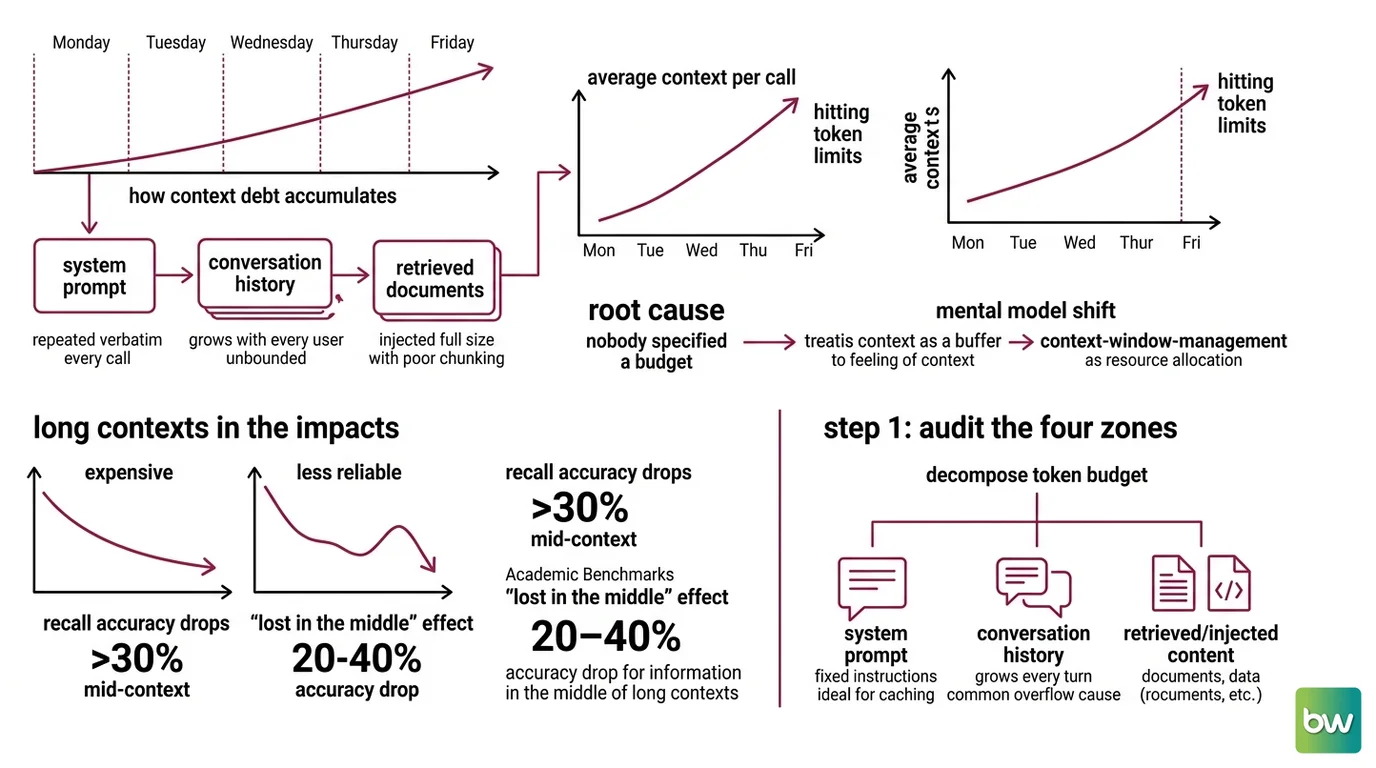
Here’s how context debt accumulates between Monday morning and Friday afternoon.
The system prompt repeats on every API call. Verbatim. Every time. Nobody removed it because nobody said it needed to be cached. Conversation history grew with every user turn — nobody set a truncation policy because nobody expected sessions to run this long. Retrieved documents got injected at full size because the chunking strategy was “copy the whole thing and let the model sort it out.”
By Thursday, average context per call is three times its Monday baseline. By Friday, you’re hitting token limits on mid-conversation calls.
The root cause: nobody specified a budget. Context Window Management treats the context as a resource with allocation rules, not a buffer you fill until it breaks. That shift — from “how do I fit more in?” to “what does each zone cost, and what strategy owns it?” — is the mental model this guide builds.
One more thing before you optimize: longer contexts aren’t just expensive, they’re less reliable. Recall accuracy for mid-context information drops by more than 30% compared to content at the window’s edges (Anthropic Docs). Academic benchmarks on the “lost in the middle” effect measure a 20–40% accuracy drop for information buried in the middle of long contexts (arXiv). Managing context saves money and improves answer quality. Those aren’t separate benefits.
Step 1: Audit the Four Zones
Start by decomposing your Token Budget into its four constituent zones. This audit happens before you write a single line of optimization code.
Your context window has these four parts:
- System prompt — Fixed instructions, persona definitions, tool schemas. Same on every call. High repeat rate. Ideal for caching.
- Conversation history — Grows with every turn. Unbounded by default. The most common cause of context overflow in production chatbots.
- Retrieved/injected content — Documents, search results, tool call outputs. Variable per request. Can spike when a query returns a large document.
- Output reservation — The
max_tokensyou set for the response. Unused tokens still count against your effective window.
The Architect’s Rule: If you can’t name these four zones and give approximate token counts for each, you don’t have a context specification. You have a context prayer.
Run this audit before you optimize anything:
- Enable token usage logging for a representative sample of production requests
- Parse the
usageobject from each API response — most providers break this down by role - Identify your largest zone. That’s where your first dollar of savings lives.
Step 2: Match Strategy to Zone
Each zone has a different cost profile. The wrong strategy in the wrong zone either saves nothing or degrades quality.
Zone strategy map:
| Zone | Strategy | Why |
|---|---|---|
| System prompt | Prompt caching | Fixed content, high repeat rate — cache reads give 90% savings on every hit |
| Conversation history | Sliding window, summarization, or compaction | Unbounded growth is the primary overflow risk |
| Retrieved content | RAG routing decision | Large corpora need retrieval; small ones are cheaper at full context |
| Output reservation | max_tokens cap + context-aware models | Prevents over-provisioning on short-answer tasks |
The pivotal decision is corpus size. Full-context with caching is often cheaper than RAG for corpora under 200K tokens — and it eliminates retrieval errors. When corpus size exceeds 200K tokens, documents update frequently, or query coverage is sparse, route to RAG. That threshold holds in production deployments (TianPan.co).
When you do use RAG, watch the retrieved context size. Answer quality degrades when retrieved chunks exceed roughly 2,500 tokens of injected context per call (SurePrompts). Beyond that, you’re paying for tokens that hurt more than they help.
Route by complexity: Simple requests don’t need expensive models. Use Model Routing to send short-context, low-complexity calls to cheaper models and reserve higher-capability models for tasks that genuinely need a wider context. An LLM Gateway makes this routing transparent to your application layer — no conditional logic spread through your business code.
Step 3: Wire Each Layer
With your zone audit done and strategies chosen, implement each layer in order of impact.
Prompt Caching
Place cache breakpoints at stable content boundaries. Anthropic’s prompt caching requires a minimum of 1,024 tokens of content before the breakpoint on most models — 512 tokens for Claude Fable 5 on the Claude API directly, but still 1,024 tokens on Bedrock. You can mark up to 4 explicit cache breakpoints per request (Anthropic Docs).
Cache cost structure (Anthropic Docs):
- 5-minute TTL write: 1.25x base input price
- 1-hour TTL write: 2x base input price
- Cache read on hit: 0.1x base input price — a 90% discount
If your system prompt is resent 1,000+ times per day, caching recoups the write cost on the second call. It compounds with volume.
Breakpoint placement:
- Static system instructions → first breakpoint
- Tool schemas (version-controlled, rarely changed) → second breakpoint
- Stable few-shot examples → third breakpoint
- Never place user message content or per-request variables before a breakpoint — dynamic content invalidates the cache on every call
Tokenizer caution: Migrating from Claude Opus 4.6 to Opus 4.7 or later? The new tokenizer encodes the same text using up to 35% more tokens (Anthropic Docs). Your cache breakpoint positions and zone budgets need recalibration after the migration.
Conversation History Management
Pick your truncation strategy before the first deployment:
Sliding window: Keep the last N turns. Simple. Works when turns are self-contained and the task doesn’t require long history recall. Apply Sliding Window Attention at the application layer — truncate from the oldest messages first, keeping the system prompt intact.
Summarization: When history matters but verbatim recall doesn’t. Pass the oldest turns to the model with a compression instruction, then swap raw turns with the structured summary. Context Compression via summarization typically saves 30–70% on token costs (SurePrompts). Anthropic’s context editing tool on 100-turn workflows delivers 29% improvement on task performance and 84% reduction in token consumption (Anthropic Blog).
Compaction API (beta): Anthropic automates this step for supported models — Fable 5, Mythos 5, Opus 4.8/4.7/4.6, and Sonnet 4.6. Send the compact-2026-01-12 beta header with your request.
Security & compatibility notes:
- Compaction API (beta): Requires the
compact-2026-01-12beta header. API surface may change before GA. Keep a manual summarization fallback for critical production paths until the API reaches general availability.- Claude Opus 4.8 on Microsoft Foundry: Context is capped at 200K tokens (vs. 1M on the Claude API, Bedrock, and Vertex). Adjust your zone budgets if Foundry is your deployment target.
Token Budget Enforcement
Set max_tokens to a realistic cap for each request class. A chatbot answering “Where is my order?” doesn’t need a 4,000-token output reservation — set it to 256 and keep the rest of the window available for context. Claude Sonnet 4.6, Sonnet 4.5, and Haiku 4.5 support context awareness: the model tracks remaining budget and signals when it’s running low, giving your application a chance to compress before hitting the limit (Anthropic Docs).
Prices shown in this guide are indicative and may vary. Always verify current pricing in the provider’s official documentation before encoding cost constraints into your specifications.
Step 4: Validate Your Context Pipeline
Four checks confirm the system is working. Run them before you call context management done.
Validation checklist:
- Cache hit rate — failure looks like: hit rate below 60% on production traffic. Root cause: dynamic content placed before the breakpoint. Fix: move all per-request variables after your final breakpoint.
- Compression quality — failure looks like: model responses become incoherent or lose reference to earlier topics. Root cause: summarization too aggressive. Fix: increase turn retention or use structured summaries with explicit entity tracking.
- Token consumption trend — failure looks like: median tokens per call growing week over week despite history management. Root cause: truncation trigger set too high or retrieved content zone has no size cap. Fix: enforce hard zone caps with alerting.
- Mid-context retrieval accuracy — failure looks like: model fails to use information from injected documents. Use LLM Load Testing with synthetic queries targeting mid-document content. If accuracy drops significantly, restructure injection order (most important content at the edges) or reduce injected chunk size.
Common Pitfalls
| What You Did | Why It Failed | The Fix |
|---|---|---|
| Added caching without auditing zones | Cached a tiny system prompt, ignored a massive history | Do the audit first — cache the highest-cost fixed zone |
| Put user data before cache breakpoints | Cache invalidates on every unique request | Move all per-request content after the final breakpoint |
| Compressed history without quality testing | Multi-turn coherence breaks silently | Test on a 20-turn conversation set before shipping |
| Built RAG for a 50K-token corpus | Added retrieval latency and error rate unnecessarily | Corpora under 200K tokens: try full-context with caching first |
| Same model for all request types | Expensive model on simple yes/no tasks | Route by complexity through a model-tiering gateway |
Pro Tip
Context is a budget, not a buffer. The real mindset shift: treat max_context_tokens the way you treat a database connection pool — a hard resource with named allocations and an overflow policy, not a ceiling you hope to stay under. Write a context spec before you write code: each zone gets a name, a token cap, and a defined behavior when it’s exceeded. Wire up
LLM Fallback And Retry Patterns to handle context overflow gracefully. When a spike in conversation depth hits, you want a documented fallback path, not a 500 error. Catching this in load testing is better than learning about it at 3 AM.
Frequently Asked Questions
Q: How to use Anthropic Prompt Caching to cut LLM API costs in production in 2026?
A: Place cache breakpoints at stable content boundaries — system instructions, tool schemas, fixed few-shot examples. Minimum is 1,024 tokens on most models; 512 tokens for Claude Fable 5 on the Claude API, but still 1,024 on Bedrock. Cache reads cost 0.1x base input price. One catch: verify your deployment platform before positioning breakpoints — the minimum token threshold differs between the Claude API and Bedrock (Anthropic Docs).
Q: How to manage long conversation histories in a production chatbot without hitting token limits?
A: Pick a truncation strategy before your first deployment: sliding window (keep last N turns), summarization (compress old turns into a structured paragraph), or the beta compaction API (compact-2026-01-12 header on supported models). Compaction automates the summarization step but is still in beta — keep a manual summarization fallback in production paths until the API reaches GA (Anthropic Docs).
Q: When should you use RAG instead of a long context window to handle large documents?
A: The threshold that holds in production: if your corpus fits under 200K tokens, try full-context with prompt caching first — retrieval errors often outweigh the cost savings at smaller scales. Switch to RAG when corpus size exceeds 200K, documents update frequently, or retrieved context per call would exceed roughly 2,500 tokens — beyond that point, answer quality starts to degrade (TianPan.co, SurePrompts).
Q: How to build a context compression pipeline with conversation summarization step by step?
A: Three stages: (1) Monitor — log token count per request and set a compression trigger threshold. (2) Summarize — when the trigger fires, pass the oldest turns to the model with a structured compression prompt. (3) Replace — swap raw turns with the summary in your context builder. For further reduction, LLMLingua-style token pruning reaches up to 20x compression in benchmarks, though real-world ratios depend heavily on prompt type (arXiv).
Your Spec Artifact
By the end of this guide, you should have:
- A four-zone context audit with current token counts: system prompt, conversation history, retrieved content, and output reservation
- A strategy assignment per zone: which zones get caching, which get compression, which route to RAG, which get hard
max_tokenscaps - A validation checklist with named thresholds: cache hit rate target, compression quality criteria, and a token trend baseline per request class
Your Implementation Prompt
Use this prompt in Claude Code, Cursor, or Codex to spec out your context management layer before writing implementation code. Fill in the brackets with values from your zone audit.
You are helping me build a production LLM context management layer
for [describe your application: chatbot / document QA / agent / other].

## Context Budget Specification

My LLM: [model name and provider]
Total context window: [token count]
Daily API call volume: [calls/day]

Zone allocations (from my audit):
- System prompt: [token count] → strategy: [cache with N-minute TTL / no cache]
- Conversation history: [average token count at turn 10] → strategy: [sliding window / summarization / compaction API]
- Retrieved content: [max per-request tokens] → source: [RAG / full-context injection]
- Output reservation: [max_tokens cap per request class]

## Constraints

- Cache breakpoint positions: [list content that never changes between calls]
- History truncation trigger: [token count that fires compression or truncation]
- Corpus size: [total tokens] → routing decision: [full-context or RAG]
- Overflow fallback: [truncate / summarize / return error + retry]

## Build Order

1. Logging layer — instrument token counts per zone on a sample of real requests
2. Cache breakpoints — annotate stable system content with cache markers
3. History manager — implement truncation strategy with the trigger threshold above
4. RAG router — route to retrieval when corpus exceeds your threshold
5. Validation harness — log cache hit rate, token trends, mid-context accuracy per release

## Validation Criteria

- Cache hit rate above [your target] in staging before promoting to production
- Compression quality: multi-turn coherence test on 20-turn conversations passes
- Token trend: 7-day median cost per call stable or declining after rollout
Ship It
You now have the decomposition: four zones, four strategy assignments, one spec before you write implementation code. Context window management isn’t a performance optimization you add later — it belongs in your first architecture draft, next to model selection and retry logic. Specify the budget. The bill takes care of itself.
AI-assisted content, human-reviewed. Images AI-generated. Editorial Standards · Our Editors