How to Integrate AI Code Review with Qodo, CodeRabbit, and Greptile in Your GitHub Workflow in 2026

TL;DR
- AI Code Review is a bot job, not a magic button — pick the tool that matches your review surface, not the loudest landing page.
- Every team rule lives in one config file at the repo root. If it is not in that file, the bot does not know it.
- Validate the bot the same way you validate a junior reviewer: turn it on for one repo, measure action rate for two weeks, then roll out.
A pull request opens at 9:47 on a Tuesday. By 9:48, the bot has dropped fourteen inline comments. Eleven are noise, two are useful, one is wrong but assertive. The author closes the tab and merges anyway. That is what unspecified AI review looks like in production — and it is the exact failure mode this guide fixes.
Before You Start
You’ll need:
- A GitHub repository where you have admin rights (or an org owner who will install the app for you)
- One review bot account — pick Qodo, CodeRabbit, or Greptile based on Step 1
- A baseline of what your team currently catches in human review (so you can measure delta)
- Understanding of how AI tooling reads diffs vs. whole repos — see AI Code Completion for the upstream side of this loop
This guide teaches you: how to spec your review surface, lock down the bot’s config, and validate that it makes your PRs better instead of louder.
The Bot That Reviewed Itself Into Irrelevance
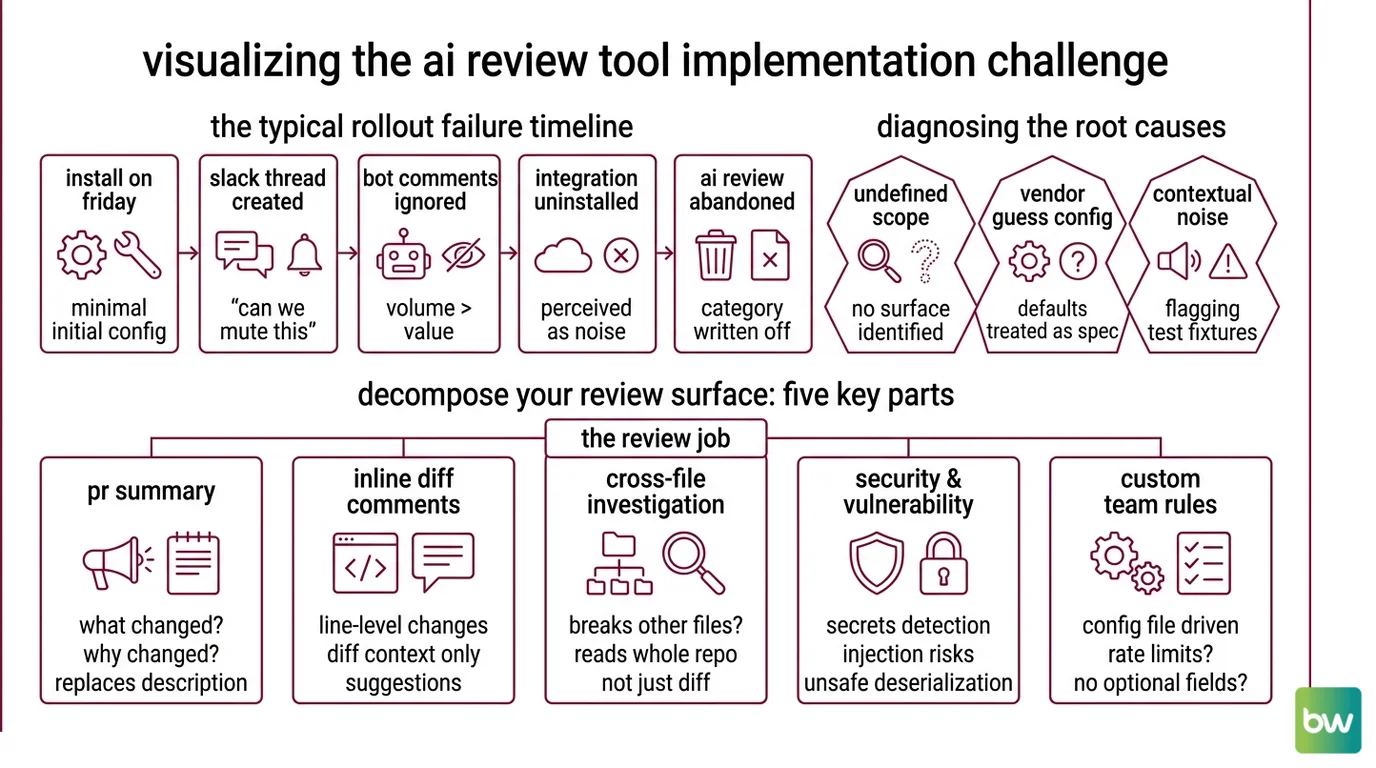
Most AI review rollouts die the same way. Someone installs CodeRabbit on a Friday. Monday morning the team Slack has a thread titled “can we mute this thing.” By Wednesday the bot is still posting comments but nobody reads them. By the next sprint the integration is uninstalled and the team writes off “AI review” as a category.
The bot was fine. The install was the problem. Nobody decided what surface the bot was supposed to cover, which rules belonged to humans, and what “useful” looked like. The default config was treated as a spec. It is not a spec — it is the vendor’s guess about your repo.
It worked on Friday. On Monday, the bot started flagging every test file because nobody told it that tests/fixtures/ is allowed to use any types.
Step 1: Decompose Your Review Surface
Before you pick a tool, decompose the review job into the things a reviewer actually does on a PR. Each one is a separate surface, and each tool covers a different subset.
Your review surface has these parts:
- PR summary — the one-paragraph “what changed and why” at the top of the PR. Replaces the description nobody writes.
- Inline diff comments — line-level suggestions on the changed code only. The bot can only see the diff.
- Cross-file investigation — does this PR break something three files away? Requires the bot to read the whole repo, not just the diff.
- Security and vulnerability scan — secrets, injection risks, unsafe deserialization. Often a separate agent.
- Custom team rules — “we don’t use
Optionalfor required fields”, “all new endpoints need a rate limit decorator”. Lives in a config file.
The three tools split this surface differently:
- Qodo (Qodo Merge) runs a multi-agent architecture — separate agents for bug detection, security, quality, and test coverage all run in parallel on the same PR, per Qodo Docs. The
/review,/describe,/improve, and/askcommands let you call agents individually as PR comments. It topped the Martian Code Review Bench at 64.3% F1 in Jan–Feb 2026 (Market scan). - CodeRabbit is the market-share leader — over two million repos installed and 13M+ PRs reviewed per CodeRabbit Docs. Its strength is configuration depth: a single
.coderabbit.yamlat the repo root, plus 40+ built-in linters chained behind the LLM pass. - Greptile does the thing the other two cannot — it indexes your entire repo into a code graph before the first review, then walks dependencies, git history, and cross-file references during each PR. Per Greptile Docs, that multi-hop investigation is the differentiator. It ranked #4 on the Martian Bench but caught roughly 82% of bugs in indie testing — a different benchmark, not directly comparable.
The Architect’s Rule: If you can’t draw your review surface on a whiteboard before installation, you are renting someone else’s opinion of what review means.
Step 2: Lock the Spec Into a Config File
Every team rule that matters has to live in one file at the repo root. If it is not in that file, the bot will not honor it, and the next reviewer who joins your team will not see it.
Config file by tool:
- Qodo Merge →
.pr_agent.tomlat repo root (see Qodo’s GitHub repository for the open-sourceqodo-ai/pr-agentengine that backs it). - CodeRabbit →
.coderabbit.yamlat repo root. CodeRabbit auto-detects the file from the PR’s feature branch, per CodeRabbit Docs, which means you can iterate on the config in the same PR that ships the change. - Greptile → repo-level rules file plus dashboard settings.
Context checklist your config must specify:
- Scope — which paths the bot reviews and which it ignores (
tests/fixtures/, generated code, vendored deps). - Profile — how loud the bot is allowed to be. CodeRabbit uses
reviews.profile: chill(default) orassertive(more nitpicks) under.coderabbit.yaml, per CodeRabbit Docs. Start atchill. You can always turn it up. - Custom rules — your team’s coding standards encoded as natural-language directives. All three tools support repo-level custom rules.
- Permissions surface — what the GitHub App is allowed to do. CodeRabbit needs read-only access to actions, checks, discussions, members, and metadata, plus read+write on code, commit statuses, issues, and pull requests, per CodeRabbit Docs. Greptile and Qodo have similar permission shapes.
- Out-of-scope topics — things you explicitly do not want the bot to comment on. Style nits, formatting if you already have Prettier, license headers if you have a pre-commit hook.
The mistake teams make at this step is treating the config file as optional. It is not. The vendor default is generic across two million repos. Your team is not generic.
The Spec Test: If a new engineer joins on Monday and reads only your
.coderabbit.yaml(or.pr_agent.toml), do they know what the bot will and will not comment on? If no, the spec is incomplete and the bot’s comments will surprise people.
Step 3: Wire the Bot in the Right Order
Build order matters because each phase produces a signal you need for the next one.
Build order:
- Install on one repo first — never the org-wide install on day one. Pick a repo with active PR traffic but low blast radius (an internal tool, not the payments service). For CodeRabbit this means logging in at coderabbit.ai with GitHub OR installing via GitHub Marketplace; either way the install needs repo owner permissions (org-owner for org repos), per CodeRabbit Docs. Qodo installs as the “Qodo Merge” GitHub Marketplace app, per Qodo on GitHub Marketplace. Greptile installs as a GitHub App and immediately starts indexing the repo — your first review will be slower because the index has to build.
- Commit the config file — before the bot reviews real PRs. CodeRabbit reads the file from the PR’s feature branch, so the very first PR after install can ship
.coderabbit.yamlitself. Use@coderabbitai configurationas a PR comment to print the effective config the bot is using, per CodeRabbit Docs. That command exists because vendor defaults silently override anything you forgot to set. - Open a dummy PR — something small with one intentional bug and one intentional style violation that the bot should NOT comment on. This is your spec test. If the bot flags the style violation, your config is wrong, not the code.
- Add custom rules iteratively — for each false positive, write a rule that suppresses that pattern. For each missed bug, write a rule that catches that class. Two weeks of iteration replaces six months of complaining in Slack.
For each phase, the bot’s context must specify:
- What it receives (which PRs, which paths, which event triggers)
- What it returns (summary, inline comments, security findings, or all three)
- What it must NOT do (no auto-approvals, no commit pushes, no resolving its own threads)
- How to handle failure (timeout behavior, retry policy, fallback to silence)
Step 4: Validate Before You Roll Out
You do not measure an AI reviewer by how many comments it posts. You measure it by what fraction of comments the author acts on. That is the metric Martian uses too — F1 over acted-upon developer comments — which is why their bench is the only credible third-party number in this category.
Validation checklist:
- Action rate — out of N comments the bot posted last week, how many resulted in a code change? Failure looks like: most comments ignored, week after week. The bot is noise.
- False positive surface — which rule produced the most ignored comments? Failure looks like: one rule generating the bulk of unactioned comments. Disable or reword that rule.
- Missed bugs — pull a sample of last month’s bug fixes that landed on
main. For each, check whether the original PR was reviewed by the bot. Failure looks like: the bot reviewed it and said nothing. That class of bug needs a custom rule. - Time-to-first-review — does the bot’s comment land before or after the human reviewer? Failure looks like: human reviewer beats the bot every time. The bot is not adding speed.
- Author sentiment — ask three engineers whose PRs the bot reviewed this week whether it helped or annoyed them. If the answer is annoyed, your profile is too loud — drop CodeRabbit from
assertivetochill, or remove agents you are not using from Qodo’s parallel run.
Common Pitfalls
| What You Did | Why AI Failed | The Fix |
|---|---|---|
| Installed org-wide on day one | Every team got the vendor default config; complaints from teams that never asked for the bot | Single-repo pilot first, then opt-in expansion |
Ran on assertive from the start | Bot flagged every minor style choice; PR authors muted the integration | Start on the calmer profile (CodeRabbit chill), raise it after two weeks of clean data |
| Skipped the config file | Bot reviewed test fixtures, generated code, and vendored deps with the same intensity as production code | Commit .coderabbit.yaml or .pr_agent.toml in the first PR after install |
| Used only the diff-only tool for cross-file bugs | The bot could not see that the new endpoint broke a downstream consumer in another file | Use Greptile (full-repo index) or layer it alongside a diff-only tool for cross-cutting changes |
| Treated security findings as advisory | Bot flagged a hardcoded secret; PR shipped anyway because there was no required-check gate | Wire security-flagged PRs to a required status check; humans approve overrides explicitly |
Pro Tip
Treat the bot as one reviewer on a team of three, not as the team. The bot’s job is to compress the surface area the humans have to look at — catch the obvious, summarize the diff, flag the security smells — so the humans can spend their review budget on the things only humans see: architectural fit, naming, whether this change is even the right change. If you find yourself arguing with the bot in PR threads, your config is wrong. If you find yourself ignoring the bot, your validation is wrong. Pick one to fix, in that order.
Frequently Asked Questions
Q: How to set up AI code review for a GitHub repository in 2026?
A: Install one tool (Qodo Merge, CodeRabbit, or Greptile) from GitHub Marketplace on a single low-blast-radius repo. Commit the tool’s config file (.pr_agent.toml, .coderabbit.yaml, or Greptile’s repo rules) in the next PR. Run a dummy PR to verify the spec, then iterate on custom rules for two weeks before expanding to the org. The first review from Greptile will be slower because the repo index has to build — that is expected, not a failure.
Q: How to use AI code review for security and vulnerability detection? A: Qodo’s multi-agent architecture runs a dedicated security agent in parallel with bug detection and quality, per Qodo Docs — you do not need a separate tool. Whichever bot you pick, wire its security findings to a required GitHub status check so a PR with an unaddressed high-severity finding cannot merge without an explicit human override. Do not rely on advisory comments alone — flagged secrets get shipped that way.
Q: How to configure AI code review rules for a team’s coding standards?
A: All three tools support repo-level config — Qodo via .pr_agent.toml, CodeRabbit via .coderabbit.yaml, Greptile via a repo-level rules file plus dashboard. Write rules as natural-language directives, not regex. Add one rule per false positive you see in the first two weeks. Keep the config in version control next to the code — the rules ARE part of your standards, and reviewers in three months need to read them as easily as the linter config.
Your Spec Artifact
By the end of this guide, you should have:
- A review surface map — five surfaces (summary, inline diff, cross-file, security, custom rules) marked as covered, partial, or out-of-scope for your chosen tool
- A committed config file at the repo root with scope, profile, custom rules, and out-of-scope topics specified
- A validation dashboard — action rate, false positive surface, missed bugs, time-to-first-review, author sentiment — measured for two weeks before any org-wide rollout
Your Implementation Prompt
Drop this into Claude Code or Cursor at the root of the repo where you are installing the bot. It mirrors Steps 1-4 and forces you to fill in the team-specific decisions before any install happens.
You are helping me wire an AI code review bot into a single GitHub repository.
The bot is: [Qodo Merge | CodeRabbit | Greptile]
The repository is: [repo name + primary language + framework]

Generate the rollout spec in four sections.

Section 1 — Review surface map.
For each surface (PR summary, inline diff comments, cross-file investigation,
security scan, custom team rules), mark it as: covered by tool / partial / out-of-scope.
Explain why each surface fits or does not fit our chosen tool.

Section 2 — Config file content.
Produce the literal contents of the tool's config file
([.pr_agent.toml | .coderabbit.yaml | Greptile rules]) with these constraints filled in:
- Paths to ignore: [tests/fixtures/, generated/, vendored deps, ...]
- Review profile: [chill | assertive | tool equivalent]
- Custom rules our team enforces today: [paste team standards here]
- Out-of-scope topics the bot must not comment on: [style if Prettier owns it, license headers, ...]
- Required GitHub permissions surface: [list]

Section 3 — Rollout order.
Produce the 4-step build order with the specific repo I named, the specific
dummy PR I should open as a spec test, and what success looks like for that PR.

Section 4 — Validation plan.
List the five metrics (action rate, false positive surface, missed bugs,
time-to-first-review, author sentiment) with the specific failure threshold
that means I should NOT roll out org-wide, and a 2-week measurement plan.

Do not write code. Do not invent rules my team did not specify.
If something is missing from the inputs above, ask me before guessing.
Ship It
You now have a way to look at AI code review as four engineering decisions — surface, spec, sequence, validation — instead of one product purchase. Pick the tool that matches the surface you actually need covered. Lock the spec into a file your team can read. Validate before you scale. That is the whole loop, and once you have run it once, the next bot rollout is a copy of the same playbook with a different vendor name.
AI-assisted content, human-reviewed. Images AI-generated. Editorial Standards · Our Editors