Metadata Filtering in Qdrant, Weaviate, Milvus & Pinecone (2026)
TL;DR
- A filter is a contract. Specify tenant, time, and permission boundaries before you touch the SDK.
- Each vector DB enforces filters differently — payload index, ACORN, partition key, namespace. Match the spec to the engine.
- Validate selectivity and recall, not just “did it return something.” Empty results and silent leaks fail the same way.
A retrieval pipeline returns a document the user is not allowed to see. The vector match was perfect. The metadata said tenant_id: acme-corp and the user belongs to globex. Nobody added a filter because everyone assumed somebody else did. That is the failure I want to spec out of existence.
Before You Start
You’ll need:
- A vector database — Qdrant, Weaviate, Milvus, or Pinecone
- A working understanding of Metadata Filtering as part of Knowledge Graphs For RAG
- A clear picture of who queries your index, what they are allowed to see, and how fresh the data must be
- A Document Parsing And Extraction pipeline that already produces clean payload fields
This guide teaches you: how to design a single filter contract that maps cleanly onto whichever vector DB you ship on, instead of patching filter logic into the query layer one bug at a time.
The Filter Nobody Wrote
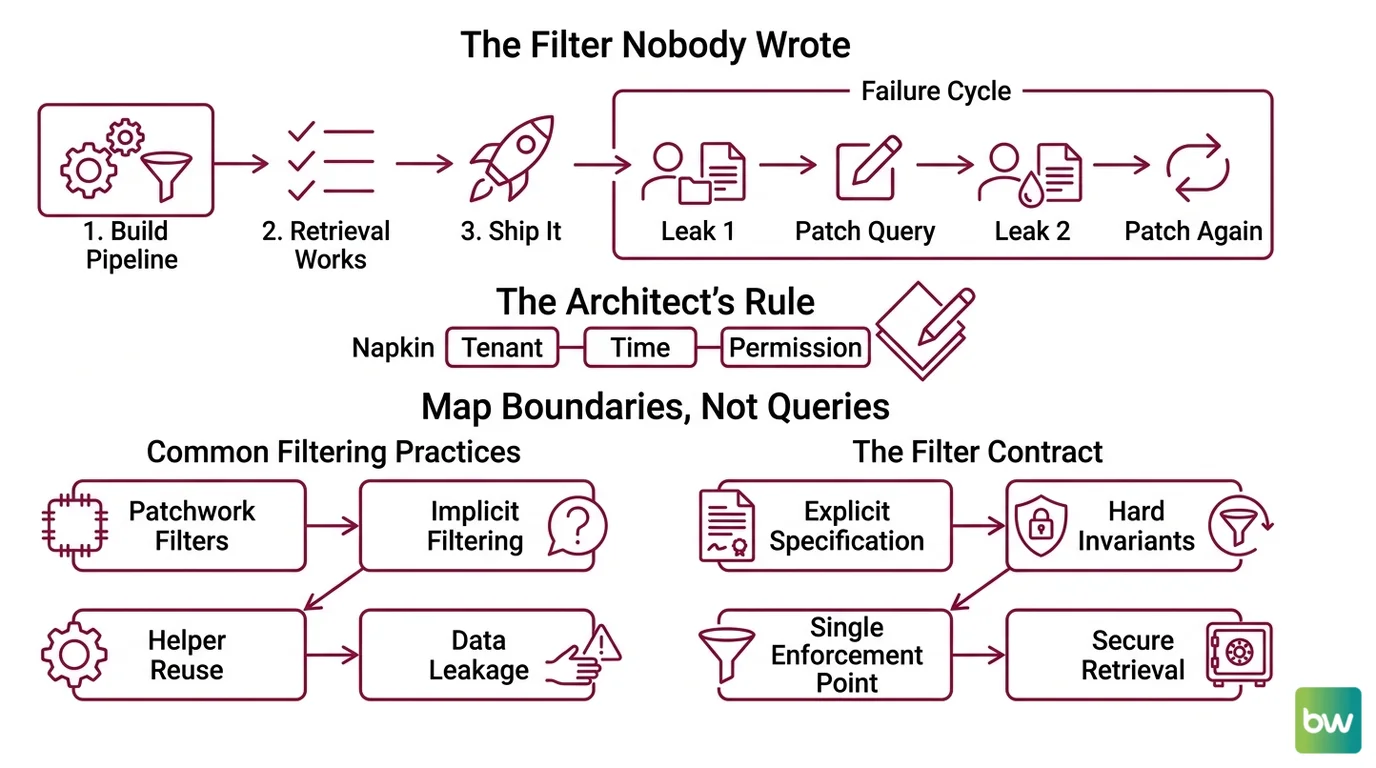
Here is the failure I see most often. A team builds a metadata filtering pipeline. Retrieval works. Latency looks fine. They ship it.
Two weeks later, support gets a screenshot. A globex user is reading an acme-corp invoice. The vector matched. Nothing filtered. The team adds tenant_id == "globex" to one query path, deploys, and breathes. Then a second leak shows up — a different endpoint, same missing predicate.
It worked on Friday. On Monday, the cross-tenant leak surfaced because the new “share search across workspaces” feature reused the unfiltered helper and nobody specified that tenancy was a hard invariant, not a query parameter.
This is fixable. But not by patching individual queries. You have to spec the filter as a contract before you write the first SDK call.
Step 1: Map Your Tenant, Time, and Permission Boundaries
Before you choose a database, decompose the filter contract into the dimensions your retrieval actually has to enforce. Most production pipelines have three.
Your filter contract has these parts:
- Tenant boundary — the hard invariant. Every query must carry it. Cross-tenant leakage is a security incident, not a bug.
- Temporal window — date, version, or freshness constraint. “Last 90 days,” “current quarter,” “active policy.”
- Permission overlay — role, ACL, or department. Soft constraint — varies per user, may be expressed as
INlists.
Add a fourth if your domain needs it: language, region, content type. But the first three carry their weight in almost every RAG system.
The Architect’s Rule: If you cannot draw the filter contract on a napkin in three labeled boxes, your retrieval layer cannot enforce it either. Tenant, time, permission. Name them. Then choose the engine.
This decomposition matters because each vector DB exposes a different surface for each box. Tenant is a namespace in Pinecone, a shard in Weaviate, a partition key in Milvus, a payload field in Qdrant. Pick the engine after you know the contract — not before.
Step 2: Lock Down the Filter Contract per Vector DB
Now translate the three boxes into the specific filter language your engine speaks. The contract stays the same. The syntax does not.
Context checklist — what your spec must declare:
- Which payload fields are filterable (and indexed)
- Which logical combinator each box uses (AND for tenant + time, IN for permissions)
- Maximum cardinality your filter values can hit
- Null and missing-field behavior — explicit, not implicit
- Pre-filter vs. post-filter strategy
Here is how each engine wants the contract phrased.
Qdrant — payload index plus filter
Qdrant builds the filter from must (AND), should (OR), and must_not (NOT) clauses, with conditions like match, match_any, range, and nested, per Qdrant Docs. The Python client takes the filter as query_filter on a search call.
The spec rule: every field you filter on must have a payload index of the right type — keyword, integer, datetime, geo. Indexed fields also feed the filtered-HNSW path, so an unindexed filter field silently degrades to a brute-force scan. Declare the index. Do not assume it.
Weaviate — pre-filter plus ACORN
Weaviate v1.34 makes ACORN the default filter strategy for new collections, replacing the SWEEPING strategy introduced in v1.27 (Weaviate Blog). ACORN skips non-matching nodes during the HNSW distance calculation and seeds extra entry points inside the filtered subgraph, which keeps recall stable when filters are highly selective.
The v4 Python client expresses filters with Filter.by_property("tenant_id").equal("acme-corp"), combined with &, |, Filter.all_of([...]), or Filter.any_of([...]) (Weaviate Docs). The contract is pre-filter — Weaviate constructs the predicate set before vector search.
Watch the geo case. Geo-coordinate filtering returns at most the nearest 800 results from the source location, per Weaviate Docs. If your radius search needs more, paginate by tile, not by limit.
Milvus — boolean expression plus partition key
Milvus filters use a SQL-like boolean expression: comparison (==, !=, >, <, >=, <=), IN, LIKE, arithmetic, AND/OR/NOT, plus IS NULL / IS NOT NULL (Milvus Docs). JSON fields support bracket notation json_field["key"]["nested"] and helpers JSON_CONTAINS, JSON_CONTAINS_ALL, JSON_CONTAINS_ANY.
For multi-tenant systems, mark the tenant column as a partition_key_field. A predicate like tenant_id == "acme-corp" then routes to a single partition instead of scanning the collection (Milvus Docs). Use expression templating to keep the predicate compiled and reuse-friendly — this matters more than it looks for high-QPS endpoints.
Pinecone — MongoDB-subset operators plus namespace
Pinecone’s filter language is a subset of MongoDB query operators: $eq, $ne, $gt, $gte, $lt, $lte, $in, $nin, $exists, with $and and $or as the only top-level combinators (Pinecone Docs).
Two hard limits to bake into the spec. Metadata is 40 KB per vector — flat key-value JSON, strings, numbers, booleans, or string lists (Pinecone Docs). The $in and $nin operators cap at 10,000 values per operator; over the limit, the request fails. If your permission overlay can balloon past that, you need a different shape — pre-resolve to a tenant-level boolean instead of an exhaustive ID list.
For tenancy, Pinecone documents one namespace per tenant as the recommended isolation model on serverless (Pinecone Docs). Namespaces physically separate data and reduce the records the query has to scan, which is also how serverless bills you.
The Spec Test: If you cannot delete one tenant’s data by dropping a single namespace, partition, or shard, your tenancy is implemented as a filter, not as isolation. That is fine for some apps and a compliance failure for others. Decide which one this is, write it down, and pick the engine accordingly.
Step 3: Wire Filters to the Right Indexing Strategy
Filtered vector search has a performance shape that depends on how filters and indexes cooperate. Build in the order that lets each layer earn its keep.
Build order:
- Schema and payload indexes first — define which fields are filterable, declare types, create the indexes. No queries yet. In Qdrant this is the payload index call. In Milvus it is the partition key declaration. In Weaviate it is the collection schema with property types. In Pinecone, the metadata schema is implicit but you still declare the namespace strategy up front.
- Tenant isolation second — wire the hardest invariant before anything else. One namespace, one shard, one partition, or one mandatory predicate per query. This is the one you cannot skip.
- Time and permission filters third — once tenant routing works, layer the temporal and permission predicates on top. These run inside the tenant scope, so a bug in them leaks data within a tenant — annoying, not catastrophic.
- Query helpers and SDK wrappers last — only after the above are spec’d and tested. Helpers that accept a “query” string and add filters internally are where unfiltered queries hide.
For each filter layer, your context must specify:
- Inputs: the user identity, the requested time window, the requested categories
- Outputs: a fully-qualified filter object the engine accepts as-is
- Constraints: what fields are MANDATORY (tenant), what are OPTIONAL (date), what are FORBIDDEN (raw user-supplied filter strings)
- Failure mode: what happens when a required field is missing — the spec answer is “fail closed, return zero results, log the call”
Security & compatibility notes:
- Qdrant v1.17.x: RocksDB storage backend fully removed in favor of Gridstore. Older deployments require a snapshot migration before upgrade — do not roll v1.17.x into a live cluster without it.
- Weaviate v1.34: ACORN is default for new collections only. Collections created before v1.34 stay on SWEEPING unless explicitly migrated, so filtered-search performance can differ between collections in the same cluster.
- Milvus v2.6.x: New features land here; v2.5.x is maintenance-only via the v2.5.27 security release. Target v2.6 for new pipelines.
- Pinecone: Closed-source SaaS — no public version. Treat the 40 KB metadata cap and 10,000-value
$incap as the only quantitative guarantees; anything else may change without notice.
Step 4: Validate Filter Selectivity and Recall
A filter that returns zero results is not always wrong, and a filter that returns results is not always right. Validation is where the contract gets tested against reality.
Validation checklist:
- Tenant isolation test — failure looks like: any query with
tenant_id = Areturning a vector whose payload saystenant_id = B. This is the security test. Run it on every deploy. Fail loud. - Selectivity recall test — failure looks like: a highly selective filter (say, 1% of corpus) returning fewer top-K results than expected. On Weaviate, this is the case ACORN was built for; on pre-1.34 collections, you may see recall drop off a cliff and need to re-index.
- Cardinality limit test — failure looks like: a query with an
$inlist of 12,000 user IDs throwing on Pinecone. Catch it in staging by feeding the maximum realistic list size, not a representative one. - Null and missing-field test — failure looks like: a document with no
created_atfield slipping through a “last 90 days” filter becauseIS NULLwas not explicitly handled. - Permission downgrade test — failure looks like: a user with revoked access still reading old documents because the filter checks group membership at index time, not query time. Permissions belong on the query side.
If your CI does not run all five against a fixture corpus, you do not know the contract holds. You hope it does.
Common Pitfalls
| What You Did | Why AI Failed | The Fix |
|---|---|---|
| One-shot “add filtering” prompt | The AI defaults to a single combinator, picks the wrong engine surface, ships unfiltered helper functions | Decompose into tenant, time, and permission boxes before any SDK call |
| Filter on an unindexed payload field | Qdrant falls back to a brute-force scan; Weaviate pre-filter is fine but recall drops off pre-1.34; Milvus full-collection scan if no partition key | Declare the payload index or partition key in the schema before the first query |
| Treated tenant filtering as a query-side predicate | One missing predicate in one helper leaks the whole tenant’s data | Use namespace (Pinecone), shard (Weaviate), partition key (Milvus), or mandatory must clause (Qdrant) |
| Passed user-supplied filter strings to the engine | Filter injection — user widens scope by editing the predicate they sent | Parse user input into typed values, build the filter object server-side, never concatenate |
| Skipped null-handling on optional fields | “Last 90 days” silently excludes documents missing created_at, or includes them, depending on engine | Specify in the contract: missing field is treated as either pass or fail, never “whatever the engine does” |
| Wrote head-to-head latency claims into the spec | None of the four DBs publish absolute QPS guarantees | Validate filter performance on your own corpus and your own selectivity profile, not on a marketing page |
Pro Tip
Treat the filter contract as a typed object that lives in one file. Every retrieval call accepts that object — never a free-form dict. If a new endpoint needs a new dimension, it goes in the type, not into a query helper. The day you can search your codebase for “everywhere we hit the index” and find every call site reading from that one type, you have made the data leak structurally impossible — not just unlikely.
Frequently Asked Questions
Q: How to build a filtered vector search pipeline with metadata payloads in 2026?
A: Spec the filter contract first — tenant, time, permission — then choose the engine. Map each box to the engine’s native surface (payload index, partition key, ACORN, namespace) instead of stuffing every constraint into a query predicate. One detail not covered above: keep your payload schema flat. Nested JSON is supported by Milvus and Qdrant but costs you cleaner index plans, especially when you later want to filter on a deeply-nested field at high QPS.
Q: How to use metadata filtering for multi-tenant RAG with access control?
A: Tenant goes on isolation, not on filter. Pinecone uses namespaces, Weaviate uses per-tenant shards, Milvus uses partition keys, Qdrant uses a mandatory must predicate against an indexed payload field. Layer permissions on top inside the tenant scope. The watch-out: if compliance requires you to fully delete a tenant, only namespace/shard/partition isolation gives you a single delete operation. A filter-only approach at scale forces a corpus-wide scan-and-delete.
Q: How to filter vector search by date, category, and user permissions in production RAG?
A: Use AND across tenant + time, then IN against permission groups inside that scope. Index created_at as a datetime field (Qdrant), a typed property (Weaviate), or a partition-friendly column (Milvus). On Pinecone, watch the 10,000-value cap for $in — if a user belongs to many groups, pre-resolve permissions into a smaller boolean rather than dumping the full group list into the predicate.
Your Spec Artifact
By the end of this guide, you should have:
- A three-box filter map: tenant boundary, temporal window, permission overlay — written down as the input shape every retrieval call accepts.
- A constraint list per engine: which payload field is indexed, which dimension is namespace/shard/partition, which combinators are allowed, what the cardinality cap is.
- A validation checklist: tenant isolation, selectivity recall, cardinality limit, null handling, permission downgrade. Each runs on every deploy.
Your Implementation Prompt
Drop the prompt below into Claude Code, Cursor, or Codex after you have filled in the bracketed values from your own filter contract. The prompt encodes the four steps from this guide and forces the AI to produce a typed filter layer rather than ad-hoc query helpers.
You are designing the metadata filter layer for a RAG retrieval pipeline.

Vector database: [qdrant | weaviate | milvus | pinecone]
SDK + version: [client library and version, e.g. weaviate-client v4]

Filter contract (Step 1 — three boxes):
  - Tenant boundary field: [field name, type]
  - Temporal window field: [field name, type, default window]
  - Permission overlay field: [field name, type, max cardinality]

Engine constraints (Step 2 — fill from the engine's spec):
  - Payload indexes / partition key / namespace strategy: [declare per engine]
  - Allowed logical combinators: [AND, OR, IN, NOT — list what your contract uses]
  - Max filter value cardinality: [Pinecone: 10000 for $in; others: declare yours]
  - Null/missing field policy: [PASS or FAIL — pick one explicitly]
  - Pre-filter or post-filter strategy: [declare]

Build order (Step 3 — produce in this sequence):
  1. Schema + payload index declarations
  2. Tenant isolation primitive (namespace/shard/partition/mandatory predicate)
  3. Typed FilterContract object accepted by every retrieval helper
  4. SDK wrapper that takes the FilterContract and produces the engine-native filter

Validation (Step 4 — emit tests for each):
  - Tenant isolation test
  - Selectivity recall test against [N] documents at [P]% selectivity
  - Cardinality limit test at [max permission list size]
  - Null/missing field test
  - Permission downgrade test (revoked access does not return cached docs)

Forbidden patterns:
  - Free-form dict filters on retrieval helpers
  - Concatenating user input into filter strings
  - Filtering on unindexed payload fields
  - Implicit null handling — every nullable field must declare its policy

Produce the schema, the FilterContract type, the SDK wrapper, and the five tests. Do not produce documentation prose.
Ship It
You now have a contract. Three boxes — tenant, time, permission — that map onto whichever vector DB you ship on, instead of leaking implementation details into your query layer. The engine becomes a deployment choice, not an architectural one. The next time someone says “add a filter,” you decompose first and let the spec tell you whether you are adding a dimension to the contract or just a value to an existing one.
AI-assisted content, human-reviewed. Images AI-generated. Editorial Standards · Our Editors