How to Fine-Tune an Open-Source LLM with Hugging Face PEFT, Unsloth, and Axolotl in 2026
Table of Contents
TL;DR
- Fine-tuning is a specification problem: dataset format, adapter config, and validation criteria must be locked before any GPU spins up
- LoRA and QLoRA let you adapt 7B+ models on consumer hardware — but the wrong hyperparameters waste more compute than they save
- A 500-example dataset with tight formatting beats a 50,000-row dump with inconsistent structure every time
You spent eight hours on a fine-tuning run. The loss curve looked clean. Then you tested the model and it hallucinated worse than the base. The dataset had formatting inconsistencies — some examples used ChatML, others were raw text, and three had the assistant turn in the user field. Eight hours of A100 time, gone because the spec was wrong.
This is fixable. And once you see the framework, you won’t burn that compute again.
Before You Start
You’ll need:
- A Hugging Face account and access to the Hub
- An NVIDIA GPU with at least 8 GB VRAM (or a cloud instance — Colab T4 works for small runs)
- Working knowledge of Fine Tuning concepts: what LORA and QLORA do, why Transfer Learning works, and what Catastrophic Forgetting looks like
This guide teaches you: How to decompose a fine-tuning job into four specification layers — dataset, adapter, training, and validation — so each component is locked before you spend GPU hours.
The Run That Taught Nothing
Here’s what I see every week. Developer grabs a dataset from the Hub. Picks a base model. Copies a training script from a blog post. Hits run. Three hours later — the model generates grammatically perfect nonsense that sounds nothing like the target domain.
The training succeeded. The specification didn’t.
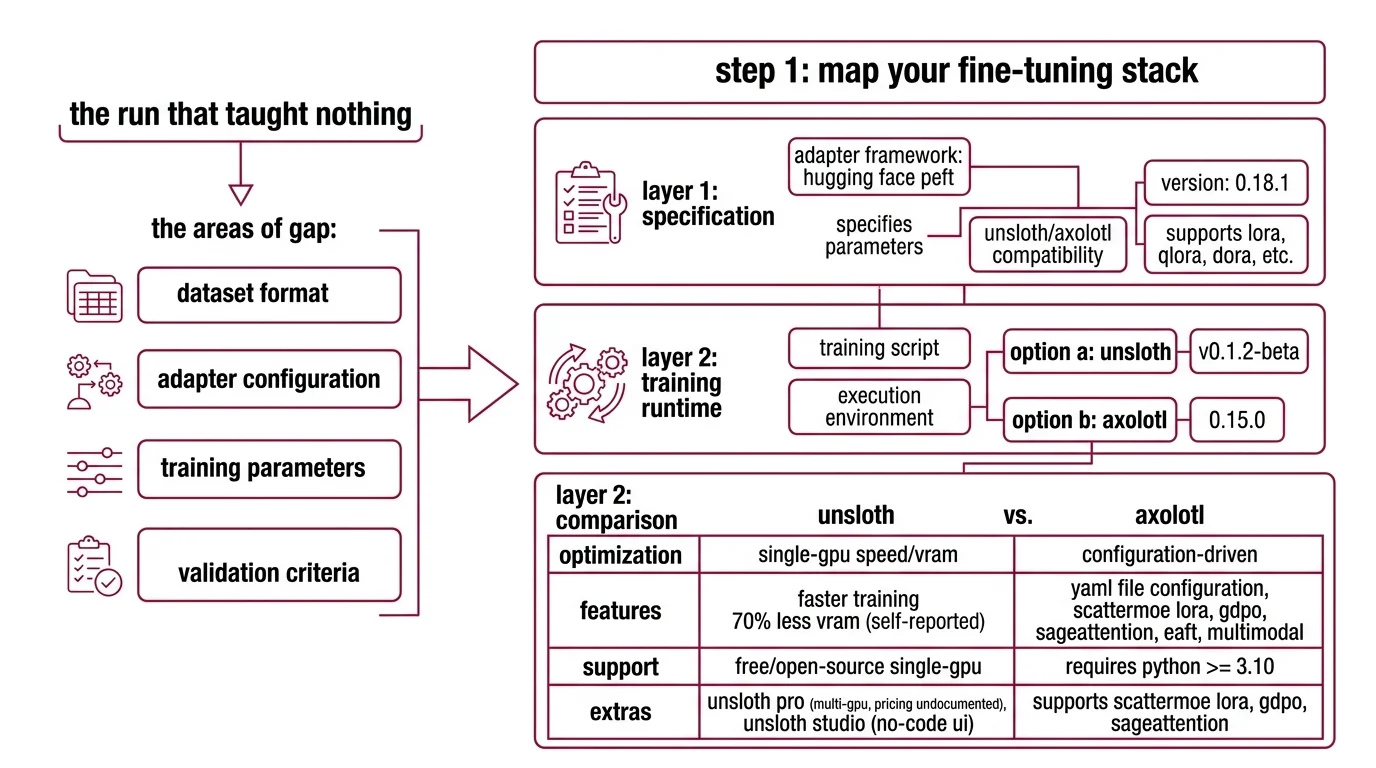
The gap is always in one of four places: dataset format, adapter configuration, training parameters, or validation criteria. Miss any one, and you’re debugging outputs instead of shipping a model.
That formatting inconsistency from the intro? It happens because ChatML, ShareGPT, and Alpaca templates structure turns differently. The training loop doesn’t validate your format. It tokenizes whatever you feed it — garbage included.
Step 1: Map Your Fine-Tuning Stack
Supervised Fine Tuning in 2026 runs on three layers. Each one handles a different concern. Mix them up and you’ll spend hours debugging the wrong layer.
Layer 1 — Adapter framework: Hugging Face PEFT
PEFT is the specification layer. It defines which parameters get updated and how. Current release is 0.18.1, which adds Transformers v5 compatibility (HF PEFT Releases). It supports LoRA, QLoRA, DoRA, and newer methods like ALoRA, WaveFT, and DeLoRA (HF PEFT Docs).
You don’t train through PEFT directly. You configure through it.
Layer 2 — Training runtime: Unsloth or Axolotl
Two options, different trade-offs:
- Unsloth (v0.1.2-beta) — optimized for speed on single-GPU setups. Reports 2x faster training and 70% less VRAM, though these are self-reported benchmarks with limited independent verification. Free and open-source for single-GPU; Pro tier covers multi-GPU, but pricing is not publicly documented. Studio, a no-code UI, launched March 17, 2026.
- Axolotl (0.15.0) — configuration-driven. You write a YAML file, Axolotl handles the rest. Requires Python >= 3.10. Supports ScatterMoE LoRA, GDPO, SageAttention, EAFT, and multimodal fine-tuning (Axolotl GitHub). Free and open-source.
One benchmark on an A100 showed Unsloth completing a QLoRA run on Llama-3.1 8B in 3.2 hours versus Axolotl’s 5.8 hours (Spheron Blog). Speed matters when you’re iterating on configs. But Axolotl’s YAML-first approach means your entire training spec is version-controlled — no notebook state to lose.
Layer 3 — Base model
As of March 2026, the practical choices: Llama 4 (broadest framework support), Qwen 3 (strong multilingual — the 30B-A3B MoE fits a single 80 GB GPU), DeepSeek V3.2 (MIT license, frontier-competitive), Phi-4 (efficient for constrained hardware), and Mistral/Ministral (3B-8B, edge-optimized).
The Architect’s Rule: If you can’t name which layer a bug lives in — adapter, runtime, or model — you will spend hours debugging the wrong one.
Step 2: Lock Down Your Dataset Spec
This is where most fine-tuning jobs fail. Not during training. Before it.
Format first. Pick one template and enforce it across every example:
- ChatML — the modern standard. Multi-role turns with explicit
<|im_start|>and<|im_end|>markers. - ShareGPT — multi-turn conversations with
fromandvaluefields. Good for dialogue. - Alpaca — single-turn instruction-response. Simple, but limited.
ChatML is the default for 2026-era models. If you’re mixing formats in one dataset, stop. The tokenizer doesn’t complain. It just produces inconsistent token sequences that your model learns as features.
Size and quality. 500-10,000 high-quality examples outperform larger, noisy datasets (Unsloth Docs). High-quality means every example demonstrates the behavior you want. No duplicates. No contradictions. No examples where the “correct” answer is wrong.
Your dataset spec checklist:
- Format: single template across all examples (ChatML / ShareGPT / Alpaca)
- Size: 500-10,000 examples — quality over volume
- Validation: every example programmatically checked for format compliance
- Domain balance: representative distribution of topics and difficulty
- Edge cases: a dedicated portion of examples covers boundary conditions the model will face in production
Step 3: Configure the Adapter and Training Loop
Now the parameters. Get these wrong and you’ll either Overfitting to your training set or barely moving the weights at all.
Adapter configuration (LoRA / QLoRA):
The recommended starting point (Unsloth Docs):
- Rank:
r=16 - Method: DoRA (combines LoRA with magnitude decomposition)
- Target modules:
all-linear - Learning Rate:
2e-4 - Epochs: 1-3
Your hardware determines the adapter choice:
- LoRA needs 16-24 GB VRAM for a 7B model. An RTX 4090 handles this. Achieves 90-95% of full fine-tuning quality (Spheron Blog).
- QLoRA needs 8-12 GB VRAM for the same 7B model. An RTX 4070 Ti is viable. Quality drops to approximately 80-90% of full fine-tuning — though this gap is task-dependent and narrows at higher ranks (Index.dev).
Build order matters:
- Dataset pipeline first — format validation, tokenization check, train/eval split. No GPU needed.
- Adapter config second — rank, target modules, method. This determines VRAM requirements.
- Training parameters third — learning rate, epochs, batch size, warmup. These depend on dataset size and adapter choice.
- Monitoring last — loss curves, eval metrics, checkpoint strategy.
For each component, your config must specify:
- What it receives (dataset path, model ID, adapter type)
- What it returns (merged model, adapter weights, training logs)
- What it must NOT do (no training on eval set, no skipping validation)
- How to handle failure (checkpoint saves, OOM recovery, gradient accumulation fallback)
The Spec Test: If your config doesn’t specify the dataset format, the training loop will tokenize whatever structure it finds. You won’t get an error. You’ll get a model that learned the wrong patterns.
Step 4: Prove the Model Improved
Training loss going down means nothing if the model doesn’t do what you need in production.
Validation checklist:
- Task accuracy — compare the fine-tuned model against the base on your eval set. If it isn’t measurably better on your task, the run failed. Failure: lower scores than base on domain prompts.
- Format compliance — does the output match your expected structure? JSON when you need JSON? Failure: correct content, wrong format.
- Regression check — test general-knowledge prompts the base model handled. Catastrophic forgetting shows up here. Failure: model loses answers outside the fine-tuning domain.
- RLHF alignment — if you trained with preference data, verify A/B comparisons favor the correct response. Failure: model picks rejected over chosen.
Security & compatibility notes:
- Axolotl PyTorch: PyTorch 2.6 support dropped and 2.7.1 deprecated. Pin to PyTorch 2.8+ for Axolotl 0.15.0.
- Axolotl Transformers v5: Upgraded from Transformers v4 to v5. Older YAML configs referencing v4 API patterns may need updates.
- Unsloth dependency caps: TRL capped at <=0.24.0, PEFT 0.11.0 excluded, datasets 4.4.0-4.5.0 blocked. Check your environment pins before upgrading.
Common Pitfalls
| What You Did | Why It Failed | The Fix |
|---|---|---|
| Mixed ChatML and Alpaca in one dataset | Tokenizer encoded inconsistent turn boundaries | Pick one format, convert all examples |
Set r=64 hoping for better quality | Overfitting on small datasets, longer training, no quality gain | Start at r=16, increase only if eval metrics plateau |
| Skipped eval split | No way to detect overfitting during training | Hold out a validation split before training |
| Fine-tuned on tens of thousands of noisy examples | Model learned noise patterns alongside signal | Curate a smaller, clean dataset instead |
| Ignored base model capabilities | Fine-tuned for tasks the base already handles | Benchmark the base model first — only fine-tune the gap |
Pro Tip
Version-control your training config, not just your code. The YAML file (Axolotl) or notebook (Unsloth) that defines your run is the spec. Pin it to a commit. When a run produces a good model, the config that produced it should be reproducible six months later — same dataset hash, same adapter settings, same base model revision.
Frequently Asked Questions
Q: How to fine-tune a large language model step by step in 2026? A: Curate a dataset in one format — ChatML is the current default. Configure your adapter at r=16 with DoRA and all-linear targets. Train through Unsloth or Axolotl. Validate against held-out examples and regression tests. The missed step: benchmark the base model first so you know what “better” means.
Q: How to prepare and format a dataset for LLM fine-tuning? A: Pick one template (ChatML, ShareGPT, or Alpaca) and enforce it across every example. Validate programmatically before tokenization — check role markers, turn boundaries, and response completeness. The most common silent failure: including system prompts in some examples but not others.
Q: When should you fine-tune vs use prompt engineering or RAG? A: Fine-tune for structural behavior changes — tone, format, reasoning style, domain vocabulary. Use prompting if a handful of examples solve it. Use RAG for knowledge gaps. Fine-tune only the gap neither approach covers. The wrong answer is fine-tuning when prompting already works.
Q: How to fine-tune an LLM for domain-specific tasks like legal or medical? A: Use input-output pairs validated by domain experts, not scraped text. Legal: expert-reviewed contract analyses. Medical: de-identified clinical templates. Build your eval set with practitioners before writing training examples — the eval defines what “correct” means for your domain.
Your Spec Artifact
By the end of this guide, you should have:
- A dataset specification — format template, quality criteria, size target, edge case coverage
- An adapter and training configuration — LoRA/QLoRA settings, learning rate, epochs, hardware requirements
- A validation protocol — eval metrics, regression tests, format checks, production acceptance criteria
Your Implementation Prompt
Paste this into Claude Code, Cursor, or your preferred AI coding tool. Fill in the bracketed placeholders with your values.
I need a fine-tuning pipeline for an open-source LLM. Here is my specification:

## Dataset
- Base format: [ChatML / ShareGPT / Alpaca]
- Source: [path to raw data or Hugging Face dataset ID]
- Target size: [500-10,000 — specify your count]
- Domain: [your domain — e.g., legal contract analysis, medical triage, customer support]
- Validation: every example must have [role markers / turn boundaries / response format] checked programmatically before tokenization

## Base Model
- Model: [Llama 4 / Qwen 3 / DeepSeek V3.2 / Phi-4 / Mistral — specify exact model ID from Hugging Face]

## Adapter Configuration
- Method: [LoRA / QLoRA / DoRA]
- Rank: [16 as starting point — adjust based on eval]
- Target modules: [all-linear / specific modules]
- Learning rate: [2e-4 as starting point]
- Epochs: [1-3 — specify]

## Hardware
- GPU: [your GPU model and VRAM]
- Framework: [Unsloth / Axolotl]

## Validation
- Eval split: [10-15% of dataset]
- Task-specific metric: [accuracy / F1 / BLEU / custom — specify]
- Regression test: [list 5-10 general-knowledge prompts the base model handles correctly]
- Format check: [expected output structure — JSON schema / markdown template / plain text]
- Acceptance criterion: [fine-tuned model must beat base by X% on task metric without degrading regression tests by more than Y%]

Generate: dataset preprocessing script, training config YAML, and evaluation script. Each component as a separate file.
Ship It
You now have a four-layer specification framework for fine-tuning: dataset, adapter, training, validation. Each layer locks down decisions before GPU hours start. The next time someone suggests “just fine-tune it,” you know the four questions to answer first — and you know which layer to debug when something breaks.
AI-assisted content, human-reviewed. Images AI-generated. Editorial Standards · Our Editors