How to Evaluate LLMs for Your Use Case with DeepEval, Langfuse, and Custom Benchmarks in 2026
Table of Contents
TL;DR
- Define evaluation metrics before choosing tools — your use case determines whether you need RAG faithfulness, task completion, or safety scores
- Wire DeepEval for metric execution, Langfuse for production tracing, and Promptfoo for CI/CD gating — each tool handles a different layer
- Automate the full pipeline so every prompt change triggers evaluation — manual spot-checks miss the regressions that matter
You shipped a RAG chatbot last quarter. Internal testers loved it. Then support tickets tripled in two weeks — the model was hallucinating product specs that looked plausible but were wrong. The model wasn’t broken. Your Model Evaluation was. You read a few outputs, nodded, and deployed. Nobody measured faithfulness. Nobody checked retrieval quality. Nobody ran the same prompt twice to see if the answer stayed consistent.
This is fixable. And once you build the pipeline, you won’t ship blind again.
Before You Start
You’ll need:
- A working LLM application (RAG pipeline, agent, or chatbot) with at least one prompt in production or staging
- Familiarity with what LLM As Judge means and why public rankings like Chatbot Arena don’t replace domain-specific evaluation
- Python 3.9+ and a CI/CD pipeline (GitHub Actions, GitLab CI, or similar)
This guide teaches you: How to decompose your evaluation surface into measurable layers, select the right metric for each layer, and wire three open-source tools into a pipeline that catches regressions before your users do.
The Chatbot That Passed Every Manual Review
Here’s the pattern I see every month.
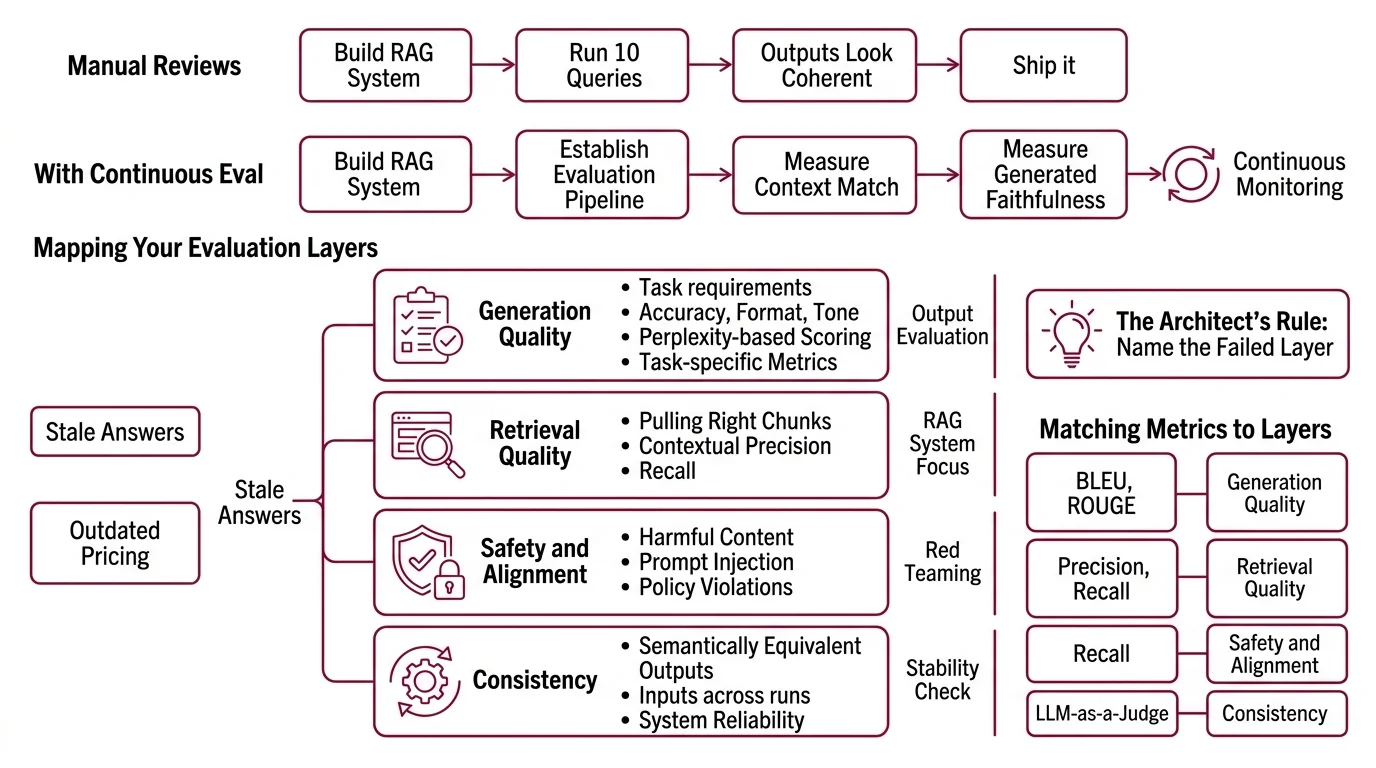
Team builds a RAG system. Runs ten queries by hand. Outputs look coherent, well-formatted, confident. Ship it.
Two weeks later, a customer asks about a product that changed after the last index refresh. The system retrieves stale chunks, generates a confident answer with outdated pricing, and the customer makes a purchasing decision based on wrong data. Nobody noticed because nobody was measuring whether retrieved context matched the query — or whether the generated answer stayed faithful to that context.
It worked on Thursday. On Monday, the knowledge base got a partial update and three answers started contradicting the product catalog — because the evaluation pipeline didn’t exist.
Step 1: Map Your Evaluation Layers
Model evaluation is not one thing. It’s at least four layers, and each one fails differently.
Your evaluation surface has these layers:
- Generation quality — does the output meet your task requirements? Accuracy, format, tone. This is where Perplexity-based scoring and task-specific metrics live.
- Retrieval quality — for RAG systems, are you pulling the right chunks? Contextual precision and recall matter here more than generation fluency.
- Safety and alignment — does the output avoid harmful content, prompt injection, and policy violations? This is where red teaming lives.
- Consistency — does the same input produce semantically equivalent outputs across runs? If not, your system is a slot machine.
The Architect’s Rule: If you can’t name which layer failed, you can’t write the fix. A hallucinated answer might be a generation problem (model made it up) or a retrieval problem (model faithfully summarized the wrong document). Different layers, different metrics, different fixes.
Step 2: Match Metrics to Each Layer
This is where most teams go wrong. They grab a popular metric, not one that matches their failure mode.
For generation quality:
- Automated benchmarks like BLEU and HumanEval measure specific capabilities — translation overlap and code correctness, respectively. Useful for narrow tasks. Misleading for open-ended generation.
- SWE Bench tests real-world coding ability against actual GitHub issues. Good for evaluating coding agents, irrelevant for summarization tasks.
- LLM-as-judge scoring — have a separate model grade your primary model’s output on rubric dimensions. Two surveys on arXiv document both the power and the pitfalls of this approach, including preference leakage as a contamination risk (arXiv).
For retrieval quality (RAG):
- DeepEval ships five dedicated RAG metrics — Answer Relevancy, Faithfulness, Contextual Relevancy, Contextual Precision, and Contextual Recall (DeepEval Docs). Faithfulness is the metric most teams skip, and it’s the one that would have caught the hallucinated product specs in our opening scenario.
For safety:
- Promptfoo includes 67+ security attack plugins for red teaming (Promptfoo Docs). Run these before every production deployment, not just once during development.
For consistency:
- Run the same prompt set multiple times. Compare outputs using semantic similarity. A Confusion Matrix helps you visualize where the model’s classifications drift between attempts.
The Spec Test: If your evaluation plan doesn’t name specific metrics for each layer, you’re not evaluating. You’re hoping.
Step 3: Wire DeepEval, Langfuse, and Promptfoo
Each tool handles a different job. Don’t make one tool do everything.
DeepEval — metric execution and test harness.
Open-source (Apache-2.0), pytest-compatible. Runs deepeval test run against your test cases and returns pass/fail per metric. The framework ships with over 50 LLM-evaluated metrics covering RAG, agents, and conversational systems (DeepEval Docs). For agentic workflows, v3.9 added Task Completion, Tool Correctness, and Plan Adherence metrics — useful if you’re evaluating multi-step agents, not just single-turn generation.
Langfuse — production tracing and prompt management. Open-source, self-hostable. Every LLM call gets a trace with latency, token counts, cost, and the full prompt-completion pair. This is your debugging layer — when a user reports a bad output, you trace the exact call and see which retrieval chunks the model received (Langfuse Docs).
One caveat: the Python SDK was rewritten for v4, based on OpenTelemetry. If you’re on v3, the migration involves breaking changes to environment variables and span export behavior (Langfuse Docs). Plan the upgrade before wiring tracing into production.
Promptfoo — CI/CD gating and red teaming. Open-source (MIT), supports 90+ model providers. Define assertions in YAML, run them in your CI pipeline, and gate deployments on pass rates. Promptfoo was acquired by OpenAI in March 2026, though the CLI remains open-source and MIT-licensed (OpenAI Blog). As of this writing, the open-source commitment holds — monitor for changes.
Build order:
- DeepEval first — because you need metric definitions and a test suite before anything else. No metrics, no pipeline.
- Langfuse second — wire tracing into your application so every call is logged. You need the traces to debug metric failures.
- Promptfoo last — connect your CI/CD to run DeepEval tests and Promptfoo assertions on every prompt change. This is the gate.
For each tool, your specification must include:
- What it receives (test cases, traces, prompt configs)
- What it returns (scores, pass/fail, trace IDs)
- What it must NOT do (DeepEval doesn’t trace production; Langfuse doesn’t gate CI)
- How to handle failure (what happens when a metric drops below threshold?)
Step 4: Gate Your CI/CD and Catch Regressions
Deploy the pipeline. Then prove it catches what manual testing misses.
Validation checklist:
- Faithfulness regression — change a retrieval source to include contradictory information. Does the pipeline flag it? Failure looks like: the model generates a confident answer from the bad source and no metric fires.
- Format drift — modify your prompt slightly. Does the output still match the expected schema? Failure looks like: JSON keys renamed or missing, downstream parser crashes.
- Safety bypass — run Promptfoo’s red team plugins against your latest prompt. Failure looks like: the model follows a prompt injection that your system prompt should have blocked.
- Consistency check — run 50 identical queries. Compare outputs. Failure looks like: semantically different answers to the same question on different runs.
Common Pitfalls
| What You Did | Why It Failed | The Fix |
|---|---|---|
| Evaluated with public benchmarks only | Arena rankings measure general ability, not your domain | Build custom test cases from real user queries |
| Used one metric for everything | BLEU doesn’t measure faithfulness; faithfulness doesn’t measure safety | Map one metric minimum per evaluation layer |
| Tested once before launch | Prompts change, models update, retrieval data drifts | Gate every prompt change in CI/CD |
| Skipped retrieval evaluation | Assumed generation quality means retrieval is fine | Measure contextual precision and recall separately |
Pro Tip
Build your test suite from production failures, not synthetic examples. Every support ticket about a wrong answer is a test case. Every hallucinated citation is an assertion. The best evaluation pipelines are built backward — from the failures you already know about to the metrics that would have caught them.
Frequently Asked Questions
Q: How to build an LLM evaluation pipeline step by step in 2026? A: Start by mapping your evaluation layers — generation, retrieval, safety, consistency. Define at least one metric per layer. Wire DeepEval as your test harness, Langfuse for production tracing, and Promptfoo for CI/CD gating. Run every prompt change through the pipeline automatically. Don’t rely on manual spot-checks, especially after model provider updates that silently change output distributions.
Q: How to choose the right evaluation metrics for RAG applications? A: Focus on retrieval-specific metrics first: contextual precision (are the retrieved chunks relevant?), contextual recall (did you miss relevant chunks?), and faithfulness (does the answer stick to what was retrieved?). Faithfulness catches the most dangerous RAG failure — confident answers built on wrong context. Add answer relevancy last as a generation-layer check on top.
Q: How to use LLM-as-judge to automate model output evaluation? A: Define a rubric with specific scoring dimensions — accuracy, completeness, tone — and have a separate model score outputs against it. DeepEval supports this natively with customizable judge models. Watch for preference leakage: the judge may favor outputs matching its own generation style. Rotate judge models periodically or use multiple judges and take the majority score to reduce single-model bias.
Q: How to set up automated LLM testing in CI/CD with Promptfoo and DeepEval? A: Define test cases in DeepEval’s pytest format and assertions in Promptfoo’s YAML config. Add both to your CI pipeline as sequential steps — DeepEval runs metric-level tests, Promptfoo runs assertion-level gates. Set a minimum pass rate and block deployment when it’s not met. Start with high thresholds on faithfulness and safety, lower on stylistic metrics — catch dangerous regressions without blocking every minor tone shift.
Your Spec Artifact
By the end of this guide, you should have:
- Evaluation layer map — four layers (generation, retrieval, safety, consistency) with at least one metric per layer matched to your specific failure modes
- Tool wiring specification — DeepEval for test execution, Langfuse for production tracing, Promptfoo for CI/CD gating, with clear boundaries on what each tool owns
- CI/CD gate criteria — minimum pass rates per metric category, with faithfulness and safety thresholds set higher than stylistic thresholds
Your Implementation Prompt
Copy this into Claude Code, Cursor, or your preferred AI coding tool. Replace the bracketed placeholders with your specific values from the evaluation layer map you built in Steps 1-4.
Build an LLM evaluation pipeline with the following specification:

APPLICATION:
- Type: [RAG pipeline | Agent | Chatbot | other]
- Primary model: [model name and version]
- Framework: [LangChain | LlamaIndex | custom | other]

EVALUATION LAYERS AND METRICS:
Layer 1 — Generation: [metric from Step 2, e.g., LLM-as-judge with rubric for accuracy + completeness]
Layer 2 — Retrieval: [RAG metrics from Step 2, e.g., Faithfulness + Contextual Precision + Contextual Recall]
Layer 3 — Safety: [red team scope from Step 2, e.g., prompt injection + PII leakage via Promptfoo plugins]
Layer 4 — Consistency: [consistency check from Step 2, e.g., semantic similarity across N identical runs]

TOOL WIRING:
- DeepEval: test harness running [metric list] with pytest integration
- Langfuse: production tracing with [self-hosted | cloud] deployment, SDK version [v3 | v4]
- Promptfoo: CI/CD assertions in [GitHub Actions | GitLab CI | other] with [pass rate threshold]% gate

TEST CASES:
- Source: [production failure logs | synthetic generation | both]
- Minimum count: [number] per evaluation layer
- Format: DeepEval test case schema with input, expected_output, context fields

CI/CD GATE:
- Faithfulness threshold: [minimum score, e.g., 0.85]
- Safety threshold: [minimum score, e.g., 0.95]
- Style threshold: [minimum score, e.g., 0.70]
- Block deployment if any threshold fails: [yes | no]

VALIDATION: After building, run these regression scenarios — faithfulness regression (inject contradictory retrieval source), format drift (modify prompt and check schema compliance), safety bypass (run red team plugins), consistency check (N identical queries compared). Report pass/fail per scenario.
Ship It
You now have a four-layer evaluation framework that maps metrics to failure modes, not to marketing pages. Every prompt change runs through automated gates. Every production call gets traced. The model hasn’t changed — your ability to measure what it does has.
AI-assisted content, human-reviewed. Images AI-generated. Editorial Standards · Our Editors