How to Engineer Code Context with CLAUDE.md, .cursorrules, and AGENTS.md in 2026
TL;DR
- Different agents read different files — Claude Code reads
CLAUDE.md, Codex readsAGENTS.md, Cursor reads.cursor/rules/*.mdc. One repo, multiple surfaces. - Treat each file as a spec, not a README. Constraints and conventions in, prose and history out.
- Scope rules to paths. Repo-wide files set defaults; path-scoped files override on the directories that need different conventions.
You opened a fresh repo on Monday, added a CLAUDE.md, and pasted in everything you wished a new contributor knew. By Wednesday Cursor was still generating axios calls in a codebase that banned them six months ago, and Codex confidently wrote a migration that ignored your test conventions. The file existed. The agents never read it. Or they read it and the conventions sat 400 lines deep, drowned in tone-of-voice notes nobody asked for.
This guide treats Context Engineering For Code as a specification problem, not a documentation problem. You will end with a working file layout that each of the major agents — Claude Code, Cursor, Codex, GitHub Copilot — actually reads, plus a checklist for verifying they did.
Before You Start
You’ll need:
- An AI coding tool — Claude Code, Cursor, OpenAI Codex, or GitHub Copilot
- A repo with at least one convention worth enforcing (lint config, framework version, test style)
- Familiarity with Agentic Coding and how it differs from Vibe Coding
This guide teaches you: Context files are routing, not documentation. Pick the right surface for each agent, scope rules to the paths that need them, and verify adherence before assuming compliance.
The Context File That Six Agents Ignored
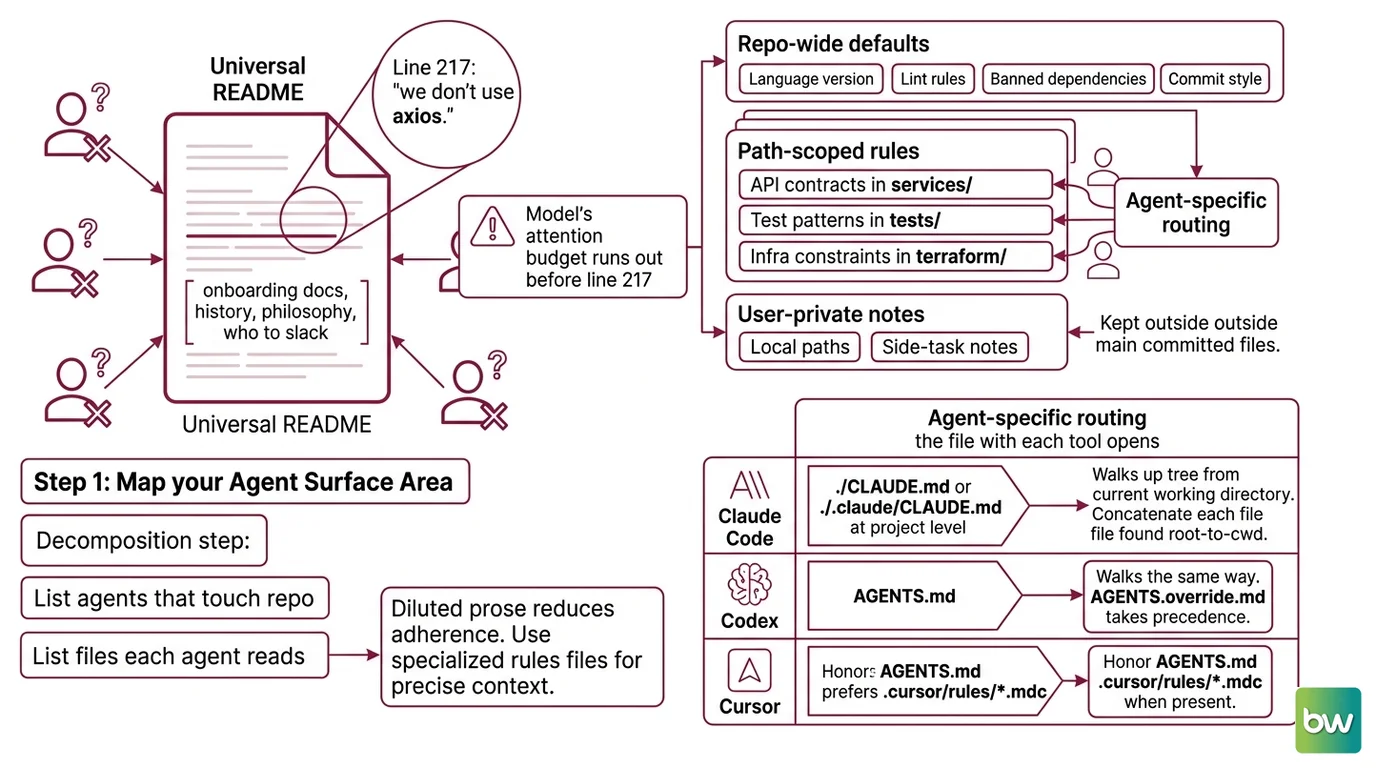
The most common failure is the universal README pattern. One file, sitting at the repo root, written like an onboarding doc for humans. Three hundred lines about project history, philosophy, who to slack when the CI breaks. Buried somewhere on line 217: “we don’t use axios.”
The agents are fine. The file is the problem. Claude Code walks the directory tree and concatenates every CLAUDE.md it finds — but if your conventions are diluted by prose, adherence drops. Cursor honors AGENTS.md as a fallback but prefers .cursor/rules/*.mdc when present. Codex never looked at your CLAUDE.md in the first place.
It worked on Friday. On Monday, the agent generated axios because the rule lived inside a paragraph titled “A Brief History of Our HTTP Layer,” and the model’s attention budget ran out before line 217.
Step 1: Map Your Agent Surface Area
Before writing any rules, list the agents that touch your repo and the files each one actually reads. This is the decomposition step — without it, you will write the same convention into four different files and forget to update three of them next quarter.
Your context system has these parts:
- Repo-wide defaults — conventions that apply everywhere: language version, lint rules, banned dependencies, commit style
- Path-scoped rules — conventions that apply only to certain directories: API contracts in
services/, test patterns intests/, infra constraints interraform/ - Agent-specific routing — the file each tool actually opens when it boots
- User-private notes — anything you do not want committed (local paths, side-task notes), kept out of the team-shared files
Per Claude Code Docs, Claude reads ./CLAUDE.md or ./.claude/CLAUDE.md at the project level, walking up the tree from your current working directory and concatenating each file it finds root-to-cwd. Codex reads AGENTS.md and walks the same way, with AGENTS.override.md taking precedence per directory according to OpenAI Codex Docs. Cursor reads .cursor/rules/*.mdc files, each with its own activation mode. GitHub Copilot reads .github/copilot-instructions.md for repo-wide context and .github/instructions/*.instructions.md for path-scoped guidance.
Four agents. At least four file conventions. You either route deliberately or accept that three of them are guessing.
The Architect’s Rule: If you cannot name which file each agent reads on boot, the agents cannot follow conventions they cannot find.
Step 2: Lock the Conventions That Don’t Live in Code
What goes into a context file is what the AI cannot infer from the codebase alone. Your package.json already pins your framework version. The agent can read it. Do not restate it. The file is for the conventions, taste, and constraints that have no representation in the source tree.
Context checklist:
- Banned patterns — libraries, idioms, or APIs that are deprecated in this codebase but still common in training data (
axios,moment.js,enzyme) - Required idioms — the project’s preferred way to do something that has many valid alternatives (error handling pattern, async style, state management)
- Test conventions — file location, naming, assertion library, what counts as a unit vs. integration test
- Architectural boundaries — what code lives where, which modules may not import from which others
- External contract style — API response shape, error envelope, pagination convention
- What “done” looks like — typecheck passes, tests pass, lint passes, plus any project-specific gate
According to Claude Code Docs, you should target under 200 lines per CLAUDE.md file. Longer files reduce adherence and burn through context budget — the same warning surfaces in GitHub Docs, which limits repository-wide Copilot instructions to “no longer than 2 pages.” Both vendors converged on the same operational reality: long files lose. Short, declarative files win.
The Spec Test: Open your context file. Strike every sentence that is history, motivation, or tone-of-voice. What remains should be enforceable. If less than half survives, the file is documentation, not a spec.
Step 3: Layer Files Root to Leaf
The hierarchy matters because every modern coding agent uses some form of nearest-file-wins precedence. Claude Code concatenates root to cwd, with deeper files loaded last. Codex walks git root down to cwd, picking at most one file per directory and concatenating them, joined with blank lines (OpenAI Codex Docs). Cursor activates rules based on path globs declared in each .mdc file’s frontmatter.
Build order:
- Repo-root files first — broad conventions, the ones true for every directory. This is where banned libraries, commit style, and language version live.
- Subdirectory files next — only where conventions diverge. A
services/CLAUDE.mdsaying “API handlers use theResult<T, E>wrapper here” beats burying that rule in the root file under a paragraph titled “Services.” - Path-scoped rules last —
.cursor/rules/*.mdcwith glob targets,.claude/rules/*.mdwith optionalpaths:frontmatter,.github/instructions/*.instructions.mdwithapplyTo:glob. These let one rule activate only inside the directory it governs.
For each file, your spec must specify:
- Where it lives — exact path, because the agent will not find it elsewhere
- What it covers — the slice of the repo the rules apply to
- What it explicitly does not cover — so the next file in the hierarchy can take over without contradiction
- What happens when rules conflict — usually nearest file wins, but state the assumption
Two cross-agent bridges are worth knowing. Claude Code does not natively read AGENTS.md — per Claude Code Docs, the recommended pattern is to create a CLAUDE.md that imports it with @AGENTS.md, or symlink (ln -s AGENTS.md CLAUDE.md) on macOS or Linux. Imports follow the @path/to/file syntax, with a max recursion depth of four hops. Second bridge: when you run /init in Claude Code, it reads existing AGENTS.md, .cursorrules, and .windsurfrules files and incorporates relevant parts into the generated CLAUDE.md. You do not have to rewrite history.
Step 4: Verify the Agent Reads What You Wrote
Writing the file is half the job. The other half is proving the agent loaded it. Skip this and you will spend a week debugging “why is the AI ignoring my rules” when the answer is that the file lives in the wrong directory or the activation mode never fires.
Validation checklist:
- Mention test — ask the agent to summarize the conventions in its context. Failure looks like: vague platitudes about clean code, no mention of your specific banned libraries.
- Path scope test — generate code in a directory governed by a path-scoped rule, then generate in a directory not covered. Failure looks like: identical output in both locations, suggesting the scoped rule never activated.
- Conflict resolution test — define a deliberate override in a child directory and verify the agent honors it. Failure looks like: child rule ignored, root rule wins.
- Refresh test — change a rule, restart the agent session, ask again. Failure looks like: the agent quotes the old rule, meaning your session cached the previous context.
- Hard-constraint check — for anything you absolutely cannot ship (a security policy, a banned API), do not rely on the context file alone. Both Claude Code Docs and Cursor Docs explicitly state the agent “may not follow them.” Pair the rule with a lint gate, a pre-commit hook, or a settings-level deny.
Security & compatibility notes:
.cursorrules(single root file): Deprecated since Cursor 0.43. Still functions but is no longer the documented path. Migrate to.cursor/rules/*.mdcper FlowQL’s migration guide.- Claude Code auto memory: Requires Claude Code v2.1.59 or later. Earlier versions do not load
~/.claude/projects/<proj>/memory/MEMORY.mdautomatically. Disable globally withCLAUDE_CODE_DISABLE_AUTO_MEMORY=1if you do not want auto-captured notes shipped into future sessions.- Context files are not enforcement: Claude Code Docs and Cursor Docs both note the agent “may not follow” rules in these files. For hard guarantees, pair every must-not rule with a lint check, pre-commit hook, or settings-level deny.
Common Pitfalls
| What You Did | Why AI Failed | The Fix |
|---|---|---|
| One giant root file with history, philosophy, and rules mixed together | Conventions buried under prose; attention budget exhausted before the model reaches the rule | Strip to spec-only content; target under 200 lines per Claude Code Docs |
Same conventions copy-pasted into CLAUDE.md, AGENTS.md, and .cursor/rules/ | Drift the moment one file is updated; agents see contradicting rules | One source of truth; the others import or symlink it |
| Path-scoped rule placed at repo root with no glob | Rule fires globally and overrides intent in directories where it should not apply | Move to .claude/rules/*.md with paths: frontmatter, or .cursor/rules/*.mdc with explicit glob |
| Trusted the file to enforce a security rule | Agent may not follow; both Claude Code and Cursor explicitly warn about this | Add a lint or pre-commit check that fails the build, not just the agent’s awareness |
| Wrote AGENTS.md and assumed Claude Code reads it | Claude Code reads CLAUDE.md, not AGENTS.md | Create CLAUDE.md that imports @AGENTS.md, or symlink the file |
Pro Tip
Context files are routing tables. The same way you do not duplicate environment variables across services — you read them from one place — you should not duplicate conventions across context files. Pick the canonical file for each rule. Make every other agent’s surface a thin pointer to it. When you change a rule next quarter, you change it once.
Frequently Asked Questions
Q: How to set up context engineering for Claude Code, Cursor, and Codex in 2026?
A: Write AGENTS.md as the canonical spec, then route each tool to it: Codex reads it natively, Cursor honors it as a fallback, and Claude Code reaches it via a CLAUDE.md that contains @AGENTS.md or a symlink. One file changes, three agents update. Skip the symlink on Windows — use the import.
Q: How to use CLAUDE.md and copilot-instructions.md for project conventions?
A: Both files want spec-style content under their size targets — Claude under 200 lines, Copilot under two pages per GitHub Docs. Keep CLAUDE.md at repo root or ./.claude/. Place Copilot’s file at .github/copilot-instructions.md. For path-scoped Copilot rules, use *.instructions.md files with applyTo: globs; note that on github.com, path-specific instructions currently apply only to Code Review and the Coding Agent.
Q: How to structure a monorepo for AI coding agent context retrieval?
A: Place a root file with cross-repo defaults, then a focused file inside each package directory. Claude Code and Codex walk root-to-cwd, concatenating files (Codex picks one per directory with AGENTS.override.md taking precedence per OpenAI Codex Docs). For Cursor, use .cursor/rules/*.mdc with globs scoped to each package path.
Your Spec Artifact
By the end of this guide, you should have:
- An agent-surface map — which files each of your active coding agents reads on boot, and where they live in your repo
- A constraint inventory — banned patterns, required idioms, test conventions, and architectural boundaries written as enforceable rules under the size limits each vendor recommends
- A verification routine — the four-test checklist (mention, path scope, conflict, refresh) you run any time you change a rule or onboard a new agent
Your Implementation Prompt
Paste this into your AI coding tool the next time you bootstrap a context-engineering setup. It encodes the four-step decomposition above. Replace each bracketed placeholder with the value from your repo before sending.
You are helping me set up context engineering for an AI coding agent in this repo.

Step 1 — Map agent surface area:
The active agents in this repo are: [list: Claude Code, Cursor, Codex, Copilot]
For each, name the exact file path the agent reads on boot.

Step 2 — Specify constraints (under 200 lines for CLAUDE.md, under 2 pages for Copilot):
- Banned patterns: [list: e.g., axios, moment.js, default exports]
- Required idioms: [list: e.g., Result<T, E> for error handling, async/await only]
- Test conventions: [list: file location, framework, naming]
- Architectural boundaries: [list: forbidden import paths]
- External contract style: [list: error envelope shape, pagination convention]
- Definition of done: [list: typecheck, tests, lint, plus project-specific gates]

Step 3 — Layer files root to leaf:
- Repo-root file: [path, e.g., /CLAUDE.md or /AGENTS.md]
- Subdirectory overrides: [list: e.g., services/CLAUDE.md for API conventions]
- Path-scoped rules: [list: e.g., .cursor/rules/api.mdc with glob services/**]
- Cross-agent bridge: [e.g., CLAUDE.md contains @AGENTS.md import, or symlink]

Step 4 — Validate:
After generating the files, propose four verification tests:
- Mention test: ask agent to summarize its loaded conventions
- Path scope test: generate in/out of scoped directory
- Conflict test: deliberate override in child directory
- Refresh test: restart session, confirm new rule loaded

Produce the file contents in order, with file paths as headers. Do not invent
rules I did not list. Where a placeholder is unfilled, leave a TODO marker
rather than guessing.
Ship It
You now have a mental model that treats context files as routing tables for AI coding agents, not as documentation for humans. The conventions live once, in the canonical file. Every other agent’s surface points back to it. The conventions get tested, not assumed. And when a rule absolutely cannot be violated, it lives in a lint check or a pre-commit hook, not in a paragraph the model may quietly skim past.
AI-assisted content, human-reviewed. Images AI-generated. Editorial Standards · Our Editors