How to Detect and Mitigate Dataset Bias with AIF360, Fairlearn, and Aequitas in 2026
TL;DR
- Accuracy can’t see bias. A dataset can produce a high-accuracy model that still hands favorable outcomes to one group more than another — you measure fairness separately, or you don’t measure it at all.
- Audit before you mitigate. The baseline measurement is the only thing that later proves a fix actually moved the gap.
- The tool reports what you specify. Name the protected attribute, the privileged group, and the favorable outcome, or the metric hands you a number that means nothing.
Your loan-approval model passed every accuracy test you threw at it. It shipped. Three months later a regulator asks why the approval rate for one group came in far below another’s, and nobody on the team can answer. The accuracy metric never measured that. The bias was sitting in the training data the whole time, and no part of your spec ever asked anyone to look for it.
Before You Start
You’ll need:
- A fairness toolkit — AI Fairness 360, Fairlearn, or Aequitas (all Python, all free and open source)
- A labeled dataset with at least one Protected Attribute you can isolate
- Understanding of Dataset Bias and how it differs from Class Imbalance (imbalance is about rare classes; bias is about unequal treatment of groups)
- A clear definition of your favorable outcome — the label the model is trying to award
This guide teaches you: how to decompose a fairness audit into measure, diagnose, mitigate, re-measure — and how to specify each stage so the tool reports the bias you actually care about, not noise.
Why Your Accuracy Score Can’t See the Bias
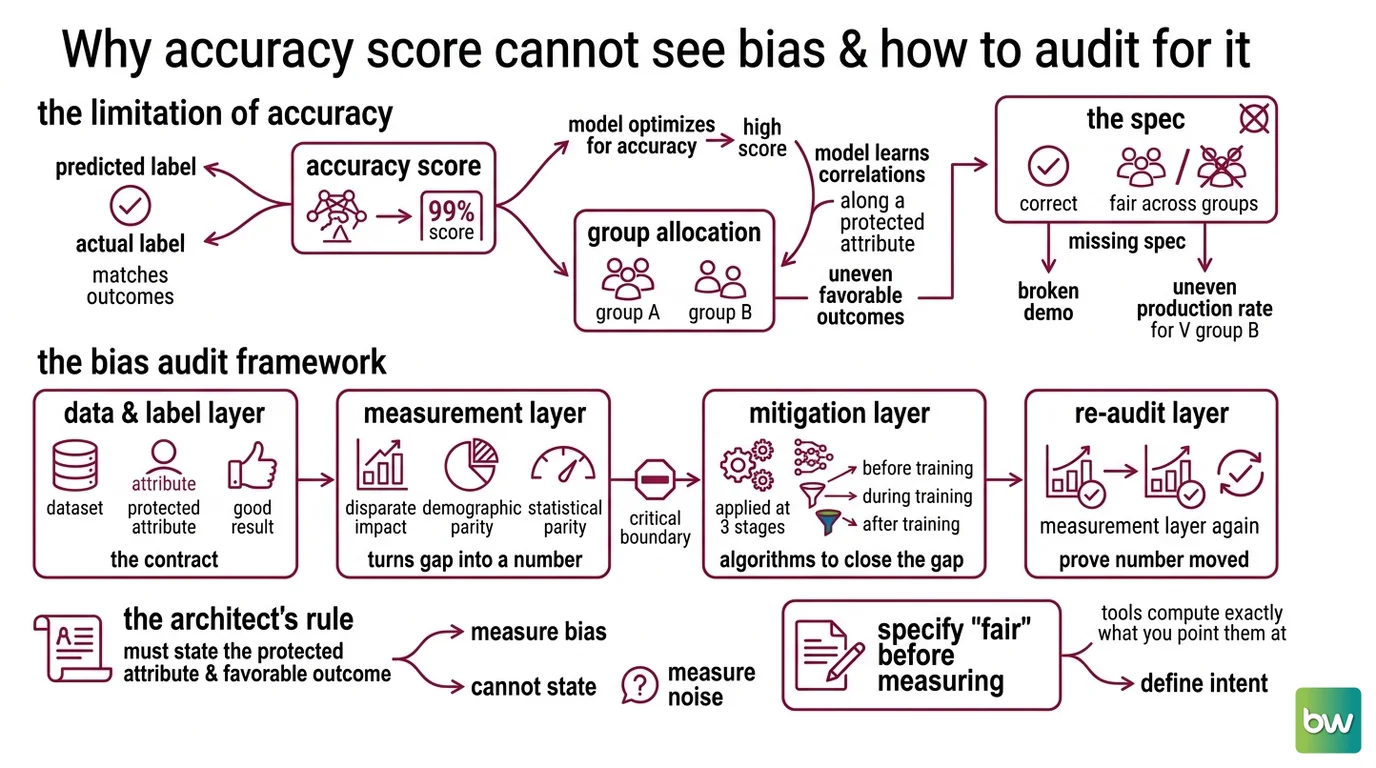
You optimize for one number and ship. The model learned the correlations in the data, including ones that ride along a protected attribute, and a high score on accuracy is perfectly compatible with that. Accuracy is blind to group-level allocation — it only asks whether predictions match labels, not whether the favorable outcome is shared evenly.
It worked in the demo. In production, the approval rate for one group landed well under another’s, because nobody specified that “correct” had to also mean “fair across groups.” The model didn’t break. The spec did.
Step 1: Break the Audit Into Four Layers
Before you install anything, decompose the work. A bias audit is not one script — it’s four concerns that connect in sequence, and naming them is what lets you specify each one.
Your pipeline has these parts:
- Data and label layer — the dataset, the protected attribute(s), and the favorable outcome. This is the contract: who the groups are, and what counts as a good result.
- Measurement layer — the metrics that turn the gap into a number you can track ( Disparate Impact, Demographic Parity, statistical parity).
- Mitigation layer — the algorithms that close the gap, applied at one of three stages: before training, during training, or after.
- Re-audit layer — the measurement layer run a second time, after mitigation, to prove the number actually moved.
The boundary that matters most is between measurement and mitigation. Mixing them is how teams convince themselves a fix worked when it didn’t.
The Architect’s Rule: If you can’t state the protected attribute and the favorable outcome in one sentence, the tool can’t measure bias — it will measure noise and report it with confidence.
Step 2: Specify What “Fair” Means Before You Measure
The tools don’t infer your intent. They compute exactly what you point them at, so the spec is everything. This is where most audits go wrong — not in the math, in the setup.
Context checklist:
- Protected attribute(s) named, with privileged and unprivileged groups defined explicitly — no defaults
- Favorable outcome defined (which label is the “good” one the model awards)
- Metrics and thresholds chosen: disparate impact, where 1.0 means parity and a value below 0.8 flags adverse impact under the Four Fifths Rule convention (AIF360 Docs); demographic parity difference, which targets 0 (Fairlearn Docs)
- A bias-type hypothesis: are you chasing Selection Bias, Representation Bias, or Measurement Bias? Each demands a different fix
- Environment pinned — AIF360 in particular needs an isolated install (see the note below)
The four-fifths threshold deserves a flag. The 0.8 cutoff comes from US employment-law practice, not from a law of statistics. Treat 0.8 as a starting convention, not a finish line — your domain and your risk decide the real bar.
The Spec Test: If your spec doesn’t name the privileged group, AIF360’s
disparate_impact()still returns a number — it just won’t be the one you think. The ratio is direction-sensitive: swap which group you mark as privileged and a flagged result quietly flips to a passing one.
Compatibility notes — verify before you install:
- AIF360 (v0.6.1, last released April 2024): its pinned dependencies conflict in shared environments. Install it in a dedicated Python 3.11 virtual environment, per AIF360 Docs. It is slow-moving but still the broadest toolkit for metrics and mitigation algorithms.
- Fairlearn (v0.14.0): targets scikit-learn 1.6, with APIs stable across the recent 0.1x line (Fairlearn’s PyPI page).
- Aequitas (v1.1.0): capped at Python below 3.14; the current API surface is “Aequitas Flow” (Aequitas’s GitHub repository).
Step 3: Audit First, Mitigate Second, Never the Reverse
Order is not a preference here — it’s a dependency chain. You cannot prove a fix worked without a baseline, and you cannot pick the right fix without a diagnosis. Audit first, mitigate second.
Build order:
- Audit the raw data — run the measurement layer before you touch a single row. Aequitas is built for exactly this: audit-first reporting through its “Aequitas Flow” pipeline. The output is your baseline.
- Diagnose the bias type — the metric says there’s a gap; the data says why. Representation bias (a group is underrepresented) needs different handling than measurement bias (the label itself is skewed). Skip this and you’ll fix the wrong thing.
- Apply mitigation at the matching stage — pre-processing (reweigh or resample the data), in-processing (constrain the model during training, the approach Fairlearn’s reduction methods take), or post-processing (adjust the decision threshold per group).
- Re-audit — run the same metrics again. The delta is your evidence.
For each layer, your context must specify:
- What it receives (inputs)
- What it returns (outputs)
- What it must NOT do (constraint — for example, never drop the protected attribute before the audit runs)
- How to handle failure (what to do when a group is too small to measure)
Step 4: Prove the Gap Closed Without Breaking Everything Else
A fairness fix that wrecks accuracy is not a fix — it’s a different failure. Validation here means checking both numbers and the groups behind them.
Validation checklist:
- Disparate impact moved toward 1.0 — failure looks like: the ratio barely changed, meaning your mitigation hit the wrong stage
- Accuracy held inside an acceptable band — failure looks like: parity improved but accuracy cratered, so you traded one problem for another. Fairness can quietly cost you accuracy if you don’t watch it
- Intersectional subgroups checked, not only single attributes — failure looks like: parity across one attribute, but a large gap for a subgroup defined by two attributes together
- No Data Leakage from the split — failure looks like: the protected attribute leaks into a proxy feature, the headline metric reads clean, and the model still discriminates
Common Pitfalls
| What You Did | Why It Failed | The Fix |
|---|---|---|
| Measured accuracy only | Accuracy is blind to how favorable outcomes are allocated across groups | Add a fairness metric to the spec before training, not after the incident |
| Installed AIF360 in your main environment | Pinned dependencies conflict and the import silently breaks | Use a dedicated Python 3.11 venv |
| Treated 0.8 as a hard legal line | The four-fifths rule is an employment-law convention, not a universal cutoff | Set the threshold from your domain and risk, and document why |
| Dropped the protected attribute “to be fair” | The model rebuilds it from proxy features; you only lost the ability to measure it | Keep it for auditing, exclude it from features as a deliberate, documented choice |
Pro Tip
Measure before you mitigate — every time. The baseline audit is the only artifact that can tell you whether a fix did anything. Beyond this topic, the principle is simple: treat fairness like any other requirement. It gets a metric, a threshold, and a test, or it does not exist. A requirement you can’t measure is a wish.
Frequently Asked Questions
Q: How to use AI Fairness 360 to detect bias in a training dataset?
A: Wrap your data in AIF360’s dataset object, name the protected attribute and the privileged group, then call disparate_impact() or statistical_parity_difference(). Watch the direction: the ratio depends on which group you mark as privileged, so set it deliberately or the number quietly misleads you.
Q: How to measure disparate impact and demographic parity in a dataset? A: Disparate impact is the ratio of favorable-outcome rates between groups, where 1.0 is parity and below 0.8 flags concern under the four-fifths convention. Demographic parity difference, in Fairlearn, targets 0 instead. Compute both — a ratio and a difference catch different shapes of the same gap.
Q: How to build a bias detection and mitigation pipeline step by step? A: Audit the raw data for a baseline, diagnose whether the gap comes from selection, representation, or measurement bias, apply mitigation at the matching stage — reweigh data, constrain training, or adjust thresholds — then re-audit with the identical metrics. If the gap didn’t move, you mitigated the wrong stage.
Your Spec Artifact
By the end of this guide, you should have:
- A four-layer map of your pipeline: data and label, measure, mitigate, re-audit
- A fairness contract: protected attribute(s), privileged and unprivileged groups, the favorable outcome, and your chosen metrics plus thresholds
- A validation checklist with a named failure symptom for every check
Your Implementation Prompt
Paste this into your AI coding tool (Claude Code, Cursor, Codex) when you’re about to scaffold the audit. It mirrors the four layers from this guide. Fill every bracket with your own values — the tool builds the structure, you supply the contract.
You are helping me architect a dataset bias audit and mitigation pipeline.
Do not write the model itself — help me specify and structure the audit.

Context:
- Dataset and task: [describe your dataset and what the model predicts]
- Protected attribute(s): [e.g., gender, age band]
  - Privileged group = [value]
  - Unprivileged group = [value]
- Favorable outcome: [the label that counts as a good result, e.g., "loan approved"]
- Bias hypothesis: [selection / representation / measurement] because [reason]
- Environment: isolated Python 3.11 venv (required for AIF360's pinned dependencies)

Build it in this order:
1. Audit layer — measure baseline disparate impact (target 1.0, flag below
   [0.8 or your own threshold]) and demographic parity difference (target 0)
   using [AIF360 / Fairlearn / Aequitas].
2. Diagnosis — given the baseline, tell me which bias type the gap points to and why.
3. Mitigation — recommend pre-, in-, or post-processing for [my bias type] and
   name the specific algorithm.
4. Re-audit — re-run the identical metrics and report the delta.

Constraints:
- Keep the protected attribute for auditing; exclude it from model features only
  as a deliberate, documented choice.
- Check intersectional subgroups, not just single attributes.
- Flag any feature that could act as a proxy for the protected attribute.

Validation: the pipeline is done when disparate impact moves toward 1.0,
accuracy stays within [your acceptable band], and no proxy leakage remains.
Ship It
You now have a pipeline that treats fairness as a measured requirement, not a hope you hold after deployment. You can audit a dataset before training, name the bias type instead of guessing, and prove a fix moved the number. Decompose, specify, build, validate — the same loop runs on the next dataset, and the one after that.
Deploy safe, Max.
AI-assisted content, human-reviewed. Images AI-generated. Editorial Standards · Our Editors