How to Design Tool Descriptions and Build Function Calling Pipelines with Claude and GPT-5.5 in 2026
TL;DR
- The description field is the model’s decision spec — it determines when a tool gets called, not just what it does. Write it as a routing rule, not a label.
- Tool result blocks must arrive before any text in the user message content array. Violating this order causes 400 errors on both Claude and GPT-5.5.
- Add
strict: trueto guarantee schema-conformant parameters. Without it, the model approximates.
The model called get_user_profile with "Alice Chen" instead of "usr_12345". The tool definition said user_id: string. That is a type annotation, not a spec. The model inferred that any string works — because you never said otherwise. The fix was one sentence in the description field.
Tool Use in Prompts is as much a writing problem as a schema design problem. The schema defines structure. The description defines behavior. Most engineers nail the schema and skip the behavior.
Before You Start
You’ll need:
- Claude Sonnet 4.6 (
claude-sonnet-4-6) or GPT-5.5 (gpt-5.5) API access - A working understanding of
JSON Schema — required by the
input_schemafield on Claude - Clear answers to three questions: what does each tool do, when should the model call it, and when should it not?
This guide teaches you: how to write a tool description that functions as a routing spec — not prose, not documentation, but a decision rule the model can follow.
The Hallucinated Parameter That Broke Your Agent
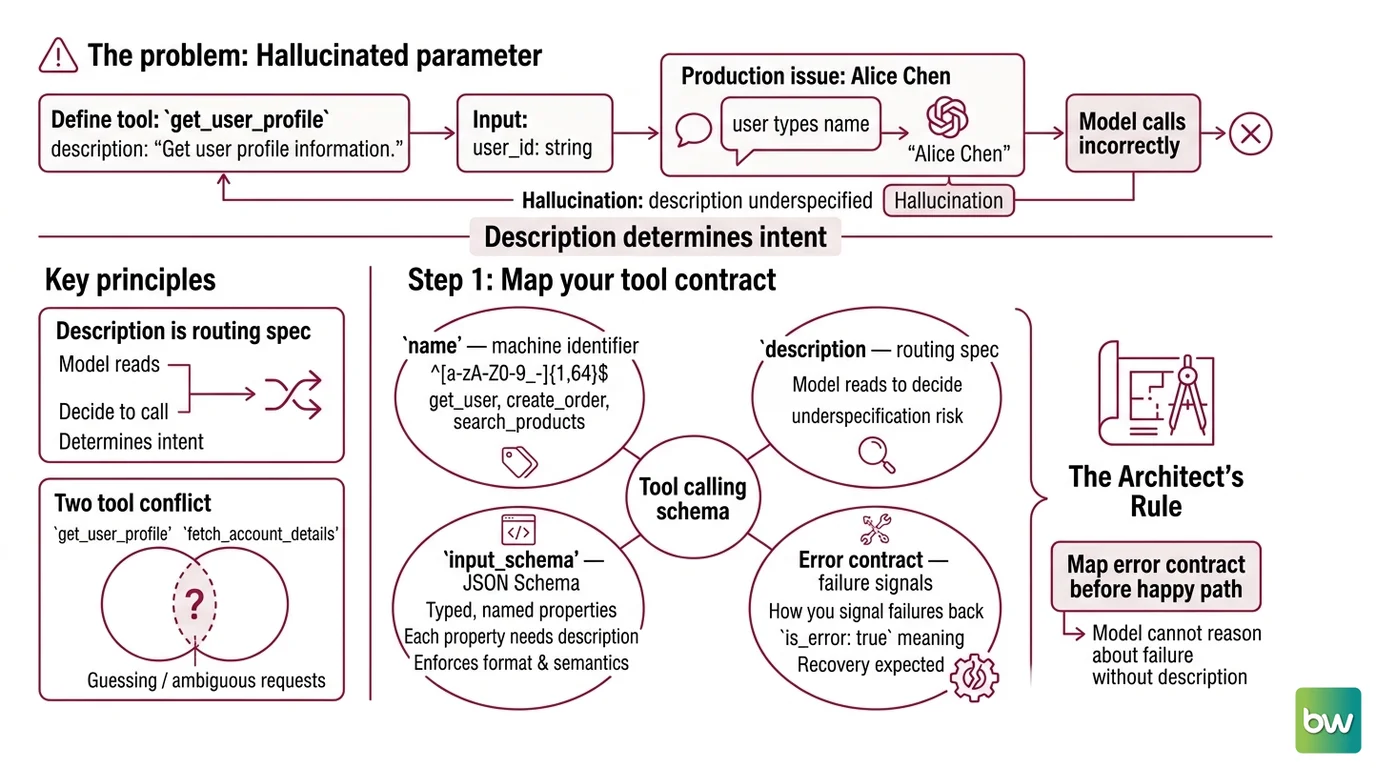
Here is the pattern. You define a tool: name: get_user_profile, description: "Get user profile information." The schema has one field: user_id: string. It works in testing. In production, a user types their full name in the chat. The model calls the tool with "Alice Chen" — because string is technically correct, and the description never mentioned database IDs.
The description is the model’s only routing document. The schema enforces structure. The description determines intent. A description that reads like a label produces a tool that gets called incorrectly.
The same pattern kills tool selection. Add a second function — fetch_account_details — with an overlapping description, and the model will guess between them on every ambiguous request. It worked in isolation. It breaks under real traffic.
Step 1: Map Your Tool Contract
Before writing a single description, map what each tool does at the contract level. A Tool Calling Schema has four layers. Most implementations address two.
Your tool contract covers:
name— machine identifier, constrained to regex^[a-zA-Z0-9_-]{1,64}$on Claude (Anthropic Docs). Use verb-noun format:get_user,create_order,search_products. The name signals intent to the model and to you.description— the routing spec. The model reads this to decide whether to call the tool. This is the component you underspecify. More on it in Step 2.input_schema— a JSON Schema object with typed, named properties. Every property needs its owndescriptionkey. The schema enforces format; the property descriptions carry semantics.- Error contract — how you signal failures back to the model. What does
is_error: truemean for this tool? What recovery do you expect?
The Architect’s Rule: Map the error contract before the happy path. If you cannot describe what failure looks like, the model cannot reason about it either.
Claude requires three top-level fields (Anthropic Docs): name, description, and input_schema. OpenAI requires type: "function", name, description, and parameters. Optional on Claude: strict, input_examples, cache_control. Optional on OpenAI: strict.
One constraint worth noting immediately: OpenAI recommends starting with fewer than 20 available functions for best accuracy (OpenAI Docs). The more tools in scope, the more routing decisions the model must make — and the more description quality matters. Start narrow.
Step 2: Write Descriptions the LLM Reads as Specs
A description has three jobs. Most descriptions do one.
Three-part spec for every description:
- Trigger condition — “Call this when the user needs to look up a registered user by ID.” Put this first. The model scans descriptions when deciding which tool to call. If the trigger is not in the first sentence, the routing is softer than you think.
- Parameter semantics — not just what the parameter is, but what format, what scope, and what it is not.
"user_id: The user's database ID (format: usr_XXXXX). Not a display name, not an email address."That is a spec."user_id: string"is a type annotation. - Exclusion clause — “Do NOT call this to search for users; use search_users for that.” The model needs to know when not to fire as much as when to fire. Overlapping tools without exclusions produce guessing.
Before:
description: "Get user profile information."
After:
description: "Call this when you need to look up a registered user's profile.
Requires a database user ID (format: usr_XXXXX) — not a display name or email.
Do NOT call this to search for users by name; use search_users for that."
Add strict: true to the tool definition. Schema conformance is guaranteed in strict mode — the model returns parameters that match your schema exactly (Anthropic Docs). Without strict, the model approximates. Without a description that specifies format, the model guesses.
Apply the same precision to every property description inside the schema. Each field in properties should state the exact format, acceptable values, and boundary behavior.
Structured Output Prompting applies at this layer. The model generates tool call parameters through the same decoding process as text. Constrain what it can produce at the schema level. Describe what you want at the semantic level. Both layers are necessary — neither replaces the other.
Step 3: Wire the Execution Loop
The tool calling message sequence has a fixed order. Deviate and you get 400 errors.
Claude message sequence:
messagesarray with the user request.toolsarray passed at the top level of the API call, along withtool_choice(autoby default).- Assistant responds with one or more
tool_useblocks, each containing anid,name, andinputobject. - User message containing
tool_resultblocks. tool_result must be first in the content array — any text before it returns a 400 error (Anthropic Docs). Each block references thetool_useid. - If the execution failed: set
"is_error": truein thetool_resultblock and include the error message incontent. Claude reads the error flag and corrects. - Assistant generates the next response — another
tool_useblock, or a final answer.
Claude auto-retries 2–3 times with corrections when it produces missing or invalid parameters (Anthropic Docs). Build your error handling to work alongside this mechanism, not over it. Signal is_error: true and let Claude attempt a correction before escalating to your own retry logic.
GPT-5.5 message sequence:
Tools go in the tools array at the call level. The assistant response contains tool_calls — each with an id, type: "function", and function object. Return results with role: "tool", tool_call_id matching the call, and content containing the result.
API header: Claude requires anthropic-version: 2023-06-01 in every request (Anthropic Docs). GPT-5.5 uses model ID gpt-5.5 or the snapshot gpt-5.5-2026-04-23 (OpenAI Docs).
For
Parallel Tool Calling: both models fire multiple tool call blocks in one turn when they determine the calls are independent. Claude enables this by default — disable with disable_parallel_tool_use: true if your tools have sequencing dependencies. GPT-5.5 also enables it by default — disable with parallel_tool_calls: false.
tool_choice control on Claude: auto (default, model decides), any (must call at least one tool), tool (forces a specific tool), none (no tool calls this turn) (Anthropic Docs). One hard constraint: tool_choice: any and tool_choice: tool are incompatible with Claude’s extended thinking mode. If you are using extended thinking, use auto or none.
Security & compatibility notes:
- OpenAI Assistants API: Scheduled for sunset August 26, 2026. Migrate existing pipelines to the Responses API now (OpenAI Community).
- GPT-5.4+ with
reasoning: none: Tool calling is not supported when reasoning is disabled. Keep reasoning enabled in your API calls (OpenAI Docs).- OpenAI
functionsparameter: Deprecated. Use thetoolsarray in Chat Completions — thefunctionspath has undefined behavior in GPT-5.5+ (OpenAI Docs).
For
Prompt Injection defense: validate tool inputs before execution. The model passes through whatever arrives in the conversation — a malicious input that matches string format still gets sent to your tool handler. Input validation at the execution layer is a separate responsibility from the model’s schema validation.
Step 4: Validate the Call Sequence
Four checks. Shipping after only the first one is how bugs survive to production.
Validation checklist:
- Correct tool selection — does the model call
get_user_profilerather thansearch_userswhen given a database ID? Test inputs that sit on the boundary between trigger conditions. Failure: model calls the wrong tool on ambiguous queries. - Parameter format — does
user_idarrive asusr_12345or as"Alice Chen"? Test with real user inputs, not synthetic ones. Failure: tool call technically succeeds, returns wrong data, or produces a lookup error downstream. - Error recovery — what happens when you set
is_error: truein thetool_result? The model should adjust and retry. Test by injecting errors deliberately. Failure: model loops indefinitely, or ignores the error and fabricates a final answer. - Loop termination — does the pipeline stop after delivering a tool result and answering? Failure: unnecessary second tool call that inflates cost and latency.
For systematic coverage, Prompt Testing And Evaluation tooling formalizes these checks. Instructor adds structured output validation around function call results. Constrained Decoding techniques enforce exact output shapes at the model layer, catching format deviations before they reach your execution code.
One pattern worth building early: add input_examples to your tool definitions on Claude. The optional field shows the model what valid inputs look like before it generates them (Anthropic Docs). Think of it as few-shot examples embedded in the spec — the model sees the pattern once and applies it consistently.
Common Pitfalls
| What You Did | Why AI Failed | The Fix |
|---|---|---|
| Description says “Get user data” | No trigger condition — model guesses when to call | Start every description with “Call this when…” |
Returned text before tool_result | 400 error — Claude requires tool_result first in content array | Move tool_result blocks before any text content |
Used OpenAI functions parameter | Deprecated — undefined behavior in GPT-5.5 | Switch to tools array in Chat Completions |
| Loaded 30+ tools in one call | Routing accuracy drops above 20 initial functions (OpenAI Docs) | Scope tools by task context; use tool_choice subsets |
Forced tool_choice: any with extended thinking | Incompatible combination — Claude rejects it | Use tool_choice: auto or none when thinking is enabled |
Pro Tip
Write a decision matrix before you write any descriptions. Rows are request scenarios. Columns are your tools. Fill in which tool fires for each scenario. If the same tool fires for two scenarios that should route differently — or if two tools both fire for the same scenario — your descriptions are ambiguous before you have written a word. Fix the matrix first. Then write the descriptions to match it.
This is Prompt Optimization applied upstream, before the model sees the tools at all. A description you cannot place correctly in the matrix will not route correctly in production.
Frequently Asked Questions
Q: How to write tool descriptions that improve LLM function calling accuracy?
A: Use a three-part spec: trigger condition first (“Call this when…”), parameter semantics second (format constraints and what the value is not, not just the type), exclusion clause third (“Do NOT call this when…”). The trigger condition is the most critical element — the model screens tools by the first sentence of each description during routing. Add input_examples as optional Claude field for cases where the description alone does not cover edge-case inputs.
Q: How to handle tool call errors and implement retry logic in LLM agent pipelines?
A: Set "is_error": true in the tool_result block and include the error message in content. Claude reads the error flag and corrects its next call automatically — typically 2–3 attempts on missing or invalid parameters (Anthropic Docs). For unrecoverable failures, follow the error tool_result with a system-level instruction in the next user message that tells the model to stop. Avoid stacking your own retry loop on top of Claude’s built-in correction — you will create conflicting recovery signals.
Q: How to implement parallel tool calling to speed up multi-step LLM agents?
A: Parallel calling is enabled by default on both Claude and GPT-5.5. The model fires multiple tool_use blocks in a single turn when it determines the calls are independent. Disable selectively — disable_parallel_tool_use: true on Claude, parallel_tool_calls: false on GPT-5.5 — when tools have execution dependencies where one result must feed the next. The key design question: are your tools stateless and order-independent? If yes, parallel calling is safe and reduces latency with no extra configuration.
Q: How to build a function calling pipeline with Claude Sonnet 4.5 step by step in 2026?
A: Note: Claude Sonnet 4.5 is now a legacy model — use claude-sonnet-4-6 instead, which carries a 1M token context window versus Sonnet 4.5’s 200K, at $3/$15 per million tokens input/output (Anthropic Docs). The pipeline steps are the same regardless of model: pass the tools array in your API call, parse tool_use blocks from the assistant response, return tool_result blocks as the first items in the next user message’s content array, and include the anthropic-version: 2023-06-01 header.
Your Spec Artifact
By the end of this guide, you should have:
- A tool contract for each function: trigger condition, parameter semantics with format constraints, and explicit exclusion clause
- A message-loop spec: turn sequence,
tool_resultplacement rule,is_errorhandling, andtool_choicesettings - A validation checklist: four test scenarios covering tool selection accuracy, parameter format, error recovery, and loop termination
Your Implementation Prompt
Copy this into Claude Code, Cursor, or your AI coding tool when building a new function calling pipeline. Fill in the bracketed placeholders with values from your Steps 1–4 work.
You are building a function calling pipeline for [system name].

Tool contracts:
- Tool name: [verb_noun format, max 64 chars, regex-safe]
- Trigger condition: Call this when [specific scenario, not a general capability]
- Parameter semantics: [parameter name] — [exact format, e.g., "usr_XXXXX"] — NOT [wrong format, e.g., display name or email]
- Exclusion clause: Do NOT call this when [overlapping scenario] — use [alternative tool] for that
- Error contract: Return is_error: true when [failure condition]; expected recovery: [retry / escalate / stop]

Message loop spec:
- Model: [claude-sonnet-4-6 / gpt-5.5]
- tool_result placement: first item in content array, before any text
- Error handling: set is_error: true in tool_result, include error message in content
- Parallel calling: [enabled (default) / disabled — reason: tools have sequencing dependency]
- tool_choice: [auto / any / tool / none] — Note: any and tool are incompatible with Claude extended thinking

Validation requirements before shipping:
1. Model calls [tool name], not [alternative tool], when given [boundary input]
2. [parameter name] arrives as [correct format], not [wrong format]
3. On is_error: true, model retries with corrected parameters — does not fabricate a result
4. Pipeline terminates after tool result delivery without additional unnecessary calls

Build the pipeline with strict: true on all tool definitions. Include the anthropic-version header for Claude. Use the tools array, not the functions parameter on OpenAI.
Ship It
You now have the tool contract, the message loop spec, and the validation checklist. The model’s behavior in a function calling pipeline is determined almost entirely by what you put in the description field and the order you enforce in the message sequence. A spec that names the trigger, constrains the parameter semantics, signals errors correctly, and excludes adjacent tools is the difference between a pipeline that routes reliably and one that guesses confidently.
AI-assisted content, human-reviewed. Images AI-generated. Editorial Standards · Our Editors