How to Deploy LiteLLM or Portkey as a Production LLM Gateway with Fallback Chains in 2026
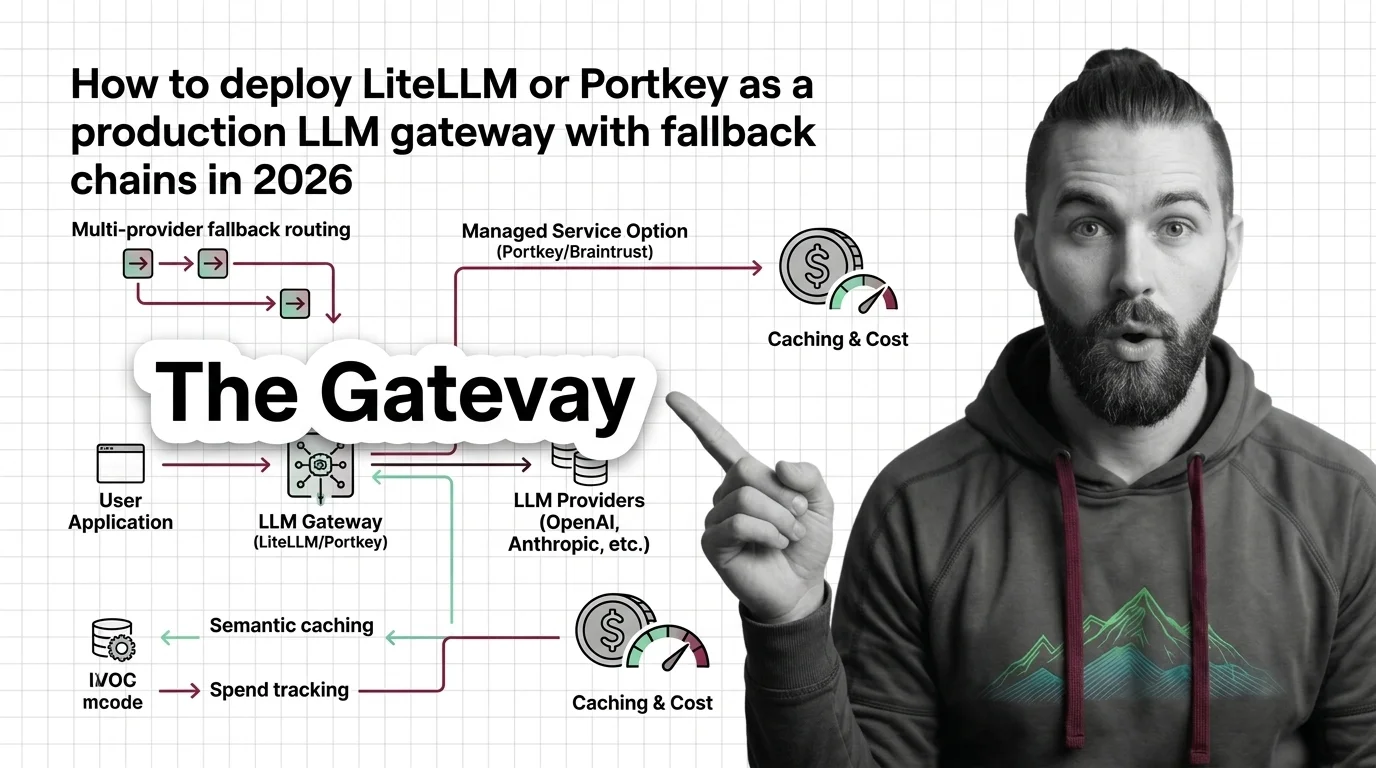
TL;DR
- A production LLM Gateway needs four specified behaviors: routing priority, typed fallback chain, caching policy, and spend boundary — not just a proxy URL
- LiteLLM (MIT, 100+ providers) and Portkey (Apache 2.0, 1,600+ models) cover the same routing primitives; the decision is self-host control vs managed observability
- Pin LiteLLM to v1.83.14+ and use the official Docker image — six CVEs hit the proxy in 2026, including a CVSS 10.0 RCE chain and a CISA KEV entry
Your OpenAI quota fills at 11 PM. The app stops responding. The fallback model you added last sprint never fires — because nobody specified what triggers it.
That’s not a provider failure. That’s a missing specification. A fallback chain that isn’t defined by trigger type is the same as no fallback chain at all. The config entry says “use backup model” but doesn’t say when, under which error class, or for which request shape.
This guide fixes that. Decompose the four contracts your gateway owns, specify each one before touching configuration, then wire LiteLLM or Portkey to implement it.
Before You Start
You’ll need:
- Docker (for LiteLLM self-hosted) or a Portkey account (managed or self-hosted OSS)
- Understanding of API Gateway routing patterns and Fallback Strategy design
- A clear list of LLM providers you intend to use, in priority order
This guide teaches you: How to decompose an LLM gateway into four independent contracts, specify each before writing configuration, and validate that your fallback chain actually fires before production needs it.
The Fallback That Exists in Config But Not in Reality
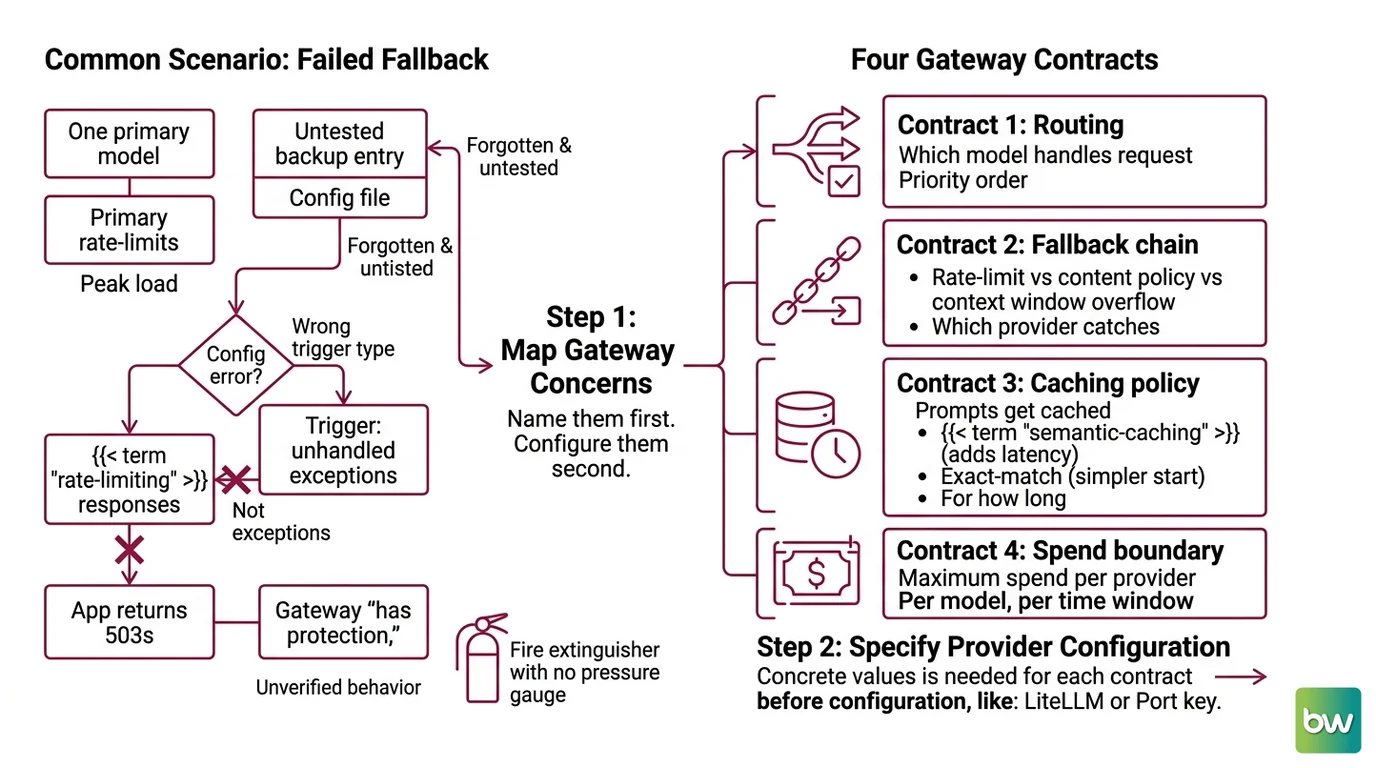
Here is what most teams ship: one primary model, one provider, and a backup entry that nobody tested. The backup was added during code review (“for safety”), committed, and forgotten.
Three months later, the primary rate-limits at peak load. The fallback is there in the config file — but it’s configured for the wrong trigger type. It only fires on unhandled exceptions. Rate Limiting responses from the provider are not exceptions. The app returns 503s for nine minutes until someone notices.
The failure was not the provider. The specification never said what constitutes a trigger condition, which failure types route where, or how to verify the chain fires before you need it.
Step 1: Map What Your Gateway Actually Owns
Before writing a single config value, write down what the gateway is responsible for. Four contracts, nothing more.
Your gateway owns four distinct concerns:
- Routing — which model handles which request, in what priority order
- Fallback chain — what triggers a failover (rate-limit vs content policy vs context window overflow), and which provider catches each type
- Caching policy — whether identical or semantically similar prompts get cached, and for how long ( Semantic Caching adds latency complexity; exact-match is simpler to start)
- Spend boundary — maximum spend per provider, per model, per time window
The Architect’s Rule: If you can’t name these four contracts without opening your config file, the AI tool generating that config can’t build them correctly either. Name them first. Configure them second.
If you skip this step, you end up with a gateway that “has fallbacks” the same way a fire extinguisher with no pressure gauge “has protection.” The label is there. The behavior is unverified.
Step 2: Specify Your Provider Configuration
You have the four contracts. Each needs concrete values before you touch LiteLLM or Portkey.
Context checklist:
- Primary model and provider named (e.g.,
openai/gpt-4o) - Fallback models listed in priority order, each tagged with its trigger condition:
- General fallbacks: rate-limit responses and 5xx errors
- Content policy fallbacks: requests the primary provider refuses, routed to an alternative model
- Context window fallbacks: requests that exceed the primary model’s token limit, routed to a higher-context backup
- Default fallbacks: the catch-all when no specific rule matches
- Budget limit per provider per day (your spend boundary from Step 1)
- Caching decision: Semantic Caching earns its vector-comparison overhead only when your traffic has high prompt repetition — for low-repetition workloads, exact-match cache is faster and simpler
- Credential strategy: LiteLLM supports
Virtual Keys scoped per team or service; Portkey routes through its Model Catalog using
@provider-slug/model-nameidentifiers - RBAC and audit log requirements — these push toward a managed tier or self-hosted OSS with infrastructure investment
The Spec Test: If your configuration specifies only a generic fallback list without naming the trigger condition per entry, rate-limit responses will fail over but content policy refusals and context window overflows will route nowhere. Trigger type is not optional metadata. It is the specification.
Step 3: Wire the Fallback Chain
Two tools, same four contracts. Pick based on your operational model.
LiteLLM: Full Control, Self-Hosted
LiteLLM is MIT-licensed, ships weekly stable releases (v1.90.0 as of June 27, 2026, LiteLLM PyPI), and supports 100+ providers including OpenAI, Anthropic, Azure, AWS Bedrock, and VertexAI. You run the proxy. You own the infrastructure.
The litellm_config.yaml file wires your four contracts directly. Under model_list, define each provider entry with a model string and credentials loaded from environment variables. The routing priority is the order you list models.
The fallback chain lives under router_settings — and each trigger type needs its own key. fallbacks handles rate-limit and 5xx failures. content_policy_fallbacks handles refusals specific to one provider’s content policy. context_window_fallbacks routes oversized requests to a higher-context backup. default_fallbacks is the catch-all.
Supporting parameters complete the reliability contract. num_retries sets how many times to retry the primary before failing over. cooldown_time defines how long a failing model sits out of rotation. allowed_fails is the count that triggers cooldown. enable_pre_call_checks: true screens requests against context limits before sending, so you know whether the fallback model can handle the prompt before the primary fails (LiteLLM Docs).
LiteLLM also accepts per-request fallback overrides. Pass a "fallbacks" key directly in the request body to bypass the gateway’s default chain at the call level — useful for per-feature routing without a config change (LiteLLM Docs).
Portkey: Managed Observability, Faster Setup
Portkey has been Apache 2.0 licensed since Gateway 2.0 (March 2026, Portkey GitHub), covers 1,600+ models across 40+ providers, and offers both a managed SaaS tier and a free self-hosted OSS deployment.
Routing in Portkey uses a JSON config object sent as a request header, or stored as a named config in the Portkey dashboard. The strategy field sets mode: "fallback". The targets array lists models in priority order using Model Catalog identifiers — for example, @openai/gpt-4o or @anthropic/claude-sonnet-4-5.
Semantic caching is enabled by adding "cache": {"mode": "semantic"} to the config object. It is available on the Production tier at $49/month and on the free OSS self-hosted version since Gateway 2.0 (Portkey Pricing). Spend tracking runs per-provider in the dashboard without additional configuration.
One significant context: Portkey was acquired by Palo Alto Networks, closing May 29, 2026, and is now integrated into their Prisma AIRS security platform (Palo Alto Networks). Current pricing is confirmed at $49/month Production as of the research date, but the post-acquisition product roadmap may evolve. Verify current terms at portkey.ai before committing to a tier.
Security & compatibility notes:
- LiteLLM Supply Chain (March 24, 2026): PyPI packages v1.82.7 and v1.82.8 contained a credential-stealing payload targeting API keys, SSH keys, cloud credentials, and Kubernetes tokens — active approximately 40 minutes. Docker image users were unaffected (LiteLLM Security Blog). Fix: use the official Docker image
ghcr.io/berriai/litellmand pin to v1.83.14+.- CVE-2026-42208 (CVSS 9.3, SQL injection): Affected v1.81.16–v1.83.6; actively exploited within 36 hours of public disclosure (LiteLLM Security Blog). Fixed in v1.83.7+.
- CVE-2026-42271: Added to the CISA Known Exploited Vulnerabilities catalog June 8, 2026 — active exploitation confirmed in the wild (LiteLLM Security Blog).
- RCE chain CVE-2026-47101 + CVE-2026-47102 + CVE-2026-48710 (CVSS 10.0): Unauthenticated remote code execution on any exposed proxy. Fixed in v1.83.14+.
- Six total CVEs in 2026: Run v1.83.14+ minimum, rotate all credentials, use the official Docker image — not raw
pip install litellm.
LiteLLM Enterprise pricing is contact-based and not publicly listed on official docs. Third-party estimates suggest approximately $250/month (Basic) to $30,000/year (Premium) (TrueFoundry Blog), but treat these as reference only — contact BerriAI directly before budget planning.
Step 4: Verify the Chain Before You Need It
Untested fallback chains don’t exist in production. They exist in config files.
LiteLLM has a built-in verification mechanism. Set mock_testing_fallbacks: true in your router settings and fire a request — the proxy simulates a primary failure and triggers the fallback chain without touching the real provider. This is your primary validation tool (LiteLLM Docs).
Validation checklist:
- Trigger mock fallback on the primary — correct behavior: primary receives no request, fallback model responds instead
- Test
content_policy_fallbacksseparately — correct behavior: a provider refusal routes to the content policy backup, not the general fallback - Test
context_window_fallbacksseparately — correct behavior: a request exceeding the primary’s token limit routes to the high-context model before the primary even errors - Verify spend boundary fires — correct behavior: requests exceeding the configured daily limit return a budget error, not a model response
- Check cache hit rate after 48 hours — if the majority of requests are not cache hits, your traffic pattern is too varied for semantic caching to pay off; switch to exact-match or disable caching
Common Pitfalls
| What You Did | Why It Failed | The Fix |
|---|---|---|
Configured fallbacks: only | Rate-limit failures route to backup, but content refusals and context overflows have no path | Add content_policy_fallbacks: and context_window_fallbacks: as separate entries with their own target models |
| Tested the happy path only | Fallback chain was never triggered; silent 503s in production | Run mock_testing_fallbacks: true, test each trigger type explicitly |
Installed via pip install litellm | Supply chain attack on PyPI v1.82.7–v1.82.8 (March 2026) compromised credentials | Use the official Docker image; pin to v1.83.14+ |
| Enabled semantic caching without profiling traffic first | Low prompt repetition means cache rarely hits; latency increases, cost savings don’t | Measure traffic repetition first — semantic caching pays off only on high-repetition workloads |
Referenced Portkey’s deprecated virtual_key= parameter | Virtual Keys were deprecated and removed by Portkey in March 2026 | Migrate to Model Catalog format: @provider-slug/model-name |
Pro Tip
The four-contract framework from Step 1 transfers to every LLM integration you build — not just dedicated gateways. When you add a new LLM call anywhere in your stack, ask: what triggers a retry? What’s the spend ceiling? What’s the cache policy? Those questions describe your system’s behavior, not the model’s API surface. Answer them before writing the call and provider failures stop being surprises.
Frequently Asked Questions
Q: How to set up LiteLLM proxy as an LLM gateway with multi-provider fallback routing?
A: Deploy via the official Docker image, pinned to v1.83.14+ (six CVEs hit PyPI packages in 2026, including a CVSS 10.0 RCE chain). Your config needs three separate fallback keys: fallbacks for rate-limit/5xx, content_policy_fallbacks for provider refusals, and context_window_fallbacks for oversized requests. Each covers a distinct failure class — configuring only fallbacks: leaves the other two silent in production. Add enable_pre_call_checks: true so the proxy validates context fit before attempting the primary call.
Q: How to use Portkey gateway for semantic caching and spend tracking across LLM providers?
A: Semantic caching is available on the Production tier ($49/month, Portkey Pricing) and on the free OSS self-hosted version since Gateway 2.0. Set "cache": {"mode": "semantic"} in your routing config object to enable it. Spend tracking runs per-provider in the Portkey dashboard without extra configuration. Key consideration: following the Palo Alto Networks acquisition (closed May 2026), Portkey is under Prisma AIRS — verify current pricing before committing, as post-acquisition roadmaps tend to shift, especially for managed SaaS tiers.
Q: When to self-host an LLM gateway vs use a managed service like Braintrust or Portkey in 2026?
A: Self-host LiteLLM when you need zero data egress, full config control, or your team can absorb the operational overhead. Choose managed when you want built-in observability without running gateway infrastructure. Braintrust is the stronger pick if your team also runs evaluations — its span-level tracing with AES-GCM encrypted caching integrates routing and eval in one platform rather than two. Portkey suits teams prioritizing model breadth and are comfortable with the post-acquisition product direction.
Your Spec Artifact
By the end of this guide, you should have:
- A four-contract gateway spec: routing priority list, fallback trigger conditions per error class, caching policy decision, and spend boundary per provider
- A provider configuration checklist: primary model, fallback models in trigger-typed order, credential strategy, and RBAC or audit log requirements
- A validation protocol: mock test run covering each of the three typed fallback conditions, cache hit rate baseline after 48 hours, and spend boundary confirmation run
Your Implementation Prompt
Paste this into Claude Code, Cursor, or your preferred AI coding tool. Fill in the bracketed placeholders from your Step 2 checklist — each bracket maps directly to a contract from Step 1.
You are configuring a production LLM gateway using LiteLLM proxy
(pin to v1.83.14+, Docker image ghcr.io/berriai/litellm).

ROUTING CONTRACT (Step 1):
- Primary model: [your primary model string, e.g., openai/gpt-4o]
- Provider priority order: [list models in fallback priority, most preferred first]

FALLBACK CHAIN — specify each trigger type separately (Step 2):
- General fallbacks (rate-limit / 5xx): primary fails over to [rate-limit backup model]
- Content policy fallbacks (provider refusals): primary fails over to [content-policy backup]
- Context window fallbacks (input exceeds token limit): primary fails over to [high-context backup]
- Default fallbacks (catch-all): [catch-all model]
- Retry settings: num_retries=[value], cooldown_time=[seconds], allowed_fails=[count]
- Pre-call context check: enable_pre_call_checks=true

CACHING POLICY (Step 1):
- Cache type: [exact-match / semantic / none]
- If semantic: similarity threshold [0.0–1.0], TTL [seconds]

SPEND BOUNDARY (Step 1):
- Max spend per provider per day: [USD amount]
- Over-budget behavior: [return error / route to cheaper fallback]

CREDENTIAL STRATEGY (Step 2):
- API keys via: [environment variables / virtual keys / secrets manager]
- RBAC scoped per: [team / service / global]

SECURITY REQUIREMENTS:
- Minimum version: v1.83.14+ (clears all 2026 CVEs including CVSS 10.0 RCE chain)
- Use official Docker image, not raw pip install

Generate a litellm_config.yaml implementing all four contracts above. Add a
docker-compose.yml with the proxy and a Redis instance for caching. After the
config, output a validation checklist — one item per fallback trigger type —
showing how to verify each condition using mock_testing_fallbacks: true before
the proxy handles real traffic.
Ship It
You now have four named contracts before a single line of config. The fallback chain is specified by trigger type — not optimism. The caching decision is deliberate, not a default you inherited from a tutorial.
Run the mock validation protocol from Step 4 before production traffic arrives. A fallback chain you haven't tested is a comment in a config file, not a reliability guarantee.
Deploy safe, Max.
AI-assisted content, human-reviewed. Images AI-generated. Editorial Standards · Our Editors