How to Deploy and Optimize LLM Inference with vLLM, TensorRT-LLM, and SGLang in 2026
Table of Contents
TL;DR
- Profile your workload first — chat, batch, and multi-turn sessions need fundamentally different engine configurations
- Engine choice follows from constraints: vLLM for fastest path to production, TensorRT-LLM for peak NVIDIA throughput, SGLang for multi-turn prefix reuse
- FP8 quantization and PagedAttention are where you recover the margin between “it runs” and “it runs in production”
You deployed a 70B model on an H100. Single-user latency looked fine — 80ms to first token, smooth streaming. Then the load test hit fifty concurrent users and time-to-first-token jumped to 400ms. The model wasn’t broken. The serving stack was never specified for production load.
Before You Start
You’ll need:
- NVIDIA GPU with sufficient VRAM (H100, A100, or L40S — engine choice narrows from here)
- Working knowledge of Inference pipelines and Quantization trade-offs
- A clear picture of your target workload: request rate, latency budget, model size
This guide teaches you: how to match your workload profile to the right inference engine, configure it for production throughput, and prove it holds up under real traffic before your users discover it doesn’t.
The Inference Server That Fell Over at Fifty Users
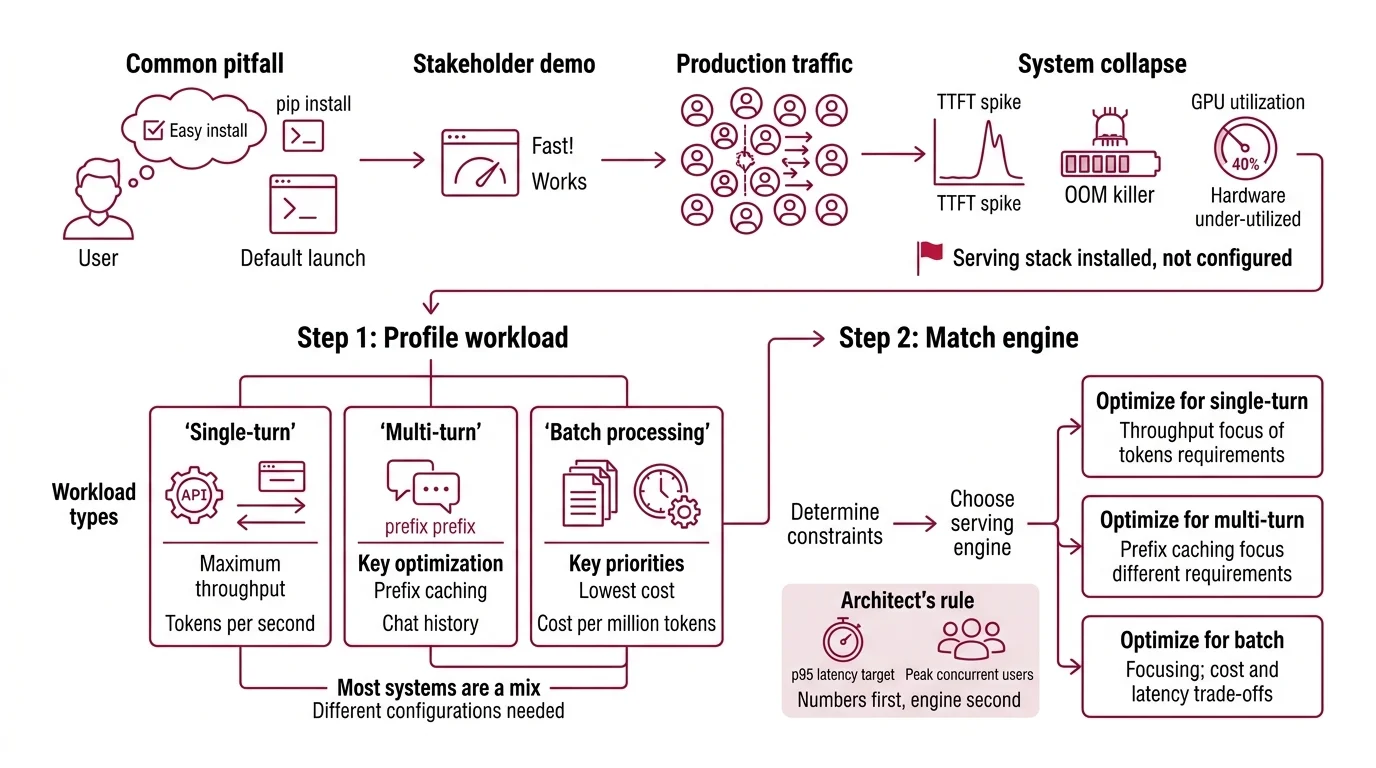
Here’s the pattern. Team picks vLLM because the README says “easy to get started.” They run pip install vllm, launch with default settings, and demo to stakeholders. It works. Looks fast. Everyone signs off.
Two weeks later, production traffic hits 200 concurrent requests. TTFT spikes to seconds. Memory climbs until the OOM killer fires. The on-call engineer stares at GPU utilization — 40%. The hardware is barely working and the server is drowning.
It worked on Friday. On Monday, a marketing launch tripled request volume and the default batch config buckled because nobody specified what “production load” meant.
The serving stack wasn’t configured — it was installed.
Step 1: Profile Your Workload Before You Touch an Engine
Three workload shapes. Three optimization paths. Pick the wrong one and you’re tuning knobs that don’t matter for your traffic.
Your workload is one of these:
- Single-turn API calls — one request, one response, no shared context. Throughput is king. You want maximum tokens per second per GPU dollar.
- Multi-turn conversations — chat sessions with history. The same prefix (system prompt plus conversation so far) appears in every request. Prefix caching becomes your biggest win.
- Batch processing — offline jobs: summarization queues, document extraction, evaluation runs. Latency doesn’t matter. Cost per million tokens does.
Most production systems are a mix. A customer-facing chatbot is multi-turn. The nightly evaluation pipeline behind it is batch. Specify both profiles. Configure both serving paths.
The Architect’s Rule: If you can’t name your p95 latency target and peak concurrent users, you’re not ready to choose an engine. Numbers first. Engine second.
Models fine-tuned with DPO or RLHF tend to produce longer outputs on average — factor that into your token budget when profiling.
Step 2: Match the Engine to Your Constraints
Three engines dominate production inference serving as of March 2026. Each earns its place for different reasons.
vLLM (v0.18.0) is the most widely adopted open-source inference engine. Apache 2.0 license. It serves an OpenAI-compatible API at localhost:8000 out of the box — drop-in replacement for any OpenAI SDK client (vLLM Docs). The v0.17.0 release introduced --performance-mode with three presets: throughput, interactivity, and balanced (vLLM Docs). Fastest path from zero to a serving endpoint.
TensorRT-LLM (v1.2.0) is NVIDIA’s native inference stack. It compiles your model into an optimized TensorRT engine. Compilation takes time and locks you to NVIDIA hardware, but the payoff is measurable: 8-13% higher throughput than vLLM at matched concurrency levels in H100 benchmarks (Spheron Blog). Best for teams committed to NVIDIA infrastructure who can absorb the compilation overhead.
SGLang (v0.5.9) is built around RadixAttention, which automatically caches and reuses shared prefixes. On multi-turn workloads, that translates to 10-20% better performance than engines without prefix-aware scheduling (Spheron Blog). Raw throughput on H100 reached roughly 16,200 tokens per second in a PremAI benchmark — about 29% ahead of vLLM’s 12,500 tok/s in the same test (PremAI Blog). Those numbers come from a single benchmark configuration; your model, prompt length, and hardware will shift the gap.
Dedicated inference hardware like Groq LPUs takes a different path — purpose-built silicon instead of GPU repurposing. Worth evaluating if your workload is latency-critical and you can accept a narrower model list.
All three GPU-based engines support Continuous Batching — TensorRT-LLM calls it “in-flight batching.” All three support Speculative Decoding in production as of 2026.
Both vLLM and SGLang carry critical security vulnerabilities in specific deployment modes. SGLang has unpatched RCE flaws in its multimodal and disaggregated-prefill features. vLLM patched a critical RCE in multimodal mode — verify you’re running the fixed version.
Security & compatibility notes:
- vLLM Multimodal RCE (CVSS 9.8): Crafted video URLs enable remote code execution (CVE-2026-22778). Fix: upgrade to v0.14.1 or later. If you process user-submitted video, verify your version immediately.
- vLLM SSRF Bypass (CVSS 7.1): URL loading function vulnerable to server-side request forgery (CVE-2026-24779). Restrict network access from serving nodes.
- SGLang Pickle RCE (CVSS 9.8): Unauthenticated RCE via pickle deserialization in multimodal and disaggregation modules (CVE-2026-3059, CVE-2026-3060). Reported unpatched as of March 2026. Do not expose these endpoints to untrusted input until patches are confirmed.
- TensorRT-LLM CLI deprecation:
trtllm-serveCLI options changed in v1.0+. PyTorch backend now default. Review NVIDIA release notes before upgrading from pre-1.0.
Step 3: Configure for Production Throughput
Installation gets you a demo. Configuration gets you production. Here’s what to specify.
Memory management with Paged Attention is on by default in all three engines. The original paper showed memory waste drops to under 4%, down from 60-80% in naive pre-allocation systems (PagedAttention paper). Don’t disable it. Don’t override the block size unless you have benchmark data showing a different size wins.
FP8 quantization cuts memory footprint and can roughly double inference speed with minimal accuracy loss (Red Hat Developer). Hardware requirement: compute capability 8.9 or higher — Ada Lovelace and Hopper GPUs. On older Turing or Ampere cards (7.5+), W8A16 is your fallback. On H100, TensorRT-LLM with FP8 achieves over 10,000 output tokens per second with time-to-first-token under 100ms (NVIDIA Blog). Don’t skip quantization on compatible hardware — the throughput gain is too large to leave on the table.
Speculative decoding drafts a few tokens with a small model, then verifies them against the full model in a single forward pass. The EAGLE-3 method achieved up to 4.79x speedup on a specific LLaMA-3.3-70B configuration (NVIDIA Blog). Real-world gains typically land at 2-3x, depending on acceptance rate and draft model quality. Enable it for latency-sensitive interactive paths. Skip it for batch workloads where throughput per GPU matters more than time-to-first-token.
Performance mode (vLLM only): the --performance-mode flag is new in v0.17.0. Set it explicitly:
throughput— maximizes batch size, higher latency per requestinteractivity— prioritizes low TTFT, smaller batchesbalanced— default trade-off
For each configuration knob, specify:
- What you changed (flag and value)
- What metric you expect to improve
- What you’ll measure to verify it worked
- What the rollback looks like if it didn’t
Step 4: Benchmark Before You Ship
Benchmarking is not running curl ten times and averaging the numbers. Here’s what a real validation pass looks like.
Validation checklist:
- Throughput at target concurrency — failure looks like: tok/s drops sharply between low and high concurrency. That’s a batching or memory pressure issue.
- p95 TTFT under latency budget — failure looks like: median TTFT is fine but p95 is far higher. That’s queue depth or preemption contention.
- Memory stability over one hour — failure looks like: VRAM usage climbs steadily. That’s a KV cache leak or fragmentation in your paging config.
- Correctness under load — failure looks like: outputs truncate or differ from single-user outputs at the same temperature. That’s a batching bug, not a model bug.
Ramp concurrency gradually: 1, 10, 50, 100, your peak target. Log every metric at every step. The concurrency level where things break tells you which bottleneck to fix next.
Common Pitfalls
| What You Did | Why It Failed | The Fix |
|---|---|---|
| Launched vLLM with all defaults | Batching, memory, and performance mode untuned for your load | Set --performance-mode explicitly, configure max batch size |
| Picked SGLang for batch jobs | RadixAttention prefix caching doesn’t help one-shot requests | Use vLLM or TRT-LLM for batch; reserve SGLang for multi-turn |
| Skipped FP8 on H100 | Running FP16 when hardware supports FP8 wastes half your throughput | Enable FP8 quantization, verify accuracy on your eval set |
| Benchmarked at concurrency=1 | Single-user latency tells you nothing about production behavior | Load-test at 2x your expected peak concurrency |
| Deployed SGLang multimodal to public traffic | Unpatched RCE flaws in multimodal and disaggregation modules | Isolate from untrusted input; monitor for CVE patches |
Pro Tip
The spec is the optimization. Every flag you set explicitly is a failure mode you prevented. Every flag you left at default is a decision the engine made for you — and it doesn’t know your latency budget, your GPU count, or your traffic pattern. Write the serving spec before the Dockerfile. The Dockerfile implements the spec. Not the other way around.
Frequently Asked Questions
Q: How to set up a production LLM inference server with vLLM step by step in 2026?
A: Install vLLM v0.18.0, point it at your model path, and set --performance-mode to match your workload (throughput, interactivity, or balanced). The server exposes an OpenAI-compatible endpoint at localhost:8000. The step most teams skip: profiling concurrent request volume before choosing batch and memory settings — that single measurement determines whether your config survives real traffic.
Q: How to benchmark and load-test an LLM inference endpoint for latency and throughput? A: Ramp concurrency in stages (1, 10, 50, 100) and log throughput (tok/s), p50/p95 TTFT, and VRAM usage at each level. Run each stage for at least five minutes to catch memory drift. The metric that matters most isn’t peak throughput — it’s the concurrency level where p95 latency crosses your SLA, because that’s your actual capacity ceiling.
Q: How to choose between vLLM, TensorRT-LLM, and SGLang for production inference workloads? A: Start with your constraints: vLLM if you need an OpenAI-compatible API running today, TensorRT-LLM if you’re NVIDIA-committed and can invest in model compilation for peak throughput, SGLang if your workload is multi-turn with shared prefixes. A pattern teams miss: running two engines — SGLang for chat, vLLM for batch — behind a routing layer that matches traffic type to optimization target.
Q: How to reduce LLM inference costs with FP8 quantization, PagedAttention, and speculative decoding? A: Stack all three. FP8 halves memory and roughly doubles throughput on Hopper GPUs. PagedAttention eliminates the 60-80% memory waste of static KV cache allocation. Speculative decoding cuts latency 2-3x on interactive paths. The order matters: PagedAttention first (it’s default), then FP8, then speculative decoding — each builds on the headroom the previous one created.
Your Spec Artifact
By the end of this guide, you should have:
- A workload profile document: request type (single-turn, multi-turn, batch), target concurrency, p95 latency budget
- An engine selection decision with the constraints that justified it
- A configuration manifest: every flag, its value, its expected metric impact, and its rollback plan
Your Implementation Prompt
Paste this into Claude Code, Cursor, or your AI coding tool after filling in the bracketed values. It encodes the decision framework from Steps 1-4 into a deployment spec.
I need a production inference deployment spec for the following workload:

Model: [model name and parameter count, e.g., Llama-3.3-70B]
Engine: [vLLM | TensorRT-LLM | SGLang]
Hardware: [GPU type and count, e.g., 2x H100 80GB]
Workload type: [single-turn API | multi-turn chat | batch processing | mixed]
Peak concurrent users: [number]
p95 TTFT budget: [milliseconds]
Quantization: [FP8 | FP16 | W8A16]

Generate:
1. A Docker Compose or Kubernetes manifest that configures the engine with explicit settings for batch size, performance mode (if vLLM), and memory allocation — no defaults left unspecified.
2. A load-test script that ramps concurrency from 1 to [2x peak concurrent users] in stages, logging tok/s, p50/p95 TTFT, and VRAM at each level.
3. A rollback checklist: for each configuration flag, what to revert if the metric it targets regresses.
4. A security hardening section: network isolation rules, version pinning, and CVE-specific mitigations for the chosen engine.
Ship It
You now have a framework for decomposing inference deployment into four decisions: workload shape, engine constraints, configuration flags, and validation criteria. The serving stack is a specification problem. Treat it like one, and the 2AM pages stop.
AI-assisted content, human-reviewed. Images AI-generated. Editorial Standards · Our Editors