How to Debug Production Bugs with Claude Code, Cursor, and Copilot Chat in 2026
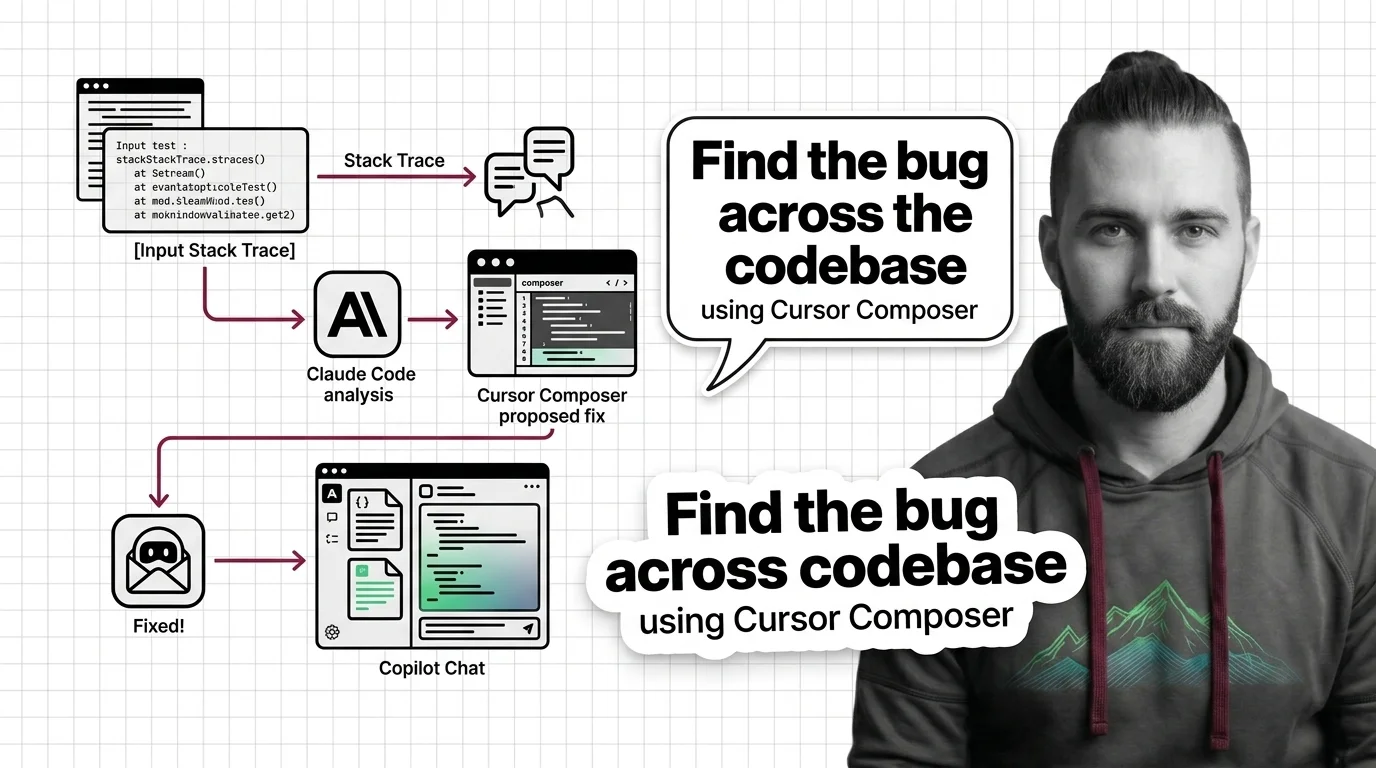
TL;DR
- A production bug is a specification problem before it is a code problem. The AI tool that fixes it fastest is the one you gave the cleanest context.
- Claude Code, Cursor, and Copilot Chat each have a different debug loop. Match the bug to the loop — don’t dump the same prompt into all three.
- The fix is not a fix until you can name the failure mode it prevents. Validate against the original symptom, not against “the test now passes.”
It’s 2:14 AM. A 5xx alert lit up the dashboard. You paste the stack trace into Cursor and type “fix this.” Twelve minutes later you have a patch that compiles, three new comments explaining the bug, and zero confidence the root cause is the one the AI named. The patch ships. Six hours later the same error returns under a different stack.
You didn’t get a bad model. You got a bad spec.
Before You Start
You’ll need:
- One of three tools: Claude Code (Opus 4.7 via
/fast), Cursor 3.3 with Composer 2.5, or GitHub Copilot Chat in agent mode - A working understanding of AI-Assisted Debugging as a loop — not as a single prompt
- The actual stack trace, log lines, and a reproducer — or a written admission you don’t have a reproducer yet
- Familiarity with AI Code Review habits, because every AI fix is a code review you owe yourself
This guide teaches you: how to triage a production bug into four artifacts (symptom, reproducer, context bundle, success criterion) so an AI tool can debug it instead of guessing at it.
The 3 AM Patch That Came Back at 9 AM
Here’s the failure mode I see every week.
A developer hits an error. They paste the stack trace into an agent and type “find the bug.” The agent reads three files, picks the most suspicious-looking line, rewrites it, and reports “fixed.” The test that exercised the original symptom either didn’t exist or only checked one path. The patch lands. The bug returns when the next user hits the edge case the agent didn’t know existed.
It worked on Friday. On Monday, the same error surfaced with a different stack because the AI patched the symptom in one caller and the second caller still passed None.
The problem isn’t the model. The problem is that “find the bug” is not a debug spec. It’s a wish.
Step 1: Triage Before You Prompt
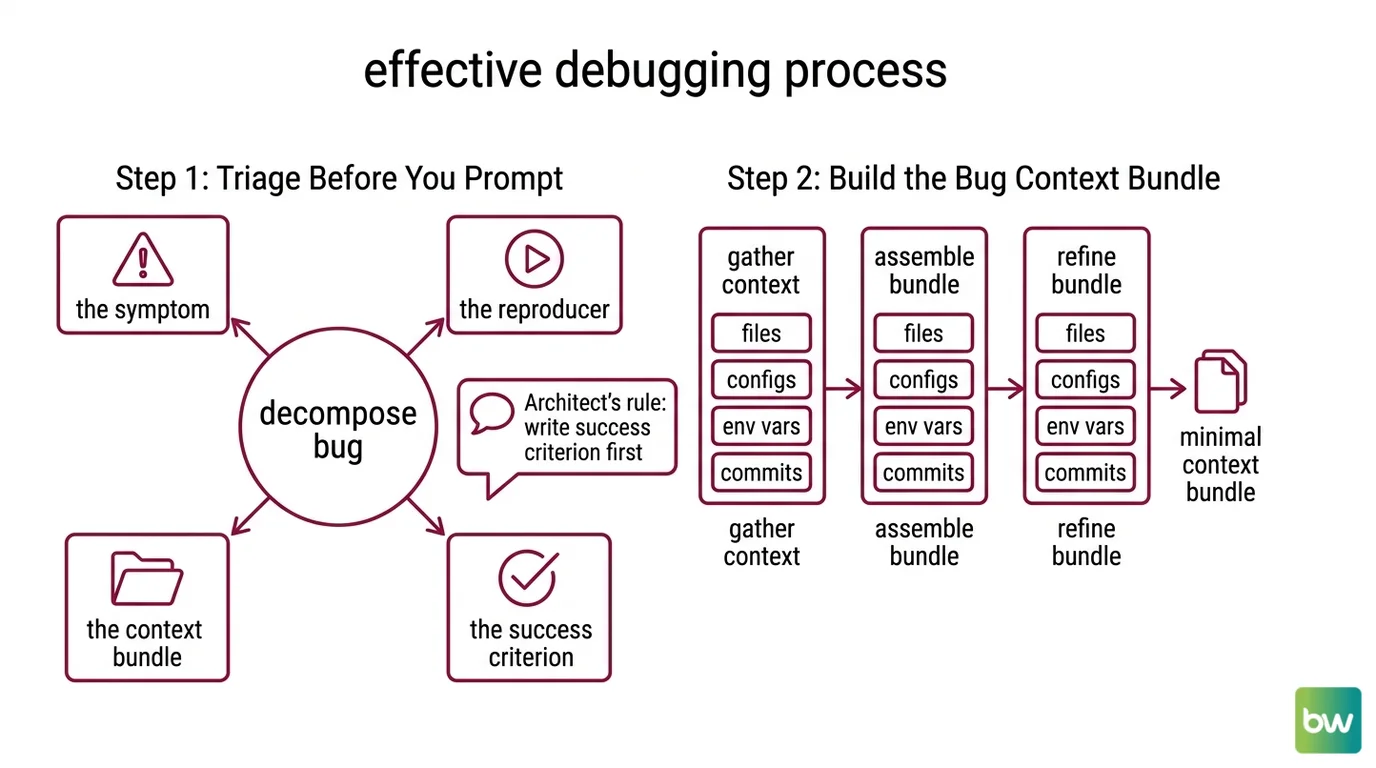
Before you open Claude Code, Cursor, or Copilot Chat, you decompose the bug into four artifacts. The AI cannot debug what you have not separated.
Your bug has these parts:
- The symptom — the exact error message, status code, or wrong output. Not your interpretation of it.
- The reproducer — the minimum input or sequence that triggers the symptom. If you can’t reproduce it, your first job is to make a reproducer, not to fix the bug.
- The context bundle — the files, configs, env vars, and recent commits the AI needs to see. Everything else is noise.
- The success criterion — what “fixed” means, written as an assertion. “The test passes” is not enough. “The 5xx no longer fires when the upstream returns a 429” is enough.
The Architect’s Rule: If you can’t write the success criterion in one sentence, you are not ready to debug. You are still investigating. Don’t ask the AI to fix what you haven’t defined.
A symptom plus a stack trace plus a hope is not a triage. It’s a paste. Three months from now, when this bug comes back under a different stack, you will paste the same way and get the same patch.
Step 2: Build the Bug Context Bundle
Each tool eats a different shape of context. Specifying it wrong is the difference between a 30-second fix and a 30-minute hallucination tour.
Context checklist (apply to all three tools):
- The exact stack trace, untruncated, with line numbers preserved
- The reproducer — either a failing test, a curl command, or a sequence of inputs
- Recent commits that touched the failing path (
git log -pfor the file, last 10 commits) - Runtime config that differs from local — env vars, feature flags, database state
- The expected behavior, stated as an assertion
- What you have already ruled out — “it’s not the cache, I flushed it”
Tool-specific shapes:
Claude Code wants a project-wide spec. It auto-builds memory across sessions and works best when you let it run multi-step inside the repo, per Claude Code Docs. Drop the stack trace into the terminal, point it at the failing test, and let it form a hypothesis before you push for a fix. For deeper investigation, route to Opus 4.7 with /fast — Claude Code Changelog notes this is the current default debug model.
Cursor wants inline context first, project context second. Highlight the error in the integrated terminal, hit Cmd/Ctrl+L for “Add to Chat,” then @terminal to inject the log output, per Cursor Docs. Then escalate to Debug Mode — a dedicated agent that reads the codebase, generates hypotheses, instruments code with runtime logs, and verifies the fix, per Cursor Docs.
Copilot Chat wants a slash command up front. /explain for “what is this code doing,” /fix for inline patches, and /startDebugging to configure a debug session, per GitHub Docs. Copilot agent mode reached general availability on VS Code and JetBrains in March 2026, per GitHub Blog — but slash command coverage across JetBrains IDEs lagged historically and should be re-checked per IDE.
The Spec Test: If the context bundle doesn’t tell the AI what is in the request body when the 500 fires, the AI will assume. The AI’s assumption will be wrong often enough that you cannot afford to leave it in. Your job is to remove the assumption, not to argue with the result.
Step 3: Pick the Loop That Matches the Bug
Three tools, three debug loops. The mistake is dumping the same prompt into all three and picking whichever output sounds most confident.
Match the bug to the loop, in this order:
Reproducible, single-file bug → Copilot Chat with
/fix. Inline, fast, no agent overhead. You read the patch, you accept or reject it, you move on. The Free tier covers 50 agent requests and 2,000 completions a month, per GitHub’s pricing page — plenty for a day’s worth of small fixes. Pro is $10/user/month for 300 premium requests; Pro+ is $39/user/month for 1,500 premium requests and access to higher-tier models, per GitHub’s pricing page.Reproducible, multi-file or cross-component bug → Cursor Composer 2.5 in Debug Mode. Composer 2.5 hit 79.8% on SWE-Bench Multilingual, per Cursor Blog, and Debug Mode is the right shape when you need an agent to grep through the codebase, instrument code with runtime logs, and verify the fix end-to-end. Cursor IDE 3.3 was released May 7, 2026, with Composer 2.5 landing May 18, 2026, per Cursor’s changelog and Cursor Blog. Cursor Pro is $20/month, per Cursor’s pricing page.
Non-reproducible bug or one that needs cross-session memory → Claude Code. When the bug only shows up after a long session of investigation, when you need the tool to remember what you tried yesterday, or when the fix touches a contract across many files, Claude Code’s auto-built session memory pays for itself, per Claude Code Docs. Pro is $20/month; Max plans are $100/month (5x usage) and $200/month (20x usage), per Anthropic pricing.
The wrong default: treating Claude Code as your primary tool for a single-file null-pointer bug. You pay agent overhead you don’t need. The right default is the smallest loop that closes the bug.
For each tool, your context bundle must specify:
- Inputs — stack trace, reproducer, env state
- Outputs — the assertion that proves the fix
- Constraints — files the AI must NOT touch, patterns it must NOT introduce (no swallowed exceptions, no broad except clauses, no commented-out tests)
- Failure cases — what the bug looks like in production, not just in the test
Step 4: Verify the Fix Didn’t Lie
The fix is not a fix until it fails to reproduce the original symptom. “The test passes” is not the same as “the bug is gone.”
Validation checklist:
- Re-run the original reproducer against the patched code — failure looks like: the symptom still appears, or the agent rewrote the test instead of the code.
- Check whether the patch matches the success criterion you wrote in Step 1 — failure looks like: the agent fixed a symptom but introduced a new behavior the criterion doesn’t allow.
- Scan the diff for what was deleted, not just what was added — failure looks like: a meaningful check, log line, or test was removed to make the symptom disappear.
- Look at adjacent callers — failure looks like: the patch fixed one call site and left a sibling that hits the same code path with the same broken input.
- Run AI Test Generation on the patched function — failure looks like: the new tests pass trivially because they were generated from the patched code, not from the original spec.
This step is non-negotiable. AI Code Completion can write convincing wrong patches faster than you can read them. The verification is the only thing standing between a confident agent and a Monday morning incident review.
Security & compatibility notes:
- Claude Code RCE (CVE-2025-59536): Remote code execution when opening Claude Code in an untrusted directory. Fix: upgrade to 1.0.111+ (patched October 2025).
- Claude Code credential exfil (CVE-2026-21852): API credential leak via a malicious project configuration. Fix: upgrade to 2.0.65+ (patched January 2026). Treat any cloned repo as untrusted until both versions are confirmed.
- Claude Code billing change, June 15, 2026: Interactive use stays on subscription. Programmatic use (Claude Agent SDK,
claude -p, GitHub Actions, third-party apps) moves to a separate Agent SDK credit pool at API rates. If your debug workflow shells out toclaude -p, budget for it now.- Model deprecations, June 15, 2026: Legacy Opus 4 and Sonnet 4 will be removed — API requests will error. Migrate to Sonnet 4.5/4.6 or Opus 4.5/4.6/4.7 before then.
Common Pitfalls
| What You Did | Why AI Failed | The Fix |
|---|---|---|
| Pasted stack trace, typed “fix this” | No reproducer, no constraint — agent guesses the cheapest patch | Write the symptom, reproducer, and success criterion before opening the tool |
| Used Claude Code for a single-line null check | Agent overhead masked a 5-second human read | Match the loop: Copilot Chat /fix for small, single-file patches |
| Accepted the first plausible diff | “Compiles + tests pass” is not “bug is fixed” | Re-run the original reproducer; check what the diff deleted |
| Pointed the AI at the whole repo | Token budget burned on irrelevant files, hypothesis quality drops | Scope context to the failing path: stack trace, recent commits for that file, related tests |
| Let the AI write the regression test | Tests generated from patched code pass trivially | Write the failing test from the symptom first; then ask for the fix |
Pro Tip
The cheapest thing an AI debug session can do for you is not the patch — it’s the hypothesis list. Before you accept a fix, ask the tool to enumerate the top three causes of the symptom and rank them by likelihood. If the patch only addresses cause #1 and cause #2 is more likely, you don’t have a fix. You have a guess wearing a diff.
The same rule applies across tools, across models, across releases. The hypothesis comes before the patch. Always.
Frequently Asked Questions
Q: How to use AI to debug a failing test or stack trace in 2026?
A: Start by extracting four artifacts — symptom, reproducer, context bundle, success criterion — before opening the tool. Then pick the loop: Copilot Chat /fix for single-file, Cursor Debug Mode for cross-file investigation, Claude Code when you need session memory. Watch out for tools that rewrite the failing test instead of the code; always re-run the original reproducer against the patched code, not the new test.
Q: How to set up an AI debugging workflow in VS Code or JetBrains in 2026?
A: Install Copilot Chat or Claude Code as the primary in-IDE assistant (both support VS Code and JetBrains per their docs), and add Cursor as a sidecar editor when you need a stronger agent loop. Configure /startDebugging in Copilot for breakpoint-driven flows and pin Opus 4.7 via /fast in Claude Code for deeper investigation. The JetBrains-specific gotcha: Copilot slash command parity historically trailed VS Code, so verify each command per IDE before you depend on it in a runbook.
Q: How to use Cursor Composer to find and fix bugs across a codebase?
A: In Cursor 3.3, open Debug Mode (not plain Chat) and let Composer 2.5 read the codebase, generate hypotheses, and instrument the code with runtime logs, per Cursor Docs. Feed it the stack trace via @terminal and the failing test path via @file. The edge case to know: Composer 2.5’s $0.50/M input, $2.50/M output token pricing applies to API/BYO routing — included usage on Cursor’s plans is bounded differently, so check your plan before running long agent loops.
Your Spec Artifact
By the end of this guide, you should have:
- A four-artifact bug card for every production issue: symptom, reproducer, context bundle, success criterion
- A tool-matching rule: single-file → Copilot, cross-file → Cursor Debug Mode, cross-session → Claude Code
- A validation checklist that survives the patch — re-run the reproducer, scan the diff for deletions, check adjacent callers, verify generated tests aren’t trivial
Your Implementation Prompt
Paste this into Claude Code, Cursor Composer, or Copilot Chat agent mode at the start of any non-trivial debug session. Fill the bracketed placeholders with your specific bug. The prompt mirrors Steps 1-4 from this guide so the tool runs the same loop you would.
You are debugging a production bug. Follow this loop exactly.

STEP 1 — TRIAGE
- Symptom: [exact error message, status code, or wrong output]
- Reproducer: [failing test path, curl command, or input sequence]
- Context paths: [files to read, e.g. src/foo/bar.py, tests/test_bar.py]
- Recent changes: [last commits touching the failing path]
- Success criterion: [single-sentence assertion that "fixed" means]

STEP 2 — CONTEXT
- Read ONLY the files listed in "Context paths" before proposing anything.
- Do NOT touch: [files or patterns off-limits, e.g. migrations/, generated/]
- Constraints: no swallowed exceptions, no broad except clauses, no commented-out tests, no test rewrites.

STEP 3 — HYPOTHESIS BEFORE PATCH
- List the top 3 likely root causes, ranked by likelihood.
- For each, name the evidence in the context that supports or rules it out.
- Wait for my "go" before writing the patch.

STEP 4 — VERIFY
- After patching, re-run the original reproducer (not a new test).
- Report: does the symptom still appear? what did the diff DELETE?
- Generate a regression test that fails on the ORIGINAL code, then passes on the patched code.
- If you cannot make the test fail on the original code, stop and tell me — the patch does not address the bug.
Ship It
You now have the mental model: a bug is a specification problem before it is a code problem. Triage into four artifacts, match the tool to the loop, verify against the original symptom — not the new test. You can decompose any production incident into something an AI tool can actually fix, instead of something it can confidently mis-patch at 2 AM.
AI-assisted content, human-reviewed. Images AI-generated. Editorial Standards · Our Editors