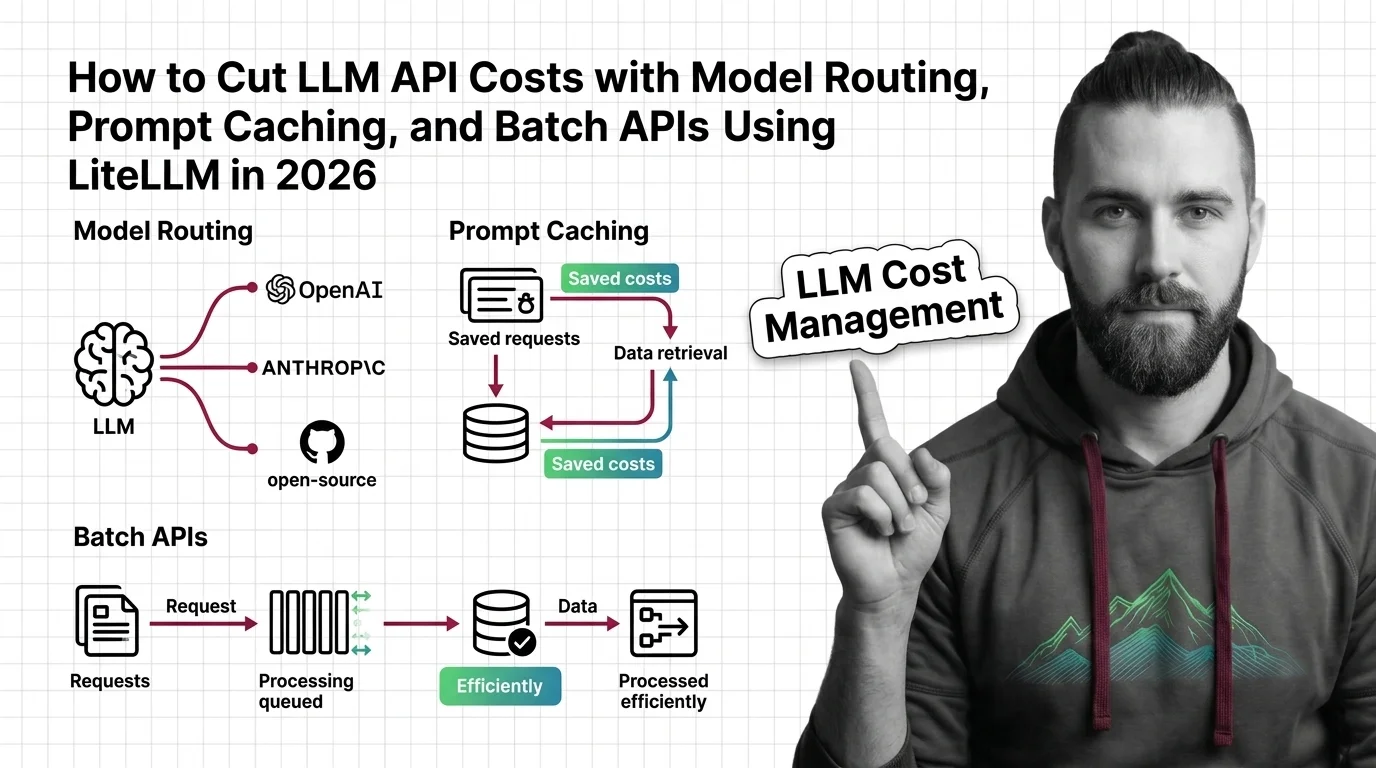
How to Cut LLM API Costs with Model Routing, Prompt Caching, and Batch APIs Using LiteLLM in 2026
TL;DR
- Model Routing is a cost contract, not a preference setting. Define which task types qualify for each model tier before writing a single line of routing config.
- Both OpenAI and Anthropic batch APIs give 50% off input and output tokens for jobs that tolerate a 24-hour completion window. Any pipeline that doesn’t serve a live user response is a candidate.
- Your system prompt is your most expensive repeated token. Prefix it with a cache control block — Anthropic’s prompt cache read costs 10% of base input price; OpenAI cached input runs the same. Stacked with batch, Anthropic savings can reach 95%.
You shipped the feature. The invoice landed three weeks later. Line item: LLM API costs — several times your mental estimate. Nobody changed the model. Nobody increased traffic. The spec just never said to use the cheap model for classification tasks. So the AI coding tool defaulted to the most capable — and most expensive — option it knew about.
That’s not a model problem. That’s a specification problem. And it’s fixable in three layers.
Before You Start
You’ll need:
- Claude Code, Cursor, or Codex as your AI coding tool
- An existing LLM Cost Management challenge — visible API spend you want to reduce
- Accounts on at least two LLM providers (OpenAI + Anthropic covers the main routing targets)
- LLM Observability tooling installed or queued — you can’t reduce what you can’t see
This guide teaches you: How to decompose LLM spend into three addressable components — per-request cost, redundant Inference, and synchronous-processing waste — so your AI coding tool builds the right cost controls, not the most obvious ones.
The Invoice That Finally Got Everyone’s Attention
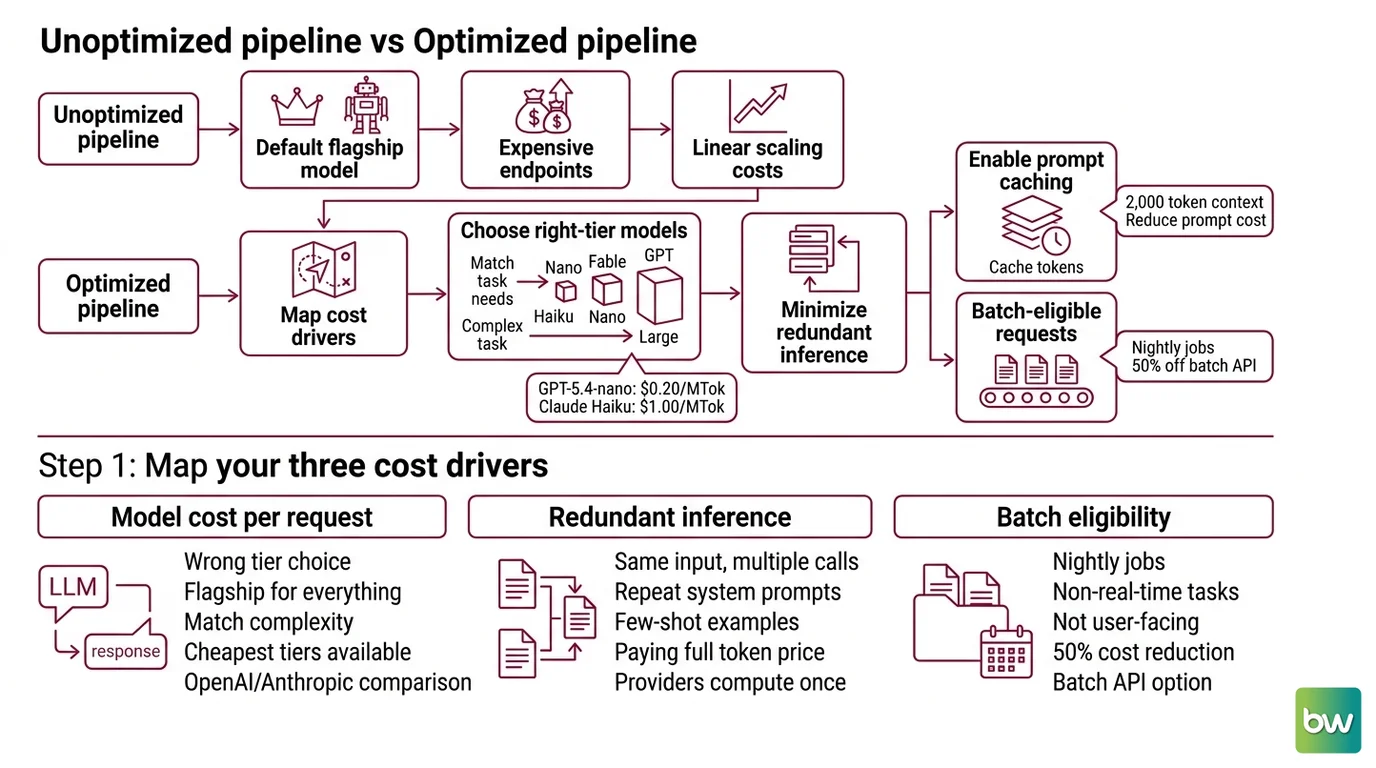
Here’s what happens without a cost spec. The team ships an LLM-powered document processing pipeline. It works in staging. With real traffic, the same pipeline becomes a line item that triggers a budget review — because the spec never said which model tier to use for which task. The AI coding tool defaulted to the flagship model for everything: classification, extraction, and synthesis all went through the same expensive endpoint.
Two things made it worse. First, half those requests were batch-eligible — nightly jobs nobody was waiting on. They could have gone through the batch API at 50% off. Second, the system prompt repeated across every call without caching. The same 2,000 tokens of context paid full price, every time.
It worked on Friday. On Monday, with ten times the document volume, the pipeline costs scaled linearly — because no part of the spec said costs should not scale linearly.
Step 1: Map Your Three Cost Drivers
Before your AI coding tool writes any routing configuration, you need to name what’s expensive and why. Three components drive most LLM cost surprises. Each one has a different fix.
Your cost stack has these layers:
- Per-request model cost — wrong tier for the task. Classification, extraction, and structured output rarely need flagship reasoning. The cheapest OpenAI tier (GPT-5.4-nano at $0.20/MTok input) is 25 times cheaper than the most capable (GPT-5.5 at $5.00/MTok input), per OpenAI Docs. The cheapest Anthropic tier (Claude Haiku 4.5 at $1.00/MTok) is ten times cheaper than Claude Fable 5 ($10.00/MTok), per Anthropic Docs. The majority of classification, extraction, and triage tasks never needed the top tier — the spec just didn’t say so.
- Redundant inference — same input, new API call each time. If your system prompt, reference documents, or few-shot examples repeat across calls unchanged, you’re paying full tokenization price for tokens the provider already computed. These are Prompt Caching candidates.
- Sync/async mismatch — real-time prices for workloads that don’t need real-time responses. Document processing, nightly evaluations, bulk classification jobs — none of these require synchronous latency. They’re Batch API candidates, and they’re currently paying synchronous prices.
The Architect’s Rule: If you can’t label each LLM call with a tier (budget / mid / premium) and a latency requirement (sync / async), your AI coding tool can’t route it correctly either.
Prices above are current as of June 2026 per OpenAI Docs and Anthropic Docs. Check the provider’s current pricing page before including cost ceilings in your specifications.
Step 2: Specify the Routing and Caching Contract
This is the step most teams skip. They install LiteLLM and wire up a model list. They don’t write the contract that tells the router what to do.
Context checklist — what your AI coding tool must know before touching configuration:
- Tier map: task type → model → price ceiling (e.g., “classification tasks → GPT-5.4-nano or Claude Haiku 4.5”)
- Cache eligibility: which prompt sections are stable across calls (system prompt, reference docs, few-shot examples). Anthropic offers two write durations: 5 minutes at 1.25× base price, or 1 hour at 2× base. The 90% savings on cache reads applies regardless of write duration — but if your hit rate is low, 1-hour writes cost more than you save. Specify duration expectations in your contract.
- Async eligibility: which pipelines tolerate a 24-hour completion window. Be explicit — the router cannot infer this from call shape.
- Token Budget limits: per-user, per-pipeline, and per-day hard ceilings.
- Fallback behavior: what happens when the primary model is unavailable or over budget — fallback to the next tier, return an error, or queue for later.
The Spec Test: If your spec doesn’t define cache eligibility by prompt section, LiteLLM’s auto-inject feature will guess — and it may not match your actual prompt structure. Mark cache block boundaries explicitly.
One thing the spec must also cover: Semantic Caching eligibility. Semantic caching sits between your application and the LLM API, intercepts calls, embeds the query, and returns stored responses for semantically similar inputs — without touching the API at all. This is different from prompt caching. Prompt caching saves on repeated context within a call. Semantic caching eliminates calls entirely when the query is close enough to a prior one. The spec question: which request types have high query similarity across users? FAQs and product queries are good candidates. Highly variable analytical queries are not.
Step 3: Wire the Stack
You have three components to install. Wire them in this order — each depends on the previous one being observable.
Build order:
Langfuse first — before you route anything, you need cost attribution. Langfuse v3.172.1 (stable) captures LiteLLM cost data directly without extra instrumentation (Langfuse Docs). The free tier covers 50,000 observations per month with no credit card required (Langfuse Docs). Langfuse uses OpenTelemetry for distributed tracing — configure it as your LiteLLM callback and cost data flows automatically. Start here because you can’t validate routing decisions without visibility into what’s being routed.
LiteLLM router second — once you can see costs, install the router. LiteLLM v1.90.0 (LiteLLM GitHub) supports six routing strategies. For cost control,
cost-based-routingpicks the lowest-cost capable model on each call. For spreading load without cost optimization,simple-shuffleis the default. The routing spec from Step 2 becomes themodel_list— each tier as a model group with fallback order defined explicitly.Semantic cache layer third — add GPTCache or a Redis-backed vector cache on top of the router. Production hit rates of 30–70% are achievable depending on traffic patterns (Spheron Blog) — don’t promise the high end unless you’ve measured query diversity in your actual workload. A cache that misses 90% of the time adds latency without reducing cost.
Batch API routes last — once routing and caching are visible in Langfuse, identify which pipelines are hitting the async-eligible criteria from your spec. Route those separately to the batch endpoint. Both OpenAI and Anthropic offer 50% off input and output tokens for batch jobs (OpenAI Docs, Anthropic Docs). Stack that with Anthropic prompt cache reads (10% of base input price) and a single async pipeline with a stable system prompt can clear 95% off the base synchronous cost.
Bifrost is an alternative API gateway worth knowing about — vendor-benchmarked at 11 µs overhead at 5,000 RPS and supporting 23+ LLM providers (Bifrost GitHub). The “50x faster than LiteLLM” claim on their site is Maxim AI’s own benchmark, not independently verified. Evaluate it for your latency requirements — the Go-native architecture is a real advantage for high-throughput gateways.
Security & compatibility notes:
- LiteLLM SQL Injection (CVSS 9.3): CVE-2026-42208, affects v1.81.16–v1.83.6. Exploited in the wild within 36 hours of disclosure. Fix: upgrade to v1.83.7+ (LiteLLM Security Blog).
- LiteLLM Privilege Escalation (CVSS 9.9): CVE-2026-47101, CVE-2026-47102, CVE-2026-40217. Fixed in v1.83.14-stable (LiteLLM Security Blog).
- LiteLLM Supply Chain Incident (March 2026): PyPI packages v1.82.7 and v1.82.8 contained malicious code, live roughly 40 minutes before quarantine. These versions are unsafe.
- CISA KEV (June 2026): CVE-2026-42271 added to the CISA Known Exploited Vulnerabilities catalog. Actively exploited in the wild.
- Minimum safe version: v1.83.14-stable. Run v1.89.0 or higher — current release is v1.90.0 (LiteLLM GitHub).
Step 4: Validate Budget Enforcement
Don’t assume the stack is working. Validate each layer before trusting it with production traffic.
Validation checklist — and what failure looks like:
- Cost attribution visible — can you see spend by model, pipeline, user? Failure looks like: all spend attributed to one model label regardless of actual routing.
- Cache hit rates tracked — actual vs. expected per workload type. Failure looks like: hit rate at 0% despite matching prompts. Common cause: trailing whitespace or newline differences in the cached vs. incoming prompt. Canonicalize whitespace before caching.
- Budget ceiling enforced — does Langfuse alert fire before the bill arrives? Failure looks like: alert fires after the ceiling is already breached. Fix: set the alert threshold at 80% of ceiling, not 100%.
- Async jobs completing — are batch API jobs returning within the 24-hour window? Failure looks like: jobs queued but not completed. Most common cause: malformed job format for that provider’s batch spec.
- Fallback tested — what actually happens when the primary model returns 429? Return a test 429 in staging and verify the router falls back to the next tier, not to an error response you didn’t spec.
Common Pitfalls
| What You Did | Why AI Failed | The Fix |
|---|---|---|
| No tier map in spec | AI coding tool defaults to the most capable model it knows | Define task type → model mapping explicitly in routing config |
| Cache eligibility undefined | LiteLLM auto-inject misses stable sections or caches dynamic content | Mark cache block start/end boundaries in the system prompt spec |
| Async jobs in sync pipeline | Batch API never applied; full price for non-urgent workloads | Classify pipelines by latency requirement before writing routing spec |
| No cost attribution tags | Spend visible at account level only, no per-pipeline breakdown | Require user_id, pipeline_name, task_type tags on every LLM call |
| Cache write duration unspecified | 1-hour cache write at 2× base costs more than it saves for low-frequency prompts | Choose write duration based on call frequency; validate hit rate before committing |
Pro Tip
The cheapest optimization in this stack is pre-routing classification. Before you route a request to any LLM, classify it. A tiny, fast model that decides “this task needs the premium tier” costs a fraction of a cent. Using the premium tier for everything because the spec didn’t define classification costs real money at scale. Build your tier classifier spec first — define what “premium required” means for your use case, with examples. The classifier pays for itself on day one.
Frequently Asked Questions
Q: How do I use LiteLLM to route requests across OpenAI, Anthropic, and open-source models to reduce per-token costs?
A: LiteLLM exposes a single OpenAI-compatible endpoint and routes to your provider pool using the strategy you configure. For cost control, cost-based-routing picks the lowest-cost model that meets capability requirements on each call. The edge case most teams miss: define fallback order explicitly in your model_list. Without it, simple-shuffle distributes load regardless of cost tier — and you end up paying premium prices for tasks the budget tier handles just as well (LiteLLM Docs).
Q: How do I cut LLM API bills 50% using OpenAI and Anthropic batch APIs for async workloads?
A: Both batch APIs offer 50% off input and output tokens for jobs submitted with a 24-hour completion window (OpenAI Docs, Anthropic Docs). The critical spec decision is workload classification — any pipeline that doesn’t serve a live user response is a batch candidate. Document processing, evaluation runs, and nightly summaries all qualify. One detail the main guide doesn’t cover: OpenAI batch jobs require a .jsonl file upload; Anthropic uses a different request format. Spec both separately if you’re routing across providers.
Q: How do I implement semantic caching to reduce redundant LLM calls in production?
A: A semantic cache embeds the incoming query and checks vector distance against prior responses — hits return stored answers without an API call. Production hit rates of 30–70% are achievable depending on traffic patterns (Spheron Blog), but the floor is closer to 10% for highly variable analytical inputs. Measure query diversity before sizing the cache. One practical tip: set your similarity threshold conservatively at first. A too-permissive threshold returns semantically similar but factually wrong cached answers — harder to debug than a cache miss.
Q: How do I build a real-time LLM cost attribution and budget enforcement system with Bifrost and Langfuse?
A: Langfuse captures LiteLLM cost data without extra instrumentation when LiteLLM is configured as the trace source — the integration is native (Langfuse Docs). The free tier covers 50,000 observations per month. Bifrost adds per-request budget gates that block calls before they reach the LLM if the user or pipeline ceiling would be exceeded. The key spec decision: define token budget granularity before wiring enforcement. Per-user daily limits require user tagging on every call. Per-pipeline limits require pipeline tagging. Get the tagging spec right first — enforcement is easy once attribution is clean.
Your Spec Artifact
By the end of this guide, you should have:
- A task-to-model tier map — every task type in your application assigned to a model tier with a price ceiling and a justification
- A cache eligibility list — each prompt section marked as stable or dynamic, with expected cache write duration and hit rate estimate per workload
- A workload classification — every LLM pipeline labeled sync (user-facing, latency-constrained) or async (batch-eligible), with per-pipeline and per-user budget limits
Your Implementation Prompt
Use this prompt in Claude Code, Cursor, or Codex to generate your initial LiteLLM router configuration and Langfuse observability setup. Fill each bracket before running — these are the decisions the spec must make, not the AI tool.
You are specifying a production LLM cost control stack for [describe your application and its LLM use cases].

TASK-TO-MODEL TIER MAP:
- Premium tasks (complex reasoning, synthesis, code generation): [list task types] → [premium model, e.g. claude-sonnet-4-6 or gpt-5-4]
- Mid-tier tasks (structured output, multi-step analysis): [list task types] → [mid-tier model]
- Budget tasks (classification, extraction, routing, triage): [list task types] → [budget model, e.g. claude-haiku-4-5 or gpt-5-4-nano]

PROMPT CACHE SPEC:
- System prompt: [static across all calls / partially static — specify the stable prefix length]
- Reference documents: [yes / no — same documents reused across calls?]
- Few-shot examples: [yes / no — same examples per task type?]
- Preferred write duration: [5-minute / 1-hour] (note: 1-hour cache writes cost 2× base input; choose based on call frequency per hour)

ASYNC ELIGIBILITY:
- The following pipelines tolerate a 24-hour completion window: [list pipeline names]
- The following pipelines require synchronous responses: [list pipeline names]

BUDGET LIMITS:
- Per-user daily ceiling: [amount or "not enforced"]
- Per-pipeline daily ceiling: [amount or "not enforced"]
- Hard block behavior when ceiling reached: [error with message / fallback to budget tier / queue for later]

ATTRIBUTION TAGS REQUIRED ON EVERY LLM CALL:
- [user_id, pipeline_name, task_type — add or remove tags to match your billing granularity]

SECURITY CONSTRAINT:
- LiteLLM version must be v1.83.14-stable or higher. Do not generate config for any prior version.

Build the LiteLLM router config (model_list + router_settings), the Langfuse callback configuration, and the semantic cache integration for the pipelines where I specified high query similarity. For each component, include the validation check that proves it is working — what to look for in Langfuse and what failure looks like.
Ship It
You now have three levers instead of one. Model routing addresses cost at the per-request level. Prompt caching addresses cost at the repeated-context level. Batch APIs address cost at the workload-timing level. Each works independently. The spec decides which lever owns which workload. Get that right and each lever compounds the others.
Get the spec right before you get the config right. Deploy safe, Max.
Deploy safe, Max.
AI-assisted content, human-reviewed. Images AI-generated. Editorial Standards · Our Editors