How to Clone a Voice with Fish Speech, XTTS v2, and CosyVoice2 in 2026
TL;DR
- License, language, and latency constraints must be defined before you choose an engine — the wrong library choice costs days to unwind
- Three open-source engines cover different constraint profiles: Fish Speech S2 Pro for streaming and language breadth, XTTS v2 for proven offline non-commercial work, CosyVoice 3.0 for commercial use without licensing negotiation
- Validate your reference audio before synthesis — voice quality is determined at ingestion, not at model inference
Here is what happens most weeks. Developer finds XTTS v2 in a tutorial. Spends a day installing, gets a working clone. Shows the team. Someone asks: “Can we use this in our product?” The developer checks the license. Coqui AI is gone. The Coqui Public Model License prohibits commercial use. There is no licensing pathway — the company that issued the license no longer exists. Three days of integration work. Wrong tool from the start.
The pipeline failure happened before the first install command. Not at synthesis. Not at inference. At the specification step that never happened.
Before You Start
You’ll need:
- An AI coding assistant (Claude Code, Cursor, or similar) to scaffold the pipeline from your spec
- A reference audio sample — 10–30 seconds of clean, mono speech for best results
- Python 3.10 or higher environment
- Basic understanding of Text-to-Speech and how Voice Cloning differs from standard synthesis
- Clear answers to three questions before opening a terminal: commercial or non-commercial use? Which languages? Streaming or batch output?
This guide teaches you: how to decompose a voice cloning pipeline into its five core concerns and match the right open-source engine to your license, language, and latency constraints — before you write a line of code.
The Wrong Library, Three Days In
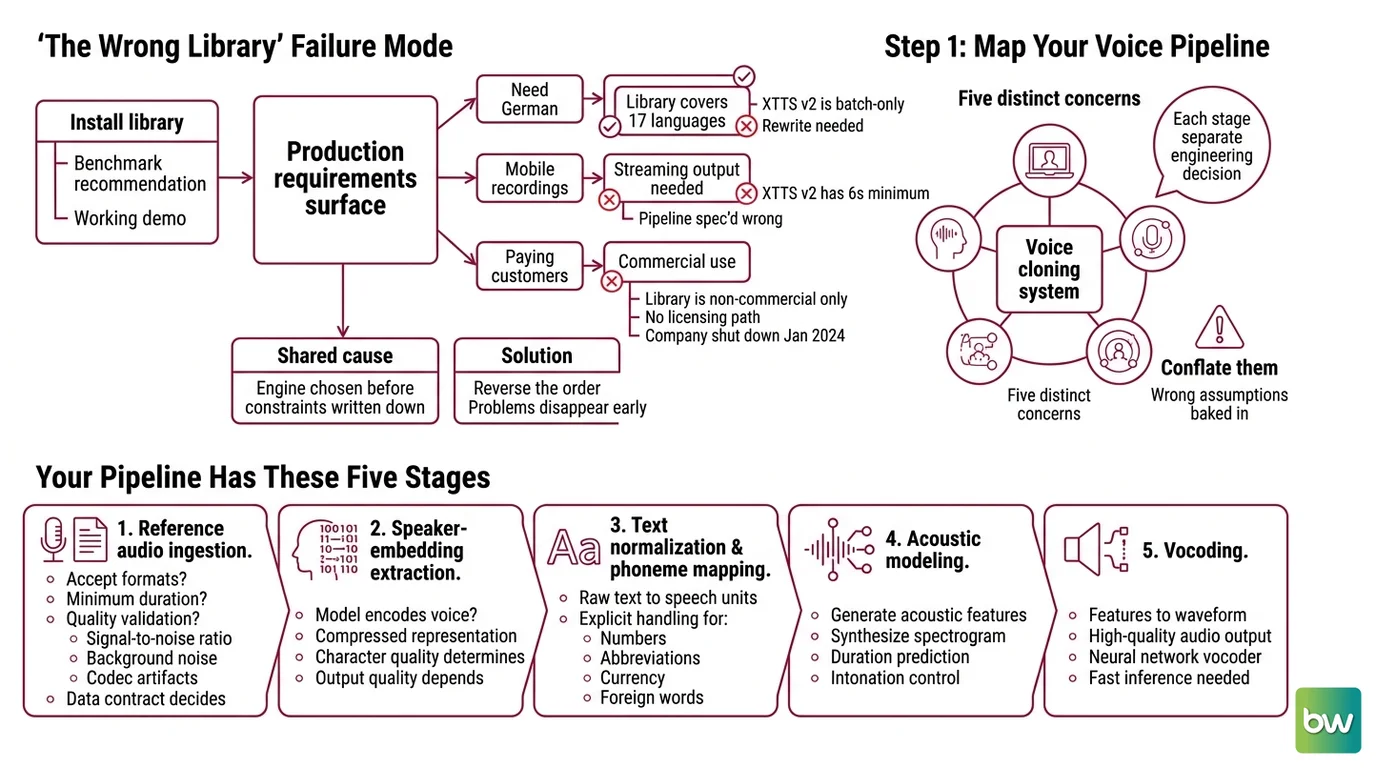
The failure mode is consistent. You install a library because a benchmark recommended it. You get a working demo. Then production requirements surface one at a time.
Your app needs German. The library covers 17 languages — German is there, you are fine. But it needs streaming output for real-time dubbing. XTTS v2 is batch-only. Rewrite needed.
Or: your reference clips come from a mobile recording setup. Typical clip is four seconds. XTTS v2 has a six-second minimum. The entire ingestion pipeline is spec’d wrong.
Or: your product ships to paying customers. You discover the library is non-commercial only, no licensing path exists, and the company that could have granted you a license shut down in January 2024.
These failures share a cause. The engine was chosen before the constraints were written down. Reverse that order and most of these problems disappear before they cost you anything.
Step 1: Map Your Voice Pipeline
A voice cloning system has five distinct concerns. Each stage is a separate engineering decision. Conflate them and the AI coding tool generates code with wrong assumptions baked into every layer.
Your pipeline has these five stages:
Reference audio ingestion — What formats do you accept? What is the minimum duration? How do you validate quality (signal-to-noise ratio, background noise, codec artifacts)? This stage decides the data contract every downstream component depends on.
Speaker Embedding extraction — How does the model encode the target voice? The speaker embedding is the compressed representation the synthesis engine conditions on. The embedding quality determines how much of the voice character survives into the output.
Text normalization and Phoneme mapping — How does raw text become a sequence of speech units? Numbers, abbreviations, currency, and foreign words all need explicit handling before they reach the acoustic model.
Acoustic synthesis — The main model. Takes the speaker embedding plus the phoneme sequence and generates a Mel Spectrogram. Early systems like Tacotron used encoder-decoder structures here; current models use flow-matching or autoregressive generation. This is where engine selection has the most impact.
Vocoder and output formatting — Converts the mel spectrogram to a waveform. Some engines bundle the vocoder (XTTS v2, Fish Speech); others let you swap it. Output: streaming audio chunks, WAV, or MP3 depending on your downstream.
The Architect’s Rule: If you cannot explain which stage handles which concern, the AI coding tool will guess — and it will guess differently in every file it generates.
Step 2: Define Your Constraints Before Choosing an Engine
License decides everything else in your constraint stack. Get this wrong and no other decision matters.
License:
- Commercial product → Apache-2.0 or equivalent required. CosyVoice 3.0 (Apache-2.0) or Fish Speech with a commercial agreement are your options.
- Research or personal project → CPML (XTTS v2) and FISH AUDIO RESEARCH LICENSE (Fish Speech S2 Pro) are both available at no cost.
Languages:
- 50+ languages including minority and regional languages → Fish Speech S2 Pro (Fish Audio Blog)
- 17 major languages (English, Spanish, French, German, Italian, Portuguese, Polish, Turkish, Russian, Dutch, Czech, Arabic, Chinese, Japanese, Hungarian, Korean, Hindi) → XTTS v2 covers this set exactly
- Chinese, English, Japanese, Korean, German, Spanish, French, Italian, or Russian, plus 18+ Chinese dialects → CosyVoice 3.0 (CosyVoice GitHub)
Latency:
- Real-time streaming, first audio under 200ms → Fish Speech S2 Pro achieves ~100ms on H200 GPU (Fish Audio Blog); CosyVoice 3.0 delivers 150ms first-packet latency (CosyVoice2 paper)
- Batch processing is acceptable → any of the three engines work
GPU VRAM:
- XTTS v2: 8GB VRAM minimum; an RTX 3060 runs at roughly 8× CPU speed, an RTX 3080 at 12×, an RTX 4090 at 20× (Local AI Master)
- Fish Speech S2 Pro: 4B parameter model — official docs do not publish minimum VRAM requirements; community reports suggest 16–24GB, but treat this as unverified
- CosyVoice 3.0: 0.5B parameters; lighter than the other two; Python 3.10 with optional NVIDIA GPU
Reference audio floor:
- XTTS v2: 6 seconds minimum; 10–20 seconds recommended; 30–60 seconds optimal (Local AI Master)
- Fish Speech S2 Pro: 10–30 seconds (Fish Speech Docs)
- Design your ingestion validation around the minimum your production environment can guarantee
Context checklist:
- License type confirmed (commercial / non-commercial)
- Language list finalized (check against each engine’s coverage)
- Latency requirement set (streaming target in ms, or batch acceptable)
- GPU VRAM documented (or CPU-only constraint)
- Reference audio minimum defined (what your users will actually provide)
The Spec Test: If you cannot answer “commercial or non-commercial?” before this step, stop. That answer changes which libraries are legally available to you and removes entire branches from the decision tree.
Step 3: Select the Right Engine
With constraints written down, the selection becomes mechanical. Match your profile to the table.
| Constraint | Fish Speech S2 Pro | XTTS v2 (idiap fork) | CosyVoice 3.0 |
|---|---|---|---|
| Commercial use | Requires separate agreement | Not available (CPML) | Apache-2.0 |
| Languages | 50+ | 17 | 9 major + 18+ Chinese dialects |
| Streaming latency | ~100ms (H200 GPU) | Batch only | 150ms first-packet |
| GPU demand | ~4B params (high VRAM) | 8GB VRAM | 0.5B params (lighter) |
| Maturity | Beta-track (open-sourced March 2026) | Frozen since December 2023 | Active (v3.0, late 2025) |
CosyVoice 3.0 needs no licensing negotiation. The article headline references CosyVoice2-0.5B — the current recommended version from FunAudioLLM is CosyVoice 3.0 (Fun-CosyVoice3-0.5B-2512, CosyVoice GitHub). For any new project, download the v3.0 models.
XTTS v2 uses a
VITS-based architecture extended with cross-language speaker conditioning. It remains the most extensively documented option for offline, non-commercial work across its 17 languages. Install via the idiap/coqui-ai-TTS community fork — the original coqui-ai/TTS repo is unmaintained and incompatible with Python 3.10+.
Fish Speech S2 Pro is a Dual-AR system: a 4B slow model paired with a 400M fast model on a Qwen3 backbone, trained with RL alignment via GRPO (Fish Audio Blog). Zero-shot cloning from 10–30 seconds of reference audio, 50+ language support. Non-commercial use is free; commercial deployments require contacting business@fish.audio.
Build order regardless of which engine you choose:
- Reference audio validation layer — quality gate before any model inference
- Speaker embedding extraction — test with known voices before integrating with text input
- Text normalization and phoneme pipeline — cover edge cases (numbers, abbreviations, mixed-language input)
- Synthesis integration — single test sentence first, measure latency before scaling
- Output pipeline — streaming or file format, error handling, structured failure responses
For each stage, specify to your AI coding assistant:
- What it receives (input types, duration constraints, format requirements)
- What it returns (output types, latency target)
- What it must not do (swallow errors silently, exceed memory budget, produce audio without logging input duration)
- How it handles failure (sub-minimum clip, corrupted file, encoding error)
Step 4: Validate the Clone
Voice cloning validation has three layers. Skip any one and production failures arrive without warning.
Layer 1 — Reference audio quality:
- Duration check: hard-fail on clips below the engine minimum — not a warning, a rejection with the actual duration logged
- Signal-to-noise ratio: background music, echo, and codec compression all degrade Prosody fidelity in the clone. Detect and reject poor-quality audio at ingestion, not after synthesis
- Sample rate: normalize to the engine’s expected rate (typically 16 kHz or 22 kHz) before embedding extraction, not after
Layer 2 — Speaker similarity:
- Generate five test sentences spanning different lengths and emotional registers. Listen for pitch accuracy, rhythm match, and articulation pattern
- Speaker similarity fails silently without explicit checks. The model produces plausible audio that sounds like someone else. Define a similarity threshold and measure it — subjective review misses systematic drift across voices
- Test with emotionally varied text. Prosody patterns degrade on sentences that live outside the model’s training distribution for that speaker type
Layer 3 — Production readiness:
- Latency: measure time-to-first-audio at production load. Not just the mean — the 95th percentile tells you what users actually experience at peak
- Error handling: submit a 3-second clip below the minimum. Does your pipeline return a structured error, swallow the exception, or produce degraded output silently?
- License compliance: confirm your chosen engine’s license or commercial agreement is in place before production deployment
Validation checklist:
- Clip duration ≥ engine minimum → failure symptom: unstructured exception from model layer
- SNR passes threshold → failure symptom: muddy output with encoded background noise
- Speaker similarity score meets target → failure symptom: output sounds like a different speaker
- Latency p95 within target → failure symptom: users experience audio gaps in streaming mode
- Error cases return structured responses → failure symptom: silent exception in production logs
Compatibility & licensing notes:
- XTTS v2 (coqui-ai/TTS): Frozen at v0.22.0 (December 2023); Coqui AI closed January 2024. Install the
idiap/coqui-ai-TTScommunity fork (pip install coqui-tts) for Python 3.10+ compatibility.- XTTS v2 commercial use: CPML prohibits commercial use with no licensing pathway available. Not suitable for production or commercial deployments (PromptQuorum).
- Fish Speech: FISH AUDIO RESEARCH LICENSE covers personal and research use only. Commercial deployments require a separate agreement at business@fish.audio.
- CosyVoice2-0.5B: Superseded by CosyVoice 3.0 (Fun-CosyVoice3-0.5B-2512) as of late 2025. FunAudioLLM recommends downloading v3.0 models for new projects; CosyVoice2 is functional but not the current recommended path (CosyVoice GitHub).
Common Pitfalls
| What You Did | Why It Failed | The Fix |
|---|---|---|
Installed coqui-ai/TTS directly | Python 3.10+ incompatible; original repo unmaintained since January 2024 | Use idiap/coqui-ai-TTS fork (pip install coqui-tts) |
| Chose XTTS v2 for a commercial product | CPML prohibits commercial use; no licensing path since company closure | Switch to CosyVoice 3.0 (Apache-2.0) or negotiate a Fish Speech commercial agreement |
| Used 4–5 second reference clips | Below engine minimums; speaker embedding is underspecified | Validate clip duration at ingestion; reject below minimum with structured error |
| Downloaded CosyVoice2 model weights | Superseded by v3.0; new capabilities only in CosyVoice 3.0 | Download Fun-CosyVoice3-0.5B-2512 from HuggingFace for new projects |
| Skipped SNR validation on reference audio | Background noise encodes into the speaker embedding; clone output sounds muddy and off-pitch | Add SNR check to ingestion layer; reject below threshold with explicit noise reason |
| Built synthesis layer before ingestion validation | Model receives bad audio; synthesis errors appear as model failures | Always build and validate ingestion first — garbage in, garbage out applies literally here |
Pro Tip
The same five-stage decomposition applies across all AI audio tasks — voice cloning, AI Music Generation, and audio enhancement all share this structure with different components at each stage. Build the ingestion and output layers as reusable modules with clean interfaces. They do not change when you swap synthesis engines. This means you can run XTTS v2 now and migrate to CosyVoice 3.0 or Fish Speech later by replacing only stages 2–4. The ingestion contract and the output format stay stable across engine swaps — and your AI coding tool can generate each replacement component from the same interface spec.
Frequently Asked Questions
Q: How do I build a voice cloning pipeline step by step? A: Write the five-stage spec first (ingestion → embedding → normalization → synthesis → output), then define your three constraint axes (license, language, latency) before choosing a library. Install the engine only after the constraint matrix is written and the build order is decided. Start the build with reference audio validation — most production failures trace back to bad audio reaching the embedding stage, not to the synthesis model. Build and test ingestion in isolation before wiring up any TTS component.
Q: How do I use XTTS v2 to clone a voice from a short audio sample?
A: Install the idiap/coqui-ai-TTS community fork (pip install coqui-tts), not the original unmaintained coqui-ai/TTS repo. XTTS v2 requires a minimum of 6 seconds of reference audio; 10–20 seconds produces noticeably more natural output; 30–60 seconds of clean, mono speech represents the quality ceiling (Local AI Master). For clips shorter than 6 seconds in production, implement a hard rejection at the ingestion layer — never pass a sub-minimum clip silently to the model or you will get unpredictable output with no diagnostic signal.
Q: How do I run Fish Speech locally for zero-shot voice cloning in 2026? A: Fish Speech has two parallel branches: V1.5.1 (stable numbered release, May 2025) and S2 Pro (newer model family, open-sourced March 2026, currently beta-track). For zero-shot work, target 10–30 seconds of reference audio per Fish Speech Docs. The S2 Pro 4B model requires significant VRAM — benchmark on your hardware before committing production infrastructure to it, since official minimum figures are not published. The FISH AUDIO RESEARCH LICENSE covers personal and research use free; contact business@fish.audio before any commercial deployment.
Q: What is the best open-source voice cloning library for production use in 2026? A: “Best” is meaningless without your constraint matrix. For commercial products requiring no licensing negotiation, CosyVoice 3.0 (Apache-2.0) is the only unrestricted path. For non-commercial offline work with proven stability and 17-language coverage, XTTS v2 via the idiap community fork remains practical. For streaming zero-shot cloning across 50+ languages in a research or negotiated-commercial context, Fish Speech S2 Pro leads on capability. No single library wins across all constraint combinations — the constraint matrix decides it, not the benchmark leaderboard.
Your Spec Artifact
By the end of this guide, you should have:
- A pipeline component map: five stages, each with defined input types, output types, duration constraints, and error contracts
- A constraint matrix: license type (commercial/non-commercial), required languages, latency target (streaming ms or batch), GPU VRAM available, minimum reference audio duration your production can guarantee
- A validation checklist: reference audio quality gates with rejection criteria, speaker similarity threshold definition, latency p95 target, structured error handling verification for each failure case
These three artifacts are what you give your AI coding assistant. Not “build me a voice cloning app” — the map, the matrix, and the checklist. Your AI tool can generate correct component code from a precise spec. It cannot recover from a missing one.
Your Implementation Prompt
Copy this into Claude Code, Cursor, or your AI coding assistant. Replace each bracketed section with the values from your constraint matrix above.
You are helping me build a voice cloning pipeline. Here is my complete specification:

**Pipeline stages (build in this order):**
1. Reference audio ingestion — accepts [your accepted formats]; rejects clips under [minimum duration in seconds]; validates SNR above [your threshold dB]; returns structured error with logged duration on rejection
2. Speaker embedding extraction — uses [your chosen engine: Fish Speech S2 Pro / XTTS v2 idiap fork / CosyVoice 3.0]; outputs a fixed-dimension speaker vector; accepts only validated audio from stage 1
3. Text normalization — handles [your target languages]; expands abbreviations, numbers, and mixed-language terms before phoneme mapping; logs any tokens it cannot normalize
4. Acoustic synthesis — conditions on speaker embedding + normalized text; generates audio at [your target sample rate]; measures and returns time-to-first-audio
5. Output formatting — returns [streaming audio chunks / WAV at path / MP3 at path]; wraps all errors as structured responses (never silent failure)

**Constraints:**
- License: [commercial / non-commercial]
- Target languages: [list your required languages]
- Latency requirement: [streaming first-packet target in ms / batch acceptable]
- GPU VRAM available: [amount in GB or CPU-only]
- Reference audio minimum: [minimum seconds your production environment can guarantee]

**Validation requirements (implement for each stage):**
- Ingestion: hard reject on clips below [minimum duration]; return error code + logged actual duration
- Embedding: benchmark against five known voices before any production integration
- Synthesis: implement speaker similarity check with threshold [your target score]
- Output: test all error cases before deployment — short clip, corrupted file, encoding failure

For each component: write the interface definition first (input types, output types, error types). Get the contract right before writing any implementation.
Ship It
You now have a spec, not just a tutorial. The engine you choose matters less than knowing why you chose it — and that answer comes from the constraint matrix, not the benchmark table. Write the five-stage map, fill in the constraint columns, build ingestion first, validate reference audio before synthesis. Every voice cloning failure I have seen in production traces back to a spec that skipped one of those three steps.
Deploy safe, Max.
AI-assisted content, human-reviewed. Images AI-generated. Editorial Standards · Our Editors