How to Choose and Configure Temperature, Top-P, and Min-P for Every LLM Use Case in 2026
Table of Contents
TL;DR
- Temperature scales randomness in token selection — set it by task type, not by intuition
- Top-p and min-p filter the candidate pool differently — top-p caps cumulative probability, min-p sets a relative floor that adapts to model confidence
- Every API implements these parameters with different ranges and constraints — porting settings between providers without checking the docs is a silent regression
You deploy a RAG pipeline. Retrieval is clean, context is relevant, the model keeps inventing facts. You rewrite the prompt three times. Still hallucinating. The problem isn’t your prompt. It’s the Temperature And Sampling configuration you never changed from the default.
Before You Start
You’ll need:
- An LLM API account (OpenAI, Anthropic) or a local runtime (llama.cpp, vLLM)
- Understanding of how Logits drive token selection during Inference
- A defined use case with clear expectations for output consistency
This guide teaches you: How to match sampling parameters to your task, map them across providers, and prove your configuration holds under production conditions.
The Defaults Nobody Questioned
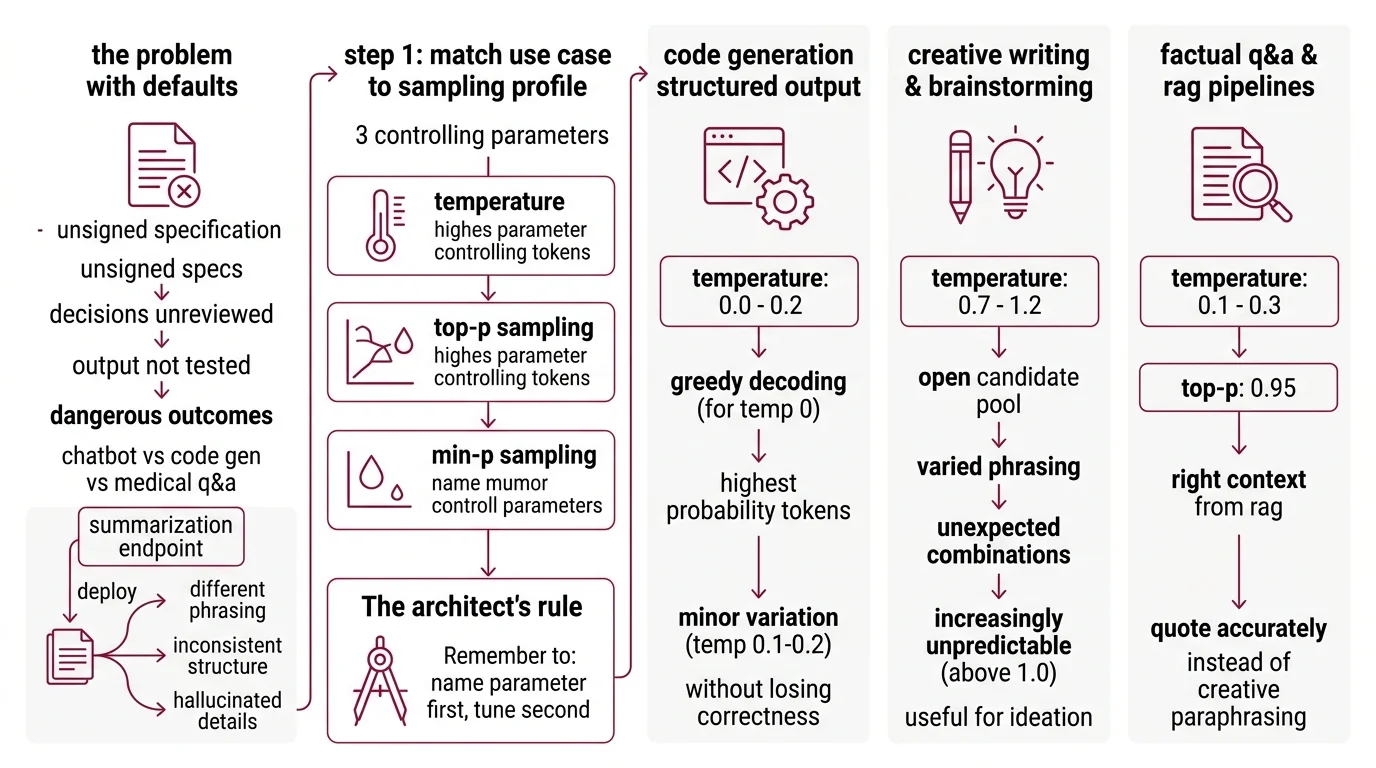
Most APIs ship with temperature 1.0. General-purpose. Reasonable for a chatbot demo. Wrong for a code generator. Dangerous for a medical Q&A system.
Defaults are unsigned specifications. They make decisions about your output that you never reviewed, never tested, never approved.
You build a summarization endpoint. Works fine in staging. Deploys Monday. By Wednesday, users report summaries that rephrase the source material differently every run. Same input, different structure, occasional hallucinated detail. Nothing broke — the temperature was just too high for a task that needed consistency.
Step 1: Match Your Use Case to a Sampling Profile
Three parameters control the token selection: temperature, Top P Sampling, and Min P Sampling. Each shapes the output differently, and the right combination starts with knowing what your task needs.
The Architect’s Rule: If you can’t name which parameter controls the output behavior you need, you’re tuning by trial and error. Name the parameter first. Tune second.
Code generation and structured output
Set temperature to 0.0-0.2. You want the highest-probability token almost every time. Temperature 0 gives you Greedy Decoding — one token, always the same. Bump to 0.1-0.2 if you need minor variation across test cases without losing correctness (Prompt Engineering Guide).
Creative writing and brainstorming
Temperature 0.7-1.2 opens the candidate pool. The model considers less probable tokens, producing varied phrasing and unexpected combinations. Above 1.0, outputs get increasingly unpredictable — useful for ideation, risky for anything that needs to stay on topic.
Factual Q&A and RAG pipelines
This is where developers get burned. RAG retrieval gives you the right context, but if your temperature is too high, the model paraphrases creatively instead of quoting accurately. Set temperature to 0.1-0.3 with top-p at 0.95 as a safety net that trims low-probability noise without collapsing the distribution.
When to reach for min-p
Min-p filtering sets a threshold relative to the most probable token. If the top token has high confidence, the filter is tight. If the model is uncertain, the filter relaxes. This adapts the cutoff to model confidence per position — handling both deterministic and exploratory tokens in a single generation pass. Community consensus puts the practical range at 0.05-0.2, though the original research tested across 1B-123B parameter models without specifying a single recommended value (Nguyen et al., ICLR 2025).
Step 2: Map Parameters to Your Provider’s API
Same parameter name. Different range. Different behavior. Copy settings from one provider to another without checking the docs, and your outputs shift without warning.
OpenAI — Temperature range 0-2, default 1.0. Top-p range 0-1, default 1.0. Critical constraint: alter temperature OR top-p, not both simultaneously (OpenAI Docs). Min-p is not available.
Anthropic — Temperature range 0.0-1.0, default 1.0. Top-p and top-k are optional, advanced use only. Same rule: use temperature OR top-p, not both (Anthropic Docs). Current model family includes Claude Opus 4.6, Sonnet 4.6, and Haiku 4.5.
HuggingFace Transformers — Version 5.3.0 as of March 2026. Min-p support was added in v4.41.0 with a range of 0-1. Typical values run 0.01-0.2.
llama.cpp — Build b8502 (March 2026). Temperature defaults to 0.80, top-p to 0.95, top-k to 40, and min-p to 0.05. This is the most configurable runtime — it exposes the full sampler chain including DRY, XTC, and Mirostat alongside standard parameters (llama.cpp GitHub).
vLLM — Version 0.18.0 (March 2026). Supports min-p as a float in [0, 1] where 0 disables filtering. Note: the V0 engine is deprecated, with code removal planned by end of June 2026. Make sure you’re running the V1 engine.
The Spec Test: If your configuration targets OpenAI’s 0-2 temperature range and you move to Anthropic’s 0-1 range, a temperature of 1.5 doesn’t translate. It clips to 1.0 — and your creative writing output loses variance without warning.
Step 3: Wire the Sampler Chain for Local Deployment
Cloud APIs apply sampling behind a closed door. Local runtimes let you control the full chain — and the order filters run in determines the output.
The default llama.cpp sampler chain processes in this sequence: penalties, DRY, top_n_sigma, top_k, typ_p, top_p, min_p, XTC, then temperature. Temperature comes last. Every filter before it narrows the candidate set. Temperature only scales what remains.
Two configurations worth knowing:
For factual tasks — disable min-p (set to 0), keep top-p at 0.95, temperature at 0.1. The chain trims the long tail through top-p. Temperature handles the rest.
For creative tasks with local models — set min-p to 0.05-0.1, temperature to 0.8-1.0, and let the adaptive threshold do the work. Min-p adjusts its cutoff based on per-token model confidence, which means it handles mixed-confidence sequences better than a fixed top-p alone.
If you’re running Quantization on your model, be aware that quantized weights shift the token distributions. Settings tuned on full-precision weights may behave differently at Q4 or Q5 — always re-validate after changing precision.
Step 4: Prove Your Settings Hold
Configuration without validation is guessing with extra steps.
Consistency check:
- Run the same prompt 10 times with identical settings
- For factual tasks, outputs should be near-identical — if they diverge, temperature is too high
- For creative tasks, outputs should vary in phrasing but stay on topic — if they go off-rails, tighten top-p or min-p
Ground truth check:
- For RAG pipelines, compare generated answers against retrieved context. Every claim should trace to a source passage. If the model adds details not in the context, drop temperature further.
Failure symptoms:
| Symptom | Likely Cause | Fix |
|---|---|---|
| Identical outputs every run | Temperature at 0 or near 0 | Raise to 0.1-0.3 for slight variation |
| Random hallucinations in factual answers | Temperature too high for the task | Drop to 0.0-0.2, add top-p 0.95 |
| Creative output feels flat and repetitive | Temperature too low, top-p too tight | Raise temperature to 0.7+, loosen top-p |
| Quality degrades mid-generation | Sampler chain filtering out good candidates early | Lower min-p to 0.05, check chain order |
Common Pitfalls
| What You Did | Why It Failed | The Fix |
|---|---|---|
| Set temperature AND top-p simultaneously on OpenAI | API docs say alter one, not both — combined changes produce unpredictable shifts | Pick one control per request |
| Copied llama.cpp settings to OpenAI | Temperature 0.8 on a 0-2 scale behaves differently than 0.8 on a 0-1 scale | Check each provider’s range before porting |
| Used min-p at 0.3 for code generation | Too aggressive — filters out valid tokens when model confidence is moderate | Lower to 0.05-0.1, validate correctness |
| Never tested under Continuous Batching load | Batch scheduling can interact with sampling on local runtimes under concurrent requests | Test output consistency at production throughput |
Pro Tip
Treat your sampling parameters like a deployment configuration, not a tuning dial. Version them. Pin them per use case. Review them when you change models. Parameter drift is a silent regression. The same temperature value produces different behavior on different architectures because the underlying token distributions shift with every model update.
Frequently Asked Questions
Q: What are the best temperature and sampling settings for code generation vs creative writing vs factual Q&A? A: Code generation: temperature 0.0-0.2 with greedy decoding for determinism. Creative writing: 0.7-1.2 for lexical variety. Factual Q&A: 0.0-0.3 with top-p 0.95. The variable most teams miss is testing with actual production prompts — benchmarks use clean inputs, your pipeline probably doesn’t.
Q: How to use temperature and top-p for RAG pipelines and grounded question answering? A: Temperature 0.1-0.3 with top-p 0.95. Keep temperature low so the model sticks to retrieved context instead of paraphrasing creatively. If you’re still seeing hallucinations at low temperature, the problem is usually retrieval quality, not sampling — check your chunks before tuning further.
Q: How to configure sampling parameters in OpenAI, Anthropic, and HuggingFace Transformers APIs in 2026? A: OpenAI accepts temperature 0-2 and top-p 0-1 but warns against setting both. Anthropic caps temperature at 0-1 with optional top-p and top-k. HuggingFace Transformers v5.3.0 exposes min-p alongside standard parameters. Pin your API client version — parameter defaults can shift between releases.
Q: How to set up min-p sampling in llama.cpp and vLLM for local LLM deployment? A: In llama.cpp (b8502), min-p defaults to 0.05 and sits late in the sampler chain — after top-p, before temperature. In vLLM v0.18.0, min-p is a float in [0, 1] where 0 disables it. Start at 0.05, increase to 0.1-0.2 for creative tasks, and re-validate after quantizing.
Your Spec Artifact
By the end of this guide, you should have:
- A use-case-to-parameter mapping (code, creative, factual, RAG — each with specific temperature, top-p, and min-p ranges)
- A provider-specific configuration sheet (parameter ranges, constraints, and defaults per API)
- A validation checklist (consistency checks, ground truth comparison, failure symptom table)
Your Implementation Prompt
Paste this into Claude Code, Cursor, or your AI coding tool when setting up sampling configuration for a new LLM integration. Fill in the bracketed placeholders with your project specifics.
You are configuring sampling parameters for an LLM-powered [use case: code generation / creative writing / factual QA / RAG pipeline].

STEP 1 — SAMPLING PROFILE:
- Task type: [code / creative / factual / RAG]
- Required output consistency: [deterministic / moderate variation / high variation]
- Temperature range: [0.0-0.2 for code, 0.7-1.2 for creative, 0.1-0.3 for factual/RAG]
- Top-p: [0.95 for factual/RAG, 1.0 for creative, disabled for code]
- Min-p: [0.05-0.1 if local runtime supports it, otherwise skip]

STEP 2 — PROVIDER MAPPING:
- Target API or runtime: [OpenAI / Anthropic / HuggingFace / llama.cpp / vLLM]
- Temperature range for this provider: [0-2 for OpenAI, 0-1 for Anthropic, check docs for others]
- Provider constraint: [e.g., "do not set both temperature and top-p on OpenAI"]
- Min-p available: [yes/no — only llama.cpp, vLLM, HuggingFace]

STEP 3 — CONFIGURATION:
- For cloud API: set temperature=[value], top_p=[value]
- For local runtime: configure chain — top_k=[value], top_p=[value], min_p=[value], temperature=[value]
- If quantized model at [precision]: re-validate output after applying settings

STEP 4 — VALIDATION:
- Run [10] identical prompts, compare outputs
- For factual tasks: verify against [ground truth source or retrieved context]
- Flag if: factual outputs diverge, creative outputs go off-topic, quality degrades mid-generation
Ship It
You now have a framework for matching sampling parameters to tasks, mapping them across providers, and validating they hold. Next time your model drifts, check the sampling configuration before you rewrite the prompt.
AI-assisted content, human-reviewed. Images AI-generated. Editorial Standards · Our Editors