Which Agent Framework Fits? Matching State, Control, and Scale
TL;DR
- Pick the framework after you decompose the agent system, not before. Orchestration, memory, tools, and state are four separate concerns.
- AutoGen is in maintenance mode. New projects go to Microsoft Agent Framework, AG2, or one of the GA-stable alternatives.
- Frameworks save prototype time. They cost production debuggability. Specify the trade-off on purpose.
You picked LangGraph on a Tuesday. By Friday the team was rewriting the orchestration layer because nobody specified how state was supposed to survive a worker restart. The framework didn’t fail. The spec did. This is how teams burn six weeks before they realize the choice between LangGraph, CrewAI, AutoGen, and LlamaIndex Workflows is downstream of a decomposition they never wrote down.
Before You Start
You’ll need:
- An AI coding tool — Cursor, Claude Code, or Codex
- Working understanding of Agent Frameworks Comparison as a category
- A clear picture of what your agents need to do — domain, inputs, outputs, autonomy bounds
- Familiarity with Multi Agent Systems concepts (roles, hand-offs, coordination)
This guide teaches you: How to decompose an agent system into four layers, then match each layer to the framework that handles it best — instead of picking a framework first and bending your problem to fit.
The Framework You Picked First Is Probably Wrong
Here is the failure mode I see every week. A team reads one good blog post about LangGraph. Or watches a CrewAI demo. They install the SDK. They wire two agents together in an afternoon. The demo works.
Then they hit production. State doesn’t persist across nodes the way they assumed. Memory leaks between agent turns. Tool calls fail silently because nobody specified retry semantics. A junior dev tries to add a third agent and the graph topology breaks.
The framework didn’t pick the wrong defaults. The team picked the framework before specifying what the system needed to do. Different problem.
Step 1: Decompose Your Agent System into Four Layers
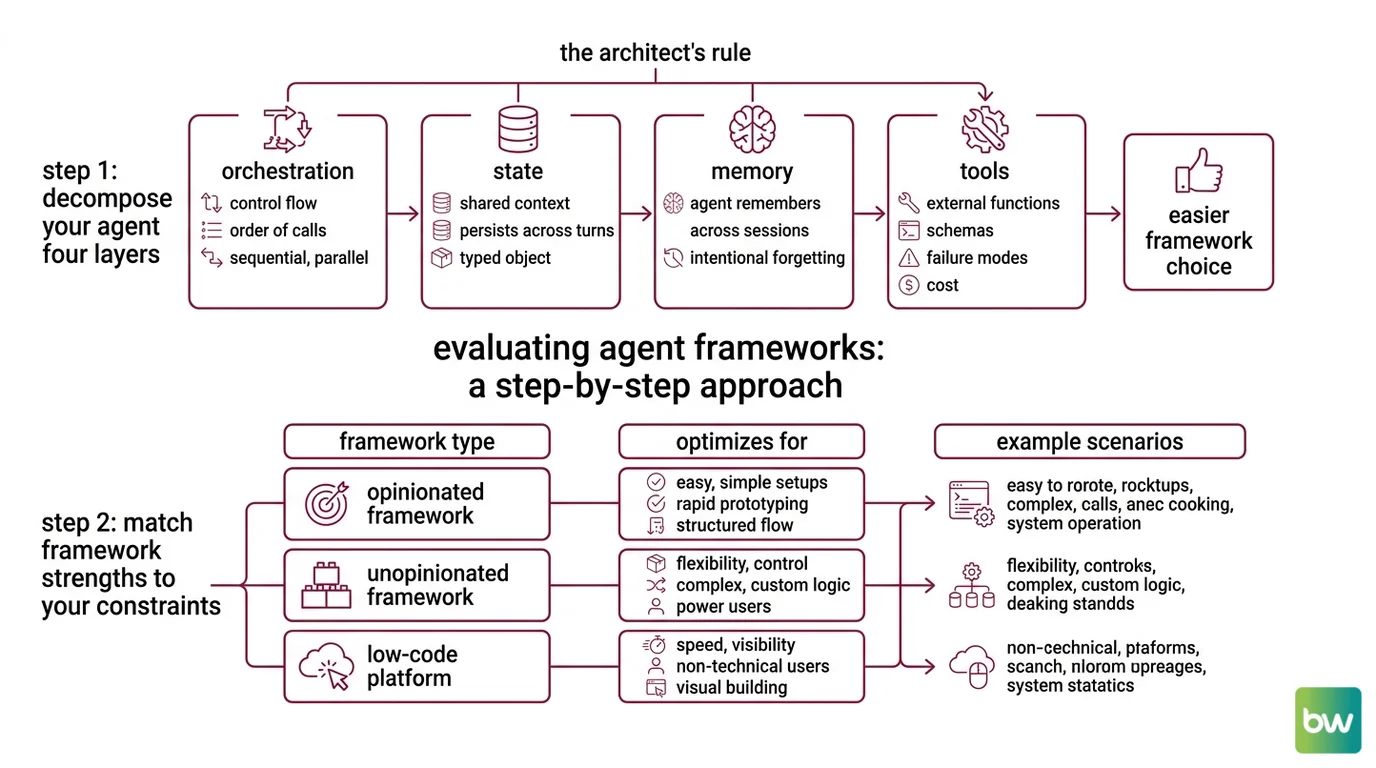
Every production agent system has four concerns. Mix them and you cannot reason about failures. Separate them and the framework choice gets easy.
Your system has these parts:
- Orchestration — who calls whom, in what order, with what control flow (sequential, parallel, conditional, looping). This is where graph-based frameworks earn their keep.
- State — the shared and per-agent context that persists across turns, calls, and restarts. State is not memory. State is the typed object that survives a worker crash.
- Memory — what the agent remembers across sessions and what it forgets on purpose. See Agent Memory Systems for the patterns.
- Tools — the external functions the agent can call, their schemas, their failure modes, and their cost.
The Architect’s Rule: If you cannot draw your agent system as four boxes with labeled arrows between them, the framework will not save you. It will just give your confusion a fancier name.
A LangGraph node with shared state, calling a tool that fails halfway through, with no retry policy specified — that is four bugs in one line, not one. Decompose first.
Step 2: Match Framework Strengths to Your Constraints
This is the step everyone skips. Each framework optimizes for a different layer. Pick by matching, not by hype.
Framework fit by primary strength:
- LangGraph — explicit graph control flow, typed state, durable execution. Best when orchestration is the hard part and you need to debug the topology. The MIT-licensed library is free; LangGraph Platform Developer plan is free for self-hosted with up to 100,000 nodes executed per month, per the LangChain Pricing page. Plus and Enterprise tiers move to hosted or hybrid deployments.
- CrewAI — role-based agents (
role,goal,backstory) plus a Flows API for production orchestration. The framework is built from scratch in Python and is independent of LangChain, per the CrewAI’s GitHub repository. Best when the natural unit of work is “this agent has this job” and you want fast prototyping. - AutoGen — in maintenance mode. No new features. The Microsoft AutoGen GitHub directs new users to Microsoft Agent Framework instead. AG2, the community fork, is on path to v1.0 if you specifically need the original AutoGen 0.2 conversation patterns.
- Microsoft Agent Framework 1.0 — released April 3, 2026 for .NET and Python, per Microsoft DevBlogs. Merges AutoGen and Semantic Kernel into one production line. Session-based state, type safety, middleware, telemetry, graph-based workflows. Best when you live in the Microsoft stack.
- LlamaIndex Workflows 1.0 — async-first event primitives, pause/resume statefully, FastAPI integration, per the LlamaIndex Blog. Best when retrieval is the center of gravity and the workflow wraps document agents. Fully open source.
- Google ADK 1.0 — GA at Google Cloud Next 2026 across Python, Go, Java, and TypeScript, per the Google Developers Blog. Best when your stack is Google Cloud or you need a polyglot agent runtime.
Decision constraints to specify before you choose:
- Production timeline — prototype in two weeks, or ship to enterprise customers
- Team language — Python only, .NET shop, polyglot
- Orchestration complexity — linear pipeline, branching, dynamic graph
- State requirements — in-memory, durable across restarts, multi-tenant
- Compliance posture — self-hosted only, hybrid OK, fully managed acceptable
The Spec Test: If you cannot answer all five constraints in writing, you are not ready to pick a framework. You are ready to write a specification.
Step 3: Sequence the Build (State First, Tools Last)
Order matters. Build in the wrong sequence and you will rewrite the foundation after every layer change.
Build order:
- State schema first — define the typed state object that flows through your graph or crew. Every other layer reads from or writes to this. No shortcuts. This is the contract.
- Orchestration second — wire the nodes, edges, and control flow. Use a single agent before you use multiple. Get the happy path through the graph before you add branching.
- Memory third — add persistence and recall once the orchestration is stable. Memory bugs in an unstable graph are unfindable.
- Tools last — connect external APIs, file systems, retrievers. Tools are the most likely source of latency and failures. Add them when the surrounding system is stable enough to absorb their noise.
For each layer, your context must specify:
- What it receives (typed inputs from the prior layer)
- What it returns (typed outputs to the next layer)
- What it must NOT do (boundary violations — e.g., orchestration layer must not write to memory directly)
- How to handle failure (retry, fallback, escalate, fail loud)
This is the layer where Agent Planning And Reasoning actually shows up — the planner sits inside orchestration, but its tool budget is specified at the tool layer. Two layers, one feature, separate constraints.
Step 4: Validate Multi-Agent Behavior Before Production
Multi-agent systems fail in ways single-agent systems do not. Two agents can deadlock. Three agents can loop. Hand-offs can lose state. Validation is not “it ran once.”
Validation checklist:
- State integrity — state object survives node failure mid-graph. Failure looks like: graph restart loses partial work, tool call results vanish.
- Hand-off correctness — agent B receives exactly what agent A specified. Failure looks like: agent B asks for context agent A already provided.
- Termination guarantee — every loop has a bounded exit condition. Failure looks like: agent burns budget on the same sub-task forever.
- Tool failure recovery — every tool call has a defined failure path. Failure looks like: agent escalates to user when retry was specified.
- Cost ceiling — per-run budget enforced before the run, not measured after. Failure looks like: dev environment bill ten times the prototype budget.
Security & compatibility notes:
- AutoGen (microsoft/autogen): In maintenance mode — no new features. New projects go to Microsoft Agent Framework. If you must keep AutoGen patterns, use the AG2 community fork.
- AutoGen v0.2 → v0.4 migration: Breaking API changes (
AssistantAgent→ChatAgent,FunctionTool→@ai_function, event-driven → graph Workflow APIs). Pin a version before upgrading.- Semantic Kernel: v1.x receives bug fixes and security patches only; new capabilities ship in Microsoft Agent Framework. Do not start new projects on Semantic Kernel as the forward-looking choice.
Common Pitfalls
| What You Did | Why AI Failed | The Fix |
|---|---|---|
| Picked the framework before decomposing | The framework’s defaults override your unstated requirements | Write the four-layer decomposition first, choose second |
| Treated state and memory as the same thing | State got cleared on session boundary, agent lost mid-task work | Specify state as typed contract, memory as session-scoped store |
| Adopted AutoGen for a new 2026 project | Maintenance mode means no new features and no security backports | Choose Microsoft Agent Framework, AG2 fork, or LangGraph |
| Skipped retry policy on tool calls | Agent escalated transient API failures to the user | Specify retry-and-fallback per tool in the context spec |
Pro Tip
Frameworks do not abstract complexity away. They relocate it. LangGraph moves complexity from “you write the loop” to “you write the graph.” CrewAI moves it from “you orchestrate” to “you specify roles.” Pick the relocation that matches where your team is strongest at debugging — because that is where you will spend most of your engineering hours.
Frequently Asked Questions
Q: How to build a multi-agent system step by step with LangGraph in 2026?
A: Define a typed state schema, build a single-node graph that runs end to end, then add nodes and edges incrementally. Use the version="v3" content-block streaming protocol for new code — the older dict-shaped event API still works but newer LangGraph 1.1.0 features assume v3. Add durable execution before you add a second worker.
Q: When should you use CrewAI vs. AutoGen vs. LangGraph for production agents?
A: Use LangGraph when orchestration topology is the hard part. Use CrewAI Flows when role-based decomposition fits naturally and you want fast iteration. Skip AutoGen for new builds — it is in maintenance mode. The forgotten constraint: tooling and observability maturity, not just runtime features. Pick the one your team can debug at 2 AM.
Q: How to use Semantic Kernel or Google ADK for enterprise agent applications?
A: Default to Microsoft Agent Framework over Semantic Kernel — Semantic Kernel v1.x is in feature freeze. For Google ADK, pin a release because the cadence is roughly bi-weekly and unpinned dependencies will break the build. Validate compliance posture before either: hosted vs. self-hosted vs. hybrid changes the spec.
Your Spec Artifact
By the end of this guide, you should have:
- A four-layer decomposition map of your agent system (orchestration, state, memory, tools)
- A constraint list answering the five Spec Test questions (timeline, language, complexity, state, compliance)
- A validation checklist with named failure symptoms for state, hand-offs, termination, tool recovery, and cost ceiling
Your Implementation Prompt
Copy this into Claude Code, Cursor, or Codex once you have filled the bracketed values from your decomposition. The prompt encodes the four-layer split and the build order — it does not pick the framework for you. Run it after Step 2, not before.
You are helping me build an agent system. Generate a starter implementation that respects this specification.

LAYER 1 — ORCHESTRATION
- Pattern: [sequential | branching | dynamic graph | role-based crew]
- Framework: [LangGraph 1.1.0 | CrewAI 1.14.4 | LlamaIndex Workflows 1.0 | Microsoft Agent Framework 1.0 | Google ADK 1.0]
- Number of agents: [n]
- Hand-off rules: [describe who calls whom and on what condition]

LAYER 2 — STATE
- State schema (typed): [paste TypedDict or Pydantic model]
- Persistence requirement: [in-memory | durable across restart | multi-tenant]
- Mutation rules: [which layer is allowed to write which field]

LAYER 3 — MEMORY
- Session scope: [per-run | per-user | global]
- Storage backend: [in-process | Redis | vector store | none]
- Forget rules: [TTL, eviction policy, what must never persist]

LAYER 4 — TOOLS
- Tool list: [name, input schema, output schema for each]
- Retry policy per tool: [attempts, backoff, fallback]
- Cost ceiling per run: [token budget, dollar cap, time cap]

CONSTRAINTS
- Language: [Python | .NET | TypeScript | Go]
- Compliance posture: [self-hosted only | hybrid OK | hosted OK]
- Production timeline: [prototype | staging | production]

GENERATE
1. The state schema as a typed object.
2. A single-node orchestration graph that runs end to end with placeholder logic.
3. Validation tests for: state integrity on restart, hand-off correctness, termination guarantee, tool failure recovery, cost ceiling enforcement.

Do NOT add tools, memory, or extra agents until the single-node version passes the validation tests.
Ship It
You now decompose before you choose. Four layers, in order: orchestration, state, memory, tools. The framework comes after the decomposition, not before. Once you see the system this way, the choice between LangGraph, CrewAI, LlamaIndex Workflows, Microsoft Agent Framework, and Google ADK is a matching problem — not a marketing problem.
AI-assisted content, human-reviewed. Images AI-generated. Editorial Standards · Our Editors