Multi-Turn Conversation Systems: Sliding Windows, Compression, and State Management in 2026

TL;DR
- A multi-turn conversation has three distinct memory layers — recent context, session state, and long-term persistence. Specify each separately or the AI will guess wrong.
- Sliding windows are not a memory strategy. They are a context management tactic. You need a compression spec before you need a window size.
- LangGraph’s
trim_messagesand Mem0 solve different problems. Deploy them in sequence — state schema first, window second, persistence last.
Here’s the pattern I keep seeing. Developer builds a chatbot. Adds LangGraph. Configures a memory module. Ships it. By turn 12, the model forgets the user’s subscription tier. By turn 25, it fabricates a product feature. By turn 40, the whole session crashes with a token overflow. They blame the framework. The framework is fine. The Multi-Turn Prompt Design was never specified.
The problem is not which memory tool you chose. The problem is that you chose a tool before you had a memory architecture. Those are two different decisions, and the second one comes first.
Before You Start
You’ll need:
- An AI coding tool (Claude Code, Cursor, or Codex)
- Familiarity with Prompt Engineering basics and Context Engineering concepts
- A target model with a known context limit (GPT-4o at 128K, Claude Sonnet 4.6 at 200K)
- LangGraph or an equivalent framework for conversation state
This guide teaches you: How to decompose a multi-turn conversation into three distinct memory layers, then specify the contracts that determine what gets kept, compressed, or persisted across sessions.
The Session That Gaslights Its Own Users
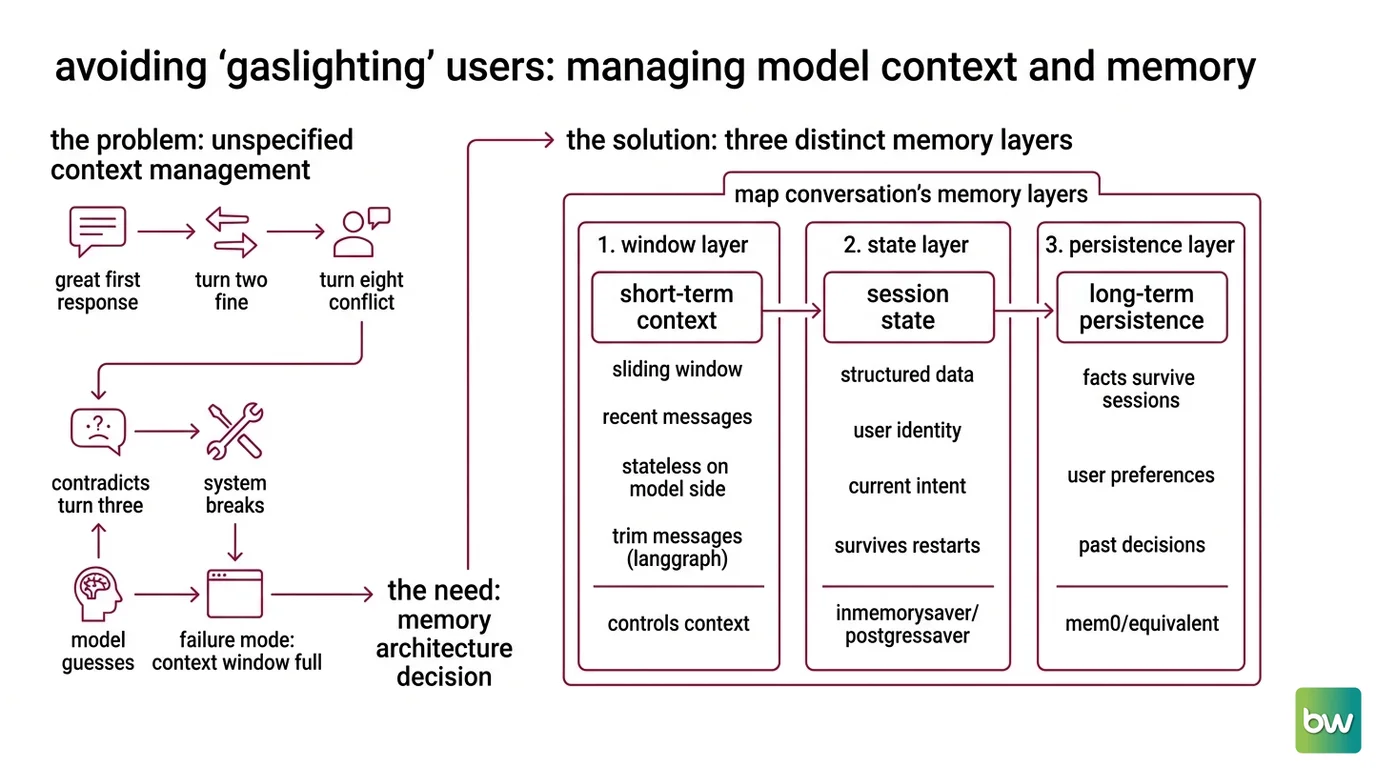
You give the user a great first response. Turn two is fine. Turn eight, the model gives advice that contradicts what it said at turn three — and neither party realizes it until something breaks downstream.
The failure mode has a name: unspecified Context Window management. You picked a window size without deciding what to do when the window fills. The model compensates by guessing. Confident, fast, wrong.
Production systems need a memory architecture decision before they need a memory library. And every memory architecture has exactly three layers. Most teams try to handle all three with one thing — and that’s where the trouble starts.
Step 1: Map Your Conversation’s Memory Layers
Every multi-turn system has three memory layers. Name them before you build anything.
The three layers:
- Short-term context — the sliding window of recent messages sent to the model on each turn. Stateless on the model side. Your responsibility to manage.
- Session state — structured data about the current conversation: user identity, current intent, entities mentioned, progress through a workflow. Lives in your state store, not in the message history.
- Long-term persistence — facts that survive session end: user preferences, past decisions, prior context. This is where Mem0 fits — not in the short-term window.
Your System Prompts cover the rules. Your memory layers cover the state. They are separate concerns and should be built separately.
Your system has these parts:
- Window layer — recent messages, managed by
trim_messagesin LangGraph or equivalent. Controls what the model sees per turn. - State layer — structured JSON checkpoint via
InMemorySaver(dev) orPostgresSaver(prod) from LangGraph checkpointing (LangChain Docs). Survives restarts. The single source of truth for session data. - Persistence layer — long-term memory via Mem0 or equivalent. Cross-session facts, queried at session start and injected into the opening prompt.
The Architect’s Rule: If your model gives different answers to the same question at turn 5 versus turn 25, the failure is in the window layer. If it treats a returning user as a stranger, the failure is in the persistence layer. Map where the failure lives before you write any code.
Step 2: Lock Down the State Contract
Three layers. Three different specs. Here is what each one needs before you touch a framework.
Window layer:
- Target model and verified context window size
- Number of messages to retain per turn
- Compression trigger — when to summarize versus truncate
- Definition of “must-keep” messages (system prompt, initial user statement, last assistant response)
State layer:
- Required state schema fields: at minimum,
user_id,session_id, current intent, and step counter - Persistence mode:
InMemorySaverfor local development,PostgresSaverfor production (LangChain Docs) - Conflict resolution when session state contradicts long-term memory
Persistence layer:
- Which facts qualify to cross session boundaries (preferences, prior decisions, user tier)
- Retrieval trigger: always-on at session start, on-demand per turn, or explicit flush
- Mem0 deployment mode: managed cloud or self-hosted server with per-user API keys (Mem0 Docs)
Context checklist:
- Target model and verified context window size
- Window size in messages and estimated token budget per turn
- Compression trigger: token count threshold, turn count, or explicit flush event
- Required state schema fields — defined before the first checkpoint write
- Persistence facts list — which categories of information survive session end
- Instruction Following boundaries: what the model must NOT infer from conversation history
The Spec Test: If you haven’t specified your compression trigger, the AI defaults to truncating the oldest messages — which often means losing the user’s initial problem statement. That is not a trade-off. That is a bug. Name the trigger before you configure the window size.
Step 3: Sequence the Memory Stack
Build order matters because each layer depends on the one below it. Build out of order and you will debug the wrong thing for longer than you want to admit.
Build order:
- State schema first — every layer reads from it. Define the checkpoint fields before anything else. No state schema means the sliding window has nothing to anchor to.
- Window management second — it shapes what the model sees per turn. Use LangGraph’s
trim_messagesfor non-destructive trimming (applies before the LLM call, does not modify the checkpoint). UseRemoveMessageonly when you need permanent removal from the checkpoint (LangChain Docs). - Compression layer third — fires when the window fills. Specify the summarization strategy before you implement it. Note the trade-off: summarization achieves far lower exact-match recall than verbatim retrieval — one 2026 study measured 19% exact match for summaries versus 93% for verbatim recall (arXiv C-DIC paper). Decide which facts warrant verbatim preservation before you compress anything.
- Persistence layer last — wraps everything else. Role Prompting patterns for memory retrieval inject retrieved facts into the session prompt at startup: “Given prior user context: [retrieved facts], continue the following conversation.” Mem0 supports 21 framework integrations including LangChain, CrewAI, and Vercel AI SDK (Mem0 Docs), so this layer slots into most stacks.
The Meta Prompting technique — a structured retrieval prompt that queries Mem0 before each session — is the cleanest pattern for injecting long-term memory without polluting the message history.
For each layer, your spec must define:
- What it receives (inputs from the layer below)
- What it returns (outputs to the layer above)
- What it must NOT do (out-of-scope responsibilities)
- How to handle failure (missing checkpoint, failed retrieval, timeout)
Security & compatibility notes:
- OpenAI Assistants API (BREAKING): Shuts down August 26, 2026. If your multi-turn system uses Assistants API Threads, migrate now to the Responses API — the Conversations API replaces Threads. Full migration path: OpenAI migration guide.
- LangChain ConversationChain (WARNING): Deprecated since v0.2.7, scheduled for removal in LangChain 2.0. Replace
ConversationBufferWindowMemorywithRunnableWithMessageHistoryor LangGraph checkpointing (LangChain deprecations page).- Mem0 Node SDK (WARNING — CVE-2026-12143): Addressed in v3.0.10 (Mem0’s GitHub repository). Monitor the repository for the corresponding Python SDK patch. Pin your protobuf dependency versions accordingly.
Step 4: Validate Continuity Under Pressure
Don’t test the system at turn 3. Test it under the conditions that cause real failures — after a compression event, after a restart, at exactly the window boundary.
Validation checklist:
- Identity continuity — At turn 20, does the model still know the user’s name, tier, and stated goal? Failure looks like: correct-sounding but depersonalized responses.
- Compression integrity — After a summarization event, does the model give consistent answers to questions that were addressed before compression? Failure looks like: contradicted facts or mysteriously missing context.
- Session recovery — Kill the process, restart it, reconnect the user. Does the model correctly retrieve and inject long-term memory from Mem0? Failure looks like: treating a returning user as new.
- Window boundary behavior — Fill the window to exactly one message before the compression trigger, then add one more. Does compression fire correctly, or does the system truncate silently? Failure looks like: the oldest message disappears with no trace in the state log.
- Prompt Leakage check — Inspect compression summaries. Do they expose system prompt instructions or other users’ data? Failure looks like: summary text containing literal fragments from your system layer.
Common Pitfalls
| What You Did | Why AI Failed | The Fix |
|---|---|---|
| Mixed system rules and message history | Compression summarized away the AI’s operating instructions | Keep system prompt separate from the message array — never compress it |
| Set window size without a compression trigger | Window filled; model silently dropped oldest messages, including the user’s original problem | Specify the compression trigger before configuring the window size |
| Built persistence layer first | Long-term memory with no session state schema to anchor it to | Follow the build order: state schema → window → compression → persistence |
| Trusted summaries for exact-fact retrieval | Compression achieves a fraction of verbatim retrieval accuracy | Reserve verbatim storage for facts that must be reproducible; compress everything else |
Used InMemorySaver in production | State dropped on every process restart | Switch to PostgresSaver in production — InMemorySaver is development-only (LangChain Docs) |
Pro Tip
Every multi-turn system eventually faces the same question: what does this conversation need to remember, and what can it afford to forget? That answer is your memory policy — and it should be written before any code exists.
A written memory policy survives framework migrations, model upgrades, and team changes. A hardcoded window size does not. Treat your memory policy the same way you treat a database schema: it is a contract, not a configuration value. When Mem0 releases a major update or LangGraph changes its checkpoint interface, the policy stays stable. The implementation adapts around it.
Frequently Asked Questions
Q: How to implement sliding window context management for multi-turn LLM conversations?
A: Use LangGraph’s trim_messages for non-destructive trimming — it does not touch the checkpoint — and RemoveMessage only for permanent removal. Key detail: trim_messages counts system messages toward the token budget. Subtract your system prompt’s token count from the target window size before setting the threshold (LangChain Docs).
Q: How to use Mem0 for persistent multi-turn conversation memory in 2026?
A: Initialize with user_id scoping and query at session start. The free tier covers 10,000 add requests and 1,000 retrievals monthly (Mem0’s pricing page); the Starter plan begins at $19/month. Self-hosted deployment is available if your organization requires data isolation (Mem0 Docs).
Q: How to design multi-turn prompts for long-running AI agent tasks? A: Keep operational instructions immutable in the system prompt — never compress or include them in the window budget. Version your state schema so agents resume correctly after interruption. The most common gap: no resumption protocol defining what the agent verifies on restart before continuing.
Your Spec Artifact
By the end of this guide, you should have:
- A three-layer memory map: window spec (size, trigger, and “must-keep” rules), state schema (required fields per checkpoint), and persistence spec (which facts cross session boundaries)
- A compression decision record: which facts require verbatim storage versus summarization, with the accuracy trade-off documented
- A validation checklist: identity continuity at turn 20, compression integrity after a flush, session recovery after restart, window boundary behavior, and prompt leakage inspection
Your Implementation Prompt
Use this prompt with Claude Code, Cursor, or Codex at the start of a multi-turn conversation system build. Fill each bracketed placeholder with the values you specified in Steps 1–4.
Build a multi-turn conversation system for [describe your use case in one sentence].

MEMORY ARCHITECTURE — three layers, built in this order:

1. STATE SCHEMA (build first):
   Checkpoint fields required every turn: user_id, session_id, current_intent, step_counter, [add your domain-specific fields].
   Persistence mode: InMemorySaver for local dev / PostgresSaver for production.

2. WINDOW MANAGEMENT (build second):
   Target model: [model name]. Verified context window: [token count].
   Window size: retain the last [N] messages. Token budget per turn: [X tokens].
   Compression trigger: fire when message history exceeds [threshold].
   Must-keep messages: system prompt (never compress), initial user statement, last assistant response.
   Summarization strategy: [what to extract — entities, user intent, unresolved items, decisions made].
   Verbatim preservation: [list fact categories that must survive compression exactly].

3. PERSISTENCE LAYER (build last):
   Mem0 user_id scoping. Query at: session start only.
   Facts that qualify for long-term storage: [list 3-5 categories].
   Injection pattern: prepend to session prompt as structured context block.
   On retrieval failure: [proceed without / surface error to user / retry with backoff].

CONSTRAINTS:
   The system prompt is immutable — never compress, never include in window token budget.
   The model must NOT infer: [list what it must not guess from conversation history].
   On Mem0 timeout: [specify fallback behavior].

VALIDATION SEQUENCE (run after implementation):
   1. Identity continuity: verify model knows user's [key facts] at turn 20.
   2. Compression integrity: check consistency before and after a compression event.
   3. Session recovery: restart process, verify Mem0 retrieval and injection.
   4. Window boundary: trigger compression at exactly [threshold], confirm no silent truncation.
   5. Prompt leakage: inspect summaries for system prompt fragments or cross-user data.
Ship It
You now have a framework that applies to every multi-turn conversation problem you will encounter. Not “add a memory library” — “specify each memory layer, in sequence, with a failure mode and a validation criterion for each one.” That distinction is the difference between a chatbot that works at turn 3 and an agent that holds up at turn 300.
Deploy safe, Max.
AI-assisted content, human-reviewed. Images AI-generated. Editorial Standards · Our Editors