How to Build Multi-Provider LLM Failover with LiteLLM, Portkey, and Tenacity in 2026

TL;DR
- Decompose LLM failover into three tiers — same-provider retry, cross-provider failover, graceful degradation — each owned by a different tool with a different trigger condition
- Classify error codes before writing any config: 429 rate limits go to Tenacity backoff, 503s escalate to LiteLLM cooldown and routing, 401s mean stop and alert immediately
- LiteLLM router handles cross-provider failover via four distinct fallback types that must be configured separately; Portkey can complement or replace it with routing changes that don’t require code deploys
Your inference layer worked fine all week. Then the primary provider had a regional issue, and four minutes later your monitors were full of 503 errors. Your engineer found the retry logic — one function, one provider, no Fallback Strategy configured. The spec for which errors go where and which tool owns which tier was never written. It was obvious. Until it wasn’t.
Before You Start
You’ll need:
- An AI coding tool: Claude Code, Cursor, or Codex
- Familiarity with LLM Gateway architecture, Circuit Breaker patterns, and the goals of LLM Fallback And Retry Patterns — specifically the difference between retrying a failed call and routing to a different provider
- A clear answer to: which providers you’re routing between, what latency SLA you’re protecting, and what “degraded but functional” looks like for your specific use case
This guide teaches you: how to decompose multi-provider LLM failover into three distinct failure tiers so your AI coding tool can configure each one correctly — without guessing what to do when a 503 arrives.
The Incident Nobody Writes Down
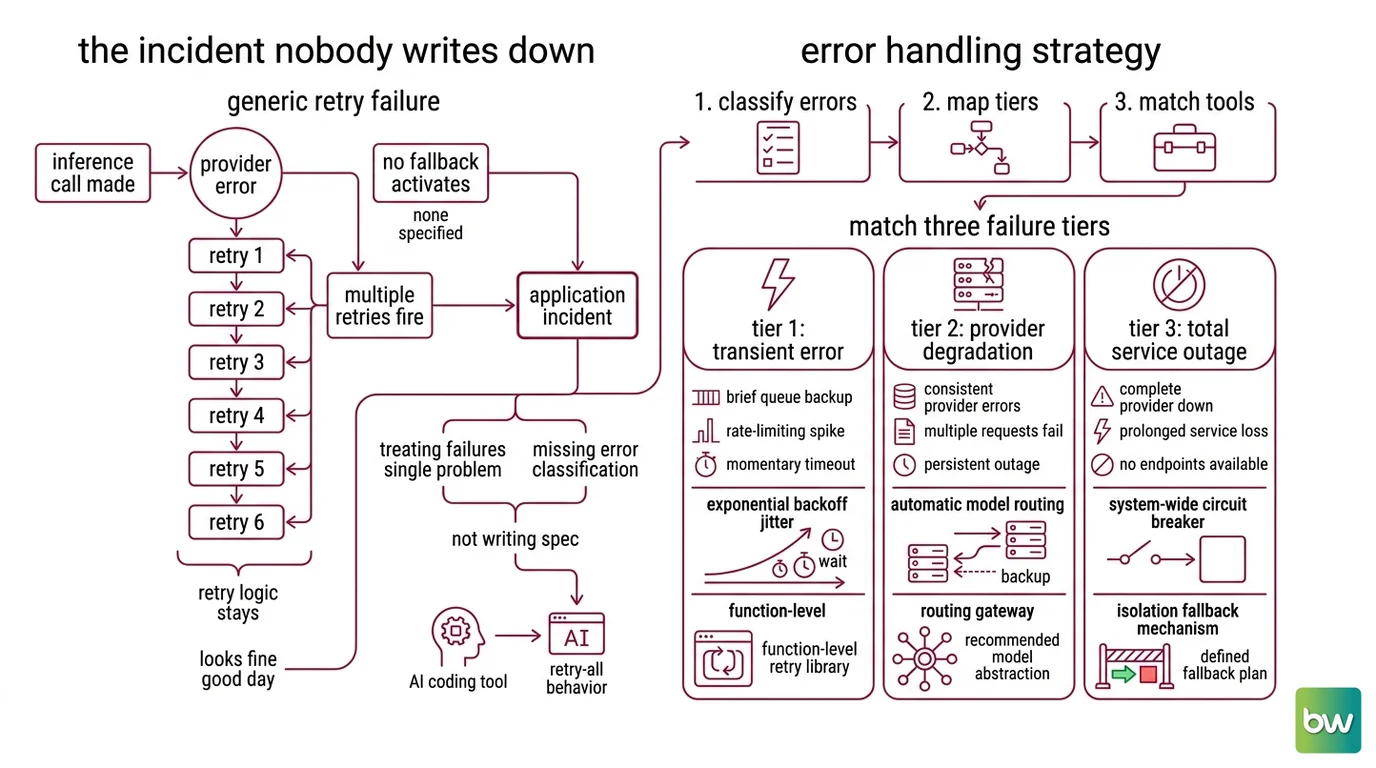
Here’s what happens without a spec. Someone adds a retry function to the inference call. The function doesn’t check the error type — it just retries. So when the provider returns 503 — not a transient hiccup but a sustained outage — the retry fires. Six times. Against the same dead endpoint. No fallback activates, because none was specified.
The outage ends. The retry logic stays in the codebase. Nobody removes it because it looks fine on a good day.
Two patterns cause this. First: treating all LLM failures as a single retry problem when they’re actually three different problems requiring three different tools. Second: not writing the error classification before touching any configuration. The AI coding tool gave you retry-all behavior because that’s what “handle failures” implies without an explicit spec. The missing classification is what turned a provider hiccup into a longer incident.
Step 1: Map the Three Failure Tiers
Your LLM inference path has three distinct failure modes. Each requires different behavior and a different tool.
Tier 1 is a transient error. The provider is up, but this specific request failed — a Rate Limiting spike, a brief queue backup, a momentary timeout. The right response is Exponential Backoff with jitter: retry the same provider, wait longer each round, and spread retries out so you’re not hammering the endpoint in sync with every other client that hit the same spike. Tenacity owns this tier, operating at the individual call level.
Tier 2 is provider degradation. The provider is returning consistent errors — past what a few retries can fix. The right response is Model Routing: automatically route to a backup provider without your application code detecting the failure and deciding what to do. LiteLLM router and LLM Gateway tools like Portkey own this tier. The calling code shouldn’t change; the routing layer absorbs the failure.
Tier 3 is multi-provider failure. Everything is either down or too slow to wait for. The right response is Graceful Degradation: a cached response, a simplified local model, or a clear user-facing message. Your application code owns Tier 3 — no routing library can define what “degraded but functional” means for your product.
Your system has these tiers:
- Tier 1: Same-provider transient retry — owned by Tenacity, fires at the call level
- Tier 2: Cross-provider failover — owned by LiteLLM router or Portkey, fires at the routing layer
- Tier 3: Graceful degradation — owned by application logic, fires when the routing layer is exhausted
The Architect’s Rule: If you can’t name which tool owns each failure tier before writing any config, the spec isn’t done.
Step 2: Write the Error Classification Contract
Most failover implementations fail here. Someone writes retry logic, maps 429, 500, 503, and 408 to the same behavior — retry — and ships it. That’s wrong. When an outage hits, the retry loop hammers a dead endpoint and makes debugging harder because the behavior looks intentional.
Classify errors before writing any config:
- 429 rate limit → Tier 1. Retry the same provider with exponential backoff. Do not route to a fallback yet.
- 500 / 503 internal or unavailable → Increment the LiteLLM
allowed_failscounter. After the threshold, trigger cooldown and route to fallback. - 401 unauthorized → Never retry. Alert immediately. This is a configuration problem; retries hide it.
- 404 not found → Never retry. Check your model name or endpoint.
- Context window exceeded → Skip Tier 1 and 2 entirely. Route directly to
context_window_fallbacks— a model with a larger context limit, not a retry of the same model.
LiteLLM’s defaults: allowed_fails is 3 failures per minute before cooldown triggers; cooldown_time is 5 seconds per provider (LiteLLM Docs). Cooldown fires on 429 rate limits, failure rates above 50% in the current minute, or non-retryable codes including 401 and 408.
This contract is what your AI coding tool needs before generating any configuration. Without it, an open specification produces arbitrary behavior — “add LiteLLM fallback” without a contract is exactly that.
The Spec Test: If your error contract doesn’t distinguish 429 from 503, your AI coding tool will generate retry-all logic. That’s how you end up hammering a provider that’s already down.
Step 3: Specify the Build Order
Three tools. Three responsibilities. Build them in dependency order — the wrong sequence produces components that work in isolation but fail when wired together.
Build order:
- LiteLLM router first — it’s the routing layer that everything else depends on. Configure your provider list,
fallbacks, andcooldown_timeand verify they work before adding anything else. This is your Tier 2 foundation. - Tenacity retry layer second — Tenacity operates inside a single provider attempt, before LiteLLM even sees the error as a routing problem. The two tools handle different scopes; build the broader routing layer first, then add call-level retry on top.
- Portkey
API Gateway last, if needed — Portkey sits in front of LiteLLM (or replaces it) when you need routing changes without code deploys or want its observability layer. The open-source self-hosted variant runs via
npx @portkey-ai/gatewayor Docker and is free to host (Portkey GitHub). The managed tier auto-retries up to 5 times with exponential backoff (Portkey Docs).
For each component, your context must specify:
- What errors trigger it (inputs)
- What behavior it produces (outputs)
- What it must NOT do — Tenacity must not fire on 503; LiteLLM must not silently absorb 401
- What happens at exhaustion — what fires when all retries are spent or all providers are in cooldown
LiteLLM supports four fallback types that must be configured separately (LiteLLM Docs):
fallbacks— general cross-provider failover when the primary model failscontent_policy_fallbacks— when the request hits a content filter on the primary providercontext_window_fallbacks— when the request exceeds the primary model’s context limitdefault_fallbacks— catch-all that fires when no other fallback matches
Configuring only fallbacks leaves the other three unhandled. Your spec needs to list all four, even when some map to the same provider.
Compatibility notes:
- Tenacity +
litellm.completion(GitHub issue #5690): When using thelitellm.completionAPI directly (not LiteLLM Router or Proxy), Tenacity retries can fail silently if Tenacity is not explicitly installed as a dependency. Fix: addpip install tenacityto your setup explicitly — do not rely on it arriving as a transitive dependency.- Tenacity 9.1.4: Requires Python >= 3.10. Projects running Python 3.8 or 3.9 must pin Tenacity to an older release that supports their Python version (Tenacity PyPI).
Step 4: Validate Each Failure Mode
Building the stack isn’t enough. You need proof that each tier triggers on the right error and hands off correctly to the next.
Validation checklist:
- 429 rate limit → Tenacity retries fire; LiteLLM does not route to fallback. Failure symptom: the router routes to backup provider on the first 429. Check that Tenacity wraps the call before LiteLLM sees the error.
- 503 from primary provider → LiteLLM routes to fallback after the
allowed_failsthreshold. Failure symptom: the router keeps sending requests to the degraded primary. Verify yourallowed_failscounter is decrementing against the correct model alias. - Context window exceeded → call routes to
context_window_fallbacks, not tofallbacks. Failure symptom: you receive a context error instead of a response from the larger-context model. Check thatcontext_window_fallbacksis configured as a separate key. - All providers in cooldown → Tier 3 graceful degradation fires before the caller times out. Failure symptom: your application hangs waiting for a provider that will not respond. Your degradation trigger must fire before your user-facing timeout.
Common Pitfalls
| What You Did | Why AI Failed | The Fix |
|---|---|---|
| Retried 503 with Tenacity | No error contract — AI mapped all failure codes to one retry behavior | Write the error classification contract first; 503 routes to LiteLLM cooldown, not Tenacity retry |
Didn’t specify cooldown_time | LiteLLM defaults to 5 seconds; may be too short for slow-recovering providers | Set cooldown duration based on the provider’s typical recovery window, not the default |
Configured only fallbacks | AI didn’t know about the other three LiteLLM fallback types | List all four fallback types in your spec explicitly, even if some map to the same provider |
| Used Portkey managed free tier in production | 10k logs/month cap — routing still works but observability stops at the cap | Portkey’s managed free tier is not production-suitable; plan for the $49/month Production tier for 100k logs, or self-host the open-source gateway (Portkey’s pricing page) |
Pro Tip
Version pin your routing infrastructure. LiteLLM follows a weekly stable release cadence, and major version bumps — from 1.x to a future 2.x — introduce breaking changes with 90 days of support for the prior stable image (LiteLLM Release Cycle). Pin LiteLLM at >=1.86.0 as your minimum to get enable_weighted_failover support, document the version you tested your failover config against, and treat that version constraint as part of your spec artifact — not a footnote in your dependency file.
Frequently Asked Questions
Q: How to configure LiteLLM router with automatic failover across OpenAI, Anthropic, and Google in 2026?
A: Define a model list with model_name aliases, then set a fallbacks key mapping your primary alias to a priority-ordered list of backup aliases. LiteLLM >=1.86.0 adds enable_weighted_failover for weighted retries within a model group before cross-group escalation. Configure context_window_fallbacks and content_policy_fallbacks as separate keys — the generic fallbacks key does not cover those two error paths (LiteLLM Docs).
Q: How to implement exponential backoff for LLM API calls in Python using Tenacity?
A: Apply @retry with wait=wait_exponential(multiplier=1, min=4, max=10) and stop=stop_after_attempt(3). Use wait_random_exponential instead of wait_exponential to add jitter and prevent synchronized retry spikes across concurrent callers. Always run pip install tenacity explicitly — retries from litellm.completion fail silently without it (GitHub issue #5690). Tenacity 9.1.4 requires Python 3.10 or higher (Tenacity Docs).
Q: How to use Portkey AI Gateway to route LLM traffic around provider outages without code changes?
A: Pass an x-portkey-config header containing your routing configuration to any OpenAI-compatible API call. Portkey intercepts at the gateway layer, applies your fallback rules and automatic retries — up to 5 times with exponential backoff — and forwards to the configured provider without any application code changes. The open-source self-hosted variant runs via npx @portkey-ai/gateway or Docker and is free to host (Portkey GitHub).
Q: When should you roll your own LLM retry logic instead of relying on a gateway like LiteLLM or OpenRouter? A: When you need full control over error classification and can’t add a vendor dependency to your inference path. Gateways add a network hop and a config layer — when your latency budget is tight, your error handling has domain-specific requirements, or your compliance setup restricts third-party routing, direct retry logic gives you cleaner failure boundaries. Roll your own when the spec is simpler than the gateway’s configuration surface (LiteLLM Docs).
Your Spec Artifact
By the end of this guide, you should have:
- A three-tier failure map: which error codes go to Tenacity retry, which trigger LiteLLM cooldown and routing, and what fires when all providers are unavailable
- An error classification contract: specific HTTP codes mapped to specific behaviors, with “never retry” codes listed explicitly alongside the alert action they should trigger
- A validation checklist: one failure simulation per tier, with the exact symptom that indicates the wrong tier fired
Your Implementation Prompt
Paste this into Claude Code, Cursor, or Codex. Fill in the bracketed values from your spec artifact before pasting.
You are configuring a three-tier LLM failover stack. Follow this specification exactly.

Tier 1 — Tenacity retry (call level):
- Decorate the LLM call function with @retry
- Retry on these error codes only: [your transient codes, e.g. 429, 408]
- Wait strategy: wait_random_exponential(multiplier=1, min=4, max=10)
- Max attempts before escalating to Tier 2: [your retry limit]
- Never retry on: [your non-retryable codes, e.g. 401, 404, context window errors]
- Required: add tenacity to requirements explicitly (silent failure without it on litellm.completion)

Tier 2 — LiteLLM router (routing level):
- Primary model alias: [your primary model name]
- Fallback list in priority order: [alias-1, alias-2, alias-3]
- allowed_fails: [failures per minute before cooldown triggers]
- cooldown_time: [seconds, based on your provider's typical recovery window]
- context_window_fallbacks: [alias for a model with larger context limit]
- content_policy_fallbacks: [alias for an alternative provider]
- default_fallbacks: [catch-all alias]
- Minimum version pin: litellm>=1.86.0

Tier 3 — Graceful degradation (application level):
- Trigger: [milliseconds before Tier 3 fires when all providers are in cooldown]
- Degraded response: [cached response | simplified model | user-facing message]
- Logging: record which tier handled the request and the error code that triggered the handoff

Validation: write one test per tier that simulates the specific error code triggering that tier. Each test must verify that the correct tier fires — not just that the function returns a value.
Ship It
You can now decompose a production LLM failover problem into three separate specifications instead of one retry-all function. Each tier has a clear trigger, a clear owner, and a clear contract for what happens at exhaustion. That’s what makes failover predictable — not the tools. The spec.
Deploy safe, Max.
AI-assisted content, human-reviewed. Images AI-generated. Editorial Standards · Our Editors