How to Build, Fine-Tune, and Deploy Diffusion Models with Diffusers, ComfyUI, and LoRA in 2026
TL;DR
- Diffusion projects decompose into four specification surfaces — architecture, training objective, adapter, and deployment contract. Skip any one and the run silently collapses.
- Flux.2 [dev] and SD 3.5 Large have different base architectures and different training objectives. Your LoRA must match both or it trains garbage.
- Spec rank, target modules, quantization, and scheduler before you download a single weight — or spend eight GPU-hours discovering your adapter produces gray noise.
You pointed your AI coding tool at a Flux.2 [dev] checkpoint and asked it to fine-tune on your product photos. The generated script picked an epsilon-prediction scheduler — the one every Stable Diffusion tutorial from 2023 uses. Flux.2 is a flow-matching transformer. Your adapter learned the wrong objective for 400 steps before anyone noticed the samples were getting worse, not better.
Before You Start
You’ll need:
- An AI coding tool — Claude Code, Cursor, or Codex
- Working knowledge of PyTorch — tensors, autograd, mixed-precision training
- A base checkpoint — Flux.1 [dev], Flux.2 [dev], or Stable Diffusion 3.5 (Large or Medium)
- A GPU with enough VRAM for your adapter strategy (more on this in Step 3)
- A small dataset of captioned images — 20 to 500 pairs, sharp and on-topic
This guide teaches you: how to decompose any Diffusion Models project into four specification surfaces so your AI tool picks the right scheduler, the right adapter target, and the right deployment runtime on the first pass.
The $800 Run That Produced Gray Noise
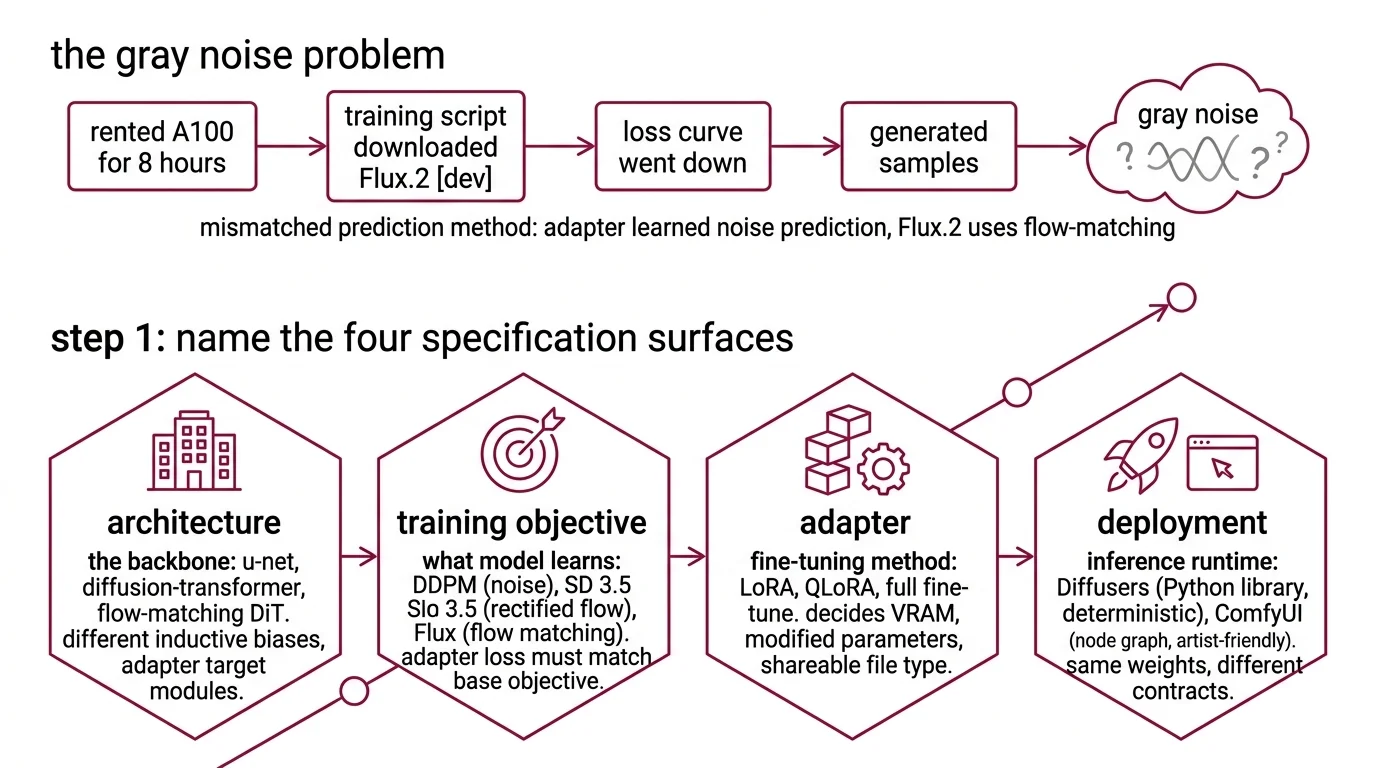
You rented an A100 for eight hours. Your training script downloaded Flux.2 [dev]. The loss curve went down. At the end of the run you generated samples. Gray noise. No brand objects. No recognizable shapes.
What happened: the script loaded an epsilon-prediction scheduler because that is what the AI coding tool saw in older SD 1.5 tutorials in its training data. Flux.2 [dev] is a 32B flow-matching transformer (Black Forest Labs). Epsilon-prediction and flow matching are different objectives. Your adapter learned to predict noise for a model that was never trained to predict noise. The loss went down because the adapter was getting better at an irrelevant task. The samples went to mud.
One unchecked constraint. Eight GPU-hours down.
Step 1: Name the Four Specification Surfaces
A diffusion project is not one thing. It is four systems that have to agree on a contract.
Your system has these parts:
- Architecture — the backbone. U-Net (classical Stable Diffusion, SDXL), Diffusion Transformer / MMDiT (SD 3.5), or flow-matching DiT (Flux.1 and Flux.2). Different inductive biases. Different adapter target modules.
- Training objective — what the model is learning to predict. Denoising Diffusion Probabilistic Models use noise prediction. SD 3.5 uses rectified flow. Flux uses flow matching. An adapter’s loss function must match the base model’s objective or training does nothing useful.
- Adapter — LORA, QLoRA, or full fine-tuning. The adapter spec decides VRAM, which parameters you actually touch, and whether the resulting file is a shareable LoRA or a full-checkpoint download.
- Deployment — the runtime that serves inference. Diffusers (Python library, deterministic scripts) or ComfyUI (node graph, artist-friendly). Same weights, very different contracts.
The Architect’s Rule: Four surfaces, four contracts. If your spec doesn’t address all four, your AI tool picks defaults from the first tutorial it remembers — and those defaults were written for SD 1.5 in 2023.
Step 2: Match the Objective to the Base Model
The biggest silent failure in diffusion fine-tuning is training against the wrong objective. The loss curve still decreases — you are just learning a garbage direction.
Objective checklist — match to base model:
- SDXL / SD 1.5 / SD 2.x — epsilon-prediction (noise). Use the DDPM / DDIM scheduler family.
- Stable Diffusion 3.x —
Rectified Flow. The reference uses
FlowMatchEulerDiscreteScheduler. SD 3.5 Large ships 8.1B MMDiT parameters and leads prompt adherence benchmarks in its size class (Stability AI); SD 3.5 Medium is 2.5B and fits consumer hardware. - Flux.1 [dev], Flux.2 [dev] —
Flow Matching on rectified paths. Flux.2 [dev] is a 32B-parameter transformer with reference-image conditioning across up to 10 inputs at 4MP (Black Forest Labs). The Diffusers repo ships the reference script at
examples/dreambooth/train_dreambooth_lora_flux.py— do not improvise. - Classifier-Free Guidance — the inference-time steering knob, not a training concern. Spec the CFG scale in your deployment contract.
The Spec Test: If your context file does not name the scheduler family, your AI tool will pick one that “looks right” from training data. That default was almost certainly written for SDXL. Flux and SD 3.5 trained with it produce gray noise. Name the scheduler or nothing else in the spec matters.
Step 3: Spec the LoRA Adapter Before You Download Weights
LoRA is where VRAM gets decided. Rank, target modules, and quantization are three levers. Your AI tool will guess each one if you do not specify.
Adapter checklist:
- Rank (
r) — 4 for style tuning, 16 for subject training, 64 for significant capability shifts. Higher rank means more trainable parameters, more VRAM, and a bigger adapter file. - Target modules — transformer blocks only, text encoder too, or all components. Transformer-only is the cheapest by a wide margin. Training the text encoder on Flux is rarely worth the VRAM cost.
- Quantization — none, 8-bit, or 4-bit (QLoRA). A rank-16 LoRA on Flux [dev] that targets all components runs above 40 GB VRAM without quantization (Diffusers README). QLoRA with a 4-bit base model plus BF16 adapters fits a similar job on a 24 GB consumer card (HF Blog).
- PEFT version —
peft>=0.6.0is required for the Diffusers LoRA backend. Pin it or the training script throws at import. - Alpha and dropout — alpha conventionally set to twice the rank. Dropout of 0.05 is a sane starting point. Spec both, or the defaults will bite you during overfitting debugging.
The Spec Test: “Fine-tune Flux with LoRA” picks a rank, picks target modules, picks quantization, and commits your GPU for hours. One missing line in the spec is one uncontrolled variable in the run.
Step 4: Validate Before Deployment
A LoRA that loads without error is not a working LoRA. You need evidence the weights learned what you meant.
Validation checklist:
- Adapter merges cleanly — failure looks like tensor shape mismatch on
load_lora_weights. Your rank or target modules do not match the base model. Return to Step 3. - Samples diverge from base — generate with and without the adapter at the same seed. If outputs look identical, the adapter is either unloaded or was trained against the wrong objective. Return to Step 2.
- Overfitting signal — prompts with subject tokens produce the trained subject, but unrelated prompts also look like the subject. Training set too small, rank too high, or CFG at inference too aggressive.
- Preview at inference settings — validate at your deployment CFG scale and step count, not at training-time defaults. Gray noise at CFG=7 with 20 steps can disappear at CFG=3.5 with 50 steps — or the reverse. The bug you see depends on the scheduler you test with.
Deploying Flux.2 with Diffusers or ComfyUI: Same Spec, Two Runtimes
Same weights. Two very different deployment contracts. Pick one for production.
Diffusers is a Python library. Scripts are deterministic, version-pinnable, CI-friendly. Diffusers 0.37.1 (March 2026) introduced Modular Diffusers — reusable pipeline blocks — plus MagCache and TaylorSeer caching for repeated inference (Diffusers GitHub releases). Your spec names the checkpoint, the scheduler class, the precision (BF16 or FP8), the caching strategy, and the device map. Your deployment is code you check into a repo.
ComfyUI is a node-graph runtime. ComfyUI v0.19.1 (April 16, 2026) added a small Flux.2 decoder node and Flux.2 conditioning without the old pooled-output path (ComfyUI changelog). Your spec names the workflow JSON, the custom nodes with pinned versions, the security level, and the model checkpoints dropped into the right folders. Your deployment is a file an artist can edit.
Choose by team. Engineers speak Diffusers. Artists speak ComfyUI. Teams that mix both in one production pipeline lose a week debugging why the same prompt produces different images in two runtimes.
Compatibility & freshness notes:
- ComfyUI custom nodes (Jan 2026 break): The Jan 5, 2026 ComfyUI core update removed
precompute_freqs_cisfromcomfy.ldm.lightricks.model, breakingComfyUI-TeaCacheandComfyUI-MagCacheextensions (ComfyUI GitHub issues). Update extensions before upgrading to v0.19.1 or your workflows silently lose caching.- Diffusers Flax schedulers: Deprecated in v0.37.0 and slated for removal (Diffusers GitHub releases). Migrate to PyTorch schedulers before pinning a newer minor version.
- Flux.1 [dev] gate: Access requires accepting the Hugging Face gate form and logging in.
from_pretrainedfails silently on unauthenticated calls (Diffusers README).- ComfyUI Manager security level: Default
security_level = normalblocks unverified third-party Git repos. Lower it explicitly and only for nodes you have inspected.- SD 3.5 license: Free for users and organizations under $1M annual revenue under the Stability AI Community License; enterprise license required above that threshold (Stability AI).
Common Pitfalls
| What You Did | Why AI Failed | The Fix |
|---|---|---|
| “Fine-tune this model” (one-shot) | AI merged objective, rank, and scheduler into one guess | Decompose: architecture, objective, adapter, deployment |
| Copied an SDXL training script for Flux | Wrong objective — SDXL uses epsilon-prediction, Flux uses flow matching | Use the Diffusers Flux LoRA reference script |
| No rank specified | AI picked rank 8 — fine for style, too small for subject training | Spec rank explicitly: 4 style, 16 subject, 64 capability |
| No quantization spec on consumer GPU | AI trained full-precision, OOM on a 24 GB card | Spec QLoRA with a 4-bit base model and BF16 adapters |
| Validated only at training-time CFG | Adapter looked broken at deployment CFG scale | Validate at inference-time CFG and step count |
Pro Tip
Treat the model card as part of your spec. Every production diffusion project has a model card on Hugging Face that names the architecture, the training objective, the recommended scheduler, and the license. Paste the relevant section into your context file before you write a single training argument. Half of the silent-failure bugs in diffusion pipelines come from specs that contradict the base model’s own documentation.
Frequently Asked Questions
Q: How to build a diffusion model from scratch with PyTorch? A: Decompose into four surfaces before writing code: the noise schedule (linear, cosine, or rectified-flow path), the denoising network (U-Net for 2D images, DiT for transformer-based), the sampler (DDPM, DDIM, or Euler-flow), and the training loop. Mixed-precision training makes small U-Nets practical on a single consumer GPU — but expect to train on toy datasets like CIFAR-10 or MNIST before anything real. From-scratch is a learning exercise, not a production path. For production, fine-tune a pretrained model and own the spec.
Q: How to fine-tune Stable Diffusion 3.5 or Flux with LoRA in 2026?
A: Use the Diffusers Flux LoRA reference script at examples/dreambooth/train_dreambooth_lora_flux.py as your baseline (Diffusers README). Spec rank (16 for subject, 4 for style), target modules (transformer only unless you have the VRAM budget), and quantization (QLoRA with a 4-bit base model for any card under 40 GB). For SD 3.5, use the MMDiT-targeted LoRA script and FlowMatchEulerDiscreteScheduler. Never copy an SDXL training script onto a flow-matching model — the objective mismatch trains nothing useful.
Q: How to deploy Flux or SDXL for production image generation with Diffusers and ComfyUI? A: Pick one runtime and commit. Diffusers gives you deterministic Python scripts, version pinning, and CI integration — choose it when the team speaks code. ComfyUI gives you a node-graph UI artists can edit and share workflow JSONs for — choose it when the team speaks visual. Diffusers 0.37’s Modular Diffusers reuses pipeline blocks across models (Diffusers GitHub releases); ComfyUI v0.19 added native Flux.2 support (ComfyUI changelog). Do not split a single production pipeline across both.
Your Spec Artifact
By the end of this guide, you should have:
- A four-surface decomposition map — architecture, training objective, adapter spec, deployment contract, each with named constraints
- A constraint checklist — base model, scheduler family, LoRA rank and target modules, quantization strategy, PEFT version, CFG scale, and runtime choice
- A validation protocol — adapter load test, divergence-from-base check, overfitting signal, and inference-time-settings preview
Your Implementation Prompt
Paste this prompt into Claude Code, Cursor, or Codex when starting a new diffusion fine-tuning project. Replace the bracketed placeholders with values from your constraint checklist. The prompt mirrors the four surfaces from Steps 1–4.
Build a diffusion fine-tuning pipeline with these specifications:

ARCHITECTURE (Surface 1):
- Base model: [Flux.1 dev / Flux.2 dev / SD 3.5 Large / SD 3.5 Medium / SDXL]
- Backbone type: [flow-matching DiT / MMDiT / U-Net]
- Hugging Face repo: [exact repo id, e.g., black-forest-labs/FLUX.1-dev]
- Gate access: [confirm HF gate accepted / N/A]

TRAINING OBJECTIVE (Surface 2):
- Objective: [flow-matching / rectified-flow / epsilon-prediction]
- Scheduler class: [FlowMatchEulerDiscreteScheduler / DDIMScheduler / other]
- Reference training script: [path under diffusers/examples/]

ADAPTER SPEC (Surface 3):
- Adapter type: [LoRA / QLoRA / full fine-tune]
- Rank: [4 / 16 / 64]
- Target modules: [transformer only / transformer + text encoder / all]
- Alpha: [e.g., 2 * rank]
- Dropout: [e.g., 0.05]
- Quantization: [none / 8-bit / 4-bit bitsandbytes]
- PEFT version: peft>=0.6.0

DEPLOYMENT CONTRACT (Surface 4):
- Runtime: [Diffusers / ComfyUI]
- Precision: [BF16 / FP16 / FP8]
- CFG scale at inference: [e.g., 3.5]
- Sampling steps: [e.g., 28]
- Caching strategy: [none / MagCache / TaylorSeer]  # Diffusers 0.37+
- Device: CUDA with CPU fallback

VALIDATION:
- Test adapter load without error
- Generate with and without adapter at the same seed, compare
- Check for overfitting on unrelated prompts
- Validate at inference CFG and step count, not training-time values
- Stop on NaN loss — save last checkpoint
Ship It
You now have a decomposition that works across every diffusion project in 2026 — from an SDXL LoRA on a legacy pipeline to a Flux.2 fine-tune on fresh hardware. Four surfaces, four contracts, one spec file. Spec the surfaces. Let the AI write the scripts.
AI-assisted content, human-reviewed. Images AI-generated. Editorial Standards · Our Editors