How to Build and Version Production Prompts with Braintrust, PromptLayer, and Agenta in 2026
TL;DR
- Prompt specs need an explicit output contract — model ID, format, examples — not just instructions. Without them, every deployment is a gamble.
- Few-shot classification and structured JSON output require the same fix: constraints specified in the prompt, not assumed from context.
- Braintrust, PromptLayer, and Agenta each solve versioning differently. Choose by team size, eval depth, and your tolerance for storing prompts in the cloud.
OpenAI deprecated its v1/prompts API on June 3, 2026. Full shutdown: November 30. If your team relied on native OpenAI prompt storage, your version history is on a clock (OpenAI Community). That external pressure is new. The internal pressure is not: a
Prompt Engineering pipeline that worked last Thursday fails on Monday after someone edited the system message. No diff. No rollback. No record of what changed.
That’s the gap this guide closes.
Before You Start
You’ll need:
- An API account with OpenAI, Anthropic, or another LLM provider
- Familiarity with Zero Shot Prompting and Structured Output basics
- A Braintrust account (free Starter tier), a PromptLayer account (free tier), or Docker if you are self-hosting Agenta
- One prompt you need to move to production
This guide teaches you: How to write a complete prompt specification — system message, examples, output contract, validation criteria — before you touch any versioning tool.
The Prompt That Passed Staging and Wrecked Production
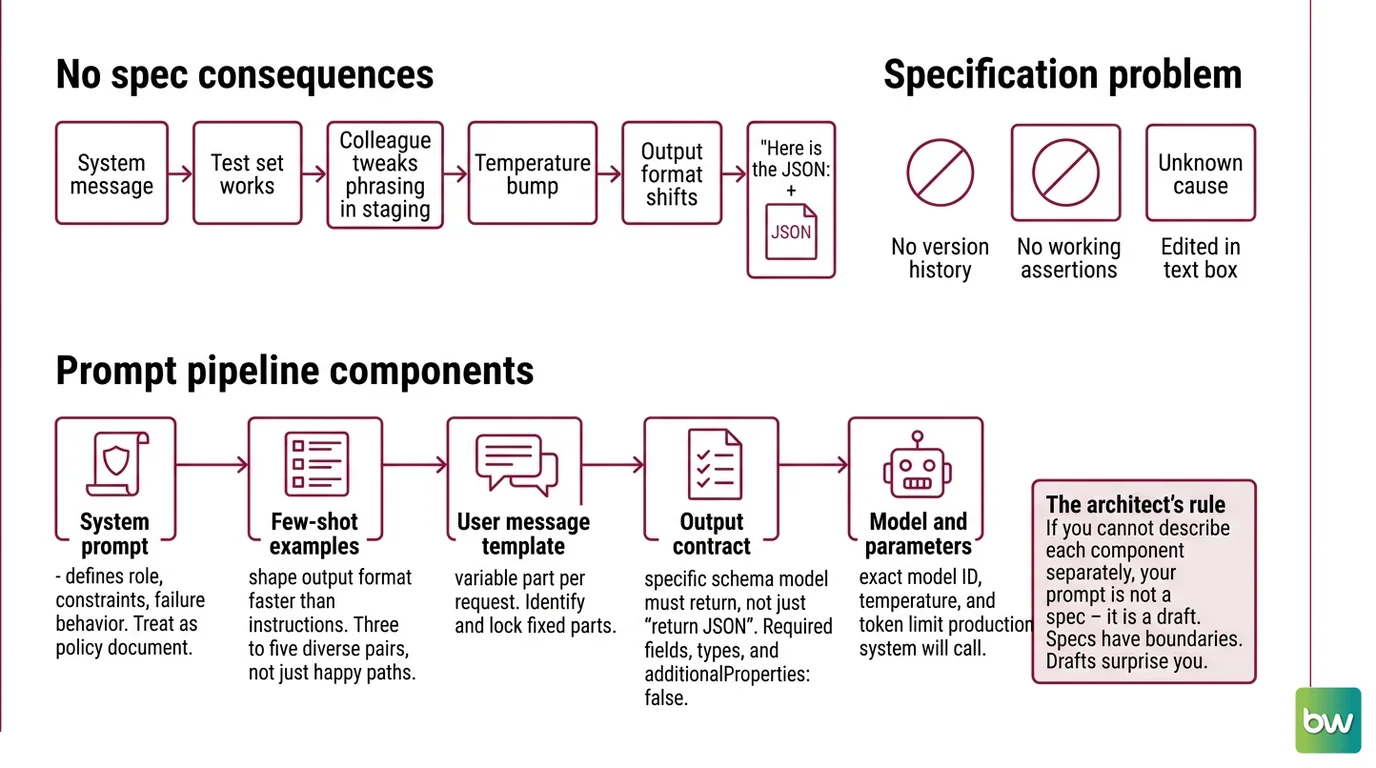
Here is what happens without a spec. You write a system message for a ticket-routing classifier. It works on your test set. A colleague tweaks the phrasing in staging. Someone else bumps the temperature. The output format shifts from valid JSON to “Here is the JSON:” followed by JSON. Customer-facing feature breaks. Nobody knows which change caused it.
You have no version history. You have no assertion that proves what “working” looks like. You have a prompt someone edited in a text box.
That is not a tooling problem. It is a specification problem. The fix starts before you open Braintrust.
Step 1: Decompose the Prompt Pipeline
Before you write a single line, map the moving parts. Every production prompt has the same five components. Skipping any one of them is the spec gap that costs you a Saturday.
Your prompt pipeline has these parts:
- System prompt — defines role, constraints, and failure behavior. This is the policy document. Treat it that way.
- Few-shot examples — shape output format faster than written instructions. Three to five diverse, representative pairs. Not just happy paths.
- User message template — the variable part. Identify what changes per request and what stays fixed. Lock the fixed parts.
- Output contract — the schema the model must return. Not “return JSON.” A specific schema with required fields, types, and
additionalProperties: false. - Model and parameters — the specific model ID, temperature, and token limit your production system will call. Not “Claude” or “GPT-5.” The exact model string.
The Architect’s Rule: If you cannot describe each component separately, your prompt is not a spec — it is a draft. Specs have boundaries. Drafts surprise you.
Step 2: Write the System Prompt Contract
The System Prompts component is where most production failures start. A vague system message leaves the model filling in blanks — and it fills them with training data priors, not your requirements.
Three things every system prompt must include:
Your system prompt checklist:
- Role — one sentence. “You are a support ticket classifier that assigns tickets to one of five predefined categories.” Not a paragraph, not a persona essay.
- Constraints — three to five rules, each with the why. “Return only the category name, not a sentence. Reason: downstream parsing expects a single string.” The model improves Instruction Following when it understands the purpose behind each rule (Anthropic Docs).
- Failure handling — explicit. “If the ticket does not match any category, return
UNCATEGORIZED. Do not guess.”
Context checklist:
- Role specified in one sentence
- Each constraint includes its reason
- Failure cases named explicitly
- No instructions that apply to multiple formats (“be concise” is not a constraint)
- Validated on five representative test cases before moving to the next step
The Spec Test: If your system prompt does not say what to return on a bad input, the model will invent something. It will invent it confidently. It will invent it every time a slightly different bad input appears.
Use Role Prompting to anchor behavior at the start of every request. In customer-facing applications, the Context Window accumulates across turns — the role definition at the top shapes how the model weighs everything that follows.
One more thing: your system prompt is a Prompt Leakage surface. Keep business logic out of it. Constraints and roles belong in the system message. Pricing rules, workflow logic, and anything proprietary belong in a separate Context Engineering layer — not embedded in prompt text.
Step 3: Build the Few-Shot and Output Specs
Two separate specs. Different mechanisms. Do not conflate them.
Few-shot examples for classification and extraction:
Few-shot examples are your fastest path to consistent output. Ten well-chosen examples can match a fine-tuned classifier on certain classification tasks (learnprompting.org). You do not need fine-tuning if your examples cover the edge cases.
Build your example set this way:
- Three to five input/output pairs minimum. Diverse beats numerous.
- Cover the failure mode you have seen most often. If the model misclassifies edge-case tickets, add two examples of that failure with the correct label.
- Wrap examples in XML tags.
<example>tags prevent the model from treating examples as additional instructions, and Claude is specifically designed to distinguish them (Anthropic Docs). - Uniform examples teach nothing about variation. If all five examples are clean, two-sentence inputs, the model has no signal for messy, multi-topic inputs.
For information extraction tasks, your examples must show the expected JSON shape — not just the correct label. Include one example where a required field is absent in the input and show what the output looks like in that case.
Structured JSON output for GPT-5.5 and Claude:
Vague “return JSON” instructions produce JSON-ish text. Constrained decoding produces valid, schema-adherent JSON every time.
For OpenAI models — GPT-4o-2024-08-06 and later, including the current GPT-5.5 — use Structured Outputs mode: response_format: { type: "json_schema", json_schema: { name: "your_schema", schema: {...}, strict: true } }. The strict: true flag activates constrained decoding — the model can only generate tokens that produce valid schema output (OpenAI API Docs). This is different from JSON mode, which only guarantees valid JSON, not schema adherence.
For Claude (Sonnet 4.6 and later), use output_config.format with type: "json_schema" — no beta header needed as of 2026 (Anthropic Docs). Specific limits apply: max 20 strict tools per request, no recursive schemas, and additionalProperties must be set to false.
Meta Prompting can accelerate schema creation: ask the model to generate a JSON schema from your examples, then validate and refine. Faster than writing it from scratch for complex extraction tasks.
Step 4: Choose and Wire Your Version Store
You have a spec. Now you need to version it. The three tools handle this differently, and the right choice depends on what you are optimizing for.
Braintrust is the most complete system — prompts, evals, environments, and datasets in one platform. The free Starter plan covers a team getting started. The Pro plan at $249/month adds separate dev/staging/production environments with quality gates — you can require eval scores above a threshold before a prompt version promotes from staging to production (Braintrust’s pricing page). That gate is what most teams build by hand. Braintrust automates it.
PromptLayer is the fastest path from zero to versioned prompts. The Pro plan runs at $49/month (PromptLayer’s pricing page), with unlimited playground workspaces and per-transaction logging. If your team prefers a visual editor over an API and does not need programmatic eval pipelines, PromptLayer gets you there with minimal setup. It carries SOC2 Type 2, GDPR, HIPAA, and CCPA certifications — relevant if you route sensitive data through your prompts.
Agenta is the choice when prompts cannot leave your infrastructure. MIT open-source and self-hostable, currently at v0.104.3 (Agenta GitHub repository). The versioning model uses Git-like branching — variants for experimentation, per-environment deployment. The Hobby tier is free. The Pro plan runs at $49/month with unlimited evals and 90-day retention.
Humanloop, the fourth tool many teams used, shut down September 8, 2025 after acquisition by Anthropic. If you are migrating from Humanloop, all three tools above accept JSONL datasets.
Security & compatibility notes:
- Braintrust security breach (May 2026): Unauthorized access to a Braintrust AWS account exposed customer model API keys. Braintrust told all customers to rotate any API keys stored in the platform — do this now if you have not (TechCrunch).
- Braintrust API breaking change (May 2026):
POST /v1/api_keyandPOST /v1/service_tokenendpoints removed. Create keys via the UI only — automations that create keys programmatically will fail (Braintrust’s changelog).- Braintrust OTel metadata (April 2026): Raw OTel attributes (e.g.,
gen_ai.input.messages) removed frommetadata— SQL queries and dashboards reading these fields break. Update queries to use structured fields (Braintrust’s changelog).- OpenAI Prompt Objects:
v1/promptsAPI deprecated June 3, 2026; full shutdown November 30, 2026. Migrate prompt storage to an external tool before the deadline (OpenAI Community).- Claude Opus 4.1: Deprecated, retiring August 5, 2026. Migrate to
claude-opus-4-8(Anthropic Docs).- Claude structured output parameter: Old
output_formatparameter andanthropic-beta: structured-outputs-2025-11-13header deprecated — useoutput_config.formatinstead (Anthropic Docs).
Common Pitfalls
| What You Did | Why AI Failed | The Fix |
|---|---|---|
| System prompt in free text, no format | Model infers context from training priors, not your spec | Use XML tags; add explicit constraints with reasons |
| Examples all from happy path | Model has no signal for edge cases | Add two examples of your most common failure mode |
| “Return JSON” without a schema | Model generates JSON-ish text, not schema-adherent output | Use Structured Outputs (OpenAI) or output_config.format (Claude) |
| Versioned in a shared Notion doc | No eval history, no environment gates, no rollback | Move to Braintrust, PromptLayer, or self-hosted Agenta |
| Changed temperature without re-running eval | Same prompt, different output distribution | Pin temperature in the spec; re-run assertions after any parameter change |
Pro Tip
The spec you write in Step 2 is more valuable than the tool you choose in Step 4. Braintrust with a vague system message is worse than a plain text file with a precise one. The spec is the product. Invest in it first — the tooling choice is almost always reversible. The specification choice defines correctness. The tooling choice defines traceability.
Frequently Asked Questions
Q: How to use few-shot prompting for classification and information extraction tasks?
A: For classification: use three to five labeled examples in <example> XML tags, covering your most common edge case. For extraction: include one example where a required field is absent and show the expected output shape. Vary phrasing across examples — identical phrasing teaches format, not generalization. If the model still mislabels edge cases after five examples, add more of that specific failure mode rather than adding random variety.
Q: How to get reliable structured JSON output from GPT-4o and Claude using prompt engineering?
A: Use constrained decoding, not prompt instructions. For OpenAI models (GPT-4o-2024-08-06 and later, including GPT-5.5), set response_format: { type: "json_schema", ..., strict: true }. For Claude Sonnet 4.6 and later, use output_config.format with type: "json_schema". Both enforce schema adherence at the token level. “Return JSON” in the system prompt produces valid-looking JSON, not validated JSON — different failure modes, different debugging cost.
Q: How to use system prompts to constrain LLM behavior in customer-facing applications? A: Name the role in one sentence, state each constraint with its reason, and define failure handling explicitly. The reason behind each constraint matters — models follow constraints better when they understand the intent (Anthropic Docs). For customer-facing apps, add one more rule: what the model must do when asked to step outside its defined role. Do not assume it will refuse — specify the refusal behavior explicitly.
Q: How to build a prompt versioning and evaluation pipeline with Braintrust and PromptLayer in 2026? A: Start with Braintrust’s free Starter plan to create your first prompt, dataset, and eval. Write one assertion per output claim: valid schema, no empty required fields, correct classification for your edge case. Promote to the Pro plan when you need environment-based promotion gates. Use PromptLayer instead if your team prefers a visual no-code interface — its Pro plan includes per-transaction logging and unlimited workspaces at $49/month (PromptLayer’s pricing page).
Your Spec Artifact
By the end of this guide, you should have:
- A system prompt contract: role in one sentence, constraints with reasons, explicit failure handling
- A few-shot example set: three to five diverse pairs covering your most common edge case
- An output contract: JSON schema with required fields, types, and
additionalProperties: false
Your Implementation Prompt
Paste this into Claude Code, Cursor, or Codex as your starting spec. Fill each bracketed placeholder with your values before submitting.
You are building a production prompt specification.

## Task
[Task in one sentence — e.g., "classify support tickets into one of five categories"
or "extract invoice line items into structured JSON"]

## System prompt contract
- Role: [one-sentence role definition]
- Constraints (include the *why* for each):
  1. [Constraint 1 — e.g., "Return only the category name, not a sentence.
     Reason: downstream parsing expects a single string."]
  2. [Constraint 2 with reason]
  3. [Constraint 3 with reason]
- Failure handling: [what to return when input is invalid or matches no category]

## Few-shot examples
Provide 3–5 input/output pairs inside <example> tags:
- Cover [your most common edge case by name]
- Vary phrasing across examples
- Include one example where [a required field is absent / the input is ambiguous]

## Output contract
JSON schema with:
- Required fields: [field1: type, field2: type, ...]
- additionalProperties: false
- Use OpenAI Structured Outputs (strict: true) or Claude output_config.format with json_schema type

## Model and parameters
- Model: [specific model ID — e.g., claude-sonnet-4-6 or gpt-5.5]
- Temperature: [0 for classification, 0.3–0.5 for extraction]
- Max tokens: [explicit upper bound based on expected output size]

## Validation
The spec passes when all five test inputs produce output that:
1. Validates against the JSON schema
2. Has no empty required fields
3. Returns [your expected output] for [your edge case input] — not a close approximation
Ship It
You have a spec now, not just a prompt. System message, examples, output contract, model ID — each component documented, each constraint explicit. That spec travels into Braintrust, PromptLayer, or Agenta as a versioned artifact. The next time someone changes the temperature, you have a diff, not a mystery.
AI-assisted content, human-reviewed. Images AI-generated. Editorial Standards · Our Editors