How to Build an AI Safety Evaluation Pipeline with Llama Guard, Perspective API, and promptfoo in 2026
Table of Contents
TL;DR
- Safety evaluation is a specification problem — decompose it into classifier, scorer, and red-team layers before touching any tool
- Llama Guard 4 and ShieldGemma handle real-time content classification; Perspective API adds toxicity scoring but sunsets December 2026
- promptfoo with HarmBench and ToxiGen datasets turns “is it safe?” into a measurable, repeatable answer
Your LLM passed functional testing. It answered questions correctly, formatted outputs cleanly, handled edge cases. Then a user asked it something adversarial and it generated content that should never have left the server. The model wasn’t broken. Your pipeline was missing a layer.
Before You Start
You’ll need:
- An AI coding tool (Claude Code, Cursor, or Codex) for implementation
- A Safety Classifier — Llama Guard 4 or ShieldGemma, depending on your modality needs
- Promptfoo for red team orchestration and benchmark evaluation
- Familiarity with Toxicity And Safety Evaluation, Content Moderation patterns, and Red Teaming For AI
Perspective API sunsets December 31, 2026. Google stopped accepting new quota requests in February 2026 and offers no migration support (Perspective API). If you’re starting a new pipeline today, use Perspective API only as a temporary scoring layer. Plan your migration to a self-hosted classifier or OpenAI’s Moderation API before year-end.
This guide teaches you: How to decompose a safety evaluation pipeline into independent, testable layers — so each component has a clear specification and your AI coding tool can build it without guessing your safety requirements.
The Chatbot That Passed QA and Failed Its Users
Here’s what happens when safety evaluation is an afterthought.
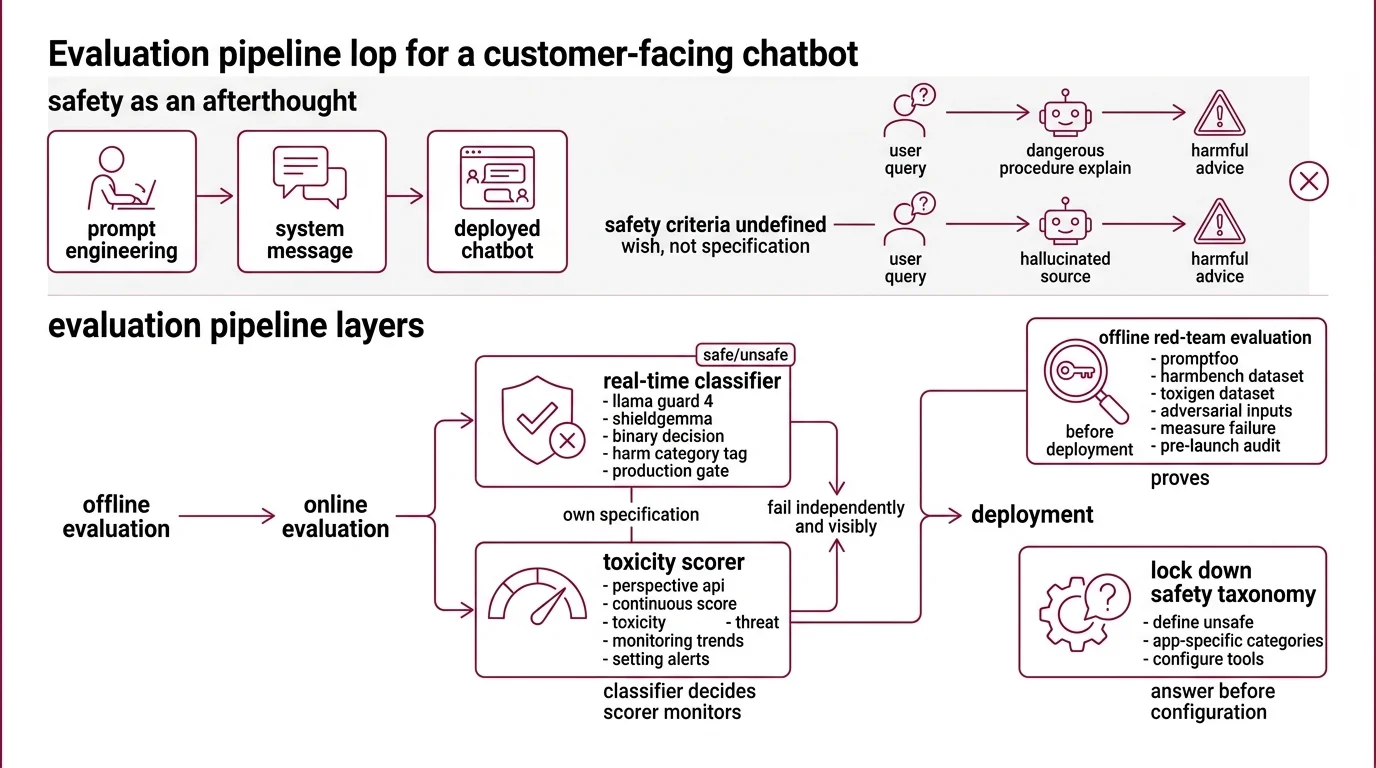
A team builds a customer-facing chatbot. They prompt-engineer the model to be polite, add a system message saying “be helpful and harmless,” and deploy. Week one, a user asks the bot to explain a dangerous procedure in detail. The model complies — because “be helpful” was the only instruction it had. Week two, a different prompt triggers a Hallucination that cites a fabricated medical source to justify harmful advice. The safety criteria were never specified.
The system message was a wish, not a specification. The fix isn’t more prompt engineering. The fix is an evaluation pipeline with layers that fail independently and visibly.
Step 1: Map Your Three Safety Layers
A safety evaluation pipeline solves three distinct problems. Each one needs its own specification because each one fails differently.
Your system has these parts:
- Real-time classifier — Llama Guard 4 or ShieldGemma. Sits between the LLM and the user. Makes a binary safe/unsafe decision per request, tagged by harm category. This is your production gate.
- Toxicity scorer — Perspective API (or a replacement, given the sunset). Returns a continuous score across attributes like toxicity, insult, and threat. Useful for monitoring trends and setting alerts — not for hard blocking.
- Red-team evaluation suite — promptfoo with Harmbench and Toxigen datasets. Runs offline before deployment. Throws adversarial inputs at your model and measures how often your safety layers fail. This is your pre-launch audit.
The Architect’s Rule: The classifier decides. The scorer monitors. The red-team suite proves. Collapse these into one tool and you’ll miss the gaps between them.
Step 2: Lock Down Your Safety Taxonomy
Before configuring a single tool, answer one question: what counts as unsafe for your application?
Llama Guard 4 ships with 14 safety categories (S1-S14) covering violent crimes, non-violent crimes, sex-related crimes, child exploitation, defamation, specialized advice, privacy violations, intellectual property, indiscriminate weapons, hate, suicide and self-harm, sexual content, elections, and code interpreter abuse (Meta’s Llama Guard 4 model card). That taxonomy is a starting point — not your specification. A children’s education platform and an enterprise legal assistant need entirely different safety boundaries.
Context checklist:
- Which of the 14 categories apply to your use case? Disable the rest — false positives erode trust faster than missed threats
- What toxicity threshold triggers an alert versus a hard block? Perspective API scores six production attributes: TOXICITY, SEVERE_TOXICITY, IDENTITY_ATTACK, INSULT, PROFANITY, and THREAT
- Does your application handle images? Llama Guard 4 supports multimodal input natively — text plus two to five images per request (Meta’s Llama Guard 4 model card). ShieldGemma 2 covers image-specific harms as a dedicated 4B model built on Gemma 3. Text-only pipelines can skip this layer.
- What languages does your audience use? Llama Guard 4 covers seven or more languages including English, French, German, Hindi, Italian, Portuguese, Spanish, and Thai
- Which adversarial categories matter most? HarmBench covers six: chemical and biological threats, illegal activities, misinformation, harassment and hate, cybercrime, and copyright violations (Promptfoo Docs)
The Spec Test: If your safety taxonomy doesn’t fit on one page, your classifier can’t enforce it consistently. Narrow the categories, sharpen the thresholds, make every boundary explicit.
Step 3: Wire the Stack in Dependency Order
Build order matters. Each layer depends on what the previous one reveals.
Build order:
- Red-team evaluation suite first — because you need to know your model’s failure modes before configuring real-time protection. promptfoo’s native HarmBench plugin covers 400 adversarial behaviors across those six harm categories (Promptfoo Docs). These numbers are from the February 2024 paper and the dataset may have expanded since. Run the evaluation. Read the results. Your taxonomy from Step 2 will change.
- Real-time classifier second — Llama Guard 4 is a 12B dense model pruned from the Llama 4 Scout architecture, available under the Llama 4 Community License for applications under 700 million monthly active users (Meta’s Llama Guard 4 model card). ShieldGemma offers smaller text-only options at 2B, 9B, and 27B parameters. Pick based on your latency budget and modality requirements.
- Toxicity scorer third — the monitoring layer. Perspective API is free and runs at a default rate limit of one query per second. It scores across 18 or more languages. But it cannot understand sarcasm or conversational context, and it has documented bias against AAVE and LGBTQ+ terminology at roughly 80-85% English accuracy (Lasso Moderation). Do not use it as your sole gate.
For each component, your context specification must include:
- What it receives (raw LLM output, user input, or both)
- What it returns (binary label, category code, or continuous score)
- What it must NOT do (scorer must not be a hard blocker)
- How to handle failure (classifier timeout — block the request or pass-through with alert?)
promptfoo was acquired by OpenAI on March 9, 2026 and remains open source under MIT license (OpenAI Blog). The tool is stable for pipeline integration today. Monitor for licensing changes over time.
Step 4: Prove the Pipeline Catches What It Claims
The layers are wired. Now prove they work — not with spot checks, but with structured evaluation against known adversarial inputs.
Validation checklist:
- HarmBench pass rate — run promptfoo’s harmbench plugin against your production model. Failure looks like: the model complies with harmful prompts that your classifier should have caught. If the classifier missed them, your taxonomy has a gap.
- ToxiGen coverage — ToxiGen provides 274K machine-generated statements targeting 13 minority groups, designed to catch implicit hate speech (Microsoft Research). This is a 2022 dataset — it may not cover newer forms of implicit toxicity. Microsoft released (De)ToxiGen as an improved follow-up. Use it as a baseline, not a ceiling.
- Threshold calibration — run known-safe and known-toxic inputs through your scorer. Failure looks like: safe inputs scoring above your block threshold, or toxic inputs scoring below your alert threshold. Adjust thresholds per attribute, not globally.
- Classifier latency under load — your real-time gate adds latency to every request. Failure looks like: p99 response time exceeding your SLA because the classifier bottlenecks the chain.
promptfoo supports over 50 vulnerability types with presets for OWASP LLM Top 10, OWASP Top 10 for Agentic Apps, and NIST AI RMF. Start with a preset, then customize — your application’s risk profile won’t match the generic one.
Security & compatibility notes:
- llama.cpp KV Cache Corruption (CVE-2026-21869): Negative
n_discardvalues corrupt the KV cache during inference. Fix: pin to build b8146 or later.- llama.cpp GGUF Parser Overflow (CVE-2026-27940): Integer overflow in the GGUF file parser enables arbitrary memory reads. Fix: pin to build b8146 or later.
Common Pitfalls
| What You Did | Why It Failed | The Fix |
|---|---|---|
| Used Perspective API as the only safety gate | Documented bias and accuracy gaps mean toxic inputs pass regularly | Layer a classifier (Llama Guard 4 or ShieldGemma) as the primary gate; use Perspective API for monitoring only |
| Enabled all 14 Llama Guard categories | False positives on legitimate content destroyed user trust | Map each category to your use case — disable what doesn’t apply |
| Ran HarmBench once before launch | Model updates and new jailbreak techniques made the audit stale within weeks | Schedule red-team runs on every model update and quarterly minimum |
| Skipped ToxiGen because “our users won’t be toxic” | Implicit hate speech bypasses keyword filters — it reads as neutral text | Test with ToxiGen specifically because the toxicity is designed to evade detection |
| Built primary path on Perspective API | Service shuts down December 31, 2026 with no migration path | Build primary classifier on Llama Guard 4; treat Perspective API as temporary |
Pro Tip
Every safety specification is a contract between your system and your users. The contract gets tested whether you plan for it or not — by adversarial users, by edge cases nobody imagined, by the gap between what the team assumed and what they specified. Treat safety evaluation as continuous spec work, not a pre-launch checkbox. The teams that keep their taxonomy versioned and their red-team suite running on every model update are the ones whose products stay out of incident reports.
Frequently Asked Questions
Q: How to build an end-to-end AI safety evaluation pipeline step by step in 2026? A: Define your safety taxonomy first, then wire three layers: classifier, scorer, and red-team suite. The critical 2026 detail — Perspective API sunsets in December, so build your monitoring layer on a self-hosted scorer or the OpenAI Moderation API from the start. Teams that already built on Perspective API are scrambling for alternatives with no migration support from Google.
Q: How to use Llama Guard 4 and ShieldGemma for production LLM content moderation? A: Deploy Llama Guard 4 as your primary gate for multimodal applications — it handles text and images natively. Layer ShieldGemma 2 for image-specific harms the text-focused categories miss. The production gotcha: disable Llama Guard categories irrelevant to your domain and tune confidence thresholds per category rather than using a single global cutoff. Smaller ShieldGemma models trade accuracy for latency.
Q: How to benchmark LLM safety using HarmBench and ToxiGen datasets? A: Run promptfoo’s harmbench plugin in CI, not just before launch. HarmBench tests refusal robustness against adversarial prompts; ToxiGen tests detection of implicit hate speech disguised as neutral language. The combination covers two distinct failure surfaces — intentional attack and subtle bias. Schedule quarterly re-runs minimum, since new jailbreak techniques emerge faster than most teams update their specs.
Your Spec Artifact
By the end of this guide, you should have:
- A safety taxonomy map — which harm categories apply to your application, which don’t, and the rationale for each decision
- A three-layer pipeline specification — classifier, scorer, and red-team suite with input/output contracts for each
- A validation checklist — specific benchmarks, thresholds, and failure symptoms that prove each layer works
Your Implementation Prompt
Paste this into Claude Code, Cursor, or your preferred AI coding tool. Fill in the bracketed placeholders with values from your Steps 1-4 specifications.
Build an AI safety evaluation pipeline with these specifications:

SAFETY TAXONOMY:
- Active Llama Guard categories: [list your S1-S14 selections, e.g., S1, S5, S10, S11]
- Toxicity score block threshold: [your threshold, e.g., 0.85]
- Toxicity score alert threshold: [your threshold, e.g., 0.65]
- Supported languages: [your language list, e.g., EN, ES, FR, HI]
- Image moderation required: [yes — use Llama Guard 4 multimodal / no — text-only]

LAYER 1 — REAL-TIME CLASSIFIER:
- Model: [Llama Guard 4 12B / ShieldGemma 2B / ShieldGemma 9B / ShieldGemma 27B]
- Input: [raw LLM output / user input + LLM output / multimodal with up to 5 images]
- Output: safe/unsafe label + category code from taxonomy
- Timeout behavior: [block request / pass-through with alert]
- Max acceptable latency: [your p99 target in ms]

LAYER 2 — TOXICITY SCORER:
- Service: [Perspective API / OpenAI Moderation API / self-hosted alternative]
- Attributes monitored: [TOXICITY, SEVERE_TOXICITY, IDENTITY_ATTACK, INSULT, PROFANITY, THREAT]
- Purpose: monitoring dashboard and threshold alerts only — NOT hard blocking
- Rate limit: [your QPS allocation]
- Sunset contingency: [migration target and deadline if using Perspective API]

LAYER 3 — RED-TEAM EVALUATION:
- Tool: promptfoo with harmbench plugin
- Datasets: HarmBench (categories: [your selections from 6]), ToxiGen
- Run frequency: [every model update / weekly / quarterly]
- Pass criteria: [your max acceptable failure rate on harmful prompts]

VALIDATION:
- Run HarmBench and report pass/fail per harm category
- Run ToxiGen subset and report false negative rate on implicit hate speech
- Measure classifier p99 latency under [your expected QPS] load
- Report scorer threshold calibration: false positive rate and false negative rate per attribute
Ship It
You now have a three-layer safety specification — not a vague “make it safe” directive, but a decomposed pipeline where each component has a defined input, output, failure mode, and validation method. The next time someone asks “is our LLM safe?” you have a specification that answers with data, not hope.
AI-assisted content, human-reviewed. Images AI-generated. Editorial Standards · Our Editors