Image Editing Pipeline 2026: Flux Kontext, Qwen Edit & GPT Image
TL;DR
- Every production AI Image Editing workload is one router plus a small set of specialist backends. Spec the router by edit type and the backends by contract — not by demo reel.
- GPT Image 1.5, Flux Kontext, Qwen Image Edit, HunyuanImage 3.0, Seedream, and Adobe Firefly each own a different lane. A single model behind a single API is a spec hole, not an architecture.
- Validate at every seam: identity preservation, reference fidelity, text rendering, cost tier, commercial-use compliance. If a boundary is silent, you are shipping a black box with a billing address.
You watched a reel. Nano Banana turned a plain couch into teal velvet in a single prompt. You paste the exact prompt into your own app. Monday morning a customer uploads a portrait, asks for a logo swap on the shirt, and your model trims half the face off. Nothing crashed. Everything is wrong.
The model is fine. Your pipeline is not. And this guide is going to fix it.
Before You Start
You’ll need:
- An AI coding tool (Claude Code, Cursor, or Codex) for specification-assisted implementation
- Working knowledge of Diffusion Models and how editing APIs differ from image-generation APIs
- A concrete edit taxonomy for your product — what kinds of edits your customers actually request
This guide teaches you: how to decompose any image-editing workload into one router plus swappable editors, so the models you dispatch to become implementation details inside contracts, not load-bearing architecture.
The Reel That Shipped a Bill
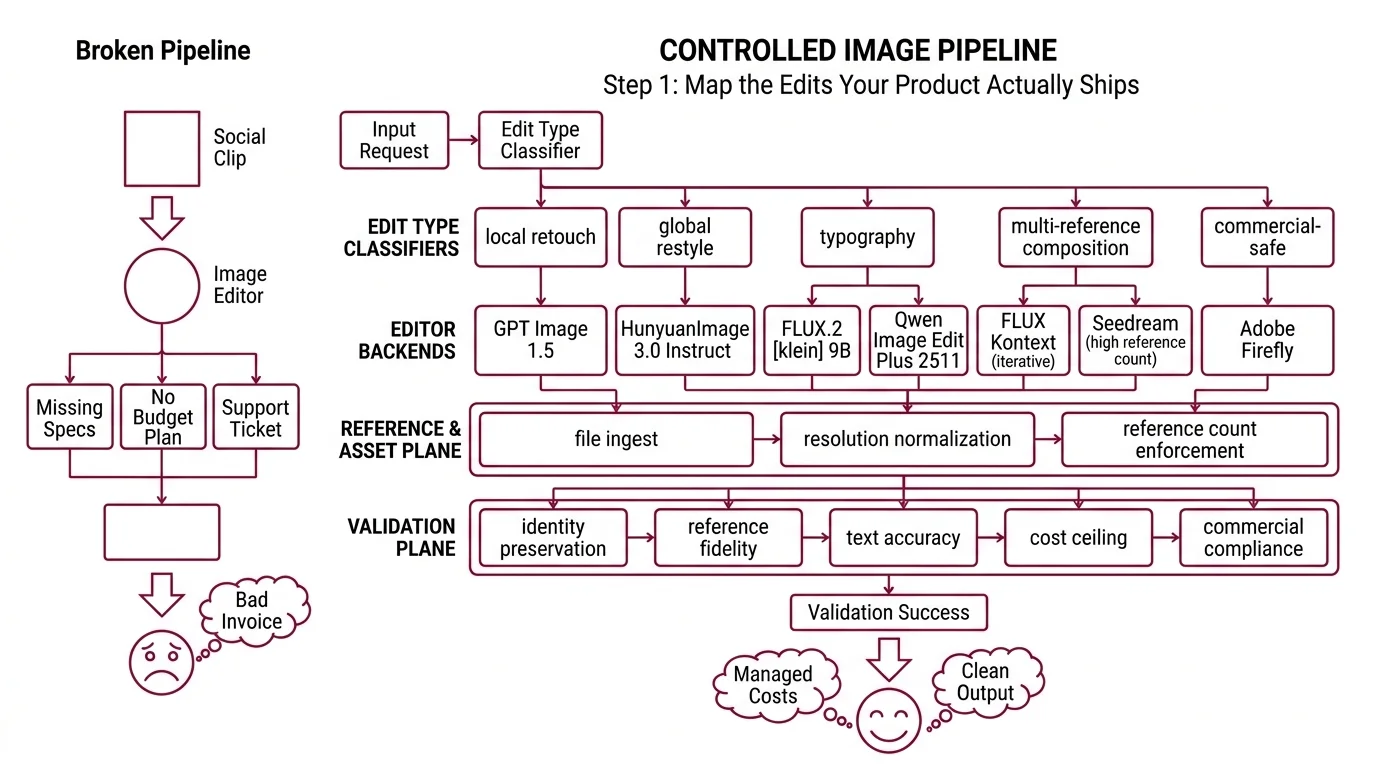
Teams pick an image editor because a social clip looked magical. They paste it behind an existing product surface. Nobody specifies which edit types each model handles, how many reference images each backend accepts, or which quality tier gets charged when a thumbnail goes through. The first week of demos looks clean. Then the invoice arrives, and a support ticket, and a face that does not match its profile photo anymore.
It worked on Friday. On Monday, a customer on the commercial-safe plan got an output from a backend that was never licensed for commercial use — because the router was a single if-statement that nobody spec’d.
Step 1: Map the Edits Your Product Actually Ships
There is no universal image editor in 2026. The Artificial Analysis Image Editing Arena currently ranks GPT Image 1.5 (high) at the top with an ELO of 1254, HunyuanImage 3.0 Instruct at #4 with 1220, FLUX.2 [klein] 9B at #6 with 1154, and Qwen Image Edit Plus 2511 at #7 with 1150 (Market Scan, April 2026). These are aggregate scores. Your product does not live in the aggregate — it lives inside specific edit types, and the lane winners change per type.
Your pipeline has these parts:
- Edit-type classifier — takes a request, returns a category tag (local retouch, global restyle, typography, multi-reference composition, commercial-safe)
- Editor backends — the specialist models behind the router: GPT Image 1.5 for broad coverage, Flux Kontext for iterative and typography edits, Qwen Image Edit Plus 2511 for bilingual text, Hunyuan Image 3.0 Instruct for open-weights multi-reference, Seedream for high-reference-count composition, Adobe Firefly for commercial-safe output
- Reference and asset plane — file ingest, resolution normalization, reference-count enforcement per backend
- Validation plane — identity preservation, reference fidelity, text accuracy, cost ceiling, commercial compliance
Nano Banana and Grok Imagine lead sibling arenas, but they sit behind general-purpose chat surfaces. For a dedicated editing pipeline you want backends with a standalone API contract — which is why the six above form the short list and the chat-surface models stay in the “interesting benchmark neighbors” column.
The Architect’s Rule: one API per editor is vendor tech. One router per edit type is your architecture.
Step 2: Lock the Contract for Every Backend You Dispatch To
This is where demo-driven builds fall apart. You specify one model well — usually the one from the reel — and you leave every other backend as “we will figure it out.” The AI coding tool fills the gap with assumptions from whichever doc page it saw last.
Context checklist:
- GPT Image 1.5 tier + pricing — $0.009 low / $0.034 medium / $0.133 high at 1024×1024, and $0.013 / $0.05 / $0.20 at 1024×1536 (OpenAI API Pricing). The 1.5 revision is 20% cheaper and about 4× faster than GPT Image 1 and is the current OpenAI default; a GPT Image 1 mini lane exists from $0.005 for budget flows. Your spec names the tier per edit type — photorealistic retouch runs high, thumbnail captioning runs low.
- FLUX.1 Kontext variants —
[pro]for iterative and local edits,[max]for maximum prompt adherence and typography. Up to 4MP output, 64×64 minimum input, 8 reference images via API (10 in the playground), roughly 3–5 seconds at 1MP (Melies FLUX comparison). Pay-as-you-go uses 1 credit = $0.01, with FLUX Dev starting at $0.02 per image. Pro and Max per-image pricing lives inside a live calculator on bfl.ai — re-check before baking a number into a budget model. - Qwen Image Edit hardware, region, and migration signal — 20B-parameter backbone, bilingual text handling native. Plus 2511 runs on NVIDIA, Ascend, and Cambricon hardware with distillation speedups up to 42.55×. Hosting goes through Alibaba Cloud Model Studio via DashScope SDK; Beijing and Singapore regions use separate keys that do not cross-call (Alibaba Cloud Docs). Per-image pricing is region-specific and quota-shared with other Qwen visual models — do not pin a number. Qwen Image 2.0 launched February 10, 2026 and unifies generation and editing in one model (WaveSpeedAI Qwen 2.0); new workloads are being steered there, so your spec names which SKU you target today and when you re-evaluate.
- HunyuanImage 3.0 Instruct — released January 26, 2026 as the largest open-source image MoE, with multi-image fusion supporting up to 3 references and a distilled variant at 8 sampling steps (Hunyuan HF Model Card). Open weights on Hugging Face and GitHub; hosted inference via Replicate or similar, each with its own pricing page.
- Seedream envelope — Seedream 4.5 lists at $0.04 per image, up to 4MP (2048×2048), and accepts up to 10 reference images (fal.ai Seedream). Seedream 5.0 Lite arrived in February 2026 at $0.035 per image with reasoning and web-search signals added. When composition depth matters more than typography precision, this is the reference-count leader on the short list.
- Adobe Firefly plans and credits — Standard $9.99 (2k credits), Pro $19.99 (4k credits), Premium $199.99 (50k credits) per month (Adobe Generative Credits FAQ). Credits reset monthly and do not roll over. The “unlimited standard generations” promotion expired 2026-04-22 — today. Standard-generation credit behavior may change on some plans from here on, so re-check your plan before committing spec language to “unlimited.”
The Spec Test: Trace a portrait upload with three reference logos, commercial-use flag set, output required in CMYK for print. If every leg of that path is not spec’d end-to-end — backend chosen, reference count within the backend’s limit, color profile guaranteed, commercial-use backend approved — the contract has a hole wide enough to ship a refund through.
Step 3: Wire the Router, the Primary Editor, and the Fallbacks
Build order matters because each stage depends on the one before it. If you start from “we are a Flux Kontext shop” and work outward, you end up routing every edit type into one backend and treating the mismatches as bugs instead of as missing contracts.
Build order:
- Edit-type classifier first — the cheapest component to change and the input contract everything else depends on. Start with a rules-based classifier over request metadata and keywords. Measure its failure modes before you swap to a small model or an LLM classifier. Complexity earns its place; it does not start with a seat.
- Primary editor second — the backend that covers the plurality of your edit types. For consumer-grade work with text-heavy creatives, GPT Image 1.5 at the medium tier is a reasonable anchor given its current arena position. For typography-critical or iteration-heavy flows, Flux Kontext [max] is the specialist. For bilingual text or open-weights constraints, Qwen Image Edit Plus 2511 or HunyuanImage 3.0 Instruct. Pick one. Ship one path end-to-end before you add any fallback.
- Fallback chain third — the second and third editors your router can hand off to when a validation check fails on the primary. Each fallback owns its own contract and its own failure modes. If you cannot explain why a request reroutes from A to B in one sentence, you do not have a fallback chain — you have a random selector with good branding.
- Validation plane last — but already sketched. The assertions live across the pipeline, not inside one backend call.
For each component, your context must specify:
- What it receives (raw request, reference image list, commercial-use flag, user locale)
- What it returns (edit-type tag from the classifier; edited image from the backend; pass or reject from the validation plane)
- What it must NOT do (no silent model substitution, no upscaling without an explicit flag, no logging of raw customer images to disk, no cross-region key sharing on Qwen)
- How to handle failure (low classifier confidence routes to a general-purpose editor; backend error triggers the fallback chain; drift threshold breach rejects and requeues)
A note on arena rankings: the ELO list shifts every few weeks as backends ship minor versions. Your router should not hardcode “GPT Image 1.5 is best.” It should hardcode “the edit type named T routes to the backend that owns contract C” — and let the mapping update when the arena, your eval set, or your pricing math tells you to.
Step 4: Prove the Pipeline Doesn’t Silently Break Faces or Budgets
You do not validate an image-editing pipeline by scrolling the last 20 outputs and nodding. You validate by asserting what should and should not change in every result, on every request, forever. Assertions at every seam.
Validation checklist:
- Identity preservation — failure looks like: face geometry drift, wrong skin tone, a lost tattoo or freckle pattern on a product model. Run a cosine-similarity check between source and output on the face region. Hard-fail above a configured threshold; soft-flag in the gray zone.
- Reference fidelity — failure looks like: Flux Kontext was handed 6 reference images but only 2 show up in the composition, and the excess was silently dropped. Log reference counts at request and result. Assert every referenced asset is represented.
- Text rendering accuracy — failure looks like: an edited billboard that reads “HEAD CFFEE” instead of “HEAD COFFEE.” OCR the output, diff against the intended string. For bilingual flows on Qwen Image Edit, check both scripts — a pipeline that only verifies the Latin characters is a pipeline that ships Mandarin mistakes in production.
- Cost tier drift — failure looks like: the router picks GPT Image 1.5 (high) for every thumbnail because nobody wired the tier selector, and the monthly bill triples. Log the quality tier per request. Alert when the high-tier share drifts past your budget model.
- Commercial-use compliance — failure looks like: a customer on a commercial-safe plan receives an output from a backend that was never approved for commercial use. Route flagged requests to an approved backend (Adobe Firefly is the default choice here). Assert on the route, not only on the output — by the time you are checking the output, the model already saw the asset.
Security & compatibility notes:
- Qwen Image Edit standalone deprecation signal. Qwen Image 2.0 launched February 10, 2026 and Alibaba is steering new workloads to the unified generation + editing model (WaveSpeedAI Qwen 2.0). Pin standalone Qwen Image Edit only when Plus 2511 behaviors you depend on are not yet on 2.0; otherwise schedule a migration window.
- Adobe Firefly standard-tier change. The “unlimited standard generations” promotion expired 2026-04-22. Standard-generation credit behavior may change on select plans from today onward (Adobe Generative Credits FAQ). Re-check your plan before committing spec language to “unlimited.”
- Qwen cross-region keys. Beijing and Singapore DashScope keys do not cross-call (Alibaba Cloud Docs). A spec that names “Qwen” without naming a region has a silent failure mode where requests from one region quietly fail against the other region’s quota.
Common Pitfalls
| What You Did | Why AI Failed | The Fix |
|---|---|---|
| “Use GPT Image for everything” | No tier specified — thumbnails charged at $0.133 high when $0.009 low or $0.005 on GPT Image 1 mini would do (OpenAI API Pricing) | Select tier per edit type in the router; alert on tier drift |
| One editor behind one API | Typography tasks look wrong, local edits come back globally restyled, cost balloons on simple asks | Route by edit type; Flux Kontext [max] for typography, [pro] for iterative, GPT Image 1.5 for broad, Firefly for commercial-safe |
| Pasted references straight through | Kontext accepts 8 via API, Seedream up to 10, Hunyuan 3 — overflow drops silently without throwing (fal.ai Seedream, Hunyuan HF Model Card) | Assert reference count against the backend’s limit before dispatch |
| Assumed Qwen “works the same” across regions | Beijing and Singapore keys do not cross-call; requests fail against the wrong quota | Spec the region at route time; separate keys, separate quotas (Alibaba Cloud Docs) |
Pro Tip
Write your router spec around edit types, not around models. When a new backend ships — Seedream 5.0 Lite arrived in February 2026 with reasoning signals at $0.035 per image, HunyuanImage 3.0 Instruct dropped its 8-step distilled variant in January — you add it as another option inside an existing edit-type contract. The taxonomy outlives the vendors. Models rotate every quarter; edit types change every decade. Architect for the slower cycle.
Frequently Asked Questions
Q: How to build an AI image editing pipeline step by step? A: Decompose the workload into edit types, map each to a specialist backend, put a typed router in front, assert drift at every boundary. Ship one primary editor end-to-end before adding fallbacks. Per-backend reference limits matter — Kontext 8 via API, Seedream 10, Hunyuan 3 — overflow fails silently.
Your Spec Artifact
By the end of this guide, you should have:
- An edit-type taxonomy — a list of categories your product actually encounters, with a default routing rule per category
- A per-backend contract list — GPT Image 1.5 (with tier), Flux Kontext (with variant), Qwen Image Edit Plus 2511 (with region), HunyuanImage 3.0 Instruct (with host), Seedream (with version), Adobe Firefly (with plan) — each with inputs, outputs, constraints, and failure modes
- A validation checklist with assertions at every seam: identity preservation, reference fidelity, text rendering accuracy, cost tier, commercial-use compliance
Your Implementation Prompt
Paste the prompt below into Claude Code, Cursor, or Codex when you are ready to scaffold the pipeline. Fill every bracketed value from the contracts you wrote in Steps 1–4. Do not run it with placeholders still in place — the whole point of this guide is that the blanks are where the failures come from.
You are building a production image-editing pipeline. Follow the
router-plus-backends architecture: classify edit type -> route to
backend -> validate output. Do not deviate.

EDIT-TYPE TAXONOMY
- Categories covered: [local retouch, global restyle, typography,
  multi-reference composition, commercial-safe — edit to fit product]
- Routing rule per category: [one backend + variant + tier per category]
- Classifier: [rules-based | small model | LLM — pick one, state why]

BACKEND CONTRACTS (one block per backend in scope)
- Backend + SKU: [e.g., GPT Image 1.5]
  - Quality tier: [low | medium | high | GPT Image 1 mini]
  - Max input resolution: [e.g., 1024x1536]
  - Reference image limit: [Kontext: 8 via API | Seedream 4.5: 10 |
    Hunyuan 3.0: 3]
  - Region constraint: [Beijing or Singapore for Qwen — never both]
  - Cost per image: [from provider's pricing page, with date]
  - Commercial-use approved: [yes | no | plan-dependent]
  - MUST NOT: silently substitute variant; log raw images to disk;
    exceed tier without re-routing; share keys across regions

ROUTER
- Input: raw request + reference images + commercial-use flag + locale
- Output: route decision (backend, variant, tier) + validation plan
- Fallback chain per edit type: [primary -> secondary -> tertiary]
- MUST NOT: route commercial-use requests to non-approved backends

VALIDATION (emit assertions, not only runtime code)
- Identity preservation: cosine similarity on face region, threshold [X]
- Reference fidelity: every referenced asset present in output
- Text rendering accuracy: OCR-diff against intended text, per language
- Cost tier: high-tier share per 1k requests under [Y] percent
- Commercial-use compliance: backend on approved list for flagged requests

ERROR HANDLING
- Classifier low confidence -> [defined default route]
- Backend error -> [fallback chain]
- Drift threshold breach -> [reject + requeue + alert]
- Reference overflow -> [truncate + warn | reject | route to larger-ref]
- Region key mismatch (Qwen) -> [defined behavior]

Generate the pipeline module, the assertion suite, and a one-page
README explaining how to add a new backend without touching the router
or the validation plane.
Ship It
You now have a pipeline that treats “which model edits this image” as a routing decision instead of an architecture commitment. When GPT Image 1.6 lands, when FLUX.3 ships a new Kontext variant, when Qwen Image 2.0 absorbs the standalone editor in your stack — you add a contract, you route a share of traffic to it, you measure, and the rest of the system does not move. The names on the backends change. The router does not.
AI-assisted content, human-reviewed. Images AI-generated. Editorial Standards · Our Editors