How to Build a Voice Cloning TTS Pipeline with XTTS-v2 and Fish Audio in 2026
TL;DR
- The original
TTSpackage is abandoned. Usecoqui-tts(idiap fork) and install PyTorch separately before it — that order matters starting with v0.27.4. - XTTS-v2 model weights are non-commercial only under the CPML license. Your production deployment goes through Fish Audio or another commercially licensed synthesis API.
- Clone once, store the reference_id, reuse it on every call — that is the one spec pattern separating a working Fish Audio integration from one that breaks under load.
You find a TTS tutorial, copy the install command, and your dev environment runs clean. You push to staging. Import error. Or worse — it runs, the model loads, you demo it to the team. Three weeks later, legal flags the license. The model weights you’ve been using are non-commercial only, and the company that issued them shut down in January 2024.
Two spec gaps. Neither shows up until the damage is done.
Before You Start
You’ll need:
- An AI coding tool: Cursor, Claude Code, or Codex
- Python 3.10 or higher — versions below 3.10 are unsupported; 3.15+ is out of range per coqui-tts on PyPI
- Understanding of Voice Cloning, Text-to-Speech, and how Mel Spectrogram representations feed the synthesis process
- A reference audio sample — at minimum 6 seconds, clean, single speaker, no background noise
- A Fish Audio API key if you are targeting production deployment
On alternatives: Kokoro TTS is worth knowing if your project uses preset voices. It offers 54 preset options under Apache 2.0, but it does not support custom voice cloning. If you need to clone a specific voice, you are in the right guide.
This guide teaches you: How to decompose the pipeline into two tracks — local synthesis for prototyping and a managed API for production — and how to specify the constraints that keep your AI coding tool from generating a broken build.
Once you have those pieces, you’re ready to diagnose why most first builds fail before they even compile.
The Two Spec Gaps That Break Every First Build
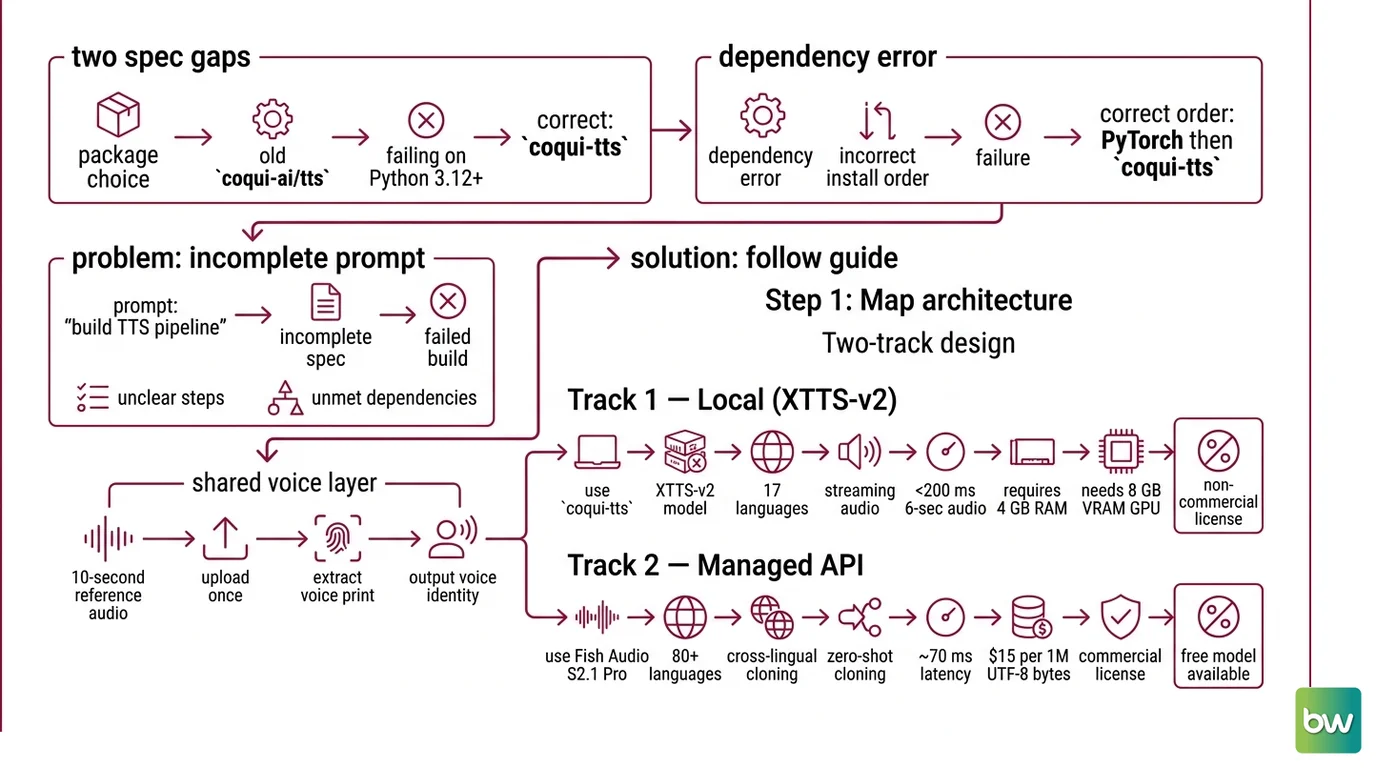
Here is what happens when you skip the spec. You ask your AI coding tool to build a voice cloning text-to-speech pipeline and it generates code that imports from the old coqui-ai/TTS package — abandoned, failing on Python 3.12+, and not what you want. If it gets the package right, it installs it before PyTorch, which triggers a dependency error you will not understand without reading the release notes.
And underneath all of that: the XTTS-v2 model weights carry a non-commercial license. Your AI coding tool does not know that. You do — now.
These are not edge cases. Every developer who hit these problems hit them because the prompt said “build a TTS pipeline” and stopped there. The spec did not mention the package name, the install order, or the license boundary.
That is what this guide fixes.
Step 1: Map the Two-Track Architecture
The pipeline has two synthesis tracks and one shared voice identity layer. Design them separately.
Track 1 — Local (XTTS-v2): Best for prototyping, privacy-sensitive environments, or low-volume cost experiments. The XTTS-v2 model via coqui-tts handles 17 languages (Coqui Docs), produces streaming audio at under 200 milliseconds of latency (idiap/coqui-ai-TTS GitHub), and needs nothing more than a 6-second reference audio clip. Hardware minimum: 4 GB RAM, 8 GB VRAM GPU for real-time synthesis.
Track 2 — Managed API (
Fish Audio S2.1 Pro): The production path. S2.1 Pro covers 80-plus languages with cross-lingual zero-shot cloning, time-to-first-audio of roughly 70 milliseconds (Fish Audio Blog), and pricing of $15.00 per 1 million UTF-8 bytes — per byte, not per character (Fish Audio Docs pricing). A free model (s2.1-pro-free) is available; check docs.fish.audio for current fair-use terms before relying on it in production. Commercial licensing is clean.
The shared voice identity layer: A 10-second reference audio clip goes in once and comes back as a reference_id (Fish Audio Docs TTS). That ID is the voice. You pass it on every subsequent synthesis call without re-uploading the audio.
Your pipeline has these parts:
- Reference audio management — stored, versioned, retrievable at startup
- Track selector — local XTTS-v2 for dev and non-commercial; Fish Audio API for production
- Synthesis layer — model initialization (XTTS-v2) or API call with streaming (Fish Audio)
- Output formatter — audio buffer, file, or real-time stream depending on the downstream consumer
The Architect’s Rule: If you cannot tell your AI coding tool which track handles which environment and why, it will pick one arbitrarily — and it will usually pick the wrong one for the deployment context.
The architecture is clear. The next question is what your AI coding tool needs to know to build it correctly — and that is almost entirely in the installation and license spec.
Step 2: Lock Down the Installation and License Spec
Environment checklist:
- Package:
coqui-tts— notTTS. The originalcoqui-ai/TTSpackage is abandoned (coqui-ai/TTS issue #3488). Only the idiap fork undercoqui-ttsis maintained, currently at version 0.27.5 (coqui-tts on PyPI). - Install order: PyTorch first, then
coqui-tts. Since v0.27.4, PyTorch is no longer bundled. Reverse this order and you get a broken import. - Python version:
>=3.10, <3.15(coqui-tts on PyPI) - Hardware for XTTS-v2: 4 GB RAM minimum; 8 GB VRAM GPU if you need real-time synthesis
- Fish Audio SDK:
fish-audio-sdkversion 1.3.0, Python>=3.9 - Voice reference for local synthesis: 6-second minimum audio sample (Coqui Docs)
- Voice reference for Fish Audio: 10-second reference audio (Fish Audio Docs TTS)
- License: XTTS-v2 model weights are Coqui Public Model License — non-commercial use only. Production deployments generating commercial output require Fish Audio, Cartesia Sonic, or another commercially licensed synthesis option.
The Spec Test: If your context file says “use coqui TTS” without naming the package, your AI will reach for whichever one its training data knows best — and that is the old, broken one. Name the package. Name the install order. Name the license constraint.
Compatibility & freshness notes:
- XTTS-v2 install package (BREAKING): Original
pip install TTS(coqui-ai/TTS) abandoned; fails on Python 3.12+. Usepip install coqui-tts(idiap fork) instead. Source: coqui-ai/TTS issue #3488.- PyTorch bundling removed (BREAKING): coqui-tts ≥0.27.4 no longer bundles PyTorch — install
torchseparately before installing coqui-tts. Source: coqui-tts on PyPI.- XTTS-v2 model weights (WARNING): Coqui Public Model License (CPML) restricts use to non-commercial only. Coqui AI shut down in January 2024; no new commercial licenses are being issued. Source: XTTS-v2 on Hugging Face.
With the environment spec locked, you can move to the synthesis layer itself.
Step 3: Specify the Cloning and Synthesis Layer
Two implementations. Different specs, different failure modes.
Local synthesis with XTTS-v2: Your AI needs to know:
- Model ID:
tts_models/multilingual/multi-dataset/xtts_v2(Coqui Docs) - Reference audio: local file path, minimum 6 seconds, single speaker
- Language code: match the synthesis language to the reference audio for best Prosody
- Output target: file path or in-memory buffer depending on downstream consumer
- Warmup cost: the model loads weights from disk on first call. This is a one-time startup cost, not a per-request cost. Tell your AI to initialize at startup, not per request.
The Vocoder inside XTTS-v2 converts the neural mel-spectrogram representation into the final waveform. You do not configure this directly, but your AI needs to understand that model load and audio generation are two separate operations with different timing characteristics.
Managed synthesis with Fish Audio: Your AI needs to know:
- Endpoint:
POST https://api.fish.audio/v1/tts(Fish Audio Docs TTS) - Auth:
Authorization: Bearer $FISH_API_KEY— environment variable, never hardcoded - Model:
s2.1-profor production,s2.1-pro-freefor development (Fish Audio Docs pricing) - Reference ID: clone once at startup, store the
reference_id, reuse on every call. This is the spec pattern that prevents redundant cloning on each request. - Streaming method:
tts.stream()for HTTP chunked output;tts.stream_websocket()for real-time token-by-token pipelines (Fish Audio Docs TTS) - Audio format:
pcmfor lowest latency;mp3for file output (default);wavoropuswhen the downstream consumer requires it
The Spec Test: If your context does not specify whether to stream via HTTP or WebSocket, the AI will default to HTTP. That is correct for most use cases. But if you are connecting a language model token stream directly to audio output, you need
stream_websocket(). Specify the downstream consumer, and the right method follows.
Specify these constraints and your AI coding tool has everything it needs to build both tracks. What remains is verifying it built them correctly.
Step 4: Validate Latency and License Compliance
Validation checklist:
- Streaming latency (XTTS-v2): target under 200 ms (idiap/coqui-ai-TTS GitHub). Failure symptom: audio starts after a multi-second wait — the model is running on CPU, not GPU.
- Time-to-first-audio (Fish Audio S2.1 Pro): target around 70 ms (Fish Audio Blog). Failure symptom: TTFA above 500 ms — the integration is re-cloning on each request instead of reusing a stored
reference_id. - Language coverage: XTTS-v2 covers 17 languages; Fish Audio covers 80-plus. Failure symptom: degraded prosody and unnatural rhythm on an unsupported language. Check coverage before committing to the local track.
- Reference ID reuse: confirm the integration calls the clone API once and stores the result. Every redundant clone call wastes latency and costs money.
- License boundary: confirm every environment using the XTTS-v2 model weights is non-commercial. Production deployments serving paying users require a commercial synthesis path.
- Rate limits (Fish Audio): Starter tier (below $100 cumulative spend): 5 concurrent requests; Elevated (at $100 or above): 15; High Volume (at $1,000 or above): 50 (Fish Audio Docs pricing). Validate your concurrency spec against your current tier before load testing.
Common Pitfalls
| What You Did | Why AI Failed | The Fix |
|---|---|---|
Used pip install TTS from an old tutorial | coqui-ai/TTS is abandoned; AI training data is stale on the package name | Specify coqui-tts (idiap fork) by name in your context file |
Installed coqui-tts before torch | PyTorch no longer bundled since v0.27.4; import fails at runtime | Specify install order: torch first, then coqui-tts |
| Skipped the license constraint | AI doesn’t know CPML blocks commercial use; it just builds what you ask | Specify the license boundary explicitly — which track handles which environment |
| Re-cloning on every Fish Audio request | No reference_id reuse spec; AI regenerates voice every call | Add a clone-once step at startup, store the ID, reference it in all synthesis calls |
| No audio format specified | AI defaults to mp3; downstream consumer needed pcm for low latency | Specify format alongside the streaming method in your context |
Pro Tip
The reference_id pattern in Fish Audio is the right model for any managed synthesis API that supports voice identity. Treat it like a session credential — create it once per voice at application startup, store it in a variable accessible to your synthesis layer, and pass it into every call. The same pattern applies to Cartesia Sonic and other APIs in this space. If your context file encodes this at the architecture level, your AI coding tool will implement it correctly across every synthesis call without you having to repeat the constraint per function.
Frequently Asked Questions
Q: How to build a voice cloning text-to-speech pipeline with XTTS-v2 and Fish Audio step by step?
A: The four-step framework in this guide covers it: map the two tracks (local vs. managed API), lock down the environment and license spec, specify the cloning and synthesis layer for each track, then validate latency and license compliance. The edge case most guides skip: if you need both tracks serving the same voice identity, the Fish Audio reference_id and the XTTS-v2 local model will not produce identical output from the same reference audio. Specify which track owns which environment in your architecture doc before you start building, not after.
Q: How to integrate a TTS API into a developer application with streaming audio output?
A: Fish Audio provides two streaming methods via fish-audio-sdk: tts.stream() delivers audio via HTTP chunked transfer, which fits most application integrations; tts.stream_websocket() is designed for pipelines that stream language model tokens directly into audio — both the input and output sides are streaming simultaneously. Choose based on your upstream: if you are piping an LLM output token-by-token into the voice layer, use the WebSocket method; for everything else, tts.stream() handles it with less complexity.
Your Spec Artifact
By the end of this guide, you should have:
- A two-track architecture map — which synthesis path handles which environment (dev/non-commercial vs. production/commercial), with the license boundary explicitly marked
- An environment and installation checklist — package names, install order, Python version, hardware requirements, and API keys scoped to the right environments
- A validation plan — latency targets per track, reference_id reuse verification, language coverage check, and rate limit alignment to your current Fish Audio tier
Your Implementation Prompt
Copy this into Claude Code, Cursor, or Codex at the start of your TTS pipeline session. Replace every bracketed value with your own constraints before running.
Build a two-track voice cloning TTS pipeline.

TRACK 1 — Local synthesis (dev and non-commercial environments only):
- Package: coqui-tts [version 0.27.5 or latest from coqui-tts on PyPI — NOT the TTS package]
- Install order: install torch first, then coqui-tts — required since v0.27.4
- Model ID: tts_models/multilingual/multi-dataset/xtts_v2
- Reference audio: [your 6-second minimum reference file path]
- Language code: [your target language, e.g. "en"]
- Output: [file path or in-memory buffer]
- Initialize model at startup — warmup is a one-time cost, not per-request
- License boundary: this track must NOT run in any environment serving paying users or commercial output

TRACK 2 — Fish Audio API (production and commercial environments):
- SDK: fish-audio-sdk 1.3.0, Python >=3.9
- Endpoint: POST https://api.fish.audio/v1/tts
- Auth: FISH_API_KEY from environment variables — never hardcode
- Model: [s2.1-pro for production / s2.1-pro-free for development]
- Reference audio: [your 10-second reference file path]
- Clone step: call clone API once at application startup → store the reference_id
- All synthesis calls: pass the stored reference_id — do not re-clone per request
- Streaming method: [tts.stream() for HTTP chunked / tts.stream_websocket() for LLM token streaming]
- Audio format: [pcm for low latency / mp3 for file output / wav or opus if required by consumer]

VALIDATION TARGETS:
- XTTS-v2 streaming latency: under 200ms (failure = running on CPU, check GPU availability)
- Fish Audio TTFA: target ~70ms (>500ms failure = reference_id not being reused, check clone step)
- Language coverage: verify target language is supported by the chosen track before committing
- Rate limit tier: [confirm concurrent request limit matches your Fish Audio spending tier]
- License: confirm every environment using Track 1 is non-commercial

ERROR HANDLING:
- Track 1 model load failure: surface error clearly — no silent fallback to Track 2
- Track 2 API error: [retry strategy, e.g. exponential backoff with 2 retries max]
- Missing FISH_API_KEY: fail at startup with a clear error message — never proceed without auth
Ship It
You now have a two-track specification that tells your AI coding tool exactly what to build — the right package, the right order, the license boundary between tracks, and how to manage voice identity across synthesis calls. The XTTS-v2 track handles your Phoneme-to-waveform prototyping without cloud costs, built on a Tacotron-lineage architecture that the idiap fork has kept current. The Fish Audio track handles production scale with commercial licensing. Build one track, validate it, then wire the second.
— Max
AI-assisted content, human-reviewed. Images AI-generated. Editorial Standards · Our Editors