How to Build a Training Data Quality Pipeline with Cleanlab, Snorkel, and Lightly in 2026
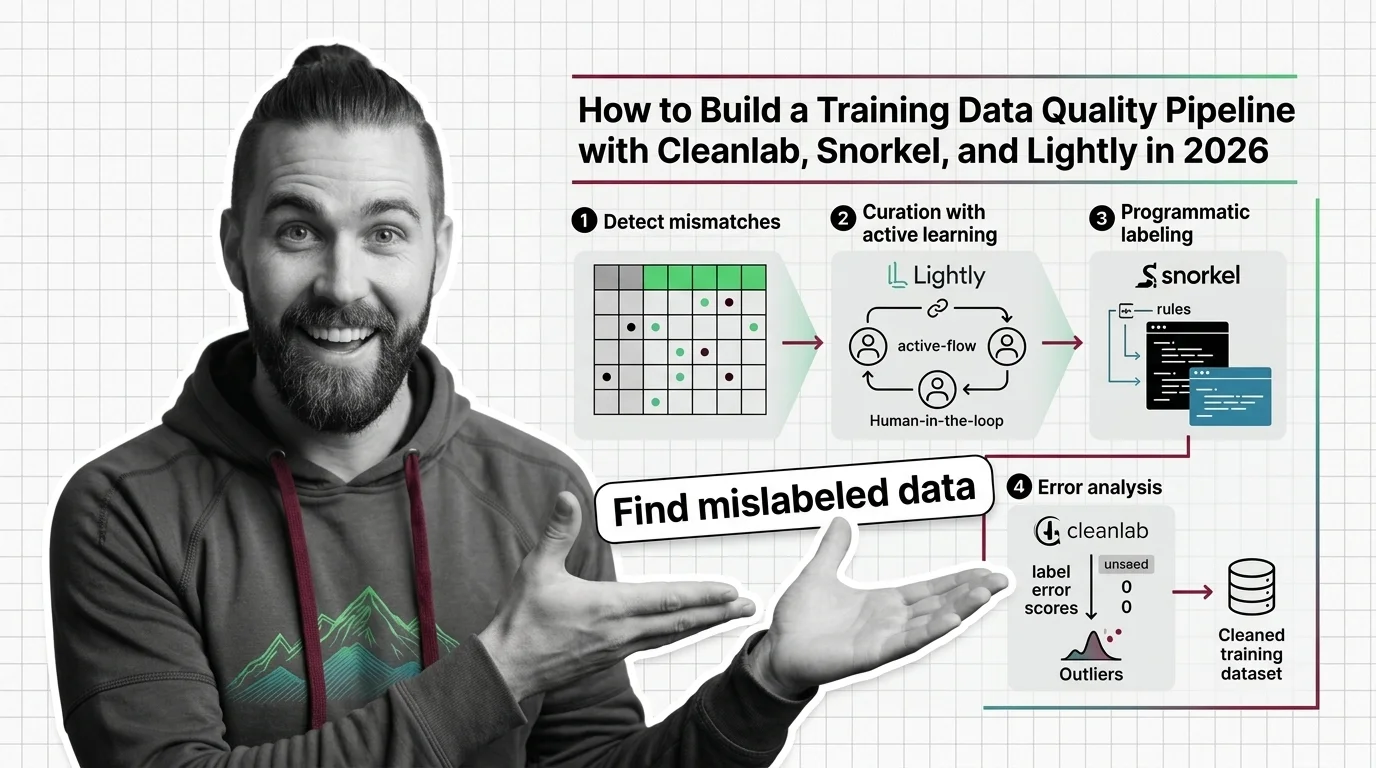
TL;DR
- A data quality pipeline is three separate jobs — curate what goes in, label it, and audit the labels. Build them as distinct stages, not one script.
- Define what “a label error” means for your project before you run any tool. The tools detect what you specify, not what you hope.
- Treat the audit as a measurement, not a vibe. You should be able to show that label quality went up after a pass, with numbers you can point at.
You fine-tune a classifier. Accuracy looks fine in your notebook. You ship it. Two weeks later support tickets pile up because the model confidently labels the wrong thing — and when you trace it back, the same mistake is sitting in your training set, repeated hundreds of times. Nobody audited the labels. The model didn’t fail. It learned exactly what you gave it.
That’s the pattern I see most. the data is the bug, and there’s no stack trace for data.
Before You Start
You’ll need:
- An AI coding tool you already use (Claude Code, Cursor, or Codex) to scaffold the pipeline stages
- A working understanding of Training Data Quality and where Label Noise comes from
- A clear picture of one dataset you actually want to clean — not a hypothetical one
This guide teaches you: how to decompose data quality into three independent stages — curation, labeling, and auditing — so each tool does one job well instead of one script trying to do everything.
The Model That Learned Your Mistakes
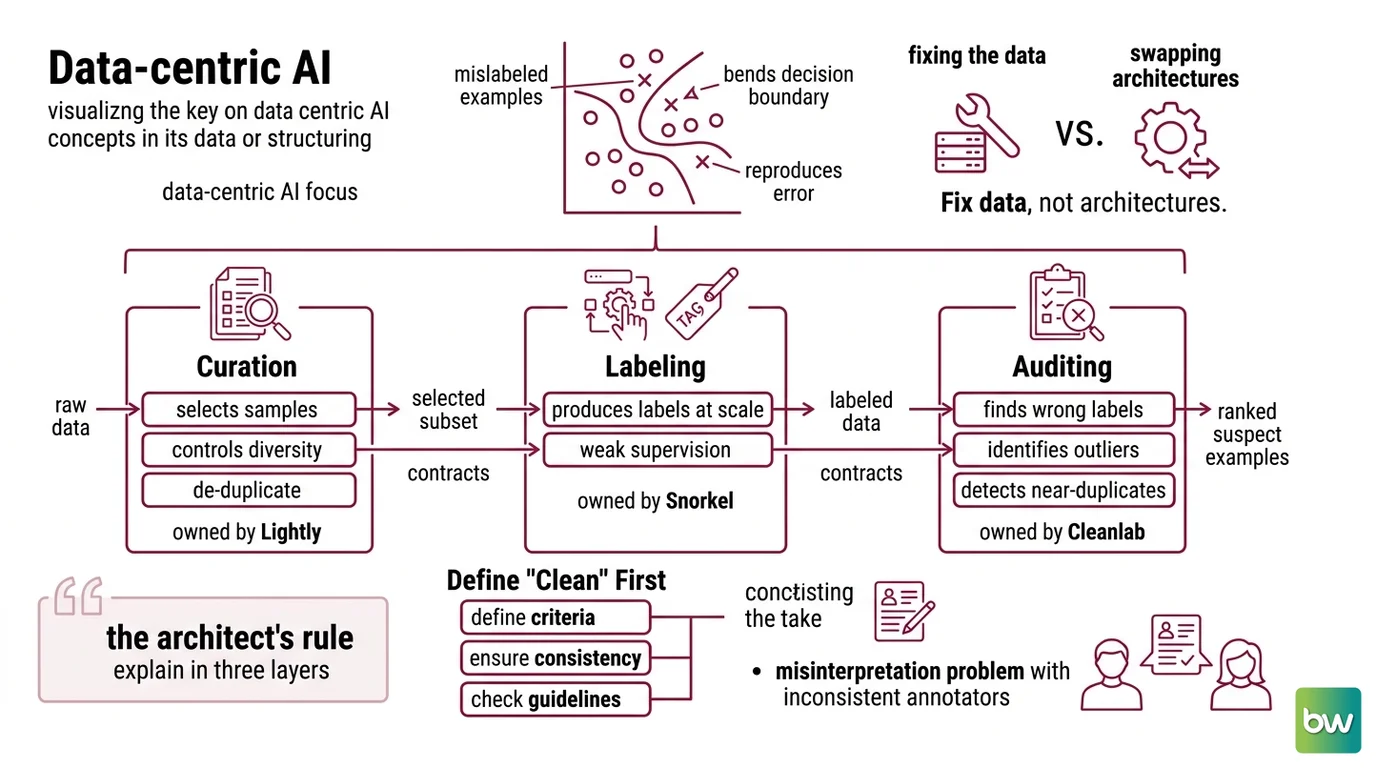
Most “the model is dumb” reports are really “the labels were wrong” reports. A handful of mislabeled examples in a small training set bends the decision boundary, and the model dutifully reproduces your error at inference time. This is the whole premise of Data-Centric AI: you get more out of fixing the data than out of swapping architectures.
It passed eval on Friday. On Monday the same model started misclassifying a whole category — because the new batch of labels came from a different annotator who interpreted the guideline differently, and nobody checked the labels against the old ones before training.
Step 1: Separate the Three Jobs Your Pipeline Actually Does
People reach for “a data cleaning script” and end up with one tangled file that selects samples, generates labels, and tries to catch errors all at once. When it breaks, you can’t tell which job broke. Decompose first.
Your pipeline has these parts:
- Curation — decides which raw samples are worth keeping and labeling. This is where you control diversity, dedup, and Data Provenance. Owned by Lightly.
- Labeling — produces labels at scale when you don’t have enough hand-labeled data. This is programmatic Weak Supervision. Owned by Snorkel.
- Auditing — finds the labels that are wrong, the samples that are outliers, and the near-duplicates that inflate your metrics. Owned by Cleanlab.
Each stage has a different input and a different output. Curation takes raw data, returns a selected subset. Labeling takes the subset, returns labels. Auditing takes labeled data, returns a ranked list of suspect examples. Three contracts. Three failure modes you can isolate.
The Architect’s Rule: If you can’t explain the pipeline in three layers, the AI can’t build it either — and you can’t debug it either.
Step 2: Define What “Clean” Means Before You Touch the Data
Here’s the step everyone skips. You can’t detect a label error until you’ve written down what a correct label is. The tools are precise. Your definition has to be too.
Context checklist — specify these before the first run:
- Label schema and edge cases — the exact classes, and the rule for ambiguous samples that sit between two of them
- Duplicate policy — what counts as a duplicate. Exact match? Near-match above a similarity threshold? This drives your Data Deduplication rule
- Outlier tolerance — how far from the distribution a sample can sit before it’s flagged for review instead of trained on
- Class balance target — whether you’re correcting for Class Imbalance or preserving the real-world ratio
- Stack and versions — pin them, because these tools have real version constraints (see the note below)
The Spec Test: If your duplicate policy doesn’t define a similarity threshold, the AI will pick one for you — usually exact-match — and your near-duplicate leakage between train and test sails straight through, inflating accuracy you don’t actually have.
Version & compatibility notes:
- Cleanlab: Use 2.9.0 (released January 13, 2026), which requires Python 3.10 or newer (cleanlab PyPI).
- Snorkel (open-source): Latest is 0.10.0 (February 2024), Python 3.11+. The open-source package is in low-maintenance mode — the team’s active development moved to the commercial Snorkel Flow platform (snorkel PyPI). Expect slow updates; pin your version and don’t wait on new OSS features.
- Lightly: Use 1.5.24 (released May 2026). Pin your project to Python 3.12 or lower — Python 3.13 is not yet supported (lightly PyPI). Note that LightlyOne is being superseded by LightlyStudio for new curation work.
Step 3: Sequence the Pipeline — Curate, Label, Audit
Order matters, because each stage feeds the next. Get it wrong and you’ll spend labeling budget on samples you should have thrown away.
Build order:
- Curate first, with Lightly — because labeling and auditing both cost time you don’t want to spend on redundant or low-value samples. Lightly’s approach uses self-supervised embeddings plus active-learning selection to pick a diverse, informative subset from a large pool, which is its core curation method (Lightly Blog). For vision datasets especially, this is where you kill redundancy before it costs you anything downstream.
- Label next, with Snorkel — because once you’ve chosen what to keep, you need labels for it. Snorkel’s mechanism is labeling functions: small programmatic heuristics that each vote a label or abstain, combined into probabilistic labels by its LabelModel (snorkel PyPI). Use the maintained
LabelModelAPI — olderMeTaLandDryBellnames are research artifacts, not current packages. - Audit last, with Cleanlab — because auditing only makes sense once labels exist. Cleanlab runs
Confident Learning to find label errors, outliers, duplicates, and class-imbalance issues, and its
Datalabclass is the single entry point across text, image, audio, and tabular data (Cleanlab Docs). It’s model-agnostic — it works from the predicted probabilities of whatever model you already have.
For each stage, your context must specify:
- What it receives (raw pool / selected subset / labeled set)
- What it returns (subset / labels / ranked suspect list)
- What it must NOT do (curation must not relabel; auditing must not silently drop samples)
- How to handle failure (what happens to abstained labels, to flagged outliers, to ties)
The output of stage three usually loops back: the suspect list from Cleanlab tells you which labels to fix or which labeling functions to rewrite. A data quality pipeline is a loop, not a one-shot.
Step 4: Prove the Data Got Better
“It looks cleaner” is not a result. You specified what clean means in Step 2 — now measure against it.
Validation checklist:
- Label-error count dropped — failure looks like: you fixed flagged labels but the re-run surfaces the same count, meaning your fixes introduced new errors
- Train/test duplicate leakage is zero — failure looks like: suspiciously high eval accuracy that collapses on a truly held-out set
- Outlier set was reviewed, not deleted — failure looks like: your rare-but-valid edge cases vanished, and the model now fails on exactly those in production
- Label agreement improved — failure looks like: the LabelModel’s confidence stayed flat, meaning your labeling functions conflict more than they agree
Common Pitfalls
| What You Did | Why AI Failed | The Fix |
|---|---|---|
| One “clean my data” script | Curation, labeling, and auditing have different inputs — one function picks the wrong priority | Decompose into three stages with explicit contracts |
| No duplicate threshold specified | Tool defaults to exact-match, near-duplicates leak between train and test | Define a similarity threshold in Step 2 |
| Deleted every flagged outlier | Rare-but-valid edge cases get thrown out, model fails on them in production | Route outliers to review, not to the trash |
| Audited before curating | Spent labeling and audit time on redundant samples | Curate first — never audit data you’d have discarded |
Pro Tip
Treat the suspect list as a spec change, not a cleanup chore. When Cleanlab flags the same class of error repeatedly, that’s not noise to delete — it’s a labeling guideline that was never written down. Fix the guideline, regenerate the labels, and the whole class of error disappears at the source. The best data quality work edits the rules upstream, not the rows downstream.
Frequently Asked Questions
Q: How to detect mislabeled data in a training set? A: Run a model to get predicted probabilities, then feed them to Cleanlab’s confident learning, which ranks examples by how likely each label is wrong. Watch the threshold: a strict cutoff misses subtle errors, a loose one floods you with false positives you’ll have to triage by hand.
Q: How to build a data cleaning and curation pipeline step by step? A: Decompose into three stages — curate (Lightly), label (Snorkel), audit (Cleanlab) — each with its own input and output contract. The detail most people miss: make it a loop. The audit stage should feed corrections back to labeling, not end the pipeline.
Q: How to use Cleanlab to find label errors and outliers?
A: Use the Datalab class as your single entry point — it detects label errors, outliers, duplicates, and class imbalance across text, image, audio, and tabular data. One tip: Cleanlab is model-agnostic, so the quality of your flagged list depends on the predicted probabilities you feed it.
Q: How to curate a training dataset with active learning using Lightly? A: Lightly builds self-supervised embeddings, then uses active-learning selection to pick a diverse, informative subset instead of random sampling. Pin to Python 3.12 or lower for now, and for new projects start on LightlyStudio rather than the older LightlyOne.
Your Spec Artifact
By the end of this guide, you should have:
- A three-stage pipeline map — curate, label, audit — with the input and output written for each stage
- A “what clean means” constraint list — label schema, duplicate threshold, outlier tolerance, class-balance target
- A validation checklist with a named failure symptom for each check, so a passing run is a measured result, not a feeling
Your Implementation Prompt
Paste this into your AI coding tool to scaffold the three pipeline stages. Fill every bracket with the values you defined in Step 2 — the prompt is built around your decomposition, not a generic template.
Build a training data quality pipeline as three independent stages. Do not
merge them into one function — each stage has its own input and output contract.

STAGE 1 — CURATION (Lightly, pin Python <=3.12):
  Input: raw sample pool at [path to raw data]
  Output: a selected subset
  Method: self-supervised embeddings + active-learning selection
  Constraint: must NOT relabel; selection only
  Duplicate policy: flag pairs above similarity threshold [your threshold]

STAGE 2 — LABELING (Snorkel OSS 0.10.0, use the maintained LabelModel API):
  Input: the curated subset
  Output: probabilistic labels
  Label schema: [your exact classes]
  Ambiguous-sample rule: [your rule for samples between two classes]
  Constraint: abstained labels must be routed to [review queue], not dropped

STAGE 3 — AUDITING (Cleanlab 2.9.0, Python >=3.10, via the Datalab class):
  Input: the labeled set + model predicted probabilities
  Output: a ranked list of suspect examples
  Detect: label errors, outliers, duplicates, class imbalance
  Outlier tolerance: [how far from the distribution before flag-for-review]
  Constraint: must NOT silently delete flagged samples

VALIDATION (run after a full pass):
  - Confirm label-error count dropped on re-run
  - Confirm zero train/test duplicate leakage
  - Confirm flagged outliers were reviewed, not deleted
  - Loop suspect list back to Stage 2 to fix labeling functions
Ship It
You now think about data quality as three jobs instead of one mess: curate what goes in, label it, audit the labels — then loop. The next time a model “gets dumber,” you’ll know to check the data before the architecture, and you’ll have a pipeline that tells you exactly which stage went sideways.
AI-assisted content, human-reviewed. Images AI-generated. Editorial Standards · Our Editors