Build a Stateful Agent with LangGraph, Mem0, and Zep in 2026
TL;DR
- A stateful agent needs three storage layers — short-term thread state, long-term user memory, and a temporal knowledge graph — not one giant memory blob.
- The build order matters: get the checkpointer working first, then layer memory on top. Skip steps and you get silent corruption you only discover in production.
- The right tool depends on what you are storing. Match the tool to the layer, not the layer to the tool.
You shipped the agent on Friday. By Tuesday morning the support inbox is full. Users say it forgets their account number two messages in. It re-asks questions it already answered. Sometimes it confidently quotes a fact from a conversation that happened three weeks ago — except it gets the fact wrong. The model is fine. The framework is fine. The Agent State Management layer never got specified.
Before You Start
You’ll need:
- An AI coding tool — Cursor, Claude Code, or Codex
- A working understanding of LangGraph graphs and nodes
- Postgres 14+ available (managed or self-hosted)
- A clear answer to one question: “What does my agent need to remember, for whom, and for how long?”
This guide teaches you: How to decompose agent memory into three distinct storage layers, pick the right 2026 tool for each, and wire them together so the AI coding tool can generate the integration without inventing schemas.
The Agent That Forgot Its Own Name
Here is the failure mode I see in code reviews every week.
Developer wraps a
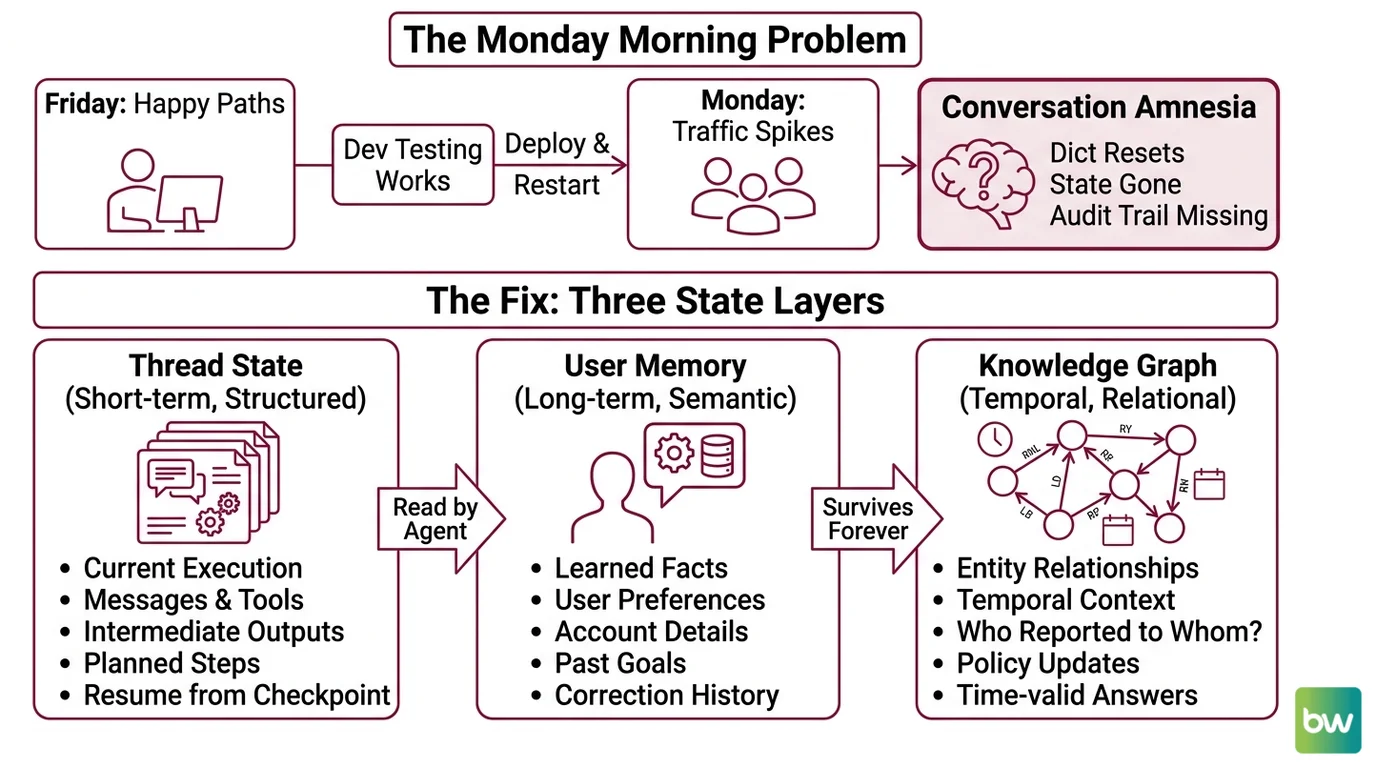
Multi Agent Systems graph around an LLM, throws conversation history into a Python dict keyed by session_id, and ships. It works on Friday because Friday traffic is one developer testing happy paths. On Monday, the process restarts during deploy, the dict resets, and every active conversation amnesiacs at once. Then the team adds Redis. State now survives restarts — but there is still no concept of “what does this user prefer” and no audit trail when a user complains the agent invented a refund policy.
It worked on Friday. On Monday, the agent forgot every conversation in flight.
The fix is not “add more memory.” The fix is recognizing that “memory” is three different problems with one wrong solution.
Step 1: Separate the Three State Layers
Before you write a single line of integration code, draw the layers. An agent that needs to “remember things” almost always needs all three of these — and the boundaries between them are what make the system debuggable.
Your system has these parts:
- Thread state (short-term, structured) — The current graph execution. Messages, tool calls, intermediate node outputs, the next planned step. Keyed by
thread_id. This is what Agent Planning And Reasoning reads on every step. If the process crashes, the agent must resume from the last checkpoint without re-running tool calls. - User memory (long-term, semantic) — Facts the agent learned about this user across all their threads. Preferences, account details, past goals, things they corrected the agent on. Survives forever. Queried by user identity, not by conversation.
- Knowledge graph (temporal, relational) — Entities and the relationships between them, with valid-from / valid-to timestamps. Lets the agent answer “who reported to whom in Q1” or “what was the policy before the March update” without confusing past with present.
The Architect’s Rule: If you can’t draw the three layers on a whiteboard before you start coding, the AI coding tool will smear them into one table and you will spend two weeks unsmearing it.
These are not interchangeable. Putting user preferences inside the thread checkpoint means they vanish when the thread ends. Putting raw conversation history into a knowledge graph means you pay graph-write latency on every message. Each layer has a job. Match the tool to the job.
Step 2: Specify the Tool for Each Layer
Now lock down what your AI coding tool needs to know before generating any integration code. The point of this step is to remove every defaulted-to-training-data decision from the AI’s pencil.
Layer 1 — Thread state: LangGraph PostgresSaver
This is the LangGraph built-in Agent Memory Systems primitive for thread-level checkpoints. It writes the full graph state to Postgres after every node execution, so a crashed process resumes mid-graph instead of restarting.
- Package:
langgraph-checkpoint-postgres, latest 3.0.5 as of March 2026 (PyPI). - Classes:
PostgresSaver(sync) andAsyncPostgresSaver(async), imported fromlanggraph.checkpoint.postgresandlanggraph.checkpoint.postgres.aio(LangChain Reference). - Setup requirement: call
.setup()once on first run to create the checkpointer tables. Manual psycopg connections must be opened withautocommit=Trueandrow_factory=dict_row(LangChain Docs). - Dependencies: Python 3.10 or higher, Psycopg 3 (PyPI).
Layer 2 — User memory: Mem0
Mem0 is the OSS memory layer that handles the “what does this user prefer” problem. It extracts facts from conversation, deduplicates them, and serves them back via semantic retrieval.
- Latest stable: Python v1.0.11, Node SDK v2.4.6, both released April 2026 (Mem0’s GitHub releases).
- Storage primitives: vector + graph + key-value; graph memory unlocks at the Pro tier (Mem0 Blog).
- Managed pricing: Free covers 10,000 adds and 1,000 retrievals per month; Starter $19, Growth $79, Pro $249 — graph memory is Pro-only (Mem0’s pricing page).
- OSS line is v1.0.x; v2.0.0 is beta as of May 2026, not for production.
Layer 3 — Temporal knowledge graph: Zep (or Graphiti self-hosted)
Zep is the cloud product for temporal knowledge graphs over agent context, built on Graphiti, an open-source temporal graph engine.
- Retrieval latency under 200ms P95 on a single call (Zep).
- Benchmarks: up to 18.5% accuracy improvement and 90% latency reduction versus baseline on LongMemEval (Zep arXiv paper); 80.32% accuracy at 189ms on LoCoMo (Zep).
- Compliance: SOC 2 Type II and HIPAA (Zep).
- Pricing: free tier without a credit card plus sales-led enterprise plans — Zep does not publish self-serve dollar pricing.
- Self-host note: the full Zep stack is cloud-only in 2026. Community Edition was deprecated in April 2025 with further retirements in February 2026 (Zep Blog). For on-prem, run Graphiti directly (Apache 2.0, Zep’s GitHub repository) — but you rebuild the application layer yourself.
Security & compatibility notes:
- langgraph-checkpoint-postgres metadata break: Upgrading from 2.0.21 to 2.0.22 broke metadata serialization — non-JSON objects like
HumanMessagein metadata now raise errors, and a recent version dropped thecw.task_pathcolumn. Action: pin the version, test migrations on a staging schema, and keep metadata JSON-serializable. (LangGraph GitHub issue #5862)- Zep Community Edition deprecated: Self-hosting the full Zep stack is no longer supported as of February 2026. Action: choose Zep Cloud or self-host Graphiti directly — do not assume the “Zep self-host” path still exists.
- Mem0 v2.0/v3.0 beta: v2.0.0 (Python) and v3.0.0 (Node) changed parameter casing and removed deprecated parameters. Action: pin to v1.0.11 / v2.4.6 for production until v2.0 leaves beta.
The Spec Test: If your context file does not name an exact version for
langgraph-checkpoint-postgres, the AI tool will pick whatever it remembers from training data and you will inherit whichever breaking change matches that version.
Step 3: Build the Layers in Dependency Order
Order matters because each layer depends on the one below. Skip the order and you debug three problems at once.
Build order:
- Postgres + PostgresSaver first — no dependencies. Get a graph that crashes in the middle of a tool call and resumes correctly. Until this works, nothing else matters because you cannot trust the agent state at all.
- Mem0 second — depends on Postgres being up (Mem0 OSS can also use Postgres as a backend). Wire the “after each turn, extract facts about the user” hook. Test that a fact stated in thread A is retrievable in thread B for the same user.
- Zep last — depends on real conversation data already flowing through layers 1 and 2. Zep adds value when you need temporal queries (“what did the user say their target was before April”). Adding it before you have real conversational traffic gives you nothing to query.
For each layer, your AI coding tool’s context must specify:
- Inputs — what goes in. PostgresSaver: the
(state, config)pair from a LangGraph node. Mem0: user identifier and message turn. Zep: user identifier, session ID, and message. - Outputs — what comes back. PostgresSaver exposes
.put,.put_writes,.get_tuple,.list, and.delete_thread()(LangChain Reference) — these are the Agent Frameworks Comparison-relevant API surface. Mem0 returns memory IDs and retrieved facts. Zep returns a context block to inject into the prompt. - Constraints — what each layer must NOT do. PostgresSaver: no non-JSON-serializable objects in metadata. Mem0: never the source of truth for the current turn. Zep: not queried on every message — only when the agent needs historical context.
- Failure mode. Checkpointer down: fail loud, refuse new turns. Mem0 down: degrade gracefully. Zep down: same as Mem0 — enrichment, not a hard dependency.
Step 4: Validate the Wiring Before You Trust It
The agent will look like it works long before it actually works. Run these four checks and watch what happens. Each one targets a specific failure mode you cannot see from happy-path traffic.
Validation checklist:
- Hard restart mid-tool-call — Kill the process while a tool is executing. On restart, the agent should resume from the checkpoint before the tool call, re-issue it, and not double-charge or double-write. Failure looks like: the tool runs twice (no resumption from checkpoint) or the agent skips it entirely (checkpoint written before tool result was confirmed).
- Cross-thread memory leak — User A says “my account number is 1234” in thread A. Start thread B as User B. Ask thread B for “my account number.” If User B gets 1234, your Mem0 wiring keys on the wrong identifier. Failure looks like: agent confidently leaks one user’s data to another.
- Temporal query honesty — Update a fact at time T. Ask the agent the same question with
valid_at=T-1. The agent must return the old fact. Failure looks like: the knowledge graph returns the latest value regardless of query time, which means you have a key-value store, not a temporal graph. - Metadata serialization — Put a
HumanMessageobject in your checkpointer metadata, then upgradelanggraph-checkpoint-postgrespast 2.0.21. Failure looks like: serialization error on next checkpoint write. This is the upgrade trap from the 2026 breaking change.
Common Pitfalls
| What You Did | Why AI Failed | The Fix |
|---|---|---|
Stored everything in one Postgres table called agent_memory | The AI tool merged thread state, user facts, and entity relations into one schema; queries became slow and ambiguous | Three tools, three schemas, one per layer |
Skipped .setup() and connected with raw psycopg defaults | Tables never created; transactions held open because autocommit=False | Call .setup() once; pin autocommit=True, row_factory=dict_row |
Put HumanMessage objects in checkpoint metadata | Worked on 2.0.21, broke after upgrade — non-JSON metadata raises errors | Keep metadata JSON-serializable; store rich objects in state, not metadata |
| Recommended self-hosting “Zep” because the docs used to mention it | Community Edition is deprecated as of April 2025 with further retirements in February 2026 | Use Zep Cloud, or self-host Graphiti directly |
| Used Mem0 OSS v2.0.0 because it was “newer” | v2.0 is beta with breaking parameter changes | Pin to v1.0.11 (Python) or v2.4.6 (Node) until v2.0 ships stable |
Pro Tip
Treat memory layers like database tables, not one big RAM. You would not put invoices in your users table because both involve money. Same here: thread state, user facts, and temporal relationships have different lifecycles, access patterns, and failure semantics. The moment you can name the lifecycle of a piece of data — “this dies with the conversation,” “this lives until the user leaves,” “this is a fact about the world” — you know which layer it belongs in. Write the lifecycle on a sticky note before you write the schema.
Frequently Asked Questions
Q: How to implement agent state management step by step in 2026?
A: Pick your three layers first — thread state, user memory, knowledge graph — then build them in that order. Get LangGraph PostgresSaver working (with .setup() and pinned autocommit=True, row_factory=dict_row) before adding Mem0, and add Zep last when you have real traffic. Most teams skip the order and end up debugging three layers at once. Build, validate, then layer.
Q: How to use LangGraph checkpointers for long-running agents?
A: Use AsyncPostgresSaver for async graphs and call .setup() exactly once at deploy time. Lean on .get_tuple to inspect a thread mid-flight when debugging — it returns the full state at any checkpoint. Watch the metadata trap from issue #5862: only JSON-serializable values in metadata, otherwise an upgrade past 2.0.21 will start raising errors on writes.
Q: When should you use Mem0 vs Zep vs Letta for agent memory? A: Mem0 for “remember user-level facts across sessions” — vector + graph + KV with cheap entry pricing. Zep for “answer temporal questions about a knowledge graph” — sub-200ms retrieval, strong LongMemEval and LoCoMo numbers, but cloud-only. Letta (formerly MemGPT, v0.16.7) when you want self-editing memory built into the agent loop itself. They overlap; pick by the query you actually run.
Your Spec Artifact
By the end of this guide, you should have:
- A three-layer memory map naming exactly what goes in each layer (thread state / user memory / temporal graph) and what stays out
- A constraint list with pinned versions, required setup calls, and connection parameters for each tool
- A four-test validation checklist (hard restart, cross-thread leak, temporal query, metadata serialization) you run before declaring the agent stateful
Your Implementation Prompt
Paste this into Claude Code, Cursor, or Codex inside the repo where your agent lives. Replace every bracketed placeholder with the value from your spec artifact. The prompt mirrors the four steps above so the AI tool generates one layer at a time, in dependency order, instead of one undifferentiated memory module.
You are integrating a three-layer stateful memory system into an existing
LangGraph agent. Build it one layer at a time. Do not combine layers into
one storage primitive.

## Layer 1 — Thread state (LangGraph PostgresSaver)

- Package: langgraph-checkpoint-postgres, version [pin exact version, e.g. 3.0.5]
- Class: [PostgresSaver | AsyncPostgresSaver] — match my graph's [sync | async] style
- Connection string env var: [POSTGRES_URL]
- Schema: [shared | dedicated schema name]
- Required: call `.setup()` once at startup; open psycopg connections with
  autocommit=True and row_factory=dict_row
- Constraint: only JSON-serializable values in checkpoint metadata
- Failure mode: if checkpointer is unreachable, fail loud, do not accept new turns

## Layer 2 — User memory (Mem0)

- Mode: [self-hosted OSS v1.0.11 | Mem0 managed tier: free | starter | growth | pro]
- Storage backend (OSS only): [Postgres connection — reuse Layer 1 instance | separate]
- User identifier source: [auth subject claim | internal user UUID]
- Hook point: [after each assistant turn | only on explicit fact statements]
- Constraint: never the source of truth for the current turn — Layer 1 owns that
- Failure mode: degrade gracefully, agent continues without long-term memory

## Layer 3 — Temporal knowledge graph (Zep or Graphiti)

- Choice: [Zep Cloud | Graphiti self-hosted]
- Auth: [ZEP_API_KEY env var | Graphiti Neo4j connection]
- Query trigger: [only when agent calls a "lookup_history" tool | on every turn]
- Constraint: not a hot-path dependency; treat as enrichment
- Failure mode: skip context injection, log the miss, continue

## Validation gate (run before merge)

After integration, generate a test script that exercises:

1. Hard restart mid-tool-call — process killed, resumes from last checkpoint,
   tool not double-executed
2. Cross-thread memory leak — User A's fact does not surface for User B
3. Temporal query honesty — querying with valid_at=[past timestamp] returns
   the historical value, not the current one
4. Metadata serialization — checkpoint metadata stays JSON-serializable
   under realistic message types

Generate code for Layer 1 only first. Do not touch Layers 2 or 3 until I
confirm Layer 1 passes test (1).
Ship It
You now have a mental model for Agent State Management that survives a code review. You can name what each layer does, why it exists, and which 2026 tool fills it — which means you can read someone else’s stateful agent and find the bug in the right layer instead of rewriting all of it. Ship one layer at a time. Validate. Then add the next.
AI-assisted content, human-reviewed. Images AI-generated. Editorial Standards · Our Editors