How to Build a Self-Hosted Model Router with LiteLLM, Bifrost, and Braintrust in 2026
TL;DR
- A model router needs a three-tier spec before any config is written — FAST, STANDARD, and REASONING tiers with explicit fallback chains per tier.
- LiteLLM’s built-in Complexity Router classifies queries across 7 dimensions at sub-millisecond latency; two or more reasoning markers trigger a hard override to the REASONING tier, regardless of the weighted score.
- Braintrust Gateway quality routing only activates after evaluation experiments are wired up — caching and fallback headers are available immediately, quality-based model selection is not.
Everything sent to the same model. Works fine Tuesday. Wednesday, a junior dev adds a customer support chatbot to the same endpoint. The API bill for the week is four times the monthly budget.
Or you cut costs by routing everything through the cheapest model — and now your code reviewer returns suggestions that look plausible but break at runtime. The model never had the reasoning capacity to catch the edge case.
Both failures share one root cause: no routing contract. One model for every query, regardless of what the query actually needs. That’s fixable. Here’s the spec.
Before You Start
You’ll need:
- An AI coding tool: Claude Code, Cursor, or Codex
- A working understanding of Model Routing, LiteLLM, and API Gateway concepts
- A clear picture of your three model tiers — which providers, which deployment names
- Redis, if you’re running more than one LiteLLM instance (required for shared Rate Limiting)
Alternatives this guide doesn’t cover: Portkey, Helicone, and Openrouter are managed gateway alternatives with overlapping routing features. This guide focuses on the self-hosted path where you control tier definitions, fallback chains, and data.
This guide teaches you: How to decompose a multi-model architecture into a three-tier routing spec and wire it up with Braintrust Gateway for quality-tied selection, an LLM Gateway layer for throughput, and a Fallback Strategy that survives real production failures.
The One-Model-for-Everything Tax
Here’s what happens when you skip the routing spec.
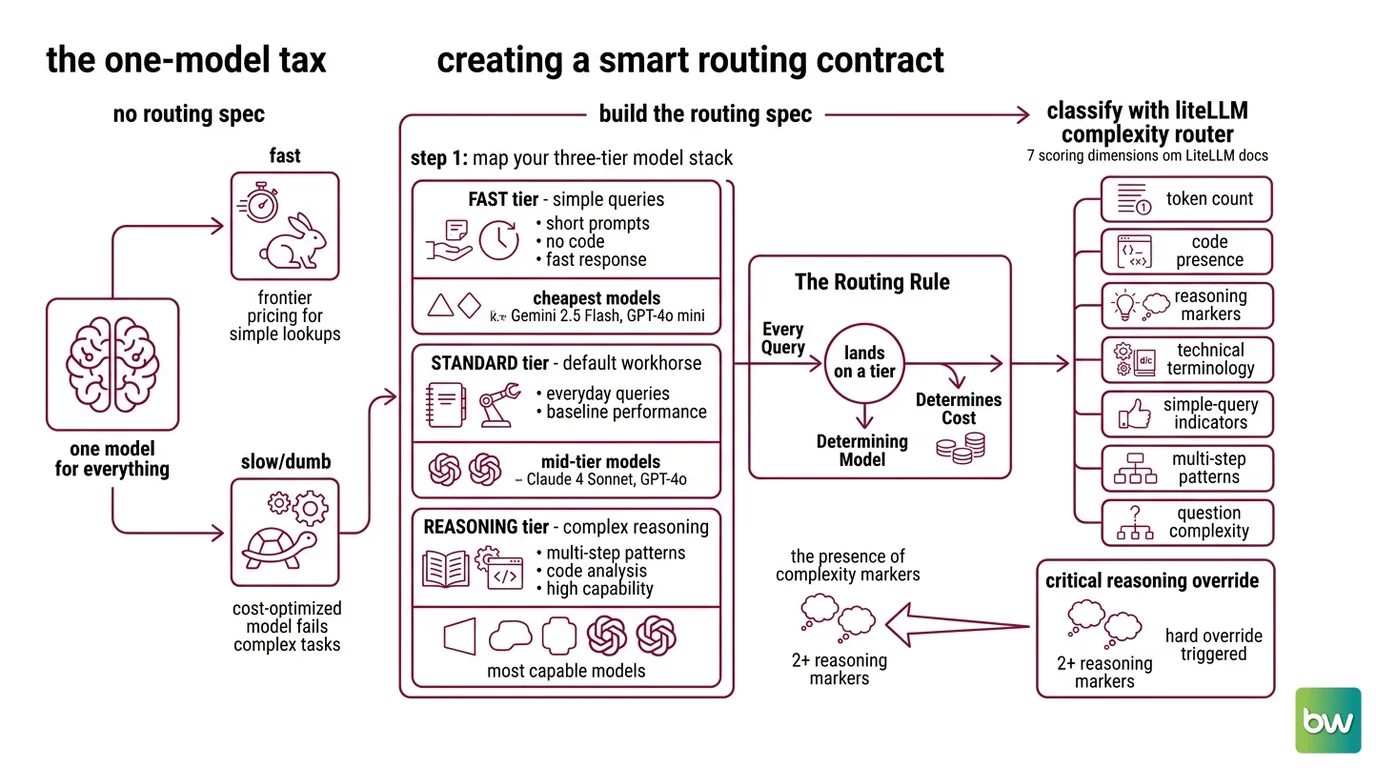
You pick one model that handles most queries well. For simple lookups — “what’s the return policy,” “summarize this paragraph” — you’re paying frontier pricing for work a cheap model handles correctly in half the time. For complex reasoning tasks, you go the other direction: a cost-optimized model returns something that passes a quick read but fails in production.
The router doesn’t eliminate these tradeoffs. It makes them intentional. You decide which signals move a query up or down the tier stack — not the model’s training tendencies. But only after you’ve written the spec.
Step 1: Map Your Three-Tier Model Stack
Before you touch a config file, you need a model map. Three tiers. Each with a defined role, a specific model assignment, and a cost ceiling.
Your three tiers:
- FAST tier — simple queries: short prompts, no code, no reasoning markers, fast response required. Cheapest model that gets the answer right. Candidates: Gemini 2.5 Flash, GPT-4o mini, or equivalent.
- STANDARD tier — the default for everything that doesn’t qualify as FAST or REASONING. Your everyday workhorse: Claude 4 Sonnet, GPT-4o, or whatever your baseline performance bar requires.
- REASONING tier — queries with multi-step patterns, explicit reasoning markers, or code that requires careful analysis. Most capable model in your stack. Highest cost per token.
The Routing Rule: Every query lands on a tier. The tier determines the model. The model determines the cost. This map is the core artifact your routing contract is built from.
LiteLLM’s Complexity Router classifies queries across 7 scoring dimensions (LiteLLM Docs): token count, code presence, reasoning markers, technical terminology, simple-query indicators, multi-step patterns, and question complexity. Each dimension contributes to a weighted score. Two or more reasoning markers trigger a hard REASONING-tier override — the override fires regardless of what the total weighted score says.
Name the reasoning marker patterns your queries will use before your AI tool generates the config. If your system prompt contains “let’s work through this step by step,” that’s a reasoning marker. The override fires. Know which phrases in your prompts trigger it.
Step 2: Write the Routing Contract
The routing contract is what you hand your AI coding tool before it generates a single line of config. Without it, LiteLLM defaults to simple-shuffle across all registered models — no tier awareness, no complexity classification.
Context checklist:
- Model name and provider for each tier (exact deployment names, not display names)
- Fallback chain per tier: what happens when the target model times out or rate-limits
- RPM and TPM budgets per tier (FAST typically handles high volume; REASONING typically handles low volume at higher latency tolerance)
- Redis configuration, if you’re running multiple LiteLLM instances (
redis_host,redis_port,redis_password) - Whether Braintrust Gateway is in scope (if yes: your evaluation experiment IDs and the scope of quality-routing policies)
- The failure definition for each tier: timeout threshold, error codes that trigger cascade, budget-exceeded signal
The Spec Test: An undefined fallback chain is an API wrapper, not a router. If your routing config doesn’t specify what happens when the REASONING-tier model times out, LiteLLM retries the same model. You get retry logic, not routing. Define the cascade before your AI tool generates the config.
Step 3: Install and Connect in Dependency Order
Order matters here. Each layer depends on what’s below it.
Build order:
- LiteLLM first — it’s the core routing layer. Everything else routes through it or augments it. The open-source core is free, self-hosted, Apache 2.0; v1.89.4 is the current stable release as of June 2026 (LiteLLM PyPI). Your AI tool needs the three-tier model map, the routing strategy set to
complexity-based-routing, and the explicit fallback chain to generate a correctconfig.yaml. - Redis second, if you’re scaling past one instance. Without Redis, each LiteLLM instance maintains its own RPM and TPM counters independently. You’ll hit per-instance limits before the cluster-wide limit, and your rate-limiting spec becomes meaningless at scale. Redis provides shared counters across all instances (LiteLLM Docs).
- Bifrost third, if you need sub-millisecond gateway overhead at high request volume. Bifrost is a Go-based gateway that adds 11 µs of overhead per request at 5,000 RPS with 100% success rate (Bifrost GitHub). Start it locally with
npx -y @maximhq/bifrostor via container withdocker run -p 8080:8080 maximhq/bifrost— both expose a web UI atlocalhost:8080. The current stable Helm chart is v2.1.25. Configure CEL-expression routing rules, weighted load balancing, and automatic failover through the UI. - Braintrust Gateway last — it’s not an independent service you stand up. It’s a managed gateway that wraps your provider calls and applies quality-based model selection from your evaluation experiments. Caching is available immediately: temperature=0 requests and seeded requests cache automatically, with a TTL of up to one week, and the
x-bt-cachedresponse header tells you whether each response was served from cache (Braintrust Docs). Fallback routing via thex-bt-fallback-providersheader is also immediately available. Quality-based model selection — routing to a higher- or lower-tier model based on experiment scores — requires evaluation setup first.
For each component, your context must specify:
- What it receives from upstream (model identifier, routing decision, request parameters)
- What it returns downstream (response format, latency expectation)
- What it must NOT do (FAST tier must not cascade to REASONING models; REASONING tier must not retry indefinitely under budget-exceeded conditions)
- How to handle failure (explicit cascade path, or explicit error surface with error code)
Step 4: Validate the Routes Before Traffic Hits
Don’t validate by reading the first few outputs. Route validation has four concrete checks.
Validation checklist:
- FAST tier fires correctly — failure looks like: a plain 20-token factual query routing to the STANDARD model in LiteLLM logs. The complexity score for short, no-code, no-marker queries should stay below the FAST/STANDARD boundary.
- REASONING override fires on 2+ reasoning markers — failure looks like: a query containing your defined reasoning-marker phrase routing to STANDARD. The override is unconditional — if it’s not firing, your reasoning-marker patterns aren’t matching the Complexity Router’s detection patterns.
- Fallback chain activates on error — failure looks like: a timeout surfaces directly as an API error to the caller. Test this deliberately: temporarily rate-limit the primary model and verify the cascade fires to the next tier rather than returning an error.
- Redis counters are shared across instances — failure looks like: per-instance rate limits triggering before the cluster-wide limit. Run two instances simultaneously against a shared prompt and verify the combined RPM matches your Redis-configured limit, not twice the per-instance limit.
Security & compatibility notes:
- LiteLLM Supply Chain (March 2026): Versions v1.82.7 and v1.82.8 contained malware that harvested environment variables, SSH keys, cloud credentials, and Kubernetes tokens for approximately 40 minutes before remediation. Fix: pin to v1.83.0 or later. All container images from v1.83.0-nightly onward are cosign-signed for verification (LiteLLM Security).
- Bifrost v1.5.0 Breaking Changes: The
enforceGovernanceHeaderfield is deprecated;GetErrorMessageis deprecated with removal planned. Review the v1.5.0 Migration Guide before upgrading existing Bifrost deployments (Bifrost Docs).- Bifrost Bedrock + Extended Thinking: Open issue #3688 — Bifrost emits reasoning tokens after tool use in multi-turn Anthropic conversations with extended thinking enabled, breaking the conversation format. Avoid routing Bedrock-backed models through Bifrost when extended thinking is active until the issue is resolved (Bifrost GitHub Issues).
- Braintrust Legacy Proxy Deprecated: The old
braintrust proxycommand is deprecated. Braintrust documentation explicitly redirects to the Braintrust Gateway for production-grade reliability. Any tutorial referencingbraintrust proxyis outdated (Braintrust Docs).
Common Pitfalls
| What You Did | Why AI Failed | The Fix |
|---|---|---|
| One-shot “route everything to the best model” | No tier boundaries defined; AI generates a single-model config with no routing logic | Decompose into three tiers first, then generate the routing config from the spec |
| Skipped the fallback chain | AI generates happy-path LiteLLM config; failures surface as errors to the caller | Add one fallback chain entry per tier to your context before generating |
| Routing on token count alone | LiteLLM’s simple-shuffle strategy ignores complexity signals entirely | Set routing strategy to complexity-based-routing and specify reasoning-marker patterns |
| Used Braintrust Gateway without evaluation setup | Quality routing policies have no experiment data to activate against | Wire up evals first; use caching and the x-bt-fallback-providers header as immediate value while experiments accumulate |
| Multi-instance LiteLLM without Redis | Per-instance rate counters run independently; cluster-wide limits are never enforced | Add redis_host, redis_port, redis_password to your LiteLLM spec before scaling past one instance |
Pro Tip
The routing spec is infrastructure code, not application config. Treat it that way. Version your LiteLLM config.yaml, your Bifrost CEL rules, and your Braintrust routing policy IDs in the same repository as your application. A routing change in production with no diff to trace is harder to debug than a code bug — it changes cost, latency, and quality simultaneously, with no stack trace. The router is the most consequential config file in your AI stack. Give it the same review process as your application code.
Frequently Asked Questions
Q: How to build a self-hosted model routing layer with LiteLLM step by step?
A: The spec comes first. Map your three tiers, write the routing contract with explicit fallback chains, then give that contract to your AI coding tool to generate config.yaml. LiteLLM’s open-source core is free and self-hosted (v1.89.4 stable as of June 2026, per LiteLLM PyPI). One detail the main guide doesn’t cover: pin to a specific version in your deployment manifest. LiteLLM ships weekly MINOR releases — pip install litellm on a fresh deploy can land you on a different version than what you tested, and routing behavior can shift between minors.
Q: How to implement complexity-based query classification to route requests to the right model?
A: LiteLLM’s Complexity Router evaluates 7 dimensions at sub-millisecond latency and assigns a weighted tier score (LiteLLM Docs). The hard override at 2+ reasoning markers is the most important detail in your spec — it fires unconditionally, before the weighted score is consulted. Threshold customization details are minimal in public documentation, so instrument your routing logs first. Observe where the router miscategorizes real traffic, then adjust your tier boundaries based on observed data rather than assumed thresholds.
Q: How to implement quality-based model selection with Braintrust in production?
A: Start with what’s available immediately: automatic caching for temperature=0 and seeded requests (up to one week TTL), and x-bt-fallback-providers header routing for provider resilience (Braintrust Docs). Quality-based model selection — routing a request to a different model based on evaluation scores — requires experiments to be configured and online scoring to be running against production traces before the policy activates. The article’s spec models Braintrust Gateway as a quality gate; Braintrust does not publish specific routing rule syntax in public documentation, so your AI tool cannot generate that config layer from scratch.
Your Spec Artifact
By the end of this guide, you should have:
- A three-tier model map: FAST, STANDARD, and REASONING tiers with specific model names, provider deployments, and per-tier RPM/TPM budgets
- A routing contract: complexity classification strategy, explicit fallback chain per tier, Redis configuration if multi-instance, Braintrust Gateway scope and experiment IDs if applicable
- A validation checklist: one test per tier confirming correct dispatch, one test per fallback chain confirming activation on failure, one Redis shared-counter test if multi-instance
Your Implementation Prompt
Copy this into Claude Code, Cursor, or Codex. Replace every bracketed placeholder with the actual values from your routing contract before running.
You are configuring a self-hosted model routing layer. Here is the architecture spec:

THREE-TIER MODEL MAP:
- FAST tier: [model name and provider, e.g., "gemini-2.5-flash via Vertex AI"]
  - Routing criteria: token count below [your threshold], no code block, no reasoning markers
  - Max RPM: [your FAST tier RPM limit]
  - Max TPM: [your FAST tier TPM limit]
- STANDARD tier: [model name and provider]
  - Routing criteria: default for all queries not classified FAST or REASONING
  - Max RPM: [your STANDARD tier RPM limit]
  - Max TPM: [your STANDARD tier TPM limit]
- REASONING tier: [model name and provider]
  - Routing criteria: 2+ reasoning markers present, or multi-step complexity score above [threshold]
  - Max RPM: [your REASONING tier RPM limit]
  - Max TPM: [your REASONING tier TPM limit]

ROUTING ENGINE: LiteLLM v1.89.4+, strategy: complexity-based-routing
REASONING MARKERS: [list the exact phrases that should trigger the REASONING override]
DISTRIBUTED RATE LIMITING: [Redis host, port, and password — or "not required, single instance"]

FALLBACK CHAIN:
- REASONING → STANDARD on timeout exceeding [your timeout threshold] or retryable error
- STANDARD → FAST on budget-exceeded signal
- FAST → surface error to caller (no further cascade)

BRAINTRUST GATEWAY: [in scope / out of scope]
  - If in scope: caching mode = [Auto / Always / Never]
  - Fallback providers: [comma-separated list of provider IDs]

VALIDATION REQUIREMENTS:
- Confirm FAST tier fires for a plain query under [token threshold] with no markers
- Confirm REASONING override fires when the query contains "[your reasoning marker phrase]"
- Confirm STANDARD → FAST cascade activates when the STANDARD model returns a budget-exceeded error
- Confirm Redis shared counters apply when running [number] LiteLLM instances simultaneously

Generate LiteLLM config.yaml encoding this spec. Do not generate application code — generate the router configuration only.
Ship It
You now have a routing spec, not just a router. Every query is a routing decision. Every routing decision has a cost, a latency profile, and a quality guarantee. That mental shift — from “send everything to the best model” to “this query belongs on this tier, for this reason, with this fallback” — is what separates a production AI system from a proof-of-concept with an enormous API bill.
— Deploy safe, Max.
AI-assisted content, human-reviewed. Images AI-generated. Editorial Standards · Our Editors