How to Build a Real-Time AI Generation Pipeline with WebSockets and Streaming TTS in 2026
TL;DR
- A real-time generation pipeline lives or dies on architecture, not model choice — transport, chunking, and fallback decide whether output actually streams.
- Streaming inference means sending audio, image, or text chunks the instant they exist, not buffering the full result and calling it “real-time.”
- Licensing and API deprecation are part of the spec, not a footnote — skip them and the pipeline breaks in production, not in dev.
Your voice agent demo nailed it in the office. Sub-second replies, clean audio, the founder is sold. Three weeks later a beta tester on a hotel wifi connection waits four full seconds of dead air before the agent says a word — and closes the tab. The model didn’t get slower. The pipeline you built around it was never specified to stream in the first place.
Before You Start
You’ll need:
- An AI coding tool (Claude Code, Cursor, or Codex) to turn this spec into a working server
- A working grasp of Streaming Inference and how Websocket connections differ from a normal request-response call
- A clear target: voice agent, live image generation, or both — the components differ enough that “build real-time AI” isn’t a spec, it’s a wish
This guide teaches you: how to decompose a Real-Time AI Generation system — the latency-sensitive slice of Generative Media Pipelines — into components an AI coding tool can build correctly the first time: transport, generation, buffering, fallback.
The Pipeline That Worked in Dev and Died in Prod
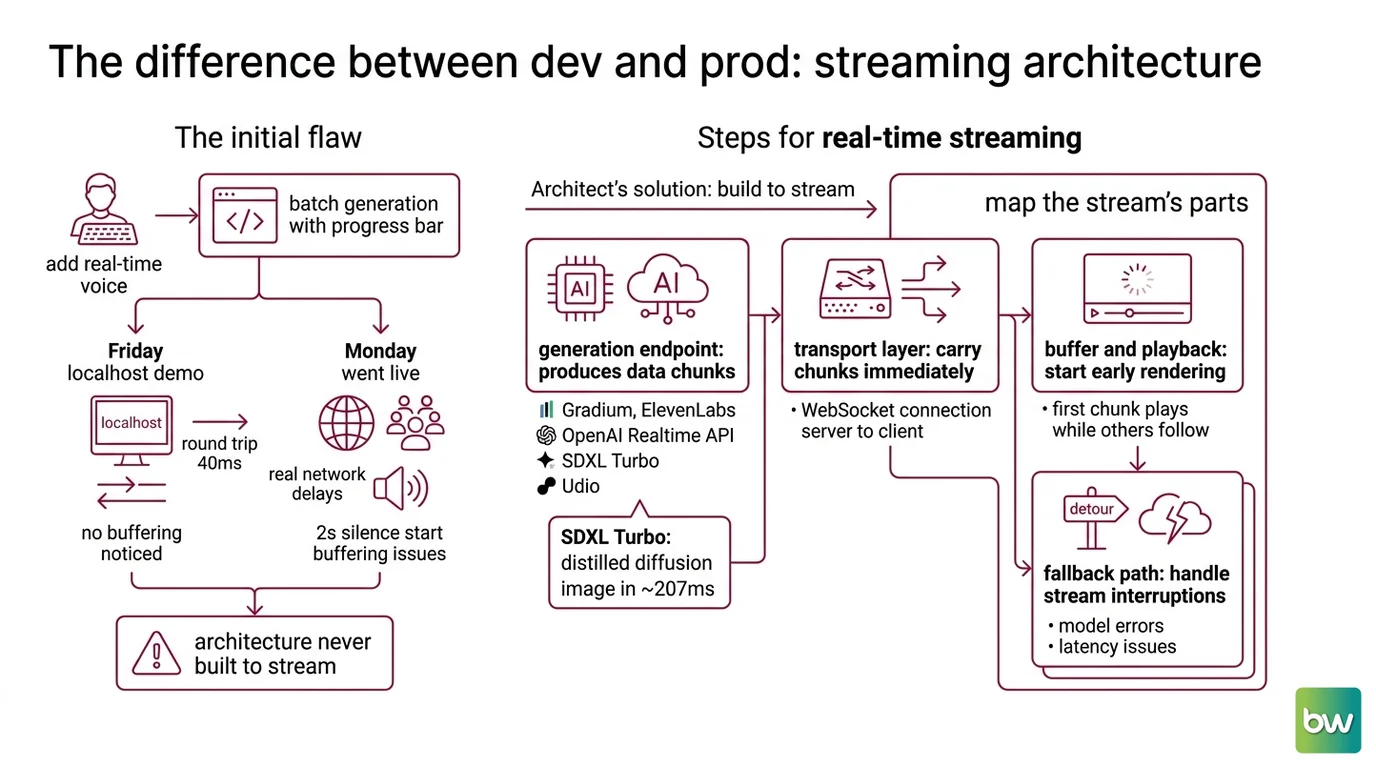
You type “add real-time voice to the agent” into your AI coding tool. It wires up a single HTTP call to a TTS API, waits for the complete audio file, then plays it. It’s slow batch generation with a progress bar removed, not real-time at all.
It worked on Friday’s localhost demo, where the round trip was forty milliseconds and nobody noticed the buffering. On Monday the agent went live, real users hit it over real networks, and every reply opened with two seconds of silence — because the spec never said “stream the audio as it’s generated,” so the AI never built for it. The architecture was never built to stream — the model was never the bottleneck.
Step 1: Map the Stream’s Moving Parts
Generation isn’t a single write anymore — it’s a feed. Generative Media APIs increasingly expose a way to receive output before the full result exists, but only if your system is built to consume it that way. Treat each part as a separate concern before you write a single line of context.
Your system has these parts:
- Generation endpoint — the model or API producing chunks: Gradium or ElevenLabs for voice, OpenAI’s Realtime API for speech-to-speech, SDXL Turbo for live visuals, or Udio for music beyond speech
- Transport layer — the WebSocket connection carrying chunks from server to client as they’re produced, not after the model finishes
- Buffer and playback layer — client-side logic that starts rendering the first chunk while later chunks are still in flight
- Fallback path — what happens when the stream drops, the model errors, or latency blows past your budget
SDXL Turbo reaches single-step generation through Adversarial Diffusion Distillation — distilling a multi-step diffusion process into one pass — producing a 512×512 image in roughly 207ms on an A100, fast enough to feel live (Stability AI Blog).
The Architect’s Rule: If you can’t explain the system in three layers, the AI can’t build it either.
Step 2: Specify the Latency Budget
What does “fast” mean to your AI coding tool? Nothing, unless you give it a number. “Real-time” is not a spec — it’s a vibe, and vibes compile into buffered HTTP calls every time.
Context checklist:
- Target time-to-first-audio or time-to-first-token, specified in milliseconds — not “fast” or “instant”
- Model or API licensing checked against your actual deployment (commercial use vs. research-only)
- Chunk size and audio or image encoding format locked down before generation starts
- Reconnect and retry behavior defined for dropped connections
- Content provenance and watermarking requirements checked if generated output ships to real users
The Spec Test: If your context doesn’t name a latency target in milliseconds, the AI will optimize for “produces correct output” over “produces it fast” — and ship you a buffered response that looks real-time in a demo and falls apart the moment the network isn’t perfect.
On the model side, the spread is wide enough to matter. Gradium’s streaming TTS posted a 155ms median time-to-first-audio — fastest of nine models in Coval’s independent benchmark as of May 2026. Cartesia markets Sonic-3 as sub-100ms; that same benchmark measured 188ms instead, a gap likely from differing network conditions and methodology between vendor marketing and independent measurement (Coval TTS Benchmark). ElevenLabs’ Turbo v2.5 and Flash v2.5 trailed further behind, and Deepgram’s Aura-2 was slowest of the four — though it ships the simplest flat per-character pricing of the group. Benchmark your own network and workload before locking a number into your spec.
Building the voice leg yourself? ElevenLabs’ streaming endpoint is a solid reference pattern — a persistent, API-key-authenticated connection returning audio chunks on the same socket (ElevenLabs Docs). Prefer it fully managed? OpenAI’s Realtime API runs the full speech-to-speech loop over WebSocket at sub-300ms median first-token latency, priced at $32/M input and $64/M output audio tokens (OpenAI Blog). Prices shown are indicative and may vary. Always check the provider’s current pricing before including cost constraints in your specifications.
One more constraint to name upfront: content provenance and watermarking ( AI Watermarking And Content Provenance) belongs in the contract, not an afterthought — OpenAI joined the C2PA steering committee and added SynthID watermarking in May 2026 (C2PA.org). Specify disclosure requirements here; retrofitting them after a stream has played doesn’t help anyone.
Security & compatibility notes:
- ElevenLabs Legacy Models:
scribe_v1,eleven_monolingual_v1,eleven_multilingual_v1removed July 9, 2026 — pinned code breaks almost immediately after. Migrate before you ship.- SDXL Turbo License: Non-commercial research license since its 2023 launch. Commercial pipelines need a hosted provider (Fal.ai, Replicate) or a differently-licensed checkpoint, not the open weights.
- Udio API Access: No public API — only the web app and unofficial wrappers exist. A programmatic integration on a wrapper risks breaking Udio’s Terms of Service.
Step 3: Sequence the Build: Connection Before Generation
Build order matters more in a streaming system than a batch one. Turn on the water main before the pipes are run and you get a flood, not running water — same principle here: connect and authenticate before anything tries to flow through the socket.
Build order:
- WebSocket handshake and auth — first, because nothing streams without a stable, authenticated connection
- Chunk protocol — define the message format (what a chunk looks like, how the client knows the stream ended) before any generation call touches it
- Generation call wired to the transport — now the model’s streaming output has somewhere to go
- Client playback or render layer — last, because it depends on chunks actually arriving, in order, on a connection that already works
For each component, your context must specify:
- What it receives (inputs)
- What it returns (outputs)
- What it must NOT do (constraints)
- How to handle failure (error cases)
Step 4: Prove It Doesn’t Stutter
“It worked when I tested it” is not validation. Test under the conditions your users actually have, not the conditions your office wifi gives you for free.
Validation checklist:
- Time-to-first-audio or time-to-first-frame under your target — failure looks like: silence or a blank frame longer than your spec’d budget before anything appears
- Mid-stream stability — failure looks like: stutters or gaps after the first chunk arrives fine, usually a buffering or backpressure bug
- Reconnect behavior — failure looks like: a dead connection that never recovers after one dropped packet, instead of retrying per your fallback spec
Common Pitfalls
| What You Did | Why AI Failed | The Fix |
|---|---|---|
| One-shot “add real-time voice” prompt | AI wires a single buffered HTTP call, not a stream | Decompose into transport, generation, and buffer layers first |
| No model or API named | AI defaults to whatever’s common in training data, sometimes deprecated | Name the exact model and version in your context |
| Skipped error handling | AI generates happy-path streaming only — no reconnect logic | Add a fallback spec: what happens when the stream drops mid-response |
| Treated SDXL Turbo weights as commercial-ready | AI ships a demo on a license that blocks production use | Route commercial image generation through a hosted provider; name the license constraint upfront |
Pro Tip
Treat the pipeline as a state machine, not a request-response pair. Request-response has exactly two states: waiting and done. A streaming system has connecting, generating, degraded, and recovering — if your spec only describes the happy path, your AI coding tool only builds the happy path. Name every state you expect the connection to pass through, and you get a system that survives a dropped packet instead of one that hangs.
Frequently Asked Questions
Q: How to build a real-time AI image generation pipeline step by step? A: Decompose into generation endpoint, transport, and client render layer, same as audio. Pick a single-step or few-step model — Latent Consistency Model or SDXL Turbo — and confirm its license covers your use case before wiring it into the build order from Step 3.
Q: How to set up WebSocket streaming for AI-generated audio or video? A: Open the WebSocket connection and authenticate first, define your chunk message format second, then wire the generation call to push chunks onto that socket as they’re produced. Build your transport layer against the spec, not a single vendor’s API quirks, since most providers reuse this handshake pattern.
Q: How to use real-time AI generation for live voice agents and chat interfaces? A: Voice agents need the tightest latency budget here — users notice gaps over a few hundred milliseconds in a live conversation. Specify time-to-first-audio in milliseconds, pick a model benchmarked for that target, and build the fallback path before the happy path, not after.
Q: What is the best real-time AI generation setup for interactive design tools? A: Design tools tolerate slightly more latency than voice but need tighter consistency between frames — prioritize low output variance over the single fastest median time. Few-step distilled image models paired with a WebSocket transport are the current reference pattern for live preview tools.
Your Spec Artifact
By the end of this guide, you should have:
- A component map separating generation endpoint, transport, buffer, and fallback into independently-specifiable pieces
- A latency and licensing constraint list with numbers in milliseconds, not adjectives
- A validation checklist covering time-to-first-output, mid-stream stability, and reconnect behavior
Your Implementation Prompt
Paste this into Claude Code, Cursor, or Codex once you’ve filled in the bracketed values from your own Steps 1-4. It mirrors the decomposition from this guide, so the AI builds the same four layers you just specified, in the same order.
Build a real-time generation pipeline with these components, specified independently:

1. GENERATION ENDPOINT
   - Model/API: [your chosen model or provider]
   - Output type: [audio chunks / image frames / text tokens]
   - License: [commercial-ready / requires hosted provider — name which]

2. TRANSPORT LAYER
   - Protocol: WebSocket
   - Auth method: [API key header / token / other]
   - Chunk message format: [your defined schema]

3. BUFFER AND PLAYBACK LAYER
   - Starts rendering after: [first chunk / N chunks buffered]
   - Must NOT: [block on full result before rendering]

4. FALLBACK PATH
   - On dropped connection: [retry count, backoff strategy]
   - On model error: [fallback model or graceful failure message]
   - Latency budget: [target time-to-first-output in milliseconds]

Build order: transport handshake first, chunk protocol second, generation call third, playback layer last.

Validate against: time-to-first-output under [target]ms, no mid-stream stutter after the first chunk, recovery within [N] seconds of a dropped connection.
Ship It
You now have a mental model that splits “make it real-time” into four pieces an AI coding tool can actually build: what generates, what carries it, what plays it, and what happens when any of those break. That’s the difference between a demo that works on your wifi and a pipeline that works on theirs.
MAX Deploy safe, Max.
AI-assisted content, human-reviewed. Images AI-generated. Editorial Standards · Our Editors