How to Build a ReAct Agent in Python and When to Choose It Over Native Function Calling in 2026
TL;DR
- ReAct wins when your task requires transparent intermediate reasoning — multi-step, open-ended, or where you need to audit why the agent made each decision.
- Native function calling wins when the task is well-defined, the API contract is fixed, and speed matters more than explainability.
- In 2026, the production pattern is hybrid: function calling for simple lookups, ReAct for complex reasoning chains.
You built the tool. You wired it to your LLM. You sent the first request. Three seconds later: a confident wrong answer, no trace of how the model got there, and no way to debug it without restructuring your entire agent. The output format was wrong on call two. Call three hallucinated a tool name. None of the three attempts used ReAct Prompting.
That is what happens when you skip the reasoning loop specification. Here is how to fix it.
Before You Start
You’ll need:
- Python 3.10+ (required by both LangGraph 1.2.6 and Pydantic AI 2.0.0)
- An LLM with tool use support — Claude Sonnet 4.6, Claude Haiku 4.5, or Claude Opus 4.8 are confirmed as of June 2026 (Anthropic Docs)
- A clear picture of the task type: multi-step reasoning, or a well-defined single-call API?
- Familiarity with Prompt Chaining — ReAct is structured chaining with tool outputs as context
This guide teaches you: how to decompose the ReAct loop into specifiable components, choose the right framework, and validate that your reasoning trace is actually working — so you can hand each piece to an AI coding tool with a tight specification.
The Wrong Pattern That Ships to Production
You copy a ReAct tutorial. The code runs. You test three happy-path inputs. They work. You ship it.
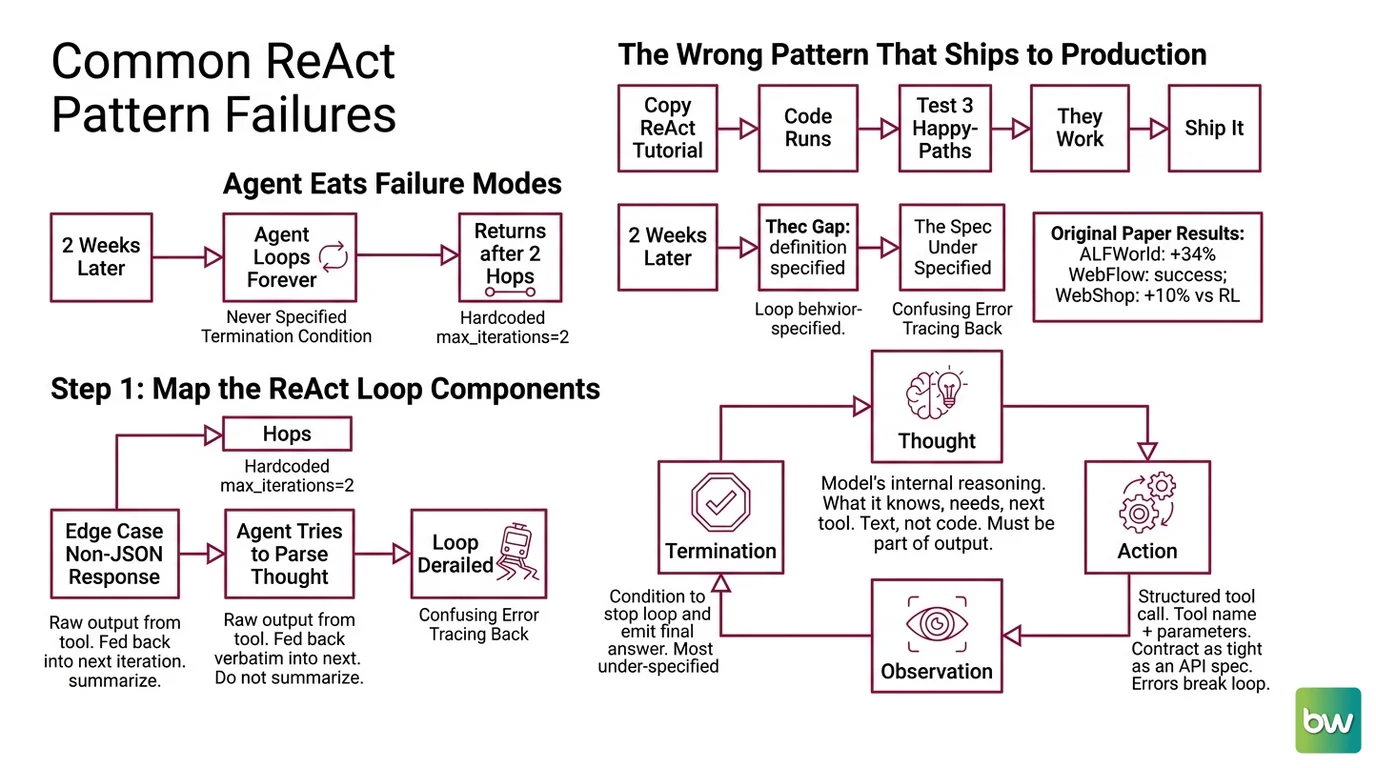
Two weeks later: a task that needs four tool calls before the answer is reachable. The agent loops forever because you never specified the termination condition. Or it returns after two hops because someone hardcoded max_iterations=2 and called it a default.
It worked on Friday. Monday, the tool returned a non-JSON response for one edge case, the agent tried to parse it as Thought output, and the loop derailed with a confusing error that took an hour to trace back to the observation-parsing step.
The spec gap is almost always the same: developers specify what the tools do, but not what the loop itself is allowed to do.
Step 1: Map the ReAct Loop Components
ReAct Prompting — Reasoning and Acting — runs a Thought-Action-Observation cycle. The original paper (ArXiv:2210.03629) showed +34% absolute success on ALFWorld and +10% vs. reinforcement learning on WebShop. The gain comes from grounding each action in an explicit reasoning step, not from the tools themselves.
Your loop has four components:
- Thought — the model’s internal reasoning: what it knows, what it still needs, which tool call comes next and why. This is text, not code. It must be part of the loop output, not just an internal inference artifact.
- Action — a structured tool call: tool name + parameters. The contract here must be as tight as an API spec. Tool name misspelled? Loop breaks. Parameter format wrong? Loop breaks.
- Observation — the raw output from the tool, fed back verbatim into the next iteration. Do not summarize observations before returning them to the model. Summarizing changes the information and introduces a new failure point.
- Termination — the condition under which the loop stops and emits a Final Answer. This is the most commonly under-specified component.
The Architect’s Rule: If you cannot name the termination condition before you write the first line of tool code, the agent will loop until it hits the iteration ceiling — which you probably also haven’t specified.
Your system has these parts:
- Thought parser — reads model output, extracts the reasoning text before the action block
- Action dispatcher — parses tool name + parameters, routes to the correct function
- Observation injector — takes tool output, formats it as context for the next iteration
- Loop controller — tracks iteration count, checks termination condition, emits Final Answer
Step 2: Define Tool Contracts
The action dispatcher is only as reliable as the tool contracts it enforces. A missing return type or an ambiguous failure mode becomes a loop crash at 11 PM.
For each tool, specify:
- Input schema — exact parameter names, types, and which are optional. The model will hallucinate parameter names if you leave this vague.
- Output format — string? JSON? structured object? Specify the schema, not just the description.
- Failure behavior — does the tool raise an exception, return an error string, or return None? Your observation injector must handle all three consistently.
- Side effects — read-only or does it write state, make network calls, or consume rate-limited resources? The loop controller needs this to decide whether to retry on failure.
The Spec Test: If your tool returns
Noneon failure and your observation injector passes thatNoneas context to the next iteration, the model will try to reason from an empty observation. Name what every failure path returns — before you write the tool.
Termination contract — define all three conditions:
- Task complete — model emits a Final Answer token (you define the exact format)
- Max iterations reached — loop exits with partial result and a note that the limit was hit
- Tool error threshold — loop exits if N consecutive tool calls fail
Step 3: Choose Your Framework and Pin Your Dependencies
Three paths in 2026. Choose based on how much control you need over the loop internals.
From scratch with the Anthropic SDK (0.112.0): Full control. You write the loop, the parser, the dispatcher, the termination logic. Anthropic’s client tools pattern is straightforward — the model returns a tool_use block, your code executes the tool and returns a tool_result (Anthropic Docs). No framework abstractions to debug. Right choice when your loop logic is non-standard or you need precise cost control per iteration.
LangGraph (1.2.6): Highest-level abstraction for ReAct. Important: create_react_agent from langgraph.prebuilt is deprecated in LangGraph v1. Use from langchain.agents import create_agent instead, and note that the prompt parameter has been renamed to system_prompt (LangGraph Docs). One known limitation: the migration path can break stream_mode="messages" token streaming in some configurations — test this on your setup before relying on streaming in production. Pin to langgraph >= 1.2.4; version 1.2.3 was yanked due to a merging regression.
Pydantic AI (2.0.0): Harness-first design — tools are registered as “capabilities” via @agent.tool, and Agent.iter exposes the step-by-step loop for inspection (Pydantic Blog). Version 2.0.0 is a major release with breaking changes from v1: Agent.result_validator, Agent.last_run_messages, and AgentRunResult.data have been removed. If you are upgrading from v1, clear all deprecation warnings first before moving to v2.0.0.
For orchestrating multi-agent ReAct chains, LangGraph gives you graph-based state management that is hard to replicate from scratch without significant scaffolding.
Security & compatibility notes:
- LangGraph / langchain-core (CVE-2025-68664, CVSS 9.3): Deserialization of untrusted data leaks API keys. Fix:
langchain-core >= 0.3.81.- LangGraph / langchain-core (CVE-2026-34070, CVSS 7.5): Path traversal allows arbitrary file access. Fix:
langchain-core >= 1.2.22.- langgraph-checkpoint-sqlite (CVE-2025-67644, CVSS 7.3): SQL injection in checkpoint metadata. Fix:
langgraph-checkpoint-sqlite >= 3.0.1,langgraph-checkpoint >= 4.0.0.
Step 4: Validate the Reasoning Trace
Running the agent on a happy-path input and getting the right answer is not validation. That proves the tools work. It does not prove the loop is reasoning correctly.
Validation checklist:
- Thought-before-action — failure looks like: two consecutive Actions with no Thought in between. The model is pattern-matching, not reasoning. Fix: tighten the system prompt to require explicit Thought output before every Action.
- Observation verbatim — failure looks like: the model summarizes a tool output differently in the next Thought than what the tool actually returned. Fix: log raw observations and compare them to the context the model received.
- Termination fires correctly — failure looks like: the agent emits a Final Answer and then calls another tool, or never emits a Final Answer and exits at max iterations. Fix: treat termination as a separate contract, not an emergent behavior.
- Loop counter respected — failure looks like: the agent runs 15 iterations when you specified 10. Fix: enforce the counter in your loop controller, not in the system prompt.
Common Pitfalls
| What You Did | Why AI Failed | The Fix |
|---|---|---|
| Built the tools first, loop second | Tool interfaces don’t match what the loop dispatcher expects | Specify the action contract before writing any tool |
Copied create_react_agent from an older tutorial | Function was deprecated in LangGraph v1 | Use from langchain.agents import create_agent; rename prompt → system_prompt |
| Left termination implicit | Agent loops to max iterations on every complex task | Define all three termination conditions explicitly before building |
| Passed summarized observations | Model reasons from your summary, not from tool output | Feed raw tool output verbatim into the next context window |
| Chose ReAct for a single-tool lookup | Three unnecessary Thought steps; slower and more expensive | Use native function calling for well-defined, single-hop API calls |
Pro Tip
The observation injector is where most loop failures hide. Every time a tool returns data, your injector makes a decision: format it, truncate it, or pass it raw. That decision changes what the model reasons from in the next iteration. Treat the injector as a contract, not a utility function. Specify exactly what it does to each output type before you generate the first line of code — because the reasoning quality of the entire loop depends on it.
Frequently Asked Questions
Q: How to implement a ReAct agent from scratch in Python? A: Define the four components — Thought parser, action dispatcher, observation injector, loop controller — before touching LLM code. Build the dispatcher first: it enforces tool contracts independently of the loop. Test each tool in isolation. Add the loop controller last and wire termination before you run a full cycle. Watch out for edge case: if your Thought parser is regex-based, it will break the moment the model formats the Thought block slightly differently. Make the parser tolerant of minor whitespace variation from day one.
Q: How to use ReAct prompting to build a web search agent? A: The search tool is the easy part. The hard part is the observation contract: search APIs return HTML, snippets, or JSON depending on the provider and query. Specify what format the observation injector normalizes to before you build the search tool. Also define a recency check — web search results can be stale, and the model will not flag this without an explicit instruction to prefer results from a specified date range.
Q: When should I use ReAct prompting instead of native function calling APIs? A: Use ReAct when the task requires more than one tool call in a reasoning chain, when you need to audit why the agent made each decision, or when the path to the answer is not known in advance. Use native function calling when the task maps to a single well-defined API call, when speed is more important than explainability, or when you are extracting structured data from a predictable input. The 2026 pattern is hybrid routing: function calling handles simple lookups, ReAct handles multi-step chains that require intermediate reasoning (LeewayHertz).
Q: How to use ReAct prompting with LangGraph in 2026?
A: Pin to langgraph >= 1.2.4 (1.2.3 is yanked). Import create_agent from langchain.agents, not from langgraph.prebuilt — create_react_agent is deprecated. Pass your system prompt as system_prompt, not prompt. Before relying on streaming: test stream_mode="messages" explicitly, because the migration from the deprecated function has a known issue with token streaming in some setups that the deprecation warning does not surface.
Your Spec Artifact
By the end of this guide, you should have:
- A loop component map: Thought parser, action dispatcher, observation injector, loop controller — each with input/output types and failure behavior
- A tool contract for every tool the agent can call: parameter schema, output format, failure return value, side effects
- A termination spec: three named exit conditions with the exact output format for each
Your Implementation Prompt
Copy this into Claude Code, Cursor, or your AI coding tool of choice. Fill every bracket before you submit — the brackets map directly to the spec work in Steps 1-4.
You are building a ReAct agent in Python that runs a Thought → Action → Observation loop.

Framework: [langgraph 1.2.6 / pydantic-ai 2.0.0 / from-scratch using anthropic SDK 0.112.0]
Python version: [3.10 / 3.11 / 3.12]
LLM: [model name — e.g. claude-sonnet-4-6]
Max iterations: [your limit]

Loop component specs:
- Thought parser: extract reasoning text from model output before the action block. Must tolerate [minor whitespace / format variation your model produces].
- Action dispatcher: parse tool name and parameters. Raise ValueError for unknown tool names. Parameter format: [JSON / structured text].
- Observation injector: pass tool output [verbatim / normalized to {your format}] as context for the next iteration.
- Loop controller: increment counter each iteration. Exit on: (1) model emits "Final Answer:" prefix, (2) iteration count reaches max, (3) [N] consecutive tool errors.

Tool contracts (repeat for each tool):
Tool name: [exact string the model must use]
  Input parameters: [parameter names, types, required vs optional]
  Output format: [string / JSON schema / object structure]
  On failure: [raise / return error string / return None]

Build order:
1. Tool functions — test each in isolation against [your test input]
2. Single Thought → Action → Observation cycle — verify observation reaches the next Thought
3. Full loop with controller — verify termination fires on all three exit conditions
4. Wire to framework (if using LangGraph or Pydantic AI) — add framework scaffolding last

Validation step: after generation, run the agent on [your test task]. The reasoning trace must show one Thought before every Action, and the raw tool output must appear verbatim in the next Observation. If two Actions appear without a Thought in between, the loop spec is broken.
Ship It
You now have a framework-independent spec for the ReAct loop and a clear decision rule for when to use it. The four-component model — Thought, Action, Observation, Termination — transfers to any framework, any LLM, any tool set. The next time a tool changes its output format or a new framework version ships a breaking change, you will know exactly which component is affected. That is the spec paying off.
Deploy safe, Max.
AI-assisted content, human-reviewed. Images AI-generated. Editorial Standards · Our Editors