How to Build a Prompt Versioning System with Langfuse, Braintrust, and PromptHub in 2026
TL;DR
- Every Prompt Versioning And Management system needs the same three parts: a registry, a promotion policy, and an evaluation gate — pick your tool after you spec these, not before
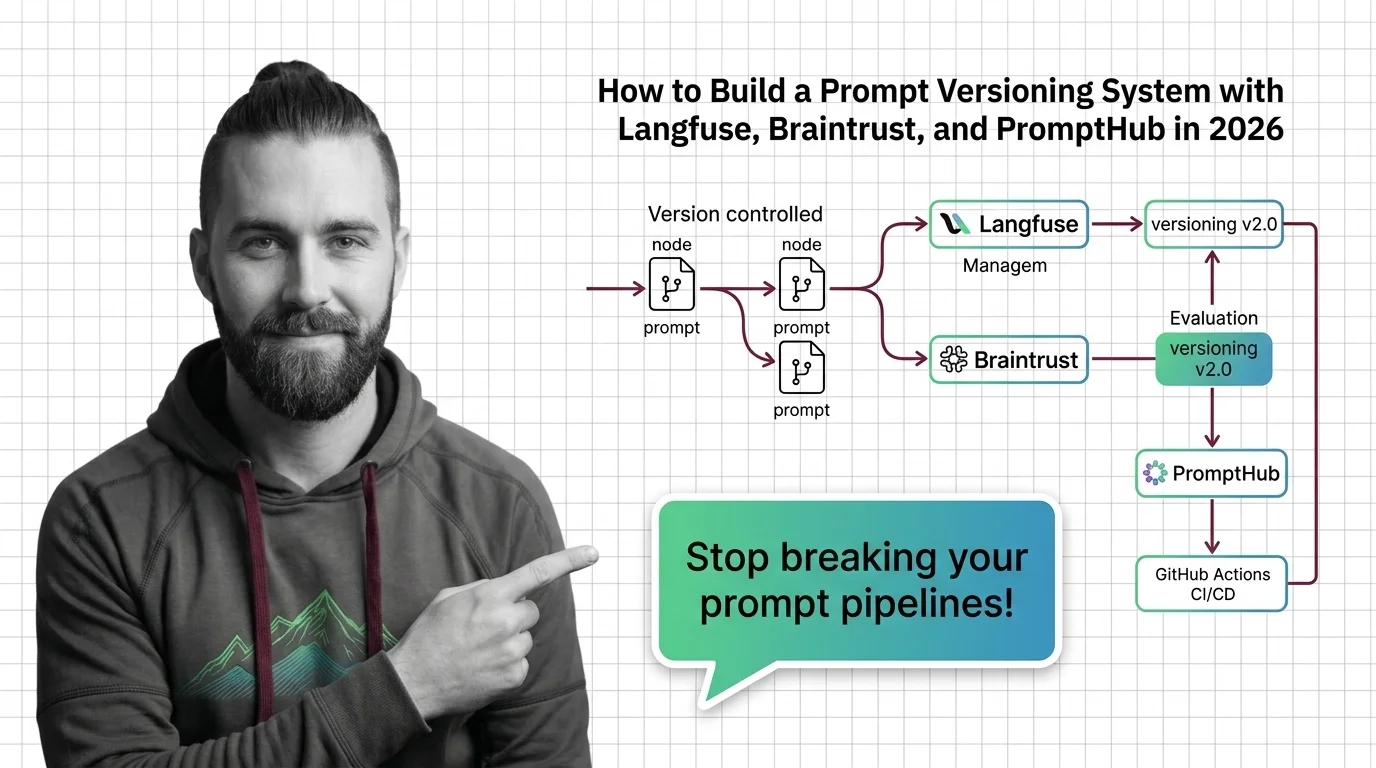
- Langfuse tracks versions as auto-incrementing integers with mutable labels; Braintrust uses content-addressable IDs with environment-based stages; PromptHub uses Git-style branches and merge requests
- Promotion without evaluation is just file management — nothing goes to production without a passing evaluation score
Three hours of debugging. The staging chatbot gave slightly different answers than production. No code changed. The culprit: someone edited the production prompt directly — a minor typo fix — while staging sat on the previous version. No diff. No history. Nobody knew when the change happened or which version was serving.
That’s not a tool problem. That’s a missing spec.
This guide teaches you how to decompose a prompt versioning system into its three core components, write the contract that ties them together, and pick the tool that fits what you actually need.
Before You Start
You’ll need:
- AI coding tool: Claude Code, Cursor, or Codex CLI
- Familiarity with LLMOps and how a Prompt Registry works in production
- At least one prompt that has been live — this isn’t a first-prompt setup guide
This guide teaches you: How to decompose a prompt operations system into three separate layers so that any AI coding tool can build the integration correctly the first time.
The Production Prompt Nobody Could Find
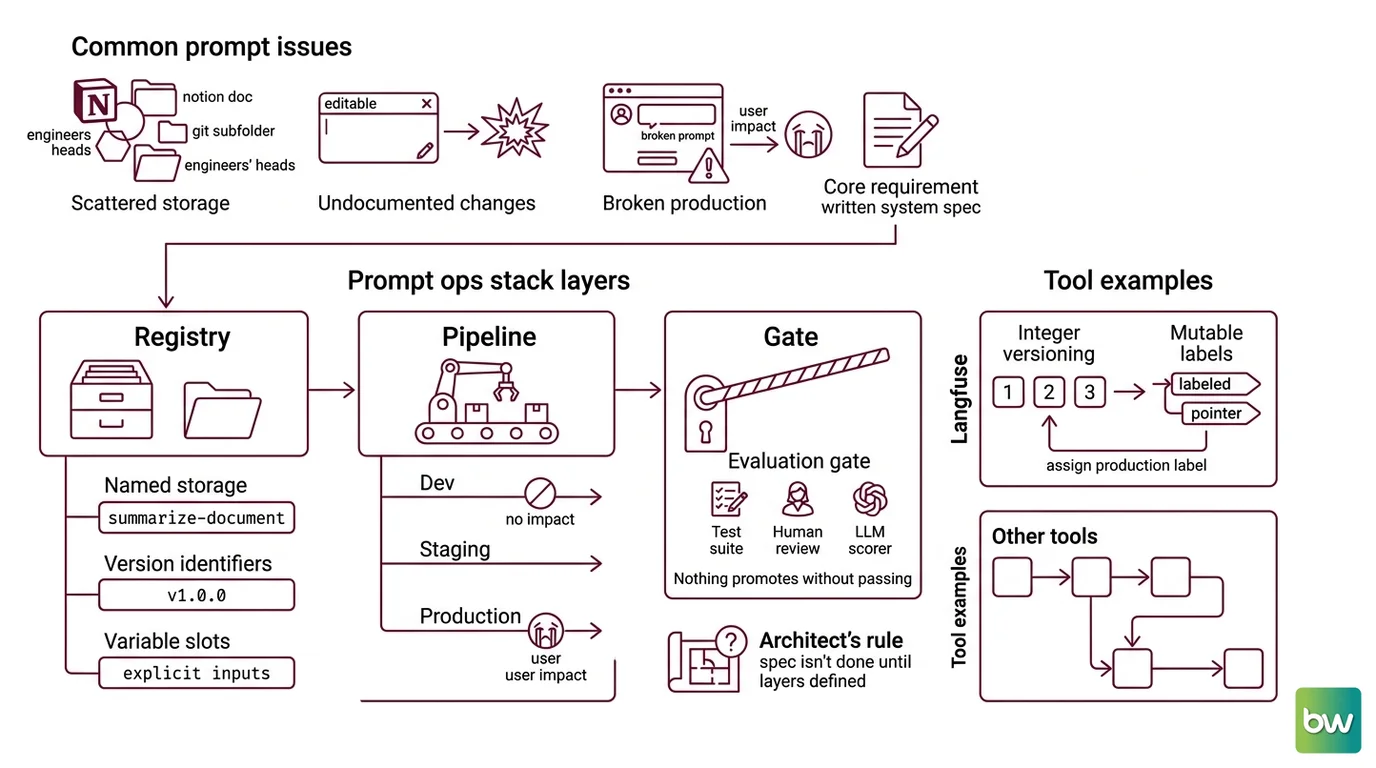
Here’s how it starts. Your team has a dozen prompts in production. They live across a shared Notion doc, a Git subfolder, and two engineers’ heads. Someone edits the summarization prompt to handle a new edge case. Staging passes. Three days later, production breaks — different environment variable, different model version, no version marker to diff against.
The spec gap is not “we don’t have versioning.” It’s “we never defined what a version is, who can change it, or what has to pass before it gets to users.”
Before you open any tool dashboard, you need those answers in writing. That’s what you build first.
Step 1: Map Your Prompt Ops Stack
Every prompt versioning system has three layers. They’re separate concerns. Build them that way.
The three layers:
- Registry — the store where prompts live, addressable by name and version. Prompts have names (
summarize-document), version identifiers, and variable slots. Structured Output Prompting depends on those variable slots being explicit and consistent across versions. - Promotion pipeline — the path a prompt travels from
devtostagingtoproduction. Promotion is a deliberate act, not a save button. A broken dev prompt has no user impact. A broken production prompt breaks in front of people. - Evaluation gate — the check between
stagingandproduction. The gate can be a test suite, a human review step, an LLM scorer, or all three. Nothing promotes without passing it — this is the one rule that cannot be optional.
The Architect’s Rule: If you can’t say which layer a prompt-versioning problem belongs to — registry, pipeline, or gate — the system spec isn’t done yet.
Each tool implements these three layers differently:
- Langfuse uses integer versioning (
1,2,3…) with mutable labels as pointers. Theproductionlabel resolves the version served when no label is specified. Reassign it to any previous integer to roll back in seconds. Labels are RBAC-protected: Viewer and Member roles cannot modify theproductionlabel; only Admin and Owner can (Langfuse Docs). - Braintrust uses content-addressable IDs with named environments. Versions are immutable once created. The staged deployment model maps directly to a dev → staging → production pipeline — the environment name IS the label.
- PromptHub uses a Git-style model: branches, commits, merge requests, and diffs. If your team already thinks in Git, the mental model transfers directly (PromptHub Docs).
Step 2: Specify the Version Contract
Most teams skip straight to the tool. Then they spend two weeks migrating because the naming convention conflicts with their environment setup, or the variable syntax doesn’t match what they shipped.
Spec these before you open any dashboard:
- Naming convention — kebab-case, no spaces, environment-agnostic.
summarize-document, notsummarize-document-prod. The environment is a label or branch, not embedded in the prompt name. - Variable syntax — Langfuse uses
{{variable}}double curly brace interpolation, compiled at fetch time withprompt.compile(). Choose your convention before you write the first prompt (Langfuse Docs). - Label policy — what
productionmeans, who can reassign it, and whether a CI score can trigger reassignment automatically. If you’re using Langfuse, a fetch with no label specified returns theproductionversion by default. - Retention window — Langfuse’s Core plan retains 90 days; Pro retains 3 years (Langfuse’s pricing page). If your team needs to debug a production incident from six months ago, retention belongs in your tier selection, not your evaluation rubric.
- Promotion authority — who can move a prompt from staging to production? A PR approval? A passing eval threshold? A human sign-off? Document this before anything goes live. The decision made under pressure at 2 AM is always the one that breaks something.
The Spec Test: If your lead asks “which version is currently serving production requests?” and the answer requires checking three different places — the spec is not finished.
Step 3: Wire the Components
Build order matters here. Start with the registry, add the evaluation loop, then add the CI gate.
Build order:
- Registry stub first — create one prompt in your chosen tool. Fetch it with the SDK. Compile it with one real variable. Verify the output is what you expected. For Langfuse, install the Python SDK (
pip install langfuse) and callprompt.compile(variable_name="value"). Don’t move to step 2 until this call returns the exact string you intended. - Staging label and golden test set — add your staging environment and write three test cases. A golden test case is an input-output pair where you know the correct answer. You cannot build an evaluation gate without these.
- Evaluation loop — wire your Prompt Testing And Evaluation scorers. Braintrust supports three types: LLM-as-judge, code-based, and human scoring (Braintrust Docs). Code-based scorers run in CI; LLM scorers catch semantic drift; human scoring blocks for review. Choose the type that matches your quality bar, not the one that’s easiest to set up.
- CI gate —
Promptfoo provides a native GitHub Action (
promptfoo/promptfoo-action) that runs your test suite on every pull request and fails the build if a prompt version misses a threshold score. This is your Guardrails layer at the commit level — not a notification, a block.
For each component, your spec must answer:
- What does it receive as input?
- What must it return, and in what format?
- What is it NOT allowed to do? (A registry fetch must not mutate state; an eval gate must not auto-promote)
- How does it fail? (Timeout, schema mismatch, scorer disagreement)
One migration note before you start. Langfuse launched V4 in March 2026 as a Cloud Preview. If you’re on V3, the Python SDK has breaking changes:
Langfuse V3 → V4 migration (Langfuse Docs):
- Python SDK breaking change:
update_current_trace()is replaced bypropagate_attributes()andset_current_trace_io();blocked_instrumentation_scopesis deprecated. Pin to V4 only after running your instrumentation layer against the updated methods.- Self-hosted: V4 self-hosted upgrade requires a separate migration path — check the Langfuse Changelog before upgrading in production.
Step 4: Validate Before You Promote
Validation is not “run the tests and see what happens.” It’s a structured checklist where each failure mode points to a different problem in the pipeline.
Validation checklist:
- Compile check — does the prompt render without errors when all variables are present? Failure looks like: a variable placeholder appearing verbatim in output, or a
KeyErrorat compile time - Golden test pass rate — do your pre-written input-output pairs produce the expected outputs? Failure looks like: format violations, semantic drift from the target behavior, unexpected refusals
- Regression check — does the new version score at least as well as the version it replaces on your eval suite? Failure looks like: an LLM judge score drop, or a code scorer returning
falseon cases that previously passed - Prompt Injection scan — does the prompt allow user input to override system instructions? Failure looks like: outputs that include injected instructions, role confusion, or content that should have been blocked
- Secret leak check — does your compiled prompt ever include API keys, internal endpoint URLs, or tenant identifiers in its output? PromptHub runs this guardrail on every commit and merge request — blocking secret leaks, profanity, and scoring regressions before they reach staging (PromptHub Docs)
A version that fails any check doesn’t get a staging label. It gets a bug report and a note in the version history.
Common Pitfalls
| What You Did | Why Promotion Broke | The Fix |
|---|---|---|
| Edited the production prompt directly in the UI | No version record created; nothing to diff or roll back | All edits go through the registry — create a new version, promote it through the pipeline |
| Used the same label for dev and staging | Fetch calls in staging pull from dev; different environments, same pointer | Map each environment to a distinct label or branch — never share labels across environments |
| Ran evaluation only on the golden test set | Misses regressions on real traffic patterns that diverge from golden cases | Add async production monitoring — Braintrust scores live traffic with no added latency |
| Built the gate as a warning, not a block | The gate exists but doesn’t stop the promotion | Make the CI step fail the build on a score below threshold; alerts don’t replace blocks |
| Skipped Prompt Optimization before promoting | Promoted a prompt that works but costs significantly more per call | Benchmark token usage on the new version before promotion — cost regressions compound at scale |
Pro Tip
The evaluation gate is only useful if it can actually stop a promotion. An alert that fires but lets the version through is not a gate — it’s a log entry. Wire your CI step to fail the build when the score falls below your threshold. That one change converts every future promotion from a guess into a decision.
Frequently Asked Questions
Q: How do I implement prompt versioning from scratch with Langfuse, step by step?
A: Install the Python SDK (pip install langfuse), create your first prompt in the Langfuse UI, fetch it with langfuse.get_prompt("your-prompt-name"), and call .compile() with your variable values. Add a staging label first. Promote to production only after your golden tests pass. Watch out: Langfuse V4 introduced breaking SDK changes from V3 — review the migration guide before upgrading existing instrumentation so you don’t break tracing alongside versioning (Langfuse Docs).
Q: How does Braintrust handle prompt management, evaluation loops, and staged deployment? A: Braintrust stores versions with content-addressable IDs and maps deployments to named environments — dev, staging, and production. Evaluation loops run scorers in CI on every pull request to catch regressions before deployment, and asynchronously against live traffic with no added latency for production monitoring (Braintrust Docs). One edge case worth knowing: the Loop feature lets non-technical stakeholders iterate on prompts through natural language — useful for shortening the cycle when product owners need to change prompt behavior without opening a PR.
Q: How do I connect prompt guardrails to a GitHub Actions CI/CD pipeline?
A: PromptHub runs guardrails internally on every commit and merge request — blocking secret leaks, disallowed content, and evaluation regressions — but does not publish a native GitHub Action. For GitHub Actions CI/CD, use Promptfoo: its promptfoo/promptfoo-action runs your test suite on every PR and fails the build when a version misses a threshold score. You can combine both: PromptHub for versioning, access control, and internal guardrails; Promptfoo for the external CI gate on your repository.
Your Spec Artifact
By the end of this guide, you should have:
- A three-layer system map — registry, promotion pipeline, and evaluation gate — with a tool assigned to each layer and a rationale for each assignment
- A version contract — naming convention, variable syntax, label policy, retention window, and promotion authority — documented and agreed on before the first SDK call
- A validation checklist with at least four checks and their failure symptoms, ready to drive both the CI gate and your golden test set
Your Implementation Prompt
Use this with Claude Code or Cursor after completing the spec above. Replace each bracketed value with your decisions from Step 2.
You are building a prompt versioning integration. Do not write code until I confirm the spec is complete.

System spec:
- Registry tool: [Langfuse | Braintrust | PromptHub]
- Environment labels: [dev, staging, production — or your team's convention]
- Prompt naming convention: [kebab-case, no environment suffix]
- Variable syntax: [{{variable}} for Langfuse, or your tool's convention]
- RBAC: [who can promote to production — role names]
- Retention requirement: [days — verify against your tool's pricing tier]

Build in this order:
1. Registry fetch — one prompt, one SDK call, verify compile() returns the expected string
2. Staging label — assign to current version, write three golden test input-output pairs
3. Evaluation loop — wire [LLM-as-judge | code-based | human] scorer against golden test set
4. CI gate — configure [Promptfoo | Braintrust CI] to fail the build on score below [threshold %]

For each component, specify:
- Input: what it receives
- Output: what it returns and in what format
- Must NOT: what it cannot do (no auto-promotion, no mutation on fetch)
- Failure mode: what to do on timeout, schema error, or scorer disagreement

Validation checklist before any promotion:
- Compile check passes with all required variables
- Golden test pass rate >= [your threshold]
- New version score >= previous version score (regression check)
- No prompt injection vector detected in the compiled output
- No secret or internal identifier appears in rendered output

Before writing any integration code, list the components in build order
and confirm the spec is complete. Ask if anything is missing before proceeding.
Ship It
You now have a spec that separates registry from promotion from evaluation — three distinct concerns, each with its own failure mode and its own fix. You can point to which layer any prompt-versioning problem belongs to, and that makes every future debugging session shorter than the last.
AI-assisted content, human-reviewed. Images AI-generated. Editorial Standards · Our Editors