How to Build a Prompt Evaluation Pipeline with Regression Testing and CI/CD Integration in 2026
TL;DR
- Prompts regress silently. Without automated eval, every prompt change ships without a safety net.
- Promptfoo wires into GitHub Actions with one action block — set a pass threshold and the gate blocks failing merges automatically.
- Golden dataset entries must be human-reviewed. Never use the model you are testing to write its own expected outputs.
You changed one line in your system prompt. The model still returns JSON. Your lint checks pass. The CI pipeline stays green. Three days later, edge-case handling degrades in production — not because your application code changed, but because that one word shifted how the model interprets ambiguous inputs. You had no assertion that caught it.
That is the gap. Prompts are not static config. They are behavioral specifications. Change one word and the model’s output distribution shifts. If nothing in your pipeline checks that distribution against a known-good baseline, every prompt commit ships blind.
This guide shows you how to close that gap — from golden dataset structure through GitHub Actions integration to the quality gate that blocks the merge.
Before You Start
You’ll need:
- Promptfoo installed (Node.js ^20.20.0 or >=22.22.0, per Promptfoo Docs)
- A GitHub repository with Actions enabled
- Familiarity with Prompt Testing And Evaluation concepts and JSON Schema validation
- At least one prompt with a defined input/output contract and one failure mode you have already seen in production
This guide teaches you: how to spec your evaluation system — test cases, assertions, CI action, and quality gate — so that prompt regressions cannot reach production undetected.
The Merge That Passed Every Check
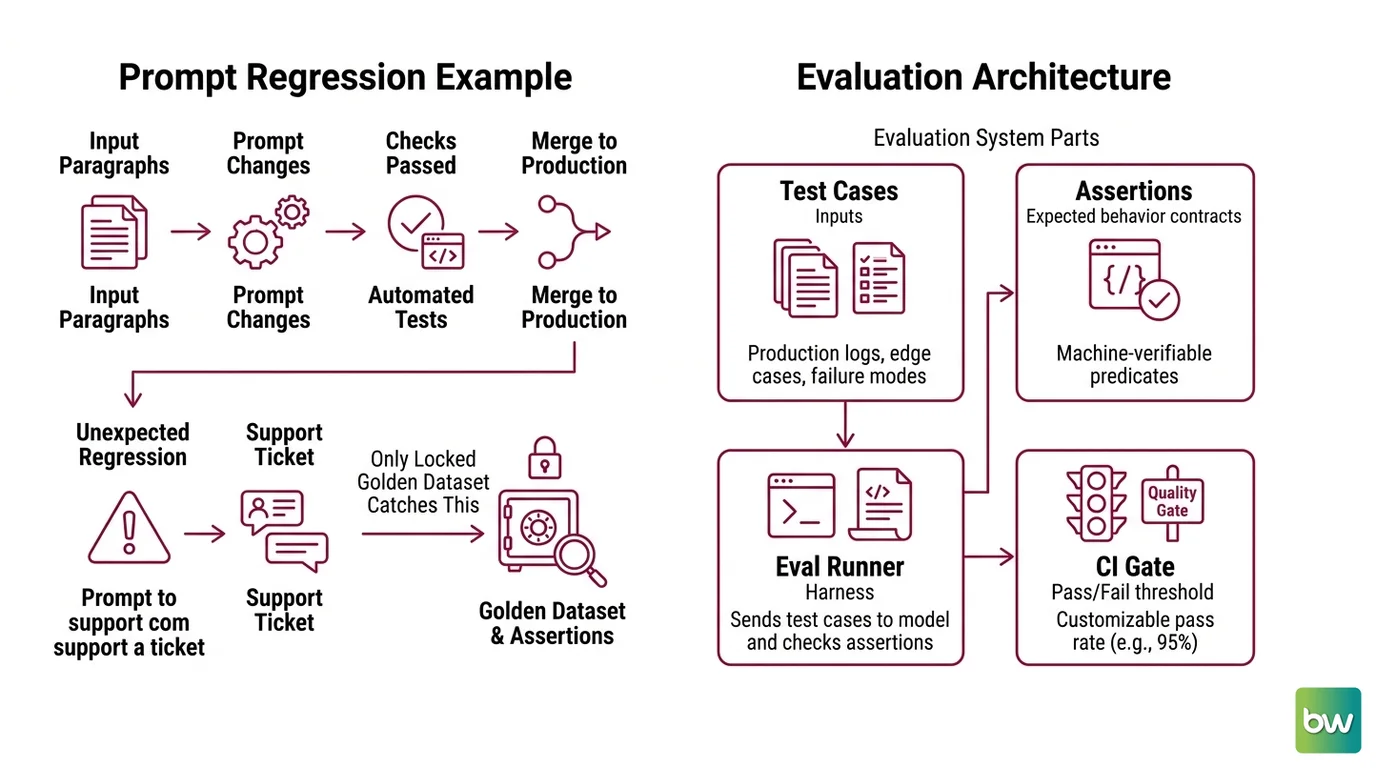
Here is what a prompt regression looks like in practice. Your summarization prompt produces coherent paragraphs on your test inputs. You tighten the instruction to “always respond in bullet format.” You run your usual automated checks — format validation, schema checks, a quick manual read. All green. You merge.
Two days later, support surfaces a ticket: the model is now returning single-bullet responses for multi-part queries. The word “always” in your updated instruction is colliding with an implicit formatting rule from the model’s instruction-following training. Deterministic once you identify it. But you had no test case that exercised that edge.
That is not a code bug. Your code never changed. That is a prompt regression. And the only thing that catches it before it ships is a locked golden dataset with assertions.
Step 1: Map the Evaluation Architecture
Before you write a single test case, get the components on the page. Your eval system has four distinct parts. Blur the boundaries and the AI coding tool you use to build it will blur them too.
Your system has these parts:
Test cases — the inputs. Each case is one
{input, variables}pair that represents a real prompt invocation. Not hypothetical. Not constructed to make your prompt look good. Pulled from production logs, your edge case inventory, or known failure modes.Assertions — the expected behavior contracts. For each test case: what must the output contain, what structure must it follow, what must it never include. These are not eyeball checks. They are machine-verifiable predicates.
The eval runner — the harness that sends each test case to the model and checks assertions.
npx promptfoo@latest eval -c promptfooconfig.yaml(Promptfoo CI/CD Docs). This runs identically on your machine and in CI.The CI gate — the pass/fail threshold. A quality gate set at, say, 95% pass rate (Promptfoo CI/CD Docs — customizable per project) that blocks a merge when too many assertions fail.
The Architect’s Rule: If you cannot describe each component’s inputs, outputs, and failure behavior in two sentences, the AI coding assistant you use to implement it will fill in the gaps with its training bias. Write the two sentences first.
Step 2: Specify Your Golden Datasets
Your test cases are only as good as your expected outputs. This is where most eval setups fail.
Expected outputs must be human-reviewed. Never use the model under test to generate them (FutureAGI Blog). If you ask the model to grade its own outputs, you are not testing quality — you are testing whether the model is self-consistent. Those are not the same thing.
What makes a valid test case:
Input variety — cover your typical use, your edge cases, and your known failure modes. At minimum: happy path cases, edge cases, and at least one adversarial input designed to probe Prompt Injection patterns.
Locked expected behavior — the assertion describes what correct behavior looks like, not what the current model happens to produce. For JSON outputs: a schema that the response must validate against. For prose: a semantic similarity check against a human-written reference. For safety: a
not-containsassertion for forbidden phrases.Dataset immutability — commit your golden dataset to version control as a separate file. Do not regenerate it with each run. When your prompt changes and the test fails, that failure is the signal working correctly. The dataset is the ground truth, not the model’s current opinion.
Context checklist:
- Enough test cases to surface meaningful patterns — single-digit counts rarely catch systematic regressions in real prompts
- A meaningful fraction targeting known failure modes and edge cases, not only happy paths
- Expected outputs written by a human who understands the task, not inferred from model outputs
- Dataset file versioned separately from your prompt files
- Schema validation included for any Structured Output Prompting path ( Constrained Decoding, BAML, Instructor, or XGrammar)
The Spec Test: If the model generating your expected outputs is the same model you are evaluating, your tests cannot catch model drift. They can only catch format drift. That is not a regression suite — it is a format linter.
Step 3: Wire the CI/CD Gate
The eval runner is not valuable until it runs automatically on every pull request. Here is what your CI configuration must specify before you write the first line of YAML.
Your GitHub Actions spec:
The action identifier is promptfoo/promptfoo-action@v1 (Promptfoo GitHub Action docs). It runs on Node 24 runtime. Three parameters you must define before touching the workflow file: the path to your promptfooconfig.yaml, the API key environment variable name, and the fail threshold.
Build order:
The
promptfooconfig.yaml— defines providers (which model and locked version), your test file path, and output format. SetoutputPathto JUnit XML format — this integrates with GitHub’s built-in test reporting panel. JSON and HTML output formats are also supported (Promptfoo CI/CD Docs) for downstream tooling.The secrets — your model’s API key goes into GitHub Secrets. Add
PROMPTFOO_CACHE_PATHpointing to a persisted cache directory. SetPROMPTFOO_CACHE_TTL— the default is 86400 seconds (Promptfoo CI/CD Docs) — to prevent redundant API calls during rapid iteration.The workflow trigger — fire on pull request to your main branch. Not on push. Pull request. You want the gate to run before the merge, not after.
The fail condition — set your pass threshold in the action’s configuration. The 95% threshold is a starting point (Promptfoo CI/CD Docs); calibrate to your risk tolerance. A customer-facing summarization prompt warrants a tighter gate than an internal tool.
For teams evaluating commercial alternatives:
Braintrust offers its own CI action (braintrustdata/eval-action) with a managed observability layer for teams that want hosted eval tracking. The spec structure is the same — test cases, assertions, threshold, gate.
For each eval run, your config must specify:
- Model provider and version (locked — not “latest”)
- Test file path and dataset version
- Output format and artifact path
- Pass threshold and fail behavior (block merge vs. warn-only)
- Cache configuration (path, TTL)
Compatibility notes (as of June 2026):
- Promptfoo (acquisition pending): OpenAI announced the acquisition on March 9, 2026 (OpenAI Blog); the deal was subject to customary closing conditions at time of writing. MIT open-source license is maintained (Promptfoo Blog). Roadmap may shift toward OpenAI Frontier tooling integration.
- Braintrust SDK breaking change:
btno longer auto-loads.envfiles (Braintrust Changelog). CI scripts that relied on automatic dotenv loading must now set environment variables explicitly. Verify your SDK version before migrating CI scripts.- Braintrust API key endpoint:
POST /v1/api_keywas removed from the public API (Braintrust Changelog); key creation is now UI-only for most users.- OpenAI Evals: Deprecated June 3, 2026 (OpenAI API Changelog). Shuts down November 30, 2026. If your team uses it, migrate to Promptfoo — there is an official migration cookbook (OpenAI Cookbook).
Step 4: Validate the Quality Gate Is Working
A CI gate that never fails is not a working gate. It is passing theater.
Run this validation sequence after initial setup — before the gate goes into production:
Validation checklist:
Intentional failure test — change your prompt to produce a known-wrong output. Run the eval. Confirm the gate blocks. Failure looks like: gate passes despite a bad output. Root cause: assertions are not specific enough, or threshold is set too low.
Dataset coverage check — confirm each test case exercises a distinct behavior path in your prompt’s logic. Failure looks like: all cases test the same happy-path scenario. Edge case coverage is zero.
Cache validation — run the eval twice on identical inputs. Confirm the second run shows cache hits and lower latency. Failure looks like: duplicate API calls on every CI run. Root cause:
PROMPTFOO_CACHE_PATHnot persisted between workflow runs.Threshold calibration check — introduce a subtle regression (paraphrase one instruction in your system prompt). Confirm the gate catches it. Failure looks like: the paraphrased prompt passes. Your assertions are measuring format, not behavior.
Model version lock check — run the eval against a frozen model version. Confirm no “model not found” errors on CI. Failure looks like: CI fails on model deprecation two months after setup. Root cause: model pinned to
latestinstead of a specific version.
Common Pitfalls
| What You Did | Why the Eval Failed | The Fix |
|---|---|---|
| Used model output to generate expected outputs | The model grades itself — format drift passes, behavior drift passes too | Write expected outputs by hand before touching the eval config |
Locked model to latest | Model version changes silently; assertions break on CI | Pin to a specific model version in promptfooconfig.yaml |
| Set threshold at 100% | One legitimate format variation blocks every merge | Start lower, move up once dataset covers edge cases |
| No cache configured | Every CI run hits the API; latency spikes, costs accumulate | Set PROMPTFOO_CACHE_PATH and PROMPTFOO_CACHE_TTL in CI environment |
| Skipped adversarial cases | Gate passes, but prompt is vulnerable to injection patterns | Include adversarial inputs designed to probe injection behavior in your dataset |
Pro Tip
The most common mistake with eval pipelines is treating the gate as the goal. It is not. The goal is a golden dataset that accurately describes your prompt’s expected behavior. The gate is the enforcement mechanism. If your dataset is weak, a passing gate means nothing. Spend the majority of your setup time on test cases — not on the CI wiring. The workflow YAML takes an afternoon. Writing honest test cases for your edge cases takes judgment you can only get from your own production logs.
Frequently Asked Questions
Q: How to build an automated prompt evaluation pipeline with CI/CD integration step by step?
A: Start with the golden dataset — human-written test cases covering happy paths, edge cases, and failure modes you have actually observed. Define assertions for each: schema validation, semantic similarity, contains/not-contains checks. Configure your promptfooconfig.yaml with a locked model version and an output path. Wire promptfoo/promptfoo-action@v1 into a pull-request workflow trigger. Set your pass threshold. Run the intentional failure test to confirm the gate can block before treating it as production-ready.
Q: How to integrate Promptfoo prompt regression tests into GitHub Actions?
A: Add promptfoo/promptfoo-action@v1 to your workflow (Promptfoo GitHub Action docs). Store your model API key as a GitHub Secret and reference it in the action’s environment block. Configure PROMPTFOO_CACHE_PATH to a persisted cache directory and PROMPTFOO_CACHE_TTL to 86400 seconds to avoid redundant API calls (Promptfoo CI/CD Docs). Set outputPath to JUnit XML format for native GitHub test-results panel integration. Trigger on pull request to your main branch — not on push. The gate runs before the merge, not after.
Q: How to write golden datasets and test cases for automated prompt evaluation?
A: Three principles: first, never generate expected outputs from the model under test — write them by hand (FutureAGI Blog). Second, organize cases by coverage tier: happy path, edge cases, and adversarial inputs probing injection behavior. Third, commit the dataset file separately from your prompt files and treat it as immutable ground truth. When a prompt change breaks a test, decide explicitly: fix the prompt, or update the ground truth. That decision should be deliberate, not automatic.
Your Spec Artifact
By the end of this guide, you should have:
- A golden dataset file (versioned, human-written expected outputs, covering happy path, edge cases, and adversarial inputs)
- A
promptfooconfig.yamlwith locked model version, assertion types, JUnit XML output, and cache configuration - A GitHub Actions workflow that runs on pull request, checks assertions against a calibrated quality gate threshold, and blocks merges that fall below it
Your Implementation Prompt
Paste this prompt into Claude Code, Cursor, or Codex to spec out your evaluation system. Fill in the bracketed values before submitting.
You are setting up a prompt evaluation pipeline. Implement the following four components in order:

COMPONENT 1 — Test Case Structure
Dataset file: [path to your golden dataset YAML/CSV]
Coverage requirement: happy path cases + edge cases from production logs + adversarial inputs
Expected output format: [schema validation / semantic similarity / contains-not-contains]
Immutability: dataset committed to version control, separate from prompt files

COMPONENT 2 — Assertion Contracts
For each test case, define:
- Output must validate against: [your JSON Schema if using structured output]
- Output must contain: [required phrases or fields]
- Output must never contain: [forbidden phrases, injection-pattern responses]

COMPONENT 3 — Promptfoo Config (promptfooconfig.yaml)
Provider: [your model provider and locked version — not "latest"]
Test file: [path to golden dataset]
Output: JUnit XML at [output path for GitHub test reporting panel]
Cache: PROMPTFOO_CACHE_PATH=[persistent cache dir], PROMPTFOO_CACHE_TTL=86400

COMPONENT 4 — GitHub Actions Workflow
Action: promptfoo/promptfoo-action@v1
Trigger: pull_request targeting [your main branch]
API key secret name: [your GitHub Secret name]
Pass threshold: [your percentage — start conservatively if dataset is new]
Fail behavior: block merge

Validation sequence after setup:
1. Intentional failure test — introduce a known-wrong output, confirm gate blocks
2. Cache validation — run twice on identical inputs, confirm cache hits on second run
3. Threshold calibration — introduce a subtle prompt paraphrase, confirm gate catches it

Do not mark this complete until the intentional failure test blocks a merge.
Ship It
You now have a prompt eval pipeline that runs before every merge — not after. Your golden dataset is the specification of what your prompt must do. The CI gate is the enforcement mechanism. The quality threshold is the minimum bar for shipping — not a target, not a guideline, not a number to negotiate down when you are in a hurry to merge.
Every time a prompt change breaks a test and you choose to update the dataset instead of fixing the prompt, you are making a deliberate tradeoff. The eval system makes that tradeoff visible. That is the whole point.
— Max
AI-assisted content, human-reviewed. Images AI-generated. Editorial Standards · Our Editors